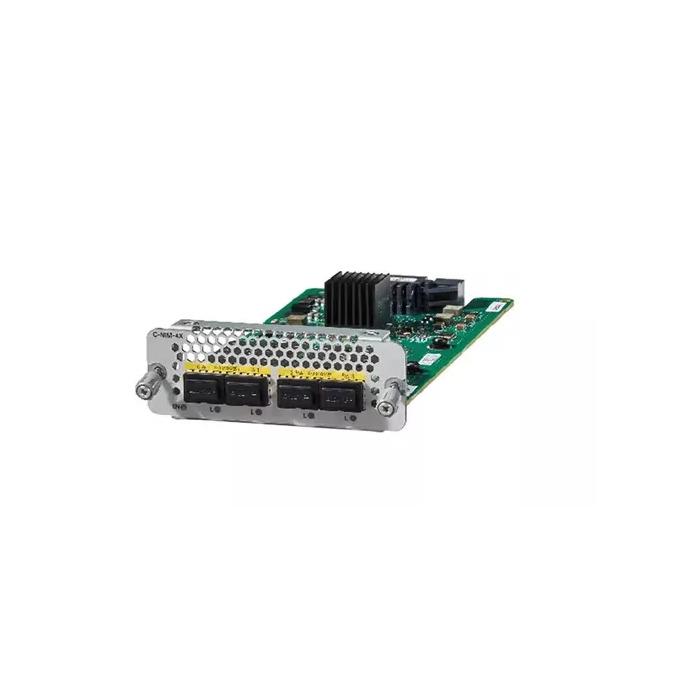
Cisco C-NIM-4X: Cisco Catalyst Expansion Card for WAN/LAN Networking
The Cisco C-NIM-4X is a high-performance Cisco Catalyst expansion card designed for enterprise network modules and advanced WAN/LAN connectivity. As a versatile network interface card for Cisco routers, the C-NIM-4X delivers a cost-effective, scalable solution for businesses seeking high-speed 1G/10G connectivity, Layer 2 and Layer 3 switching, and enhanced MACsec security.
Overview of Cisco C-NIM-4X
The C-NIM-4X is a next-generation 4-port WAN/LAN module supporting speeds up to 10 Gbps. It provides flexible Layer 2 switching on all four ports, making it a low-density LAN switch solution integrated directly into the router. The two highest-numbered ports can also operate in Layer 3 mode, delivering feature parity with the router’s embedded WAN interfaces.
This module supports SFP and SFP+ pluggable transceivers, including 1000BASE-X, 10GBASE-R, and even 100 Mbps connections using the GLC-GE-100FX module. High-speed WAN connectivity is achieved through a 10-Gbps-capable internal link, enabling robust performance for enterprise-grade applications. Additionally, the module supports IEEE 802.1AE MACsec, ensuring encrypted Layer 2 communications for secure data transmission.
Key Features
4-Port LAN/WAN Module: Provides four flexible ports for high-speed 1G/10G connectivity.
Layer 2 Switching: Offers local Layer 2 switching capabilities across all four ports for efficient LAN traffic management.
Layer 3 Functionality: Two ports configurable for native Layer 3 operation, perfect for WAN deployment.
SFP/SFP+ Compatibility: Supports multiple pluggable transceivers for fiber and copper connections, including 100 Mbps, 1G, and 10G speeds.
High-Speed Backplane Connectivity: Internal 10-Gbps link ensures fast data throughput across WAN ports.
MACsec Security: IEEE 802.1AE MACsec encryption protects sensitive enterprise traffic.
Oversubscription Awareness: Supports 4:1 oversubscription at maximum capacity, balancing cost and performance.
Cisco C-NIM-4X: Cisco Catalyst Expansion Card for WAN/LAN Networking
Benefits of Cisco C-NIM-4X
Scalable Network Expansion: Ideal for branch offices or enterprise sites requiring additional WAN/LAN ports without extra hardware.
Cost-Effective LAN Solution: Provides a low-density 4-port switch integrated into the router, reducing additional switch purchases.
Secure Data Transmission: MACsec support ensures end-to-end encryption, safeguarding sensitive communications.
High Performance: Supports 1G/10G WAN connectivity and high-speed SFP/SFP+ modules for reliable enterprise performance.
Flexible Deployment: Ports configurable for Layer 2 or Layer 3 operation depending on network needs.
Ideal Use Cases
Enterprise Branch Offices: Expand WAN connectivity with a compact and secure module.
Secure Networks: MACsec ensures encrypted Layer 2 traffic, perfect for finance, healthcare, or government networks.
Network Upgrades: Upgrade existing Catalyst 8300 routers with additional high-speed WAN/LAN ports.
High-Performance Applications: Ideal for sites requiring 10G uplinks or fiber connections for data-intensive tasks.
Compatibility
Cisco C-NIM-4X: Cisco Catalyst Expansion Card for WAN/LAN Networking
Why Choose Cisco C-NIM-4X?
The Cisco C-NIM-4X network interface card is more than just a WAN/LAN module. It’s a Cisco Catalyst expansion card that offers enterprise-grade security, high-speed connectivity, and flexible Layer 2/3 operation. Businesses can simplify their network architecture, reduce hardware costs, and enjoy robust performance and reliability for years.
Whether you are expanding branch office capabilities, upgrading WAN links, or securing your enterprise network, the C-NIM-4X delivers premium Cisco networking technology in a compact, high-performance module.
Step 1: Safety First
Power off your router before installing the module to prevent damage.
Use an anti-static wrist strap or touch a grounded metal surface to avoid electrostatic discharge (ESD).
Work in a clean, dry environment.
Step 2: Check Compatibility
Ensure your router is a Catalyst 8300 Series.
This module is not compatible with Catalyst 8200 Series routers.
Make sure you have the correct SFP/SFP+ transceivers for your WAN/LAN connection (1G, 10G, or 100 Mbps).
Step 3: Open the Module Slot
Locate an available NIM slot on the front of the Catalyst 8300 router.
Remove the blank slot cover if present.
Keep screws or latches to secure the new module.
Cisco C-NIM-4X: Cisco Catalyst Expansion Card for WAN/LAN Networking
Step 4: Install the C-NIM-4X
Align the module edges with the slot guides.
Slide it gently into the slot until it clicks or fits snugly into the backplane.
Secure it using screws or latches provided with the router.
Do not force the module—if it doesn’t slide easily, check alignment.
Step 5: Connect WAN/LAN Cables
Insert your SFP/SFP+ transceivers into the module ports.
Connect the fiber or copper cables from your network, WAN, or other routers.
Make sure each port is connected to the correct network segment according to your design.
Step 6: Power On the Router
Step 7: Configure the Module (Without Code)
Access the router management interface via the web GUI or network management software (like Cisco DNA Center).
Assign IP addresses and VLANs to the ports as needed.
Choose which ports should operate in Layer 2 or Layer 3 mode depending on your network design.
Enable MACsec encryption for secure Layer 2 connections if needed.
Save the configuration before closing the management interface.
Cisco C-NIM-4X: Cisco Catalyst Expansion Card for WAN/LAN Networking
Step 8: Verify the Setup
Check that each module port is recognized and active in the router management GUI.
Ensure network traffic flows properly across all configured ports.
Test WAN/LAN connectivity between your devices to confirm everything works.
Step 9: Optional Optimization
Group ports into VLANs for better LAN segmentation.
Enable security features such as MACsec for sensitive traffic.
Monitor traffic throughput to ensure the 10G ports are not oversubscribed for your network needs.
1. Typical Hardware Lifespan
5–7 years is the standard lifespan in enterprise use.
With careful handling and a stable environment, some modules can last up to 10 years.
Cisco C-NIM-4X: Cisco Catalyst Expansion Card for WAN/LAN Networking
2. Factors That Affect Longevity
Operating Environment:
Power Stability:
Physical Handling:
Firmware Updates:
Regular updates ensure the module continues to support modern network features.
Even if hardware lasts, unsupported software may limit functionality after ~5–7 years.
3. Realistic Enterprise Expectation
Most organizations plan for a hardware refresh every 5–7 years to maintain support, performance, and compatibility with newer networking standards.
In stable conditions, the module can continue operating beyond 7 years, but for critical networks, it’s recommended to upgrade before the end of official support.\
1. Maintain Proper Operating Environment
Temperature Control: Keep the router in a room between 0°C–40°C. Avoid hot spots or direct sunlight.
Humidity: Maintain moderate humidity (ideally 20–80% non-condensing). Excess moisture can corrode components.
Clean Environment: Avoid dust accumulation; dust can clog vents and overheat the module. Use filtered air or clean the area regularly.
Cisco C-NIM-4X: Cisco Catalyst Expansion Card for WAN/LAN Networking
2. Power Management
3. Handle With Care
Always wear an anti-static wrist strap when inserting or removing the module.
Hold the module by the edges; avoid touching gold connectors or chips.
Avoid frequent insertion/removal — each handling slightly increases wear.
4. Keep Firmware Updated
Regularly update the router’s firmware to ensure the module works with the latest protocols and security features.
Firmware updates can improve performance, patch security vulnerabilities, and prevent incompatibilities.
5. Monitor Module Health
Use the router’s management interface to check port status, throughput, and error rates.
Watch for port errors, high temperatures, or slow throughput, which could indicate wear or a failing component.
Replace faulty SFP/SFP+ transceivers promptly to avoid overloading the module.
6. Network Optimization
Avoid oversubscription beyond the module’s 4:1 limit for best performance.
Assign ports correctly for Layer 2 or Layer 3 to prevent unnecessary processing load.
Segment network traffic with VLANs if possible to reduce strain on the module.
7. Physical Protection
Avoid stacking heavy equipment on top of the router.
Ensure proper airflow around the module to prevent overheating.
Keep the router secured in a rack with proper ventilation.
Cisco C-NIM-4X: Cisco Catalyst Expansion Card for WAN/LAN Networking
Cisco C-NIM-4X Cisco Catalyst Expansion Card (4-Port 1G/10G LAN/WAN NIM)
The Cisco C-NIM-4X is a next-generation 4-port 1G/10G LAN/WAN Network Interface Module (NIM) designed to extend the performance and flexibility of Cisco Catalyst edge routers. Built for modern enterprise and service-provider environments, this expansion card delivers high-speed connectivity, advanced security, and efficient Layer 2 switching in a compact, modular form factor.
Exclusively supported in the NIM slots of Cisco Catalyst 8200 and 8300 Series Edge Platforms, the C-NIM-4X integrates seamlessly with Cisco’s SD-WAN–ready architecture, enabling organizations to scale bandwidth, enhance WAN resiliency, and simplify network upgrades without replacing existing infrastructure.
Key Features & Capabilities
Four high-speed SFP/SFP+ ports supporting 1G and 10G Ethernet
Local Layer 2 switching across all four ports for efficient traffic handling
LAN and WAN flexibility, allowing ports to be configured based on deployment needs
IEEE 802.1AE MACsec support for hardware-based encryption and secure data transport
Hot-swappable design for minimal downtime during upgrades or maintenance
Optimized for SD-WAN, branch networking, and edge connectivity
Designed for Cisco Catalyst 8200 & 8300 Series
The C-NIM-4X is purpose-built to work only with Cisco Catalyst 8200 and 8300 Series Edge Platforms, ensuring full compatibility, performance optimization, and long-term reliability. By installing the module into the dedicated NIM slots, businesses can instantly expand network capacity while maintaining Cisco’s enterprise-grade standards for security and performance.
Ideal Use Cases
Enterprise branch offices requiring high-speed uplinks
Secure WAN aggregation with MACsec encryption
SD-WAN deployments needing flexible LAN/WAN port configuration
Service providers delivering scalable edge connectivity
Network upgrades where modularity and investment protection are critical
Why Choose Cisco C-NIM-4X?
The Cisco C-NIM-4X offers a cost-effective way to add 10G capability, enhance network security, and future-proof Catalyst edge routers. Its tight integration with the Catalyst 8200 and 8300 Series ensures consistent performance, simplified management, and enterprise-class reliability—making it an ideal expansion solution for growing networks.
🛒 Get It From Choicecycle (SGCCTV Singapore)
🌐 Website: https://sgcctv.com.sg
✉️ Email: enquiry@choicecycle.com.sg
📞 WhatsApp: +65 9853 4404
📍 Sim Lim Square #02-81, Singapore
🕚 11 AM – 8 PM