Cisco Catalyst C8300-2N2S-4T2X Edge Platform Router DB
$5290.00
SGCCTV SINGAPORE OFFICIAL PARTNER
Supply and Maintenance SGCCTV CCTV IP Cameras, NVR, Turbo HD TVI Cameras, DVR, PTZ Cameras,
Access Control System, Video Intercom.
Sim Lim Square 02-81 10am-7pm Daily.
Whatsapp Enquiry Project +65 98534404, Technical Support +65 81120788, Site Visit Maintenance +65 81985572.
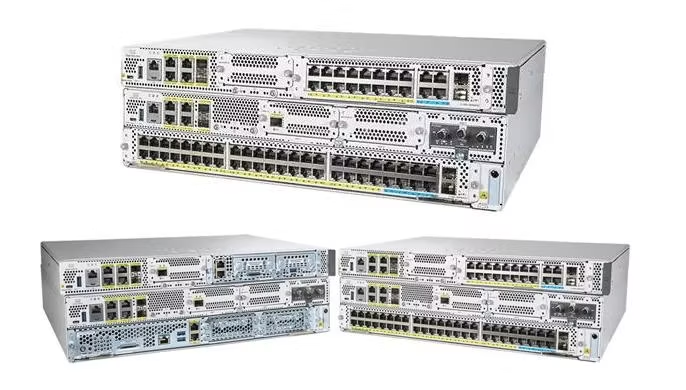
Cisco Catalyst C8300-2N2S-4T2X Edge Platform Router
The Cisco C8300-2N2S-4T2X is a powerful enterprise-grade Cisco router built for high-performance branch networking, SD-WAN deployments, and secure WAN connectivity. As part of the Cisco Catalyst 8300 Series Edge Platforms, this router combines 10G SFP+ uplinks, 4x Gigabit Ethernet RJ45 ports, and a modular architecture with NIM and SM slots, making it an ideal solution for modern, scalable networks.
Running on Cisco IOS XE, the C8300-2N2S-4T2X delivers advanced routing, security, and cloud-ready services in a compact, future-proof platform designed for medium to large enterprise environments.
Key Features of Cisco C8300-2N2S-4T2X
High-Speed Fixed Interfaces
2 × 10G SFP+ Ethernet ports for high-bandwidth WAN or data center connectivity
4 × 1G Gigabit Ethernet RJ45 ports for LAN or WAN access
Optimized for 10G-ready enterprise networks
Modular Expansion with NIM & SM Slots
2 × NIM (Network Interface Module) slots
2 × SM (Service Module) slots
Supports expansion modules such as Cisco C-NIM-4X
Enables flexible LAN/WAN configuration, security upgrades, and service scalability
Cisco IOS XE Software
Runs on Cisco IOS XE, delivering:
Advanced routing and switching
SD-WAN capabilities
API and automation readiness
Consistent management across Cisco Catalyst platforms
Built for SD-WAN and Enterprise Edge Networking
The Cisco C8300-2N2S-4T2X SD-WAN router is purpose-built for organizations adopting cloud applications, SaaS platforms, and hybrid WAN architectures. It integrates seamlessly with Cisco SD-WAN to provide intelligent traffic routing, application visibility, and centralized policy control.
This makes the router ideal for:
Enterprise branch offices
Secure internet breakout
WAN aggregation
Cloud and data center access
Mission-critical business applications
Security and Performance Capabilities
Security is a core strength of the Cisco Catalyst 8300 Series. The C8300-2N2S-4T2X Cisco router supports enterprise-level protection through Cisco IOS XE security services and compatible hardware modules.
Key security benefits include:
IPsec VPN support
Secure SD-WAN overlays
Hardware-accelerated encryption
MACsec support (with compatible NIM modules)
Firewall and threat protection (license-based)
These features ensure secure data transmission across WAN and internet links while maintaining high throughput.
Cisco Catalyst C8300-2N2S-4T2X Edge Platform Router
Ideal Use Cases
The Cisco C8300-2N2S-4T2X is well suited for:
Medium to large enterprise branch networks
Organizations upgrading to 10G WAN connectivity
Businesses requiring modular router expansion
SD-WAN edge deployments
Enterprises seeking long product lifecycle and scalability
Why Choose Cisco C8300-2N2S-4T2X?
Choosing the Cisco C8300-2N2S-4T2X enterprise router means investing in a platform that delivers:
High-speed 10G SFP+ connectivity
Flexible NIM and SM slot expansion
Proven Cisco IOS XE reliability
Strong security and SD-WAN readiness
Long-term support and future-proof design
It is a smart choice for businesses that demand performance today while preparing for tomorrow’s network growth.
1. Physical Installation (No Tools, No Commands)
Unbox & Check
Make sure you have:
Cisco C8300-2N2S-4T2X router
Power cable(s)
Rack-mount kit (if rack installation)
Network cables (RJ45 / SFP+ as needed)
Rack or Desktop Placement
Install the router in a 19-inch rack or place it on a stable, ventilated surface
Leave at least 5 cm of space around the router for airflow
Avoid heat sources and dusty areas
Power On
Connect the power cable to a reliable power source
Turn on the router
Wait 3–5 minutes for the system to fully boot
Cisco Catalyst C8300-2N2S-4T2X Edge Platform Router
2. Network Cabling Setup
Connect Internet / WAN
Plug your ISP modem or upstream switch into:
10G SFP+ port (for high-speed fiber)
OR Gigabit RJ45 port (for standard broadband)
Connect Local Network / LAN
Connect your switch, firewall, or office network to one of the RJ45 LAN ports
Optional: connect additional networks using NIM modules if installed
3. Accessing the Router (No CLI)
Using Cisco Web Interface (GUI)
Connect a laptop or PC to the router using an Ethernet cable
Open a web browser (Chrome, Edge, Firefox)
Enter the router’s default management IP address (provided in the Cisco quick start guide)
Log in using the default admin credentials
➡️ You are now in the Cisco web-based management dashboard
Cisco Catalyst C8300-2N2S-4T2X Edge Platform Router
4. Basic Configuration Using the Web GUI
Step 1: Change Admin Password
Go to System Settings / User Management
Change the default password for security
Step 2: Set Up Internet Connection
Navigate to Network / WAN Settings
Select the connected port (10G SFP+ or RJ45)
Choose:
Automatic IP (most ISPs)
OR Static IP (if provided by ISP)
Save settings
Step 3: Configure Local Network (LAN)
Go to LAN Settings
Assign internal IP range (example: office network)
Enable DHCP if you want devices to get IP addresses automatically
5. Optional: SD-WAN Setup (No Coding)
If your company uses Cisco SD-WAN:
Log in to Cisco vManage (cloud or on-prem)
Add the router using:
Serial number
Authorization code
Apply a pre-built configuration template
Push the configuration remotely
✔️ No manual commands required
✔️ Centralized control
✔️ Easy monitoring
Cisco Catalyst C8300-2N2S-4T2X Edge Platform Router
6. Security Configuration (Simple Toggles)
From the web dashboard:
Enable Firewall protection
Turn on IPsec VPN if connecting branches
Enable MACsec (if supported NIM module installed)
Enable automatic software updates
All options are checkbox-based, no command lines.
7. Testing & Verification
Check Internet Access
Connect a PC or laptop to the LAN
Open a website to confirm connectivity
Check Status Dashboard
Verify:
WAN connection is “Active”
LAN ports are “Up”
CPU and memory usage are normal
8. Maintenance & Best Practices
Keep router firmware updated via web interface
Use UPS for power protection
Clean ventilation areas every 3–6 months
Monitor alerts from the dashboard regularly
Who This Setup Is Best For
Offices without dedicated network engineers
Businesses using Cisco SD-WAN
Enterprises wanting secure, scalable routing
IT teams preferring GUI-based management
Cisco Catalyst C8300-2N2S-4T2X Edge Platform Router
Who Will Buy the Cisco C8300-2N2S-4T2X?
The Cisco C8300-2N2S-4T2X is designed for organizations that need high performance, security, and scalability at the network edge. It is not a home router — it is built for professional, mission-critical environments.
1. Medium to Large Enterprises
Why they buy it:
Need reliable WAN and LAN connectivity
Require 10G SFP+ uplinks for high-bandwidth applications
Want long product lifecycle and Cisco support
Typical users:
Corporate offices
Regional headquarters
Multi-site businesses
2. Companies Deploying Cisco SD-WAN
Why they buy it:
Full compatibility with Cisco SD-WAN
Centralized management via vManage
Improved application performance and traffic control
Best for:
Retail chains
Logistics companies
Financial institutions
Healthcare groups
3. Businesses Upgrading to 10G Networks
Why they buy it:
Future-proofing network infrastructure
Supporting cloud apps, video conferencing, and large data transfers
Replacing older ISR or lower-speed routers
Common scenarios:
Migrating from 1G to 10G WAN
Expanding data center or cloud connectivity
Cisco Catalyst C8300-2N2S-4T2X Edge Platform Router
4. IT Service Providers & System Integrators
Why they buy it:
Modular design with NIM and SM slots
Easy to customize per customer
Strong demand in enterprise projects
Used by:
Managed service providers (MSPs)
Network integrators
Enterprise IT consultants
5. Security-Focused Organizations
Why they buy it:
Built-in support for:
IPsec VPN
MACsec (with compatible modules)
Firewall and threat protection
Hardware-assisted encryption
Ideal for:
Banks and financial services
Government-related organizations
Companies handling sensitive data
6. Branch Offices with Growth Plans
Why they buy it:
Modular architecture allows future expansion
No need to replace the router when bandwidth increases
Supports new services via SM slots
Examples:
Growing SMEs
Regional branch offices
Multi-location businesses
Who Should NOT Buy This Router?
To be honest (and buyers trust this):
Home users
Small offices with basic internet needs
Businesses without IT management or support
Companies that do not need enterprise-grade security or 10G performance
Cisco Catalyst C8300-2N2S-4T2X Edge Platform Router
Why Buyers Choose Cisco C8300-2N2S-4T2X Over Cheaper Routers
Proven Cisco reliability
Enterprise-class security
SD-WAN readiness
Long-term software and hardware support
Strong resale and lifecycle value
📅 1. Hardware Operational Lifetime
Mean Time Between Failures (MTBF): ~710,300 hours (≈ 81 years as a statistical reliability measure for hardware failure rate) — this is a theoretical figure based on testing, and real‑world lifespan often depends on environment and usage.
Practical hardware life: Most Cisco enterprise routers like this will physically run well for 8–10+ years or more in typical datacenter/office conditions if properly cooled and powered (many networking pros keep hardware running far beyond that).
🛠 Support & Software Lifecycle
This is usually the real limiting factor for “useful life” in an enterprise network:
End of Software Support window: For the broader Catalyst 8300 series, Cisco offers support and software updates typically through the mid‑to‑late 2020s.* Many products in this line are expected to receive security updates and fixes through ~2028 with active service contracts.
Once official support ends, critical firmware/IOS updates stop, which can affect:
security patches
protocol updates
compatibility with modern features
Many organizations plan replacement before or around end‑of‑support rather than when the hardware fails.
💡 Typical real‑world lifecycle for enterprise Cisco gear:
5–8 years of active network use before replacement/upgrading is common, driven by support lifecycles, new features, and security requirements — though the box often continues working beyond that if left in place.
🧠 Bottom Line
| Category | Typical Duration |
|---|---|
| Hardware failure‑free run | Many years; MTBF suggests extremely long potential life, but environment and usage matter |
| Enterprise production use | ~5–8 years before planned refresh |
| Official Cisco support (software/updates) | Through ~2028 with active contracts |
Cisco Catalyst C8300-2N2S-4T2X Edge Platform Router
🛒 Get It From Choicecycle (SGCCTV Singapore)
For authentic Cisco products, expert guidance, and competitive pricing, purchase the Cisco C9600-LC-48TX line card from Choicecycle (SGCCTV Singapore).
🌐 Website: https://sgcctv.com.sg
✉️ Email: enquiry@choicecycle.com.sg
📞 WhatsApp: +65 9853 4404
📍 Store Location: Sim Lim Square #02-81, Singapore
🕚 Operating Hours: 11 AM – 8 PM


Nunc lacus elit, faucibus ac laoreet sed, dapibus ac mi. Maecenas eu ante a elit tempus fermentum. Aliquam commodo tincidunt semper. Phasellus accumsan, justo ac mollis pharetra, ex dui pharetra nisl, a scelerisque ipsum nulla ac sem. Cras eu risus urna. Duis lorem sapien, congue eget nisl sit amet, rutrum faucibus elit.
Donec accumsan auctor iaculis. Sed suscipit arcu ligula, at egestas magna molestie a. Proin ac ex maximus, ultrices justo eget, sodales orci. Aliquam egestas libero ac turpis pharetra, in vehicula lacus scelerisque. Vestibulum ut sem laoreet, feugiat tellus at, hendrerit arcu.
Nunc lacus elit, faucibus ac laoreet sed, dapibus ac mi. Maecenas eu ante a elit tempus fermentum. Aliquam commodo tincidunt semper. Phasellus accumsan, justo ac mollis pharetra, ex dui pharetra nisl, a scelerisque ipsum nulla ac sem. Cras eu risus urna. Duis lorem sapien, congue eget nisl sit amet, rutrum faucibus elit.