
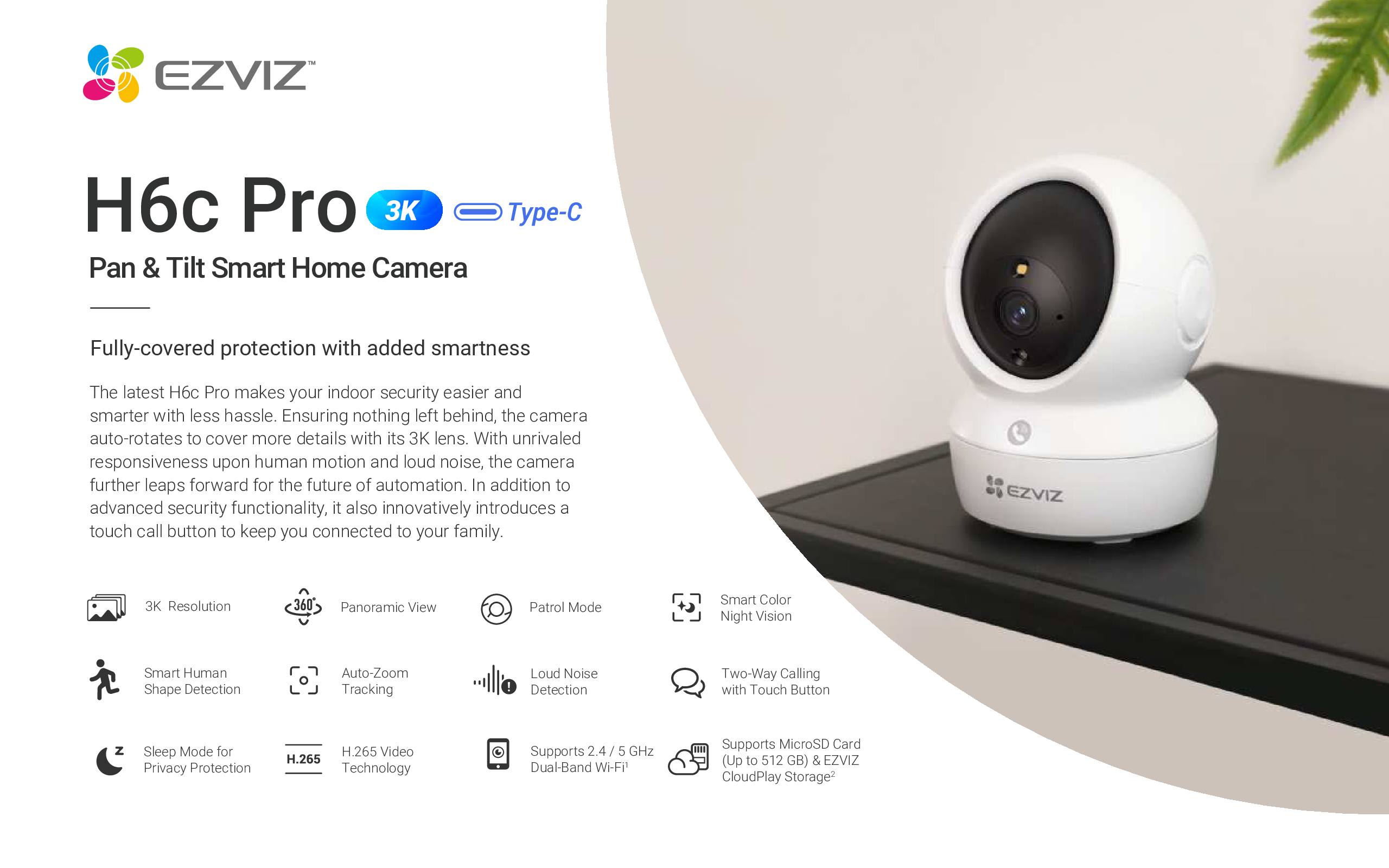
EZVIZ H6c PRO 3K 5MP Pan & Tilt Smart Home Camera DB
in stock
$498.00
EZVIZ SINGAPORE OFFICIAL PARTNER – Full Range
Supply and Maintenance Ezviz CCTV IP Cameras, NVR, Turbo HD TVI Cameras, DVR, PTZ Cameras,
Access Control System, Video Intercom.
Sim Lim Square 02-81 10am-7pm Daily.
Whatsapp Enquiry Project +65 98534404, Technical Support +65 81120788, Site Visit Maintenance +65 81985572.
in stock
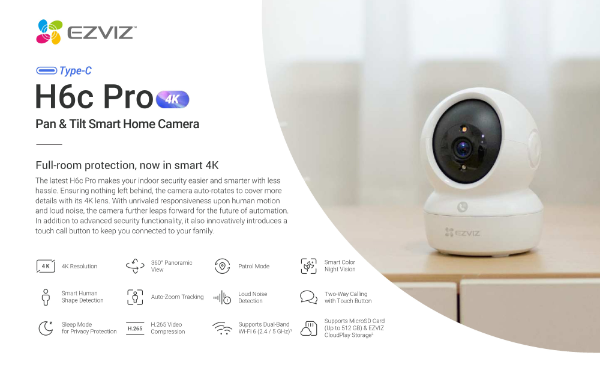
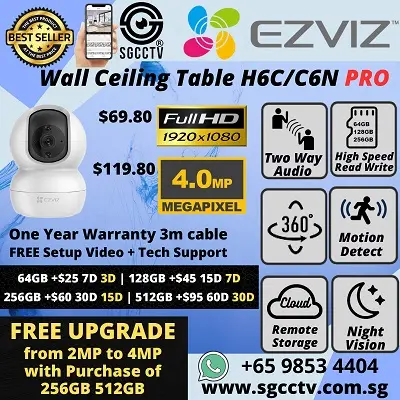
EZVIZ H6c PRO 3K 5MP Pan & Tilt Smart Home Camera
Two-Way Calling with Touch Button • Sleep Mode for Privacy Protection • Panoramic View
Introduction: Smarter Indoor Security with EZVIZ H6c PRO
The EZVIZ H6c PRO 3K 5MP Pan & Tilt Smart Home Camera is a powerful indoor security solution designed for modern homes, apartments, offices, and small businesses. Combining ultra-clear 3K resolution, 360° panoramic coverage, two-way calling with a touch button, and advanced privacy protection, the H6c PRO delivers professional-grade monitoring in a compact, stylish form factor.
Whether you want to watch over your children, elderly family members, pets, or valuables, the EZVIZ H6c PRO provides peace of mind with intelligent detection, smooth pan & tilt control, and easy mobile app management. It is built for users who want high image quality, simple installation, and real privacy control—without paying enterprise-level prices.
Crystal-Clear 3K 5MP Ultra HD Video Quality
One of the biggest advantages of the EZVIZ H6c PRO is its 3K (5MP) ultra-high-definition resolution. Compared to standard 1080p or even 2K indoor cameras, 3K resolution captures:
Sharper facial details
Clearer object recognition
Better digital zoom without image blur
Improved evidence quality for security events
This level of clarity is ideal for identifying faces, reading small details, or checking exactly what’s happening in your home—even from your smartphone screen.
360° Panoramic Coverage with Smart Pan & Tilt
The pan & tilt functionality of the EZVIZ H6c PRO ensures that no corner of the room is left unmonitored.
Wide Coverage Capabilities:
Horizontal rotation: up to 340°
Vertical rotation: up to 55°
Near-complete 360° panoramic view
With just a swipe on the EZVIZ app, users can manually control the camera angle or allow automatic tracking to follow movement. This makes the H6c PRO perfect for large living rooms, offices, retail spaces, or baby rooms where constant coverage is required.
Two-Way Calling with Touch Button – Instant Communication
A standout feature of the EZVIZ H6c PRO is Two-Way Calling with a Touch Button, which goes beyond standard two-way audio.
How It Works:
A physical touch button on the camera allows family members to initiate a call instantly
Ideal for children, elderly parents, or caregivers
Clear speaker and noise-reduced microphone ensure natural conversation
This feature transforms the H6c PRO from a simple security camera into a home communication device, making it especially useful for families and multi-generation households.
Smart Sleep Mode for True Privacy Protection
Privacy is a major concern for indoor cameras, and EZVIZ addresses this with Sleep Mode for Privacy Protection.
Privacy Features Include:
One-tap Sleep Mode via the EZVIZ app
Camera lens physically turns away when disabled
Stops video recording and live view instantly
Scheduled privacy hours for bedrooms or personal spaces
This ensures you remain fully in control of when the camera is active—ideal for bedrooms, study rooms, or private home areas.
EZVIZ H6c PRO 3K 5MP Pan & Tilt Smart Home Camera
Intelligent Human Motion Detection
The EZVIZ H6c PRO uses smart human shape detection to reduce false alerts caused by pets, shadows, or moving objects.
Benefits:
More accurate motion alerts
Faster response to real human activity
Reduced notification spam
Better battery and storage efficiency
When motion is detected, the camera can automatically pan and tilt to track movement, ensuring the subject remains in frame.
Panoramic View for Total Room Awareness
Thanks to its wide-angle lens combined with motorized pan & tilt, the H6c PRO delivers a true panoramic indoor monitoring experience.
This is especially useful for:
Open-concept homes
Retail stores
Offices and meeting rooms
Childcare and elderly monitoring
Instead of installing multiple cameras, one H6c PRO can often cover the entire room efficiently.
Smart Night Vision for 24/7 Monitoring
Security doesn’t stop when the lights go off. The EZVIZ H6c PRO is equipped with advanced infrared night vision, allowing it to capture clear footage even in complete darkness.
Night Vision Highlights:
Automatic day/night switching
Clear black-and-white video at night
Ideal for monitoring sleeping children or night activity
This ensures continuous protection around the clock.
Easy Installation & Simple Setup
The EZVIZ H6c PRO is designed for plug-and-play installation, making it suitable for both tech-savvy users and beginners.
Installation Steps:
Plug in the camera using the supplied power adapter
Download the EZVIZ app (iOS or Android)
Scan the QR code on the camera
Connect to Wi-Fi
Start monitoring instantly
No professional installation is required.
EZVIZ H6c PRO 3K 5MP Pan & Tilt Smart Home Camera
EZVIZ App Control & Smart Home Integration
The EZVIZ app provides full control over the H6c PRO from anywhere in the world.
App Features:
Live view and playback
Pan & tilt control
Motion alert notifications
Privacy sleep mode activation
Two-way calling
Cloud and microSD storage management
The camera also supports popular smart home ecosystems, making it easy to integrate into your existing setup.
Secure Storage Options
The EZVIZ H6c PRO supports flexible storage options:
microSD card storage (up to supported capacity)
EZVIZ CloudPlay subscription for encrypted cloud storage
Users can choose local storage for cost savings or cloud storage for added security and remote access.
Who Should Buy the EZVIZ H6c PRO?
The EZVIZ H6c PRO is ideal for:
Homeowners seeking indoor security
Parents monitoring babies or children
Pet owners watching pets while away
Elderly care monitoring
Small offices and retail shops
Renters needing non-invasive security
If you want high resolution, privacy control, and real communication features, this camera is an excellent choice.
Why Choose EZVIZ H6c PRO Over Standard Indoor Cameras?
Compared to basic indoor cameras, the H6c PRO offers:
Higher 3K 5MP resolution
Full panoramic coverage
Physical touch button calling
True privacy sleep mode
Smarter detection
Trusted EZVIZ ecosystem
This makes it a future-proof investment for smart indoor security.
EZVIZ H6c PRO 3K 5MP Pan & Tilt Smart Home Camera
Build Quality & Long-Term Reliability
EZVIZ products are known for durability and stable performance. The H6c PRO is built with:
High-quality optical lens
Reliable motorized pan & tilt mechanism
Long-life electronic components
Continuous firmware updates via EZVIZ
With proper usage, the camera can easily last 5 years or more in normal indoor conditions.
Final Thoughts: Is the EZVIZ H6c PRO Worth It?
Absolutely. The EZVIZ H6c PRO 3K 5MP Pan & Tilt Smart Home Camera offers a rare combination of high-end video quality, intelligent features, real privacy protection, and user-friendly operation.
It is a smart choice for anyone who wants dependable indoor security without complexity or compromise.
How to Install & Configure EZVIZ H6c PRO 3K 5MP Pan & Tilt Smart Home Camera
This guide explains how to install, set up, and configure the EZVIZ H6c PRO Pan & Tilt Smart Home Camera, including Wi-Fi connection, app setup, privacy settings, and smart features.
What’s Inside the Box
Before installation, check that all items are included:
EZVIZ H6c PRO Camera
Power Adapter & USB Cable
Mounting Base
Screws & Wall Anchors
Quick Start Guide
Step 1: Choose the Best Installation Location
For best performance:
Place the camera 2–3 meters above ground
Install in a central location for full panoramic view
Ensure strong Wi-Fi signal
Avoid direct sunlight or reflective surfaces
Keep close to a power socket
💡 Ideal locations: living room, baby room, hallway, office, retail counter.
EZVIZ H6c PRO 3K 5MP Pan & Tilt Smart Home Camera
Step 2: Physical Installation (Desk or Wall Mount)
Option A: Table / Shelf Placement
Place the camera on a flat surface
Adjust the camera angle using the EZVIZ app
Plug in the power adapter
Option B: Wall or Ceiling Mount
Fix the mounting base using screws
Attach the camera to the base
Adjust orientation in the EZVIZ app
Plug in power
⚠️ The camera will auto-rotate during startup—this is normal.
Step 3: Power On the Camera
Plug the camera into a power socket
Wait for the LED indicator to blink
You’ll hear a voice prompt indicating readiness
If not blinking, press and hold the Reset button for 5 seconds.
Step 4: Download the EZVIZ App
Open Google Play Store or Apple App Store
Search for EZVIZ
Download and install the app
Sign in or create an EZVIZ account
Step 5: Add EZVIZ H6c PRO to the App
Open the EZVIZ app
Tap “+ Add Device”
Scan the QR code on the camera
Select your 2.4GHz Wi-Fi network
Enter Wi-Fi password
Wait for connection confirmation
✅ Once connected, live video will appear.
Step 6: Configure Pan & Tilt Control
Open Live View in the app
Use the joystick control to move camera left/right/up/down
Set favorite viewing points for quick access
Enable motion tracking (optional)
Step 7: Set Up Motion Detection & Alerts
Go to Camera Settings
Select Motion Detection
Enable Human Shape Detection
Adjust detection sensitivity
Set alert notification schedule
This reduces false alerts from pets or shadows.
Step 8: Enable Two-Way Calling with Touch Button
Open Audio Settings
Enable Two-Way Calling
Activate Touch Call Button
Adjust microphone and speaker volume
📞 Family members can press the camera’s button to call your phone instantly.
Step 9: Activate Sleep Mode (Privacy Protection)
Open Privacy Settings
Enable Sleep Mode
Set manual or scheduled times
Camera lens will turn away automatically
🔒 Perfect for bedrooms and private areas.
EZVIZ H6c PRO 3K 5MP Pan & Tilt Smart Home Camera
Step 10: Configure Night Vision
Go to Image Settings
Set Night Vision to Auto
Adjust brightness if needed
The camera switches automatically in low light.
Step 11: Set Up Storage (SD Card or Cloud)
microSD Card
Insert microSD card into the camera
Format card via EZVIZ app
Enable continuous or event recording
EZVIZ Cloud Storage
Subscribe via the app
Enables encrypted cloud playback
Ideal for backup security
Step 12: Firmware Update (Important)
Go to Device Settings
Select Firmware Update
Install latest version
✔ Improves performance and security.
Common Setup Issues & Fixes
Camera won’t connect to Wi-Fi
Ensure 2.4GHz Wi-Fi (not 5GHz)
Move camera closer to router
Camera not detected
Reset device for 5 seconds
Retry QR scan
Motion alerts too frequent
Lower sensitivity
Enable human detection only
Installation Time & Skill Level
⏱ Installation Time: 5–10 minutes
🧠 Skill Level: Beginner-friendly
🛠 Tools Required: None (optional screwdriver)
Final Tips for Best Performance
Clean lens monthly
Keep firmware updated
Use strong Wi-Fi password
Avoid placing near moving curtains or fans
EZVIZ H6c PRO 3K 5MP Pan & Tilt Smart Home Camera
📊 Feature Comparison: EZVIZ H6c Pro vs IMOU / Dahua
Feature EZVIZ H6c PRO 3K IMOU Ranger 2 Dahua Hero A1 3MP Resolution 3 K (≈5 MP) — sharper video Full HD (≈2 MP) standard 3 MP quality Pan & Tilt Coverage 360° pan + wide tilt 360° pan + tilt 360° pan + tilt AI Detection Human shape detection, smart alerts Motion alerts, basic detection Basic motion alerts Two-Way Audio Yes (with touch button for call) Yes Yes Privacy Mode Sleep Mode with lens protection Some models have privacy cover Basic privacy settings Night Vision IR night with good clarity Standard IR night Standard night vision App/Cloud EZVIZ App + CloudPlay IMOU Life App + Imou cloud Dahua/IMOU ecosystem Storage microSD + optional cloud microSD + cloud microSD + cloud Typical Price Range Higher (premium) Lower/affordable Budget–midrange 🔍 Key Differences Explained
🖼️ Image Quality & Detail
EZVIZ H6c PRO delivers 3K (5 MP) resolution — significantly sharper and more detailed than typical 2 MP cameras like the Imou Ranger 2. This makes a big difference when zooming into faces or small objects.
Dahua Hero A1 offers around 3 MP which is better than 2 MP but usually not as detailed as the 3K resolution of EZVIZ.
Winner: EZVIZ for image clarity and detail.
🤖 Smart Features & Detection
EZVIZ H6c PRO includes advanced human shape detection with more accurate alerts and reduced false alarms. It also has a touch button for two-way calls, which is unique for instant communication.
IMOU models offer motion detection and basic smart alerts, but usually less refined AI compared to EZVIZ’s detection algorithms, especially in complex scenes.
Winner: EZVIZ for smarter alerts.
🤝 User Experience & App
EZVIZ App is well-regarded for its rich feature set, stable performance, and intuitive control over pan/tilt, alerts, privacy mode, and cloud settings.
IMOU Life App is user-friendly but tends to focus on simple basic use rather than advanced customization.
Dahua ecosystems (including Hero A1 series) integrate well with wider professional systems, but may require more setup know-how.
Winner: Tie, but EZVIZ edges ahead for beginner-to-intermediate users.
🔐 Privacy & Protection
EZVIZ H6c PRO has a Sleep Mode that physically turns the lens away when not monitoring, giving extra privacy control.
IMOU / Dahua typically offer digital privacy settings but may lack an active physical privacy shutter.
Winner: EZVIZ for stronger privacy protection.
💰 Value & Price
IMOU Ranger 2 and Dahua Hero A1 are generally more affordable, making them good options for basic monitoring on a budget.
EZVIZ H6c PRO targets users willing to pay a bit more for better quality, smarter AI, and premium features.
Winner: IMOU/Dahua for budget; EZVIZ for long-term value.
🏁 Summary: Which Should You Choose?
Choose EZVIZ H6c PRO if you want:
✔ Higher clarity (3 K 5 MP)
✔ Better AI motion & human detection
✔ True privacy sleep mode
✔ Rich and stable app experience
✔ More future-proof featuresChoose IMOU / Dahua (e.g., Ranger 2, Hero A1) if you want:
✔ Lower cost setup
✔ Reliable basic pan/tilt monitoring
✔ Good two-way audio for family use
✔ Simple cloud or local storage📌 Bottom Line
The Ezviz H6c Pro 3K Pan & Tilt Smart Home Camera is positioned as a premium indoor smart camera with sharper resolution, advanced AI, and better privacy controls — ideal for users who want future-ready home security with rich features.
In contrast, models like the Imou Ranger 2 Security Camera or Dahua Hero A1 3MP Smart Indoor Wi‑Fi Pan & Tilt Camera are budget-friendlier and great if you want reliable indoor monitoring without breaking the bank.
🛒 Get It From Choicecycle (SGCCTV Singapore)
🌐 Website: https://sgcctv.com.sg
✉️ Email: enquiry@choicecycle.com.sg
📞 WhatsApp: +65 9853 4404
📍 Store: Sim Lim Square #02-81, Singapore
🕚 Operating Hours: 11 AM – 8 PM
EZVIZ H6c PRO 3K 5MP Pan & Tilt Smart Home Camera

Donec accumsan auctor iaculis. Sed suscipit arcu ligula, at egestas magna molestie a. Proin ac ex maximus, ultrices justo eget, sodales orci. Aliquam egestas libero ac turpis pharetra, in vehicula lacus scelerisque. Vestibulum ut sem laoreet, feugiat tellus at, hendrerit arcu..


Nunc lacus elit, faucibus ac laoreet sed, dapibus ac mi. Maecenas eu ante a elit tempus fermentum. Aliquam commodo tincidunt semper. Phasellus accumsan, justo ac mollis pharetra, ex dui pharetra nisl, a scelerisque ipsum nulla ac sem. Cras eu risus urna. Duis lorem sapien, congue eget nisl sit amet, rutrum faucibus elit.
Donec accumsan auctor iaculis. Sed suscipit arcu ligula, at egestas magna molestie a. Proin ac ex maximus, ultrices justo eget, sodales orci. Aliquam egestas libero ac turpis pharetra, in vehicula lacus scelerisque. Vestibulum ut sem laoreet, feugiat tellus at, hendrerit arcu.
Nunc lacus elit, faucibus ac laoreet sed, dapibus ac mi. Maecenas eu ante a elit tempus fermentum. Aliquam commodo tincidunt semper. Phasellus accumsan, justo ac mollis pharetra, ex dui pharetra nisl, a scelerisque ipsum nulla ac sem. Cras eu risus urna. Duis lorem sapien, congue eget nisl sit amet, rutrum faucibus elit.
Related Products
 Rated 4.00 out of 5
Hikvision CCTV Camera DS-2CE72DFT-F ColorVu Colour DOME Night Vision 1080P Smart IR IP67
Rated 4.00 out of 5$104.00
Reviews
There are no reviews yet.