
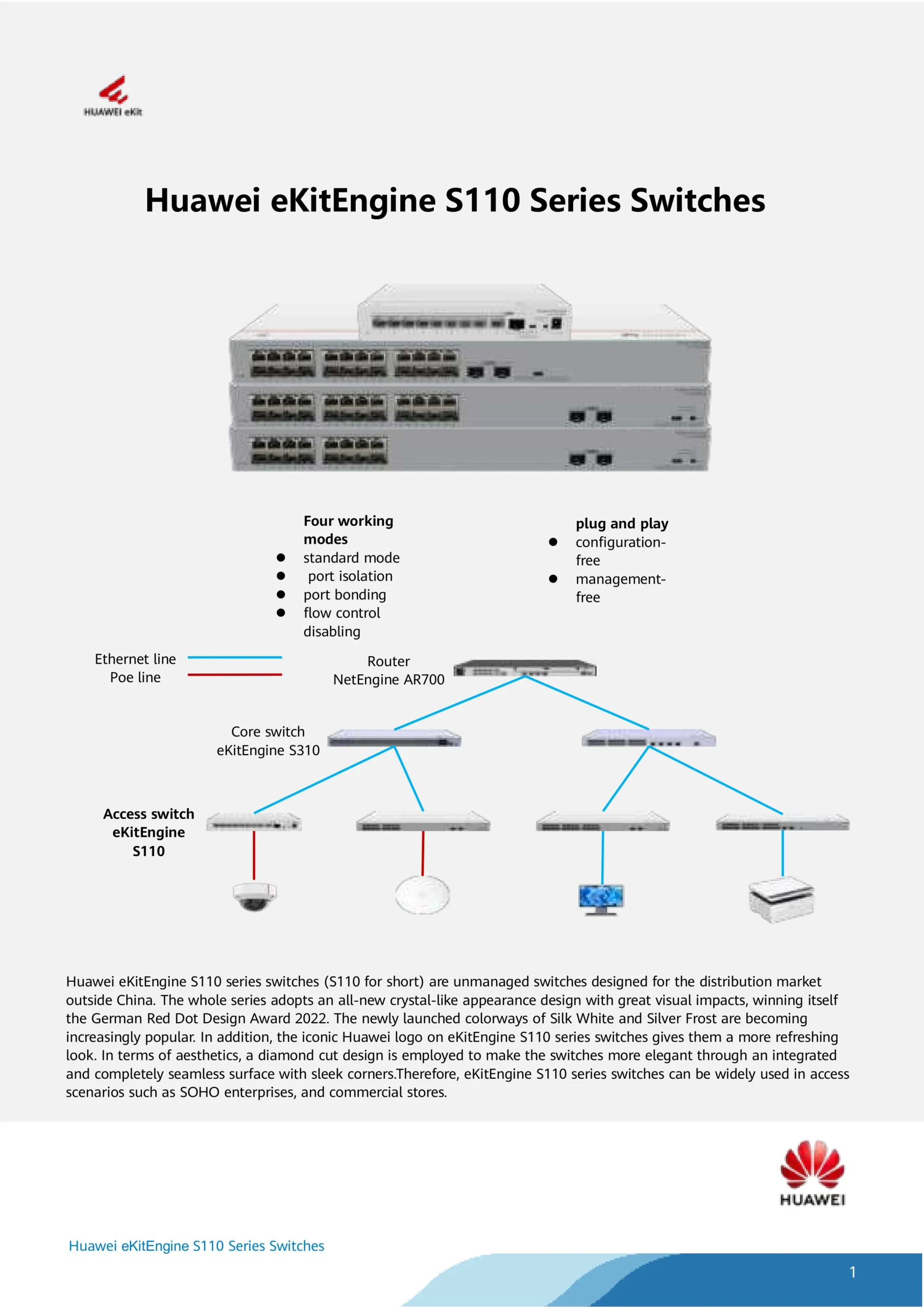
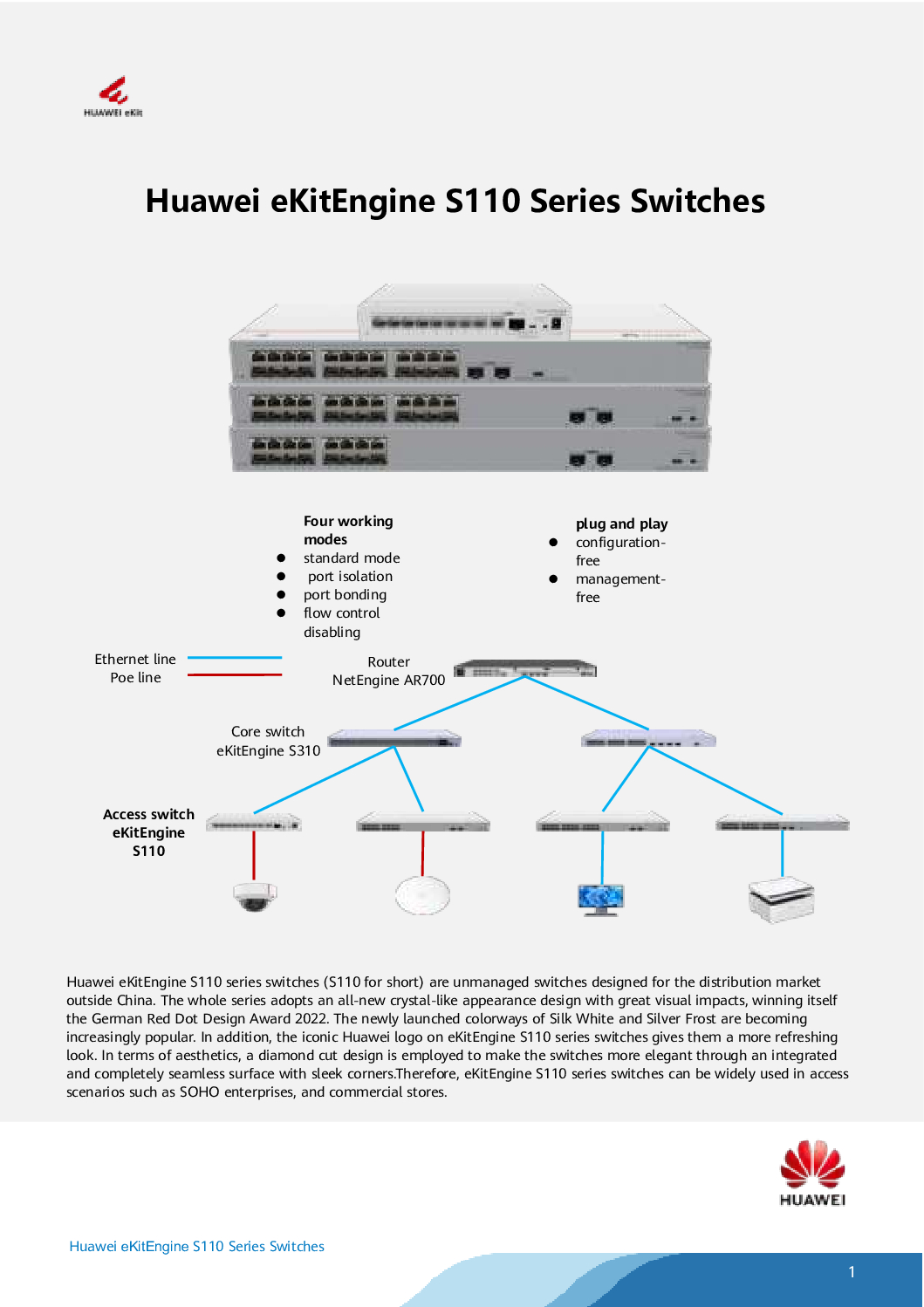
Huawei 16-Port Gigabit Unmanaged PoE Switch NEW
The Huawei 16-Port Gigabit Unmanaged PoE Switch is a high-performance, plug-and-play network solution designed for SMEs, offices, retail shops, and CCTV installations. This Huawei Gigabit Unmanaged PoE Switch combines reliable power delivery, Gigabit speeds, and simple deployment, allowing businesses and installers to expand their network with minimal setup.
Whether you are powering IP cameras, wireless access points, or VoIP phones, this switch offers robust PoE support across 16 ports, ensuring your devices operate seamlessly without the need for additional adapters or complex network configuration.
Plug-and-Play Simplicity
As a Huawei Plug-and-Play PoE Switch, it eliminates the complexity of managed switches while still delivering the power, speed, and reliability modern networks demand.
Key Plug-and-Play Features
Automatic device detection and PoE power allocation
No configuration required – simply connect and power devices
Supports IEEE 802.3af / 802.3at PoE standards
Fanless design for quiet operation in offices or retail environments
LED indicators for quick port status monitoring
This makes it ideal for CCTV installers, small business owners, and IT staff who need fast deployment without technical hurdles.
Gigabit Performance Across All Ports
With 16 Gigabit Ethernet ports, the Huawei unmanaged PoE switch ensures high-speed data transmission, minimizing latency for surveillance systems, office networks, and multimedia applications.
Benefits of Gigabit Connectivity
Smooth IP camera streaming for multi-camera CCTV systems
Fast file transfer across office LAN
Stable connections for VoIP phones and Wi-Fi access points
Reduced network congestion even with multiple devices connected
This Huawei Gigabit Unmanaged PoE Switch is particularly suited for multi-camera surveillance setups where high bandwidth and reliable PoE delivery are crucial.
Huawei 16-Port Gigabit Unmanaged PoE Switch NEW
PoE Support for CCTV & Network Devices
The built-in Power over Ethernet (PoE) technology simplifies installations by delivering data and power through a single Ethernet cable.
Typical Use Cases
Powering IP cameras for CCTV and security monitoring
Connecting wireless access points in offices and retail stores
Powering VoIP phones for unified communications
Supporting IoT devices like sensors and access control systems
By reducing cabling and power adapters, the Huawei 16-Port PoE Switch streamlines network deployment, making it a cost-effective and reliable solution for small-to-medium networks.
Who Should Buy This Switch
The Huawei unmanaged PoE switch is perfect for:
SME owners looking for simple network expansion
CCTV installers deploying IP surveillance systems
Office managers needing plug-and-play PoE for phones and APs
Retail & hospitality managers powering cameras, POS systems, and Wi-Fi
Home tech enthusiasts building advanced home networks
Its ease of use and stable power delivery make it accessible to both technical and non-technical users.
Huawei 16-Port Gigabit Unmanaged PoE Switch NEW
Easy Troubleshooting & Maintenance
Even as an unmanaged switch, it offers simple monitoring:
LED indicators show port connectivity and PoE status
Overload protection safeguards devices
Fanless design reduces maintenance requirements
For network interruptions, troubleshooting typically involves:
Checking LEDs for port activity
Ensuring PoE devices do not exceed total power budget
Verifying Ethernet cables for faults
No configuration is needed, so most issues can be quickly resolved without IT expertise.
Why Choose Huawei Over Other Brands
Compared to competitors like TP-Link, the Huawei 16-Port Gigabit Unmanaged PoE Switch offers:
Reliable PoE delivery across all 16 ports
Stable Gigabit speeds under multi-device load
Long-lasting enterprise-quality hardware
Plug-and-play simplicity without sacrificing performance
For CCTV installers and small business owners, this switch ensures reliable operation, minimal downtime, and professional network quality.
✅ 1. Plug‑and‑Play Simplicity
This is an unmanaged switch, meaning no configuration is needed:
Just plug in Ethernet cables
PoE devices (like cameras, APs, phones) power on automatically
No technical setup or IT training required
👉 Perfect for installers, SMEs, retail shops, and non‑technical users.
Huawei 16-Port Gigabit Unmanaged PoE Switch NEW
✅ 2. 16 Gigabit Ethernet Ports
You get 16 full Gigabit (1000 Mbps) ports, which means:
High‑speed data transfer across your network
Better performance than fast Ethernet (100 Mbps)
Smooth transmission for video, Wi‑Fi, and file sharing
This is especially important in CCTV systems with multiple high‑resolution cameras.
✅ 3. Built‑In PoE (Power over Ethernet)
The switch delivers both data and power over the same cable:
No need for separate power supplies for cameras or access points
Reduces installation cost and cable clutter
Simplifies network design
💡 Ideal for CCTV, VoIP phones, Wi‑Fi access points, and IoT devices.
✅ 4. Supports PoE Standards (802.3af/at)
This switch supports the industry standard PoE protocols:
Compatible with most PoE devices
Provides the right power levels automatically
Works with cameras, APs, and phones from different brands
This makes it versatile and future‑proof.
✅ 5. Reliable & Quiet Operation
Unlike some budget switches, Huawei PoE switches are known for:
Stable networking performance
Efficient power delivery
Minimal component failure
Fanless design (some models) — quiet for offices or retail
👉 Good for environments where noise and reliability matter.
Huawei 16-Port Gigabit Unmanaged PoE Switch NEW
✅ 6. Good for CCTV & Network Devices
A 16‑port PoE switch is an excellent choice to power:
✔ Multi‑camera CCTV systems
✔ Wi‑Fi access points
✔ VoIP phone systems
✔ Smart IoT devices
All through a single switch, saving space and management effort.
✅ 7. Cost‑Effective Solution
Compared to managed switches:
No expensive configuration tools needed
Lower upfront cost
Ideal for businesses that just need reliable connectivity
It brings enterprise‑like performance without enterprise complexity.
✅ 8. Durable & Long Lasting
Huawei builds networking gear with:
Good hardware quality
Stable firmware
Longevity under continuous use
This reduces maintenance costs and device replacements.
Huawei 16-Port Gigabit Unmanaged PoE Switch NEW
🧠 Great for These Users
| User Type | Why It’s Valuable |
|---|---|
| CCTV installers | Powers cameras & simplifies wiring |
| Small business owners | Quick setup, no IT skills needed |
| Office networks | Supports phones, Wi‑Fi, and devices |
| Retail/hospitality | Quiet operation + reliable power |
| Tech beginners | Plug‑and‑play convenience |
📌 Simple Real‑World Benefits
✔ Set up 16 devices with one device
✔ Power cameras and APs from a single switch
✔ Save on power adapters & separate injectors
✔ Run modern Gigabit networks with minimal fuss
🏁 Bottom Line
The Huawei 16‑Port Gigabit Unmanaged PoE Switch is a good product because it:
Is easy to use
Delivers high‑speed Gigabit performance
Provides built‑in PoE power
Works with most PoE devices
Is quiet, reliable, and cost‑effective
It’s an excellent choice for CCTV installations, small businesses, offices, and simple network builds where you want powerful networking without complexity.
Huawei 16-Port Gigabit Unmanaged PoE Switch NEW
1️⃣ Initial Setup (Plug-and-Play)
What you need:
Huawei 16‑Port Unmanaged PoE Switch
Ethernet cables (Cat5e/Cat6)
Devices to connect (IP cameras, APs, VoIP phones, etc.)
Steps:
Place the switch in a stable, ventilated location.
Connect the power adapter and turn on the switch.
Connect your devices to any of the 16 ports.
Devices that support PoE (like cameras or APs) will automatically receive power and start working.
✅ No IP settings or VLAN configuration are required.
2️⃣ LED Indicators
Check the LEDs on the switch to ensure everything is working:
| LED | Status | Meaning |
|---|---|---|
| Power | On | Switch is powered |
| Link/Act (per port) | On | Device connected |
| Link/Act blinking | Blinking | Data is being transmitted |
| PoE (per port) | On | PoE device is powered |
| PoE Overload | Off | No overload detected |
Tip: If a PoE device is not receiving power, try a different port or check the cable.
Huawei 16-Port Gigabit Unmanaged PoE Switch NEW
3️⃣ Device Placement Tips
Cameras: Connect all IP cameras to PoE ports.
Access Points: Connect to PoE ports for both power and network.
Phones / IoT devices: Can also be powered via PoE.
Note: The switch will distribute PoE power automatically, but ensure you do not exceed the total PoE budget (check the manual for maximum watts).
4️⃣ No Network Configuration Needed
This switch is unmanaged, so you don’t need to:
Assign IP addresses
Configure VLANs
Enable STP / RSTP / MSTP
It will automatically allow all devices on the same local network to communicate.
5️⃣ Troubleshooting Tips
Problem: Device not powering
Check PoE compatibility (802.3af/at)
Try another port
Verify the total PoE budget is not exceeded
Problem: Device not connecting
Check cable quality (Cat5e or better recommended)
Make sure device is powered
Restart the switch if needed
Problem: Network congestion
Keep Gigabit devices on different ports if heavy traffic
Consider adding a managed switch if advanced traffic control is needed
✅ Who Will Buy This Switch
🛠️ 1. CCTV & Security Installers
Deploying IP camera systems in:
Retail stores
Warehouses
Offices
Residential buildings
Need plug‑and‑play PoE for cameras
Why they buy: Simple installation, reliable PoE power, no configuration required
Huawei 16-Port Gigabit Unmanaged PoE Switch NEW
🧑💼 2. Small & Medium Business Owners
Small offices needing PoE for:
IP phones
Wi‑Fi access points
Security cameras
Don’t have full‑time IT staff
Why they buy: Easy setup, low cost, reliable connectivity
📶 3. Office Managers
Need to expand network for:
Additional wireless APs
VoIP phones
CCTV cameras
Why they buy: Works instantly, no learning curve
🏪 4. Retail & Hospitality Operators
Shops, restaurants, cafés, salons
Need PoE for:
Security cameras
Wi‑Fi access
Why they buy: Quiet (fanless), compact, budget‑friendly
🏡 5. Home Tech Enthusiasts / Smart Homes
Home users with multiple smart PoE devices:
IP cameras
Wi‑Fi APs
PoE sensors
Why they buy: Stable Gigabit + PoE in a simple box
Huawei 16-Port Gigabit Unmanaged PoE Switch NEW
🧩 6. System Integrators
Installing network equipment for clients
Want a basic PoE switch that “just works”
Why they buy: Great base switch for small networks
📍 Where to Place This Switch — Best Locations
Here are the most common placement scenarios depending on use case:
🏢 1. In a Central Communications / Server Room
📍 Best for offices and business buildings
Connects to router / firewall
Powers:
IP phones
APs
Internal CCTV cameras
Acts as the main PoE switch for local devices
Huawei 16-Port Gigabit Unmanaged PoE Switch NEW
📦 2. Near CCTV Camera Clusters
📍 Great for warehouses, malls, or shop floors
Place near camera clusters to:
Shorter cable runs
Easier PoE power delivery
Example:
Switch in utility closet
Cameras spread across area, all fed by this switch
🏪 3. Retail / Shop / Café Counter Area
📍 Good for retail outlets
Connect cameras and APs
Keep cables tidy behind counter / cabinet
Provides PoE without noisy fans
🏠 4. Home Network Closet
📍 For homes with many PoE devices
Powers multiple cameras outside and inside
Connect Wi‑Fi AP(s) for whole‑home Wi‑Fi
Great sub‑hub for smart home devices
Huawei 16-Port Gigabit Unmanaged PoE Switch NEW
🏢 5. Remote Satellite Offices / Branches
📍 Offices without IT staff
Quick plug‑and‑play setup
Doesn’t require managed configuration
Perfect for temporary offices or coworking spaces
🧠 Best Practice Tips for Placement
✔ Keep in a ventilated, dry area
✔ Avoid direct sunlight or hot machinery
✔ Place near power outlet
✔ Label connected devices for easy maintenance
✔ For CCTV, position switch close to cluster of cameras to reduce cable runs
📌 Summary — Buyer + Placement
| Buyer Type | Where to Place | Why |
|---|---|---|
| CCTV Installer | Utility closet near cameras | Short cables, easy PoE |
| Small Business | Central rack or desk | Connect phones/APs/cams |
| Office Manager | Server/IT room | Centralized networking |
| Retail / Café | Back counter / cabinet | Hidden, clean wiring |
| Home Enthusiast | Home network shelf | Smart devices + cameras |
| System Integrator | Project‑specific location | Fast plug‑and‑play setup |
Huawei 16-Port Gigabit Unmanaged PoE Switch NEW
💡 Key Differences
⚙️ Management & Configuration
Huawei Unmanaged:
✔ Works out of the box
❌ No VLAN, QoS, STP/RSTP controls
Best for simple Plug‑and‑Play networks
TP‑Link Smart/Managed (e.g., TL‑SG1016PE / TL‑SG2016P):
✔ Includes basic to advanced management (VLANs, QoS)
✔ Some models support STP/RSTP for loop protection
❌ Still easier than full enterprise, but more controllable than unmanaged
👉 Winner (Ease of use): Huawei — simplest setup.
👉 Winner (Network control): TP‑Link Smart models — more features.
⚡ PoE Power & Support
Huawei switch:
Designed for more ports PoE at once (model dependent)
TP‑Link TL‑SG1016PE:
Only 8 of 16 ports are PoE+ with ~110W total budget
TP‑Link TL‑SG2016P:
8 PoE+ ports with ~120W budget plus more smart features
TP‑Link TL‑SG1218MP:
Larger total PoE budget, 16 PoE+ all ports (higher power) — closer match for full 16‑port PoE needs
👉 Winner (All‑port PoE): Huawei / TP‑Link TL‑SG1218MP — depending on model.
Huawei 16-Port Gigabit Unmanaged PoE Switch NEW
📊 Features & Scalability
| Feature | Huawei 16‑Port PoE Switch | TP‑Link PoE Options |
|---|---|---|
| Unmanaged plug & play | ✔ | ● (some models) |
| Web management | ❌ | ✔ (Easy Smart / JetStream) |
| VLAN support | ❌ | ✔ (Smart models) |
| Loop protection (STP/RSTP) | ❌ | ✔ (JetStream models) |
| Power per port control | ✔ | ✔ (but port count varies) |
| All ports PoE? | ✔ (in some Huawei variants) | Only in heavier TP‑Link models |
📍 Real Use Case Comparison
🎥 CCTV & Surveillance
Huawei: Best if you want all 16 ports PoE with no configuration.
TP‑Link: Good if you want VLANs or management control and only need PoE on some ports.
🏢 Small Office / Business
Huawei: Simple, low‑maintenance PoE network — cameras + phones/APs.
TP‑Link Smart: Better for managed networks where VLAN segmentation or traffic priority is needed (e.g., guest Wi‑Fi).
🛠️ Installers
Huawei: Easiest for quick installations.
TP‑Link Smart: Offers more tools for troubleshooting and expansion, but needs some configuration.
Huawei 16-Port Gigabit Unmanaged PoE Switch NEW
📌 Bottom Line
Choose Huawei 16‑Port Gigabit Unmanaged PoE Switch if:
You want true plug‑and‑play PoE for CCTV, APs, and phones.
You don’t need VLANs, STP/RSTP, or other managed features.
Choose TP‑Link Smart/Managed PoE options if:
You want network control (VLAN, quality priority, redundancy).
You want to integrate with centralized management (especially with Omada ecosystem).
You want a higher product range with robust features (depending on model).
Huawei 16-Port Gigabit Unmanaged PoE Switch NEW
Buy Genuine Huawei PoE Switches in Singapore
Choicecycle (SGCCTV Singapore)
📍 Store: Sim Lim Square #02-81, Singapore
🕚 Operating Hours: 11:00 AM – 8:00 PM
📞 WhatsApp: +65 9853 4404
📧 Email: enquiry@choicecycle.com.sg
🌐 Website: https://sgcctv.com.sg


Nunc lacus elit, faucibus ac laoreet sed, dapibus ac mi. Maecenas eu ante a elit tempus fermentum. Aliquam commodo tincidunt semper. Phasellus accumsan, justo ac mollis pharetra, ex dui pharetra nisl, a scelerisque ipsum nulla ac sem. Cras eu risus urna. Duis lorem sapien, congue eget nisl sit amet, rutrum faucibus elit.
Donec accumsan auctor iaculis. Sed suscipit arcu ligula, at egestas magna molestie a. Proin ac ex maximus, ultrices justo eget, sodales orci. Aliquam egestas libero ac turpis pharetra, in vehicula lacus scelerisque. Vestibulum ut sem laoreet, feugiat tellus at, hendrerit arcu.
Nunc lacus elit, faucibus ac laoreet sed, dapibus ac mi. Maecenas eu ante a elit tempus fermentum. Aliquam commodo tincidunt semper. Phasellus accumsan, justo ac mollis pharetra, ex dui pharetra nisl, a scelerisque ipsum nulla ac sem. Cras eu risus urna. Duis lorem sapien, congue eget nisl sit amet, rutrum faucibus elit.


