
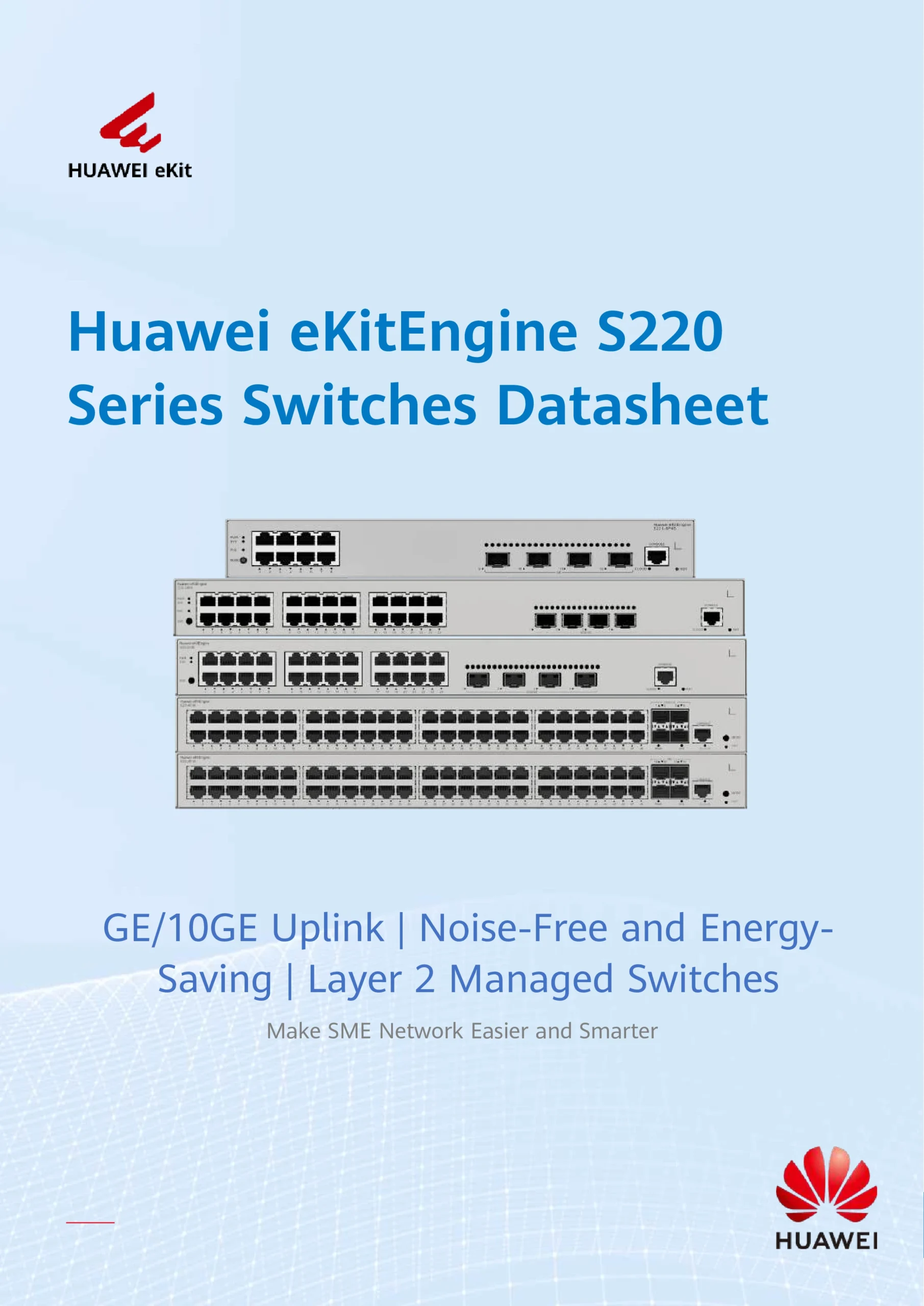
Huawei 8-Port Gigabit L2 Managed PoE Switch NEW DB
$562.00
Huawei 8-Port Gigabit L2 Managed PoE Switch
The Huawei 8-Port Gigabit L2 Managed PoE Switch is a high-performance, energy-efficient network switch designed for modern small offices, retail setups, and CCTV/IP camera deployments. Combining advanced Layer 2 features with robust PoE capabilities, this switch ensures seamless connectivity and reliable power delivery to your network devices.
Key Features of Huawei Layer 2 Managed PoE Switch
8 Gigabit Ports with PoE Support – Powers IP cameras, access points, and VoIP phones directly via Ethernet, reducing cable clutter.
Advanced Layer 2 Switching – Full support for VLAN, QoS, and STP, providing network segmentation, traffic prioritization, and loop prevention.
Flexible PoE Power Budget – Complies with IEEE 802.3af/at standards, delivering reliable power for multiple devices without interruption.
Energy-Efficient Design – Fanless or low-noise models available for quiet office environments.
Easy Management Options – Web GUI, SNMP, and CLI options for convenient configuration and monitoring.
Huawei 8-Port Gigabit L2 Managed PoE Switch
Why Choose Huawei Managed PoE Switch?
The Huawei Layer 2 Managed PoE Switch combines stability, security, and performance. Its advanced VLAN and QoS features help you prioritize critical applications such as video surveillance, VoIP, and high-speed Wi-Fi, ensuring smooth and uninterrupted operation. STP (Spanning Tree Protocol) prevents network loops, keeping your business network resilient and reliable.
Applications of Huawei 8-Port Gigabit PoE Switch
CCTV surveillance systems – Ideal for powering multiple IP cameras with stable Gigabit connectivity.
Wireless access points – Expand Wi-Fi coverage effortlessly in offices, retail shops, and campuses.
Small business networks – Reliable Layer 2 managed switch for office PCs, VoIP phones, and network appliances.
Remote monitoring & IoT devices – Seamless PoE delivery to sensors and other connected devices.
Huawei Switch VLAN QoS STP – Optimized Network Performance
Huawei 8-Port Gigabit L2 Managed PoE Switch
With VLAN support, you can separate traffic for better security and network efficiency. QoS (Quality of Service) ensures high-priority traffic like VoIP or video streaming gets the bandwidth it needs. STP (Spanning Tree Protocol) prevents network loops, keeping your network stable even in complex deployments.
🧑💼 1. Small & Medium Businesses (SMBs)
Businesses with offices or shops that need:
Stable Gigabit network switching
PoE power for IP phones, Wi‑Fi access points, or surveillance cameras
VLAN segmentation and traffic management
Example: Retail shops, cafés, coworking spaces, boutiques.
🎥 2. CCTV & Security Installers
Professional installers use PoE switches to power and connect multiple IP security cameras without separate power adapters.
These buyers care about:
PoE power budget
Stable network for 24/7 video streaming
Remote monitoring support
Huawei 8-Port Gigabit L2 Managed PoE Switch
🏢 3. System Integrators & IT Consultants
Companies or technicians deploying network infrastructure for:
Offices
Warehouses
Educational institutions
Hotels or event venues
They choose managed switches for:
VLANs & QoS configuration
Loop prevention (STP)
SNMP monitoring
🏠 4. Tech‑Savvy Home Users
Home network enthusiasts or smart home installers who want:
PoE support for a few devices (e.g., Wi‑Fi access points or outdoor cameras)
Better control and segmentation than basic unmanaged switches
Huawei 8-Port Gigabit L2 Managed PoE Switch
🧑🔧 5. Network Administrators
IT admins in charge of:
Segregating guest vs corporate networks using VLAN
Prioritizing traffic (QoS)
Preventing network loops with STP
They value the manageability and enterprise‑grade features.
📌 Buyer Needs/Goals
People who will buy this switch are typically looking for:
✔ Power over Ethernet (PoE) for multiple devices
✔ Gigabit connectivity for high‑speed traffic
✔ Network segmentation & security with VLAN
✔ Traffic optimization with QoS
✔ Managed features for professional setups
Huawei 8-Port Gigabit L2 Managed PoE Switch – No Command Installation & Setup
1. Physical Installation
Place the switch on a flat, ventilated surface or mount it in a rack.
Connect the power cable to the switch and plug it into a power source.
Connect your network devices (PCs, IP cameras, access points) to the 8 PoE Gigabit ports using Cat5e/Cat6 Ethernet cables.
💡 Tip: For PoE devices, the switch automatically provides power via Ethernet—no separate adapter needed.
2. Connect to the Switch Web Interface
Take a computer and connect it to any port on the switch.
Set your computer to the same subnet as the switch default IP (check the manual; often it’s
192.168.1.1).Open a web browser and enter the switch IP, e.g.,
http://192.168.1.1.Log in using the default username and password (usually
admin/admin).
💡 Tip: Change the default password immediately for security.
Huawei 8-Port Gigabit L2 Managed PoE Switch
3. Basic Configuration via Web GUI (No CLI)
Once logged in, the web interface allows click-based setup:
a. VLAN Setup
Navigate to Network → VLAN.
Add a VLAN ID to separate traffic, e.g., VLAN 10 for cameras, VLAN 20 for office PCs.
Assign ports to the VLAN.
b. QoS Configuration
Go to QoS → Port QoS.
Set priority for critical traffic (like IP cameras or VoIP).
Save the settings.
c. STP (Spanning Tree Protocol)
Navigate to STP → Enable STP.
Turn it on to prevent network loops.
d. PoE Settings
Go to PoE → PoE Port Settings.
Enable PoE for ports connected to cameras or access points.
Check the power budget to ensure you don’t exceed the switch limit.
e. IP Configuration
If needed, assign a static IP to the switch for easier management later.
4. Save Configuration
Always click Save or Apply after making changes.
Optionally, back up the configuration to your PC.
Huawei 8-Port Gigabit L2 Managed PoE Switch
5. Testing
Ping connected devices from your PC to ensure connectivity.
Check cameras, access points, or phones to confirm PoE is working.
Monitor traffic via Web GUI → Port Statistics.
📊 Huawei vs TP‑Link 8‑Port PoE Switch Comparison
| Feature | Huawei 8‑Port Managed PoE Switch | TP‑Link Managed / Smart PoE Switches |
|---|---|---|
| Management Level | Full Layer 2 managed (VLAN, QoS, STP) | Varies by model — smart & managed features depending on product |
| VLAN / QoS | Supported (full Layer 2 enterprise‑grade) | Supported on smart / managed models like TP‑Link TL‑SG108PE V3 and TP‑Link TL‑SG2210P |
| PoE Support | PoE / PoE+ on all ports (model dependent) | Depends on model — e.g., TL‑SG108PE has PoE on 4 ports, TL‑SG2210P offers better coverage |
| Web‑Based GUI | Yes — easy managed via web | Yes — easy smart managed via web |
| STP (Loop Prevention) | Yes (standard Layer 2) | Yes on many smart managed models |
| Best For | Small business with VLAN, traffic control, CCTV deployments | Small business / home office with simpler management and PoE needs |
| Price Position | Mid‑range to higher (professional use) | Often more budget‑friendly but feature range varies |
✅ Strengths of Huawei Switch
Full Layer 2 managed feature set — robust VLAN segmentation, STP, QoS, ideal for serious network segmentation and professional CCTV/IP setups.
Enterprise readiness — built to handle heavier networking tasks in business environments.
Great choice if you plan to centrally manage traffic, isolate devices, and scale your network reliably.
Huawei 8-Port Gigabit L2 Managed PoE Switch NEW
✅ Strengths of TP‑Link Switches
Budget‑friendly Smart Options: Models like TP‑Link TL‑SG108PE V3 · $92.92 are cheaper but still support VLAN, QoS, and PoE, suitable for many small office or home deployments.
Simpler Management: TP‑Link’s smart switches often have easy web UI and sometimes controller management (Omada).
Flexible Models: You can choose based on your needs — fewer PoE ports but lower cost, or more ports and features if needed.
🧠 When to Choose Huawei
✅ You need professional Layer 2 management (VLAN + QoS + STP) for CCTV, VoIP, Wi‑Fi APs.
✅ You plan to expand or implement strict traffic control and segmentation.
✅ You want a switch engineered for enterprise‑class networking.
🧠 When to Choose TP‑Link
✅ You want a budget‑friendly managed switch with PoE and basic enterprise features without high cost.
✅ You prefer easy plug‑and‑play smart management with web UI or controller options.
✅ Your network needs are more modest (small office, shop, home).
How the Huawei 8-Port Gigabit L2 Managed PoE Switch
The Huawei 8-Port Gigabit L2 Managed PoE Switch is manufactured through a multi-stage industrial process that combines hardware engineering, firmware development, and strict quality control by Huawei.
1. Network Hardware Design
Engineers first design the internal architecture of the switch:
High-performance Ethernet switching chipset for Gigabit speeds
Dedicated PoE controller chips to safely deliver power over Ethernet
Power regulation circuits to support IEEE 802.3af/at (PoE/PoE+)
Memory components (RAM & Flash) to run Layer 2 features
This ensures stable data switching and safe power delivery at the same time.
2. Printed Circuit Board (PCB) Manufacturing
A multi-layer PCB is fabricated to handle high-speed Gigabit data signals
Electronic components are placed using automated SMT (Surface Mount Technology) machines
The board is soldered, cleaned, and electrically tested
This step guarantees signal stability and long-term reliability.
3. PoE Power System Integration
The PoE system is carefully built to:
Detect whether a connected device supports PoE
Deliver only the required amount of power
Protect against overload, short circuit, and overheating
This allows the switch to safely power IP cameras, Wi-Fi access points, and VoIP phones.
How the Huawei 8-Port Gigabit L2 Managed PoE Switch
4. Firmware & Layer 2 Software Development
Huawei installs its proprietary Layer 2 network firmware, which enables:
VLAN configuration for traffic separation
QoS for traffic prioritization
STP to prevent network loops
Web-based management (no command line required)
The firmware is tested for stability, security, and performance.
Huawei 8-Port Gigabit L2 Managed PoE Switch
5. Metal Casing & Thermal Design
The switch is enclosed in a metal chassis for durability
Heat-dissipation design allows continuous operation
Some models use fanless cooling to reduce noise
This makes the switch suitable for offices, retail shops, and control rooms.
6. Assembly & Quality Testing
Each unit undergoes:
Power-on testing
PoE load testing on all ports
Network traffic stress testing
VLAN, QoS, and STP function checks
Only units that pass all tests proceed to packaging.
How the Huawei 8-Port Gigabit L2 Managed PoE Switch Is Made
7. Final Packaging & Distribution
Firmware is finalized
Serial numbers and compliance labels are applied
The switch is packed with manuals and accessories
Distributed through authorized suppliers and partners
Why This Manufacturing Process Matters
Because of this process, the switch offers:
Long service life
Stable PoE power for 24/7 operation
Enterprise-grade network features
Low failure rate for CCTV and business networks
How the Huawei 8-Port Gigabit L2 Managed PoE Switch Is Made
Why Buy From Choicecycle – Singapore’s Trusted Network Supplier
✅ Original Huawei products with warranty
✅ Expert guidance on network setup and PoE budgeting
✅ Visit our store: Sim Lim Square #02-81, Singapore
✅ Contact: WhatsApp +65 9853 4404 | Email: enquiry@choicecycle.com.sg
✅ Website: https://sgcctv.com.sg

Donec accumsan auctor iaculis. Sed suscipit arcu ligula, at egestas magna molestie a. Proin ac ex maximus, ultrices justo eget, sodales orci. Aliquam egestas libero ac turpis pharetra, in vehicula lacus scelerisque. Vestibulum ut sem laoreet, feugiat tellus at, hendrerit arcu..


Nunc lacus elit, faucibus ac laoreet sed, dapibus ac mi. Maecenas eu ante a elit tempus fermentum. Aliquam commodo tincidunt semper. Phasellus accumsan, justo ac mollis pharetra, ex dui pharetra nisl, a scelerisque ipsum nulla ac sem. Cras eu risus urna. Duis lorem sapien, congue eget nisl sit amet, rutrum faucibus elit.
Donec accumsan auctor iaculis. Sed suscipit arcu ligula, at egestas magna molestie a. Proin ac ex maximus, ultrices justo eget, sodales orci. Aliquam egestas libero ac turpis pharetra, in vehicula lacus scelerisque. Vestibulum ut sem laoreet, feugiat tellus at, hendrerit arcu.
Nunc lacus elit, faucibus ac laoreet sed, dapibus ac mi. Maecenas eu ante a elit tempus fermentum. Aliquam commodo tincidunt semper. Phasellus accumsan, justo ac mollis pharetra, ex dui pharetra nisl, a scelerisque ipsum nulla ac sem. Cras eu risus urna. Duis lorem sapien, congue eget nisl sit amet, rutrum faucibus elit.


