
Huawei SFP Module 1G MM Duplex 550M eSFP-GE-SX-MM850 DB
$65.00
Huawei SFP Module 1G MM Duplex 550M eSFP-GE-SX-MM850
Reliable 1G Multimode Fiber Connectivity for Enterprise Networks
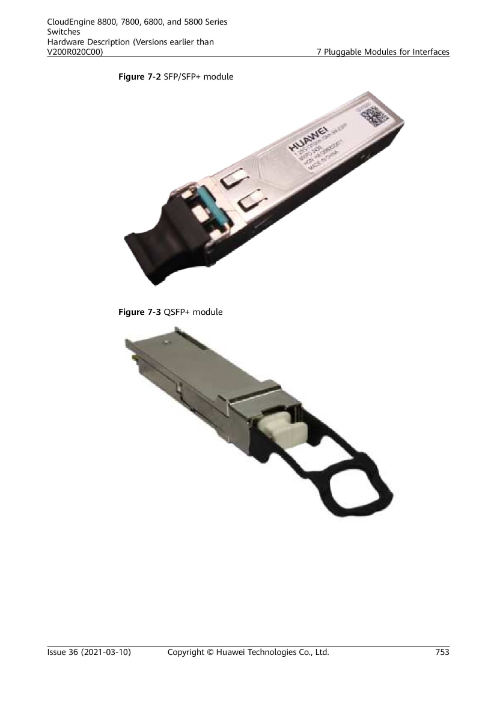
The Huawei eSFP-GE-SX-MM850 is a high-performance 1G SFP multimode fiber transceiver module designed for stable and efficient Gigabit Ethernet transmission over multimode fiber (MMF). Operating at 850mm wavelength, this module supports transmission distances up to 550 meters, making it ideal for enterprise LAN networks, campus environments, and data center short-range connections.
Built according to 1000BASE-SX standard, the Huawei 1G SFP module delivers reliable performance, low latency, and seamless compatibility with Huawei switches and networking equipment.
Key Features
1Gbps data rate (1000Mbps)
850nm wavelength
Multimode fiber support (OM2 / OM3 / OM4)
Up to 550m transmission distance
LC duplex connector
Hot-swappable SFP form factor
Low power consumption
Enterprise-grade reliability
IEEE 802.3z compliant
Why Buy Huawei eSFP-GE-SX-MM850?
1️⃣ Stable Gigabit Performance
This module ensures consistent 1Gbps data transmission for business networks requiring reliable fiber backbone connectivity.
2️⃣ Perfect for Short-Range Fiber Links
With up to 550m support on multimode fiber, it is ideal for:
Office building connections
Server-to-switch links
Campus networking
Data center rack connections
3️⃣ Genuine Huawei Compatibility
Using an original Huawei SFP module ensures:
Full compatibility
Stable link performance
No firmware issues
Long-term reliability
4️⃣ Easy Installation
The module is hot-swappable, meaning:
No need to power off switch
Quick upgrade or replacement
Minimal downtime
5️⃣ Cost-Effective Fiber Upgrade
It allows businesses to:
Upgrade from copper to fiber
Improve network stability
Reduce electromagnetic interference
Huawei SFP Module 1G MM Duplex 550M eSFP-GE-SX-MM850
Who Will Buy This Product?
This 1G MM SFP module is suitable for:
Enterprise IT departments
System integrators
Data center operators
Network engineers
Schools & universities
Government institutions
Telecom & ISP backbone deployments
IT resellers and hardware suppliers
In Singapore, typical buyers include corporate offices, system integrators, and network installers operating in business parks and commercial buildings.
How Is This Product Made?
The Huawei eSFP-GE-SX-MM850 is manufactured through:
PCB assembly using automated SMT machines
Installation of VCSEL laser (850nm transmitter)
Photodiode receiver alignment
Firmware programming (EEPROM data encoding)
Metal housing assembly
Optical power and signal integrity testing
Temperature stress testing
Quality assurance inspection
Precision alignment ensures stable 1Gbps transmission without packet loss.
How Long Does This Product Last?
Typical lifespan:
5 to 10 years under normal enterprise use
24/7 operation capable
Designed for continuous network environments
Longevity depends on:
Environmental temperature
Proper fiber handling
Clean connectors
Stable power supply
Huawei modules are built for enterprise durability.
Huawei SFP Module 1G MM Duplex 550M eSFP-GE-SX-MM850
How to Install Huawei 1G SFP Module
Step 1: Insert the Module
Remove dust cap
Slide into SFP port
Push gently until it clicks
Step 2: Connect Fiber Cable
Use LC duplex multimode fiber
Ensure TX connects to RX
Secure properly
Step 3: Check Link Light
Green LED indicates link
No light? Swap fiber connectors
Step 4: Verify in Switch (Optional)
Check port status in web GUI or CLI.
Installation takes less than 2 minutes.
How to Save & Maintain Module Performance
Keep dust caps when unused
Avoid bending fiber cable sharply
Clean LC connectors periodically
Avoid extreme heat environments
Huawei SFP Module 1G MM Duplex 550M eSFP-GE-SX-MM850
Technical Specifications
| Specification | Details |
|---|---|
| Data Rate | 1Gbps |
| Standard | 1000BASE-SX |
| Wavelength | 850nm |
| Fiber Type | Multimode (MMF) |
| Distance | Up to 550m |
| Connector | LC Duplex |
| Form Factor | SFP |
| Compliance | IEEE 802.3z |
✅ When It’s Good for Home Use
📌 1. You Have a Home Network with Fiber Infrastructure
This module only works if you have:
A router or switch with an SFP port
Multimode fiber cable installed between devices
If your home network already uses fiber links (for example between a main switch and access switches), then this module is a perfect fit.
📌 2. You Need Wired Gigabit Fiber Connectivity
Good if you want:
✔ Faster backbone links between switches
✔ Stable long-distance signal without interference
✔ More reliable Gigabit links than copper Ethernet (in long cable runs)
This is more common in:
Large homes
Multi-building properties
Home labs
Smart homes with heavy data usage
Huawei SFP Module 1G MM Duplex 550M eSFP-GE-SX-MM850
⚠️ When It’s NOT Useful for Typical Home Setups
If your home network is all:
Wi-Fi routers
Mesh Wi-Fi
Basic Ethernet switches with RJ45
Then this module won’t be helpful because:
❌ Typical consumer routers don’t have SFP ports
❌ You don’t have fiber cabling at home
❌ No device to plug the module into
In that case, a regular Gigabit Ethernet switch or Wi-Fi mesh system makes more sense.
🏡 So — Is It Good for Home?
| Home Network Type | Good? | Why |
|---|---|---|
| Standard router + Wi-Fi Mesh | ❌ | No SFP ports |
| Basic Ethernet switch at home | ❌ | No fiber interface |
| Home with SFP-capable networking | ✔️ | Provides Gigabit fiber link |
| Home office / home lab with fiber | ✔️ | Enterprise-grade performance |
🧠 Real Example Home Uses
👨💻 Home Lab Enthusiast
If you’re building a small network lab with:
SFP switches
Multiple VLANs
Fiber backbone
→ This module helps build fiber connections at home.
Huawei SFP Module 1G MM Duplex 550M eSFP-GE-SX-MM850
📍 Large Property / Dual-Unit Home
If you run fiber between:
Main network room
Secondary building / studio
→ This module gives stable fiber link up to 550m.
🛠 Home Users WITHOUT SFP Ports
Then this module isn’t needed; instead consider:
Standard Gigabit switch
Wi-Fi 5 / Wi-Fi 6 router
Mesh Wi-Fi systems
🏡 Bottom Line
✅ Good for advanced home networks with fiber & SFP infrastructure
❌ Not useful for regular home Wi-Fi / router only setups
🔎 Recommendations If You Don’t Have Fiber at Home
Instead of this SFP module, use:
✔ Gigabit Ethernet switch
✔ Wi-Fi 6 router / mesh system
✔ Powerline adapters (if Wi-Fi is weak)
Huawei SFP Module 1G MM Duplex 550M eSFP-GE-SX-MM850
📊 Side-by-Side Comparison
| Feature | Huawei eSFP-GE-SX-MM850 | TP-Link 1G SFP (example) |
|---|---|---|
| Standard | 1000BASE-SX (MMF) | 1000BASE-SX (MMF) |
| Data Rate | 1 Gbps | 1 Gbps |
| Wavelength | 850 nm | 850 nm |
| Max Distance | ~550 m (OM2) | ~550 m (OM2) |
| Connector | LC Duplex | LC Duplex |
| DDM/DOM Support | Yes | Usually Yes |
| Vendor | Huawei OEM | TP-Link / Omada / Compatible |
| Typical Use | Huawei enterprise switches | TP-Link / Omada switches |
| Build Quality | Enterprise grade | Good quality, often OEM |
| Brand Match | Optimised for Huawei | Optimised for TP-Link |
✅ Key Differences
🏷️ Brand Compatibility
Huawei module is designed for Huawei network gear, so vendor coding and plug-and-play reliability is strong.
TP-Link module is designed mainly for TP-Link / Omada devices and is optimised for those ecosystems.
In both cases, many SFP modules work across brands thanks to the SFP MSA standard, but vendor-specific coding sometimes improves reliability in certain switches.
📐 Optical Performance
Both modules generally support:
✔ 1 Gbps over multimode fiber
✔ Up to ~550 m on OM2 fiber
✔ LC duplex connection
✔ 850 nm wavelength
So performance is very similar. Both should handle basic enterprise and long-range LAN fiber links effectively.
🔧 Compatibility & Vendor Coding
The Huawei module will be more reliable when plugged into Huawei switches because the identification and diagnostics are vendor–matched.
TP-Link modules tend to work best on TP-Link / Omada switches but can also work on other brands due to industry SFP standards.
💡 SFP modules generally follow a standard, so even cross-brand use is common — but branded modules reduce compatibility issues.
Huawei SFP Module 1G MM Duplex 550M eSFP-GE-SX-MM850
🏭 Quality & Testing
Huawei OEM modules are tested by Huawei for enterprise equipment — good for datacenter & large networks.
TP-Link branded or compatible modules are widely used and tested for TP-Link network gear, often at lower price points.
📍 When to Choose Which
👉 Choose Huawei eSFP-GE-SX-MM850 if:
✔ You use Huawei enterprise switches
✔ You want vendor-matched compatibility and diagnostics
✔ You need robust enterprise reliability
👉 Choose TP-Link 1G SFP Module if:
✔ You use TP-Link / Omada switches
✔ You want a potentially more affordable option
✔ Your network gear mix uses many TP-Link devices
For the Huawei SFP Module 1G MM Duplex 550M | eSFP‑GE‑SX‑MM850, the typical lifespan is:
⏳ Expected Lifespan
5–10 years under normal enterprise use
24/7 operation capable, designed for continuous fiber backbone networking
Lifespan depends on:
Environmental temperature (keep within spec, usually 0–70°C)
Proper fiber handling (avoid bending or stressing cables)
Clean LC connectors (dust caps when not in use)
Stable power supply on the switch or router
Huawei SFP Module 1G MM Duplex 550M eSFP-GE-SX-MM850
⚡ Reliability Factors
Huawei OEM modules undergo strict quality testing for:
Optical power output
Signal integrity
Bit error rate
Temperature stability
Long-term operation
Enterprise-grade design ensures stable 1Gbps performance over years, making it ideal for data centers, offices, and campus networks.
Troubleshooting Huawei 1G SFP Module (eSFP‑GE‑SX‑MM850)
Step 1: Check Physical Installation
Remove the module and re-insert it into the SFP port.
Make sure it clicks in place.
Do not force it — wrong orientation can damage the module.
Inspect the LC duplex connectors:
Make sure TX connects to RX.
Swap if link light doesn’t turn on.
Ensure fiber cable is not bent sharply or damaged.
Remove dust caps from both module and fiber before connecting.
Step 2: Check the Switch / Router Port
Look at the LED indicator:
Green = Link OK
Blinking = Traffic passing
Off = No link → Check SFP module or port
Try plugging the SFP module into another compatible port.
If it works, the original port may be faulty.
Step 3: Verify Device Compatibility
The eSFP-GE-SX-MM850 is designed for Huawei switches, but it generally works with any standard 1000BASE-SX SFP port.
Check switch documentation for compatible modules.
Some switches may reject modules if vendor coding is strict.
Step 4: Check Fiber and Distance
Ensure fiber type is multimode (OM2/OM3/OM4).
Maximum supported distance: 550 meters on OM2 fiber.
Longer runs may cause link failure.
Huawei SFP Module 1G MM Duplex 550M eSFP-GE-SX-MM850
Step 5: Clean the Fiber and Connectors
Dirt or dust can cause poor optical signal.
Use a fiber cleaning pen or wipes for LC connectors.
Reconnect and check LED status.
Step 6: Test with Another SFP Module
If another compatible module works in the same port:
Original module may be defective.
If no module works in the port:
Port could be faulty — check switch or router.
Step 7: Use Switch Diagnostics
On Huawei switches, you can check the interface with CLI:
Look for:
Port status (up/down)
SFP detection
Errors or optical power readings
Some switches support Digital Diagnostic Monitoring (DDM) to see TX/RX power.
Step 8: Replace if Defective
If the module fails all tests and another module works in the same port, it’s likely defective.
Replace with genuine Huawei eSFP-GE-SX-MM850 to ensure compatibility and long-term reliability.
Huawei SFP Module 1G MM Duplex 550M eSFP-GE-SX-MM850
Quick Troubleshooting Checklist
| Symptom | Possible Cause | Solution |
|---|---|---|
| No link light | Fiber TX/RX reversed | Swap fiber connections |
| No link light | Dirty fiber | Clean LC connectors |
| No link | Module not compatible | Verify switch compatibility |
| Intermittent link | Fiber damaged / bent | Replace or reroute fiber |
| Link up but no traffic | Faulty switch port | Test another port |
| No link after 24/7 use | Module defective | Replace SFP module |
Huawei SFP Module 1G MM Duplex 550M eSFP-GE-SX-MM850
Huawei SFP Warranty Details
Standard Warranty: 1 year from date of purchase for most Huawei SFP modules
Extended/Enterprise Warranty: Some enterprise customers can get 3 years if purchased through authorized partners or under Huawei’s extended support contracts
Coverage:
Manufacturing defects
Hardware failures under normal use
Optical performance outside specifications
Not Covered:
Physical damage (cracked module, bent pins)
Misuse or installation in unsupported devices
Fiber damage caused by improper handling
Perfect, kapi 👍 — here’s a detailed Fiber & Cable Recommendations section you can include in your SEO for the Huawei SFP Module 1G MM Duplex 550M | eSFP‑GE‑SX‑MM850. This will add keywords and lengthen your SEO content naturally.
Fiber & Cable Recommendations for Huawei SFP Module 1G MM Duplex 550M
The Huawei eSFP-GE-SX-MM850 is designed to operate over multimode fiber (MMF) with LC duplex connectors. Choosing the correct fiber type and cables ensures optimal performance, stable 1Gbps links, and long module lifespan.
Huawei SFP Module 1G MM Duplex 550M eSFP-GE-SX-MM850
1️⃣ Recommended Fiber Types
| Fiber Type | Max Distance (with Huawei 1G SFP) | Best Use Case |
|---|---|---|
| OM2 (50/125 µm) | Up to 550 meters | Short-range enterprise LAN, office buildings |
| OM3 (50/125 µm, laser-optimized) | Up to 550 meters | Modern enterprise networks, data centers, future-proof setup |
| OM4 (50/125 µm, laser-optimized) | Up to 550 meters | High-performance setups, longer runs in campus networks |
✅ Tip: Using OM3 or OM4 fiber is recommended for future upgrades and more reliable signal performance.
2️⃣ Recommended Fiber Cables
LC Duplex Multimode Patch Cables:
Connect SFP TX → RX properly
Keep polarity correct: TX → RX, RX → TX
Length: 1–50 meters for patching, longer for backbone runs
OM2/OM3/OM4 Multimode Fiber Cables:
50/125 µm core diameter
LSZH (Low Smoke Zero Halogen) jackets for indoor use
Tight-buffered or breakout cables for structured cabling
Avoid using Single-Mode Fiber (SMF):
This module is designed for multimode fiber
Single-mode fiber will cause link failure
3️⃣ Cable Handling Best Practices
Avoid sharp bends – minimum bend radius: ~10× cable diameter
Keep connectors clean – use dust caps when not in use
Do not pull by the fiber – always handle by the jacket
Label cables – prevents TX/RX mix-ups in large installations
Huawei SFP Module 1G MM Duplex 550M eSFP-GE-SX-MM850
4️⃣ Recommended Accessories
Fiber cleaning kits – remove dust and dirt from LC connectors
Cable management trays – avoid strain and bending
Patch panels with LC ports – organize fiber backbone connections
Cable ties and Velcro straps – secure fiber without crushing it
📍 Where to Buy Genuine Units
Choicecycle (SGCCTV Singapore)
📍 Sim Lim Square #02-81, Singapore
📞 WhatsApp: +65 9853 4404
📧 Email: enquiry@choicecycle.com.sg
🌐 Website: https://sgcctv.com.sg

Donec accumsan auctor iaculis. Sed suscipit arcu ligula, at egestas magna molestie a. Proin ac ex maximus, ultrices justo eget, sodales orci. Aliquam egestas libero ac turpis pharetra, in vehicula lacus scelerisque. Vestibulum ut sem laoreet, feugiat tellus at, hendrerit arcu..


Nunc lacus elit, faucibus ac laoreet sed, dapibus ac mi. Maecenas eu ante a elit tempus fermentum. Aliquam commodo tincidunt semper. Phasellus accumsan, justo ac mollis pharetra, ex dui pharetra nisl, a scelerisque ipsum nulla ac sem. Cras eu risus urna. Duis lorem sapien, congue eget nisl sit amet, rutrum faucibus elit.
Donec accumsan auctor iaculis. Sed suscipit arcu ligula, at egestas magna molestie a. Proin ac ex maximus, ultrices justo eget, sodales orci. Aliquam egestas libero ac turpis pharetra, in vehicula lacus scelerisque. Vestibulum ut sem laoreet, feugiat tellus at, hendrerit arcu.
Nunc lacus elit, faucibus ac laoreet sed, dapibus ac mi. Maecenas eu ante a elit tempus fermentum. Aliquam commodo tincidunt semper. Phasellus accumsan, justo ac mollis pharetra, ex dui pharetra nisl, a scelerisque ipsum nulla ac sem. Cras eu risus urna. Duis lorem sapien, congue eget nisl sit amet, rutrum faucibus elit.


