Huawei 24-Port Gigabit L2+ PoE Managed Switch NEW DB
$1388.00
Huawei 24-Port Gigabit L2+ PoE Managed Switch NEW
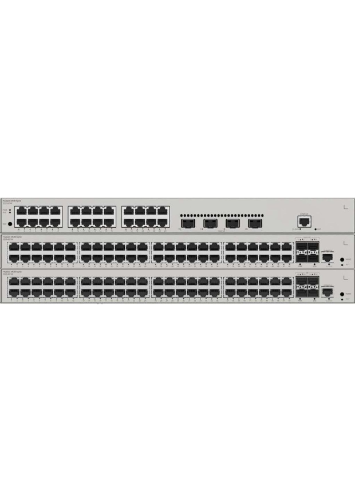
The Huawei S310-24P4X is a high-performance 24-Port Gigabit L2+ PoE Managed Switch designed for enterprise, SME, and commercial network environments. Combining high-speed Gigabit connectivity, PoE power delivery, and advanced Layer 2+ management features, this switch ensures efficient, secure, and scalable network deployment for modern businesses.
Whether it’s powering IP cameras, Wi-Fi access points, VoIP phones, or other network devices, the Huawei S310-24P4X Managed PoE Switch with SFP+ offers reliable performance, simplified management, and future-ready expansion options.
🚀 Why Choose Huawei S310-24P4X?
Businesses and IT professionals choose this switch because it provides:
Stable Gigabit connectivity for multiple devices
High PoE power budget for cameras, APs, and VoIP phones
Advanced Layer 2+ features for traffic management and security
Future-ready 10G SFP+ uplinks for network scalability
Enterprise-grade reliability for 24/7 operation
🔌 24 Gigabit PoE Ports – Power & Data in One Cable
The Huawei S310-24P4X comes with:
24 × 10/100/1000BASE-T PoE+ ports
Support for IEEE 802.3af / 802.3at PoE standards
Intelligent PoE power management with a strong total PoE budget
Ideal for powering:
CCTV IP cameras (including PTZ cameras)
Wireless Access Points (Wi-Fi 5 / Wi-Fi 6)
VoIP phones
Access control and IoT devices
With PoE+, each port can deliver up to 30W, ensuring stable operation for high-demand devices.
Huawei 24-Port Gigabit L2+ PoE Managed Switch NEW
⚡ 4 × 10GE SFP+ Uplink Ports – High-Speed Backbone
The Huawei S310-24P4X Enterprise Switch includes:
4 × 10 Gigabit SFP+ uplinks for core network connections
Benefits:
Fast uplink to servers or core switches
Smooth video streaming and NVR access
Reduced network congestion
Scalable for future growth
Businesses in Singapore and beyond can rely on these uplinks for high-bandwidth applications.
🧠 Advanced Layer 2+ Management
As a Layer 2+ managed switch, the Huawei S310-24P4X supports:
VLAN creation for network segmentation
Static routing and IPv4/IPv6 dual stack
QoS traffic prioritization
Link Aggregation (LACP) for higher bandwidth
STP / RSTP / MSTP redundancy protocols
IGMP Snooping for optimized multicast traffic
This gives network administrators full control over traffic, performance, and security.
🔐 Enterprise-Level Security
Huawei S310-24P4X ensures business networks stay protected with:
Port-based security
DHCP Snooping and ARP protection
Storm control to prevent broadcast floods
802.1X authentication
Access Control Lists (ACL)
Secure and reliable connectivity reduces downtime and protects against unauthorized access.
Huawei 24-Port Gigabit L2+ PoE Managed Switch NEW
🖥 Easy Management
The S310-24P4X offers flexible and user-friendly management options:
Web GUI for point-and-click configuration
CLI for advanced settings
SNMP monitoring
Centralized Huawei management (optional)
Administrators can quickly configure VLANs, monitor PoE usage, and troubleshoot issues.
📹 Perfect for CCTV & Surveillance Systems
Security integrators prefer this switch because:
Stable PoE for multiple IP cameras
VLAN segmentation for secure CCTV networks
10G uplink to NVR or core switch
Reliable operation 24/7
Ideal for:
Warehouses
Factories
Schools
Commercial buildings
Hotels
Office complexes
🏢 Ideal for SME & Enterprise Networks
Huawei S310-24P4X is perfect for:
Offices and small-medium enterprises (SME)
Hotels and hospitality networks
Schools and campuses
Industrial and commercial facilities
Its rackmount design allows neat installation in server rooms or network cabinets.
Huawei 24-Port Gigabit L2+ PoE Managed Switch NEW
🛠 Built for Reliability
Huawei’s enterprise-grade switches feature:
Durable components for long-term stability
Efficient cooling for high load operation
Low power consumption design
Enterprise-grade testing and certification
This ensures long-lasting performance and minimal maintenance.
📊 Key Specifications
24 × 10/100/1000BASE-T PoE+ ports
4 × 10GE SFP+ uplinks
Layer 2+ support with static routing
VLAN, QoS, LACP, STP/RSTP/MSTP
IEEE 802.3af / 802.3at PoE+
Web and CLI management
Rackmount 1U form factor
🎯 1. All‑in‑One Network + Power Solution
This switch doesn’t just move network traffic — it also powers devices directly over Ethernet (PoE).
What that means for you:
✔ Fewer cables
✔ No extra power adapters
✔ Faster, cleaner installations
✔ Lower wiring and electrical costs
Perfect for:
➡ IP cameras
➡ Wi‑Fi access points
➡ VoIP phones
➡ Door access and IoT devices
Huawei 24-Port Gigabit L2+ PoE Managed Switch NEW
⚡ 2. 24 Gigabit Ports – Room to Grow
With 24 Gigabit PoE ports, you can connect and power many devices at once without needing multiple switches.
Ideal for:
🏢 Offices
🏨 Hotels
🏫 Schools
🏪 Retail stores
🏭 Factories
📦 Warehouses
You won’t run out of ports as your network expands.
🚀 3. 10 × Faster Uplinks with 10G SFP+
The built‑in 4 × 10G SFP+ uplink ports give you a high‑speed backbone connection to other switches or servers.
Why this matters:
✔ Supports high‑bandwidth CCTV streaming
✔ Smooth access to storage/NVR servers
✔ Less network congestion
✔ Future‑ready for upgrades
Most cheaper switches don’t include 10G ports — but this one does.
🧠 4. Smart Network Control (Layer 2+)
This is a managed switch, not a basic one.
Management features you get:
✔ VLANs (segmented networks)
✔ QoS (prioritize traffic)
✔ Link aggregation (combine links for speed)
✔ Static routing
✔ IGMP snooping
✔ Redundancy protocols (STP/MSTP)
👉 Better performance, better security, better control.
Huawei 24-Port Gigabit L2+ PoE Managed Switch NEW
🔐 5. Stronger Security for Business
Security isn’t optional — especially in business networks.
This switch supports:
🔒 Port security
🔒 ACL filters
🔒 802.1X authentication
🔒 DHCP snooping
🔒 Storm control
These protect against unauthorized access, network floods, and configuration attacks.
🛠️ 6. Enterprise‑Grade Reliability
Unlike consumer switches, this is built for business use.
✔ 24/7 operation
✔ Advanced cooling design
✔ High‑quality hardware components
✔ Tested for long‑term performance
It won’t fail when your business depends on it — even under load.
📊 7. Easy Monitoring & Management
You can configure and control the switch using:
🟦 Web interface
🟦 CLI (Command Line)
🟦 SNMP monitoring tools
🟦 Centralized management systems
This is great for IT teams who need visibility and control over the network.
📹 8. Perfect for CCTV & Security Systems
Security installers prefer this switch because:
Strong PoE power for many cameras
VLAN segmentation isolates surveillance traffic
10G uplinks to NVR/storage servers
Reliable 24/7 operation
Ideal for:
📍 Office buildings
📍 Parking lots
📍 Retail malls
📍 Warehouses
📍 Campuses
Huawei 24-Port Gigabit L2+ PoE Managed Switch NEW
💰 9. Saves Money Long‑Term
While its upfront cost is higher than cheap unmanaged switches, it pays off over time by:
✅ Reducing maintenance cost
✅ Eliminating early replacement needs
✅ Cutting installation and wiring expenses
✅ Providing scalable performance
This is a long‑term investment, not a short‑term solution.
🛒 10. Trusted Huawei Brand
Huawei is a global leader in networking with decades of experience.
✔ Widely used in enterprise and telecom
✔ Strong support and updates
✔ Proven reliability and durability
Buying this switch is not a gamble — it’s a professional choice.
📅 Expected Lifespan
| Usage Scenario | Estimated Lifespan |
|---|---|
| Normal Business Use (office, CCTV, APs) | 5–10 years |
| Heavy 24/7 PoE Load | 5–8 years |
| High‑Demand Enterprise Environment | 6–12 years |
👉 Most businesses can expect around 7–10 years of reliable service under typical office or CCTV network conditions.
🧠 Why It Lasts This Long
✔ Enterprise‑Grade Components
Huawei uses industrial‑quality semiconductors, power circuitry, and board materials, which are more durable than consumer‑grade switches.
Huawei 24-Port Gigabit L2+ PoE Managed Switch NEW
✔ Designed for Continuous Operation
This switch is engineered for 24/7 uptime, unlike home switches that are only meant for intermittent use.
✔ Efficient Cooling & Power Design
Good airflow and internal thermal design help prevent overheating — one of the biggest causes of electronic failure.
✔ PoE Power Stability
PoE switches that handle high power loads (powering cameras, APs, etc.) need robust internal power stages — this model is built for that long‑term.
⚠️ Factors That Can Shorten Lifespan
Even good hardware can fail early if conditions are poor:
🔹 Heat & Poor Ventilation
High temperatures stress components.
Solution: Install in ventilated racks or cooled cabinets.
Huawei 24-Port Gigabit L2+ PoE Managed Switch NEW
🔹 Unstable Power / Surges
Voltage spikes can damage sensitive circuits.
Solution: Use a good UPS (Uninterruptible Power Supply).
🔹 Dust & Humidity
Dust buildup and moisture can lead to corrosion and overheating.
Solution: Consider environmental protection or filters.
🔹 Constant Maxed‑Out PoE Load
If the switch is always delivering near its maximum PoE budget, internal power components may wear faster.
Huawei 24-Port Gigabit L2+ PoE Managed Switch NEW
🛡️ How to Extend Its Life
Here are practical tips to maximize longevity:
✅ Mount it in a cool, ventilated network rack
✅ Use a UPS / surge protector
✅ Clean dust regularly
✅ Keep firmware updated
✅ Avoid stacking equipment on top
📊 Quick Comparison — Lifespan by Device Class
| Device Type | Typical Lifespan |
|---|---|
| Consumer Unmanaged Switch | ~2–4 years |
| Entry‑Level Business Switch | ~3–6 years |
| Huawei S310‑24P4X (Enterprise PoE) | ~5–10+ years |
Here’s a simple, straight‑to‑the‑point explanation of why you should buy the Huawei 24‑Port Gigabit L2+ PoE Managed Switch | S310‑24P4X — in your words, not technical jargon 👇
💡 1. You Want a Stable, Professional Network
If your network isn’t just “plug in & forget,” and you need reliable performance for work, security cameras, Wi‑Fi, or phones — this switch delivers real business‑grade stability.
Not just consumer level — true enterprise performance.
🔌 2. You Need Power + Data Over One Cable (PoE)
Instead of:
🔹 Running separate power cables
🔹 Plugging every device into wall sockets
This switch gives power + network through the same cable.
📌 Saves time
📌 Cuts installation cost
📌 Simplifies wiring
Perfect for:
✅ CCTV cameras
✅ Wi‑Fi APs
✅ VoIP phones
✅ IoT sensors
Huawei 24-Port Gigabit L2+ PoE Managed Switch NEW
📈 3. You Want 24 Ports — Enough for Growth
With 24 ports, you can connect:
✔ Security cameras
✔ Access points
✔ Computers
✔ Phones
✔ Printers
Without needing multiple switches.
More ports = less hassle, bigger network capacity.
🚀 4. You Want Fast Backbone Speed (10G SFP+)
This switch has 4 × 10G SFP+ uplinks — which means:
✔ Fast connection to servers
✔ Smooth video streaming (especially CCTV)
✔ Handles traffic spikes
✔ Future‑proof network growth
Cheap switches don’t have this — that’s why businesses choose this model.
🧠 5. You Want Control & Network Intelligence
This is a managed switch, which means it lets you:
✔ Create VLANs (separate networks for Wi‑Fi / CCTV / staff)
✔ Prioritize important traffic (QoS)
✔ Group links for more speed (LACP)
✔ Improve network reliability (STP/MSTP)
That’s real control, not just plugging cables in.
🔐 6. You Want Security
This switch protects your network from:
❌ Unauthorized access
❌ Broadcast storms
❌ IP spoofing
❌ Network disruptions
With:
✔ ACL filters
✔ 802.1X authentication
✔ DHCP Snooping
✔ Storm control
Businesses can’t afford network breaches — and this helps stop them.
Huawei 24-Port Gigabit L2+ PoE Managed Switch NEW
🛡️ 7. You Want Long‑Lasting Reliability
Compared to cheap consumer switches:
✔ Built for 24/7 operation
✔ Enterprise components that last
✔ Better heat control
✔ Designed for networks that can’t fail
This isn’t “throwaway tech.” It’s built to last.
💰 8. You Want Value — Not Just Cheap
Although the upfront cost is higher, it saves you money by:
✔ Reducing downtime
✔ Avoiding early replacements
✔ Cutting wiring costs
✔ Lowering support headaches
✔ Lasting longer
It’s cost‑effective over the long run.
📹 9. Perfect for CCTV & Surveillance Setups
If you’re installing IP cameras:
✔ Power all cameras through one switch
✔ Keep CCTV network separate from office network
✔ Use VLAN for isolated security network
✔ Uplink to NVR with fast 10G ports
You don’t just buy a switch — you buy a reliable security network backbone.
🏢 10. Ideal for Offices & Business Spaces
This isn’t just for techies — it’s for:
🏬 Offices
🏨 Hotels
🏫 Schools
🏪 Retail Stores
🏭 Factories
🛠 Construction sites
📦 Warehouses
If more than 5 network devices need PoE and strong traffic control — this is what you should use.
Huawei 24-Port Gigabit L2+ PoE Managed Switch NEW
🧾 Quick Reasons to Buy
✔ PoE for powering devices
✔ 24 Gigabit ports — room to grow
✔ 10G uplinks — fast backbone
✔ Managed features — control & security
✔ Enterprise reliability
✔ Value over time
✔ Ideal for CCTV and business networks
📌 Simple One‑Line
Buy this if you want a powerful, secure, scalable and reliable business network switch that handles power, data, and traffic intelligently — not just a cheap plug‑and‑play device.
Step 1: Physical Installation
Mount the Switch
Use a rackmount (1U) slot in a network cabinet OR place it on a flat surface.
Make sure there is ventilation around the switch to avoid overheating.
Connect Power
Plug the switch into a stable AC power source.
Optional: Use a UPS for surge protection and uninterrupted operation.
Connect Devices
Use standard Ethernet cables (Cat5e/Cat6) for PoE devices (CCTV cameras, APs, VoIP phones, etc.).
For uplink to core switches or servers, use the SFP+ ports with compatible SFP+ modules.
Step 2: Access the Switch Web GUI
Connect a PC
Connect your computer to any port on the switch.
Make sure the PC has an IP in the same range as the switch (default IP: usually 192.168.1.1 or check the manual).
Open a Browser
Open Chrome, Edge, or Firefox.
Type the switch’s default IP in the address bar.
Login
Default username/password is usually admin/admin (confirm from manual).
You can change it immediately for security.
Huawei 24-Port Gigabit L2+ PoE Managed Switch NEW
Step 3: Basic Configuration via Web GUI
No command needed — all settings are point-and-click:
1. Configure PoE
Navigate to PoE Settings or Port Configuration.
Enable PoE on ports that need power.
Check PoE power budget to make sure total power doesn’t exceed limits.
2. Create VLANs (Optional)
Go to VLAN > Add VLAN.
Assign ports to each VLAN (e.g., VLAN 10 for cameras, VLAN 20 for office devices).
This segregates traffic for security and performance.
3. Set QoS (Optional)
Navigate to Quality of Service.
Prioritize traffic (e.g., CCTV cameras or VoIP phones get higher priority).
4. Check Port Status
Open Port Status.
Confirm all devices are connected and PoE is delivering power.
5. Uplink Configuration
If using SFP+ uplinks, just plug in SFP+ modules to connect to your core network.
The switch will auto-negotiate speed — no manual configuration required.
Huawei 24-Port Gigabit L2+ PoE Managed Switch NEW
Step 4: Save Configuration
After setting PoE, VLANs, or QoS, click “Save” or “Apply” in the Web GUI.
This ensures settings remain after a power cycle.
Step 5: Monitoring & Maintenance
From the Web GUI, you can monitor traffic, PoE usage, and port status.
Firmware updates can be uploaded through the Web GUI — no CLI needed.
Set alerts if you want notifications for PoE overload or port failure.
Step 6: Plug-and-Play Option
If you don’t need VLANs or QoS, simply:
Connect all devices to PoE ports.
Connect uplinks via SFP+.
Power on — devices get network + power automatically.
This is perfect for small office or CCTV setups without advanced configuration.
✅ Tips for Smooth Installation
Keep firmware updated for security and bug fixes.
Use Cat6 cables for PoE+ stability, especially for high-power cameras.
Label ports to track which devices are connected.
Ensure total PoE consumption doesn’t exceed the switch’s power budget.
📞 Enquiry & Purchase – Choicecycle (SGCCTV Singapore)
SGCCTV Choicecycle
📍 Sim Lim Square #02-81, Singapore
🕒 Operating Hours: 11 AM – 8 PM
📞 WhatsApp: +65 9853 4404
📧 Email: enquiry@choicecycle.com.sg
🌐 Website: https://sgcctv.com.sg

Donec accumsan auctor iaculis. Sed suscipit arcu ligula, at egestas magna molestie a. Proin ac ex maximus, ultrices justo eget, sodales orci. Aliquam egestas libero ac turpis pharetra, in vehicula lacus scelerisque. Vestibulum ut sem laoreet, feugiat tellus at, hendrerit arcu..


Nunc lacus elit, faucibus ac laoreet sed, dapibus ac mi. Maecenas eu ante a elit tempus fermentum. Aliquam commodo tincidunt semper. Phasellus accumsan, justo ac mollis pharetra, ex dui pharetra nisl, a scelerisque ipsum nulla ac sem. Cras eu risus urna. Duis lorem sapien, congue eget nisl sit amet, rutrum faucibus elit.
Donec accumsan auctor iaculis. Sed suscipit arcu ligula, at egestas magna molestie a. Proin ac ex maximus, ultrices justo eget, sodales orci. Aliquam egestas libero ac turpis pharetra, in vehicula lacus scelerisque. Vestibulum ut sem laoreet, feugiat tellus at, hendrerit arcu.
Nunc lacus elit, faucibus ac laoreet sed, dapibus ac mi. Maecenas eu ante a elit tempus fermentum. Aliquam commodo tincidunt semper. Phasellus accumsan, justo ac mollis pharetra, ex dui pharetra nisl, a scelerisque ipsum nulla ac sem. Cras eu risus urna. Duis lorem sapien, congue eget nisl sit amet, rutrum faucibus elit.