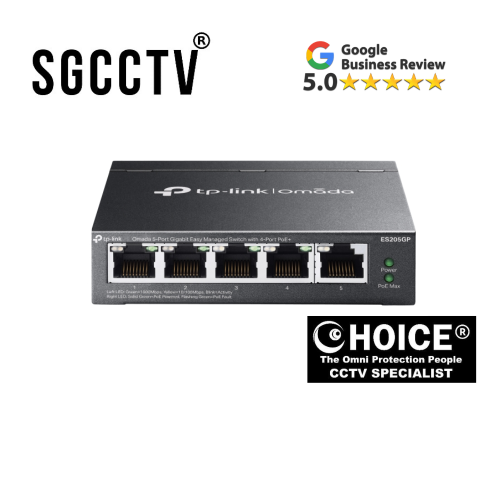
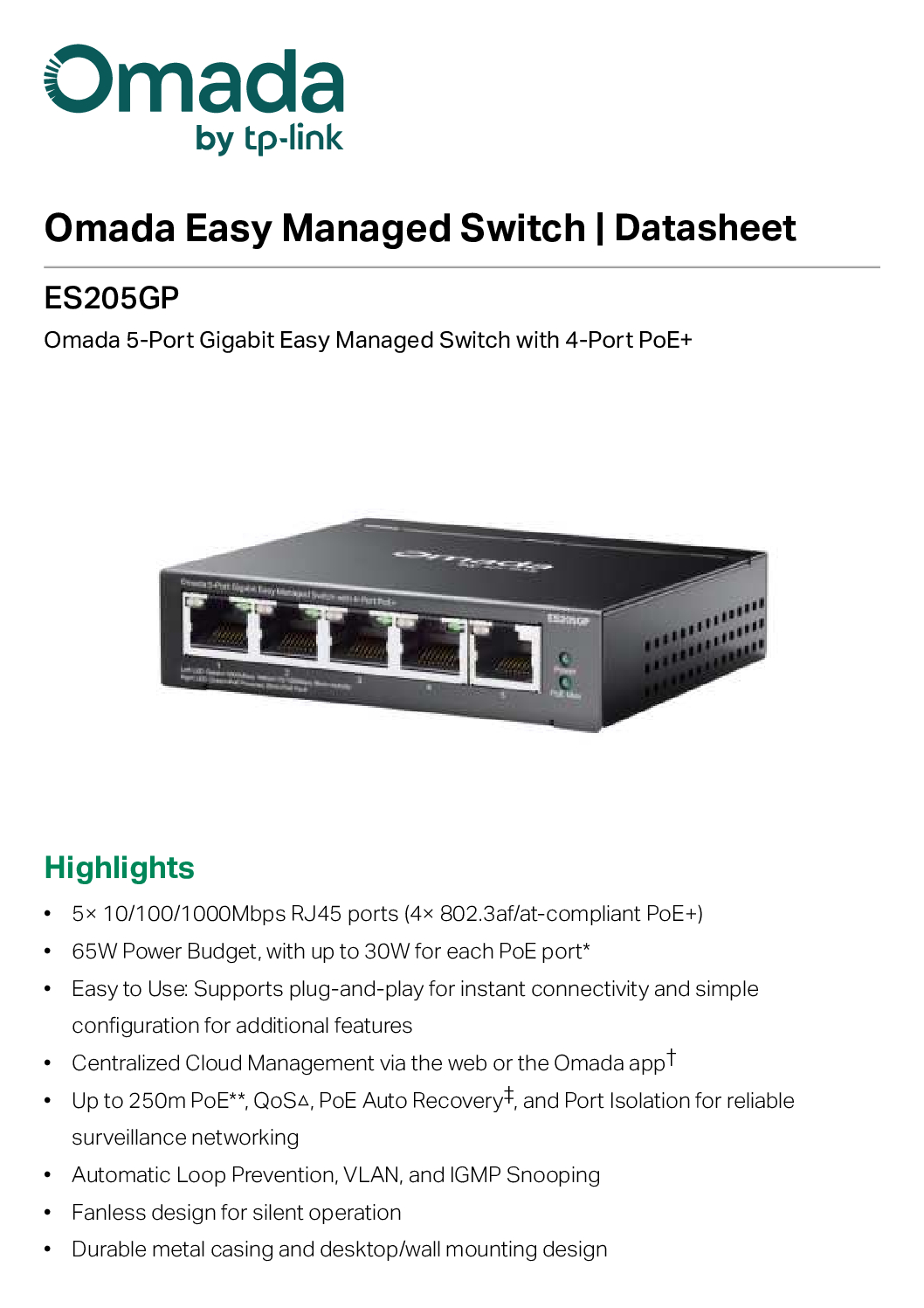

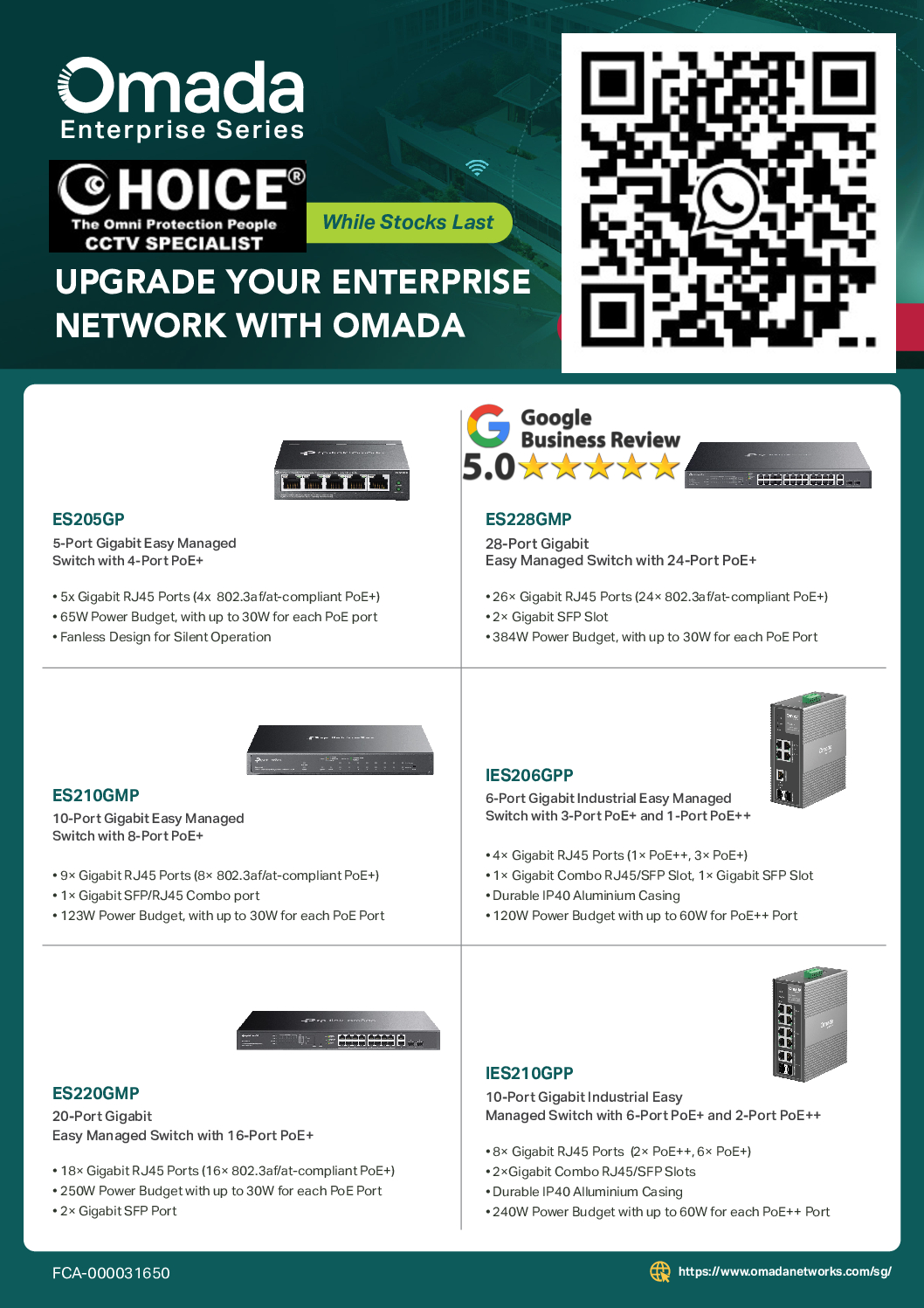
Tp-Link Omada ES205GP 5-Port Gigabit Easy Managed Switch with 4-Port PoE+5x Gigabit RJ45 Ports 65W Power Budget, with up to 30W NEW DB
$373.00
TP-LINK SINGAPORE PARTNER FULL RANGE
Supply and Maintenance VIGI CCTV IP Cameras, NVR, Turbo HD Cameras, DVR, PTZ Cameras,
WIFI ROUTER ACCESS POINT
Sim Lim Square 02-81 10am-7pm Daily.
Whatsapp Enquiry Project +65 98534404, Technical Support +65 81120788, Site Visit Maintenance +65 81985572.
Tp-Link Omada ES205GP 5-Port Gigabit Easy Managed Switch with 4-Port PoE+5x Gigabit RJ45 Ports 65W Power Budget, with up to 30W NEW
Upgrade your network infrastructure with the TP-Link Omada ES205GP 5-Port Gigabit Easy Managed Switch, a reliable and efficient solution designed for small businesses, home offices, and surveillance setups. Featuring 5× Gigabit RJ45 ports and 4 PoE+ ports, this switch delivers both high-speed data and power through a single cable—simplifying installations and reducing clutter.
🔑 Key Features & Benefits
- 4-Port PoE+ Support (Up to 30W per Port)
Power IP cameras, VoIP phones, wireless access points, and other PoE-enabled devices with ease. Each PoE+ port supports up to 30W output, ensuring stable and sufficient power delivery. - 65W Total Power Budget
With a 65W PoE budget, the ES205GP can support multiple devices simultaneously, making it ideal for small-scale deployments like CCTV systems or office networks. - 5× Gigabit Ethernet Ports
Enjoy ultra-fast wired connections with 10/100/1000 Mbps speeds across all ports for seamless data transfer, streaming, and device communication. - Easy Managed Smart Features
Access essential management tools such as VLAN, QoS, IGMP Snooping, and Port Isolation, giving you better control over network traffic and performance without complex configurations. - Omada SDN Integration
Fully compatible with the Omada Software Defined Networking (SDN) platform, allowing centralized cloud management and remote monitoring for enhanced scalability and convenience. - Plug-and-Play with Flexible Deployment
Compact and durable design makes it perfect for desktop or wall-mounted installations. Setup is quick and hassle-free.
💡 Ideal Use Cases
- Small office and home office (SOHO) networks
- IP surveillance systems
- Wireless access point deployment
- VoIP phone systems
- Smart home networking
🚀 Why Choose TP-Link Omada ES205GP?
The TP-Link Omada ES205GP is a cost-effective, high-performance switch that combines Gigabit speed, PoE+ capability, and smart management features in a compact form. Whether you’re expanding your network or setting up a new one, this switch offers the flexibility, reliability, and power you need.
The TP-Link Omada ES205GP is not a general consumer gadget—it’s a niche networking tool, so the buyers are quite specific. Here’s a clear breakdown of who typically buys it and why:
Tp-Link Omada ES205GP 5-Port Gigabit Easy Managed Switch with 4-Port PoE+5x Gigabit RJ45 Ports 65W Power Budget, with up to 30W NEW
🎯 Best Fit Buyers
1. Small Business Owners (SMEs)
- Offices with 5–20 employees
- Need to connect PCs, printers, IP phones, and Wi-Fi access points
- Want simple network control (VLAN, QoS) without hiring IT staff
- Benefit from plug-and-play + easy management
👉 Example: small accounting firm, startup office, retail shop
2. CCTV / Surveillance Installers
- One of the biggest target markets
- Power multiple IP cameras using PoE+ (no extra power cables)
- Stable video traffic with features like QoS & PoE auto recovery
👉 Example:
- Shops
- Warehouses
- Residential security setups
3. IT System Integrators / Network Installers
- Professionals deploying networks for clients
- Prefer Omada ecosystem for centralized cloud management
- Use it in small branch offices or edge deployments
👉 Example: installing networks for cafés, clinics, or co-working spaces
Tp-Link Omada ES205GP 5-Port Gigabit Easy Managed Switch with 4-Port PoE+5x Gigabit RJ45 Ports 65W Power Budget, with up to 30W NEW
4. Home Lab / Tech Enthusiasts
- Advanced home users running:
- Home servers
- NAS systems
- Smart home setups
- Want VLAN segmentation + PoE devices (APs, cameras)
👉 Common use case from community:
People use it for camera networks and VLAN isolation setups (home lab scenarios)
5. Retail & F&B Businesses
- Need:
- POS systems
- IP cameras
- Wi-Fi access points
- Prefer compact switch with power + data in one cable
👉 Example:
- Cafés
- Restaurants
- Convenience stores
❌ Who Should NOT Buy This
- Large enterprises → need bigger, fully managed switches
- Basic home users → cheaper unmanaged switch is enough
- High-performance networks → limited ports & 65W budget
Tp-Link Omada ES205GP 5-Port Gigabit Easy Managed Switch with 4-Port PoE+5x Gigabit RJ45 Ports 65W Power Budget, with up to 30W NEW
🧠 Simple Positioning
Think of the ES205GP as:
👉 “Entry-level smart PoE switch for small setups that need power + control without complexity.”
🔧 How to Install TP-Link Omada ES205GP
1️⃣ Unbox & Check
Inside the box you should have:
- ES205GP switch
- Power adapter
- Ethernet cable
- Quick installation guide
2️⃣ Connect Power
- Plug in the power adapter
- Connect it to the switch
- Power LED should turn on ✅
3️⃣ Connect to Your Router
- Take an Ethernet cable
- Plug one end into your router (LAN port)
- Plug the other into any port on the switch
👉 This gives internet access to everything connected to the switch
4️⃣ Connect Your Devices
Now plug in your devices:
🔌 Normal Devices (PC, printer, etc.)
- Use any port (1–5)
⚡ PoE Devices (IP cameras, Wi-Fi APs, VoIP phones)
- Plug into Port 1–4 (PoE+)
- These ports supply power + data automatically
Tp-Link Omada ES205GP 5-Port Gigabit Easy Managed Switch with 4-Port PoE+5x Gigabit RJ45 Ports 65W Power Budget, with up to 30W NEW
5️⃣ Check LED Indicators
- Green light = connected
- Blinking = data activity
- PoE light on = device receiving power
6️⃣ (Optional) Set Up Smart Features
To use VLAN, QoS, etc.:
Option A: Web Interface
- Connect your PC to the switch
- Find its IP (via router or TP-Link tool)
- Log in through browser
Option B: Use TP-Link Omada Controller
- Install on PC or server
- Add the switch
- Manage everything centrally (best for multiple devices)
⚠️ Important Tips
- Don’t exceed 65W total PoE budget
- Each PoE port max = 30W
- Use Cat5e or Cat6 cables for best performance
- Keep switch in a cool, ventilated area
Tp-Link Omada ES205GP 5-Port Gigabit Easy Managed Switch with 4-Port PoE+5x Gigabit RJ45 Ports 65W Power Budget, with up to 30W NEW
⚖️ Honest Comparison
🟢 TP-Link Omada ES205GP (Stronger for IT use)
Pros
- Smart features (VLAN, QoS, monitoring)
- Cloud control via Omada
- Better for mixed networks (WiFi AP + PC + cameras)
- Future-proof (can scale with more Omada devices)
Cons
- Slightly more complex
- Slightly higher price
- Not “full enterprise managed” (mid-level)
👉 Think: Small business / IT setup
🔵 Hikvision PoE Switch (Stronger for CCTV only)
Pros
- Very simple (plug & play)
- Optimized for IP cameras
- Usually cheaper or similar price
- Stable for surveillance
Cons
- No control (no VLAN, no monitoring)
- Cannot manage traffic
- Not suitable for office networks
👉 Think: CCTV installer / security system
Tp-Link Omada ES205GP 5-Port Gigabit Easy Managed Switch with 4-Port PoE+5x Gigabit RJ45 Ports 65W Power Budget, with up to 30W NEW
🧠 Which Should YOU Choose?
👉 Choose TP-Link ES205GP if:
- You want control (VLAN, QoS)
- You have WiFi + office + cameras mixed
- You plan to expand network later
- You use Omada ecosystem
✔️ Best for: offices, IT users, advanced home setups
👉 Choose Hikvision if:
- You ONLY need CCTV cameras
- You want zero configuration
- You don’t care about network control
✔️ Best for: shops, simple surveillance systems
🔥 Simple Verdict
- TP-Link ES205GP = Smart brain 🧠 (network control)
- Hikvision = Power box 🔌 (just works for cameras)
🔌 TP-Link Omada ES205GP Lifespan
⏳ Typical Lifespan
- 5 to 8 years (normal use)
- Can reach 8–10 years if:
- Good ventilation
- Stable power
- Not overloaded
👉 This is standard for small business network switches
Tp-Link Omada ES205GP 5-Port Gigabit Easy Managed Switch with 4-Port PoE+5x Gigabit RJ45 Ports 65W Power Budget, with up to 30W NEW
🔍 Why It Lasts This Long
From official specs:
- Fanless design → fewer moving parts = less failure
- Metal casing → better heat dissipation + durability
- Built for continuous 24/7 operation (CCTV + office use)
⚠️ What Affects Lifespan (Very Important)
🔥 1. Heat (BIGGEST FACTOR)
- Poor airflow = lifespan drops to 2–4 years
- Always:
- Don’t stack devices
- Avoid enclosed cabinets without airflow
⚡ 2. Power Load (PoE Usage)
- Max budget = 65W total
- Running near max 24/7 = more heat → shorter life
👉 Example:
- 4 cameras @ full load → more stress than 2 cameras
⚡ 3. Power Surges
- No surge protection = risk of early failure
👉 Use: - Surge protector or UPS\
🌡️ 4. Environment
- Dusty / humid places → shorter lifespan
- Ideal:
- Office / indoor environment
Tp-Link Omada ES205GP 5-Port Gigabit Easy Managed Switch with 4-Port PoE+5x Gigabit RJ45 Ports 65W Power Budget, with up to 30W NEW
🔵 Compared to Hikvision Lifespan
- Hikvision unmanaged switches → similar lifespan (5–8 years)
- BUT:
- Often run hotter (no smart power control)
- Less protection features
👉 In practice:
- TP-Link = slightly more stable long-term
- Hikvision = fine, but more “basic hardware”
🧠 Realistic Expectation
- Light use (home / small office) → 7–10 years
- Heavy CCTV (full PoE load 24/7) → 4–6 years
- Bad environment (heat/dust) → 2–4 years
🏭 How the TP-Link Omada ES205GP Is Made
1️⃣ Design & Engineering
At TP-Link:
- Engineers design:
- Circuit board (PCB layout)
- PoE power system (65W budget)
- Network chip architecture
- Firmware (software) is also developed for:
- VLAN
- QoS
- Omada cloud control
👉 This is the “brain” of the switch
Tp-Link Omada ES205GP 5-Port Gigabit Easy Managed Switch with 4-Port PoE+5x Gigabit RJ45 Ports 65W Power Budget, with up to 30W NEW
2️⃣ Component Sourcing
Parts are sourced globally:
- Chipsets (switch controller) → usually from companies like Realtek or Broadcom
- PoE controller chips → manage power delivery
- Capacitors & resistors → regulate electricity
- RJ45 ports → Ethernet connections
- Power module → converts AC to DC
👉 These are standard electronic components used in networking gear
3️⃣ PCB Assembly (Core Step)
This is where the switch “comes alive”:
- Components are placed on the printed circuit board (PCB)
- Done by machines using SMT (Surface Mount Technology)
- Then:
- Soldered in high-temperature ovens
- Inspected by automated systems
👉 At this stage, it becomes a working electronic board
Tp-Link Omada ES205GP 5-Port Gigabit Easy Managed Switch with 4-Port PoE+5x Gigabit RJ45 Ports 65W Power Budget, with up to 30W NEW
4️⃣ Firmware Installation
- Software (Omada features) is flashed into memory
- This allows:
- Device management
- Network control features
5️⃣ Casing & Physical Build
- Board is placed into:
- Metal casing (for durability + heat dissipation)
- Ports, LEDs, and power connectors are aligned and fixed
6️⃣ Testing & Quality Control
Every unit is tested for:
- Power delivery (PoE stability)
- Network speed (Gigabit performance)
- Heat and load stress
👉 Faulty units are rejected here
Tp-Link Omada ES205GP 5-Port Gigabit Easy Managed Switch with 4-Port PoE+5x Gigabit RJ45 Ports 65W Power Budget, with up to 30W NEW
7️⃣ Packaging & Shipping
- Packed with:
- Adapter
- Manual
- Shipped globally from factories (mostly in China/Vietnam)
✅ Warranty for TP-Link Omada ES205GP
🛡️ Official Warranty (Singapore / Omada Series)
- 🟢 5-Year Warranty (Main Unit)
This model is part of the Omada series, which gets a 5-year replacement warranty in Singapore.
📦 What’s Covered
- Manufacturing defects
- Hardware failure (normal use)
- Replacement with:
- New unit, or
- Equivalent/refurbished unit if needed
⚠️ What’s NOT Covered
- Physical damage (drops, water, lightning)
- Modified or opened device
- Bought from unauthorized sellers
- Missing receipt / serial number
🔌 Accessories Warranty
- Power adapter & accessories → ~3 months only
Tp-Link Omada ES205GP 5-Port Gigabit Easy Managed Switch with 4-Port PoE+5x Gigabit RJ45 Ports 65W Power Budget, with up to 30W NEW
🧠 Important Tips (Most People Miss This)
- ✅ Must keep receipt (very important)
- ✅ Buy from authorized seller in Singapore
- ❌ No international warranty (don’t import cheap units)
Where to get this product?
Choicecycle (SGCCTV Singapore)
📍 Sim Lim Square #02-81, Singapore
🕚 11:00 AM – 8:00 PM
📞 WhatsApp: +65 9853 4404
📧 enquiry@choicecycle.com.sg
🌐 https://sgcctv.com.sg


Nunc lacus elit, faucibus ac laoreet sed, dapibus ac mi. Maecenas eu ante a elit tempus fermentum. Aliquam commodo tincidunt semper. Phasellus accumsan, justo ac mollis pharetra, ex dui pharetra nisl, a scelerisque ipsum nulla ac sem. Cras eu risus urna. Duis lorem sapien, congue eget nisl sit amet, rutrum faucibus elit.
Donec accumsan auctor iaculis. Sed suscipit arcu ligula, at egestas magna molestie a. Proin ac ex maximus, ultrices justo eget, sodales orci. Aliquam egestas libero ac turpis pharetra, in vehicula lacus scelerisque. Vestibulum ut sem laoreet, feugiat tellus at, hendrerit arcu.
Nunc lacus elit, faucibus ac laoreet sed, dapibus ac mi. Maecenas eu ante a elit tempus fermentum. Aliquam commodo tincidunt semper. Phasellus accumsan, justo ac mollis pharetra, ex dui pharetra nisl, a scelerisque ipsum nulla ac sem. Cras eu risus urna. Duis lorem sapien, congue eget nisl sit amet, rutrum faucibus elit.
Related Products
TP-Link 4MP WIFI Bullet Camera VIGI-C340-W Full-Color Outdoor Network IPC Home Security Office Surveillance Retail Stores Parking Security Cameras Installation
Save34.8%Save $48.00Only$90.00 Original price was: $138.00.$90.00Current price is: $90.00.