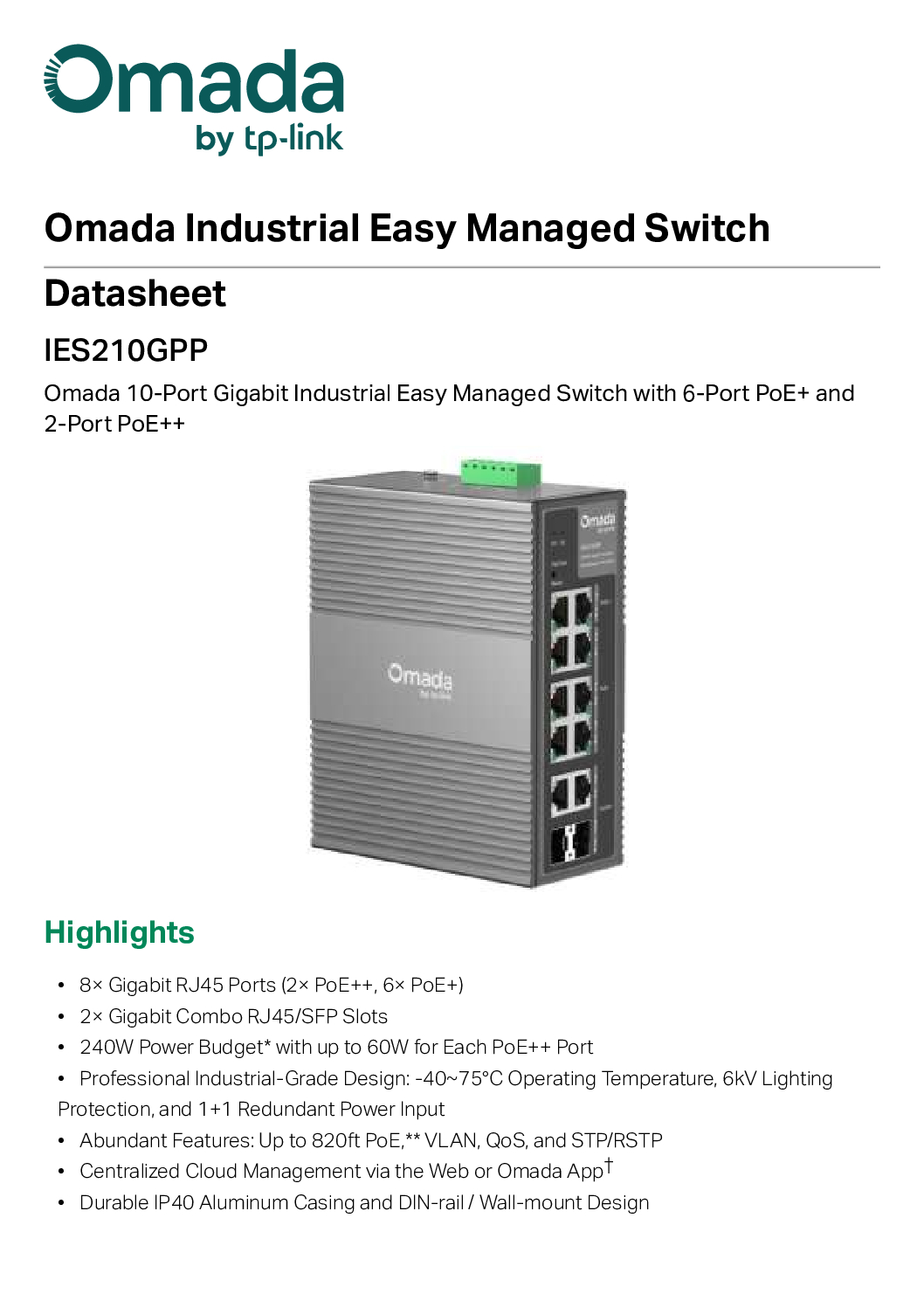
Tp-Link OmadaI IES210GPP 10-Port Gigabit Industrial
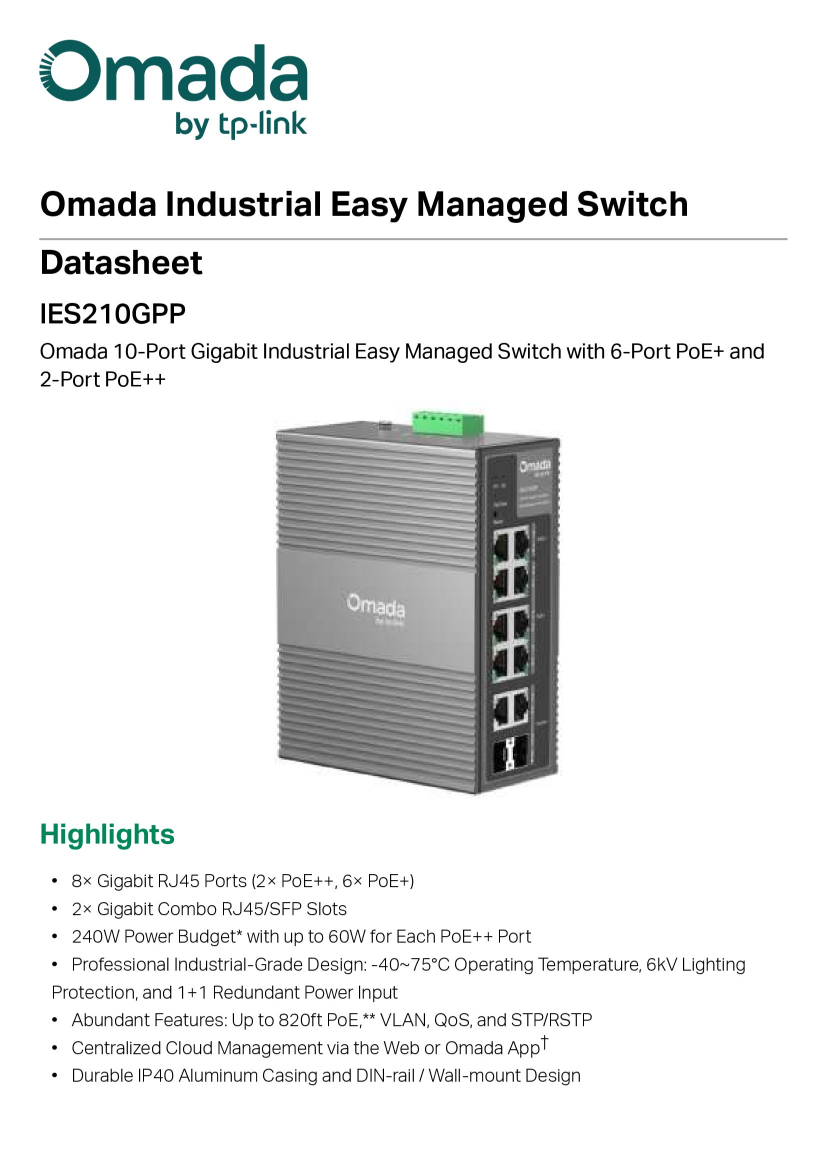
The TP-Link Omada IES210GPP is a rugged, high-performance industrial networking solution designed to thrive in harsh environments while delivering massive power. Combining the simplicity of Omada Cloud Management with industrial-grade hardware, this switch is the ideal choice for outdoor surveillance, factory floors, and smart city infrastructure.
Core Performance & Power
This 10-port Gigabit switch is engineered to power high-demand devices that standard switches simply can’t handle.
Next-Gen PoE++ Support: Features 2× PoE++ (802.3bt) ports delivering up to 60W per port. Perfect for high-power PTZ cameras, Wi-Fi 6/7 access points, and LED lighting.
Versatile PoE+ Connectivity: Includes 6× PoE+ (802.3at/af) ports for standard IP cameras, VoIP phones, and IoT sensors.
Gigabit Combo Uplinks: Equipped with 2× Gigabit Combo RJ45/SFP slots, providing the flexibility to use high-speed copper connections or long-distance fiber optics for backhaul.
Industrial-Grade Reliability
Built to withstand environments where consumer-grade hardware fails, the IES210GPP is designed for maximum uptime.
Extreme Temperature Resilience: Operates reliably in temperatures ranging from -40°C to 75°C (-40°F to 167°F).
Rugged Construction: Encased in an IP30-rated metal shell with support for DIN-rail or wall mounting.
Redundant Power Supply: Supports dual power inputs to ensure the network stays online even if one power source fails.
Enhanced Protection: Features 6KV surge protection and 8KV ESD protection to guard against atmospheric electrical interference.
Omada SDN Integration: Smarter Management
As part of the Omada Software Defined Networking (SDN) ecosystem, the IES210GPP offers centralized control that reduces maintenance costs and complexity.
Remote Cloud Management: Monitor and manage your entire industrial network from a single interface via the Omada app or Cloud Portal.
Zero-Touch Provisioning: Deploy and configure multiple units across different sites without needing an on-site technician.
Advanced L2 Features: Includes static routing, 802.1Q VLAN, ACL, and Storm Control to optimize network traffic and security.
Tp-Link OmadaI IES210GPP 10-Port Gigabit Industrial
Technical Specifications
Tp-Link OmadaI IES210GPP 10-Port Gigabit Industrial
Why Choose the IES210GPP?
The TP-Link IES210GPP bridges the gap between complex industrial switches and user-friendly managed solutions. Whether you are expanding a warehouse network or deploying a city-wide surveillance system, this switch provides the PoE++ power, fiber flexibility, and rugged durability required for mission-critical applications.
1. The “Fanless” Thermal Design
Standard switches use fans to stay cool. In a factory or an outdoor box, a fan is just a vacuum cleaner that sucks in dust and eventually breaks.
The Build: This switch uses a high-conductivity metal shell (IP30 rated) that acts as one giant heat sink.
The Result: It dissipates heat passively, allowing it to sit in a $75^\circ\text{C}$ ($167^\circ\text{F}$) enclosure without melting or throttling performance.
2. Hardened Internal Components
Inside, the “ingredients” are higher grade than consumer electronics:
Capacitors: It uses industrial-grade capacitors designed to handle extreme voltage fluctuations and temperature swings without leaking or popping.
Circuit Board Coating: Many industrial units use a conformal coating (a thin chemical layer) to protect the circuitry from moisture and corrosion in humid environments.
3. Electrical “Armor”
Since these are often mounted on light poles or in factories with heavy machinery, they face a lot of electrical “noise” and surges.
Surge Protection: It’s built with 6KV surge protection on the ports. Think of it as a built-in lightning rod for your Ethernet cables.
ESD Protection: It has 8KV/15KV Electrostatic Discharge protection, so if a technician with a static charge touches it, the chips inside don’t fry.
4. Redundant Power Logic
The “make” of this switch includes dual power inputs.
The Setup: It features a terminal block where you can wire in two separate power supplies.
The Logic: If a backhoe digs up one power line, the switch instantly draws from the second source without dropping a single packet of data.
5. Physical Mounting (DIN-Rail)
Unlike rack-mount gear, this is made to snap onto a DIN-Rail—the standard metal rail found inside industrial electrical cabinets. It’s designed to stay locked in place even if the wall it’s attached to is vibrating from heavy machinery.
Tp-Link OmadaI IES210GPP 10-Port Gigabit Industrial
Comparison: Industrial vs. Standard
| Feature | Standard Managed Switch | IES210GPP (Industrial) |
| Casing | Plastic or thin steel | Thick IP30 Aluminum/Steel |
| Cooling | Active Fans (prone to failure) | Passive Heat Dissipation |
| Power | Standard AC Plug | DC Terminal Block (Redundant) |
| Vibration | Not rated | High vibration/shock resistance |
Because the TP-Link Omada IES210GPP is an industrial-grade device, its lifespan is significantly longer than the standard switches you’d find in an office.
Here is the breakdown of how long you can expect it to last based on technical data and real-world usage:
1. The Technical Number (MTBF)
The “Mean Time Between Failures” (MTBF) for this specific switch is rated at approximately 446,898 hours.
In years: That is roughly 51 years of continuous operation under ideal conditions ($25^\circ\text{C}$).
What this means: While it doesn’t mean every unit will last 50 years, it indicates that the internal components are high-grade and extremely unlikely to fail during the first decade of service.
2. The Practical Expectation
In the industrial world, the standard “service life” for a switch like this is 10 to 15 years.
Commercial switches: Usually need replacing every 3–5 years due to fan failure or overheating.
The IES210GPP: Since it is fanless, the most common point of mechanical failure is removed. It is designed to be “set it and forget it” for over a decade in a factory or outdoor enclosure.
3. The Warranty
TP-Link generally backs their Omada industrial line with a 5-year warranty. This is their “safety net” period, but the hardware is engineered to outlast the warranty by a wide margin.
What determines if it lasts 5 years vs. 20 years?
While the switch is a tank, three main factors will dictate its actual “end of life”:
Heat & Environment: Running it at its absolute limit ($75^\circ\text{C} / 167^\circ\text{F}$) 24/7 will age the internal capacitors faster than running it in a climate-controlled room. However, it is built specifically to handle those spikes.
PoE Load: Pushing the full 240W power budget constantly creates more internal heat. If you are only using 50W, the switch will likely last much longer.
Technological Obsolescence: Honestly, you will likely want to replace this switch for a faster model (like 10Gbps or Wi-Fi 8 support) before the hardware actually breaks. It is built to “age out” technologically before it “burns out” physically.
Tp-Link OmadaI IES210GPP 10-Port Gigabit Industrial
Phase 1: Physical Hardware Setup
Powering the Device:
Since this is an industrial switch, you need a 48-57V DC power supply (sold separately).
Strip the ends of your DC power wires and insert them into the Green Terminal Block on top of the switch.
V1+ and V1- are for your primary power. V2+ and V2- are for a backup power source (optional).
Tighten the screws and flip the power on. The “PWR” LED should light up.
Mounting: * Snap the switch onto your DIN-rail or screw it into your wall mount/enclosure.
Grounding:
Connect the ground screw on the switch to a grounded metal object. This is crucial for the 6KV surge protection to actually work.
Phase 2: Choosing Your Management Mode
You have two ways to configure the software:
Option A: The “Standalone” Way (Quickest for 1 switch)
Best if you only have one switch and don’t need a central dashboard.
Connect your computer to any RJ45 port on the switch.
Set your computer’s IP address to 192.168.0.x (e.g., 192.168.0.10).
Open a web browser and type 192.168.0.1.
Log in (Default is admin/admin) and set a new password immediately.
Option B: The “Omada Controller” Way (Best for Pros)
Best if you have other Omada gear (Access Points, Routers) or want remote cloud access.
Ensure you have an Omada Controller running (Hardware like the OC200, or Software on a PC).
Connect the switch to your network.
Open your Omada Controller dashboard.
Go to Devices → the switch will appear as “Pending.”
Click “Adopt.” All settings will now be managed from the Controller.
Tp-Link OmadaI IES210GPP 10-Port Gigabit Industrial
Phase 3: Essential First Steps
Once you are logged in, do these three things immediately:
Update Firmware: Check TP-Link’s support site for the latest version. Industrial hardware relies on firmware for stability.
Configure PoE Settings: * If you are using the PoE++ (60W) ports (Ports 1-2), ensure your power supply provides enough wattage (at least 54V is recommended for full 802.3bt power).
Set up VLANs: If this is for security cameras, create a separate VLAN to keep camera traffic away from your main office data.
Even though the IES210GPP is built like a tank, industrial environments present unique challenges. Most “issues” with this switch aren’t actually hardware failures—they are usually related to power delivery or networking environment.
Here are the most common issues and how to solve them:
1. The Switch Won’t Power On
Since this uses a DC terminal block instead of a standard AC plug, power issues are the #1 support call.
The Cause: Reversed polarity or insufficient voltage.
The Fix: * Check that your Positive (+) and Negative (-) wires are in the correct slots.
Ensure your power supply is providing at least 48V DC. If you are using PoE++ (60W), a 54V-57V power supply is highly recommended to ensure enough “push” for high-power devices.
2. PoE Devices (Cameras/APs) Keep Rebooting
If your cameras work for a few minutes then turn off, or reboot when they try to use Night Vision (IR).
The Cause: Total Power Budget exceeded.
The Fix: * Industrial switches don’t always come with a power supply. If you used a small 60W power supply but are trying to power 150W worth of cameras, the switch will “brown out.”
Check your Power Supply Wattage. Ensure your external DC source has at least 20% more wattage than your total planned PoE load.
3. SFP Fiber Link is “Down”
You plugged in a fiber module, but the light isn’t turning on.
The Cause: Speed mismatch or “Combo Port” conflict.
The Fix: * The Combo Rule: Ports 9 and 10 are “Combo” ports. If you plug an Ethernet cable into Port 9 (RJ45), the SFP Slot 9 is automatically disabled. You can only use one or the other.
Manual Speed: Sometimes the SFP slot doesn’t “Auto-Negotiate” correctly. Log into the management interface and manually set the SFP port speed to 1000Mbps (Full Duplex).
Tp-Link OmadaI IES210GPP 10-Port Gigabit Industrial
4. “Heartbeat Missed” in Omada Controller
The switch shows as “Disconnected” or “Heartbeat Missed” in your Cloud dashboard.
The Cause: Management VLAN mismatch or firewall blocking.
The Fix: * Ensure the switch can “ping” the internet.
If you are using VLANs, make sure the port connecting the switch to your router is a “Trunk Port” and that the Management VLAN (usually VLAN 1) is untagged or correctly mapped.
5. Ground Loops or “Ghost” Disconnects
The switch stays on, but ports randomly drop and reconnect, especially in factories.
The Cause: Electromagnetic Interference (EMI) or lack of grounding.
The Fix: *
Ensure the Ground Screw on the back of the switch is connected to a solid earth ground.
If the switch is near heavy motors, use Shielded Twisted Pair (STP) Cat6 cables to prevent electrical noise from jumping onto your data lines.
Summary Checklist for Troubleshooting
| Symptom | Quick Check |
| No Lights | Check DC Voltage (48V-57V) and Polarity (+/-) |
| PoE Fails | Verify your DC Power Supply has enough total Amps/Watts |
| Fiber Fails | Unplug the corresponding RJ45 Combo port |
| Can’t Login | Press and hold the Reset button for 5 seconds to factory default |
Tp-Link OmadaI IES210GPP 10-Port Gigabit Industrial
1. Essential Power Supplies (DC Power)
Unlike home switches, this usually doesn’t come with a “wall wart” power adapter. You need an industrial DIN-Rail Power Supply.
For full 240W PoE power: You need a 48V–57V DC power supply (e.g., a Mean Well NDR-240-48).
For Redundancy: You can connect two power supplies to the terminal block. If one fails, the other takes over instantly.
2. Fiber Optic Modules (SFP)
To use those two “Combo” slots for long-distance runs (over 100 meters), you’ll need SFP modules:
TP-Link TL-SM311LS: For Single-Mode fiber (up to 10km).
TP-Link TL-SM311LM: For Multi-Mode fiber (up to 550m).
BiDi Modules: If you only have one fiber strand available, use Bi-Directional modules (TL-SM321A/B).
3. “High-Power” Devices (PoE++ / 60W)
Take advantage of the two 60W PoE++ ports (Ports 1 and 2) by connecting:
High-End PTZ Cameras: Large security cameras that need extra juice for heaters/motors.
Tp-Link OmadaI IES210GPP 10-Port Gigabit Industrial
Outdoor Wi-Fi 6/7 Access Points: Like the Omada EAP650-Outdoor or EAP773.
PoE Lighting: Industrial LED panels that run entirely on Ethernet power.
Tp-Link OmadaI IES210GPP 10-Port Gigabit Industrial
4. Management & Surveillance Gear
Since this is an “Omada” and “VIGI” compatible switch, it pairs perfectly with:
Omada OC200 / OC300 Controller: This acts as the “brain” so you can manage the switch from your phone anywhere in the world.
VIGI Network Video Recorder (NVR): A hardened NVR to record the footage from the cameras you’re powering with the switch.
VIGI Cameras: TP-Link’s industrial camera line that integrates directly into the same management dashboard.
5. Protection & Housing
Shielded Cables (STP): In factories with big motors, use shielded Cat6 cables to prevent data interference.
Outdoor Enclosure: If the switch is going on a pole, put it inside a ventilated NEMA-rated enclosure to keep rain off, even though the switch is rugged.
PoE Extenders: If you need to run a camera 200–300 meters away, you can add an Omada PoE Extender (like the POE20E-Outdoor) in the middle of the line.
Tp-Link OmadaI IES210GPP 10-Port Gigabit Industrial
1. Industrial Fiber Optics (SFP Modules)
If you are using the two “Combo” slots to connect to another building or a server room far away, don’t use regular SFP modules. Use Industrial Grade ones that match the switch’s temperature rating:
TP-Link ISM311LS: Industrial Single-Mode module (supports up to 10km).
TP-Link ISM311LM: Industrial Multi-Mode module (supports up to 550m).
Why? Standard SFP modules can fail in extreme heat ($60^\circ\text{C}+$); industrial ones are rated for the same $-40^\circ\text{C}$ to $75^\circ\text{C}$ as your switch.
2. Redundant Power Supply (1+1 Backup)
The switch has two power inputs (V1 and V2). You can add a second DC power supply to act as a “spare tire.”
Tp-Link OmadaI IES210GPP 10-Port Gigabit Industrial
The Setup: Plug your main power into V1 and a separate power source (or a battery-backed DC supply) into V2.
The Benefit: If one power supply burns out or a fuse blows, the switch stays on without dropping the connection to your cameras or Wi-Fi.
3. VIGI “InSight” Series Cameras
Since this is an Omada switch, it pairs natively with TP-Link’s VIGI professional cameras.
PTZ Cameras: Use the 60W PoE++ ports to power heavy-duty “Speed Dome” cameras (like the VIGI C540 series) that need extra power to move their motors and heaters in winter.
Bullet/Turret Cameras: Use the 30W PoE+ ports for standard high-definition 4MP or 8MP cameras.
4. DIN-Rail Ethernet Surge Protector
Even though the switch has 6KV protection, a direct lightning strike on an outdoor pole can still be devastating.
The Add-on: Place an Industrial Ethernet Surge Protector on the rail right next to the switch.
The Strategy: Run the outdoor cable into the protector first, then a short “patch” cable into the switch. If a massive surge hits, the $\$30$ protector dies to save your $\$300$ switch.
5. Wireless Bridge (For the “Unreachable” Spots)
If you need to get data to a location where you can’t run a wire (like across a road or a field):
The Device: Add a TP-Link Omada Wireless Bridge (like the EAP211-Bridge).
How it works: Plug the bridge into one of the switch ports. It will “beam” the network up to 1km or more to another bridge, effectively acting like a long invisible wire.
Tp-Link OmadaI IES210GPP 10-Port Gigabit Industrial


Nunc lacus elit, faucibus ac laoreet sed, dapibus ac mi. Maecenas eu ante a elit tempus fermentum. Aliquam commodo tincidunt semper. Phasellus accumsan, justo ac mollis pharetra, ex dui pharetra nisl, a scelerisque ipsum nulla ac sem. Cras eu risus urna. Duis lorem sapien, congue eget nisl sit amet, rutrum faucibus elit.
Donec accumsan auctor iaculis. Sed suscipit arcu ligula, at egestas magna molestie a. Proin ac ex maximus, ultrices justo eget, sodales orci. Aliquam egestas libero ac turpis pharetra, in vehicula lacus scelerisque. Vestibulum ut sem laoreet, feugiat tellus at, hendrerit arcu.
Nunc lacus elit, faucibus ac laoreet sed, dapibus ac mi. Maecenas eu ante a elit tempus fermentum. Aliquam commodo tincidunt semper. Phasellus accumsan, justo ac mollis pharetra, ex dui pharetra nisl, a scelerisque ipsum nulla ac sem. Cras eu risus urna. Duis lorem sapien, congue eget nisl sit amet, rutrum faucibus elit.