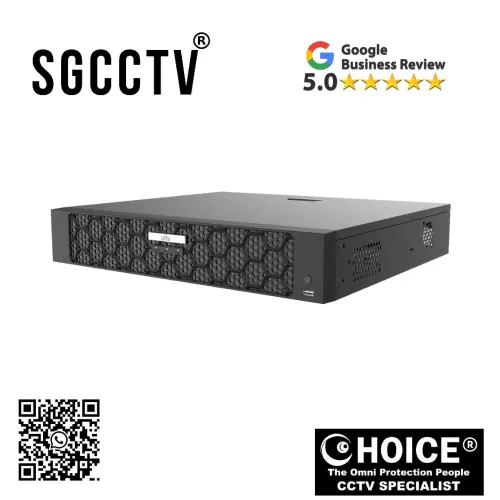
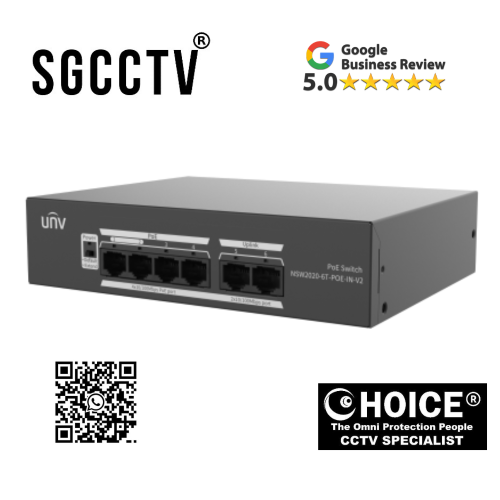

UNV UNIVIEW NVR504-32B-P16-IQ 4 HDD 32 Channel AI Network Video Recorder 16/32-channel input Up to 16 Megapixels resolution recording NEW DB
$475.00
UNV UNIVIEW Security Partner
Widely deployed in Shopping Malls, Residential, Commercial, Office, Warehouse.
Specialist in all Security System CCTV Camera Door Access Alarm Switch
Technical Support at Sim Lim Square 02-81 11am~7pm Daily +65 98534404
UNV UNIVIEW NVR504-32B-P16-IQ 4 HDD 32 Channel AI Network Video Recorder 16/32-channel input Up to 16 Megapixels resolution recording NEW
In today’s security landscape, the role of surveillance systems has evolved far beyond simple video recording. Modern environments—whether commercial, industrial, or institutional—require intelligent monitoring solutions that can not only capture footage but also analyze, manage, and secure it in real time. As organizations increasingly adopt high-resolution cameras, artificial intelligence (AI), and centralized monitoring systems, the demand for a robust and scalable network video recorder (NVR) becomes critical. The UNV Uniview NVR504-32B-P16-IQ 4 HDD 32 Channel AI Network Video Recorder is designed to meet these advanced requirements, delivering a comprehensive solution for professional-grade surveillance systems.
Combining high channel capacity, AI-powered analytics, and support for ultra-high-definition recording, this NVR represents a new generation of intelligent video management systems. It is purpose-built for environments that demand reliability, scalability, and advanced functionality, making it an ideal choice for businesses, security integrators, and organizations seeking to future-proof their surveillance infrastructure.
The Evolution of Network Video Recorders
Traditional DVRs and early-generation NVRs were primarily focused on recording video streams from connected cameras. While effective at capturing footage, they lacked the intelligence and scalability required for modern applications. Today’s surveillance systems must handle higher resolutions, larger volumes of data, and more complex monitoring requirements. They must also integrate seamlessly with other systems and provide actionable insights through AI-driven analytics.
The UNV Uniview NVR504-32B-P16-IQ addresses these challenges by combining powerful hardware with advanced software capabilities. It supports up to 32 channels of video input, enabling users to connect a large number of cameras within a single system. This high channel capacity makes it suitable for medium to large-scale deployments, where centralized control and monitoring are essential.
32-Channel Input for Scalable Surveillance
One of the defining features of this NVR is its 32-channel input capability, which allows it to support up to 32 IP cameras simultaneously. This level of scalability is crucial for organizations that need to monitor multiple areas, such as:
- Office buildings
- Retail complexes
- Warehouses and logistics centers
- Educational campuses
- Hospitals and healthcare facilities
With 32 channels available, users can design comprehensive surveillance systems that cover every critical point within their environment. The flexibility to support both 16 and 32-channel configurations ensures that the system can adapt to different deployment sizes and requirements.
UNV UNIVIEW NVR504-32B-P16-IQ 4 HDD 32 Channel AI Network Video Recorder 16/32-channel input Up to 16 Megapixels resolution recording NEW
Ultra-High-Definition Recording up to 16 Megapixels
As camera technology continues to advance, the ability to record and store high-resolution footage becomes increasingly important. The NVR504-32B-P16-IQ supports recording at resolutions of up to 16 megapixels, ensuring exceptional image clarity and detail.
High-resolution recording provides several key benefits:
- Improved identification of individuals and objects
- Enhanced forensic analysis capabilities
- Better overall situational awareness
In environments such as retail or banking, where identifying faces or transaction details is critical, the ability to capture footage in ultra-high definition can make a significant difference. Similarly, in industrial or logistics settings, high-resolution video helps monitor operations with greater precision.
AI-Powered Intelligence for Smarter Surveillance
One of the standout features of the NVR504-32B-P16-IQ is its integration of artificial intelligence (AI). Unlike traditional systems that rely solely on manual monitoring, this NVR leverages AI to automate analysis and enhance security operations.
AI capabilities may include:
- Smart motion detection
- Human and vehicle classification
- Facial recognition (depending on configuration)
- Behavior analysis
These features enable the system to distinguish between relevant events and false alarms, reducing unnecessary alerts and improving efficiency. For example, instead of triggering an alert for every movement, the system can focus on specific types of activity, such as unauthorized access or suspicious behavior.
By incorporating AI, the NVR transforms from a passive recording device into an active security tool that supports proactive monitoring and decision-making.
UNV UNIVIEW NVR504-32B-P16-IQ 4 HDD 32 Channel AI Network Video Recorder 16/32-channel input Up to 16 Megapixels resolution recording NEW
Built-In PoE for Simplified Deployment
The NVR504-32B-P16-IQ includes 16 built-in PoE (Power over Ethernet) ports, allowing cameras to be connected directly to the recorder without the need for separate power sources or additional switches. This feature significantly simplifies installation and reduces infrastructure complexity.
Benefits of built-in PoE include:
- Reduced cabling requirements
- Faster deployment
- Lower installation costs
- Centralized power management
For installers and system integrators, this means less time spent on setup and fewer components to manage. For end users, it results in a cleaner and more efficient system.
Support for Multiple Hard Drives (4 HDD Bays)
Storage is a critical component of any surveillance system, and the NVR504-32B-P16-IQ is equipped with four HDD bays, providing ample capacity for storing large volumes of video data.
With support for multiple hard drives, users can:
- Increase storage capacity as needed
- Implement redundancy for data protection
- Extend recording retention periods
This is particularly important for high-resolution recording, where file sizes are larger and storage demands are higher. The ability to expand storage ensures that the system can keep up with growing data requirements.
UNV UNIVIEW NVR504-32B-P16-IQ 4 HDD 32 Channel AI Network Video Recorder 16/32-channel input Up to 16 Megapixels resolution recording NEW
Reliable Performance for Continuous Operation
Surveillance systems must operate continuously to ensure security at all times. The NVR504-32B-P16-IQ is designed for 24/7 operation, delivering stable performance even under heavy workloads.
Its robust hardware architecture ensures:
- Consistent recording without interruptions
- Efficient handling of multiple video streams
- Reliable playback and retrieval of footage
This reliability is essential for environments where downtime is not acceptable, such as critical infrastructure or high-security facilities.
Advanced Video Management Features
In addition to recording and storage, the NVR offers a range of video management features that enhance usability and control.
These may include:
- Real-time live viewing
- Playback with timeline navigation
- Event-based recording and search
- Remote access via web or mobile applications
These features allow users to monitor their systems effectively, review footage quickly, and respond to incidents in a timely manner.
Remote Access and Cloud Integration
Modern surveillance systems require remote accessibility, enabling users to monitor their premises from anywhere. The NVR504-32B-P16-IQ supports remote access through web interfaces and mobile applications, providing flexibility and convenience.
With remote access, users can:
- View live camera feeds
- Playback recorded footage
- Receive alerts and notifications
- Manage system settings
This is particularly valuable for businesses with multiple locations or for users who need to monitor their systems while on the move.
UNV UNIVIEW NVR504-32B-P16-IQ 4 HDD 32 Channel AI Network Video Recorder 16/32-channel input Up to 16 Megapixels resolution recording NEW
Security and Data Protection
Data security is a critical consideration in surveillance systems, especially when dealing with sensitive footage. The NVR incorporates various security features to protect data and ensure system integrity.
These may include:
- User authentication and access control
- Data encryption
- Secure communication protocols
By implementing these measures, the system helps safeguard video data against unauthorized access and cyber threats.
Versatility Across Applications
The UNV Uniview NVR504-32B-P16-IQ is a versatile solution that can be deployed in a wide range of environments, including:
- Commercial buildings
- Retail stores and malls
- Industrial facilities
- Educational institutions
- Healthcare environments
- Transportation hubs
Its combination of scalability, AI capabilities, and high-resolution support makes it suitable for both standard and advanced surveillance applications.
Future-Ready Surveillance Solution
As surveillance technology continues to evolve, systems must be able to adapt to new requirements and innovations. The NVR504-32B-P16-IQ is designed with future readiness in mind, offering the flexibility and performance needed to support emerging technologies.
Whether it’s integrating with newer AI features, supporting higher-resolution cameras, or expanding storage capacity, this NVR provides a solid foundation for long-term use.
UNV UNIVIEW NVR504-32B-P16-IQ 4 HDD 32 Channel AI Network Video Recorder 16/32-channel input Up to 16 Megapixels resolution recording NEW
Conclusion
The UNV Uniview NVR504-32B-P16-IQ 4 HDD 32 Channel AI Network Video Recorder represents a powerful and intelligent solution for modern surveillance needs. With its 32-channel capacity, support for up to 16-megapixel recording, built-in PoE ports, and advanced AI capabilities, it delivers a comprehensive platform for managing complex security systems.
Designed for reliability, scalability, and ease of use, this NVR meets the demands of professional environments where security and performance are paramount. Its ability to combine high-resolution recording with intelligent analytics ensures that users not only capture critical footage but also gain valuable insights from it.
In a world where security challenges are becoming increasingly sophisticated, investing in a capable and future-ready surveillance system is essential. The NVR504-32B-P16-IQ stands out as a dependable and forward-thinking solution, providing the tools needed to protect assets, monitor operations, and maintain peace of mind.
Why Buy the UNV Uniview NVR504-32B-P16-IQ and Who Should Invest in It
Choosing the right network video recorder (NVR) is one of the most important decisions when building a surveillance system. Cameras often get the spotlight, but the NVR is the brain of the entire operation—it determines how video is recorded, stored, analyzed, and retrieved. A weak NVR can bottleneck even the best cameras, while a powerful one can transform a standard CCTV setup into a smart, efficient, and future-ready security system.
The UNV Uniview NVR504-32B-P16-IQ 4 HDD 32 Channel AI Network Video Recorder stands out as a high-performance, enterprise-grade solution designed for modern surveillance needs. But beyond the specifications, the real question is: why should someone actually buy this model, and who is it truly built for?
This detailed guide breaks down the real-world reasons behind choosing this NVR and identifies the exact users who will benefit the most from it.
Why Buy the UNV Uniview NVR504-32B-P16-IQ
1. It’s Built for Large-Scale Surveillance (Not Basic Setups)
One of the biggest reasons to invest in this NVR is its 32-channel capability. This immediately puts it in a different category from entry-level recorders.
With support for up to 32 cameras, this system allows you to:
- Monitor large premises from a single device
- Centralize all video feeds
- Avoid managing multiple smaller NVRs
This matters because managing multiple recorders:
- Increases complexity
- Raises maintenance costs
- Makes troubleshooting harder
With this model, everything is streamlined into one system, making it far more efficient for medium to large deployments.
UNV UNIVIEW NVR504-32B-P16-IQ 4 HDD 32 Channel AI Network Video Recorder 16/32-channel input Up to 16 Megapixels resolution recording NEW
2. AI Features That Actually Reduce Workload
Modern surveillance is no longer about watching screens all day. The AI capabilities in this NVR change how security is handled.
Instead of:
- Constant manual monitoring
- Endless false alarms
You get:
- Smart detection of humans and vehicles
- Reduced false alerts from animals or environmental movement
- Faster identification of real threats
This means:
- Security teams work smarter, not harder
- Less time wasted reviewing irrelevant footage
- Faster response to real incidents
AI is not just a feature—it’s a productivity multiplier.
3. Ultra-High Resolution Recording (Up to 16MP)
The ability to record at up to 16 megapixels is a major advantage.
Why this matters:
- Clearer footage = better identification
- More detail in critical situations
- Improved evidence quality
In real-world scenarios:
- You can zoom into footage without losing clarity
- Faces, license plates, and objects are easier to identify
- Investigations become more accurate
This is especially important for:
- Retail theft cases
- Security incidents
- Compliance requirements
UNV UNIVIEW NVR504-32B-P16-IQ 4 HDD 32 Channel AI Network Video Recorder 16/32-channel input Up to 16 Megapixels resolution recording NEW
4. Built-In PoE Simplifies Everything
The NVR comes with 16 built-in PoE ports, which is a huge practical advantage.
Without PoE:
- You need separate switches
- More cables
- More configuration
With built-in PoE:
- Plug cameras directly into the NVR
- Power and data run through one cable
- Installation becomes faster and cleaner
This reduces:
- Setup time
- Installation cost
- Potential points of failure
For installers and businesses, this is a major efficiency gain.
5. Massive Storage Flexibility (4 HDD Bays)
Storage is often underestimated—until it becomes a problem.
This NVR supports four hard drives, allowing:
- Large storage capacity
- Long retention periods
- Backup and redundancy options
This is critical when:
- Recording 24/7
- Using high-resolution cameras
- Storing footage for weeks or months
Instead of constantly deleting old footage, you can:
- Keep longer archives
- Meet legal or compliance requirements
- Maintain historical records
UNV UNIVIEW NVR504-32B-P16-IQ 4 HDD 32 Channel AI Network Video Recorder 16/32-channel input Up to 16 Megapixels resolution recording NEW
6. Designed for 24/7 Reliability
Surveillance systems don’t get downtime. They must run continuously.
This NVR is built for:
- Non-stop operation
- Stable performance under heavy load
- Long-term reliability
This matters because:
- System failure = security risk
- Downtime = blind spots
- Unreliable recording = lost evidence
This device minimizes those risks.
7. Centralized Management = Less Complexity
Instead of juggling multiple systems, this NVR allows:
- Centralized monitoring
- Unified control
- Simplified troubleshooting
For multi-camera setups, this is essential.
It reduces:
- Human error
- Management overhead
- Training requirements
UNV UNIVIEW NVR504-32B-P16-IQ 4 HDD 32 Channel AI Network Video Recorder 16/32-channel input Up to 16 Megapixels resolution recording NEW
8. Scalable for Future Growth
A good system isn’t just about today—it’s about tomorrow.
This NVR allows:
- Adding more cameras later
- Upgrading to higher-resolution cameras
- Expanding storage
So you don’t need to:
- Replace the system when you grow
- Rebuild your infrastructure
It’s a future-proof investment.
9. Remote Access and Control
Modern users expect remote access.
This NVR allows you to:
- View live footage from anywhere
- Playback recordings remotely
- Receive alerts on your phone
For business owners, this means:
- Monitoring operations without being onsite
- Quick response to incidents
- Greater peace of mind
UNV UNIVIEW NVR504-32B-P16-IQ 4 HDD 32 Channel AI Network Video Recorder 16/32-channel input Up to 16 Megapixels resolution recording NEW
10. Cost Efficiency in the Long Run
While this NVR may not be the cheapest option, it offers:
- Lower maintenance costs
- Fewer system failures
- Reduced need for upgrades
Over time, this results in:
- Better ROI
- Lower total cost of ownership
Who Should Buy This NVR
1. Medium to Large Businesses
Perfect for:
- Offices
- Retail chains
- Warehouses
They benefit from:
- Centralized monitoring
- Scalability
- Reliable performance
2. CCTV Installers & System Integrators
This is a top choice for professionals who:
- Install systems for clients
- Need reliable hardware
- Want fewer callbacks
It helps them:
- Deliver better systems
- Reduce troubleshooting time
- Build reputation
UNV UNIVIEW NVR504-32B-P16-IQ 4 HDD 32 Channel AI Network Video Recorder 16/32-channel input Up to 16 Megapixels resolution recording NEW
3. Retail Stores & Shopping Malls
Retail environments need:
- Theft prevention
- Customer monitoring
- Operational visibility
This NVR provides:
- High-resolution recording
- AI detection
- Multi-camera management
4. Warehouses & Logistics Centers
These environments require:
- Large coverage areas
- Continuous monitoring
- Reliable recording
The 32-channel support is ideal here.
5. Schools, Universities & Campuses
Educational institutions need:
- Wide-area surveillance
- Centralized control
- Long recording retention
This system fits perfectly.
UNV UNIVIEW NVR504-32B-P16-IQ 4 HDD 32 Channel AI Network Video Recorder 16/32-channel input Up to 16 Megapixels resolution recording NEW
6. Hotels & Hospitality Industry
Hotels require:
- Guest safety
- Staff monitoring
- Multi-floor coverage
This NVR supports:
- Large camera networks
- Easy management
7. Industrial & Manufacturing Facilities
Factories need:
- Equipment monitoring
- Worker safety
- Continuous recording
The reliability and scalability make it suitable.
8. Government & High-Security Sites
For:
- Critical infrastructure
- Public safety
- Secure facilities
The AI and high-resolution features are essential.
UNV UNIVIEW NVR504-32B-P16-IQ 4 HDD 32 Channel AI Network Video Recorder 16/32-channel input Up to 16 Megapixels resolution recording NEW
Who Should NOT Buy This
Let’s be realistic.
This NVR is not for:
- Small homes (overkill)
- Users needing only 4–8 cameras
- Budget-only buyers
For those cases:
- Smaller NVRs are more suitable
Final Verdict
The UNV Uniview NVR504-32B-P16-IQ is not a basic recorder—it’s a professional surveillance backbone.
You should buy it if you need:
- Large-scale camera support
- Intelligent AI monitoring
- Reliable 24/7 operation
- Long-term scalability
You should skip it if:
- Your setup is small
- You don’t need advanced features
Bottom Line
This NVR is best described as:
A powerful, scalable, intelligent control center for serious surveillance systems
It’s built for environments where:
- Security matters
- Data matters
- Reliability matters
If that’s your situation, this is exactly the kind of system worth investing in.
How to Set Up UNV Uniview NVR504-32B-P16-IQ 32-Channel AI Network Video Recorder (Step-by-Step Full Guide)
Setting up a UNV Uniview NVR504-32B-P16-IQ 4 HDD 32 Channel AI Network Video Recorder is not just about plugging in cameras and turning it on. To get the best performance—stable recording, AI accuracy, remote access, and long-term reliability—you need to follow a structured setup process.
This guide walks through everything in detail, from physical installation to advanced configuration, AI setup, storage configuration, and troubleshooting. It is written for installers, IT users, and even first-time users who want a professional-grade setup.
UNV UNIVIEW NVR504-32B-P16-IQ 4 HDD 32 Channel AI Network Video Recorder 16/32-channel input Up to 16 Megapixels resolution recording NEW
1. Before You Start: Understanding the System
The NVR504-32B-P16-IQ is a:
- 32-channel AI network video recorder
- Supports up to 16MP IP cameras
- Has 16 built-in PoE ports (plug-and-play cameras)
- Supports up to 4 internal HDDs for storage
- Designed for 24/7 surveillance
So your setup involves:
- Physical installation (hardware)
- Network configuration
- Camera connection (PoE or LAN)
- Storage setup (HDD initialization)
- AI configuration
- Recording & playback setup
- Remote access setup
2. Unboxing and Initial Inspection
When you open the box, check:
- NVR unit
- Power cable
- Mouse (USB)
- Screws for HDD installation
- Quick guide
Before powering on:
- Check for physical damage
- Ensure ventilation vents are not blocked
- Confirm correct model (NVR504-32B-P16-IQ)
UNV UNIVIEW NVR504-32B-P16-IQ 4 HDD 32 Channel AI Network Video Recorder 16/32-channel input Up to 16 Megapixels resolution recording NEW
3. Installing Hard Drives (HDD Setup)
This step is critical because the NVR cannot record without storage.
3.1 Open the NVR casing
- Remove screws from the top cover
- Slide open carefully
3.2 Install HDDs
- Mount up to 4 SATA hard drives
- Secure using screws
- Connect SATA power + data cables
Recommended drives:
- Surveillance-grade HDDs (Seagate SkyHawk / WD Purple / Exos)
3.3 Close casing
- Reattach cover
- Tighten screws
4. Physical Installation Setup
4.1 Placement
Place the NVR:
- In a cool, ventilated area
- Away from direct sunlight
- On a stable rack or shelf
4.2 Power connection
- Plug in power supply
- Connect UPS (recommended for stability)
UNV UNIVIEW NVR504-32B-P16-IQ 4 HDD 32 Channel AI Network Video Recorder 16/32-channel input Up to 16 Megapixels resolution recording NEW
5. Connecting Cameras (Two Methods)
This NVR supports:
- Built-in PoE ports
- External IP cameras via LAN switch
Method 1: Direct PoE Connection (Recommended)
Steps:
- Plug IP cameras into PoE ports (1–16)
- Use CAT5e/CAT6 cables
- NVR automatically powers and detects cameras
Benefits:
- No extra power supply needed
- Plug-and-play simplicity
- Faster setup
Method 2: Network Switch Connection
Steps:
- Connect cameras to PoE switch
- Connect switch to NVR LAN port
- Manually add cameras in system
Use this when:
- You exceed 16 PoE cameras
- Cameras are far away
6. First Boot Setup
Turn on the NVR.
You will see:
- Boot screen
- Language selection
- Initialization wizard
UNV UNIVIEW NVR504-32B-P16-IQ 4 HDD 32 Channel AI Network Video Recorder 16/32-channel input Up to 16 Megapixels resolution recording NEW
6.1 Initial Configuration Wizard
Set:
- Language
- Time zone (Singapore GMT+8)
- Date & time
- Admin password
⚠️ Important:
Use a strong password (not default).
6.2 Network Setup
You will configure:
- DHCP or Static IP
Recommended:
- Static IP for stability
Example:
- IP: 192.168.1.100
- Gateway: 192.168.1.1
- DNS: 8.8.8.8
7. Adding Cameras to the NVR
7.1 Auto Detection (PoE Cameras)
If using PoE ports:
- Cameras appear automatically
- Click “Add”
7.2 Manual Add (IP Cameras)
Steps:
- Go to Camera Management
- Click “Add Device”
- Enter:
- IP address
- Username/password
- Protocol (ONVIF or UNV)
UNV UNIVIEW NVR504-32B-P16-IQ 4 HDD 32 Channel AI Network Video Recorder 16/32-channel input Up to 16 Megapixels resolution recording NEW
8. Camera Configuration
Once added, configure each camera:
8.1 Resolution Setup
Set:
- Up to 16MP (if supported)
- Or optimized 4MP/8MP for balance
8.2 Frame Rate
- 15–25 FPS recommended
- Higher FPS = smoother video but more storage
8.3 Bitrate
Adjust based on network:
- Higher bitrate = better quality
9. Storage Configuration (HDD Setup)
After installing drives:
9.1 Initialize HDD
Go to:
- Storage → HDD Management → Initialize
This prepares disks for recording.
9.2 Recording Mode Setup
You can choose:
- Continuous recording
- Motion detection recording
- AI-triggered recording
Recommended:
- Motion + AI hybrid mode
9.3 Storage Allocation
Configure:
- Overwrite when full (ON recommended)
- Retention period (e.g. 7–30 days)
10. AI Configuration Setup
This is where the NVR becomes “smart”.
10.1 Enable AI Features
Go to AI settings:
- Human detection
- Vehicle detection
- Perimeter protection
10.2 Configure Smart Events
Examples:
- Intrusion detection
- Line crossing alerts
- Region entrance/exit
10.3 Reduce False Alarms
Adjust:
- Sensitivity levels
- Detection zones
This helps avoid:
- Tree movement triggers
- Lighting changes
11. Live View Setup
Configure main monitoring screen:
- Split view (4/8/16/32 screens)
- Drag and arrange cameras
- Set priority cameras
Recommended layout:
- Main entrance cameras on top row
- Secondary cameras below
12. Playback Setup
Go to Playback menu:
Features:
- Timeline view
- Event filtering
- Smart search (AI-based)
You can:
- Search by motion
- Search by human detection
- Export video clips
UNV UNIVIEW NVR504-32B-P16-IQ 4 HDD 32 Channel AI Network Video Recorder 16/32-channel input Up to 16 Megapixels resolution recording NEW
13. Remote Access Setup
This allows you to view cameras from anywhere.
13.1 Enable Cloud Access
Steps:
- Create UNV account
- Bind device via QR code
- Connect to cloud
13.2 Mobile App Setup
Install:
- UNV app
Then:
- Add device
- Scan QR code
Now you can:
- View live feeds
- Playback recordings
- Receive alerts
14. Notification Setup
Configure alerts:
- Email notifications
- Push notifications
- Alarm pop-ups
Example:
- Motion detected at night → instant alert
UNV UNIVIEW NVR504-32B-P16-IQ 4 HDD 32 Channel AI Network Video Recorder 16/32-channel input Up to 16 Megapixels resolution recording NEW
15. User Management
Set access control:
Roles:
- Admin
- Operator
- Viewer
This ensures:
- Security
- Controlled access
16. Network Optimization
To improve performance:
- Use Gigabit switch/router
- Separate camera VLAN (optional)
- Avoid network congestion
17. System Maintenance
17.1 Firmware Updates
Regularly update:
- NVR firmware
- Camera firmware
17.2 HDD Health Check
Monitor:
- Disk temperature
- Bad sector warnings
17.3 Backup Settings
- Export configuration file
- Backup recordings if needed
UNV UNIVIEW NVR504-32B-P16-IQ 4 HDD 32 Channel AI Network Video Recorder 16/32-channel input Up to 16 Megapixels resolution recording NEW
18. Troubleshooting Common Issues
Issue 1: Camera not detected
- Check cable
- Restart NVR
- Verify PoE port
Issue 2: No recording
- Check HDD initialization
- Ensure recording schedule is enabled
Issue 3: Remote access not working
- Check internet connection
- Verify cloud binding
Issue 4: Lagging video
- Reduce bitrate
- Check network bandwidth
UNV UNIVIEW NVR504-32B-P16-IQ 4 HDD 32 Channel AI Network Video Recorder 16/32-channel input Up to 16 Megapixels resolution recording NEW
19. Best Practices for Stable Setup
- Always use surveillance-grade HDDs
- Use CAT6 cables for PoE cameras
- Keep firmware updated
- Use UPS for power protection
- Label all camera cables
20. Final Thoughts
Setting up the UNV Uniview NVR504-32B-P16-IQ properly ensures you get the full value of its advanced features—especially its 32-channel capacity, AI detection system, and high-resolution recording support.
A well-configured system provides:
- Stable 24/7 recording
- Accurate AI alerts
- Easy remote access
- Long-term storage reliability
The key takeaway is simple:
A powerful NVR only performs as well as its setup.
When configured correctly, this system becomes a professional-grade surveillance backbone capable of handling complex security environments with ease, efficiency, and intelligence.
UNV UNIVIEW NVR504-32B-P16-IQ 4 HDD 32 Channel AI Network Video Recorder 16/32-channel input Up to 16 Megapixels resolution recording NEW
1. Choicecycle Is a Long-Established Security Specialist (Not a Generic Shop)
One of the strongest reasons people buy from Choicecycle is their long presence in Singapore’s security industry.
They are:
- Established around 2003–2012 (officially incorporated in 2012)
- Operating from Sim Lim Square, Singapore
- Focused on CCTV, access control, and networking systems
- Running as a dedicated security equipment retailer and integrator
They are not:
- A general electronics store
- A random online reseller
- A short-term marketplace seller
Instead, they specialize in:
- CCTV systems
- Network video recorders (NVR/DVR)
- IP cameras
- PoE switches
- Security infrastructure solutions
They have built their reputation over years by focusing on one domain: security systems integration and supply.
That specialization matters because it means when you walk in or contact them, you are not speaking to a general salesperson—you are speaking to people who understand:
- Camera compatibility
- Network bandwidth requirements
- PoE power budgets
- Storage sizing
- Surveillance design
That kind of expertise is rare in retail environments.
UNV UNIVIEW NVR504-32B-P16-IQ 4 HDD 32 Channel AI Network Video Recorder 16/32-channel input Up to 16 Megapixels resolution recording NEW
2. They Provide Full End-to-End Security Solutions (Not Just Products)
One of the biggest advantages of buying from Choicecycle is that they don’t just sell individual components.
They provide complete system solutions, including:
- CCTV cameras
- NVR/DVR recorders
- PoE switches
- Hard drives
- Installation support
- Maintenance and troubleshooting guidance
This is extremely important because CCTV systems are not plug-and-play like consumer electronics. They require:
- Compatibility matching
- Proper power planning
- Storage calculation
- Network configuration
For example:
A UNV NVR + IP cameras + Seagate Exos HDD + PoE switch setup must be designed properly. If even one component is mismatched, the system can fail or underperform.
Choicecycle’s value is that they help ensure:
Everything works together as a system—not just individual parts.
This reduces risk for:
- Businesses
- Installers
- First-time users
UNV UNIVIEW NVR504-32B-P16-IQ 4 HDD 32 Channel AI Network Video Recorder 16/32-channel input Up to 16 Megapixels resolution recording NEW
3. Strong Technical Knowledge (This Is Their Core Strength)
Unlike general electronics shops, Choicecycle focuses heavily on technical consultation.
This means they can advise on:
- Which NVR supports how many channels
- How much storage you need for 24/7 recording
- Whether your network can handle multiple IP cameras
- PoE switch selection and power budgeting
- Camera placement and system design
For example:
If you are setting up a 32-camera system with 4K recording, a normal seller may just sell you devices. But Choicecycle can help you understand:
- Bitrate impact on storage
- HDD workload rating
- Network load per camera
- AI detection compatibility
This is critical because CCTV failures are often not hardware failures—they are planning failures.
So buyers choose them because:
They reduce mistakes before installation even happens.
4. Physical Store = Real Accountability and Trust
Choicecycle operates from:
- Sim Lim Square, Singapore (a major IT and electronics hub)
This gives buyers something online sellers cannot:
- A physical location to visit
- Face-to-face consultation
- Immediate product collection
- Easier warranty handling
This matters a lot in Singapore because many CCTV systems are:
- Mission-critical (security, theft prevention, monitoring)
- Long-term investments
- Installed in homes, offices, warehouses
When something goes wrong, buyers want:
- Someone they can contact
- Someone who responds
- Someone accountable
A physical store removes uncertainty.
UNV UNIVIEW NVR504-32B-P16-IQ 4 HDD 32 Channel AI Network Video Recorder 16/32-channel input Up to 16 Megapixels resolution recording NEW
5. After-Sales Support Is a Major Differentiator
One of the most important reasons people choose Choicecycle is post-purchase support.
In CCTV systems, issues commonly happen after installation:
- Camera offline errors
- NVR storage full or not recording
- PoE power issues
- Network configuration problems
- Remote viewing setup issues
Choicecycle provides:
- Troubleshooting assistance
- Configuration help
- System tuning support
- Repair and replacement guidance
This is extremely valuable because most users:
- Are not networking experts
- Do not understand IP configuration
- Struggle with AI detection setup
So instead of hiring expensive external technicians, buyers can often:
Get help directly from the supplier.
This reduces long-term operational cost and frustration.
UNV UNIVIEW NVR504-32B-P16-IQ 4 HDD 32 Channel AI Network Video Recorder 16/32-channel input Up to 16 Megapixels resolution recording NEW
6. Trusted by Businesses, Contractors, and Installers
Choicecycle is not only for retail consumers.
They are widely used by:
- CCTV installers
- Security contractors
- Small and medium enterprises
- Warehouses and factories
- Schools and institutions
They have served multiple sectors including:
- Commercial buildings
- Industrial facilities
- Residential projects
This matters because professional installers don’t choose suppliers randomly—they choose based on:
- Reliability
- Consistency
- Availability of stock
- Technical support
If professionals trust them, it becomes a strong signal of credibility.
UNV UNIVIEW NVR504-32B-P16-IQ 4 HDD 32 Channel AI Network Video Recorder 16/32-channel input Up to 16 Megapixels resolution recording NEW
7. Product Range Covers Everything in One Place
Another reason people buy from Choicecycle is convenience.
They offer a wide range of:
- CCTV cameras (IP, analog, AI cameras)
- NVR and DVR systems
- Hard drives (Surveillance & Enterprise-grade)
- PoE switches
- Network accessories
- Alarm systems
- Access control systems
This means buyers can:
- Build a full system from one supplier
- Avoid compatibility issues
- Reduce logistics and sourcing time
Instead of buying from 5 different places, you can:
Get everything in one ecosystem.
8. Better Compatibility Guidance (Avoiding System Failures)
One of the biggest hidden problems in CCTV systems is incompatibility.
Common mistakes buyers make:
- Wrong HDD type (desktop instead of surveillance grade)
- Insufficient PoE power budget
- NVR channel mismatch
- Camera resolution not supported
- Network overload issues
Choicecycle helps prevent this by:
- Recommending correct combinations
- Ensuring system balance
- Matching products properly
This reduces:
- System downtime
- Data loss
- Performance issues
UNV UNIVIEW NVR504-32B-P16-IQ 4 HDD 32 Channel AI Network Video Recorder 16/32-channel input Up to 16 Megapixels resolution recording NEW
9. Faster Deployment for Projects
For installers and businesses, time is money.
Buying from Choicecycle helps because:
- Products are readily available
- Local pickup reduces shipping delays
- Technical advice speeds up installation
This is especially important for:
- Urgent security deployments
- Office openings
- Retail shop setups
- Warehouse commissioning
10. Real-World Reliability Matters More Than Price
In security systems, cheap products often lead to:
- Frequent failure
- Poor recording quality
- Storage corruption
- Network instability
Choicecycle focuses more on:
- Stable systems
- Long-term performance
- Correct product matching
So buyers often accept:
Slightly higher cost in exchange for reliability and support.
Because in CCTV:
Failure is more expensive than upfront savings.
UNV UNIVIEW NVR504-32B-P16-IQ 4 HDD 32 Channel AI Network Video Recorder 16/32-channel input Up to 16 Megapixels resolution recording NEW
Who Should Buy from Choicecycle
Now let’s be very clear about the ideal customers.
1. Business Owners (SMEs, Retail, Offices)
They benefit most because:
- They need reliable security
- They don’t want downtime
- They need support when issues happen
2. CCTV Installers and Contractors
They choose Choicecycle because:
- They need correct technical guidance
- They need stable product supply
- They want fewer installation problems
3. Warehouse and Industrial Operators
They require:
- Large-scale surveillance
- Long recording retention
- Stable 24/7 operation
4. Schools, Hospitals, and Institutions
They need:
- High reliability
- Centralized monitoring
- Professional installation support
5. First-Time CCTV Buyers (Home or Office)
They benefit because:
- They lack technical knowledge
- They need guidance on setup
- They want support after purchase
UNV UNIVIEW NVR504-32B-P16-IQ 4 HDD 32 Channel AI Network Video Recorder 16/32-channel input Up to 16 Megapixels resolution recording NEW
Who Should NOT Prioritize Buying from Them
To be fair:
You may not need Choicecycle if:
- You are an advanced IT/network engineer
- You only care about lowest online price
- You don’t need support or installation help
In that case:
- Online marketplaces may be sufficient
But you lose:
- Support
- Accountability
- System guidance
UNV UNIVIEW NVR504-32B-P16-IQ 4 HDD 32 Channel AI Network Video Recorder 16/32-channel input Up to 16 Megapixels resolution recording NEW


Nunc lacus elit, faucibus ac laoreet sed, dapibus ac mi. Maecenas eu ante a elit tempus fermentum. Aliquam commodo tincidunt semper. Phasellus accumsan, justo ac mollis pharetra, ex dui pharetra nisl, a scelerisque ipsum nulla ac sem. Cras eu risus urna. Duis lorem sapien, congue eget nisl sit amet, rutrum faucibus elit.
Donec accumsan auctor iaculis. Sed suscipit arcu ligula, at egestas magna molestie a. Proin ac ex maximus, ultrices justo eget, sodales orci. Aliquam egestas libero ac turpis pharetra, in vehicula lacus scelerisque. Vestibulum ut sem laoreet, feugiat tellus at, hendrerit arcu.
Nunc lacus elit, faucibus ac laoreet sed, dapibus ac mi. Maecenas eu ante a elit tempus fermentum. Aliquam commodo tincidunt semper. Phasellus accumsan, justo ac mollis pharetra, ex dui pharetra nisl, a scelerisque ipsum nulla ac sem. Cras eu risus urna. Duis lorem sapien, congue eget nisl sit amet, rutrum faucibus elit.