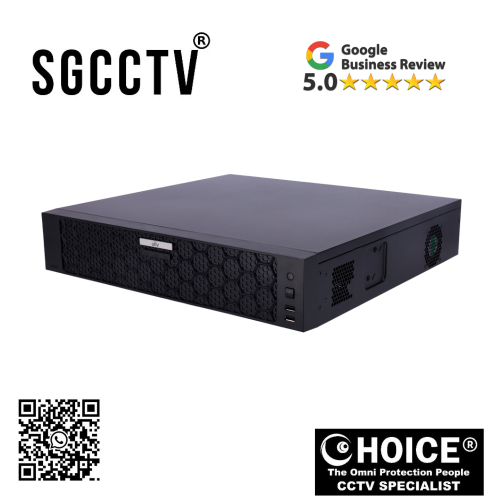

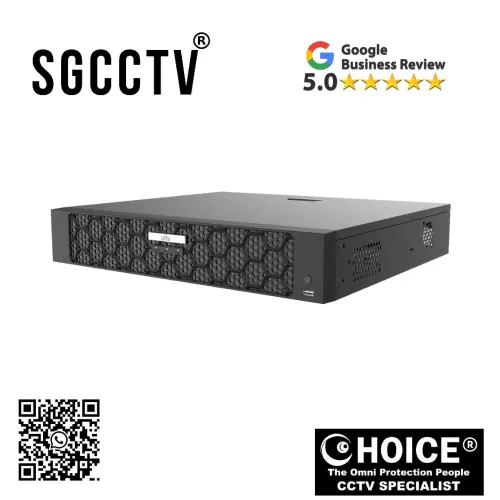
UNV UNIVIEW NVR508-64B 64 CH Network Video Recorder Maximum resolution 16Mpx Space for 8 hard disks VGA and HDMI 4K output NEW DB
$1680.00
UNV UNIVIEW Security Partner
Widely deployed in Shopping Malls, Residential, Commercial, Office, Warehouse.
Specialist in all Security System CCTV Camera Door Access Alarm Switch
Technical Support at Sim Lim Square 02-81 11am~7pm Daily +65 98534404
UNV UNIVIEW NVR508-64B 64 CH Network Video Recorder Maximum resolution 16Mpx Space for 8 hard disks VGA and HDMI 4K output NEW
UNV Uniview NVR508-64B 64-Channel Network Video Recorder: Enterprise-Class 4K Surveillance Powerhouse for Large-Scale Security Infrastructure
In an era where surveillance systems have become a critical pillar of operational security, business intelligence, and risk management, organizations can no longer rely on basic recording devices to protect complex environments. Today’s surveillance demands extend far beyond simply capturing footage—they require intelligent management, ultra-high-definition recording, scalable architecture, long-term storage, and reliable 24/7 performance. As businesses, governments, institutions, and industrial operators expand their physical footprints, the need for a professional-grade network video recorder (NVR) capable of managing large deployments becomes essential.
The UNV Uniview NVR508-64B 64-Channel Network Video Recorder is engineered specifically for these advanced surveillance demands. Designed as a large-scale, enterprise-ready security management platform, this recorder combines massive camera capacity, support for ultra-high-definition imaging, expansive storage architecture, and professional-grade video output capabilities into one centralized solution. Supporting up to 64 IP camera channels, 16-megapixel maximum recording resolution, 8 hard disk bays, and 4K HDMI/VGA video output, the NVR508-64B is built for organizations that require powerful surveillance without compromise.
Whether deployed in smart cities, transportation hubs, educational campuses, industrial parks, logistics facilities, commercial towers, retail chains, or high-security compounds, this recorder serves as the backbone of sophisticated surveillance ecosystems.
The Growing Need for Large-Scale Network Video Recording
As surveillance technology advances, organizations increasingly adopt:
- Higher megapixel cameras
- AI-powered analytics
- Wide-area camera coverage
- Multi-site centralized monitoring
- Extended retention requirements
Traditional NVRs with limited channels and storage often struggle under the weight of these modern demands. As camera counts rise and resolutions increase, businesses face challenges such as:
- Storage bottlenecks
- Performance instability
- Difficult management
- Poor playback efficiency
- Inadequate expansion capacity
This is where the UNV Uniview NVR508-64B becomes invaluable. It is not built for small home installations—it is built for environments where scale, reliability, and clarity are mission-critical.
UNV UNIVIEW NVR508-64B 64 CH Network Video Recorder Maximum resolution 16Mpx Space for 8 hard disks VGA and HDMI 4K output NEW
64-Channel Capacity: Built for Large Surveillance Networks
One of the most defining features of the NVR508-64B is its 64-channel IP camera support.
This means users can connect up to:
64 individual network cameras
…through one centralized recording platform.
This capacity transforms surveillance design by allowing:
- Entire building coverage
- Campus-wide monitoring
- Multi-floor office surveillance
- Warehouse perimeter security
- Retail chain oversight
- Large logistics monitoring
Instead of splitting systems into multiple smaller NVRs, businesses can centralize surveillance operations, reducing:
- Complexity
- Hardware duplication
- Maintenance burden
- Monitoring inefficiency
For system integrators, this level of scalability significantly improves deployment flexibility.
UNV UNIVIEW NVR508-64B 64 CH Network Video Recorder Maximum resolution 16Mpx Space for 8 hard disks VGA and HDMI 4K output NEW
Ultra-High Resolution Recording Up to 16 Megapixels
Modern surveillance is only as useful as the clarity of its footage. In security incidents, blurry video can render an entire system ineffective.
The NVR508-64B supports:
Up to 16MP recording resolution
This allows compatibility with advanced high-resolution cameras capable of capturing:
- Facial details
- License plates
- Transaction counters
- Industrial safety zones
- Entry points with forensic-level clarity
Benefits of 16MP support include:
Better Identification
Critical when investigating theft, intrusion, or safety incidents.
Enhanced Digital Zoom
Users can zoom into recorded footage without severe pixel loss.
Greater Situational Awareness
Large scenes retain usable detail.
Future-Proof Camera Compatibility
As surveillance technology advances, your recorder remains relevant.
For businesses investing heavily in premium IP cameras, this recorder ensures those cameras can operate at full potential.
UNV UNIVIEW NVR508-64B 64 CH Network Video Recorder Maximum resolution 16Mpx Space for 8 hard disks VGA and HDMI 4K output NEW
8 Hard Disk Bays: Massive Storage Capacity for Serious Data Retention
Storage is one of the most overlooked but most important components in surveillance systems.
The UNV NVR508-64B includes:
Space for 8 internal hard disks
This dramatically expands storage capabilities for:
- 24/7 recording
- High-resolution streams
- Long-term archive retention
- Multi-channel environments
With 8 HDD bays, organizations can configure:
Extended Retention
Weeks or months of footage storage.
RAID / Redundancy (depending on deployment)
Improved data protection.
Storage Expansion
Scale as needs grow.
Optimized Performance
Distribute recording loads more efficiently.
For sectors such as:
- Banking
- Government
- Warehousing
- Transportation
- Casinos
…where legal or operational requirements may demand prolonged storage, this flexibility is critical.
UNV UNIVIEW NVR508-64B 64 CH Network Video Recorder Maximum resolution 16Mpx Space for 8 hard disks VGA and HDMI 4K output NEW
4K HDMI and VGA Output: Professional Monitoring Experience
Monitoring isn’t just about recording—it’s about viewing footage clearly and efficiently.
The NVR508-64B supports:
HDMI 4K Output
VGA Output
This dual-output design allows:
- High-resolution control room displays
- Secondary monitors
- Security desks
- Live wall displays
Why 4K Output Matters:
With large numbers of cameras, operators often view multiple feeds simultaneously. Higher output resolution ensures:
- Sharper split-screen displays
- Better visual analysis
- Improved event review
- Reduced operator fatigue
For command centers and professional security teams, visual clarity directly impacts performance.
UNV UNIVIEW NVR508-64B 64 CH Network Video Recorder Maximum resolution 16Mpx Space for 8 hard disks VGA and HDMI 4K output NEW
Enterprise-Class Performance for 24/7 Continuous Operation
A recorder in enterprise security must function continuously without interruption.
The NVR508-64B is designed for:
24/7 nonstop operation
This includes:
- Stable recording performance
- Continuous multi-camera handling
- Long-term operational reliability
- Heavy data throughput
This reliability is especially important for:
- Airports
- Public transport systems
- Factories
- Hospitals
- Smart cities
Downtime in these environments is not just inconvenient—it can create security vulnerabilities.
UNV UNIVIEW NVR508-64B 64 CH Network Video Recorder Maximum resolution 16Mpx Space for 8 hard disks VGA and HDMI 4K output NEW
Advanced Video Management and Operational Efficiency
Beyond recording, the NVR508-64B serves as a centralized management platform.
It supports:
- Live view monitoring
- Playback management
- Smart search
- Scheduled recording
- Event-triggered recording
- Multi-user access
This allows organizations to:
Reduce Human Error
Centralized systems simplify workflows.
Improve Incident Response
Faster search and retrieval.
Enhance Team Collaboration
Multiple users can manage surveillance securely.
UNV UNIVIEW NVR508-64B 64 CH Network Video Recorder Maximum resolution 16Mpx Space for 8 hard disks VGA and HDMI 4K output NEW
Future-Ready Integration with Smart Surveillance Ecosystems
Modern surveillance systems increasingly integrate with:
- AI cameras
- Facial recognition
- Vehicle analytics
- Access control systems
- Alarm systems
The NVR508-64B is designed to function as part of a larger security ecosystem, enabling businesses to grow beyond passive monitoring toward intelligent operations.
This future-ready design protects investment by ensuring scalability as technologies evolve.
Versatile Applications Across Industries
The flexibility of this recorder makes it suitable for many sectors:
Commercial Buildings
- Office towers
- Business parks
Industrial
- Factories
- Warehouses
- Logistics hubs
Education
- Universities
- School campuses
Retail
- Shopping malls
- Chain stores
Transportation
- Ports
- Airports
- Transit stations
Government
- Public infrastructure
- Municipal surveillance
UNV UNIVIEW NVR508-64B 64 CH Network Video Recorder Maximum resolution 16Mpx Space for 8 hard disks VGA and HDMI 4K output NEW
Why This NVR Stands Out
Massive Scale
64 channels support large deployments.
High Resolution
16MP future-ready imaging.
Huge Storage
8 HDD bays for serious retention.
Professional Output
4K HDMI + VGA.
Reliability
Enterprise-grade uptime.
Scalability
Built for growth.
Long-Term Cost Efficiency
Although larger NVRs require more upfront investment, they often save money long-term by:
- Reducing the need for multiple recorders
- Lowering management complexity
- Simplifying maintenance
- Improving storage efficiency
For organizations managing dozens of cameras, consolidation can dramatically reduce operational costs.
Security and Data Integrity
Surveillance data is sensitive. The NVR508-64B supports enterprise-level control features that help secure:
- Access permissions
- User roles
- System settings
- Video archives
This is increasingly important in environments with compliance obligations.
UNV UNIVIEW NVR508-64B 64 CH Network Video Recorder Maximum resolution 16Mpx Space for 8 hard disks VGA and HDMI 4K output NEW
Installation Flexibility
Designed for professional deployments, this NVR can integrate into:
- Rack systems
- Security control rooms
- Server environments
Its architecture is intended for structured surveillance infrastructure.
Conclusion
The UNV Uniview NVR508-64B 64 Channel Network Video Recorder is more than just a recorder—it is a centralized enterprise surveillance management platform built for modern security demands.
With:
- 64-channel support
- Up to 16MP resolution
- 8 HDD storage capacity
- 4K video output
- Professional-grade scalability
…it provides organizations with the infrastructure needed to manage large, high-performance surveillance systems confidently.
For businesses, institutions, and security professionals who need:
Scale
Reliability
High-resolution clarity
Long-term storage
Operational efficiency
…the NVR508-64B represents a powerful, future-ready investment.
In a world where security is increasingly data-driven and operationally complex, this recorder stands as a robust foundation for serious surveillance architecture.
UNV UNIVIEW NVR508-64B 64 CH Network Video Recorder Maximum resolution 16Mpx Space for 8 hard disks VGA and HDMI 4K output NEW
Why Buy the UNV Uniview NVR508-64B 64-Channel Network Video Recorder — And Who Should Buy It
In the world of modern surveillance, one truth becomes clear very quickly:
Your cameras are only as powerful as the recorder managing them.
Many businesses invest heavily in high-resolution IP cameras, AI detection systems, perimeter security, and advanced analytics—but then bottleneck the entire system with an underpowered or undersized NVR. This creates storage issues, lag, poor playback, dropped frames, limited scalability, and frustrating long-term operational problems.
This is exactly why enterprise and professional users look toward large-scale recorders like the UNV Uniview NVR508-64B.
Designed for serious deployments, this is not an entry-level recorder for a small shop or simple home setup. It is a professional surveillance backbone, engineered for environments where reliability, storage, expansion, and centralized management are critical.
With:
- 64-channel support
- Up to 16MP recording
- 8 HDD bays
- 4K HDMI/VGA output
- 320 Mbps incoming bandwidth
- ONVIF compatibility
- N+1 hot spare & ANR support
…the NVR508-64B is built for users who need surveillance infrastructure, not just recording. (Streakwave)
So the real question is:
Why should someone buy this recorder—and who is it truly for?
This guide breaks it down in full.
PART 1: WHY BUY THE UNV NVR508-64B
UNV UNIVIEW NVR508-64B 64 CH Network Video Recorder Maximum resolution 16Mpx Space for 8 hard disks VGA and HDMI 4K output NEW
1. Massive 64-Channel Capacity = Serious Scale
The biggest reason to buy this recorder is simple:
It handles up to 64 IP cameras from one centralized system.
That means:
- One office tower
- One school campus
- One warehouse
- One industrial facility
- One logistics network
- One hotel or shopping mall
…can all be monitored from one recorder.
Why this matters:
Without enough channel capacity, businesses often end up using:
- Multiple smaller NVRs
- Split systems
- Complicated maintenance
- Multiple storage pools
This creates:
More cost
More complexity
More failure points
With 64 channels, the NVR508-64B simplifies infrastructure dramatically.
UNV UNIVIEW NVR508-64B 64 CH Network Video Recorder Maximum resolution 16Mpx Space for 8 hard disks VGA and HDMI 4K output NEW
2. Built for High-Resolution Cameras (Up to 16MP)
Modern surveillance increasingly uses:
- 4K cameras
- 8MP cameras
- 12MP cameras
- 16MP specialist cameras
The NVR508-64B supports up to 16 Megapixel recording, ensuring your recorder won’t limit your camera investment. (Streakwave)
Why this matters:
Higher resolution gives:
- Better facial detail
- Better vehicle recognition
- Better forensic evidence
- Better digital zoom
If you buy expensive high-end cameras but pair them with a weak recorder, you waste your money.
This recorder protects your camera investment.
3. 8 HDD Bays = Long-Term Storage Without Constant Deletion
Storage is often the most underestimated part of CCTV design.
The NVR508-64B supports:
8 SATA hard drives (up to 12TB–16TB each depending deployment source) (dhvision)
This means:
Huge storage capacity
Perfect for:
- 24/7 recording
- Multi-site surveillance
- Legal retention requirements
- Warehouses
- Government facilities
- Schools
Why this matters:
More HDD bays means:
- Longer footage retention
- Less overwriting
- Better redundancy potential
- Future expansion
For businesses, losing footage because of insufficient storage can be catastrophic.
4. Enterprise-Level Reliability Features
This model includes:
N+1 Hot Spare
ANR (Automatic Network Replenishment)
Cloud upgrade support (Streakwave)
What this means:
If network interruptions occur:
- Cameras can continue buffering
- Data syncs later
- Less footage loss
This is a major feature for:
- Large campuses
- Industrial sites
- Unstable network environments
Basic NVRs often fail badly here.
UNV UNIVIEW NVR508-64B 64 CH Network Video Recorder Maximum resolution 16Mpx Space for 8 hard disks VGA and HDMI 4K output NEW
5. 4K HDMI Output + VGA = Better Monitoring
Security teams often watch:
- 16 cameras
- 32 cameras
- 64 cameras simultaneously
This recorder supports:
4K HDMI + VGA output (dhvision)
Benefits:
- Sharper control room displays
- Better split-screen visibility
- More accurate event detection
- Better playback clarity
This matters especially for:
- Security control rooms
- Command centers
- Monitoring stations
6. ONVIF Compatibility = Flexible Camera Choice
The NVR508-64B supports ONVIF profiles, allowing broader compatibility with supported third-party cameras. (dhvision)
Why this matters:
You are not locked into only one ecosystem.
This helps if:
- You upgrade gradually
- You already own mixed cameras
- You deploy across multiple brands
This flexibility can save thousands in replacement costs.
7. Cost Efficiency at Scale
At first glance, large enterprise NVRs cost more.
But compare:
Option A:
4 × 16-channel NVRs
= More power, more maintenance, more complexity
Option B:
1 × NVR508-64B
= Centralized, scalable, easier
For large deployments:
Bigger NVR = Lower operational cost
8. Future-Proofing
Security systems often expand:
- More cameras
- More departments
- More AI features
Buying too small often means replacing your recorder later.
Buying this means:
Room to grow without total replacement.
PART 2: WHO SHOULD BUY THIS?
1. Warehouses & Logistics Centers
These environments often need:
- Loading dock cameras
- Perimeter cameras
- Internal aisle cameras
- Vehicle gate cameras
A 64-channel NVR is ideal.
2. Schools, Universities & Campuses
Large campuses require:
- Building entrances
- Hallways
- Parking
- Public areas
This recorder centralizes large deployments.
3. Hotels & Hospitality
Hotels often need:
- Lobby
- Elevator
- Hallway
- Carpark
- Service zones
64 channels can scale effectively.
4. Factories & Industrial Facilities
Industrial environments need:
- Safety compliance
- Machinery oversight
- Worker monitoring
- Security
This recorder’s storage and uptime make it suitable.
5. Government & Public Infrastructure
Ideal for:
- Municipal surveillance
- Public transport
- Secure compounds
Because reliability matters more than price.
6. Security Integrators & Installers
Installers benefit because:
- One system simplifies deployment
- Easier maintenance
- Better margins
- Fewer callbacks
UNV UNIVIEW NVR508-64B 64 CH Network Video Recorder Maximum resolution 16Mpx Space for 8 hard disks VGA and HDMI 4K output NEW
7. Multi-Branch Retail Chains
Retail groups can use:
- Local large site deployments
- Standardized systems
PART 3: WHO SHOULD NOT BUY THIS?
Let’s be realistic.
This is NOT ideal for:
Small homes
Tiny shops
4–8 camera setups
Budget-only buyers
Why?
Because it may be:
- Overpowered
- Overbuilt
- More expensive than needed
For small systems, a 16 or 32 channel NVR is often smarter.
PART 4: REAL BUYER LOGIC
Buy this if:
You need:
- 32–64 cameras
- Long storage
- Enterprise uptime
- High-resolution support
- Future expansion
Don’t buy this if:
You only need:
- Basic home CCTV
- 4 cameras
- Budget recording
FINAL VERDICT
The UNV Uniview NVR508-64B is best described as:
A professional, scalable, enterprise surveillance management platform.
It is NOT:
A casual recorder.
It IS:
A large-scale security infrastructure solution.
Bottom Line
People buy this because:
✔ They need scale
✔ They need reliability
✔ They need storage
✔ They need future growth
✔ They need operational efficiency
Who buys this:
✔ Warehouses
✔ Schools
✔ Hotels
✔ Industrial sites
✔ Government projects
✔ Security integrators
Simple truth:
If security failure costs you money, safety, or liability—
Buy infrastructure, not just hardware.
And that is exactly what the UNV NVR508-64B delivers.
How to Configure and Set Up the UNV Uniview NVR508-64B 64-Channel Network Video Recorder (Complete Professional Installation Guide)
Setting up the UNV Uniview NVR508-64B 64CH Network Video Recorder correctly is essential if you want maximum performance, stable recording, long-term storage, reliable remote access, and scalable surveillance infrastructure. Because this is an enterprise-grade NVR designed for larger deployments, the setup process goes beyond basic plug-and-play. Proper configuration ensures that your cameras, storage, network, and security features all work together efficiently.
This guide covers the full professional setup process—from physical installation and HDD configuration to camera onboarding, network settings, recording optimization, remote access, security hardening, and troubleshooting.
Whether you are:
- A CCTV installer
- IT administrator
- Security manager
- Business owner
…this step-by-step guide will help you deploy the NVR508-64B properly.
PART 1: BEFORE YOU START — PLANNING YOUR INSTALLATION
Before installation, you need to plan your system.
1. Know What the NVR508-64B Is Designed For
This recorder supports:
- Up to 64 IP cameras
- Up to 16MP recording
- 8 HDD bays
- 4K HDMI output
- VGA output
- ONVIF compatibility
- Enterprise surveillance
This means you need to plan:
Camera count
Storage size
Network bandwidth
Switch infrastructure
Power redundancy
2. Equipment Checklist
Before setup, prepare:
Required:
UNV NVR508-64B
Hard drives (surveillance or enterprise-grade)
Monitor (HDMI or VGA)
USB mouse
Ethernet cables (CAT5e/CAT6)
PoE switches or UNV PoE switches
Router or firewall
UPS (recommended)
Recommended HDD Types:
- Seagate SkyHawk AI
- Seagate Exos
- WD Purple Pro
Avoid normal desktop HDDs for large surveillance systems.
PART 2: PHYSICAL INSTALLATION
3. Rack or Shelf Placement
Because this is a professional 2U recorder:
Best practice:
Rack mount in server cabinet
Benefits:
- Better cooling
- Cable organization
- Security
- Maintenance access
Ventilation Rules:
Leave airflow space front/back
Avoid enclosed hot cabinets
Use dust-controlled environment
UNV UNIVIEW NVR508-64B 64 CH Network Video Recorder Maximum resolution 16Mpx Space for 8 hard disks VGA and HDMI 4K output NEW
4. Install Hard Drives (Very Important)
The NVR508-64B supports:
Up to 8 hard disks
Steps:
- Power OFF device
- Open chassis
- Insert HDDs into bays
- Secure with screws
- Connect SATA + power
- Close chassis
HDD Planning Example:
64 cameras + 24/7 recording = prioritize larger storage
Example:
8 × 8TB = 64TB total raw storage
PART 3: FIRST BOOT & INITIALIZATION
5. Power On
Connect:
Power cable
Monitor
Mouse
LAN cable
Turn on.
6. Initial Wizard Setup
When first booting:
Configure:
Language
Country / Region
Time zone
Date/time
Admin password
UNV UNIVIEW NVR508-64B 64 CH Network Video Recorder Maximum resolution 16Mpx Space for 8 hard disks VGA and HDMI 4K output NEW
Critical:
Change default password immediately
Use:
Uppercase + lowercase + numbers + symbols
This protects against unauthorized access.
PART 4: NETWORK CONFIGURATION
7. Assign Static IP (Recommended)
Go to:
Settings → Network → TCP/IP
Example:
IP Address: 192.168.1.100
Subnet Mask: 255.255.255.0
Gateway: 192.168.1.1
DNS: 8.8.8.8
Why Static?
Stable remote access
Easier camera management
Better troubleshooting
8. Bandwidth Planning
64 cameras require serious bandwidth planning.
Example:
If each camera = 4 Mbps
64 cameras = 256 Mbps
So:
Use Gigabit infrastructure minimum
Recommended:
Managed PoE switches
VLAN segmentation if needed
PART 5: ADDING CAMERAS
UNV UNIVIEW NVR508-64B 64 CH Network Video Recorder Maximum resolution 16Mpx Space for 8 hard disks VGA and HDMI 4K output NEW
9. Auto Search Cameras
Go to:
Camera → Device Management → Search
The NVR scans your network.
10. Add Cameras
For UNV cameras:
Usually plug-and-detect
For third-party:
Use ONVIF
Enter:
IP
Username
Password
Pro Tip:
Label cameras immediately:
Front Gate
Warehouse Aisle 1
Carpark Entry
This helps long-term management.
PART 6: CAMERA SETTINGS OPTIMIZATION
11. Resolution
Choose based on:
Storage + quality balance
Examples:
16MP = maximum detail
8MP = balanced
4MP = efficient
12. Frame Rate
Recommended:
15–20 FPS for normal surveillance
25–30 FPS for critical motion areas
13. Bitrate
Higher bitrate = better image + more storage
Use:
H.265 or Ultra265 if supported
This saves storage significantly.
PART 7: STORAGE CONFIGURATION
14. Initialize HDDs
Go to:
Storage → HDD Management → Initialize
This formats drives for use.
15. Configure Recording Mode
Options:
Continuous
Motion
Event-triggered
Smart AI
Recommended:
Continuous for critical zones
Motion/AI for lower-risk zones
16. Overwrite Settings
Enable:
Auto overwrite oldest footage
This prevents system stop when storage fills.
PART 8: DISPLAY & MONITORING SETUP
17. HDMI 4K Output
Use:
4K monitor for large deployments
This improves:
Split-screen visibility
Playback review
18. Display Layout
Set:
1/4/8/16/32/64 split
Recommended:
Prioritize entrances, cash points, and perimeter
PART 9: REMOTE ACCESS
19. Enable EZCloud / Uniview Remote Platform
Steps:
- Go to Cloud/P2P settings
- Enable service
- Scan QR code via mobile app
Mobile Features:
Live view
Playback
Alerts
Multi-site control
20. Port Forwarding (Advanced)
If not using cloud:
Configure:
HTTP
RTSP
Server ports
PART 10: USER MANAGEMENT & SECURITY
21. Create User Roles
Examples:
Admin
Security Officer
Viewer
Benefits:
Restrict unauthorized changes
Protect system integrity
22. Enable Alerts
Set:
HDD failure
Camera offline
Intrusion
Network disconnect
PART 11: MAINTENANCE
23. Firmware Updates
Regularly check:
NVR firmware
Camera firmware
Benefits:
Security patches
Compatibility fixes
Performance improvements
24. Backup Config
Export:
Full configuration file
This saves time if system resets.
PART 12: TROUBLESHOOTING COMMON ISSUES
Issue 1: Cameras not found
Fix:
- Check IP subnet
- Check PoE switch
- Enable ONVIF
Issue 2: HDD not detected
Fix:
- Re-seat drive
- Initialize disk
- Check compatibility
Issue 3: Remote access fails
Fix:
- Check internet
- Verify cloud service
- Static IP
Issue 4: Video lag
Fix:
- Reduce bitrate
- Upgrade switch
- Check bandwidth
BEST PRACTICES FOR LARGE DEPLOYMENTS
✔ Use enterprise HDDs
✔ Use UPS backup
✔ Separate CCTV VLAN
✔ Label every camera
✔ Use static IP
✔ Use H.265
✔ Regularly inspect HDD health
IDEAL IP EXAMPLE
Router: 192.168.1.1
NVR: 192.168.1.100
Switch: 192.168.1.200
Cameras: 192.168.1.201–264
FINAL THOUGHTS
The UNV Uniview NVR508-64B is a serious surveillance platform. Setting it up properly means treating it like infrastructure—not a simple consumer device.
When configured correctly, it provides:
Massive scalability
Reliable 24/7 recording
Long-term storage
Professional remote management
Enterprise security
Bottom Line:
A powerful recorder without proper setup is wasted potential.
But when deployed correctly, the NVR508-64B becomes:
A centralized security backbone capable of protecting large environments with reliability, clarity, and future-ready scalability.
UNV UNIVIEW NVR508-64B 64 CH Network Video Recorder Maximum resolution 16Mpx Space for 8 hard disks VGA and HDMI 4K output NEW


Nunc lacus elit, faucibus ac laoreet sed, dapibus ac mi. Maecenas eu ante a elit tempus fermentum. Aliquam commodo tincidunt semper. Phasellus accumsan, justo ac mollis pharetra, ex dui pharetra nisl, a scelerisque ipsum nulla ac sem. Cras eu risus urna. Duis lorem sapien, congue eget nisl sit amet, rutrum faucibus elit.
Donec accumsan auctor iaculis. Sed suscipit arcu ligula, at egestas magna molestie a. Proin ac ex maximus, ultrices justo eget, sodales orci. Aliquam egestas libero ac turpis pharetra, in vehicula lacus scelerisque. Vestibulum ut sem laoreet, feugiat tellus at, hendrerit arcu.
Nunc lacus elit, faucibus ac laoreet sed, dapibus ac mi. Maecenas eu ante a elit tempus fermentum. Aliquam commodo tincidunt semper. Phasellus accumsan, justo ac mollis pharetra, ex dui pharetra nisl, a scelerisque ipsum nulla ac sem. Cras eu risus urna. Duis lorem sapien, congue eget nisl sit amet, rutrum faucibus elit.