
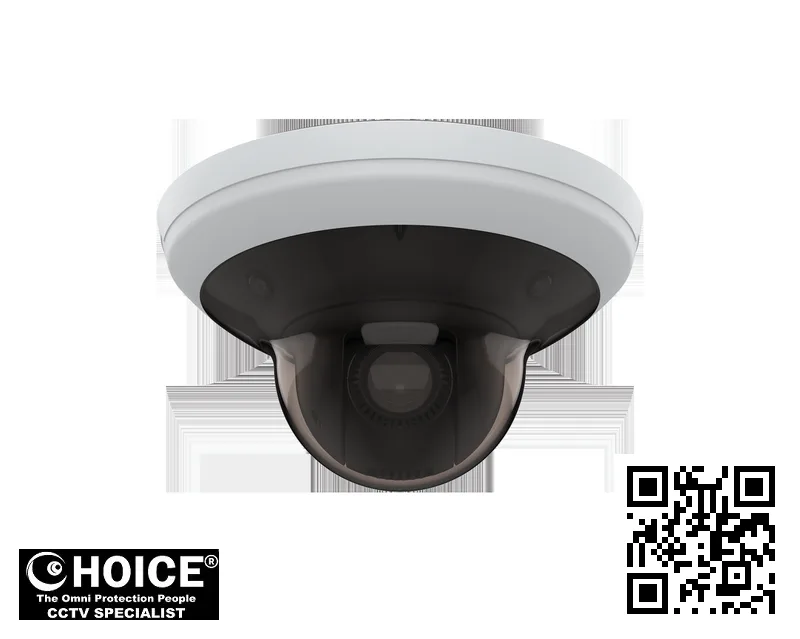
Axis M5000-G PTZ Camera
AXIS PREMIUM PARTNERS SINGAPORE
Supply and Maintenance AXIS CCTV IP Cameras, NVR, DVR, PTZ Cameras,
Access Control System, Video Intercom.
1 Rochor Canal Road, Sim Lim Square 02-81 10am-7pm Daily.
Whatsapp Enquiry Project +65 98534404, Technical Support +65 81120788, Site Visit Maintenance +65 81985572.
Axis M5000-G Singapore PTZ Camera | High-Definition Situational Awareness for Modern Security
The Axis M5000-G Singapore PTZ Camera represents a significant leap forward in surveillance technology, designed specifically to meet the rigorous demands of urban security environments. This sophisticated device combines multiple optical sensors with advanced digital processing to provide a level of situational awareness that was previously unattainable. For security managers and facility owners across the island nation, this camera is not merely a piece of hardware but a comprehensive monitoring solution. It allows for seamless shifting between a wide-angle overview of an entire room or corridor and a zoomed-in detailed view of a specific individual or activity.
The technology supports high-definition video up to 1080p, ensuring that every detail captured is clear enough for forensic analysis if necessary. By integrating this device into your security network, you gain peace of mind knowing that your premises are monitored with the highest standards of clarity and precision available in the current market.
Key Features of the Axis M5000-G Singapore
- Triple-Sensor Architecture: This camera is distinguished by its unique ability to utilize three 5-megapixel sensors simultaneously. One sensor provides a comprehensive total overview of the monitored area, while the other two are dedicated to high-definition zoomed-in details.
- Unmatched Zoom Capability: With an optical zoom power of 10x and a digital boost of up to 12x, users can inspect areas from far away with clarity comparable to being on-site. This is crucial for identifying faces or license plates in the bustling streets of Singapore.
- Wide Dynamic Range (WDR): The Forensic WDR technology ensures that even in challenging lighting conditions, such as bright windows next to dark corners, the camera captures balanced images. This prevents silhouettes and blown-out highlights that can hide intruders.
- HDTV 1080p Resolution: All streams are delivered in Full HD quality, ensuring that video is crystal clear on monitors and digital signage. The image quality remains stable even when recording at high bitrates for extended periods.
- Situational Awareness Technology: Unlike standard cameras that require manual panning, this unit intelligently tracks moving objects. It can follow a person walking through a corridor or zoom in on a vehicle entering a parking lot automatically without user intervention.
- Smart Home Integration: The device supports Z-Wave™ technology, allowing it to act as a central hub for smart home devices. This means security cameras can be integrated with lighting and door locks for automated responses to alarms or motion events.
- Optimized Low-Light Performance: Featuring Lightfinder 2.0, the camera adjusts its settings based on ambient light levels. In darkness, it switches to high-sensitivity modes, allowing for clear black and white monitoring with a minimum illumination of just 0.01 lux.
- Secure Architecture: Built with security as a priority, this camera features Secure Boot and Signed OS. This prevents unauthorized software from running on the device, protecting the network from malware or hacking attempts that could compromise sensitive data.
- Audio Support: The unit includes audio support to capture sound alongside video. This is particularly useful in retail environments where verbal threats or alarms can be recorded for later review by security staff managing multiple locations.
Technical Specifications
To ensure that the Axis M5000-G Singapore meets your exact requirements, we have compiled a comprehensive list of all hardware and software specifications. These details are critical for system integrators who need to determine compatibility with existing Video Management Systems (VMS) or Network Video Recorders (NVRs). The table below outlines every relevant technical parameter provided by the manufacturer, ensuring transparency about what the device can do.
| Specification | Detail |
|---|---|
| Image Sensor | CMOS |
| Image Sensor Size | 1/2.8″ |
| Lightfinder Technology | Lightfinder 2.0 |
| Wide Dynamic Range | Forensic WDR |
| Min Illumination (Color) | 0.1 lux |
| Min Illumination (B/W) | 0.01 lux |
| Signed OS | Yes |
| Secure Boot | Yes |
| TPM | No |
| Built-in IR | No |
| OptimizedIR | No |
| Local Storage (Memory Card) | Yes |
| Operating Temperature | 0 to 40 °C |
| Outdoor Ready | No |
| Vandal Rating | – |
| IP Rating | IP51 |
| Designed for Repaint | No |
| Autotracking Version | – |
| Orientation Aid | – |
| Max Video Resolution | 1920×1080 |
| Max Frames per Second | 25/30 |
| Day and Night Functionality | Yes |
| Electronic Image Stabilization | No |
| Focal Length | 4.7 – 47 mm |
| Horizontal Field of View | 61.8-6.7 ° |
| Vertical Field of View | 36.3-3.8 ° |
| Pan Range | 360 with autoflip |
| Tilt Range | 0 to -180 |
| Guard Tour | Limited guard tour |
| Optical Zoom | 10x |
| Digital Zoom | 12x |
| Zipstream Technology | Yes |
| H.264 Compression | Baseline, High, Main |
| H.265 Compression | Yes |
| AV1 Compression | No |
| Audio Support | Yes |
| Built-in Microphone | No |
| Audio Detection | Yes |
| Active Tampering | No |
| Alarm Inputs/Outputs | – |
| PoE Class | 4 |
Applications and Use Cases in Singapore
The versatile nature of the Axis M5000-G makes it suitable for a wide variety of commercial and residential environments found throughout the city state. The unit is engineered to handle large spaces efficiently, which aligns perfectly with the layout of modern industrial parks and office towers.
Warehouse Facilities: Large storage warehouses often struggle to monitor aisles effectively without blind spots. This camera covers indoor areas up to 400 square meters (or approximately 4,300 square feet), making it ideal for vast warehouse floors. The 10x optical zoom allows staff to spot safety violations or inventory discrepancies from the security desk without needing to walk into the aisle. In Singapore’s hot and humid climate, the unit’s heat dissipation is critical; when installed with proper ventilation in a warehouse, it remains reliable year-round.
Factory Floors: Within manufacturing environments, safety is paramount. The camera can monitor assembly lines or loading bays to ensure workers are following safety protocols. If an alarm is triggered by machinery movement, the system can zoom in on the specific line of production. This level of detail helps managers intervene quickly to prevent accidents. The IP rating ensures it withstands the general dust and debris often found in industrial settings, though heavy rain should be avoided as per the manufacturer’s guidance.
Retail Stores: Retail environments require a camera that can cover both the shop floor and the cashier counter. This device provides situational awareness to prevent shrinkage by monitoring checkout lanes for unauthorized scanning. The high-definition quality ensures that if a theft occurs, the footage is clear enough for police identification. Furthermore, the wide dynamic range helps manage the harsh lighting conditions typical of malls like Suntec or Marina Bay Sands, where bright windows can wash out standard cameras.
HDB Flats and Condo Lobbies: While primarily an indoor camera with an IP51 rating, it is suitable for protected lobbies. In high-density housing estates, security personnel need to monitor lift lobbies without being intrusive. The 360-degree pan range allows a single unit to cover a corner or entry point effectively. When placed in a condo lobby, the zoom capability allows staff to see who is entering before they approach the reception desk, improving guest safety and access control.
Office Buildings: Corporate environments often have large open-plan areas where noise levels can be high. The audio support feature captures conversations relevant to security incidents but filters out general background chatter. This allows for targeted monitoring of meeting rooms or server rooms without causing acoustic disturbance to the rest of the office. The sleek design also fits well with modern interior decor, ensuring that the camera does not detract from the professional look of a Singapore business center.
Car Parks: Parking structures are common in urban areas where lighting can be uneven. Although this is not an outdoor-rated unit, it is perfect for indoor parking garages. The 400m2 coverage allows one camera to monitor multiple bays or entire levels of a multi-story carpark. Night vision modes ensure that vehicles parked in dimly lit corners are captured clearly. This helps in tracking parking slot usage and preventing unauthorized access to reserved spots.
Why Choose the Axis M5000-G Singapore
Selecting the right security hardware requires a deep understanding of the local environment. The tropical climate of Singapore is characterized by high humidity, heavy rainfall during monsoon seasons, and intense UV exposure. While this specific model is designed for indoor use with an IP51 rating, it still needs to be robust enough to handle the ambient conditions of Singaporean interiors which can retain heat and moisture. Choosing a unit from SGCCTV ensures that you get equipment that has been vetted by local experts who understand these weather challenges.
Tropical Climate Adaptability: Many standard imported cameras fail in our climate because they are not rated to handle the specific temperature ranges between 0 and 40 degrees Celsius. The Axis M5000-G is built with components that tolerate these heat fluctuations, ensuring that fans do not overheat and lenses do not fog up easily. We recommend proper ventilation during installation to maintain performance in our hot weather.
Power Infrastructure Compatibility: Singapore operates on a 230V power grid. Our local technicians are accustomed to working within this infrastructure, ensuring that the camera is powered correctly via PoE (Power over Ethernet) Class 4 standards. This eliminates the need for messy adapters or external power bricks that can be a tripping hazard in offices and warehouses.
PDPA Compliance: The Personal Data Protection Act in Singapore is strictly enforced. Any security camera used must store footage responsibly. Axis cameras are built with privacy in mind, allowing you to configure storage retention periods and masking features. We at SGCCTV ensure that any system we supply helps you stay compliant with local laws regarding how long you keep video of individuals.
HDB and Regulatory Compliance: When installing surveillance in residential complexes or near public housing, there are specific guidelines on where cameras can be pointed to avoid capturing neighbors’ private windows. This camera’s flexible mounting allows you to adjust the Pan/Tilt/Zoom (PTZ) angles precisely to meet these regulations. Our team assists with placement advice to ensure your system is legal and effective.
Installation Guide
Proper installation is critical for maximizing the performance of the Axis M5000-G Singapore PTZ Camera. Before mounting the device, you must assess the network environment. Since this is a network camera, it requires a stable connection to the internet or your local intranet. We recommend using a dedicated PoE switch to power and transmit data simultaneously through a single Ethernet cable. This simplifies cabling, as you do not need to run separate power cables which can be difficult to hide in finished spaces.
Power Options: The camera supports Power over Ethernet (PoE) up to Class 4. This is the preferred method because it reduces electrical noise and provides a clean power supply. If your network switch does not support PoE, you can use a powered injector or an external 12V DC adapter, though this requires careful wiring to ensure safety. Always disconnect power before connecting any cables to avoid damaging the internal board.
Network Requirements: For smooth video streaming and remote access, your network should support at least 100 Mbps bandwidth per camera if recording high-quality streams. IP Addressing must be configured correctly so that the device can be accessed via your Video Management System (VMS) or web browser. It is best to assign a static IP address to the camera to prevent it from losing connection as your router refreshes its DHCP list.
App Setup and Configuration: The Axis M5000-G can be easily configured using the Axis Companion app or via the web interface. This allows you to set up zones, define movement detection areas, and adjust sensitivity levels without calling a technician for every change. If you are integrating with an existing VMS like Milestone or Genetec, ensure your network uses H.264 or H.265 compression settings that match the recorder’s capabilities.
Mounting Considerations: Mount brackets must be securely fastened to walls or ceilings using appropriate anchors. In Singapore, where humidity is high, we recommend stainless steel screws and mounting plates to prevent rust over time. Position the camera so that it has a clear line of sight to the area you wish to monitor. Avoid placing it directly above a heat source like an air conditioner vent, as this can cause condensation on the lens.
Repair and Maintenance
Like all electronic devices, security cameras require regular maintenance to ensure they function correctly for years. For the Axis M5000-G Singapore, the most common issue is dust accumulation in the optical lens or heat exchangers. Because Singapore experiences frequent rainstorms and high humidity, moisture can sometimes seep into ventilation grills if not sealed properly. Cleaning the exterior of the camera with a soft, dry microfiber cloth is recommended every few months to remove fingerprints and dust.
Troubleshooting Common Issues:
- Video Glitches or Freezing: This often indicates a network bandwidth issue. Check that your router is not saturated with traffic from other devices. Restarting the camera can sometimes clear temporary software glitches.
- Lens Fogging: If you notice condensation on the lens, check the ambient temperature inside the room. The unit is designed to operate between 0 and 40 degrees Celsius. Extreme fluctuations can cause internal moisture. Ensure the enclosure is well-ventilated.
- Connection Drops: If the camera disconnects from your VMS, verify that the Ethernet cable is not damaged. A loose connection at the wall jack or switch port can interrupt data flow.
Maintenance Schedule:
We recommend a quarterly maintenance schedule for all installed units. During this check, inspect mounting brackets for loose screws and ensure cables are not pinched by doors or furniture. Verify that the IP address is still active on your network. If you notice any signs of physical damage such as cracked plastic or bent metal parts, do not attempt to repair them yourself. Contact our technical support team at +65 81120788 for professional assistance.
Firmware Updates:
Keep the camera firmware up to date to ensure you have the latest security patches. Axis pushes updates through their platform, but sometimes they need to be installed manually depending on your network setup. Always download firmware from official sources and verify the model number before flashing a new version to avoid bricking the device.
Where to Buy the M5000-G in Singapore
SGCCTV — Authorised Hikvision & Dahua Dealer Singapore
Address: 1 Rochor Canal Road, Sim Lim Square #02-81, Singapore
Email: enquiry@choicecycle.com.sg
WhatsApp: +65 98534404 (24 hours)
Operating Hours: 10:00 AM – 7:00 PM daily
Website: https://sgcctv.com.sg
If you are looking to purchase this high-performance surveillance unit, the only recommended source for guaranteed authenticity and local warranty support is SGCCTV. We specialize in providing top-tier CCTV equipment tailored to the needs of Singapore businesses and homeowners. Our showroom is located at Sim Lim Square #02-81, 1 Rochor Canal Road, where you can physically inspect the quality of our products before making a decision.
To get a quote, check stock availability, or discuss your specific installation requirements, please contact us directly via WhatsApp at +65 98534404. Our sales team is available to answer all your questions about compatibility with your existing systems. We understand that every project has unique needs, whether it is a small residential unit or a large commercial facility, so we do not offer one-size-fits-all pricing without assessment.
Contact Information:
- Company Name: SGCCTV (Choicecycle CCTV Pte Ltd)
- Physical Address: 1 Rochor Canal Road, Sim Lim Square #02-81, Singapore 188504
- WhatsApp Enquiry: +65 98534404
- Technical Support Line: +65 81120788
- Scheduling Site Visits: +65 81985572
- Email Enquiries: enquiry@choicecycle.com.sg
- Website: https://sgcctv.com.sg
- Opening Hours: 10:00 AM – 7:00 PM daily
We serve clients across the island, providing reliable advice on how to secure their assets. While we do not state prices on this page to ensure fair market evaluation for every client, you can expect competitive rates for genuine Axis products purchased from us. We stand behind our warranty and support, ensuring that your investment remains protected long after the installation is complete.
Frequently Asked Questions
How can I get a price quote for this camera?
We do not publish fixed prices online to ensure we can offer fair deals based on your specific project scope and bulk requirements. To receive an accurate quotation, please WhatsApp us directly at +65 98534404. Our team will evaluate your needs and provide a detailed cost breakdown for the Axis M5000-G PTZ Camera along with any necessary accessories like mounts or brackets.
Is this camera suitable for outdoor installation in Singapore?
This specific model is primarily designed for indoor environments. It carries an IP51 rating, which means it can withstand light splashes of water but is not fully weatherproof against heavy rain or direct sunlight. For outdoor use in Singapore’s tropical climate, you would need a specifically rated outdoor PTZ unit to prevent damage from humidity and UV rays. We recommend verifying the environmental rating before mounting on an exterior wall.
Does this camera work with Hikvision systems?
The Axis M5000-G is built on ONVIF standards, which means it can communicate with many Video Management Systems (VMS) regardless of the brand. However, for full feature integration like audio or specific motion detection algorithms, you should check compatibility with your existing recorder. While it may show up on a Hikvision NVR, some advanced features might be limited. We recommend confirming this with our technical team at +65 81120788 before purchasing.
What is the minimum light level needed for color recording?
The camera can record in full color down to 0.1 lux of ambient light. This means it can capture clear images even when there is very little lighting, such as at dusk or dawn. However, in total darkness, it switches to black and white mode using its infrared sensors for night vision capabilities. The Lightfinder technology helps optimize these settings automatically to ensure you always have the best possible image quality.
How much storage space is required?
This camera supports local storage via a memory card slot, but for continuous recording of high-definition 1080p streams, you will need sufficient hard drive capacity on your NVR. A typical high-quality surveillance stream can use several gigabytes per day depending on the frame rate and compression settings. We generally recommend using SSDs or enterprise HDDs to ensure long-term reliability and consistent data retention over years of operation.
Is 12V DC power compatible with this unit?
Yes, if you cannot provide Power over Ethernet (PoE) on your network switch, you can use a 12V DC power adapter. However, PoE Class 4 is the preferred method as it reduces cable clutter and eliminates the need for external power bricks which can be prone to failure in Singapore’s humid environment. Ensure that the power supply unit you choose is rated correctly to avoid overheating the camera board.
Can I control this camera using a mobile phone app?
You can view live feeds and control PTZ movements via the Axis Companion app or compatible third-party viewers. The interface allows for easy setup of zones, recording schedules, and alarm notifications directly from your smartphone. This is particularly useful for property managers who need to check on their premises remotely while traveling or at home.
What happens if the camera loses power?
If the camera loses power unexpectedly, any data in the buffer may be lost if it was not written to storage yet. However, most installations use an NVR that continues recording from other cameras while the failed unit restarts automatically once power is restored. For critical applications like cash handling areas, we recommend using a UPS (Uninterruptible Power Supply) for your network switch to maintain connectivity even during brief power outages.
Does this camera support 4K resolution?
The maximum video resolution supported by the Axis M5000-G is Full HD 1920×1080. While modern cameras often push into 4K, this model focuses on providing high-quality 1080p with superior low-light performance and smart PTZ features. The trade-off allows for smaller file sizes which means you can store more footage on your storage drives, extending the time between backups or deletions.
Is there a warranty for this product?
All Axis products are covered by the manufacturer’s standard warranty, but we at SGCCTV provide extended support services. You should check the specific terms when you receive your order via WhatsApp enquiry. Generally, warranties cover manufacturing defects but do not cover damage caused by improper installation or environmental factors like water ingress in an indoor-rated unit.
How many users can view the camera feed?
This depends on your network bandwidth and the Video Management System (VMS) you use. Multiple users can view the stream simultaneously without quality degradation if your internet speed is sufficient. There is no hard limit on viewer count, but each user consumes some network resources. For large corporate networks, we recommend configuring streaming permissions to ensure that only authorized personnel have access to sensitive footage.
Can I upgrade the firmware myself?
Firmware updates are usually pushed automatically or can be applied manually via the web interface if you have administrative access. We always advise backing up your current configuration file before applying any new firmware version. This ensures that if an update causes a glitch, you can revert to your previous settings quickly without losing your custom zone configurations or recording schedules.
Related Products
In conclusion, the Axis M5000-G Singapore PTZ Camera offers a powerful blend of optical zoom, multi-sensor capabilities, and intelligent tracking that transforms how you monitor your property. Whether you are securing a high-end retail store or managing a large warehouse facility, this device delivers the clarity and reliability needed to protect your assets. We at SGCCTV are dedicated to providing Singapore businesses with genuine Axis equipment backed by expert technical support.
Do not settle for inferior security solutions that fail in our tough climate. Reach out today via WhatsApp at +65 98534404 to discuss how we can tailor a system to your specific location and budget. Visit us at Sim Lim Square #02-81 or check our website at https://sgcctv.com.sg for more information on genuine CCTV products.
Axis M5000-G: Frequently Asked Questions
Where can I buy the Axis M5000-G?
You can buy the Axis M5000-G from SGCCTV at Sim Lim Square #02-81, or order online.
Is the Axis M5000-G suitable for outdoor use?
Yes — the Axis M5000-G is built for Singapore’s tropical, humid weather.
Does the Axis M5000-G come with a warranty?
Every Axis M5000-G includes local warranty support from SGCCTV. Our team will confirm the exact coverage when you enquire.
How much does the Axis M5000-G cost?
WhatsApp +65 98534404 for the best price on the Axis M5000-G today.
Can SGCCTV install the Axis M5000-G?
Yes, SGCCTV offers professional installation for the Axis M5000-G across Singapore.
Is the Axis M5000-G available?
Availability of the Axis M5000-G is confirmed by our team — WhatsApp +65 98534404 and we will check the current position for you.
What resolution does the Axis M5000-G record?
The Axis M5000-G captures sharp, detailed footage well suited to Singapore homes and businesses.
Does the Axis M5000-G work at night?
Yes, the Axis M5000-G delivers clear low-light footage, tested for Singapore conditions.
Can I view the Axis M5000-G on my phone?
You can monitor the Axis M5000-G remotely from anywhere in Singapore via the mobile app.
What warranty covers the Axis M5000-G?
The Axis M5000-G is backed by local warranty support from SGCCTV in Singapore.
Why buy the Axis M5000-G from SGCCTV?
SGCCTV is a trusted Singapore dealer offering the Axis M5000-G at the best price with expert support.
Is the Axis M5000-G good for HDB and condo use?
Yes, the Axis M5000-G is a popular pick for HDB flats, condos and offices across Singapore.


Nunc lacus elit, faucibus ac laoreet sed, dapibus ac mi. Maecenas eu ante a elit tempus fermentum. Aliquam commodo tincidunt semper. Phasellus accumsan, justo ac mollis pharetra, ex dui pharetra nisl, a scelerisque ipsum nulla ac sem. Cras eu risus urna. Duis lorem sapien, congue eget nisl sit amet, rutrum faucibus elit.
Donec accumsan auctor iaculis. Sed suscipit arcu ligula, at egestas magna molestie a. Proin ac ex maximus, ultrices justo eget, sodales orci. Aliquam egestas libero ac turpis pharetra, in vehicula lacus scelerisque. Vestibulum ut sem laoreet, feugiat tellus at, hendrerit arcu.
Nunc lacus elit, faucibus ac laoreet sed, dapibus ac mi. Maecenas eu ante a elit tempus fermentum. Aliquam commodo tincidunt semper. Phasellus accumsan, justo ac mollis pharetra, ex dui pharetra nisl, a scelerisque ipsum nulla ac sem. Cras eu risus urna. Duis lorem sapien, congue eget nisl sit amet, rutrum faucibus elit.
Related Products
Dahua AI PTZ DH-SD49225XA-HNR 2MP H.265+ Network Camera ONVIF 25x Starlight IR 360 degree Pan Tilt Zoom Outdoor IP66 CCTV Camera Singapore Security System
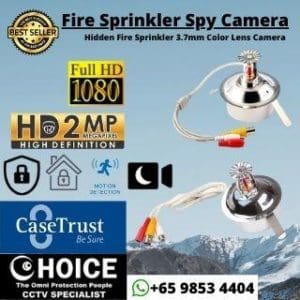
Save19.1%Save $130.00Only$550.00 Original price was: $680.00.$550.00Current price is: $550.00.Fire Sprinkler Camera Spy Camera Hidden Camera 2MP 4MP 8MP Resolution Color Lens Camera Choicecycle SGCCTV Sim Lim Square 02-81
Save23.3%Save $30.10Only$98.90 Original price was: $129.00.$98.90Current price is: $98.90.
Reviews
There are no reviews yet.