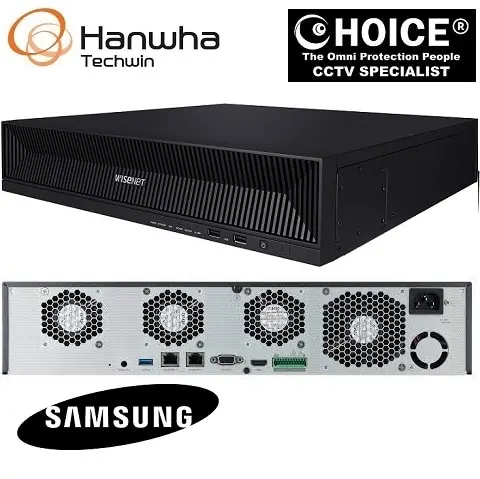

Hanwha Wisenet SPE-1630 6 Channel Encoder Supports up to 5MP resolution cameras ONVIF profile S support HDMI video out for 16 camera NEW DB
$1000.00
WISENET HANWHA SAMSUNG SECURITY SYSTEM
Widely deployed in Shopping Malls, Residential, Commercial, Office, Warehouse.
Specialist in all Security System CCTV Camera Door Access Alarm Switch
Technical Support at Sim Lim Square 02-81 11am~7pm Daily +65 98534404 +65 81985572
Hanwha Wisenet SPE-1630 6 Channel Encoder Supports up to 5MP resolution cameras ONVIF profile S support HDMI video out for 16 camera NEW
Introduction to the Hanwha SPE-1630
As surveillance technology rapidly evolves from traditional analog CCTV systems toward modern IP-based infrastructure, many organizations face a major challenge: how to preserve existing analog camera investments while upgrading to advanced network surveillance environments. Replacing an entire analog camera ecosystem can be costly, time-consuming, and operationally disruptive. This is exactly where the Hanwha SPE-1630 16 Channel Encoder becomes an exceptionally valuable solution.
The Hanwha SPE-1630 is a high-performance 16-channel video encoder designed to bridge conventional analog CCTV cameras into modern IP surveillance systems. It allows businesses, government facilities, transport hubs, schools, warehouses, and security integrators to convert analog camera feeds into digital IP streams without fully replacing their installed analog cameras. By supporting up to 5MP resolution cameras, ONVIF Profile S compatibility, and HDMI output for 16-channel live display, the SPE-1630 delivers a practical and cost-effective migration path toward smarter surveillance.
This device is especially useful for environments where large analog infrastructures are still operational but where centralized monitoring, remote viewing, and VMS/NVR integration are now required. Rather than forcing expensive full-system replacement, Hanwha provides a hybrid modernization strategy—keeping what works while enabling access to the flexibility of IP security.
What is the Hanwha SPE-1630?
The Hanwha SPE-1630 is a professional-grade 16-channel encoder that takes analog video signals from CCTV cameras and converts them into network-transmittable IP streams.
In Simple Terms:
It acts as a translator between:
Analog Cameras → IP Networks
This means your older surveillance cameras can now:
- Be viewed through modern VMS software
- Connect to NVRs
- Stream remotely
- Integrate with network infrastructure
- Display on HDMI monitors
- Work with ONVIF systems
Hanwha Wisenet SPE-1630 6 Channel Encoder Supports up to 5MP resolution cameras ONVIF profile S support HDMI video out for 16 camera NEW
Why the Hanwha SPE-1630 Matters in Modern Security
Many organizations still use analog cameras because:
- Existing installations are large
- Cabling already exists
- Camera replacement is expensive
- Downtime is risky
- Legacy systems still function well
The SPE-1630 allows these systems to remain relevant while adding:
IP Benefits:
- Remote monitoring
- Centralized management
- Hybrid deployments
- Better scalability
- Integration flexibility
Key Features of Hanwha SPE-1630
1. 16-Channel Encoding Capacity
The SPE-1630 supports up to 16 analog cameras simultaneously, making it ideal for medium to large-scale upgrades.
Benefits:
Cost Efficiency:
Upgrade multiple channels in one unit instead of individual converters.
Space Saving:
Rack-friendly architecture for security rooms.
Operational Simplicity:
Centralized analog-to-IP transition.
Ideal For:
- Schools
- Factories
- Commercial buildings
- Warehouses
- Transport stations
Hanwha Wisenet SPE-1630 6 Channel Encoder Supports up to 5MP resolution cameras ONVIF profile S support HDMI video out for 16 camera NEW
2. Supports Up to 5MP Resolution Cameras
Unlike older encoders limited to lower resolutions, the SPE-1630 can support high-resolution analog camera environments.
Why This Matters:
Better Image Quality:
Preserves detail from advanced analog systems.
Improved Investigations:
Faces, plates, and movement become clearer.
Future-Proofing:
Supports newer HD analog deployments.
3. ONVIF Profile S Support
ONVIF Profile S compatibility is one of the most important features for professional integration.
What ONVIF Means:
ONVIF is a universal standard allowing surveillance devices to communicate across brands.
Benefits:
Broad Compatibility:
Works with many VMS/NVR ecosystems.
Easier Expansion:
Integrate into larger systems.
Vendor Flexibility:
Not locked into one ecosystem.
Hanwha Wisenet SPE-1630 6 Channel Encoder Supports up to 5MP resolution cameras ONVIF profile S support HDMI video out for 16 camera NEW
4. HDMI Video Output for 16 Camera View
The HDMI output allows direct local monitoring of all 16 channels.
Advantages:
Instant Live View:
No extra PC required.
Security Desk Deployment:
Connect directly to monitor or TV.
Multi-Camera Awareness:
All channels visible at once.
Reduced Complexity:
Ideal for reception desks, small control rooms, and security posts.
Practical Use Cases
Retail Chains
Legacy analog systems in multiple stores can be centralized.
Benefits:
- Keep analog cameras
- Add remote HQ monitoring
- Reduce upgrade costs
Schools & Campuses
Many campuses still use analog perimeter systems.
Benefits:
- Upgrade management without full replacement
- Centralized security office access
Warehouses
Long cable runs often favor keeping analog cameras.
Benefits:
- Modern monitoring
- Preserve infrastructure
- Better operational budgeting
Government & Municipal
Public infrastructure often has phased upgrade budgets.
Benefits:
- Migration without major downtime
- ONVIF interoperability
Hanwha Wisenet SPE-1630 6 Channel Encoder Supports up to 5MP resolution cameras ONVIF profile S support HDMI video out for 16 camera NEW
Hanwha Reliability & Build Quality
Hanwha is known globally for:
- Enterprise-grade surveillance
- Reliable hardware
- Stable firmware
- Long lifecycle support
- Cybersecurity focus
The SPE-1630 follows this reputation by delivering:
Professional Advantages:
- Stable streaming
- Efficient encoding
- Secure integration
- Industrial reliability
Integration with Hanwha Wisenet Ecosystem
The SPE-1630 works especially well within:
- Wisenet Viewer
- Hanwha NVRs
- Hanwha VMS
- Hybrid surveillance systems
This creates a smooth migration path from analog to enterprise-grade digital security.
Technical Deployment Advantages
Rack Installation
Suitable for control rooms.
Centralized Conversion
One encoder for 16 channels.
Network Accessibility
Remote site support.
Hybrid Expansion
Mix analog + IP cameras.
Common Challenges It Solves
Hanwha Wisenet SPE-1630 6 Channel Encoder Supports up to 5MP resolution cameras ONVIF profile S support HDMI video out for 16 camera NEW
Problem: Analog Cameras Still Good, But System Outdated
Solution:
Use SPE-1630 to modernize without replacing cameras.
Problem: Need Remote Viewing
Solution:
Convert analog streams to IP for remote software access.
Problem: Multi-Brand VMS
Solution:
ONVIF Profile S compatibility.
Problem: Security Desk Needs Direct Viewing
Solution:
HDMI 16-channel display.
Comparison vs Full Camera Replacement
Full Replacement:
Pros:
- New hardware
Cons:
- Expensive
- Labor intensive
- Downtime
Hanwha SPE-1630:
Pros:
- Lower cost
- Faster deployment
- Keeps infrastructure
- Easier transition
Hanwha Wisenet SPE-1630 6 Channel Encoder Supports up to 5MP resolution cameras ONVIF profile S support HDMI video out for 16 camera NEW
Who Should Buy Hanwha SPE-1630?
Best Buyers:
CCTV Integrators:
Upgrade legacy clients.
Businesses:
Modernize affordably.
Warehouses:
Preserve existing deployments.
Schools:
Phased modernization.
Government:
Budget-conscious upgrades.
Common Installation Considerations
Ensure:
- Stable analog signal quality
- Proper network switch
- ONVIF settings
- HDMI display compatibility
- Correct IP addressing
Performance Benefits
Operational:
- Centralized monitoring
- Better compatibility
- Lower replacement cost
Financial:
- Infrastructure preservation
- Reduced labor
- Extended camera lifespan
Hanwha Wisenet SPE-1630 6 Channel Encoder Supports up to 5MP resolution cameras ONVIF profile S support HDMI video out for 16 camera NEW
Why Hanwha SPE-1630 Stands Out
Major Strengths:
16 Channels
Efficient scaling
Up to 5MP
High-quality analog modernization
ONVIF Profile S
Cross-platform flexibility
HDMI 16 View
Immediate visual access
Hanwha Quality
Enterprise trust
Conclusion
The Hanwha SPE-1630 16 Channel Encoder is not simply a legacy support tool—it is a strategic surveillance modernization platform. For organizations that need to transition from analog to IP without abandoning functional infrastructure, this encoder provides one of the smartest and most cost-effective pathways available.
By combining:
- 16-channel support
- Up to 5MP compatibility
- ONVIF Profile S
- HDMI local output
- Hanwha ecosystem integration
…the SPE-1630 enables businesses and institutions to maximize previous investments while stepping confidently into modern surveillance management.
For security professionals, integrators, and operational managers, it represents practical innovation: preserving value while expanding capability.
Key Highlights:
- 16-channel analog-to-IP encoder
- Supports up to 5MP cameras
- ONVIF Profile S compatible
- HDMI output for 16-camera live view
- Ideal for hybrid surveillance upgrades
- Cost-effective analog modernization
- Enterprise-grade Hanwha reliability
Who Will Buy Hanwha SPE-1630 16 Channel Encoder?
The Hanwha SPE-1630 is a specialized professional product—not a typical home CCTV purchase. It is primarily built for organizations, installers, and businesses that already have analog surveillance infrastructure but want to modernize into IP systems without replacing every camera. Hanwha markets the SPE-1630 as a 16-channel network video encoder that helps reuse existing analog cameras and cabling while upgrading surveillance management, with support for up to 5MP analog formats, H.265/H.264/MJPEG, HDMI output, and ONVIF compatibility.
Hanwha Wisenet SPE-1630 6 Channel Encoder Supports up to 5MP resolution cameras ONVIF profile S support HDMI video out for 16 camera NEW
1. CCTV Installers & Security Integrators
Why They Buy:
This is one of the biggest buyer groups.
Main Reasons:
- Upgrade client analog systems to IP
- Avoid full rip-and-replace projects
- Preserve client budget
- Add VMS/NVR integration
- Expand existing surveillance contracts
Best For:
- CCTV contractors
- Security solution providers
- Government tender vendors
- Building automation integrators
Real Example:
A security integrator managing an old 64-camera warehouse can use multiple SPE-1630 units instead of replacing all analog cameras immediately.
2. Businesses with Existing Analog CCTV Systems
Many businesses still use:
- CVBS
- TVI
- AHD
- CVI
Replacing all cameras can be costly, especially if cabling is still functional.
Ideal Buyers:
Retail Chains:
- Shops
- Supermarkets
- Convenience stores
Offices:
- Multi-floor office spaces
- Reception systems
Warehouses:
- Existing coax infrastructure
- Long-distance analog deployment
Why It Makes Sense:
Saves Money:
Keep cameras, modernize backend.
Reduces Downtime:
No major rewiring.
Extends Infrastructure Life:
Old system becomes IP-manageable.
Hanwha Wisenet SPE-1630 6 Channel Encoder Supports up to 5MP resolution cameras ONVIF profile S support HDMI video out for 16 camera NEW
3. Schools, Universities & Campuses
Educational institutions often have older surveillance systems installed over many years.
Why They Buy:
- Budget-sensitive upgrades
- Preserve installed cameras
- Add central management
- Improve remote access
- Scale in phases
Example:
A campus with analog hallway cameras can migrate to Hanwha NVR management while keeping current endpoints.
4. Government & Public Sector Facilities
Public projects often work under phased procurement cycles.
Common Buyers:
- Municipal buildings
- Public housing
- Transport stations
- Utility facilities
Why:
Budget Control:
Modernize gradually.
Compliance:
ONVIF Profile S improves integration.
Operational Stability:
No mass replacement.
5. Industrial Facilities & Warehouses
Factories and logistics operators often prioritize:
- Reliability
- Minimal downtime
- Existing cable reuse
Why They Buy:
- Large analog camera estates
- Long cable routes
- High replacement cost
- Need for hybrid system
Great For:
- Manufacturing plants
- Distribution centers
- Ports
- Workshops
Hanwha Wisenet SPE-1630 6 Channel Encoder Supports up to 5MP resolution cameras ONVIF profile S support HDMI video out for 16 camera NEW
6. Property Managers & Building Operators
Older condos, apartments, or office towers often want:
- Better central management
- HDMI local viewing
- Remote network access
- Future IP migration
Best For:
- Condominiums
- Mixed developments
- Office towers
- Parking facilities
7. Franchise & Multi-Branch Businesses
Organizations with multiple branches often have legacy CCTV systems.
Why Buy:
- Standardize surveillance
- Centralize remote viewing
- Lower capex
- Hybrid branch migration
Examples:
- F&B chains
- Clinics
- Tuition centers
- Retail franchises
8. Security Monitoring Centers
The HDMI output with 16-camera live view makes it practical for:
- Security desks
- Guardhouses
- Temporary control rooms
Benefits:
- Direct monitor output
- No PC dependency for basic view
- Fast situational awareness
Hanwha Wisenet SPE-1630 6 Channel Encoder Supports up to 5MP resolution cameras ONVIF profile S support HDMI video out for 16 camera NEW
Who Should NOT Buy Hanwha SPE-1630?
This may not be suitable for:
Homeowners:
A small home with 4 cameras likely does not need a 16-channel encoder.
Fully IP-Based New Installations:
If starting from scratch, direct IP cameras may be more efficient.
Users Without Analog Infrastructure:
If no analog system exists, encoder use may be unnecessary.
Ideal Buyer Profile Summary
Buy This If You:
Already Have:
- Analog cameras
- Coax cabling
- Legacy DVR systems
Want:
- IP transition
- ONVIF integration
- Remote management
- Cost savings
- HDMI local display
Top Industries That Benefit Most
| Industry | Why They Buy |
|---|---|
| CCTV Integrators | Upgrade clients affordably |
| Warehouses | Preserve infrastructure |
| Retail Chains | Multi-site modernization |
| Education | Budget-friendly migration |
| Government | Phased upgrades |
| Property Management | Hybrid system support |
| Industrial | Large analog retention |
Hanwha Wisenet SPE-1630 6 Channel Encoder Supports up to 5MP resolution cameras ONVIF profile S support HDMI video out for 16 camera NEW
Financial Buyer Logic
Full Replacement:
Higher Cost:
- New cameras
- New cabling
- Labor
- Downtime
SPE-1630 Upgrade:
Lower Cost:
- Reuse analog cameras
- Reuse coax
- Faster deployment
- IP features added
Why This Product Is Especially Valuable in 2026
Many organizations are in the middle of:
Analog → Hybrid → Full IP
The SPE-1630 fits perfectly in this transition stage because it acts as a bridge rather than forcing an expensive leap.
Bottom Line
Hanwha SPE-1630 is best for professional buyers, system integrators, and organizations that want to modernize analog surveillance into network-based security without wasting previous infrastructure investment.
Best Buyers:
Primary:
- CCTV installers
- Warehouses
- Retail chains
- Schools
- Government
- Property managers
Secondary:
- Industrial sites
- Franchise operators
- Condo security
If your business already has analog cameras but wants smarter IP management, this product can deliver major savings while expanding operational capability. For the right buyer, it is less about buying a new device—and more about protecting previous investment while upgrading intelligently.


Nunc lacus elit, faucibus ac laoreet sed, dapibus ac mi. Maecenas eu ante a elit tempus fermentum. Aliquam commodo tincidunt semper. Phasellus accumsan, justo ac mollis pharetra, ex dui pharetra nisl, a scelerisque ipsum nulla ac sem. Cras eu risus urna. Duis lorem sapien, congue eget nisl sit amet, rutrum faucibus elit.
Donec accumsan auctor iaculis. Sed suscipit arcu ligula, at egestas magna molestie a. Proin ac ex maximus, ultrices justo eget, sodales orci. Aliquam egestas libero ac turpis pharetra, in vehicula lacus scelerisque. Vestibulum ut sem laoreet, feugiat tellus at, hendrerit arcu.
Nunc lacus elit, faucibus ac laoreet sed, dapibus ac mi. Maecenas eu ante a elit tempus fermentum. Aliquam commodo tincidunt semper. Phasellus accumsan, justo ac mollis pharetra, ex dui pharetra nisl, a scelerisque ipsum nulla ac sem. Cras eu risus urna. Duis lorem sapien, congue eget nisl sit amet, rutrum faucibus elit.