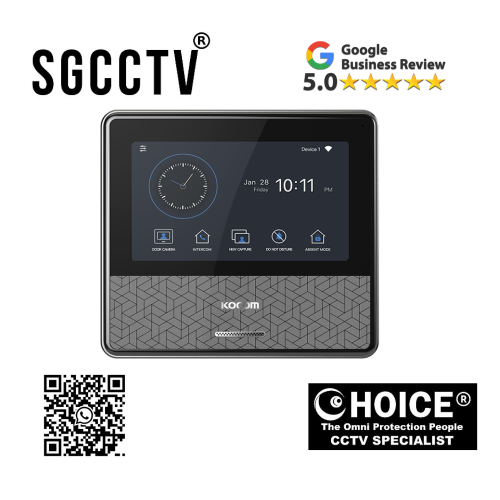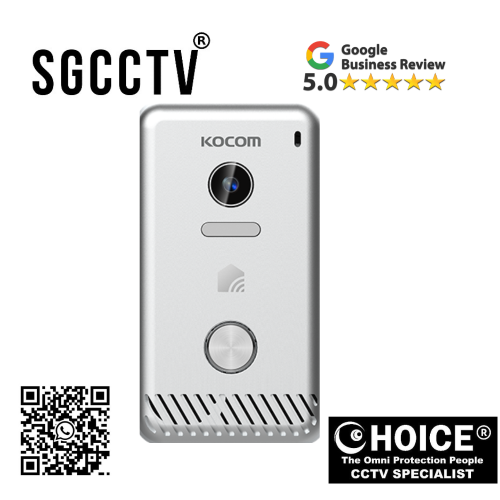

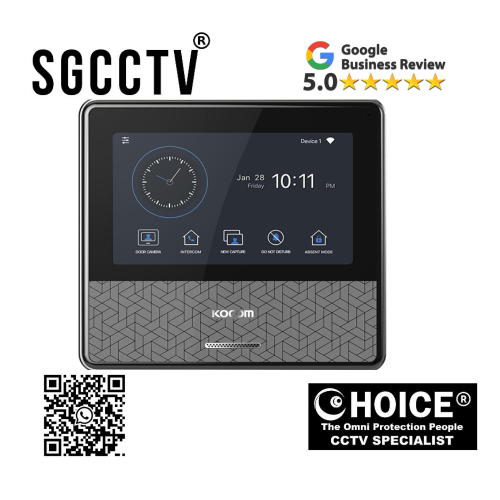
KOCOM INTERCOM KC-S81MIP IP Door Camera (1M Pixel) / 2-Wire 7 Color digital LCD monitor Easy to operate using OSD menu and icon button NEW DB
$290.00
Supply and Maintenance HIKVISION CCTV IP Cameras, NVR, Turbo HD TVI Cameras, DVR, PTZ Cameras,
Access Control System, Video Intercom.
Sim Lim Square 02-81 10am-7pm Daily.
Whatsapp Enquiry Project +65 98534404, Technical Support +65 81120788, Site Visit Maintenance +65 81985572.
KOCOM INTERCOM KC-S81MIP IP Door Camera (1M Pixel) / 2-Wire 7 Color digital LCD monitor Easy to operate using OSD menu and icon button NEW
In today’s smart security landscape, protecting your home, condominium, office, or commercial property begins at the entrance. Your front gate, main door, office entry, or apartment access point is where visitor verification, security screening, and first-contact communication happen—and in modern environments, a simple analog doorbell is no longer enough.
The KOCOM KC-S81MIP IP Door Camera (1M Pixel) / 2-Wire is designed to transform ordinary entrances into smart security checkpoints by combining high-resolution video transmission, house call communication, night-time visitor identification, simple 2-wire installation, and compatibility with a 7-inch color digital LCD monitor featuring an easy-to-operate OSD menu and icon button interface.
Built as part of KOCOM’s advanced smart IP videophone ecosystem, the KC-S81MIP offers a practical and future-ready solution for users who want better security, clearer visitor identification, simplified installation, and modern communication convenience without the complexity of full network cabling. Official KOCOM specifications highlight 2-wire non-polarized wiring, 110° diagonal lens angle, DC 27V power from monitor, and support for KOCOM’s 7” WiFi/IP monitor ecosystem.
For homeowners, HDB residents, condo owners, offices, clinics, warehouses, and commercial operators, the KC-S81MIP is not just a door camera—it is a smart entry security device that combines visitor management, communication, and modern usability into one integrated system.
What Is the KOCOM KC-S81MIP?
The KC-S81MIP is an IP door camera / outdoor door station designed for use with KOCOM’s compatible indoor monitors such as the KCV-S701IP2W series.
Core Functions:
Main capabilities:
✔ House call function
✔ High-resolution video transmission
✔ Night-time visitor identification
✔ 2-wire non-polarized connection
✔ 1MP camera system
✔ 110° wide-angle lens
✔ OSD menu compatibility through monitor
✔ Easy icon-button operation
✔ Surface-mounted design
Unlike traditional analog systems that often require more complicated or polarized wiring, the KC-S81MIP is engineered for simpler deployment while maintaining smart intercom capability.
KOCOM INTERCOM KC-S81MIP IP Door Camera (1M Pixel) / 2-Wire 7 Color digital LCD monitor Easy to operate using OSD menu and icon button NEWWhy the KC-S81MIP Stands Out in Modern Security
1. Simple 2-Wire Installation – Easier Upgrades for Existing Homes
One of the biggest advantages of this model is its 2-wire non-polarized design.
Why this matters:
Benefits:
✔ Easier retrofit installation
✔ Less wall hacking
✔ Lower labor complexity
✔ More practical for upgrades
✔ Useful for replacing older intercom systems
Real-world value:
For many homeowners and building managers, 2-wire systems can significantly reduce renovation difficulty compared to more infrastructure-heavy systems. KOCOM’s own manual specifies non-polarized 2-wire camera wiring for easier connection.
2. High-Resolution 1MP Video for Better Visitor Verification
Security starts with seeing clearly.
The KC-S81MIP offers:
Advantages:
✔ Better facial recognition
✔ Delivery verification
✔ Visitor screening
✔ Improved entrance awareness
✔ Safer access decisions
Why it matters:
A higher-quality entrance image can improve safety compared to lower-resolution legacy systems.
3. Wide 110° Lens Coverage
KOCOM lists a 110° diagonal lens angle, which provides wider entrance coverage.
Benefits:
Wider view means:
✔ Better side visibility
✔ Improved visitor positioning
✔ More reliable entrance monitoring
✔ Reduced blind spots
Why:
A wider viewing angle is especially useful in:
Ideal locations:
- Condo corridors
- Landed gates
- Office entrances
- Delivery points
KOCOM INTERCOM KC-S81MIP IP Door Camera (1M Pixel) / 2-Wire 7 Color digital LCD monitor Easy to operate using OSD menu and icon button NEW4. Easy OSD Menu + Icon Button User Interface
This is one of the strongest user-experience features.
OSD (On-Screen Display) benefits:
Makes it easier to:
✔ Configure settings
✔ Adjust sound
✔ Manage WiFi/IP settings (monitor dependent)
✔ Monitor door stations
✔ Access captured images
✔ Change language/settings
KOCOM’s monitor ecosystem uses menu-driven icon controls for easier day-to-day use.
Why this matters:
For families, elderly users, office staff, or installers, easier navigation reduces frustration and improves long-term usability.
5. Night-Time Visitor Identification
Official product functions include night-time identification.
Why important:
Night security helps:
✔ Identify late-night visitors
✔ Screen suspicious activity
✔ Improve gate safety
✔ Strengthen home protection
6. Slim Surface-Mounted Design
Dimensions are approximately 70 x 125 x 21 mm, making it relatively compact for modern entrances.
Advantages:
Benefits:
✔ Modern appearance
✔ Fits narrow spaces
✔ Practical for gate pillars
✔ Cleaner aesthetic
KOCOM INTERCOM KC-S81MIP IP Door Camera (1M Pixel) / 2-Wire 7 Color digital LCD monitor Easy to operate using OSD menu and icon button NEWWhy Buy the KOCOM KC-S81MIP?
Better Security
Visual confirmation + visitor call.
Easier Installation
2-wire simplicity.
Smart Upgrade
Ideal for replacing old intercom systems.
User-Friendly
OSD + icon controls.
Practical Modernization
Works well for residential and light commercial environments.
Who Should Buy This Product?
Residential:
Great for:
- HDB flats
- Condominiums
- Apartments
- Landed homes
Commercial:
Suitable for:
- Offices
- Clinics
- Tuition centers
- Warehouses
Developers:
Useful for:
- Renovation projects
- Smart home upgrades
- Mid-tier security improvements
Installation Flexibility
According to KOCOM’s manual:
Key practical points:
✔ 2-wire non-polarized
✔ Surface mount
✔ Power from monitor
✔ Compatible with KCV-S701IP2W ecosystem
KOCOM INTERCOM KC-S81MIP IP Door Camera (1M Pixel) / 2-Wire 7 Color digital LCD monitor Easy to operate using OSD menu and icon button NEWCommon Problems & Solutions
Problem: Poor Image
Cause:
Backlight / poor placement
Fix:
Avoid direct sunlight (recommended by KOCOM manual).
Problem: No Power
Cause:
Monitor wiring issue
Fix:
Check DC feed from monitor
Problem: Weak Night View
Cause:
Poor installation angle
Fix:
Adjust mounting height
Problem: No Call
Cause:
2-wire termination issue
Fix:
Verify non-polarized wiring integrity
KC-S81MIP vs Traditional Doorbells
Major Advantages:
✔ Video
✔ 2-wire smart intercom
✔ OSD controls
✔ Night visibility
✔ Wider lens
✔ Smart monitor ecosystem
KOCOM INTERCOM KC-S81MIP IP Door Camera (1M Pixel) / 2-Wire 7 Color digital LCD monitor Easy to operate using OSD menu and icon button NEWDesign & Build Quality
KOCOM’s ecosystem emphasizes:
Strengths:
✔ Smart residential integration
✔ Cleaner communication
✔ Retrofit practicality
✔ User-friendly control
Long-Term Value
The KC-S81MIP can improve:
Property benefits:
✔ Security
✔ Entrance professionalism
✔ Family safety
✔ Property modernization
Why This Product Is Especially Good for Retrofit Projects
Many users want better security without full rewiring.
KC-S81MIP helps because:
Benefits:
✔ 2-wire
✔ Slim profile
✔ Smart functionality
✔ Lower disruption
Final Conclusion
The KOCOM KC-S81MIP IP Door Camera (1M Pixel) / 2-Wire is a practical, security-focused, and user-friendly entrance communication solution for modern homes and businesses.
It combines:
✔ High-resolution video
✔ 2-wire simplicity
✔ 110° lens coverage
✔ Night visitor identification
✔ Easy OSD menu operation
✔ 7” smart monitor compatibility
For anyone seeking a smart intercom upgrade without excessive installation complexity, the KC-S81MIP offers a compelling balance of security, convenience, and modern usability.
If you want better visitor verification, easier operation, and a smarter entrance without the heavier infrastructure of larger systems, the KC-S81MIP is a strong long-term investment.
KOCOM INTERCOM KC-S81MIP IP Door Camera (1M Pixel) / 2-Wire 7 Color digital LCD monitor Easy to operate using OSD menu and icon button NEWKOCOM KC-S81MIP IP Door Camera (1M Pixel) / 2-Wire – Complete Setup Guide + How This Product Is Made
The KOCOM KC-S81MIP is designed as a smart 2-wire IP door camera for users who want high-resolution visitor monitoring, easier retrofit installation, modern 7” LCD compatibility, and simple OSD/icon-button operation. Because it uses a 2-wire non-polarized connection, this model is especially attractive for homes, condos, offices, and renovation projects where full Ethernet rewiring may not be practical.
This guide covers:
You’ll learn:
✔ How to physically install it
✔ How to connect it properly
✔ How to pair it with KOCOM indoor monitors
✔ How to configure it
✔ Common setup mistakes
✔ How the product is engineered and manufactured
PART 1 – HOW TO SET UP KOCOM KC-S81MIP
Before You Start – What You Need
Required:
Main equipment:
- KOCOM KC-S81MIP door camera
- Compatible KOCOM indoor monitor (such as KCV series)
- 2-wire cable
- Screwdriver
- Drill
- Wall plugs
- Mounting screws
- Power via monitor system
- Optional smartphone integration (depending monitor ecosystem)
KOCOM INTERCOM KC-S81MIP IP Door Camera (1M Pixel) / 2-Wire 7 Color digital LCD monitor Easy to operate using OSD menu and icon button NEWStep 1: Choose the Best Outdoor Installation Location
Recommended:
Install:
- Main gate
- Front door
- Condo entrance
- Office entrance
Ideal mounting height:
Best:
140–150cm from ground for face-level visibility
Avoid:
✘ Direct sunlight
✘ Heavy rain exposure
✘ Strong reflective surfaces
Why placement matters:
Proper placement improves:
✔ Facial recognition
✔ Night identification
✔ Visitor positioning
✔ Better camera angle
KOCOM INTERCOM KC-S81MIP IP Door Camera (1M Pixel) / 2-Wire 7 Color digital LCD monitor Easy to operate using OSD menu and icon button NEWStep 2: Mount the Surface Bracket
The KC-S81MIP is surface-mounted.
Process:
Steps:
- Mark screw holes
- Drill wall
- Insert anchors
- Pull 2-wire cable through
- Mount bracket
- Secure camera
Installer Tip:
For better durability:
✔ Waterproof sealant
✔ Outdoor conduit
✔ Corrosion-resistant screws
Step 3: Connect the 2-Wire Non-Polarized Cable
This is one of the biggest advantages of this model.
Key point:
Non-polarized means:
You do not need to worry about +/- polarity direction like many DC systems.
Benefits:
Easier:
✔ Faster installation
✔ Retrofit projects
✔ Reduced wiring mistakes
Wiring:
Indoor monitor ↔ KC-S81MIP via 2-wire connection
Important:
Check:
✔ Secure terminal connection
✔ Cable continuity
✔ No shorts
KOCOM INTERCOM KC-S81MIP IP Door Camera (1M Pixel) / 2-Wire 7 Color digital LCD monitor Easy to operate using OSD menu and icon button NEWStep 4: Connect to Compatible Indoor Monitor
The KC-S81MIP is designed to work with KOCOM’s indoor system.
Indoor monitor setup:
Menu:
Settings → Device Registration → Door Camera
Pairing:
Steps:
- Power monitor
- Register door station
- Confirm call station
- Test camera feed
Step 5: Power On the System
Power is typically delivered through the monitor ecosystem.
Once powered:
Check:
✔ Door camera LED
✔ Indoor monitor detection
✔ House call function
Step 6: Configure OSD Menu
KOCOM’s user-friendly OSD menu allows easier operation.
Common settings:
Configure:
✔ Brightness
✔ Ring volume
✔ Language
✔ Door camera settings
✔ Monitor timing
Why this matters:
OSD simplifies long-term daily usability.
Step 7: Test the House Call Function
Test:
Visitor presses call button:
✔ Monitor rings
✔ Live image appears
✔ Audio communication works
KOCOM INTERCOM KC-S81MIP IP Door Camera (1M Pixel) / 2-Wire 7 Color digital LCD monitor Easy to operate using OSD menu and icon button NEWStep 8: Night-Time Verification Test
Because this model supports night visitor identification:
Test:
At night:
✔ Visitor face clarity
✔ Lens angle
✔ Entrance lighting
Step 9: Door Unlock Integration (If Installed)
If paired with:
Possible systems:
- Electric strike
- Gate lock
- Relay
Check:
Ensure:
✔ Relay compatibility
✔ Monitor settings
✔ Safe unlock timing
Common Setup Problems & Fixes
Problem: No Video
Cause:
Wrong monitor pairing
Fix:
Re-register device
Problem: No Call Trigger
Cause:
Loose 2-wire
Fix:
Check terminals
KOCOM INTERCOM KC-S81MIP IP Door Camera (1M Pixel) / 2-Wire 7 Color digital LCD monitor Easy to operate using OSD menu and icon button NEWProblem: Weak Night Image
Cause:
Poor placement
Fix:
Adjust camera angle
Problem: OSD Not Responding
Cause:
Monitor compatibility or settings
Fix:
Check firmware/manual
Best Use Cases
HDB / Condo:
Great because:
✔ Retrofit friendly
✔ Less wall hacking
Landed:
Better with:
✔ Gate cover
✔ Weather protection
Office:
Useful for:
✔ Reception entry
✔ Warehouse visitor screening
PART 2 – HOW THE KOCOM KC-S81MIP IS MADE
Stage 1: Product Design Engineering
Before production begins, engineers define:
Goals:
✔ Visitor security
✔ Retrofit simplicity
✔ 2-wire convenience
✔ Smart communication
✔ Outdoor durability
KOCOM INTERCOM KC-S81MIP IP Door Camera (1M Pixel) / 2-Wire 7 Color digital LCD monitor Easy to operate using OSD menu and icon button NEWStage 2: Housing Production
The outer shell is typically made from:
Materials:
- ABS/polycarbonate
- UV-resistant materials
- Weather-protective casing
Process:
Injection molding:
- Plastic heating
- Mold injection
- Cooling
- Finishing
Why:
This creates:
✔ Slim design
✔ Weather resistance
✔ Installation practicality
Stage 3: Camera Module Manufacturing
Includes:
Core parts:
✔ 1MP CMOS sensor
✔ Wide-angle lens
✔ Image processor
✔ Protective lens cover
Why:
Better lens engineering improves:
✔ Visitor clarity
✔ Wider entrance view
✔ Night recognition
Stage 4: PCB Electronics Production
The internal PCB controls:
Functions:
✔ House call
✔ Audio
✔ Video
✔ 2-wire communication
✔ Signal processing
KOCOM INTERCOM KC-S81MIP IP Door Camera (1M Pixel) / 2-Wire 7 Color digital LCD monitor Easy to operate using OSD menu and icon button NEWPCB Manufacturing:
SMT process:
- Circuit printing
- Component placement
- Soldering
- Firmware flashing
Stage 5: Call Button Engineering
The call button must withstand:
Real-world use:
✔ Rain
✔ Frequent pressing
✔ Dust
✔ Outdoor wear
Stage 6: Firmware Development
Firmware manages:
Core operations:
✔ Call trigger
✔ Video signal
✔ Audio
✔ Monitor communication
Why firmware matters:
Good firmware = smoother operation
Stage 7: Weatherproofing
Because this is outdoor:
Protection includes:
✔ Sealing
✔ Moisture resistance
✔ UV durability
Stage 8: Quality Control
Each unit is tested for:
Hardware:
✔ Camera
✔ Audio
✔ Button
✔ Wiring
Environmental:
✔ Heat
✔ Moisture
✔ Stability
KOCOM INTERCOM KC-S81MIP IP Door Camera (1M Pixel) / 2-Wire 7 Color digital LCD monitor Easy to operate using OSD menu and icon button NEWProduct Lifespan
With proper installation:
Typical:
✔ 5–8 years residential
✔ 3–6 years commercial
Why Manufacturing Quality Matters
Better manufacturing improves:
You gain:
✔ Stable visitor calls
✔ Better image
✔ Lower failure risk
✔ Longer lifespan
Final Conclusion
The KOCOM KC-S81MIP is designed for users who want:
Main strengths:
✔ Easier 2-wire installation
✔ Smart visitor management
✔ Better retrofit practicality
✔ Modern OSD operation
✔ Reliable security
Its design combines practical installation simplicity with modern IP-style communication, making it a strong option for upgrading older intercom systems without excessive rewiring.
Whether for homes, condos, or offices, proper installation plus quality manufacturing make this product a reliable long-term entrance security solution.
KOCOM KC-S81MIP vs Hikvision Video Intercom – Which Is Better for Homes, Condos, Retrofits & Offices?
If you are comparing the KOCOM KC-S81MIP (1MP / 2-Wire IP Door Camera) against a typical Hikvision villa or 2-wire video intercom door station (such as DS-KB2411/2421 series or similar Hikvision residential door stations), the better choice depends on your installation type, retrofit difficulty, smart ecosystem needs, and long-term expansion plans.
KOCOM’s KC-S81MIP is built around 2-wire simplicity, 1MP video, slim surface mounting, night-time visitor ID, and compatibility with KOCOM’s WiFi/IP 7-inch indoor monitors. Hikvision’s systems are often stronger in broader CCTV ecosystem integration, IP65-rated weather protection on many models, larger enterprise support, and wider access-control scalability.
Quick Overview
KOCOM KC-S81MIP
Best for:
✔ Retrofit homes
✔ Condo upgrades
✔ Existing 2-wire replacement
✔ Simpler installation
✔ Residential users
✔ KOCOM WiFi monitor ecosystem
Hikvision Video Intercom
Best for:
✔ CCTV-heavy properties
✔ Office systems
✔ Larger projects
✔ Hikvision NVR users
✔ Access control expansion
✔ Enterprise scalability
KOCOM INTERCOM KC-S81MIP IP Door Camera (1M Pixel) / 2-Wire 7 Color digital LCD monitor Easy to operate using OSD menu and icon button NEWCore Product Comparison Table
| Feature | KOCOM KC-S81MIP | Hikvision DS-KB2411 / Similar Residential Door Station |
|---|---|---|
| Camera Resolution | 1MP class high-resolution | 720 × 576 (model dependent) |
| Wiring | 2-wire non-polarized | Often 4-wire or model-dependent 2-wire/IP |
| Installation Type | Retrofit-friendly | Varies by model |
| Night Vision | Yes | IR supplement |
| Lens Coverage | Wide-angle (~110° class ecosystem) | Standard pinhole style |
| Weather Rating | Weatherproof seller description, but some listings note non-IP-rated specifics | IP65 on many Hikvision models |
| Indoor Ecosystem | KOCOM 7” WiFi/IP monitor | Hikvision indoor stations + Hik-Connect |
| Smart App | KOCOM ecosystem dependent | Hik-Connect ecosystem |
| Best Strength | Easy residential retrofit | Bigger ecosystem |
1. Installation Simplicity – KOCOM Advantage
One of KOCOM’s biggest strengths is its 2-wire non-polarized design, which is especially attractive for replacing older analog intercom systems without major rewiring. Seller documentation specifically emphasizes simple 2-wire compatibility with KOCOM WiFi monitors.
Why this matters:
Better for:
✔ Existing condos
✔ Older homes
✔ Apartments
✔ Faster replacement projects
2. Ecosystem Depth – Hikvision Advantage
Hikvision generally offers broader:
Advantages:
✔ CCTV integration
✔ Hik-Connect cloud ecosystem
✔ NVR compatibility
✔ Access control range
✔ Commercial deployment flexibility
Why:
If your property already uses Hikvision CCTV, NVR, or access systems, Hikvision may create a more unified infrastructure.
KOCOM INTERCOM KC-S81MIP IP Door Camera (1M Pixel) / 2-Wire 7 Color digital LCD monitor Easy to operate using OSD menu and icon button NEW3. Video Quality & Residential Use
KOCOM emphasizes practical high-resolution residential monitoring with house-call functionality. Hikvision’s DS-KB2411 focuses on 720p-class video with IR and strong baseline visitor communication.
Practical difference:
KOCOM:
Better for straightforward home visitor management
Hikvision:
Better if integrated into larger smart surveillance
4. Weather & Outdoor Durability
Hikvision often has an advantage here because many models explicitly list IP65 weather protection and aluminum alloy housing.
Why this matters:
Hikvision may be stronger for:
✔ Heavy rain exposure
✔ Outdoor gates
✔ Harsh environments
KOCOM:
Can still work well for sheltered entrances, condos, and standard residential installations, but buyers should verify environmental suitability based on specific deployment.
5. User Interface – KOCOM Strength
KOCOM’s ecosystem focuses strongly on:
Home usability:
✔ OSD menu
✔ Icon buttons
✔ Simpler family-friendly operation
Why:
This can be especially useful for:
- Elderly users
- Family homes
- Less technical homeowners
6. Cost & Upgrade Logic
KOCOM:
Often makes sense if:
✔ You already use KOCOM
✔ You want simple replacement
✔ You need easier installation
Hikvision:
Often makes sense if:
✔ You want broader security system growth
✔ You plan CCTV expansion
✔ You need stronger installer ecosystem
KOCOM INTERCOM KC-S81MIP IP Door Camera (1M Pixel) / 2-Wire 7 Color digital LCD monitor Easy to operate using OSD menu and icon button NEWCommon Real-World Drawbacks
KOCOM:
Possible limitations:
✘ Smaller ecosystem
✘ More residential-focused
✘ Verify weather suitability
Hikvision:
Possible limitations:
✘ More installation complexity
✘ Can be overkill for simple homes
✘ Broader systems may cost more
Best Use Case Breakdown
Choose KOCOM KC-S81MIP If:
You want:
✔ Easier 2-wire retrofit
✔ Condo / HDB replacement
✔ Simple smart upgrade
✔ Family-friendly operation
✔ Less renovation
Choose Hikvision If:
You need:
✔ CCTV integration
✔ Larger office deployment
✔ Stronger weather rating
✔ Bigger ecosystem
✔ Commercial expansion
KOCOM INTERCOM KC-S81MIP IP Door Camera (1M Pixel) / 2-Wire 7 Color digital LCD monitor Easy to operate using OSD menu and icon button NEWFinal Verdict
Best for retrofit homes & easier upgrades:
KOCOM KC-S81MIP
Why: Easier 2-wire installation, residential practicality, simpler user experience.
Best for larger smart security ecosystems:
Hikvision
Why: Better CCTV synergy, stronger weatherized model options, broader expansion.
Bottom Line
If your priority is:
“I want to upgrade my current home intercom easily”
→ KOCOM is often the smarter practical choice
If your priority is:
“I want a bigger CCTV + access + enterprise ecosystem”
→ Hikvision may be the stronger long-term platform
KOCOM INTERCOM KC-S81MIP IP Door Camera (1M Pixel) / 2-Wire 7 Color digital LCD monitor Easy to operate using OSD menu and icon button NEW
Contact Choicecycle (SGCCTV Singapore)
For more information about the KOCOM KC-S81MIP, professional installation, troubleshooting, or integrated smart intercom and CCTV solutions:
SGCCTV Choicecycle
Sim Lim Square #02-81, Singapore
WhatsApp: +65 9853 4404
Email: enquiry@choicecycle.com.sg
Website: https://sgcctv.com.sg
Operating Hours: 11 AM – 8 PM

Donec accumsan auctor iaculis. Sed suscipit arcu ligula, at egestas magna molestie a. Proin ac ex maximus, ultrices justo eget, sodales orci. Aliquam egestas libero ac turpis pharetra, in vehicula lacus scelerisque. Vestibulum ut sem laoreet, feugiat tellus at, hendrerit arcu..


Nunc lacus elit, faucibus ac laoreet sed, dapibus ac mi. Maecenas eu ante a elit tempus fermentum. Aliquam commodo tincidunt semper. Phasellus accumsan, justo ac mollis pharetra, ex dui pharetra nisl, a scelerisque ipsum nulla ac sem. Cras eu risus urna. Duis lorem sapien, congue eget nisl sit amet, rutrum faucibus elit.
Donec accumsan auctor iaculis. Sed suscipit arcu ligula, at egestas magna molestie a. Proin ac ex maximus, ultrices justo eget, sodales orci. Aliquam egestas libero ac turpis pharetra, in vehicula lacus scelerisque. Vestibulum ut sem laoreet, feugiat tellus at, hendrerit arcu.
Nunc lacus elit, faucibus ac laoreet sed, dapibus ac mi. Maecenas eu ante a elit tempus fermentum. Aliquam commodo tincidunt semper. Phasellus accumsan, justo ac mollis pharetra, ex dui pharetra nisl, a scelerisque ipsum nulla ac sem. Cras eu risus urna. Duis lorem sapien, congue eget nisl sit amet, rutrum faucibus elit.