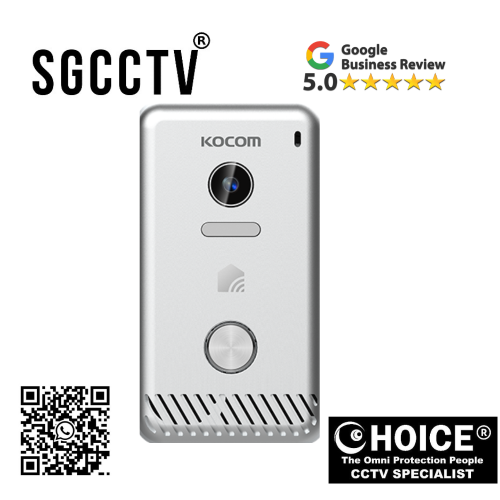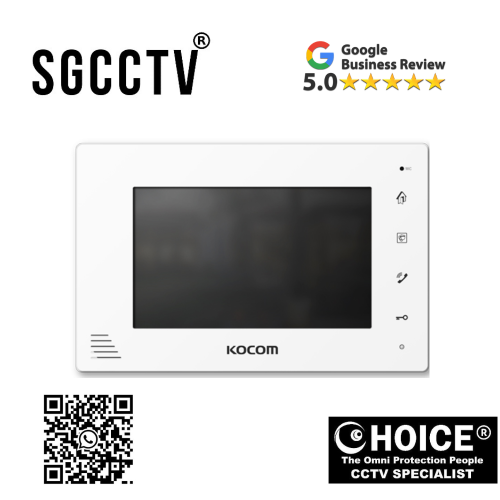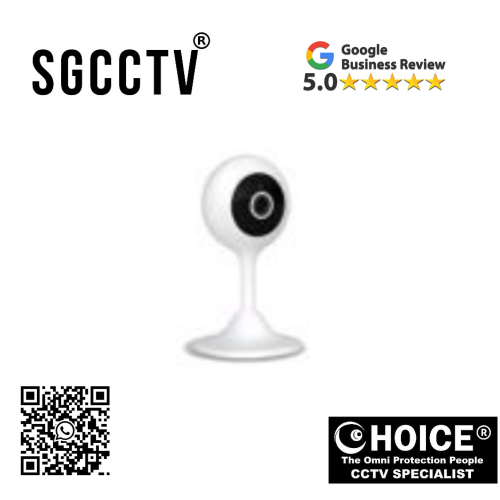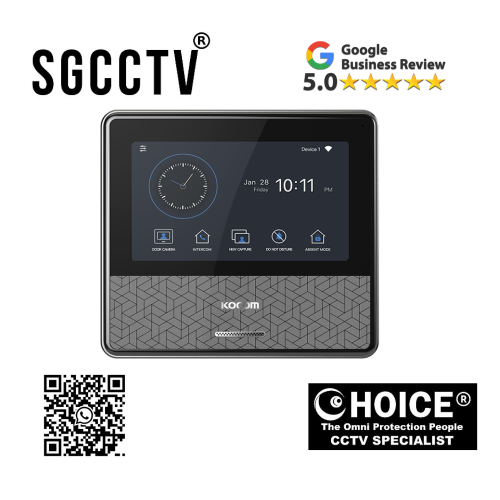
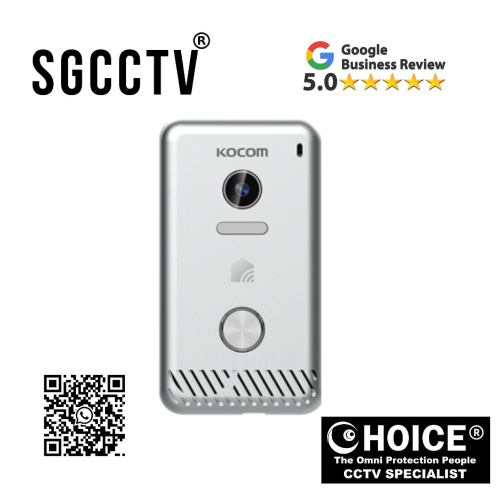

KOCOM INTERCOM KCV-S701IP2W (AC) IP Video Phone / WiFi Type (AC Power) 7″ Color digital LCD monitor Security sensors adaptable NEW DB
$615.00
Supply and Maintenance HIKVISION CCTV IP Cameras, NVR, Turbo HD TVI Cameras, DVR, PTZ Cameras,
Access Control System, Video Intercom.
Sim Lim Square 02-81 10am-7pm Daily.
Whatsapp Enquiry Project +65 98534404, Technical Support +65 81120788, Site Visit Maintenance +65 81985572.
KOCOM INTERCOM KCV-S701IP2W (AC) IP Video Phone / WiFi Type (AC Power) 7″ Color digital LCD monitor Security sensors adaptable NEW
In today’s connected world, property security is no longer limited to locks, peepholes, or traditional audio intercom systems. Modern homes, condominiums, offices, and commercial spaces now require smarter, more flexible, and more connected security solutions that not only allow communication with visitors but also provide visual verification, wireless accessibility, sensor integration, and future-ready smart property control.
The KOCOM KCV-S701IP2W (AC) IP Video Phone / WiFi Type (AC Power) is a premium smart intercom monitor engineered to deliver exactly that. Combining a sleek 7-inch color digital LCD display, IP-based communication, WiFi connectivity, AC-powered operation, and security sensor adaptability, this advanced indoor monitor is designed to serve as the intelligent command center of your property’s entrance security system.
Unlike older wired-only or analog systems, the KCV-S701IP2W offers a more modern approach by integrating wireless networking and adaptable security architecture into one elegant platform. Whether you are a homeowner looking to improve family safety, a condo owner upgrading to smarter visitor control, or a business seeking professional-grade access communication, this device delivers convenience, security, and flexibility.
KOCOM, a recognized leader in intercom and smart communication systems, designed this model for users who want:
Key user priorities:
✔ High-quality visitor video
✔ Smart wireless capability
✔ AC-powered stability
✔ Security sensor integration
✔ User-friendly touchscreen control
✔ Smart property modernization
This model is especially appealing for properties where PoE may not be practical, but strong WiFi connectivity and AC power accessibility make installation simpler.
What Is the KOCOM KCV-S701IP2W (AC)?
The KCV-S701IP2W (AC) is a 7-inch indoor IP video phone monitor designed to work with KOCOM-compatible door stations and security systems.
Main Functions:
It provides:
- 7” color digital LCD monitor
- WiFi network connectivity
- AC power operation
- Visitor video communication
- Two-way audio
- Security sensor adaptability
- House call communication
- Smart intercom functionality
- Indoor monitoring
- Enhanced access management
This product acts as the main indoor interface for:
Applications:
- Homes
- Apartments
- Condominiums
- Offices
- Small businesses
- Smart building projects
KOCOM INTERCOM KCV-S701IP2W (AC) IP Video Phone / WiFi Type (AC Power) 7″ Color digital LCD monitor Security sensors adaptable NEW
Why Modern Properties Need Smart Video Intercom Systems
Traditional systems often have major limitations:
Common problems:
✘ Audio only
✘ No visual confirmation
✘ Limited scalability
✘ No wireless convenience
✘ Weak integration
The KCV-S701IP2W solves these challenges by offering:
Key upgrades:
✔ IP communication
✔ WiFi flexibility
✔ 7-inch display
✔ Security sensor support
✔ Smart property compatibility
Key Features of the KOCOM KCV-S701IP2W (AC)
1. 7-Inch Color Digital LCD Display
The large 7-inch display is one of the strongest features.
Benefits:
Users gain:
- Clear visitor identification
- Better visibility for elderly users
- Improved user experience
- Premium modern appearance
- Easier menu navigation
Why it matters:
When verifying visitors, package deliveries, or unknown guests, visual clarity significantly improves security confidence.
KOCOM INTERCOM KCV-S701IP2W (AC) IP Video Phone / WiFi Type (AC Power) 7″ Color digital LCD monitor Security sensors adaptable NEW
2. WiFi Connectivity – Flexible Wireless Convenience
One of the defining advantages of this model is WiFi capability.
WiFi Benefits:
Allows:
- Wireless network communication
- Flexible installation options
- Reduced structured cabling dependency
- Smart home integration potential
- More convenient upgrades
Ideal for:
Best suited for:
- Existing homes
- Condo renovations
- Apartments
- Offices
- Retrofits
Why this matters:
WiFi can simplify installation in environments where running Ethernet is difficult.
3. AC Power Type Stability
Unlike PoE systems that rely on Ethernet power delivery, this model uses direct AC power.
Advantages:
Benefits:
✔ Stable power source
✔ Suitable where AC access is easy
✔ No PoE switch needed
✔ Good retrofit compatibility
Best for:
Useful in:
- Existing wall power environments
- Residential upgrades
- WiFi-first smart homes
4. Security Sensors Adaptable
This feature expands the product beyond visitor communication.
Security Integration:
Can potentially work with:
- Door sensors
- Window sensors
- Motion sensors
- Alarm triggers
- Entry notifications
Why this is valuable:
It turns the monitor from a communication device into a broader security interface.
KOCOM INTERCOM KCV-S701IP2W (AC) IP Video Phone / WiFi Type (AC Power) 7″ Color digital LCD monitor Security sensors adaptable NEW
5. IP-Based Smart Communication
IP architecture improves:
Compared to analog:
✔ Better communication
✔ Cleaner signal
✔ Future scalability
✔ Integration flexibility
Why Buy KOCOM KCV-S701IP2W (AC)?
Better Home Security
Visual + communication + sensors
Flexible Installation
WiFi + AC power
Smart Upgrade Potential
Supports modern connected living
Elegant User Interface
Large touchscreen display
More Than an Intercom
Acts as security management point
Who Should Buy This Product?
Residential:
Excellent for:
- HDB flats
- Condos
- Apartments
- Landed homes
- Smart homeowners
KOCOM INTERCOM KCV-S701IP2W (AC) IP Video Phone / WiFi Type (AC Power) 7″ Color digital LCD monitor Security sensors adaptable NEW
Commercial:
Good for:
- Offices
- Clinics
- Tuition centers
- Small retail
Property Developers:
Useful for:
- Smart apartment projects
- Security-enhanced developments
Installation Advantages
Because it uses:
WiFi + AC:
Installation can be easier in retrofit spaces where Ethernet is limited.
Typical Setup:
- Mount monitor
- Connect AC power
- Connect WiFi
- Pair with door station
- Configure sensors
- Test communication
Common Problems & Solutions
Problem: WiFi Disconnect
Cause:
Weak router signal
Fix:
Use stronger router / extender
Problem: No Video
Cause:
Pairing issue
Fix:
Reconfigure device registration
Problem: Sensor Not Responding
Cause:
Wrong configuration
Fix:
Check sensor protocol compatibility
KOCOM INTERCOM KCV-S701IP2W (AC) IP Video Phone / WiFi Type (AC Power) 7″ Color digital LCD monitor Security sensors adaptable NEW
Problem: AC Power Failure
Cause:
Adapter issue
Fix:
Verify voltage
KCV-S701IP2W vs Traditional Intercom
Major Advantages:
✔ Wireless flexibility
✔ Smart security
✔ Bigger display
✔ Sensor adaptability
✔ Better convenience
Design & Build Quality
KOCOM products are often recognized for:
Strengths:
- Modern styling
- User-friendly operation
- Practical engineering
- Residential suitability
KOCOM INTERCOM KCV-S701IP2W (AC) IP Video Phone / WiFi Type (AC Power) 7″ Color digital LCD monitor Security sensors adaptable NEW
Long-Term Value
This product can improve:
Property benefits:
✔ Security
✔ Visitor management
✔ Convenience
✔ Smart property perception
Why Security Sensor Adaptability Matters
Many intercom systems only answer calls.
This model can potentially become part of:
Broader systems:
- Intrusion alerts
- Entry monitoring
- Family safety
- Elderly care awareness
Final Conclusion
The KOCOM KCV-S701IP2W (AC) IP Video Phone / WiFi Type (AC Power) is an excellent option for users seeking a modern, flexible, and smart indoor video intercom solution.
It combines:
✔ Large 7” visual display
✔ WiFi convenience
✔ AC power reliability
✔ Security sensor adaptability
✔ Smart visitor communication
✔ Modern design
For homeowners, offices, and smart property developers, it offers a balanced solution that blends communication, convenience, and expanded security potential.
If you want a modern KOCOM system without PoE dependency—while still benefiting from IP communication and smart features—the KCV-S701IP2W is a strong and practical investment.
Why Buy the KOCOM KCV-S701IP2W (AC) IP Video Phone / WiFi Type?
The KOCOM KCV-S701IP2W (AC) is a smart indoor IP videophone built for people who want stronger home security, wireless flexibility, smartphone access, and future-ready visitor management without depending on PoE infrastructure. KOCOM lists key features including a 7-inch digital LCD, WiFi (IEEE 802.11 g/n), smartphone call + door open, door camera monitoring, security sensor adaptability, and KOCOM HOME app integration.
KOCOM INTERCOM KCV-S701IP2W (AC) IP Video Phone / WiFi Type (AC Power) 7″ Color digital LCD monitor Security sensors adaptable NEW
1. You Can Answer Visitors From Your Smartphone
One of the biggest reasons people choose this model is remote convenience.
What it does:
You can:
✔ Receive visitor calls on your phone
✔ Monitor your door camera remotely
✔ Open compatible doors remotely
✔ Stay connected while outside
Why this matters:
This is ideal for:
Perfect for:
- Working adults
- Parents
- Condo owners
- Delivery monitoring
- Airbnb / rental hosts
- Small office owners
Real benefit:
You are not forced to be physically at the indoor monitor to manage your entrance.
KOCOM INTERCOM KCV-S701IP2W (AC) IP Video Phone / WiFi Type (AC Power) 7″ Color digital LCD monitor Security sensors adaptable NEW
2. WiFi Makes Installation More Flexible
Unlike PoE versions that need Ethernet power delivery, the KCV-S701IP2W uses WiFi plus AC power.
Major benefits:
Easier for:
✔ Existing homes
✔ Condo renovations
✔ Apartments
✔ Retrofit upgrades
✔ Places where running LAN cable is difficult
Why this is good:
For many homeowners, wireless flexibility reduces:
Reduced:
- Wall hacking
- Extra cable routing
- PoE switch cost
- Complex network setup
Bottom line:
If your property already has stable WiFi, setup can be easier.
3. Large 7-Inch Display Improves Security Decisions
A larger monitor gives better visual clarity.
Benefits:
Better for:
✔ Facial verification
✔ Visitor screening
✔ Elderly users
✔ Family safety
✔ Delivery verification
Why this matters:
A clear screen reduces guesswork before unlocking doors.
4. Security Sensor Adaptability Adds More Protection
This model is not only for visitor calls.
Security sensor support can enhance:
Potential integration:
✔ Door/window alerts
✔ Entry awareness
✔ Home alarm workflows
✔ Expanded security systems
Why this matters:
It can become part of a broader smart security setup rather than just a video door phone.
KOCOM INTERCOM KCV-S701IP2W (AC) IP Video Phone / WiFi Type (AC Power) 7″ Color digital LCD monitor Security sensors adaptable NEW
5. KOCOM HOME App Integration
KOCOM includes app ecosystem support.
This can help with:
Smart features:
✔ Monitoring
✔ Notifications
✔ Remote control
✔ Device management
Why this is important:
Smart app ecosystems improve long-term convenience and modern usability.
6. AC Power Is Practical for Many Homes
This version supports AC 100V–240V power.
Why that’s useful:
Good for:
✔ Standard residential power
✔ Existing wall power
✔ No PoE injector needed
✔ Stable dedicated power source
Best for:
Strong fit:
- HDB
- Condo
- Apartments
- Homes upgrading from analog systems
7. Modern IP Technology Is More Future-Ready
Compared to older analog intercoms:
IP advantages:
✔ Better scalability
✔ Smart features
✔ App integration
✔ Cleaner digital communication
KOCOM INTERCOM KCV-S701IP2W (AC) IP Video Phone / WiFi Type (AC Power) 7″ Color digital LCD monitor Security sensors adaptable NEW
Who Should Buy This?
Best buyers:
Residential:
✔ HDB owners
✔ Condo owners
✔ Landed homes
Commercial:
✔ Small offices
✔ Clinics
✔ Tuition centers
Why It’s Better Than Basic Intercoms
Traditional systems:
✘ Audio only
✘ No app
✘ No WiFi
✘ Limited security
KCV-S701IP2W:
✔ Video
✔ App
✔ WiFi
✔ Security sensors
✔ Smart control
Things to Consider Before Buying
May not be ideal if:
Possible limits:
- Weak WiFi coverage
- Heavy enterprise networking needs
- You specifically want PoE simplicity
- You need full CCTV NVR recording
Biggest Selling Points
Top reasons:
Best for convenience:
Smartphone visitor control
Best for retrofit:
WiFi + AC power
Best for smart homes:
Security sensor adaptability
Best for user experience:
7” LCD screen
KOCOM INTERCOM KCV-S701IP2W (AC) IP Video Phone / WiFi Type (AC Power) 7″ Color digital LCD monitor Security sensors adaptable NEW
Final Verdict
The KOCOM KCV-S701IP2W (AC) is a strong buy because it balances:
You get:
✔ Security
✔ Wireless convenience
✔ Smart monitoring
✔ Better visitor management
✔ Flexible installation
✔ Smart home upgrade potential
For homeowners or businesses wanting a modern intercom without PoE dependency, this model offers a practical combination of smart features, installation flexibility, and stronger access control. If you value remote access and wireless convenience, this model can be a very worthwhile upgrade.
How to Set Up KOCOM KCV-S701IP2W (AC) IP Video Phone / WiFi Type – Complete Installation & Configuration Guide
The KOCOM KCV-S701IP2W (AC) is designed for users who want a modern smart video intercom with WiFi convenience, AC-powered reliability, smartphone connectivity, and security sensor adaptability. Because this model uses WiFi + AC power, installation can be more flexible than PoE-based systems, especially for homes, condos, and retrofit projects where Ethernet cabling may be limited.
To get the best performance, proper setup is essential so you can fully use:
Main functions:
✔ Visitor call answering
✔ Live door camera view
✔ Two-way communication
✔ Smartphone remote monitoring
✔ Security sensor integration
✔ Door release (if connected)
This guide covers physical installation, WiFi setup, pairing, app connection, sensor configuration, and troubleshooting.
Before You Start – What You Need
Main Equipment:
Required:
- KOCOM KCV-S701IP2W (AC) indoor monitor
- Compatible KOCOM IP door camera / outdoor station
- AC power source (100–240V compatible)
- WiFi router
- Smartphone
- Mounting bracket
- Screwdriver
- Drill
- Wall plugs
- Optional door lock relay
- Optional security sensors
KOCOM INTERCOM KCV-S701IP2W (AC) IP Video Phone / WiFi Type (AC Power) 7″ Color digital LCD monitor Security sensors adaptable NEW
Step 1: Choose the Best Installation Location
Recommended indoor placement:
Install:
- Near main living area
- Eye level (145–155cm from floor)
- Close to AC outlet
- Within strong WiFi coverage
- Away from direct sunlight
- Away from moisture or kitchens
Why location matters:
Good placement improves:
✔ Touchscreen usability
✔ WiFi stability
✔ Easy daily access
✔ Better screen visibility
Step 2: Mount the Wall Bracket
Installation process:
Steps:
- Mark screw points
- Drill holes
- Insert wall plugs
- Attach bracket
- Route power cable cleanly
- Mount monitor
Installer Tip:
For premium appearance:
Use:
- Concealed cable trunking
- Proper wall leveling
- Surge-protected outlet
Step 3: Connect AC Power
This model uses standard AC power rather than PoE.
Process:
Connect:
✔ AC adapter / direct compatible power source
✔ Ensure voltage matches specifications
KOCOM INTERCOM KCV-S701IP2W (AC) IP Video Phone / WiFi Type (AC Power) 7″ Color digital LCD monitor Security sensors adaptable NEW
Important:
Check:
- Stable electrical source
- Proper polarity if required
- Surge protection
Safety Tip:
Use a UPS or surge protector for:
Better:
✔ Voltage stability
✔ Device protection
✔ Longer lifespan
Step 4: Power On the Device
Once power is connected:
The system should:
✔ Boot automatically
✔ Display KOCOM startup screen
✔ Load setup interface
If no power:
Check:
- AC outlet
- Adapter
- Fuse
- Wiring
Step 5: Connect to WiFi Network
WiFi is one of this model’s biggest advantages.
Access:
Settings → Network → WiFi Setup
KOCOM INTERCOM KCV-S701IP2W (AC) IP Video Phone / WiFi Type (AC Power) 7″ Color digital LCD monitor Security sensors adaptable NEW
Setup Process:
Steps:
- Scan networks
- Select your WiFi
- Enter password
- Connect
- Confirm signal strength
Best Practice:
Use:
✔ Strong 2.4GHz/compatible network
✔ Stable router
✔ Good signal coverage
Avoid:
✘ Weak signal zones
✘ Heavy interference
✘ Cheap unstable routers
Step 6: Register / Pair Door Camera
Your indoor monitor must communicate with the KOCOM outdoor station.
Menu:
Settings → Device Registration → Door Camera Pairing
Process:
Steps:
- Search for compatible door station
- Select device
- Confirm pairing
- Test video
- Test audio
KOCOM INTERCOM KCV-S701IP2W (AC) IP Video Phone / WiFi Type (AC Power) 7″ Color digital LCD monitor Security sensors adaptable NEW
Test:
Press outdoor call button:
✔ Indoor ring
✔ Live video
✔ Audio communication
Step 7: Smartphone App Setup
KOCOM supports remote smart functionality through app ecosystem.
General setup:
Steps:
- Download official KOCOM app
- Register account
- Add device
- Scan QR / serial number
- Connect same WiFi first
- Enable push notifications
Benefits:
You gain:
✔ Remote answering
✔ Live monitoring
✔ Door control
✔ Visitor alerts
Step 8: Configure Security Sensors
A major advantage of this model is sensor adaptability.
Potential sensors:
Common:
- Door contacts
- Window contacts
- Motion sensors
- Alarm triggers
Setup:
Settings → Security → Sensor Management
Configure:
Check:
✔ Sensor zones
✔ Trigger alerts
✔ Notification type
Why:
This turns the intercom into a broader smart security panel.
Step 9: Door Unlock / Access Control Setup
If integrated with:
Supported systems:
- Electric strike
- Magnetic lock
- Gate relay
Setup:
Access Control → Relay Output
Verify:
Ensure:
✔ Lock voltage
✔ NO/NC setting
✔ Safety timing
Step 10: Full System Testing
Test all features:
Indoor:
✔ Display
✔ Touch controls
✔ Audio
Outdoor:
✔ Camera
✔ Call button
WiFi:
✔ Stable connection
App:
✔ Push alerts
Security:
✔ Sensor trigger
Best Setup Scenarios
HDB / Condo:
Ideal:
✔ WiFi monitor
✔ AC outlet
✔ Single door camera
Landed Home:
Better:
✔ Mesh WiFi
✔ Multiple sensors
✔ Gate integration
Office:
Useful:
✔ Reception monitor
✔ Visitor control
✔ Entry sensors
Common Problems & Solutions
Problem: WiFi Disconnects
Cause:
Weak router
Fix:
Use mesh WiFi / extender
Problem: No Video
Cause:
Pairing issue
Fix:
Re-register door station
Problem: Smartphone App Not Working
Cause:
Notification or network config
Fix:
Check app permissions
Problem: Security Sensor Not Triggering
Cause:
Incorrect zone setup
Fix:
Reconfigure sensor settings
Problem: Screen Lag
Cause:
Weak network
Fix:
Improve router quality
Maintenance Guide
Every 3–6 Months:
Check:
✔ WiFi strength
✔ Firmware updates
✔ Sensor battery (if wireless)
✔ Screen cleaning
✔ App login
✔ Visitor call test
Security Tips
For best protection:
✔ Strong WiFi password
✔ Firmware updates
✔ Router security
✔ App account security
DIY vs Professional Installation
DIY:
Suitable if:
✔ Basic WiFi knowledge
✔ Simple home setup
Professional:
Better if:
✔ Security sensors
✔ Door lock integration
✔ Multiple devices
✔ Commercial setup
Why Professional Setup May Be Better
It can reduce:
Common issues:
✘ WiFi instability
✘ Sensor misconfiguration
✘ Door relay errors
✘ Poor placement
KOCOM INTERCOM KCV-S701IP2W (AC) IP Video Phone / WiFi Type (AC Power) 7″ Color digital LCD monitor Security sensors adaptable NEW
Final Conclusion
The KOCOM KCV-S701IP2W (AC) is designed for flexibility and smart convenience. When properly installed, it provides:
You get:
✔ Wireless smart intercom
✔ Clear visitor management
✔ Security sensor integration
✔ Modern home upgrade
✔ Convenient smartphone access
Its WiFi + AC architecture makes it especially attractive for existing homes, condos, and offices where PoE may not be ideal.
With proper setup, this system can become a reliable smart security hub for years.
KOCOM INTERCOM KCV-S701IP2W (AC) IP Video Phone / WiFi Type (AC Power) 7″ Color digital LCD monitor Security sensors adaptable NEW
Contact Choicecycle (SGCCTV Singapore)
For more information about the KOCOM KCV-S701IP2W (AC), smart intercom systems, installation, or complete security solutions:
SGCCTV Choicecycle
Sim Lim Square #02-81, Singapore
WhatsApp: +65 9853 4404
Email: enquiry@choicecycle.com.sg
Website: https://sgcctv.com.sg
Operating Hours: 11 AM – 8 PM

Donec accumsan auctor iaculis. Sed suscipit arcu ligula, at egestas magna molestie a. Proin ac ex maximus, ultrices justo eget, sodales orci. Aliquam egestas libero ac turpis pharetra, in vehicula lacus scelerisque. Vestibulum ut sem laoreet, feugiat tellus at, hendrerit arcu..


Nunc lacus elit, faucibus ac laoreet sed, dapibus ac mi. Maecenas eu ante a elit tempus fermentum. Aliquam commodo tincidunt semper. Phasellus accumsan, justo ac mollis pharetra, ex dui pharetra nisl, a scelerisque ipsum nulla ac sem. Cras eu risus urna. Duis lorem sapien, congue eget nisl sit amet, rutrum faucibus elit.
Donec accumsan auctor iaculis. Sed suscipit arcu ligula, at egestas magna molestie a. Proin ac ex maximus, ultrices justo eget, sodales orci. Aliquam egestas libero ac turpis pharetra, in vehicula lacus scelerisque. Vestibulum ut sem laoreet, feugiat tellus at, hendrerit arcu.
Nunc lacus elit, faucibus ac laoreet sed, dapibus ac mi. Maecenas eu ante a elit tempus fermentum. Aliquam commodo tincidunt semper. Phasellus accumsan, justo ac mollis pharetra, ex dui pharetra nisl, a scelerisque ipsum nulla ac sem. Cras eu risus urna. Duis lorem sapien, congue eget nisl sit amet, rutrum faucibus elit.