



HUAWEI AP772 BE6450 Wi-Fi 7 Outdoor AP Access Point Singapore 6.45Gbps 2.5GE 10GE SFP+ Commercial Outdoor Wireless Industrial WiFi
in stock
$750.00
HUAWEI SINGAPORE OFFICIAL PLANTINUM PARTNER
Supply and Maintenance HUAWEI CCTV IP Cameras, NVR, Turbo HD TVI Cameras, DVR, PTZ Cameras,
Access Control System, Video Intercom.
Sim Lim Square 02-81 10am-7pm Daily.
Whatsapp Enquiry Project +65 98534404, Technical Support +65 81120788, Site Visit Maintenance +65 81985572.
in stock
HUAWEI AP772 BE6450 Wi-Fi 7 Outdoor AP Access Point Singapore 6.45Gbps 2.5GE 10GE SFP+ Commercial Outdoor Wireless Industrial WiFi
HUAWEI eKitEngine AP772 BE6450
High-Protection Dual-Band Wi-Fi 7 Outdoor Access Point
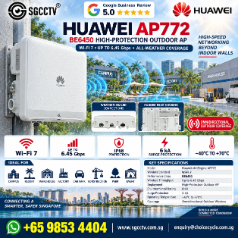
The HUAWEI eKitEngine AP772 is a commercial-grade outdoor Wi-Fi 7 (802.11be) access point designed for large outdoor wireless coverage. Huawei positions it as a BE6450 dual-band outdoor AP, delivering up to 6.45 Gbps, with built-in omnidirectional antennas and both 2.5GE copper and 10GE SFP+ uplinks. (Huawei Enterprise)
It is a strong upgrade for warehouses, factories, compounds, construction sites, resorts and other areas where ordinary indoor mesh/repeaters are not appropriate.
Key Specifications
| Feature | HUAWEI eKitEngine AP772 |
|---|---|
| Wi-Fi Standard | Wi-Fi 7 – IEEE 802.11be |
| Product Class | BE6450 |
| Frequency Bands | 2.4 GHz + 5 GHz |
| Maximum Device Rate | 6.45 Gbps |
| Spatial Streams | 8 total |
| Antenna | Built-in Omnidirectional Antenna |
| Recommended Users | 130 |
| Maximum Users | Higher than recommended design load |
| Optimal Coverage Radius | Up to 160m reference |
| Copper Uplink | 1 × 2.5GE |
| Fiber Uplink | 1 × 10GE SFP+ |
| Deployment | Outdoor / High-Protection |
| Management | Fit / Fat / Cloud Management |
Huawei’s current SME network portfolio specifically lists the AP772 at 6.45 Gbps, 130 recommended users, 160m optimal coverage radius, 1 × 10GE SFP+, 1 × 2.5GE copper and omnidirectional antenna. (Huawei Enterprise)
Wi-Fi 7 — Faster Than Conventional Mesh & Repeaters
The AP772 is an enterprise/SME-class access point rather than a consumer Wi-Fi repeater.
Internet / Firewall / Gateway
↓
Managed PoE Network
↓ 2.5GE
HUAWEI AP772
↓
Wi-Fi 7 Outdoor Coverage
↓
Phones • Tablets • Laptops • Handheld Terminals • IoT
Wi-Fi 7 introduces technologies including 4096-QAM and Multi-Link Operation (MLO) to improve wireless throughput and efficiency when used with compatible clients.
For marketing, I would avoid an absolute claim such as “10× faster than Mesh”. Mesh is a network topology rather than a Wi-Fi speed standard, so the actual comparison depends on the mesh equipment, backhaul and client devices.
A better sales message is:
Commercial-Grade Wi-Fi 7 — Higher Speed, Wider Outdoor Coverage and Better Network Capacity than Conventional Consumer Repeaters
Up to 6.45 Gbps Wireless Rate
Huawei specifies an aggregate device rate of up to 6.45 Gbps for the AP772. (Huawei Enterprise)
This is the theoretical aggregate PHY rate rather than guaranteed Internet speed to a single user.
Actual throughput depends on:
Client Wi-Fi capability • Distance • Interference • Channel width • Number of users • Regulatory settings • Network uplink • Internet bandwidth
The distinction is important when quoting commercial projects.
2.5GE Copper + 10GE Fiber
One of the strongest features of the AP772 is its high-speed wired connectivity:
1 × 2.5GE Copper
1 × 10GE SFP+ Fiber (Huawei Enterprise)
This gives considerably more deployment flexibility than an outdoor AP limited to a single 1GbE connection.
Copper Installation
PoE Switch → Cat6/Cat6A → 2.5GE → AP772
Fiber Installation
Core Switch → Fiber → 10GE SFP+ → AP772
Fiber is especially useful for:
Large factories • Separate buildings • Guard houses • Outdoor compounds • Warehouses • Long-distance network extensions
where the AP location is too far from the main network room for conventional copper Ethernet.
Up to 160m Optimal Coverage Radius
Huawei’s SME portfolio gives the AP772 an optimal coverage-radius reference of 160m. (Huawei Enterprise)
This should be presented as a manufacturer reference rather than a guaranteed 160m client connection.
Real-world outdoor coverage is affected by:
Mounting Height + Buildings + Trees + Metal Structures + Interference + Client Transmit Power + Frequency Band + Required Data Rate
A mobile phone at the edge of coverage may also have much lower transmit power than the AP itself, so good AP downlink signal alone does not guarantee a reliable two-way connection.
AP772 vs AP772E
This distinction is important.
| AP772 | AP772E | |
|---|---|---|
| Wi-Fi | Wi-Fi 7 | Wi-Fi 7 |
| Maximum Rate | 6.45 Gbps | 7.2 Gbps |
| Recommended Users | 130 | 130 |
| Reference Coverage | 160m | 250m |
| Antenna | Omnidirectional | Directional |
| Copper | 1 × 2.5GE | 1 × 2.5GE |
| Fiber | 1 × 10GE SFP+ | 1 × 10GE SFP+ |
Huawei’s current portfolio makes this distinction explicitly. (Huawei Enterprise)
Therefore:
AP772 → Better for 360° general-area coverage
AP772E → Better for directional / longer-distance coverage
Do not advertise AP772 itself as the 250m directional model.
AP772 vs AP761
For customers upgrading an older outdoor wireless network:
| AP761 | AP772 | |
|---|---|---|
| Generation | Wi-Fi 6 | Wi-Fi 7 |
| Maximum Rate | 1.775 Gbps | 6.45 Gbps |
| Recommended Users | 120 | 130 |
| Antenna | Directional | Omnidirectional |
| Copper | 1GE | 2.5GE |
| Fiber | 1GE | 10GE SFP+ |
Huawei specifies the AP761 at 1.775 Gbps with 1GE electrical and optical interfaces, whereas the AP772 moves to Wi-Fi 7 with much faster uplinks. (Huawei Enterprise)
Recommended Commercial Architecture
For a warehouse or factory:
Internet / ISP
↓
HUAWEI Gateway / Firewall
↓
HUAWEI Managed PoE Switch
↓
2.5GE / 10GE Fiber Backbone
↓
AP772 #1 — Loading Bay
AP772 #2 — Warehouse Exterior
AP772 #3 — Factory Compound
AP772 #4 — Car Park
↓ Wi-Fi 7
Mobile Devices • Tablets • Warehouse Terminals • Scanners • IoT Devices
For business-critical networks, the gateway, core switch and AP power infrastructure should also be protected by an appropriately sized UPS.
Why AP Instead of Wi-Fi Repeater?
A conventional repeater often receives wireless traffic and retransmits it over wireless.
A professionally installed AP uses a wired or fiber backhaul:
Network → Ethernet/Fiber → AP → Wi-Fi Client
This generally provides a more predictable architecture for commercial installations, particularly when several APs are deployed.
10 Major Benefits
- Latest Wi-Fi 7 technology
- Up to 6.45 Gbps aggregate device rate
- Dual-band 2.4GHz + 5GHz operation
- Built-in omnidirectional outdoor antenna
- Up to 130 recommended users
- 160m manufacturer reference optimal coverage radius
- 2.5 Gigabit Ethernet uplink
- 10 Gigabit SFP+ fiber connectivity
- Suitable for high-protection outdoor deployments
- Centralized/cloud management capability (Huawei Enterprise)
Ideal Applications
Warehouse • Factory • Construction Site • Outdoor Compound • Commercial Building • School Campus • Resort • Hotel • Car Park • Pedestrian Area • Event Venue • Industrial Facility • Logistics Centre • Large Property • Outdoor SME Network
HUAWEI AP772 BE6450 Wi-Fi 7 Outdoor Access Point Singapore | 6.45Gbps 2.5GE 10GE SFP+ Commercial Outdoor AP
HUAWEI AP772, HUAWEI AP772 Singapore, HUAWEI BE6450, BE6450 Outdoor AP, HUAWEI WiFi 7 Singapore, WiFi 7 Outdoor Access Point, Outdoor Access Point Singapore, Commercial WiFi Singapore, Industrial WiFi Access Point, Warehouse WiFi Singapore, Factory WiFi Singapore, 6.45Gbps Access Point, 2.5GE WiFi 7 AP, 10GE SFP+ Access Point, HUAWEI eKit Singapore
#HUAWEI #HuaweiEkit #AP772 #BE6450 #WiFi7 #OutdoorWiFi #OutdoorAP #AccessPoint #CommercialWiFi #IndustrialWiFi #WarehouseWiFi #FactoryWiFi #EnterpriseWiFi #NetworkSingapore #SGCCTV
Official product material: HUAWEI eKitEngine AP772 Datasheet.
HUAWEI AP772 BE6450 Wi-Fi 7 Outdoor AP Access Point Singapore 6.45Gbps 2.5GE 10GE SFP+ Commercial Outdoor Wireless Industrial WiFi
HUAWEI eKitEngine AP772
Configuration & Troubleshooting Guide
For the AP772 BE6450 Wi-Fi 7 outdoor AP, I recommend using Huawei eKit cloud/app management for SME and standalone commercial installations. Huawei specifically supports Wi-Fi onboarding, QR-code onboarding, cloud deployment, remote O&M and automatic RF optimization on the AP772. (Huawei Enterprise)
Official HUAWEI AP772 Datasheet
1. Recommended Network Configuration
For a normal outdoor installation:
Internet / ONT
↓
Router / Firewall / DHCP Server
↓
PoE++ Switch / Suitable Power Source
↓ Cat6A / 2.5GE
HUAWEI AP772
↓
2.4GHz + 5GHz Wi-Fi 7
↓
Phones / Tablets / Laptops / Warehouse Terminals
For a long-distance backbone:
Core Switch → 10GE SFP+ Fiber → AP772
The AP772 supports DHCP client operation, IEEE 802.1Q VLANs and SSID-based VLAN assignment. (Huawei Enterprise)
2. First-Time Setup
For most SME installations, use the Huawei eKit app.
The practical sequence is:
- Connect the AP772 to the correct power/network source.
- Confirm the Ethernet uplink has DHCP/Internet connectivity.
- Open the Huawei eKit management application.
- Create/select the customer project.
- Add the AP by scanning the device SN/QR code, or connect to the AP’s management Wi-Fi for Wi-Fi onboarding.
- Wait for the AP to register online.
- Create the WLAN/SSID.
- Configure WPA2/WPA3 security and password.
- Assign VLAN if required.
- Apply configuration and test with a mobile device.
Huawei officially describes both Wi-Fi onboarding and QR-code onboarding for the AP772. After onboarding, the device can be maintained remotely through the app/cloud platform. (Huawei Enterprise)
3. Recommended SSID Configuration
For a commercial installation, I would avoid putting every device into one WLAN.
A better design is:
| SSID | VLAN | Purpose |
|---|---|---|
COMPANY-STAFF | 10 | Employees |
COMPANY-GUEST | 20 | Visitors |
COMPANY-IOT | 30 | IoT / terminals |
CCTV-SERVICE | 40 | Engineering/service devices |
| Management | 99 | AP/switch management |
Huawei supports 802.1Q and SSID-based VLAN assignment, so this type of segmentation is supported by the platform. (Huawei Enterprise)
For the Guest SSID, enable client isolation where appropriate so one visitor cannot directly communicate with another visitor’s device.
4. 2.4GHz vs 5GHz
Don’t configure both radios identically without considering the application.
2.4GHz gives better penetration/range and is useful for older devices, IoT and handheld terminals.
5GHz should normally carry high-bandwidth users because it offers more spectrum and higher performance.
AP772 supports Wi-Fi 7 while maintaining compatibility with earlier Wi-Fi generations. Huawei also supports 20/40/80/160MHz channel widths, automatic channel scanning and interference avoidance. (Huawei Enterprise)
For a busy warehouse or commercial site, I would normally avoid forcing 160MHz everywhere. 80MHz is often a more practical starting point, because it balances throughput against channel availability/interference.
5. Automatic RF Optimization
This is an important AP772 feature.
Huawei’s RF optimization system collects information about surrounding AP signal strength, channel conditions, interference and AP load, then adjusts channel and transmit power to optimize the WLAN. (Huawei Enterprise)
For multiple APs:
AP772 #1 ⇄ AP772 #2 ⇄ AP772 #3
should not simply be configured:
Maximum TX Power + Same Channel + Maximum TX Power
That can actually make roaming and interference worse.
Allow proper RF planning/automatic optimization.
HUAWEI AP772 BE6450 Wi-Fi 7 Outdoor AP Access Point Singapore 6.45Gbps 2.5GE 10GE SFP+ Commercial Outdoor Wireless Industrial WiFi
AP772 Troubleshooting
The fastest troubleshooting method is to divide the problem into:
POWER → UPLINK → IP → CLOUD → SSID → RF → CLIENT
rather than immediately resetting the AP.
Problem 1 — AP772 Has No Power
Check in this order:
PoE Switch → PoE Standard/Power → Cable → RJ45 → AP
Do not assume that because an RJ45 switch port provides PoE, it necessarily provides the power level required by the AP.
Also check:
- PoE switch total power budget
- Individual port power state
- Cat6/Cat6A termination
- Cable length
- Outdoor connector/water ingress
- Patch panel
- RJ45 pins
- Surge protector, if installed
For outdoor APs, poor termination and water ingress are common physical-layer faults.
Problem 2 — AP Powered but Shows Offline
Test:
AP Power = OK
↓
Ethernet Link = ?
↓
DHCP IP = ?
↓
Gateway = ?
↓
DNS = ?
↓
Internet = ?
↓
Huawei Cloud = ?
The AP supports obtaining its management address through DHCP, so confirm that the upstream DHCP server is actually issuing an address. (Huawei Enterprise)
A very useful technician test is to plug a laptop into the same network connection.
If:
Laptop also has no IP/Internet → troubleshoot upstream network.
If:
Laptop works but AP doesn’t → investigate AP configuration, VLAN, registration or firmware.
Problem 3 — SSID Is Not Showing
Check:
WLAN Enabled?
2.4GHz Enabled?
5GHz Enabled?
SSID Hidden?
Configuration Successfully Applied?
Country/Region Correct?
Huawei explicitly supports SSID hiding, DFS and country-dependent channel configuration. (Huawei Enterprise)
A DFS channel can also cause behaviour that technicians sometimes mistake for an AP fault.
For initial troubleshooting, use a simple known-good configuration before adding advanced settings.
Problem 4 — Connected to Wi-Fi but No Internet
This usually means the radio side is working.
Troubleshoot:
Client → AP = OK
then investigate:
AP → VLAN → Switch → Gateway → Firewall → Internet
Check:
- Client received IP address
- Correct subnet mask
- Correct default gateway
- DNS server
- SSID VLAN ID
- Switch port VLAN configuration
- DHCP scope
- Firewall rules
- Internet router
A classic mistake is:
SSID VLAN 20
but the switch uplink does not carry VLAN 20.
Result:
Strong Wi-Fi Signal + Connected + No Internet
The AP itself may be perfectly healthy.
HUAWEI AP772 BE6450 Wi-Fi 7 Outdoor AP Access Point Singapore 6.45Gbps 2.5GE 10GE SFP+ Commercial Outdoor Wireless Industrial WiFi
Problem 5 — Wi-Fi Is Slow
Do not immediately conclude the AP is faulty.
Measure these separately:
Internet Speed
versus
LAN/WLAN Throughput
A 1Gbps Internet service will not become 6.45Gbps simply because the AP is rated BE6450.
Then check:
Client Wi-Fi generation
RSSI / Signal
Channel utilization
Interference
Channel width
Number of clients
2.4GHz vs 5GHz
Ethernet uplink negotiation
Internet bandwidth
A Wi-Fi 5 phone connected at long range cannot demonstrate the full capabilities of a Wi-Fi 7 AP.
Problem 6 — Good Signal but Poor Performance
This is particularly important with powerful outdoor APs.
You may see:
AP → Phone = Strong
but:
Phone → AP = Weak
because the AP has a stronger radio/antenna system than the client.
Therefore, simply increasing AP transmit power is not always the solution.
Sometimes the correct engineering answer is:
Add another AP closer to the users.
Problem 7 — Users Don’t Roam Properly
AP772 supports 802.11k/802.11v smart roaming and 802.11r fast roaming in supported operating modes. (Huawei Enterprise)
For good roaming:
AP1 + AP2 + AP3
should normally share:
Same SSID + Same Security Policy + Same VLAN
while using properly planned RF channels/power.
A common bad design is setting every AP to maximum transmit power. Clients then remain attached to a distant AP instead of roaming to the nearer one.
Problem 8 — Outdoor Coverage Is Much Shorter Than Expected
The quoted coverage figure is not a guaranteed radius for every client.
Check:
Mounting Height
Line of Sight
Trees
Metal Warehouse Walls
Containers
Buildings
Interference
Client Antenna
Required Data Rate
For example:
AP772 → 160m → Phone
is very different from:
AP772 → 160m → Industrial Outdoor CPE
The phone’s transmit power and antenna become part of the link-budget limitation.
Problem 9 — AP Keeps Disconnecting/Rebooting
Prioritize:
PoE power stability
→ PoE budget
→ Cable quality
→ Connector
→ Surge/earthing
→ Temperature/environment
→ Firmware/logs
Intermittent outdoor Ethernet problems can look like firmware or wireless faults when the actual problem is physical cabling or unstable PoE.
Huawei provides cloud/NMS status monitoring and alarms that can help locate network faults. (Huawei Enterprise)
Problem 10 — Configuration Has Gone Wrong
Do not factory-reset as the first troubleshooting step.
First save/document:
Serial Number
Current IP
SSID
VLANs
Gateway/DNS
Switch Port
Cloud Project
Firmware Version
Then try correcting the configuration or removing/re-onboarding the AP as appropriate.
A factory reset deletes configuration and interrupts wireless service. Huawei’s controller documentation explicitly warns that restoring factory defaults resets the AP and its configurations. (Huawei Enterprise)
HUAWEI AP772 BE6450 Wi-Fi 7 Outdoor AP Access Point Singapore 6.45Gbps 2.5GE 10GE SFP+ Commercial Outdoor Wireless Industrial WiFi
Technician Troubleshooting SOP
For Choicecycle technicians, I would standardize the AP772 site check to:
① POWER — AP powered? PoE sufficient?
② LINK — Ethernet link up? Correct negotiated speed?
③ IP — DHCP address obtained?
④ PING — Gateway reachable?
⑤ INTERNET — Internet/DNS working?
⑥ CLOUD — AP online in Huawei management?
⑦ SSID — Correct SSID/security/VLAN?
⑧ RF — 2.4/5GHz, channel, interference, RSSI?
⑨ CLIENT — Test with at least two known-good devices.
⑩ SPEED — Test LAN first, Internet second.
The rule should be:
Do not reset the AP until Power, Cable, PoE, DHCP, VLAN, Gateway and Internet have been checked.
That avoids destroying a valid configuration when the actual problem is upstream network infrastructure.
HUAWEI eKit Singapore SME Network Support & Product Information
HUAWEI AP772 BE6450 Wi-Fi 7 Outdoor AP Access Point Singapore 6.45Gbps 2.5GE 10GE SFP+ Commercial Outdoor Wireless Industrial WiFi


Nunc lacus elit, faucibus ac laoreet sed, dapibus ac mi. Maecenas eu ante a elit tempus fermentum. Aliquam commodo tincidunt semper. Phasellus accumsan, justo ac mollis pharetra, ex dui pharetra nisl, a scelerisque ipsum nulla ac sem. Cras eu risus urna. Duis lorem sapien, congue eget nisl sit amet, rutrum faucibus elit.
Donec accumsan auctor iaculis. Sed suscipit arcu ligula, at egestas magna molestie a. Proin ac ex maximus, ultrices justo eget, sodales orci. Aliquam egestas libero ac turpis pharetra, in vehicula lacus scelerisque. Vestibulum ut sem laoreet, feugiat tellus at, hendrerit arcu.
Nunc lacus elit, faucibus ac laoreet sed, dapibus ac mi. Maecenas eu ante a elit tempus fermentum. Aliquam commodo tincidunt semper. Phasellus accumsan, justo ac mollis pharetra, ex dui pharetra nisl, a scelerisque ipsum nulla ac sem. Cras eu risus urna. Duis lorem sapien, congue eget nisl sit amet, rutrum faucibus elit.

Reviews
There are no reviews yet.