
QUOTATION SERVICE FEES CAMERA RTSP URL Real-Time Streaming Protocol Configuration Stream Commissioning Cybersecurity Hardening
$888.00
HIKVISION SINGAPORE OFFICIAL PLANTINUM PARTNER
Supply and Maintenance HIKVISION CCTV IP Cameras, NVR, Turbo HD TVI Cameras, DVR, PTZ Cameras,
Access Control System, Video Intercom,
Sim Lim Square 02-81 10am-7pm Daily.
Whatsapp Enquiry Project +65 98534404, Technical Support +65 81120788, Site Visit Maintenance +65 81985572.
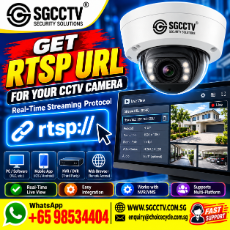
QUOTATION SERVICE FEES CAMERA RTSP URL Real-Time Streaming Protocol Configuration Stream Commissioning Cybersecurity Hardening
QUOTATION – CAMERA RTSP URL CONFIGURATION, STREAM COMMISSIONING & CYBERSECURITY HARDENING
Service: CCTV / IP Camera RTSP Real-Time Streaming Protocol Configuration & Commissioning
Recommended Service Fee Schedule
| Item | Description | Service Fee |
|---|---|---|
| 1 | RTSP Configuration – 1 Camera | S$380 / visit |
| 2 | Additional Camera RTSP Configuration – same site/session | S$120 / camera |
| 3 | NVR / VMS RTSP Stream Integration | S$450 / system |
| 4 | Main Stream + Sub Stream Configuration | S$80 / camera |
| 5 | Remote RTSP / Network Configuration | S$380 / system |
| 6 | RTSP Stream Testing & Commissioning | S$250 / system |
| 7 | Cybersecurity Hardening – Camera/NVR (10+1 FREE, 20+3 FREE) | S$280 / device |
| 8 | Firewall / VLAN / Port Access Configuration | From S$650 / system |
| 9 | RTSP Integration Troubleshooting | S$380 / visit (max 4 hours) |
| 10 | Documentation / RTSP Configuration Report | S$850 / project |
GST: Additional where applicable.
Equipment, cabling, network switches, firewall, software licences and replacement parts: Excluded unless specifically quoted.
Scope of RTSP Configuration Service
The service can include configuration of the required RTSP stream parameters, subject to equipment compatibility:
Camera/NVR IP Configuration → RTSP Service → Main/Sub Stream → H.264/H.265 → Resolution → FPS → Bitrate → Authentication → Stream URL → NVR/VMS Integration → Testing → Commissioning
Example format:
rtsp://username:password@camera-ip:554/stream-path
The exact RTSP URL and stream path depend on the camera manufacturer, model and firmware.
Cybersecurity Hardening
For professional and enterprise security-system projects, RTSP configuration should not simply expose a camera stream directly to the public Internet.
Recommended hardening scope includes:
Change Default Credentials • Strong Unique Passwords • Disable Unused Services • Firmware Review • User Permission Control • RTSP Authentication • Network Segmentation • VLAN Review • Firewall Rules • Restrict Management Access • Remove Unnecessary Port Forwarding • Time/NTP Configuration • Configuration Backup
Where remote RTSP access is required, the network architecture should be assessed before commissioning. VPN or other controlled remote-access architecture is preferable to unnecessarily exposing camera management and streaming services directly to the Internet.
Suggested Quotation Package
RTSP Configuration & Commissioning – S$600
Includes:
- Up to 4 IP cameras
- RTSP URL configuration
- Main-stream configuration
- H.264/H.265 compatibility check
- NVR/VMS stream connection
- LAN connectivity testing
- Live-stream verification
- Basic device cybersecurity hardening
- Testing & commissioning
- One site attendance
Additional camera: S$80 each
For larger projects involving multiple VLANs, firewall policies, remote servers, 4G/5G cameras, body-worn cameras, third-party VMS/API integration or penetration testing, a separate project quotation should be prepared.
Quotation Description for Xero
CAMERA RTSP URL CONFIGURATION & COMMISSIONING
Professional configuration of CCTV/IP Camera Real-Time Streaming Protocol (RTSP), including IP/network verification, RTSP URL and stream configuration, video codec/resolution/bitrate setup, NVR/VMS integration, stream testing, commissioning and basic cybersecurity hardening. Excludes equipment, replacement parts, cabling, software licences, third-party subscription fees and major network/firewall modifications.
Terms & Conditions
Configuration is subject to the camera/NVR supporting RTSP and the required third-party platform accepting the applicable video/audio codec and authentication method. Customer shall provide authorised administrator access to relevant cameras, NVRs, network equipment and VMS where required.
RTSP URLs containing credentials are treated as confidential security information and should not be published or circulated unnecessarily. Existing network or equipment faults discovered during commissioning are outside the configuration scope and will be separately quoted.
Choicecycle CCTV Pte Ltd / SGCCTV
WhatsApp: +65 98534404
Email: enquiry@choicecycle.com.sg
Website: www.sgcctv.com.sg
/SGCCTV /quotation /speccheck /compatibility /design /troubleshoot /sales
RTSP (Real-Time Streaming Protocol) is an important integration technology for modern CCTV, IP cameras, NVRs, VMS platforms and mobile surveillance systems. RTSP provides a standard mechanism for setting up and controlling real-time media delivery, including live audio and video. The IETF defines RTSP as an application-layer protocol for controlling delivery of real-time data. RFC Editor
For professional security projects, an RTSP URL can allow an authorised monitoring platform to access a live video stream from a compatible CCTV camera or mobile surveillance device.
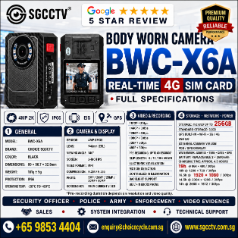
The SGCCTV BWCX6A Body Worn Camera is offered with RTSP and 4G SIM connectivity, enabling live mobile video to be incorporated into suitable security monitoring architectures. sgcctv
What Is a CCTV RTSP URL?
An RTSP URL identifies the network location and media resource that an RTSP-compatible client should request.
A typical structure looks like:
rtsp://username:password@IP_ADDRESS:554/STREAM_PATH
For example:
rtsp://user:password@192.168.1.100:554/stream
The exact stream path is manufacturer- and model-specific. The example above is therefore a format illustration, not the confirmed BWCX6A stream address.
RTSP commonly uses TCP port 554 when no other port is specified. RFC 7826 also defines rtsps for RTSP over TLS. RFC Editor
Why RTSP Matters for CCTV Security Projects
RTSP provides a useful interoperability layer between video devices and compatible monitoring systems.
A professional architecture may look like:
CCTV / Body Worn Camera
↓
RTSP Video Stream
↓
LAN / Wi-Fi / 4G Network
↓
VMS / Video Server / Compatible NVR
↓
Security Command Centre
This enables fixed and mobile surveillance sources to be incorporated into a wider monitoring solution.
SGCCTV BWCX6A RTSP Body Worn Camera
Unlike a conventional body camera that primarily records video to internal storage, the SGCCTV BWCX6A is designed for 4G live video transmission and RTSP-oriented integration.
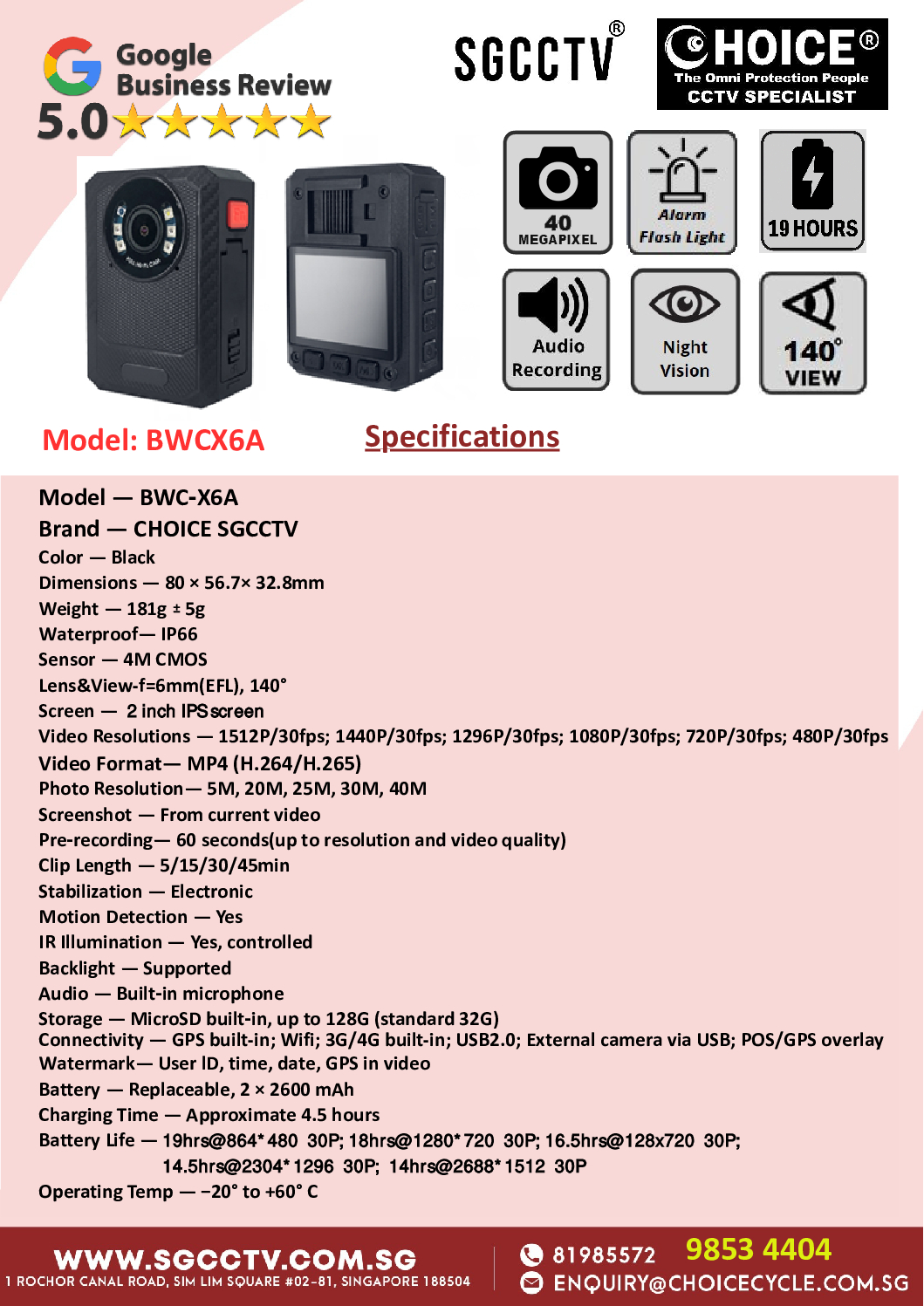
The current SGCCTV product information lists capabilities including RTSP streaming, 4G SIM connectivity, local HD recording, GPS support, night vision and remote monitoring. sgcctv
This makes it relevant for projects requiring a combination of:
Body Worn Camera + 4G + Live Video + Local Recording + GPS + Central Monitoring
RTSP + 4G Mobile Surveillance
A body-worn camera creates a different integration challenge from a conventional fixed IP camera.
A fixed CCTV camera normally has a predictable local IP address:
IP Camera → LAN → NVR/VMS
A 4G body camera moves between cellular networks and locations:
BWCX6A → 4G SIM → Internet/Platform → Video Server/CMS → Control Room
For this reason, a project should not assume that a body camera’s RTSP stream can simply be reached through a permanent public IP address. The actual implementation depends on the BWC firmware, mobile carrier, NAT/CGNAT environment, server architecture and CMS configuration.
SGCCTV’s current BWCX6A documentation identifies CMSV6 for PC-based 4G live viewing and device management. sgcctv
RTSP Integration with NVR & VMS
Where supported by both ends, RTSP can be useful for integration with:
Network Video Recorders (NVR)
Video Management Systems (VMS)
Security Command Centres
Video Servers
Central Monitoring Platforms
Custom Security Applications
A project integrator should verify at least:
RTSP URL format → Authentication → Codec → Resolution → Frame rate → Audio codec → TCP/UDP transport → Network accessibility → Concurrent stream limits
before confirming compatibility.
RTSP Does Not Automatically Mean ONVIF
This is an important distinction for security-system projects.
RTSP provides streaming control/access to media.
ONVIF provides broader interoperability functions between compatible IP security products.
Therefore:
RTSP Support ≠ Full ONVIF Compatibility
A camera may provide a working RTSP stream while still lacking ONVIF device discovery, event handling, configuration or other ONVIF services.
For a government, enterprise or system-integration project, the required protocol should therefore be stated precisely rather than simply specifying “IP camera compatible.”
RTSP URL Security
An RTSP URL may contain sensitive authentication information.
For example:
rtsp://USERNAME:PASSWORD@DEVICE:554/STREAM
For cybersecurity reasons, actual production credentials should not be published on websites, quotations, drawings or public project documents.
For deployment, use:
Unique Credentials • Strong Passwords • Network Segmentation • Firewall Rules • Restricted Stream Access • Current Firmware • VPN/secure architecture where appropriate
RFC 7826 also defines rtsps, which uses TLS for secure RTSP transport. RFC Editor
SGCCTV BWCX6A Security System Project Integration
For a professional project, the BWCX6A can form part of a broader surveillance architecture:
Security Officer
↓
SGCCTV BWCX6A Body Worn Camera
↓
4G SIM Network
↓
CMS / Streaming Infrastructure
↓
Security Control Room
↓
Live Monitoring + Recording + Incident Management
This can complement fixed security infrastructure such as:
IP CCTV Cameras • PTZ Cameras • NVRs • VMS • Control-Room Displays • Mobile Surveillance Devices
The BWCX6A product information specifically positions RTSP as an integration capability for centralised security monitoring. sgcctv
Applications
RTSP-enabled body-worn video can be useful for authorised professional applications including security patrols, industrial security, construction-site monitoring, facility management, logistics operations, event security, workplace safety operations and emergency-response coordination.
Organisations deploying body-worn video should establish appropriate policies covering activation, access control, retention, disclosure, cybersecurity and applicable privacy/data-protection requirements.
Where to Buy QUOTATION SERVICE FEES CAMERA RTSP URL
For SGCCTV BWCX6A Body Worn Camera, RTSP CCTV integration, 4G live streaming, security-system design, NVR/VMS integration and project deployment, contact:
SGCCTV / Choicecycle CCTV Pte Ltd
Website: www.sgcctv.com.sg
WhatsApp: +65 98534404
Email: enquiry@choicecycle.com.sg
SGCCTV BWCX6A RTSP product page
For project integration, provide the target NVR/VMS platform, required number of body cameras, SIM/network architecture, live-view requirements, recording requirements and required RTSP/ONVIF/API interface.
10 FAQs – CCTV RTSP URL
1. What does RTSP mean?
RTSP stands for Real-Time Streaming Protocol. It is an application-layer protocol used to establish and control delivery of real-time media such as audio and video. RFC Editor
2. What is an RTSP URL?
An RTSP URL identifies the RTSP server/device and the particular video resource or stream that a compatible client should access.
3. What does a CCTV RTSP URL look like?
A common general format is rtsp://username:password@IP:554/stream-path. The actual stream path depends on the manufacturer and model.
4. What is the standard RTSP port?
The default port for rtsp is TCP 554 when another port is not specified. RFC Editor
5. Does the SGCCTV BWCX6A support RTSP?
SGCCTV’s current product information lists RTSP Real-Time Streaming Protocol support for the BWCX6A. sgcctv
6. Can the BWCX6A transmit video over 4G?
Yes. The BWCX6A product information specifies 4G SIM connectivity and live video transmission for remote monitoring applications. sgcctv
7. Can RTSP be connected to an NVR?
Potentially, yes. The NVR must support the relevant RTSP stream, codec and authentication method. Compatibility should be tested with the exact NVR/VMS before project deployment.
8. Is RTSP the same as ONVIF?
No. RTSP focuses on real-time media delivery/control, while ONVIF provides a broader interoperability framework for IP security equipment.
9. Can I use the same RTSP URL for every CCTV brand?
No. Manufacturers use different stream paths, channel numbering, authentication methods and main/sub-stream formats. The exact model must be checked.
10. Where can I buy the SGCCTV BWCX6A RTSP Body Worn Camera in Singapore?
For BWCX6A supply, 4G live-streaming configuration and RTSP security-system integration, contact SGCCTV / Choicecycle CCTV Pte Ltd at www.sgcctv.com.sg, WhatsApp +65 98534404, or enquiry@choicecycle.com.sg.
#RTSP #RTSPURL #RealTimeStreamingProtocol #CCTVRTSP #CCTVIntegration #BodyWornCamera #BWCX6A #4GBodyCamera #LiveStreamingCamera #MobileSurveillance #VideoManagementSystem #SecuritySystemSingapore #CCTVSingapore #SGCCTV #ChoicecycleCCTV
/SGCCTV /seo /speccheck /compatibility /design /troubleshoot /sales /quotation
CCTV CAMERA RTSP URL Real-Time Streaming Protocol RTSP URL SGCCTV Body Worn Camera BWCX6A X6A Security System Project
Popular Brand Formats
- Hikvision: rtsp://username:password@IP-Address:554/Streaming/Channels/101 (Main stream) or 102 (Sub-stream)
- Dahua / Amcrest : rtsp://username:password@IP-Address:554/cam/realmonitor?channel=1&subtype=0 (Main stream)
- TP-Link Tapo: rtsp://username:password@IP-Address:554/stream1 (High quality) or stream2 (Standard quality)
- Reolink: rtsp://username:password@IP-Address:554/h264Preview_01_main (Main stream)
Axis: rtsp://username:password@IP-Address/axis-media/media.amp
In today’s fast-moving security environment, real-time evidence collection and live incident monitoring are critical for security officers, police personnel, enforcement teams, building management, logistics operations, and emergency responders.
The SGCCTV Body Worn Camera BWCX6A RTSP 4G Sim Card Security System is designed to deliver professional-grade mobile surveillance, live streaming, and secure video evidence recording for modern security operations in Singapore.
The SGCCTV BWCX6A Body Worn Camera combines advanced RTSP Real-Time Streaming Protocol technology, 4G SIM card connectivity, HD video recording, GPS support, night vision, and cloud-ready remote monitoring into a compact wearable device.
This makes it ideal for security guards, patrol officers, police investigations, warehouse security, traffic enforcement, event crowd management, and frontline incident reporting.
With increasing demand for accountability, operational transparency, and evidence protection, body worn cameras are becoming an essential part of every professional security system.
What is RTSP Body Worn Camera Technology?
RTSP stands for Real-Time Streaming Protocol, a professional video streaming technology widely used in CCTV and IP surveillance systems. The SGCCTV BWCX6A supports RTSP streaming, allowing live video transmission from the body camera directly to:
- Security Command Centres
- Video Management Software (VMS)
- Mobile Monitoring Applications
- Police Evidence Servers
- Control Rooms
- NVR Recording Systems
- Cloud Video Platforms
Unlike traditional standalone body cameras that only store recordings internally, the BWCX6A enables live remote monitoring over 4G networks, giving supervisors and operation managers instant visibility during active incidents.
Key Features of SGCCTV BWCX6A Body Worn Camera
1. 4G SIM Card Live Streaming
The integrated 4G SIM card support allows the camera to transmit live video remotely without relying on WiFi networks. Security officers can operate in:
- Construction sites
- Industrial facilities
- Public events
- Shopping malls
- Carparks
- Patrol routes
- Remote locations
This provides uninterrupted connectivity and real-time incident monitoring.
2. RTSP Real-Time Video Streaming
The RTSP function allows seamless integration into existing CCTV security systems. Video feeds can be viewed centrally from:
- Security control rooms
- Guardhouses
- Remote command centres
- Mobile apps
- Cloud surveillance systems
This creates a fully integrated mobile surveillance ecosystem.
3. High Definition Video Recording
The BWCX6A records clear HD video evidence with sharp details for:
- Facial recognition
- Incident documentation
- License plate capture
- Conflict recording
- Workplace investigations
- Enforcement operations
Clear evidence recording helps reduce disputes and improves investigation accuracy.
4. Infrared Night Vision
Built-in infrared night vision enables recording even in low-light or complete darkness. This is important for:
- Night patrols
- Warehouse operations
- Industrial security
- Dormitory patrol
- Outdoor perimeter checks
Security personnel can continue recording without visibility issues.
5. GPS Tracking Function
GPS tracking allows operation managers to monitor officer locations in real time. This improves:
- Patrol accountability
- Route tracking
- Emergency deployment
- Officer safety
- Incident response coordination
GPS logs also support operational reporting and incident verification.
6. Long Battery Operation
The SGCCTV BWCX6A is designed for long working shifts with extended battery performance suitable for:
- 8 to 12-hour patrol operations
- Security events
- Traffic control
- Enforcement duties
- Mobile inspections
Optional power bank support further extends operational runtime.
7. Rugged and Portable Design
The camera is lightweight, compact, and durable for daily field operations. It can withstand demanding environments including:
- Construction sites
- Outdoor patrol
- Industrial facilities
- Transport operations
- Security checkpoints
The wearable design allows hands-free recording during operations.
QUOTATION SERVICE FEES CAMERA RTSP URL Real-Time Streaming Protocol Configuration Stream Commissioning Cybersecurity Hardening
Advantages of Body Worn Cameras for Security Operations
Improves Officer Accountability
Body cameras promote professional conduct and transparency between officers and the public.
Reduces False Complaints
Recorded evidence protects security officers from inaccurate accusations or disputes.
Faster Incident Investigation
Management can quickly review video footage for incident analysis and evidence verification.
Enhances Public Safety
Visible body cameras can deter aggressive behaviour, theft, vandalism, and violence.
Supports Evidence Collection
Video recordings provide reliable evidence for investigations, insurance claims, and legal documentation.
Suitable Applications
The SGCCTV BWCX6A RTSP 4G Body Worn Camera is suitable for:
- Security Guard Companies
- Police and Enforcement Agencies
- Construction Site Security
- Warehouse Patrol Teams
- Traffic Enforcement Officers
- Event Security Management
- Property Management Security
- Logistics and Delivery Monitoring
- Industrial Safety Officers
- Emergency Response Teams
Integration with CCTV Security Systems
One of the strongest advantages of the BWCX6A is its ability to integrate with existing CCTV infrastructure using RTSP streaming.
This allows organizations to combine:
- Fixed CCTV Cameras
- PTZ Cameras
- Solar 4G Cameras
- NVR Recording Systems
- AI Video Analytics
- Mobile Surveillance Devices
into one centralized monitoring platform.
Security supervisors can monitor both fixed and mobile video feeds simultaneously.
Why Choose SGCCTV Body Worn Camera Solutions?
SGCCTV provides professional security technology solutions in Singapore with expertise in:
- CCTV Installation
- Body Worn Camera Deployment
- 4G Surveillance Systems
- RTSP Video Integration
- Security System Maintenance
- NVR and VMS Configuration
- Remote Monitoring Solutions
Professional support ensures proper setup, system integration, troubleshooting, and operational reliability.
Website: SGCCTV Singapore
Email: enquiry@choicecycle.com.sg
WhatsApp: +65 98534404
QUOTATION SERVICE FEES CAMERA RTSP URL Real-Time Streaming Protocol Configuration Stream Commissioning Cybersecurity Hardening
10 Common FAQ for CCTV CAMERA RTSP URL
1. What is RTSP in the SGCCTV BWCX6A body camera?
RTSP stands for Real-Time Streaming Protocol. It allows the body camera to stream live video remotely to CCTV systems, mobile apps, NVRs, or command centres over the internet.
2. Does the body worn camera support 4G SIM cards?
Yes. The BWCX6A supports 4G SIM card connectivity for live video streaming and remote access without requiring WiFi.
3. Can the camera record without internet connection?
Yes. The camera can continue local recording even when internet or 4G connection is unavailable.
4. Is the body camera suitable for night patrol?
Yes. The camera includes infrared night vision for recording in low-light and complete darkness environments.
5. Can the live video be viewed remotely?
Yes. Authorized personnel can remotely view live video streams through compatible software or mobile applications.
6. How long does the battery last?
Battery runtime depends on recording settings and streaming usage, but it is designed for long operational shifts commonly used in security patrol operations.
7. Can the body camera integrate with existing CCTV systems?
Yes. RTSP compatibility allows integration with many NVRs, VMS platforms, and CCTV monitoring systems.
8. Does the camera support GPS tracking?
Yes. GPS functionality allows real-time officer location tracking and patrol route monitoring.
9. Is the camera waterproof or rugged?
The BWCX6A is designed for professional field use and can withstand demanding operational environments.
10. Where can I buy or install the SGCCTV BWCX6A in Singapore?
You can contact SGCCTV Singapore for sales, installation, configuration, maintenance, and technical support.
Website: SGCCTV Singapore Official Website
Email: enquiry@choicecycle.com.sg
WhatsApp: +65 98534404
QUOTATION SERVICE FEES CAMERA RTSP URL Real-Time Streaming Protocol Configuration Stream Commissioning Cybersecurity Hardening
Looking for a reliable and powerful Body Worn Camera for real-time monitoring and video evidence?
The SGCCTV Body Worn Camera BWCX6A is designed for Security Officers, Police Force, Auxiliary Units, Army Training, Emergency Response Teams, and Professional Instructors who require instant and secure evidence recording on-site.
Built with cutting-edge 4G SIM card live transmission, this body camera allows real-time monitoring from command centre / control room, ensuring transparency, high accountability, and fast response.
Key Features & Advantages
📡 4G SIM Card Live Streaming
Real-time video transmission to monitoring room or mobile device
Centralized command support for ground operations
🎥 High-Resolution Video Evidence
Full HD recording for clear visuals
Night vision capability for low-light environments (safe description, no graphic detail)
🔋 Long Battery Life
Extended recording hours suitable for long deployment shifts
🛡 Rugged & Weather-Resistant
Shock-resistant design for harsh outdoor usage
Suitable for all-weather conditions
📁 Secure Storage & Playback
Local storage + cloud server / remote storage options
Protects recorded evidence from tampering
🎤 Built-in Speaker & Microphone
Strong audio clarity for training reviews and evidence documentation
📍 GPS Location Tracking
Real-time positioning for officer and team safety
Applications
The BWCX6A Body Worn Camera is ideal for:
Certified Security Agencies & Security Officers
Police, Auxiliary Police, Enforcement Departments
Army, Military and Defence Training Instructors
Safety Supervisors, Workplace Safety Coordinators
Private investigation & patrol teams
Events and crowd control management
Building facility management, hospitals, dormitory control
Why Choose SGCCTV Singapore?
23 years strong experience in security surveillance solutions
Top Google Rating – Over 500 Five-Star Reviews
Professional installation, setup, maintenance & repair
Real-time support team in Singapore
Fast delivery and deployment for large projects
Contact Us for Demo / Quotation
📞 WhatsApp: +65 9853 4404
🌐 Website: https://sgcctv.com.sg
📧 Email: enquiry@choicecycle.com.sg
QUOTATION SERVICE FEES CAMERA RTSP URL Real-Time Streaming Protocol Configuration Stream Commissioning Cybersecurity Hardening
The BWCX6A Body Worn Camera is designed for long-hour field operations, law enforcement, security patrols, and frontline personnel. Proper configuration, usage habits, and maintenance are critical to maximize battery life, ensure stable 4G viewing, and extend the camera’s operational lifespan.
1. What Is the Maximum Battery Life of the BWCX6A Body Worn Camera?
The maximum battery life of the BWCX6A body worn camera is up to 19 hours under optimal conditions.
Optimal conditions include:
- HD or lower resolution recording
- Minimal use of wireless features
- Screen turned off during standby
- Ambient temperature (not overheated)
Actual battery duration may vary depending on usage patterns, recording mode, and enabled features.
2. How to Configure and Extend Battery Usage for Longer Hours
To significantly extend battery runtime, apply the following settings:
- Set video resolution to HD 720P
- Disable GPS, Wi-Fi, and 4G when not required
- Turn off IR night vision unless operating in low-light conditions
- Reduce screen brightness and enable auto screen-off
- Enable Motion Detection recording instead of continuous recording
- Avoid unnecessary preview or playback in the field
These adjustments reduce processor load and power consumption.
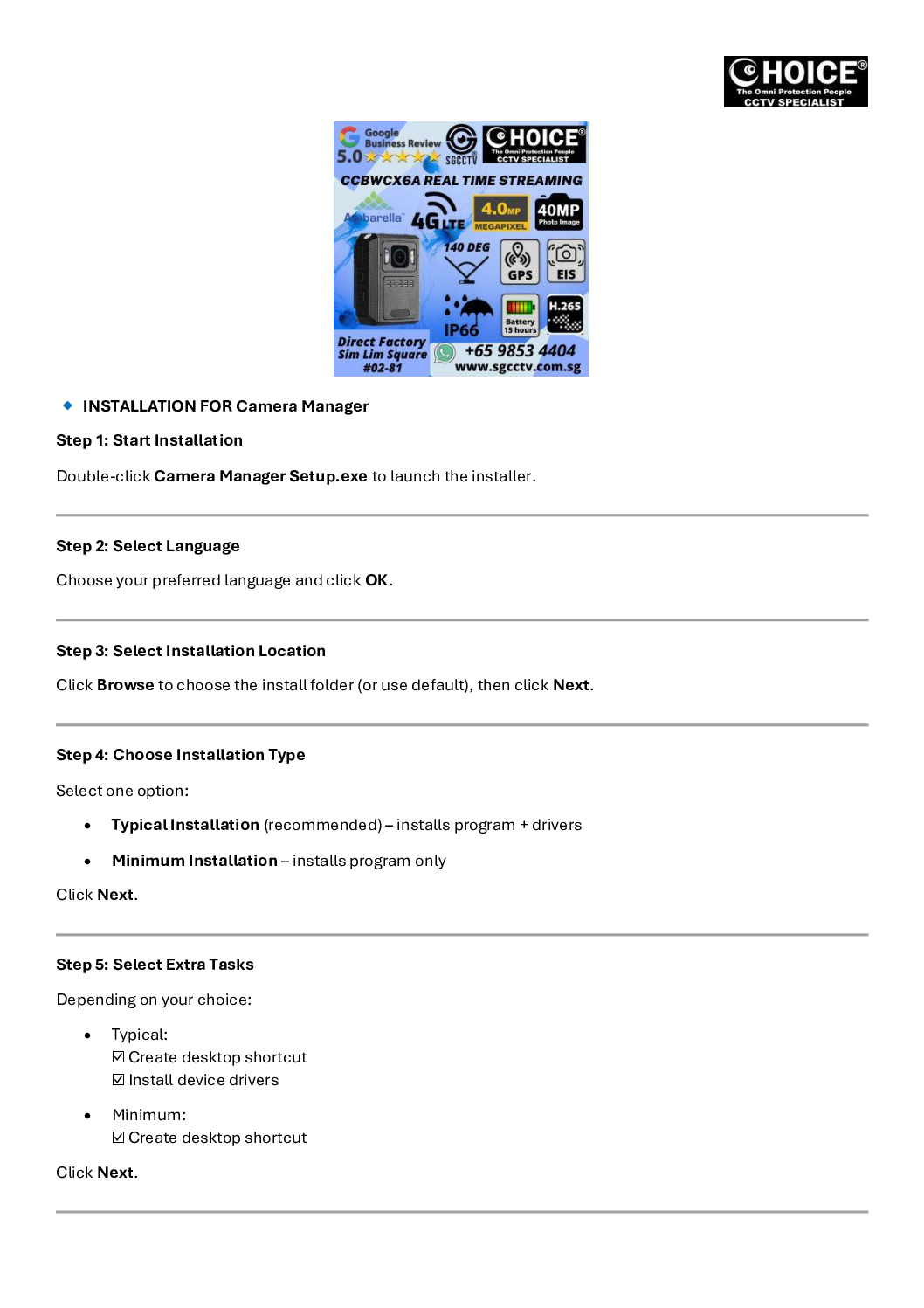
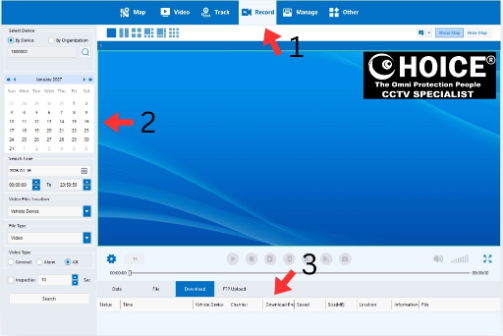
3. How to Configure 4G Viewing on Windows PC
To enable 4G live viewing and management on a PC:
- Download and install:
- CMSV6 Software
- Camera Manager Software
- Log in using the registered account credentials
- Bind the BWCX6A device to the platform
- Ensure the camera has a valid SIM card and mobile data plan
- Verify live stream access via the CMS interface
This setup allows remote live viewing, playback, and device management over 4G.
QUOTATION SERVICE FEES CAMERA RTSP URL Real-Time Streaming Protocol Configuration Stream Commissioning Cybersecurity Hardening
4. How to Configure 4G Viewing on Mobile App
For mobile viewing:
- Download the CMSV6 mobile app
- Log in using the same username and password as the PC CMS software
- Select the bound device
- Start live view or playback via mobile data or Wi-Fi
This enables real-time monitoring anytime, anywhere.
5. How to Download Video and Export to WhatsApp or Email
There are two main methods:
Method 1: Via PC
- Connect the body worn camera to a PC using the USB cable
- The device will appear as a removable storage
- Copy video files to the PC
- Compress or trim if needed
- Share via WhatsApp, Email, or Cloud Storage
Method 2: Via CMS Software
- Download recordings directly from CMSV6
- Export selected files
- Share from your computer
SGCCTV Body Worn Camera BWCX6A 4G Sim Card REAL TIME Security Officer Police Force Army Instructors Video Evidence Security System
6. Regular Maintenance to Extend Body Worn Camera Lifespan
Proper maintenance greatly improves durability and battery health:
- Clean the lens and body after each use with a soft microfiber cloth
- Never touch the lens or screen with hands or hard objects
- Always hold the camera from both sides
- Store the camera in a protective pouch
- Charge using original cables and adapters only
- Avoid frequent full battery drain (0%)
- Transfer recordings regularly and delete old files
- Inspect USB ports, clips, and buttons for damage
- Keep away from heat, moisture, dust
- Store and charge in a cool or air-conditioned environment
QUOTATION SERVICE FEES CAMERA RTSP URL Real-Time Streaming Protocol Configuration Stream Commissioning Cybersecurity Hardening
7. Troubleshooting: Body Worn Camera Cannot Power On
If the camera fails to power up:
- Recharge fully using the original charger
- Confirm power source is working
- Inspect the charging port for dirt or damage
- Clean gently if needed
- Press and hold the power button for several seconds
- Try a different cable or adapter
- Perform a reset if available
- Check for water ingress or physical damage
If unresolved, send for professional repair or battery replacement.
8. How to Visually Identify a Spoiled or Faulty Battery
A battery should be replaced immediately if you observe:
- Swollen or bulging camera body
- Deformed casing or cracks
- Battery leakage or corrosion
- Rust around charging ports
- Abnormal heat marks
- Camera not closing properly
Battery spin test:
- Remove battery (if applicable)
- Spin it on a flat surface
- If it spins easily → battery is swollen and unsafe
9. Why Are There Long Hook & Short Clip Accessories?
The BWCX6A includes two clip types to support different uniforms:
- Long hook clip:
- Tactical vest
- MOLLE gear
- Thick jackets or body armor
- Short clip:
- Shirt pocket
- Belt
- Light uniforms or security attire
This ensures stable mounting for all dressing types.
QUOTATION SERVICE FEES CAMERA RTSP URL Real-Time Streaming Protocol Configuration Stream Commissioning Cybersecurity Hardening
10. How Many Parts Are Included in a Body Worn Camera Package?
Standard BWCX6A package includes:
- Body Worn Camera
- 2 mounting clips (long & short)
- USB charging & data cable
- Power adapter
- Operation manual
- Dock station charger
11. Why Must All Parts Be Checked Before Client Demo?
Pre-demo inspection ensures:
- All components are complete
- Device functions correctly
- Battery is fully charged
- No embarrassment or delay during demo
- Professional trust and confidence with clients
12. How to Know the Camera Is Charging and Fully Charged
Charging indicators include:
- Red LED on dock station = charging
- Low battery indicator turns off
- Green LED = fully charged
- Battery status can also be confirmed on the camera screen
13. How to Playback and Download Videos from Body Worn Camera
Playback
- Directly on the body worn camera screen
Download
- Connect to PC via USB
- Device appears as external storage
- Copy video files to PC
- Backup or export as needed
Conclusion
Correct configuration, disciplined usage, and regular maintenance are essential to maximize the BWCX6A body worn camera’s battery life, reliability, and service lifespan. Following these best practices ensures dependable performance for security operations, patrol duties, and critical evidence recording.
QUOTATION SERVICE FEES CAMERA RTSP URL Real-Time Streaming Protocol Configuration Stream Commissioning Cybersecurity Hardening
Video Sample A || Video Sample B || Video Sample C || Step by Step Setup Guide #1
Merlion Park Marina Bay Sand Garden Full HD Night Vision Video
Body Worn Camera CCBWZ2SD Police Body Worn || CCBWV8GPS Specification || CCBW9LSD Specification || CCBWA75M Specification ||
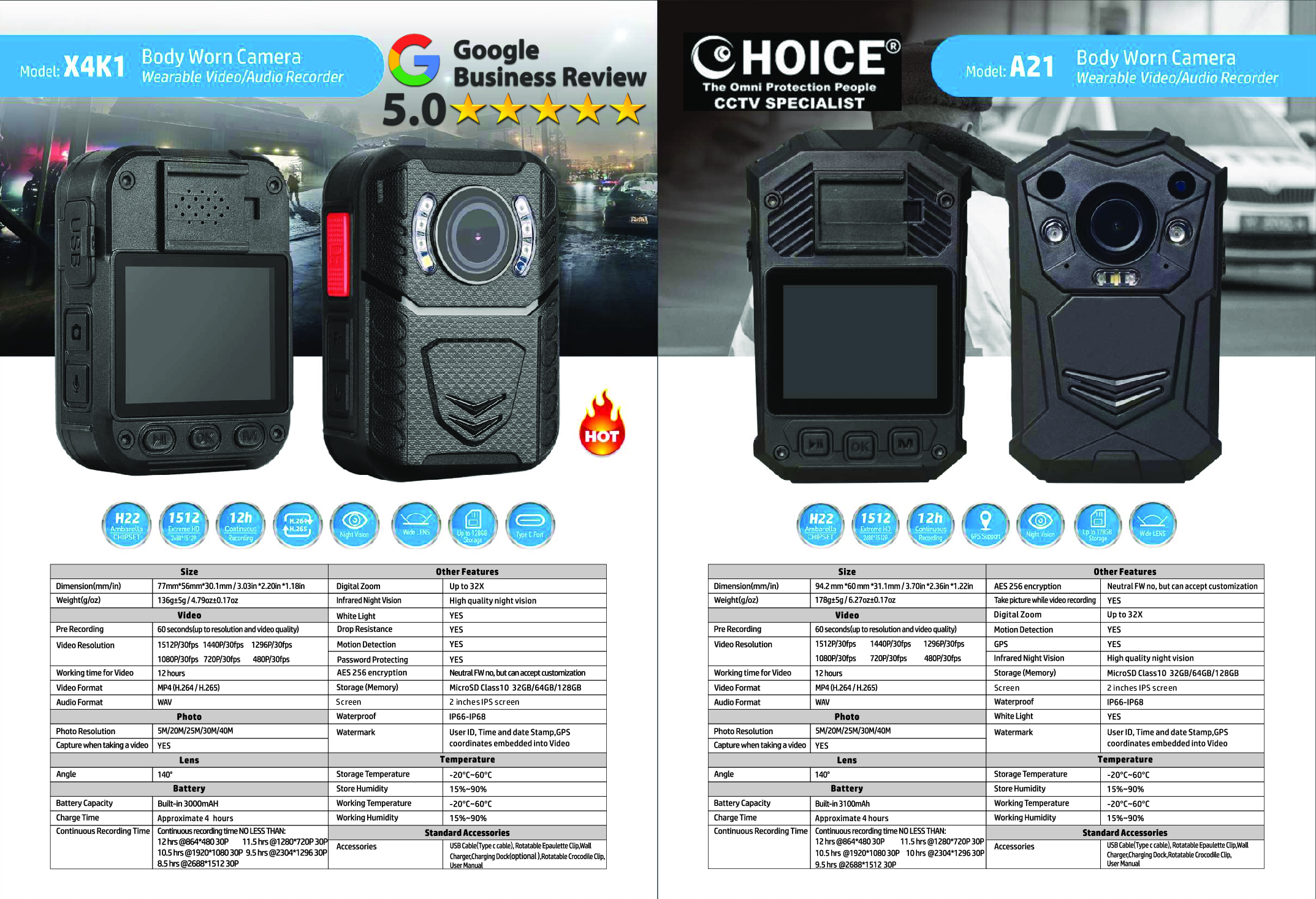
Body Worn Camera CCBWCX6A || Body Worn Camera CCBWCX3H1 || Body Worn Camera CCBWCX5B || DWCX3H1 Specification || BWCX5B Specification ||
Body-Worn Camera Hikvision DS-MH2311 || Body-Worn Camera Hikvision DS-MCW407 || HIK DS-MC407 Specification || HIK DS-MH2311 Specification ||
DAHUA 4G Body Worn Camera DH-MPT220 || Body Worn Camera CCBWCY2 || CCBWCY2 Specification ||
CCTV Dock Station CCBWDS20 || DOCK STATION CHARGING CCJDS3 || DOCK STATION CCBWDS8 8 Ports || 8 Ports Dock Station // SPECIFICATION || // Dock Station Operation Guide Video ||
Hunting Trail Camera CCH8 Specification // CCH8 Setup Guide ||
QUOTATION SERVICE FEES CAMERA RTSP URL Real-Time Streaming Protocol Configuration Stream Commissioning Cybersecurity Hardening


Nunc lacus elit, faucibus ac laoreet sed, dapibus ac mi. Maecenas eu ante a elit tempus fermentum. Aliquam commodo tincidunt semper. Phasellus accumsan, justo ac mollis pharetra, ex dui pharetra nisl, a scelerisque ipsum nulla ac sem. Cras eu risus urna. Duis lorem sapien, congue eget nisl sit amet, rutrum faucibus elit.
Donec accumsan auctor iaculis. Sed suscipit arcu ligula, at egestas magna molestie a. Proin ac ex maximus, ultrices justo eget, sodales orci. Aliquam egestas libero ac turpis pharetra, in vehicula lacus scelerisque. Vestibulum ut sem laoreet, feugiat tellus at, hendrerit arcu.
Nunc lacus elit, faucibus ac laoreet sed, dapibus ac mi. Maecenas eu ante a elit tempus fermentum. Aliquam commodo tincidunt semper. Phasellus accumsan, justo ac mollis pharetra, ex dui pharetra nisl, a scelerisque ipsum nulla ac sem. Cras eu risus urna. Duis lorem sapien, congue eget nisl sit amet, rutrum faucibus elit.

Reviews
There are no reviews yet.