
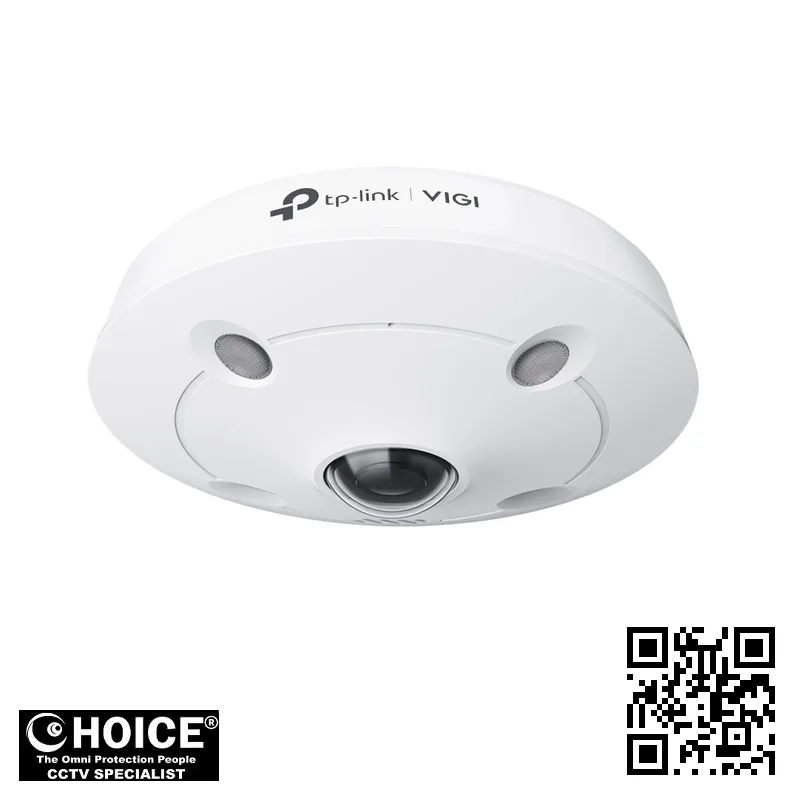
TP-Link InSight S655I VIGI 5MP IR Fisheye Network Camera
TP-LINK PREMIUM PARTNERS SINGAPORE
Supply and Maintenance TP-LINK CCTV IP Cameras, NVR, DVR, PTZ Cameras,
Access Control System, Video Intercom.
1 Rochor Canal Road, Sim Lim Square 02-81 10am-7pm Daily.
Whatsapp Enquiry Project +65 98534404, Technical Support +65 81120788, Site Visit Maintenance +65 81985572.
TP-Link InSight S655I Singapore VIGI 5MP IR Fisheye Network Camera | 360-Degree Panoramic Surveillance
TP-Link InSight S655I Singapore provides a revolutionary approach to wide-area surveillance through its advanced 5MP fisheye technology. Designed for high-resolution monitoring, this camera eliminates blind spots by offering a continuous 180-degree field of view. For property owners in Singapore, this means fewer cameras are required to cover large open spaces, effectively reducing hardware costs and complex wiring. Whether you are securing a retail storefront or a massive warehouse, the InSight S655I delivers crystal-clear imagery and intelligent motion detection. By integrating the TP-Link VIGI ecosystem, users can enjoy seamless monitoring via mobile apps or desktop software.
This camera is an essential tool for anyone seeking professional-grade security that combines panoramic coverage with high-definition detail, ensuring every corner of your premises remains under constant, reliable observation.
Key Features of the TP-Link InSight S655I Singapore
- Ultra-Wide 180° Field of View: The fisheye lens provides a massive 180-degree horizontal, vertical, and diagonal coverage, allowing a single unit to monitor entire rooms.
- High-Resolution 5MP Imaging: Capture every detail with a 2560 × 1920 maximum resolution, ensuring that faces and objects are identifiable even when zoomed in.
- Advanced Night Vision: Equipped with 4 powerful IR LEDs, the camera provides clear visibility up to 30 meters in total darkness.
- Intelligent Smart Events: The system can detect specific activities such as line-crossing, intrusion, and abnormal sound, triggering instant alerts to your device.
- Robust Weatherproofing: With an IP67 rating, this camera is built to withstand heavy tropical rain and dust, making it ideal for outdoor Singapore environments.
- Vandal-Resistant Design: The IK10-rated metal housing protects the internal components from physical impact and tampering attempts.
- Efficient Video Compression: Using H.265+ technology, the camera significantly reduces bandwidth and storage requirements without sacrificing video quality.
- Two-Way Audio Capability: A built-in microphone and speaker allow for real-time communication, which is perfect for warning intruders or interacting with visitors.
Technical Specifications
| Specification | Detail |
| Brand / Model | TP-Link InSight S655I (VIGI Series) |
| Image Sensor | 1/2.7” Progressive Scan CMOS |
| Max Resolution | 2560 × 1920 |
| Lens Type | Fixed Focal Lens (1.44 mm) | 180° Horizontal, 180° Vertical, 180° Diagonal |
| Minimum Illumination | Color: 0.01 Lux; 0 Lux with IR light |
| Day/Night Mechanism | IR Cut Filter (Auto/Scheduled/Unified) |
| IR LED Range | 30m (850nm wavelength) |
| Video Compression | H.265+, H.265, H.264+, H.264 |
| Audio | Two-Way Audio (Built-in Mic and Speaker) |
| Network Interface | 1 RJ45 10/100M Ethernet Port, PoE Support |
| Storage | Built-in MicroSD Card Slot (Up to 512 GB) |
| Protection Rating | IP67 Weatherproof & IK10 Vandal Proof |
| Operating Temperature | -30°C to 60°C |
| Power Supply | 12V DC or PoE (802.3af/at) |
Applications and Use Cases in Singapore
Warehouse and Logistics: The 180-degree coverage is perfect for large, high-ceilinged warehouses in Singapore. It allows managers to monitor loading bays and storage aisles from a single vantage point, reducing the need for multiple camera mounts.
Retail Stores and Showrooms: For boutiques and electronics shops, the fisheye lens captures the entire floor area. This helps in monitoring customer movement and preventing shoplifting by ensuring no corner of the showroom is left unmonitored.
Condominiums and HDB Common Areas: In residential settings, this camera is ideal for lobbies and lift lobbies. It provides a panoramic view of entrance points, helping building management maintain security and monitor visitor access effectively.
Office and Corporate Spaces: Modern offices can use the InSight S655I to oversee open-plan workspaces and reception areas. The high-resolution imagery ensures that sensitive documents or equipment are protected under constant surveillance.
Car Parks and Parking Lots: Mounting this camera on ceilings in multi-story car parks allows for wide-angle monitoring of vehicle movement. The IK10 vandal-proof rating ensures it remains functional even in high-traffic, high-impact environments.
Why Choose the TP-Link InSight S655I Singapore
Choosing the TP-Link InSight S655I Singapore means investing in hardware designed for durability. Singapore’s tropical climate presents unique challenges, such as high humidity and heavy rainfall. The IP67-rated housing of this camera ensures that moisture ingress does not compromise the electronics. Furthermore, the metal construction provides the necessary heat dissipation for 24/7 operation in warm environments.
For businesses operating in Singapore, compliance with the Personal Data Protection Act (PDPA) is critical. The InSight S655I supports privacy masking, allowing you to black out specific areas where sensitive information might be visible, ensuring your surveillance remains legal and ethical. Additionally, the camera integrates perfectly with local power standards, supporting both 12V DC and PoE, making it adaptable to various existing infrastructure setups in Singaporean commercial buildings.
Installation Guide
Installing the TP-Link InSight S655I requires careful consideration of the power source and network placement. You have two primary options: Power over Ethernet (PoE) or a traditional 12V DC power supply. PoE is highly recommended for professional setups as it allows a single Ethernet cable to carry both data and power, simplifying the installation process and reducing clutter. If you choose the 12V DC route, ensure that the power adapter is placed in a weatherproof enclosure if the camera is mounted outdoors.
For optimal performance, the camera should be mounted on a ceiling or wall where a clear, unobstructed view of the target area is possible. Since this is a fisheye camera, mounting it in the center of a room provides the most even panoramic distribution. Once the hardware is mounted, you can configure the network settings via the VIGI App or the Web UI. Ensure your network switch supports the necessary bandwidth for 5MP high-resolution streaming to prevent buffering or lag.
Connecting to the VIGI ecosystem is straightforward. After the physical installation, use the VIGI App to scan the QR code on the device. This will allow you to set up the password, configure motion detection zones, and enable cloud features. For complex deployments involving multiple cameras, the VIGI VMS (Video Management Software) on a PC provides a more robust interface for managing large-scale surveillance networks.
Repair and Maintenance
To ensure the longevity of your TP-Link InSight S655I, a regular maintenance schedule is essential. The most common issue in Singapore is the buildup of dust or grime on the lens due to humidity and environmental pollutants. We recommend cleaning the camera lens with a soft, microfiber cloth every three months to maintain image clarity. Always ensure the lens is dry before wiping to prevent scratches.
Periodically check the camera’s housing and cable connections. Inspect the waterproof cable attachments to ensure they remain tight and that no moisture has entered the connection points. If you notice any fogging inside the lens, it may indicate a seal failure, and you should contact a professional immediately. Additionally, check the MicroSD card’s health via the VIGI App to ensure that recording is functioning correctly and that the storage capacity is not reaching its limit.
If the camera experiences connectivity issues, start by troubleshooting the network cable and the PoE switch. A simple power cycle (unplugging and replugging the power) often resolves temporary software glitches. If the device fails to respond to the reset button, it may be a hardware-level fault. For any technical difficulties or when you require professional assistance, contacting the SGCCTV technical support team is the best course of action to avoid permanent damage to the unit.
Where to Buy the InSight S655I in Singapore
SGCCTV — Authorised Hikvision & Dahua Dealer Singapore
Address: 1 Rochor Canal Road, Sim Lim Square #02-81, Singapore
Email: enquiry@choicecycle.com.sg
WhatsApp: +65 98534404 (24 hours)
Operating Hours: 10:00 AM – 7:00 PM daily
Website: https://sgcctv.com.sg
If you are looking for the TP-Link InSight S655I in Singapore, SGCCTV (Choicecycle CCTV Pte Ltd) is your trusted local provider. Located in the heart of the electronics hub at Sim Lim Square, we specialize in providing high-quality surveillance solutions tailored to your needs.
Company: SGCCTV (Choicecycle CCTV Pte Ltd)
Address: 1 Rochor Canal Road, Sim Lim Square #02-81, Singapore 188504
WhatsApp enquiry: +65 98534404
Technical support: +65 81120788
Site visit / maintenance: +65 81985572
Email: enquiry@choicecycle.com.sg
Website: https://sgcctv.com.sg
Opening hours: 10:00 AM – 7:00 PM daily
For all inquiries regarding availability and pricing, please WhatsApp +65 98534404. We do not list prices online to ensure you receive the most accurate information based on your specific requirements.
Frequently Asked Questions
How can I find out the price of the TP-Link InSight S655I?
To ensure we provide you with the most accurate quotation based on your specific project needs and any required accessories, we do not list prices publicly. Please WhatsApp +65 98534404 for pricing. Our team is ready to assist you with a personalized quote for your security setup.
Is this camera suitable for outdoor use in Singapore’s weather?
Yes, the TP-Link InSight S655I is specifically designed to handle harsh environments. It features an IP67 weatherproof rating, which protects the camera against heavy rain and dust. This makes it highly reliable for outdoor installations in Singapore, where humidity and sudden downpours are common daily occurrences.
Can I view the camera footage on my smartphone while I am away?
Absolutely. The camera is compatible with the VIGI App, which allows you to view live streams and playback recorded footage directly on your mobile device. As long as your camera is connected to a stable internet network, you can monitor your premises from anywhere in the world, providing peace of mind.
Does the camera support local storage if I don’t have an NVR?
Yes, the InSight S655I features a built-in MicroSD card slot that supports capacities up to 512 GB. This allows you to record footage directly onto the camera itself, making it an excellent choice for small setups where a separate Network Video Recorder (NVR) might not be necessary or practical.
What is the difference between PoE and 12V DC power for this model?
PoE (Power over Ethernet) allows you to transmit both power and data through a single Ethernet cable, which is much cleaner and easier for professional installations. 12V DC requires a separate power cable running from a power source to the camera. We recommend PoE for most Singapore installations to reduce wiring complexity.
Does this camera have any intelligent detection features?
Yes, the VIGI series includes advanced smart event detection. This includes intrusion detection, line-crossing detection, and region entering/exiting detection. It can even detect abnormal sounds, such as glass breaking or loud noises, which can trigger an immediate alert to your mobile device or email.
Is the video quality good enough to identify faces?
The camera features a 5MP high-resolution sensor, providing a 2560 × 1920 resolution. When used in the correct context, such as monitoring a corridor or a small room, the clarity is sufficient to recognize faces and identify important details. However, for very long distances, the DORI (Detect, Observe, Recognize, Identify) ratings should be consulted.
How many cameras can I connect to one system?
The number of cameras you can connect depends on your network infrastructure and the capacity of your VMS or NVR. The InSight S655I supports multiple simultaneous streams, and the VIGI software is designed to manage multiple units across a single network, allowing for scalable security solutions for any business.</
Does the camera support two-way audio?
Yes, the InSight S65lar S655I includes both a built-in microphone and a built-in speaker. This enables two-way audio communication, allowing you to listen to what is happening near the camera and even speak through the camera to deter intruders or communicate with staff and visitors on-site.
Is the camera resistant to vandalism?
Yes, the camera is built with a metal housing and carries an IK10 vandal-proof rating. This means it is designed to withstand significant physical impact, making it much more difficult for vandals to damage or disable the camera, which is a crucial feature for high-risk areas like car parks or street-facing walls.
Related Products
- <a href="https://sgcctv.com.sg/More TP-Link CCTV cameras in Singapore“>TP-Link VIGI NVR Series
- <a href="https://sgcctv.com.sg/Browse all CCTV cameras in Singapore“>TP-Link VIGI Bullet Network Cameras
- <a href="https://sgcctv.com.sg/View the full SGCCTV shop“>TP-Link VIGI PTZ Dome Cameras
In conclusion, the TP-Link InSight S655I is a premier choice for anyone needing 360-degree, high-definition surveillance in Singapore. Its combination of 5MP resolution, weather resistance, and intelligent features makes it an unbeatable solution for residential and commercial security. Don’t leave your property unprotected. For more information or to request a quote, contact SGCCTV today. WhatsApp +65 98534404 for pricing or visit our website at https://sgcctv.com.sg to learn more about our full range of security solutions.
Choosing the TP-Link InSight S655I for Your Singapore Property
Selecting the right surveillance technology is a critical decision for any property owner in Singapore. Whether you are managing a small HDB flat or a sprawling industrial warehouse, the level of visual coverage required varies significantly based on your specific space and security needs.
The TP-Link InSight S655I is a versatile solution designed to bridge the gap between standard security cameras and high-end professional monitoring systems. Its unique 360-degree fisheye lens provides a panoramic view that eliminates the traditional “blind spots” found in conventional fixed-lens cameras.
For residents living in HDB apartments, the TP-Link InSight S655I offers an excellent way to monitor common areas or entry points. Its high-resolution 5MP sensor ensures that even small details, such as faces or package deliveries, are captured with extreme clarity and precision.
Condominium management teams often find this camera indispensable for monitoring lobbies and lift landings. Because one camera can cover an entire room, it reduces the total number of devices needed, making the installation process much cleaner and more cost-effective for large residential complexes.
If you own a landed property in Singapore, privacy and perimeter security are likely your top priorities. Placing this fisheye camera under the eaves of your roof allows you to monitor your entire driveway and garden area from a single, high-mounted vantage point.
Retail shop owners in bustling districts like Orchard or Bugis can utilize the wide-angle capabilities to oversee entire store layouts. This ensures that every aisle and checkout counter is under constant surveillance, helping to deter shoplifting and monitor staff activity simultaneously.
For larger-scale operations such as warehouses and logistics hubs, the TP-Link InSight S655I excels in high-ceiling environments. The ability to capture a full overhead view of loading bays and inventory aisles is vital for maintaining operational security and loss prevention.
Office managers can also benefit from this technology by deploying cameras in open-plan workspaces. The seamless 360-degree coverage helps in monitoring sensitive areas like server rooms or reception desks without the cluttered look of multiple overlapping camera feeds.
One of the most significant advantages of this model is its resilience against Singapore’s unique tropical climate. Our local weather is characterized by intense heat and high humidity, which can cause standard electronic components to degrade or fail prematurely over time.
The build quality of this camera is engineered to withstand the humidity levels common in our tropical environment. This prevents internal condensation and moisture buildup, ensuring that the high-definition image remains crisp and clear even during the monsoon season.
Reliable performance in high-temperature settings is essential for any hardware installed in unventilated areas like car park ceilings. This camera is designed to maintain stability, preventing the frequent downtime or “ghosting” images often seen with lower-quality, non-tropicalized equipment.
When you invest in this hardware, you are investing in long-term peace of mind. You no longer have to worry about the frequent hardware replacements that often plague property owners who choose cameras not rated for the Singaporean climate.
Beyond the hardware, the integration into the VIGI ecosystem allows for easy remote monitoring via mobile devices. This means you can check on your Singapore property from anywhere in the world, whether you are at work or traveling overseas.
Ultimately, the choice of surveillance should be driven by the specific geometry of your space. By leveraging the panoramic capabilities of this fisheye lens, you can achieve maximum visibility with minimum hardware, optimizing both your security budget and your property’s aesthetic.
Installation and Setup Guide for the TP-Link InSight S655I
Installing a high-end surveillance system requires precision to ensure maximum coverage. The TP-Link InSight S655I is a sophisticated fisheye camera designed for 360-degree monitoring. Achieving the perfect view begins with a strategic placement plan that eliminates blind spots in your Singapore office or retail space.
When considering mounting options, the TP-Link InSight S655I offers great versatility. It can be ceiling-mounted to capture a full panoramic view of a room or wall-mounted for directional monitoring. For the best results, we recommend centered ceiling placement to utilize the lens’s full distortion-correction capabilities.
Power management is a critical step in your setup process. This camera supports Power over Ethernet (PoE), which allows you to transmit both data and electrical power through a single Cat6 cable. This significantly reduces cable clutter and simplifies the physical installation process in complex environments.
If your existing infrastructure does not support PoE, you may need to consider a traditional power adapter setup. However, for most professional installations in Singapore, we highly recommend PoE. It ensures a more stable connection and protects your hardware from potential electrical surges during tropical storms.
Once the physical mounting is complete, the next phase involves network integration. You must pair the camera with a compatible NVR (Network Video Recorder) or a VIGI-compatible management system. This ensures that your high-resolution 5MP footage is recorded continuously and stored securely for later playback.
Configuring the network settings is vital for remote access. You will need to assign a static IP address to the camera within your local network. This prevents connection drops and ensures that your mobile devices can always find the camera feed when you are away from your premises.
The TP-Link InSight S655I integrates seamlessly with the VIGI app ecosystem. After the hardware is online, use the app to configure motion detection zones and privacy masks. The app allows you to receive real-time push notifications directly to your smartphone, no matter where you are.
Setting up the software side involves fine-tuning the image parameters. Since fisheye lenses produce a circular image, you must use the software to “dewarp” the view into a flat, readable format. This allows you to clearly see faces and license plates across the entire monitored area.
For business owners in Singapore, a DIY approach can sometimes lead to overlooked vulnerabilities. A professional installation by SGCCTV ensures that every technical detail is handled. We specialize in optimizing the configuration of the TP-Link InSight S655I to ensure zero dead zones in your security perimeter.
A professional SGCCTV installation includes a comprehensive site survey. We analyze light conditions, potential obstructions, and network bandwidth requirements. This ensures that your 5MP stream remains smooth and high-quality without lagging or causing congestion on your office network.
Our service also extends to end-to-end cabling and hardware testing. We verify that the PoE switch is delivering stable voltage and that the NVR storage is configured for maximum retention. We don’t just hang a camera; we build a robust security ecosystem for your peace of mind.
Finally, our team provides a full walkthrough of the mobile app and NVR interface. We ensure your staff knows how to retrieve footage and manage alerts effectively. With SGCCTV, you receive a turnkey solution that is ready to protect your assets from day one.
TP-Link InSight S655I: Frequently Asked Questions
Where can I buy the TP-Link InSight S655I?
You can buy the TP-Link InSight S655I from SGCCTV at Sim Lim Square #02-81, or order online.
Is the TP-Link InSight S655I suitable for outdoor use?
Yes — the TP-Link InSight S655I is built for Singapore’s tropical, humid weather.
Does the TP-Link InSight S655I come with a warranty?
Every TP-Link InSight S655I includes local warranty support from SGCCTV. Our team will confirm the exact coverage when you enquire.
How much does the TP-Link InSight S655I cost?
WhatsApp +65 98534404 for the best price on the TP-Link InSight S655I today.
Can SGCCTV install the TP-Link InSight S655I?
Yes, SGCCTV offers professional installation for the TP-Link InSight S655I across Singapore.
Is the TP-Link InSight S655I available?
Availability of the TP-Link InSight S655I is confirmed by our team — WhatsApp +65 98534404 and we will check the current position for you.
What resolution does the TP-Link InSight S655I record?
The TP-Link InSight S655I captures sharp, detailed footage well suited to Singapore homes and businesses.
Does the TP-Link InSight S655I work at night?
Yes, the TP-Link InSight S655I delivers clear low-light footage, tested for Singapore conditions.
Can I view the TP-Link InSight S655I on my phone?
You can monitor the TP-Link InSight S655I remotely from anywhere in Singapore via the mobile app.
What warranty covers the TP-Link InSight S655I?
The TP-Link InSight S655I is backed by local warranty support from SGCCTV in Singapore.
Why buy the TP-Link InSight S655I from SGCCTV?
SGCCTV is a trusted Singapore dealer offering the TP-Link InSight S655I at the best price with expert support.


Nunc lacus elit, faucibus ac laoreet sed, dapibus ac mi. Maecenas eu ante a elit tempus fermentum. Aliquam commodo tincidunt semper. Phasellus accumsan, justo ac mollis pharetra, ex dui pharetra nisl, a scelerisque ipsum nulla ac sem. Cras eu risus urna. Duis lorem sapien, congue eget nisl sit amet, rutrum faucibus elit.
Donec accumsan auctor iaculis. Sed suscipit arcu ligula, at egestas magna molestie a. Proin ac ex maximus, ultrices justo eget, sodales orci. Aliquam egestas libero ac turpis pharetra, in vehicula lacus scelerisque. Vestibulum ut sem laoreet, feugiat tellus at, hendrerit arcu.
Nunc lacus elit, faucibus ac laoreet sed, dapibus ac mi. Maecenas eu ante a elit tempus fermentum. Aliquam commodo tincidunt semper. Phasellus accumsan, justo ac mollis pharetra, ex dui pharetra nisl, a scelerisque ipsum nulla ac sem. Cras eu risus urna. Duis lorem sapien, congue eget nisl sit amet, rutrum faucibus elit.
Related Products
HIKVISION CCTV Camera Package Plug and Play Package for 6 Full HD Camera Installation service
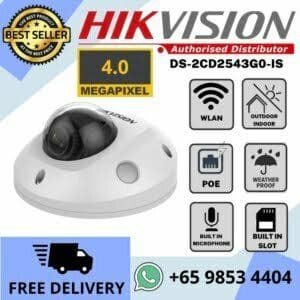
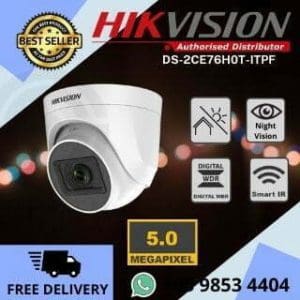
Save27.3%Save $232.00Only$618.00 Original price was: $850.00.$618.00Current price is: $618.00.Hikvision Camera 5MP 3K DS-2CE76H0T-ITPF CCTV Camera DOME Night Vision Sim Lim Square CCTV Shop CCTV Camera Upgrade Repair
Save22.2%Save $20.00Only$70.00 Original price was: $90.00.$70.00Current price is: $70.00.
Reviews
There are no reviews yet.