
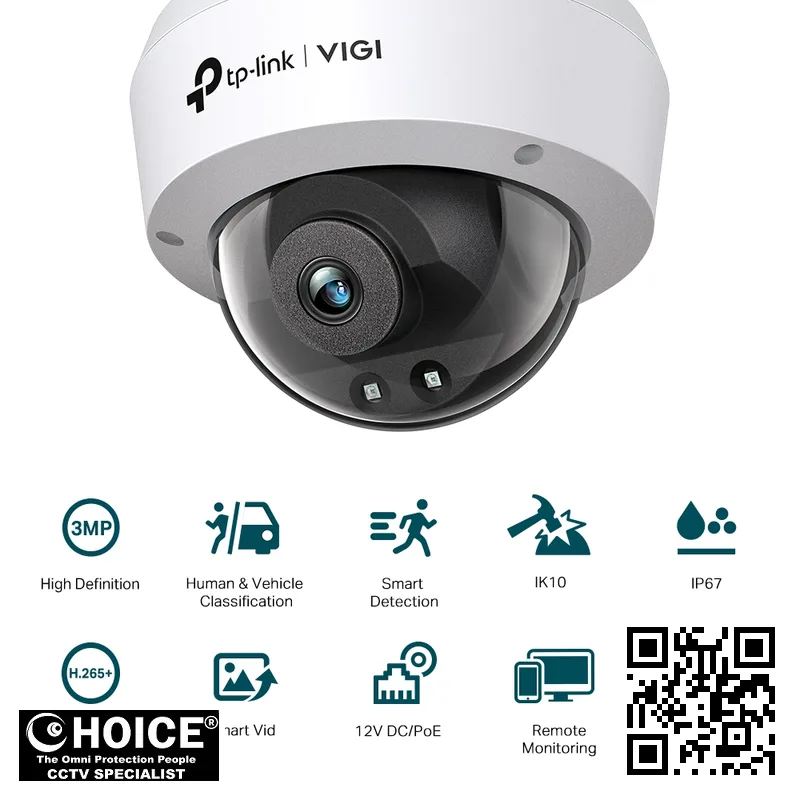
TP-Link VIGI C230I 3MP IR Dome Network Camera
TP-LINK PREMIUM PARTNERS SINGAPORE
Supply and Maintenance TP-LINK CCTV IP Cameras, NVR, DVR, PTZ Cameras,
Access Control System, Video Intercom.
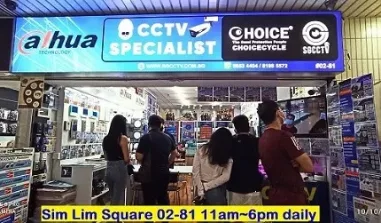
1 Rochor Canal Road, Sim Lim Square 02-81 10am-7pm Daily.
Whatsapp Enquiry Project +65 98534404, Technical Support +65 81120788, Site Visit Maintenance +65 81985572.
TP-Link VIGI C230I Singapore VIGI 3MP IR Dome Network Camera | Advanced 3MP Security Monitoring
TP-Link VIGI C230I Singapore provides a highly reliable and intelligent surveillance solution for modern security needs across the city-state. This VIGI 3MP IR Dome Network Camera is designed to deliver crystal-clear imagery and intelligent detection features that cater to both residential and commercial environments. As security requirements evolve in Singapore, having a camera that can distinguish between humans and vehicles is essential for reducing false alarms. Whether you are protecting a small shop or a large industrial facility, the VIGI C230I offers the precision needed for 24/7 monitoring. This device integrates seamlessly into existing network infrastructures, making it a versatile choice for users seeking high-definition surveillance without unnecessary complexity.
By choosing this TP-Link model, you ensure a robust layer of protection for your assets and loved ones.
Key Features of the TP-Link VIGI C230I Singapore
- High-Resolution 3MP Imaging: The camera captures detailed 2304 × 1296 resolution, ensuring that even small details are preserved for forensic review.
- Intelligent Human and Vehicle Detection: Advanced algorithms allow the camera to classify objects, significantly reducing the frequency of false alerts caused by animals or moving shadows.
- Superior Night Vision Capabilities: With an IR range of up to 30 meters, the camera maintains visibility in total darkness using 850nm infrared LEDs.
- Weatherproof and Vandal-Resistant Design: Featuring an IP67 rating and IK10 impact protection, this dome camera is built to withstand harsh outdoor elements and physical tampering.
- Advanced H.265+ Compression: This technology optimizes your network bandwidth and storage space by compressing video files efficiently without sacrificing image quality.
- Smart Event Notifications: Receive immediate alerts on your mobile device through intrusion detection, line-crossing, and region entering/exiting detection features.
- Integrated Audio Monitoring: The built-in microphone allows for ambient sound recording, providing an extra layer of situational awareness within a 5-meter radius.
- Wide Dynamic Range (DWDR): The camera manages difficult lighting conditions, such as strong backlight, to ensure clear images in high-contrast environments.
Technical Specifications
| Specification | Detail | |
| Model Name | VIGI C230I | |
| Image Sensor | 1/2.8” Progressive Scan CMOS | |
| Max. Resolution | 2304 × 1296 | |
| Lens Options | 2.8 mm / 4 mm Fixed Focal Lens | |
| Field of View (2.8mm) | Horizontal: 97.8°, Vertical: 52.9°, Diagonal: 117.9° | |
| Field of View (4mm) | Horizontal: 82.8°, Vertical: 44.5°, Diagonal: 98.1° | |
| Min. Illumination | Color: 0.01 Lux; 0 Lux with IR | |
| IR Night Vision Range | Up to 30m with 850nm wavelength | |
| Video Compression | H.265+, H.265, H.264+, H.264 | |
| Audio Input | Yes (Built-in Microphone included) | |
| Network Interface | 1 RJ45 10/100M Ethernet Port, PoE Support | |
| Power Supply | 12V DC or PoE (802.3af/at) | |
| Protection Rating | IP67 Waterproof, IK10 Vandal Proof | |
| Operating Temperature | -30°C to 60°C | |
| Dimensions | 115 × 115 × 86 mm | |
| Weight | Net: 0.27 kg / Gross: 0.45 kg |
Applications and Use Cases in Singapore
Warehouse & Logistics: The VIGI C230I is ideal for monitoring large storage areas and loading bays. Its ability to detect abandoned objects and perimeter breaches helps prevent inventory shrinkage and unauthorized access in industrial zones.
Retail Stores: For shop owners in Singapore malls, this camera provides excellent coverage of aisles and counters. The intelligent detection helps monitor customer movement and prevents shoplifting through real-time alerts.
Condominiums & HDB Estates: Enhance community safety by monitoring common corridors, lift lobbies, and car parks. The IK10 vandal-proof rating ensures the camera remains functional even in high-traffic residential areas.
Office Buildings: Secure your corporate assets by monitoring entrances and sensitive server rooms. The discreet dome design blends into professional office aesthetics while providing high-resolution surveillance.
Car Parks: Deploy these cameras in multi-story car parks to track vehicle entry and exit. The vehicle classification feature assists in identifying specific cars and managing parking lot security effectively.
Small Businesses: For cafes and boutiques, the easy integration with the VIGI App allows owners to keep an eye on their business remotely from anywhere in Singapore.
Why Choose the TP-Link VIGI C230I Singapore
Singapore’s tropical climate presents unique challenges for electronic hardware, including high humidity and heavy rainfall. The TP-Link VIGI C230I Singapore is engineered with an IP67 rating, making it highly resistant to moisture ingress and dust. This ensures long-term reliability even when installed in semi-outdoor settings like covered walkways or carpark entrances.
Furthermore, when implementing surveillance in Singapore, compliance with the Personal Data Protection Act (PDPA) is a critical consideration. Using professional-grade equipment like the VIGI series allows for better control over data access, encryption, and privacy masking. The ability to apply up to 4 privacy masks ensures that you can monitor your premises without infringing on the privacy of the public or neighbors.
Power stability is also a factor in local installations. The VIGI C230I supports both 12V DC and Power over Ethernet (PoE), allowing for flexible installation in various Singaporean building types, from older HDB structures to modern smart offices with advanced network cabling.
Installation Guide
Installing the TP-Link VIGI C230I requires careful planning regarding power and connectivity. One of the most efficient methods is using Power over Ethernet (PoE). By using a PoE switch, you can transmit both data and electrical power through a single Ethernet cable, which simplifies the cabling process and reduces the need for additional power outlets near the camera location.
If your infrastructure does not support PoE, you can utilize the 12V DC power port. However, this will require a separate power adapter and a nearby electrical point. Ensure that the cable run does not exceed the standard Ethernet distance limits to maintain signal integrity and prevent video flickering or loss of connection.
Once the hardware is physically mounted, the software setup begins. You can use the VIGI App for mobile management or the VIGI Security Manager for a more comprehensive desktop experience. The setup involves connecting the camera to your local network, assigning an IP address, and configuring the intelligent detection zones. For users needing assistance with complex network configurations, professional guidance is always recommended to ensure maximum security.
Repair and Maintenance
To ensure your security system remains operational, a regular maintenance schedule is vital. In Singapore’s dusty or humid environments, the camera lens should be cleaned periodically with a soft, microfiber cloth to prevent blurred images. Check the camera housing for any signs of water ingress or physical damage, especially after heavy monsoon seasons.
Common issues often stem from network instability or power fluctuations. If you experience video loss, first check the integrity of the RJ45 connectors and the power supply. Firmware updates are also essential; always check for the latest TP-Link updates to ensure your camera has the most recent security patches and feature enhancements.
If you encounter persistent issues such as night vision failure or motion detection errors, it may be necessary to inspect the IR cut filter or recalibrate the software settings. Regular audits of your storage capacity are also necessary to ensure that the continuous recording does not overwrite critical footage too quickly.
Where to Buy the VIGI C23I in Singapore
SGCCTV — Authorised Hikvision & Dahua Dealer Singapore
Address: 1 Rochor Canal Road, Sim Lim Square #02-81, Singapore
Email: enquiry@choicecycle.com.sg
WhatsApp: +65 98534404 (24 hours)
Operating Hours: 10:00 AM – 7:00 PM daily
Website: https://sgcctv.com.sg
If you are looking for the TP-Link VIGI C230I in Singapore, SGCCTV (Choicecycle CCTV Pte Ltd) is your trusted local provider. We are located conveniently at Sim Lim Square, a well-known hub for technology and security solutions. Our team can assist you with technical inquiries and help you find the right configuration for your specific needs.
Please note that availability is confirmed on enquiry. To discuss your requirements or to request a quote, please contact us directly. We do not provide pricing over the website; instead, please WhatsApp +65 98534404 for pricing and detailed information regarding your project.
SGCCTV (Choicecycle CCTV Pte Ltd)
Address: 1 Rochor Canal Road, Sim Lim Square #02-81, Singapore 188504
WhatsApp enquiry: +65 98534404
Technical support: +65 81120788
Site visit / maintenance: +65 81985572
Email: enquiry@choicecycle.com.sg
Website: https://sgcctv.com.sg
Opening hours: 10:00 AM – 7:00 PM daily
Frequently Asked Questions
How can I find out the price of the VIGI C230I?
To ensure you receive the most accurate and up-to-date information based on your specific requirements, please WhatsApp +65 98534404 for pricing. We can discuss the details of your project and provide a tailored quotation that includes any necessary accessories or support services you might require.
Is this camera suitable for outdoor installation in Singapore?
Yes, the TP-Link VIGI C230I is highly suitable for outdoor use. It features an IP67 waterproof rating, which protects the internal components from heavy rain and dust. This makes it an excellent choice for the tropical weather conditions found throughout Singapore, providing reliable performance in both sun and rain.
Can I view the camera footage on my smartphone?
Absolutely. The VIGI series is designed for easy remote monitoring via the VIGI App. Once the camera is connected to your network, you can view live streams and playback recorded footage from anywhere in the world, provided your smartphone has an active internet connection, making it perfect for remote business owners.
Does the camera support PoE (Power over Ethernet)?
Yes, the VIGI C230I supports PoE (802.3af/at, class 0). This allows you to power the camera and transmit data through a single Ethernet cable. This is a highly recommended setup for most Singaporean installations as it reduces cabling complexity and allows for a much cleaner, more professional-looking installation.
How does the intelligent detection feature work?
The camera uses advanced AI algorithms to distinguish between human shapes and vehicle shapes. This means the camera can ignore small movements like swaying trees or passing pets, only sending you an alert when a person or a car enters a predefined zone. This significantly reduces the number of false notifications on your phone.
What is the difference between the 2.8mm and 4mm lens versions?
The 2.8mm lens provides a wider field of view, which is better for covering large open areas like parking lots. The 4mm lens provides a narrower, more focused view, which is better for monitoring specific entry points or long corridors. The choice depends on your specific surveillance objectives and the area you need to cover.
Is the camera’s night vision effective in total darkness?
Yes, the camera is equipped with powerful IR LEDs that provide a range of up to 30 meters. In complete darkness, the infrared light illuminates the scene, allowing the sensor to capture clear, monochrome images. This ensures that your premises remain monitored even during the darkest hours of the night.
Can I use this camera with my existing NVR system?
The VIGI C230I supports the ONVIF protocol, which allows for compatibility with many standard network video recorders. However, for the best experience and access to all intelligent features like person/vehicle detection, we recommend using a VIGI-compatible NVR or the VIGI Security Manager software for seamless integration.
Is the storage of recorded footage secure and private?
Security is a priority with the VIGI C230I. It features HTTPS encryption, password protection, and IP address filtering to prevent unauthorized access to your video stream. When setting up your system, you can also use privacy masks to ensure that sensitive areas outside your property are not recorded, aiding in PDPA compliance.</
How do I get a quote for a full installation?
If you require a complete security solution including cameras, cabling, and setup, please contact SGCCTV. You can WhatsApp +65 98534404 for pricing and to discuss your site requirements. Our team can help you design a comprehensive system tailored to your specific building or business needs.
Related Products
- TP-Link VIGI Network Video Recorders (NVR)
- TP-Link VIGI Turret Security Cameras
- TP-Link VIGI PTZ Pan-Tilt-Zoom Cameras
In conclusion, the TP-Link VIGI C230I is a premier choice for anyone seeking high-definition, intelligent surveillance in Singapore. With its robust construction, advanced detection capabilities, and easy integration, it provides the peace of mind necessary for modern security. Whether you are upgrading an existing system or starting a new installation, this camera delivers exceptional value. For any inquiries regarding availability or to get a custom quote, please WhatsApp +65 98534404 or visit SGCCTV at Sim Lim Square to speak with our experts today.
Choosing the TP-Link VIGI C230I for Your Singapore Property
Selecting the right surveillance system is a critical decision for any property owner in Singapore. Whether you are managing a small retail boutique in Orchard Road or a large warehouse in Jurong, the TP-Link VIGI C2ALL-3MP IR Dome Network Camera offers the precision required for modern security needs.
For residents living in HDB flats, security often focuses on monitoring entry points like your main door or service yard. The compact design of the TP-Link VIGI C230I allows it to blend seamlessly into your ceiling, providing an unobtrusive yet powerful eye for your home’s interior.
Condominium owners can leverage this camera to monitor private balconies or shared corridors. The high-definition 3MP resolution ensures that even small details, such as faces or package deliveries, are captured with exceptional clarity, providing peace of mind for high-density living environments.
If you own a landed property, such as a terrace or bungalow, your security perimeter is much larger. This camera is ideal for monitoring foyers, porches, or gated entrances, helping you keep a watchful eye on your family and property boundaries around the clock.
Retailers across Singapore can utilize this technology to prevent shrinkage and monitor customer flow. By placing the camera strategically near cash registers or high-value merchandise displays, shop owners can gain actionable insights into daily business operations and potential security breaches.
Office managers can deploy these units to oversee workstations and meeting rooms. The discreet dome form factor ensures that employees do not feel intruded upon, while still maintaining a professional level of oversight for sensitive corporate assets and important documentation.
In industrial settings like warehouses or logistics hubs, the TP-Link VIGI C230I serves as a vital tool for monitoring loading bays and stock aisles. Its ability to handle wide-angle views helps in managing large, open spaces where movement needs to be tracked constantly.
Typical placements for this camera include ceilings in hallways, corners of large rooms, and under eaves. By mounting the device in high, unobstructed positions, you maximize the field of view and minimize the risk of the camera being tampered with by intruders.
Singapore’s unique tropical climate presents specific challenges for electronic hardware. High humidity and sudden heavy rainfall can lead to rapid degradation of inferior security cameras, making durability a non-negotiable feature for any professional-grade surveillance installation.
The TP-Link VIGI C230I is engineered to withstand the rigors of our local weather. Its robust construction helps protect the internal components from the moisture and heat fluctuations that are common in our tropical, high-humidity environment, ensuring long-term operational stability.
Reliability is the cornerstone of any security strategy in Singapore. When you choose a camera that is built to endure local environmental stressors, you reduce the frequency of maintenance visits and the need for costly hardware replacements due to humidity-induced corrosion.
Beyond its physical durability, the advanced IR night vision capabilities ensure that your property remains protected even during Singapore’s heavy tropical downpours or during the darkest hours of the night when visibility is at its lowest.
Investing in the right hardware means investing in your long-term safety. By choosing a camera specifically suited for the local landscape, you ensure that your surveillance system remains a dependable guardian for your home, office, or business for years to come.
Installation and Setup Guide for the TP-Link VIGI C230I
Setting up your new TP-Link VIGI C230I requires careful planning to ensure maximum coverage. Whether you are securing a retail shop in Orchard Road or a residential condo in Tampines, the initial placement of your dome camera is the most critical step in your security strategy.
When considering mounting options, the VIGI C230I offers great versatility. The dome design is ideal for ceiling mounts, providing a downward angle that covers large open areas. You can also use wall mounts for corner placements to eliminate blind spots around your perimeter.
For indoor settings, mounting the camera on a ceiling allows for a wide-angle view of the entire room. This is particularly effective for monitoring entry points or cash counters. Ensure the mounting surface is stable and can support the weight of the device securely.
One of the most significant advantages of the TP-Link VIGI C230I is its support for Power over Ethernet (PoE). This technology allows you to transmit both data and electrical power through a single Ethernet cable, significantly reducing the amount of wiring needed.
Using PoE simplifies the installation process by eliminating the need for a separate power outlet near the camera. This is especially helpful in Singaporean high-rise buildings where electrical sockets might be limited or difficult to access near the ceiling or eaves.
If you choose not to use PoE, you will need to provide a nearby power source for the camera. While this is possible, it often requires more complex cabling and can lead to a cluttered look that may not suit modern, minimalist office or home aesthetics.
For a seamless surveillance experience, pairing your camera with a VIGI NVR (Network Video Recorder) is highly recommended. The NVR acts as the central brain, managing the recording, storage, and playback of all your high-definition video feeds.
Connecting the camera to an NVR is straightforward. Once both devices are on the same local network, the NVR can automatically detect the camera. This setup ensures that your footage is stored safely on a hard drive, independent of your internet connection.
If you prefer a more flexible, decentralized setup, you can also use the camera with a compatible micro SD card. This is a great option for temporary monitoring or for users who do not require 24/7 continuous recording capabilities.
Configuring the VIGI app is the final step to achieving true remote monitoring. By downloading the app on your smartphone, you can view live feeds from anywhere in the world, as long as your camera is connected to the internet.
The app allows you to manage motion detection alerts, which are essential for real-time security. You can receive instant notifications on your phone if the camera detects unauthorized movement within your monitored zone during the night.
Furthermore, the app enables you to playback recorded footage and export important clips directly to your mobile device. This makes it incredibly easy to review incidents or share evidence with the authorities if a security breach occurs.
While DIY installation is possible, professional installation offers peace of mind. At SGCCTV, our professional installation service includes a comprehensive system audit to identify the best camera angles and optimal placement for your specific Singapore property.
Our technicians handle all the heavy lifting, including professional cable trunking and neat wiring. We ensure that all Ethernet cables are hidden and protected, maintaining the aesthetic integrity of your home or business premises without unsightly wires.
A professional setup also includes network optimization. We configure your router and NVR settings to ensure smooth, lag-free streaming and reliable remote access, preventing the common connectivity issues that often plague DIY-installed security systems.
Finally, our team provides a full walkthrough of the system. We will teach you how to navigate the app, manage your storage, and use all the advanced features of your new hardware to ensure you are fully confident in your security.
TP-Link VIGI C230I: Frequently Asked Questions
Where can I buy the TP-Link VIGI C230I?
You can buy the TP-Link VIGI C230I from SGCCTV at Sim Lim Square #02-81, or order online.
Is the TP-Link VIGI C230I suitable for outdoor use?
Yes — the TP-Link VIGI C230I is built for Singapore’s tropical, humid weather.
Does the TP-Link VIGI C230I come with a warranty?
Every TP-Link VIGI C230I includes local warranty support from SGCCTV. Our team will confirm the exact coverage when you enquire.
How much does the TP-Link VIGI C230I cost?
WhatsApp +65 98534404 for the best price on the TP-Link VIGI C230I today.
Can SGCCTV install the TP-Link VIGI C230I?
Yes, SGCCTV offers professional installation for the TP-Link VIGI C230I across Singapore.
Is the TP-Link VIGI C230I available?
Availability of the TP-Link VIGI C230I is confirmed by our team — WhatsApp +65 98534404 and we will check the current position for you.
What resolution does the TP-Link VIGI C230I record?
The TP-Link VIGI C230I captures sharp, detailed footage well suited to Singapore homes and businesses.
Does the TP-Link VIGI C230I work at night?
Yes, the TP-Link VIGI C230I delivers clear low-light footage, tested for Singapore conditions.
Can I view the TP-Link VIGI C230I on my phone?
You can monitor the TP-Link VIGI C230I remotely from anywhere in Singapore via the mobile app.
What warranty covers the TP-Link VIGI C230I?
The TP-Link VIGI C230I is backed by local warranty support from SGCCTV in Singapore.
Why buy the TP-Link VIGI C230I from SGCCTV?
SGCCTV is a trusted Singapore dealer offering the TP-Link VIGI C230I at the best price with expert support.
Is the TP-Link VIGI C230I good for HDB and condo use?
Yes, the TP-Link VIGI C230I is a popular pick for HDB flats, condos and offices across Singapore.


Nunc lacus elit, faucibus ac laoreet sed, dapibus ac mi. Maecenas eu ante a elit tempus fermentum. Aliquam commodo tincidunt semper. Phasellus accumsan, justo ac mollis pharetra, ex dui pharetra nisl, a scelerisque ipsum nulla ac sem. Cras eu risus urna. Duis lorem sapien, congue eget nisl sit amet, rutrum faucibus elit.
Donec accumsan auctor iaculis. Sed suscipit arcu ligula, at egestas magna molestie a. Proin ac ex maximus, ultrices justo eget, sodales orci. Aliquam egestas libero ac turpis pharetra, in vehicula lacus scelerisque. Vestibulum ut sem laoreet, feugiat tellus at, hendrerit arcu.
Nunc lacus elit, faucibus ac laoreet sed, dapibus ac mi. Maecenas eu ante a elit tempus fermentum. Aliquam commodo tincidunt semper. Phasellus accumsan, justo ac mollis pharetra, ex dui pharetra nisl, a scelerisque ipsum nulla ac sem. Cras eu risus urna. Duis lorem sapien, congue eget nisl sit amet, rutrum faucibus elit.
Related Products
Dahua Bullet Network Camera IPC-HFW3241E-AS Security System CCTV Camera World Top Security Manufacturer 2MP H.265+ Lite AI IR Fixed Focal Outdoor Weatherproof IP67
Save15.6%Save $25.00Only$135.00 Original price was: $160.00.$135.00Current price is: $135.00.
Reviews
There are no reviews yet.