
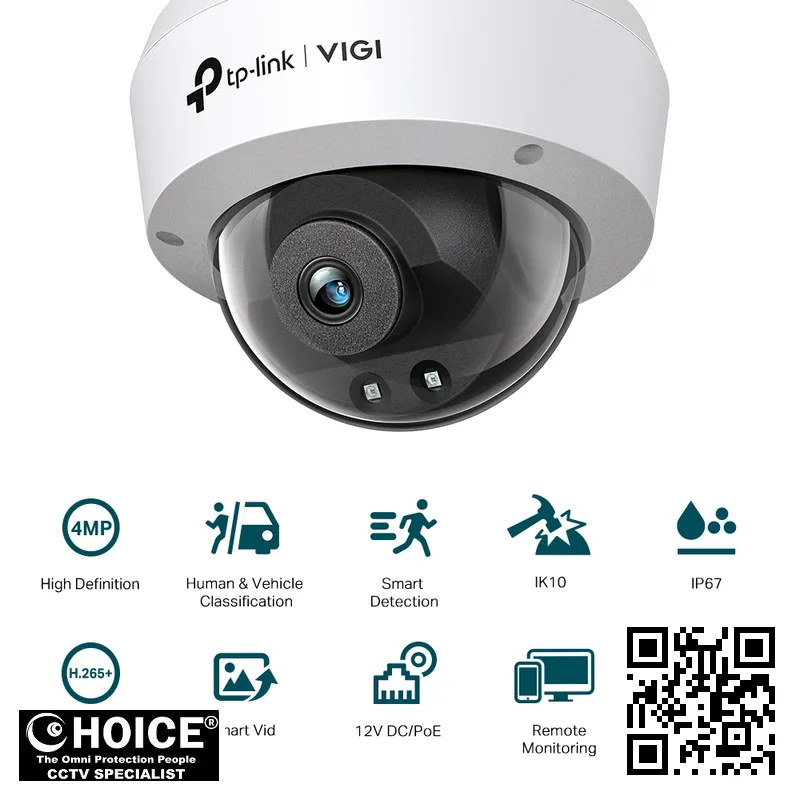
TP-Link VIGI C240I 4MP IR Dome Network Camera
TP-LINK PREMIUM PARTNERS SINGAPORE
Supply and Maintenance TP-LINK CCTV IP Cameras, NVR, DVR, PTZ Cameras,
Access Control System, Video Intercom.
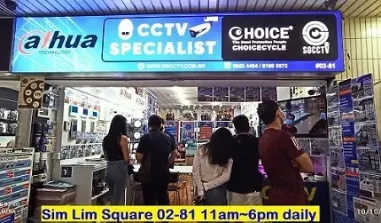
1 Rochor Canal Road, Sim Lim Square 02-81 10am-7pm Daily.
Whatsapp Enquiry Project +65 98534404, Technical Support +65 81120788, Site Visit Maintenance +65 81985572.
TP-Link VIGI C240I Singapore VIGI 4MP IR Dome Network Camera | High-Definition Surveillance for Total Security
TP-Link VIGI C240I Singapore is a premier solution for those seeking high-definition monitoring with unparalleled clarity. This VIGI 4MP IR Dome Network Camera is engineered to provide a wide field of view and exceptional detail, making it an essential tool for modern security. Whether you are looking to protect a small retail shop or a large-scale industrial facility, this camera delivers consistent performance. For users in Singapore, the importance of reliable, high-resolution surveillance cannot be overstated, especially when managing property assets. This device integrates seamlessly into existing network infrastructures, offering smart features that detect human and vehicle movements with precision.
By choosing this TP-Link model, you are investing in a robust ecosystem designed for 24/7 vigilance and peace of mind.
Key Features of the TP-Link VIGI C240I Singapore
- Superb 4MP Resolution: The camera captures images at 2560 × 1440 resolution, ensuring that every detail is preserved for accurate identification.
- Advanced Night Vision: Equipped with IR LEDs, the camera provides a clear view up to 30 meters even in total darkness.
- Intelligent Motion Detection: Enhanced algorithms allow the system to classify humans and vehicles, reducing false alarms from animals or swaying trees.
- Weatherproof Durability: With an IP67 rating, the camera is built to withstand heavy rain and dust, making it ideal for outdoor Singapore environments.
- Vandal-Resistant Design: The IK10-rated dome housing protects the internal components from physical tampering or impact.
- Efficient Video Compression: Utilizing H.265+ technology, the camera significantly reduces bandwidth and storage requirements without sacrificing image quality.
- Smart Event Notifications: Receive immediate push notifications for line-crossing, intrusion detection, and abnormal sound detection.
easily monitor your premises via the VIGI App, allowing for real-time alerts and remote live viewing from anywhere.
Technical Specifications
| Specification | Detail | |
| Model | VIGI C240I | |
| Image Sensor | 1/3” Progressive Scan CMOS | |
| Max. Resolution | 2560 × 1440 | |
| Lens Options | 2.8 mm / 4 mm Focal Length | |
| Aperture | F2.2 (2.8 mm) / F2.0 (4 mm) | Horizontal FOV: 88.8° (2.8mm) / 75.2° (4mm) |
| Minimum Illumination | Color: 0.01 Lux; 0 Lux with IR light | |
| Night Vision Range | Up to 30m with 850nm IR LEDs | |
| Video Compression | H.265+ / H.265 / H.264+ / H.264 | |
| Audio Input | Built-in Microphone (up to 5m radius) | IP67 Waterproof, IK10 Vandal Proof |
| Power Supply | 12V DC ± 5% or PoE (802.3af/at) | |
| Operating Temperature | -30°C to 60°C | |
| Network Interface | 1 RJ45 10/100M Ethernet Port |
Applications and Use Cases in Singapore
Warehouse & Logistics: The wide field of view and vehicle detection features make this camera perfect for monitoring loading bays and large storage aisles. It helps track movement and ensures that high-value inventory is protected against unauthorized access.
Retail Stores: For shops in bustling areas, the VIGI C240I provides excellent coverage of aisles and checkout counters. The smart event detection can alert owners to unusual activity during or after business hours.
HDB & Condominium: Enhance the security of residential common areas, such as lobbies and lift lobbies. The vandal-proof IK10 rating is particularly useful in high-traffic residential zones to prevent tampering.
< Office Buildings: Monitor corridors and entry points to maintain a secure corporate environment. The high resolution ensures that anyone entering the premises can be clearly identified if an incident occurs.
Car Parks: Utilize the vehicle detection and long-range IR capability to monitor parking bays and entry/exit ramps. This helps in managing traffic flow and identifying unauthorized parking or suspicious behavior.
Industrial Factories: Protect expensive machinery and production lines with continuous 24/7 surveillance. The robust build handles the dusty environments often found in manufacturing plants.
Why Choose the TP-Link VIGI C240I Singapore
Choosing the TP-Link VIGI C240I Singapore means preparing for the unique environmental challenges of our region. The high humidity and heavy tropical rainfall in Singapore can degrade inferior hardware, but the IP67-rated casing of this camera ensures long-term reliability. Furthermore, the hardware is designed to operate efficiently within the standard 230V power infrastructure used locally.
Security in Singapore also involves strict adherence to the Personal Data Protection Act (PDPA). When deploying this camera, users must ensure that footage storage and access are managed according to local privacy laws. The VIGI system provides robust security features like HTTPS encryption and password protection to help users maintain compliance while securing their premises effectively.
Installation Guide
The TP-Link VIGI C240I offers two primary power options to suit different installation needs. Power over Ethernet (PoE) is highly recommended for most professional setups in Singapore, as it allows you to transmit both data and power through a single Ethernet cable. This simplifies cabling and reduces the need for power outlets near the camera location. Alternatively, a 12V DC power port is available for setups where a local power source is already present.
For a successful network setup, ensure your network switch supports the 802.3af/at standard if using PoE. Once the hardware is mounted, you can use the VIGI App to integrate the camera into your mobile device. The setup process involves connecting the camera to your local network and using the app to scan for new devices. This allows for seamless remote viewing and configuration of smart events like motion detection.
Repair and Maintenance
To ensure your surveillance system remains operational, a regular maintenance schedule is vital. Periodically check the camera lens for dust, spider webs, or water droplets that might obscure the view. Since the camera is used in tropical climates, checking the integrity of the waterproof cable attachments is a good practice to prevent moisture ingress.
Common issues usually involve network connectivity or power fluctuations. If you experience video loss, first check the Ethernet connection and the PoE switch status. If the image appears blurry, cleaning the dome with a soft, microfiber cloth is often sufficient. For more complex technical issues, always consult your professional installer or contact SGCCTV technical support for guidance.
Where to Buy the VIGI C240I in Singapore
SGCCTV — Authorised Hikvision & Dahua Dealer Singapore
Address: 1 Rochor Canal Road, Sim Lim Square #02-81, Singapore
Email: enquiry@choicecycle.com.sg
WhatsApp: +65 98534404 (24 hours)
Operating Hours: 10:00 AM – 7:00 PM daily
Website: https://sgcctv.com.sg
If you are looking for authentic TP-Link security solutions, SGCCTV (Choicecycle CCTV Pte Ltd) is your trusted local provider. We are located at 1 Rochor Canal Road, Sim Lim Square #02-81, Singapore 188504. Our team is highly experienced in assisting clients with the right surveillance configurations for their specific needs.
Please note that availability is confirmed on enquiry. For all pricing requests, please WhatsApp +65 98534404. We do not provide quotes via the website to ensure you receive the most accurate information based on your specific requirements. You can also visit our shop during our opening hours: 10:00 AM – 7:00 PM daily.
Contact Details:
Company: SGCCTV (Choicecycle CCTV Pte Ltd)
Address: 1 RochHD 1 Rochor Canal Road, Sim Lim Square #02-81, Singapore 188504
WhatsApp enquiry: +65 98534404
Technical support: +65 81120788
Site visit / maintenance: +65 81985572
Email: enquiry@choicecycle.com.sg
Website: https://sgcctv.com.sg
Frequently Asked Questions
How can I find out the price of the TP-Link VIGI C240I?
To ensure you get the most accurate and up-to-date pricing for your specific project needs, please WhatsApp +65 98534404. Our team will be happy to provide a customized quote based on the quantity and the specific configuration you require for your premises.
Is this camera suitable for outdoor installation in Singapore?
Yes, the TP-Link VIGI C240I is specifically designed for durability. With an IP67 waterproof rating, it is highly resistant to the heavy rain and high humidity levels commonly experienced in Singapore. It is also IK10 vandal-proof, making it suitable for exposed outdoor areas.
Does the camera support remote viewing on my smartphone?
Absolutely. The camera is fully compatible with the VIGI App, which allows you to view live footage, receive motion alerts, and playback recorded events directly on your mobile device. This enables you to monitor your property from anywhere in the world as long as you have internet access.
Can I use PoE to power this camera?
Yes, the VIGI C240I supports Power over Ethernet (PoE) via the 802.3af/at standard. Using a PoE switch is a very efficient way to install the camera, as it eliminates the need for a separate power adapter and reduces the amount of cabling required at your installation site.
What is the difference between the 2.8mm and 4mm lens versions?
The 2.8mm lens provides a wider field of view, which is great for covering large open areas like car parks. The 4mm lens offers a narrower, more zoomed-in view, which is better for focusing on specific entry points or corridors where you need more detail at a distance.</
Does the camera include a microphone for audio monitoring?
Yes, the device features a built-in microphone that can record audio within a 5-meter radius of the camera. This is particularly useful for detecting abnormal sounds or capturing audio context during security incidents, providing an extra layer of evidence for your surveillance records.
<pHow much storage is required for the video recordings?
Storage requirements depend on your resolution settings and retention period. Because this camera uses H.265+ compression, it is much more efficient than older cameras. For specific storage calculations and hardware recommendations, please WhatsApp +65 98534404 for pricing and professional advice.
Can this camera detect people and vehicles specifically?
Yes, one of the standout features of the VIGI C240I is its intelligent motion detection. It is capable of human and vehicle classification, which helps the system distinguish between a person walking by and a vehicle moving into a restricted area, significantly reducing false alarms.
Is the camera compatible with other ONVIF-enabled NVRs?
Yes, the TP-Link VIGI C240I supports the ONVIF protocol, specifically the Profile S API. This ensures high interoperability with various Network Video Recorders (NVRs) and management software, allowing you to integrate it into a larger, multi-brand security ecosystem if necessary.
What should I do if the camera’s night vision is not working?
First, check if the IR Cut Filter is functioning correctly and ensure the power supply is stable. You should also check your settings in the VIGI App to see if the IR light is set to “Always Off” or a specific schedule. For persistent issues, contact our technical support.
Related Products
In conclusion, the TP-Link VIGI C240I is a high-performance, durable, and intelligent surveillance solution perfect for the Singapore market. Its combination of 4MP clarity, weather resistance, and smart detection makes it a top choice for residential and commercial security. If you are interested in upgrading your security, please WhatsApp +65 98534404 for pricing or visit SGCCTV at Sim Lim Square for expert consultation.
Choosing the TP-Link VIGI C240I for Your Singapore Property
Deciding on the right security solution depends heavily on the specific architecture of your premises. The TP-Link VIGI C240I is a versatile choice designed to bridge the gap between high-end professional surveillance and user-friendly home security.
For residents living in HDB flats, this dome camera offers a discreet way to monitor common entry points. Its compact form factor ensures it does not look intrusive in smaller-scale living environments while providing crisp 4MP resolution.
Condominium owners can utilize the TP-Link VIGI C240I to secure private balconies or perimeter corridors. It provides the necessary clarity to identify faces and movements, ensuring your private sanctuary remains undisturbed by unauthorized intruders.
If you reside in a landed property, such as a terrace or bungalow, you need wide-coverage monitoring. This camera excels at capturing detail in driveway areas or garden perimeters, helping you keep a watchful eye on your estate.
Retail business owners in Singapore can leverage this technology to prevent shrinkage. Placing these units near high-value aisles or point-of-sale counters allows for detailed monitoring of customer interactions and staff activities during busy hours.
For office environments, the camera serves as an excellent tool for internal oversight. It can be mounted on ceilings to monitor reception areas or pantry zones, ensuring a safe and productive atmosphere for all your employees.
Warehouse managers will find great value in its ability to monitor loading bays and storage aisles. The high-definition imaging ensures that even small details on packages or movement in dimly lit corners are captured with precision.
Typical placement is key to maximizing your security ROI. We recommend mounting the unit on ceilings or under eaves to take advantage of its downward-facing field of view, which minimizes blind spots in corners.
In Singapore, our tropical climate presents unique challenges for electronic hardware. High humidity and sudden heavy rainfall can cause many standard cameras to fail due to internal condensation or moisture ingress.
The TP-Link VIGI C240I is engineered to withstand these environmental stressors. Its robust build quality is designed to handle the heat and moisture levels common across the island, ensuring consistent performance year-round.
Whether you are facing the intense afternoon sun or the heavy monsoon rains, this camera maintains its integrity. This durability makes it a reliable long-term investment for any property owner in the region.
The infrared capabilities are particularly important for Singapore’s night-time security. Even when the lights are turned off in a shop or a home, the IR LEDs provide clear, monochrome imagery for total peace of much-needed peace of mind.
The 4MP resolution ensures that you aren’t just seeing movement, but identifying specific details. This level of clarity is essential when you need to review footage for insurance claims or police reports in Singapore.
Integrating this camera into a larger VIGI ecosystem allows for seamless management. You can scale your security from a single unit to a complex network of cameras across multiple locations without much difficulty.
Ultimately, choosing this model means choosing a balance of cost-efficiency and high performance. It is a smart, localized solution for anyone looking to upgrade their surveillance capabilities in Singapore’s unique urban landscape.
Installation and Setup Guide for the TP-Link VIGI C240I
Setting up your new surveillance system is an exciting step toward securing your Singapore property. The TP-Link VIGI C240I is designed for versatility, allowing for various mounting configurations. Whether you are monitoring a retail storefront or a residential driveway, understanding the physical installation is the first step to success.
The dome design of the TP-Link VIGI C240I makes it ideal for ceiling mounting in indoor environments. You can also utilize the base bracket to mount the unit on walls or overhangs. This flexibility ensures you can achieve the perfect angle to eliminate blind spots around your premises.
When planning your installation, you must decide between Power over Ethernet (PoE) and a traditional power adapter. Using a PoE switch is highly recommended for most Singaporean businesses. This single-cable solution carries both data and electricity, significantly reducing the clutter of messy wires around your ceiling.
If you choose not to use PoE, you will need to ensure a reliable power outlet is located near the camera. While this is possible, it often requires more complex electrical work. For a cleaner, more professional look, we always suggest opting for a PoE-enabled network setup.
Connecting your camera to the network is the next critical phase. To get the most out of your hardware, you should pair the camera with a VIGI NVR (Network Video Recorder). This allows for centralized management, continuous 24/7 recording, and much larger storage capacities for your high-definition footage.
For those who prefer a lightweight setup, the camera can also function as a standalone device on your local network. However, for long-term security monitoring in a high-traffic area, an NVR provides the stability and redundancy required to ensure no important event is ever missed during a playback review.
Once the hardware is physically mounted and powered, it is time for the digital configuration. You can easily manage your system using the VIGI App on your smartphone. This allows you to view live streams and receive instant motion alerts directly to your mobile device, no matter where you are.
During the app setup, you will need to scan the QR code on the device to bind it to your account. This process ensures that your video feed remains private and accessible only to authorized users. We recommend setting up strong passwords to maintain the highest level of cybersecurity.
Configuring motion detection zones is another vital step during the software setup. You can mask out areas like moving trees or public sidewalks to prevent false alarms. This precision ensures that your phone only alerts you when actual suspicious activity is detected on your property.
While DIY installation is possible for tech-savvy users, professional installation offers significant advantages. A professional SGCCTV installation includes a comprehensive site survey to identify the most strategic camera angles. This eliminates shadows and ensures the 4MP resolution is utilized to its maximum potential.
Our professional services also include precision cable management and weatherproofing. In Singapore’s humid climate, ensuring that all connections are properly sealed and protected from moisture is essential for the longevity of your equipment. We handle the heavy lifting so you can focus on your business.
A professional setup also includes a full system test and user training session. We will walk you through the VIGI App interface, showing you how to playback footage, export clips, and manage your storage settings. This ensures you are fully confident in using your new security technology.
Choosing a professional installer means your network infrastructure is optimized for high-bandwidth video streaming. We ensure your router and switches can handle the data load of multiple high-resolution cameras without lagging. This guarantees a smooth, uninterrupted viewing experience for your peace of mind.
In conclusion, while the TP-Link VIGI C240I is user-friendly, a structured installation approach is key. Whether you are managing the wires yourself or hiring our experts, proper placement and network configuration are the foundations of a truly secure and reliable surveillance ecosystem.
TP-Link VIGI C240I Performance: Image Quality, Night Vision and Analytics
When it comes to professional-grade surveillance in Singapore, clarity is non-negotiable. The TP-Link VIGI C24 40I stands out by delivering a crisp 4MP resolution. This high-definition capability ensures that every detail, from facial features to license plates, is captured with remarkable precision.
In the dense urban environments of Singapore, shadows and bright reflections can often blur security footage. However, the high-resolution sensor in this dome camera minimizes pixelation. This allows business owners to zoom in on critical footage without losing the essential details needed for investigations.
Low-light performance is where the TP-Link VIGI C240I truly excels. Equipped with advanced infrared technology, the camera provides consistent monitoring even in near-total darkness. This is vital for securing dimly lit corridors in HDB carparks or dark alleyways behind retail shophouses.
The integrated IR LEDs allow for a wide night vision range, ensuring that perimeter security remains uncompromised after sunset. Even in challenging lighting conditions, the camera maintains high contrast. This prevents the grainy, washed-out look common in cheaper, entry-level surveillance alternatives.
Beyond simple recording, the camera features intelligent analytics designed to reduce false alarms. The smart detection technology can distinguish between actual human intruders and environmental movements. This means you won’t be woken up by notifications caused by stray cats or swaying tree branches.
For Singaporean retailers, this smart detection is a game-changer. It allows for more efficient monitoring of storefronts. You can set specific detection zones to focus on entrances or high-value displays, ensuring that security personnel only respond to genuine security threats or unauthorized entries.
Managing data is just as important as capturing it. The TP-Link VIGI C240I utilizes H.265+ video compression technology. This advanced standard significantly reduces the file size of your recordings. It allows for longer storage periods on your NVR without requiring massive hard drive upgrades.
Bandwidth management is another critical factor for Singapore businesses relying on stable networks. Because the compression is so efficient, the camera places minimal strain on your office or shop Wi-Fi and LAN. This ensures that your internet speeds remain fast for other essential business operations.
Storage flexibility is also a key highlight for local installers. The camera integrates seamlessly with VIGI NVRs, providing a centralized hub for all your security footage. This setup allows for easy retrieval of historical data, which is crucial when reviewing incidents that occurred days prior.
Whether you are monitoring a small boutique in Orchard Road or a large warehouse in Jurong, the performance remains consistent. The hardware is built to handle the tropical humidity of Singapore, ensuring long-term reliability and minimal maintenance for your surveillance ecosystem.
In summary, the TP-Link VIGI C240I offers a perfect balance of high-definition imaging and intelligent software. It provides the peace of mind that modern Singaporean business owners require. Investing in such high-quality hardware means investing in a truly proactive and reliable security solution.
TP-Link VIGI C240I: Frequently Asked Questions
Where can I buy the TP-Link VIGI C240I?
You can buy the TP-Link VIGI C240I from SGCCTV at Sim Lim Square #02-81, or order online.
Is the TP-Link VIGI C240I suitable for outdoor use?
Yes — the TP-Link VIGI C240I is built for Singapore’s tropical, humid weather.
Does the TP-Link VIGI C240I come with a warranty?
Every TP-Link VIGI C240I includes local warranty support from SGCCTV. Our team will confirm the exact coverage when you enquire.
How much does the TP-Link VIGI C240I cost?
WhatsApp +65 98534404 for the best price on the TP-Link VIGI C240I today.
Can SGCCTV install the TP-Link VIGI C240I?
Yes, SGCCTV offers professional installation for the TP-Link VIGI C240I across Singapore.
Is the TP-Link VIGI C240I available?
Availability of the TP-Link VIGI C240I is confirmed by our team — WhatsApp +65 98534404 and we will check the current position for you.
What resolution does the TP-Link VIGI C240I record?
The TP-Link VIGI C240I captures sharp, detailed footage well suited to Singapore homes and businesses.
Does the TP-Link VIGI C240I work at night?
Yes, the TP-Link VIGI C240I delivers clear low-light footage, tested for Singapore conditions.
Can I view the TP-Link VIGI C240I on my phone?
You can monitor the TP-Link VIGI C240I remotely from anywhere in Singapore via the mobile app.
What warranty covers the TP-Link VIGI C240I?
The TP-Link VIGI C240I is backed by local warranty support from SGCCTV in Singapore.
Why buy the TP-Link VIGI C240I from SGCCTV?
SGCCTV is a trusted Singapore dealer offering the TP-Link VIGI C240I at the best price with expert support.
Is the TP-Link VIGI C240I good for HDB and condo use?
Yes, the TP-Link VIGI C240I is a popular pick for HDB flats, condos and offices across Singapore.


Nunc lacus elit, faucibus ac laoreet sed, dapibus ac mi. Maecenas eu ante a elit tempus fermentum. Aliquam commodo tincidunt semper. Phasellus accumsan, justo ac mollis pharetra, ex dui pharetra nisl, a scelerisque ipsum nulla ac sem. Cras eu risus urna. Duis lorem sapien, congue eget nisl sit amet, rutrum faucibus elit.
Donec accumsan auctor iaculis. Sed suscipit arcu ligula, at egestas magna molestie a. Proin ac ex maximus, ultrices justo eget, sodales orci. Aliquam egestas libero ac turpis pharetra, in vehicula lacus scelerisque. Vestibulum ut sem laoreet, feugiat tellus at, hendrerit arcu.
Nunc lacus elit, faucibus ac laoreet sed, dapibus ac mi. Maecenas eu ante a elit tempus fermentum. Aliquam commodo tincidunt semper. Phasellus accumsan, justo ac mollis pharetra, ex dui pharetra nisl, a scelerisque ipsum nulla ac sem. Cras eu risus urna. Duis lorem sapien, congue eget nisl sit amet, rutrum faucibus elit.
Related Products
Dahua AI PTZ DH-SD49225XA-HNR 2MP H.265+ Network Camera ONVIF 25x Starlight IR 360 degree Pan Tilt Zoom Outdoor IP66 CCTV Camera Singapore Security System
Save19.1%Save $130.00Only$550.00 Original price was: $680.00.$550.00Current price is: $550.00.
Reviews
There are no reviews yet.