
Why is my SD card not working in CCTV What type of SD card for IP camera Why is my camera not reading my SD card Cheap SD card for CCTV
in stock
$15.00
KIOXIA SINGAPORE GENUINE LOCAL STOCK
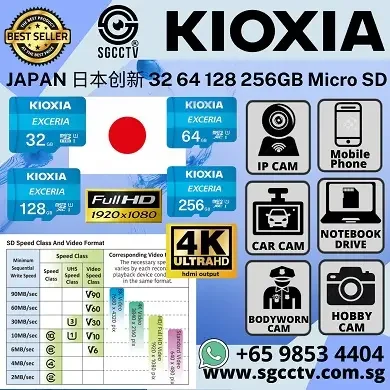
Supports high-speed playback of Full HD and 4K video resolution
Sim Lim Square 02-81 10am-7pm Daily.
Whatsapp Enquiry Project +65 98534404, Technical Support +65 81120788, Site Visit Maintenance +65 81985572.
in stock
Why is my SD card not working in CCTV What type of SD card for IP camera Why is my camera not reading my SD card Cheap SD card for CCTV
EXCERIA microSD Memory Card – Full HD video recording
EXCERIA CL10 U1 R100 32GB $15.00 3days || 64GB $25.00 7days || $128GB $45.00 15days || 256GB $65.00 30days || 512GB $165.00 60days
EXCERIA HIGH ENDURANCE microSD Memory Card – Surveillance / Dashboard camera recording
EXCERIA H/E CL10 UHS-I U1 V10 A1 R100/W30 32GB $28.00 3days || 64GB $45.00 7days || 128GB $65.00 15days || 256GB $95.00 30days || $512GB $235.00 60days
Why Is My SD Card Not Working in My CCTV Camera?
Choosing the Correct MicroSD Card for IP Cameras and Security Camera Recording
A CCTV camera may show “SD Card Not Detected,” “Memory Card Error,” “Unable to Format,” “Abnormal Status” or “No Recording” even though a MicroSD card has been inserted.
The problem is not always the camera. Common causes include an incompatible storage capacity, unsuitable speed class, counterfeit card, worn-out flash memory, incorrect formatting, damaged contacts, outdated firmware or a card that was inserted incorrectly.
For reliable CCTV recording, use a genuine High Endurance MicroSD card that meets the camera manufacturer’s required capacity and speed rating. Security cameras continuously write and overwrite video, creating much heavier wear than ordinary photography.
Why is my SD card not working in CCTV What type of SD card for IP camera Why is my camera not reading my SD card Cheap SD card for CCTV
Why Is My SD Card Not Working in CCTV?
1. The SD Card Capacity Is Not Supported
Every IP camera has a maximum supported storage capacity.
Depending on the model, a camera may support:
- 32GB
- 64GB
- 128GB
- 256GB
- 512GB
- 1TB
Installing a card larger than the camera supports may cause the card to remain undetected or fail during formatting.
Always check the exact camera model and hardware revision, not only the brand.
2. The Card Is Too Slow
Video recording requires a stable minimum write speed. The SD Association explains that speed classes identify the minimum sustained sequential writing performance needed for applications such as video recording. (SD Association)
For most modern security cameras, look for at least:
Class 10 / U1 / V10
For higher-resolution cameras, multiple video streams or demanding recording, a manufacturer may require:
U3 / V30
The camera manual remains the final compatibility reference.
3. It Is Not a High-Endurance Card
A standard consumer MicroSD card may work temporarily but fail earlier under continuous CCTV recording.
Security cameras repeatedly write and overwrite footage. High Endurance, Max Endurance or Pro Endurance cards are specifically designed for applications such as security cameras and dash cameras. TP-Link recommends endurance-rated cards for continuous camera recording. (TP-Link)
4. The SD Card Is Counterfeit
Very cheap MicroSD cards may falsely report a larger capacity than they physically contain.
For example, a modified 16GB or 32GB card may appear as 128GB or 256GB. Once the camera writes beyond the card’s real capacity, recordings may become corrupted, formatting may fail or the camera may stop recording.
Counterfeit and low-quality cards are common causes of recognition and formatting failures. (TP-Link)
5. The Card Requires Formatting
A new or previously used card may have an unsupported or corrupted file system.
Where possible, insert the card into the camera and use the camera’s own app, web interface or management software to initialise or format it.
Formatting deletes existing files. Back up important footage first.
6. The Card Is Worn Out
Flash memory has a limited number of write cycles.
A card used for continuous recording may eventually develop:
- Write errors
- Missing footage
- Corrupted files
- Formatting failures
- Frequent disconnection
- Read-only condition
If the card previously worked but now repeatedly fails, replacement may be necessary. Manufacturers note that MicroSD cards wear over time and may require periodic replacement. (TP-Link)
7. The Card Was Inserted Incorrectly
The card must be inserted in the correct orientation and fully clicked into place.
Do not insert it at an angle or force it into the slot. Incorrect insertion can prevent detection or damage the card slot. (TP-Link)
Powering off the camera before inserting or removing the card is advisable unless the manufacturer states otherwise.
8. The Contacts Are Dirty or Damaged
Dust, oxidation, moisture or damaged contacts may prevent reliable communication between the camera and card.
Remove power, inspect the card and slot, and check for:
- Bent or damaged card
- Dirt on the contacts
- Water ingress
- Corrosion
- Loose card retention
Do not insert metal tools into the card slot.
9. The Camera Firmware or App Is Outdated
An outdated camera firmware or mobile app may cause compatibility or formatting problems.
Manufacturers commonly recommend updating the camera firmware and app before continuing SD card troubleshooting. (TP-Link)
10. The Camera’s SD Card Slot May Be Faulty
When several verified compatible cards fail in the same camera, the problem may be with the camera’s card reader, mainboard, power supply or firmware.
Test the card on a computer and test the camera with another known-good compatible card before concluding that the camera is defective.
What Type of SD Card Should I Use for an IP Camera?
For most IP security cameras, choose a card with these characteristics:
- MicroSDHC or MicroSDXC, according to supported capacity
- Class 10 minimum
- U1 or higher
- V10 or higher
- High Endurance construction
- Genuine card from an authorised seller
- Suitable operating-temperature range
- Capacity within the camera’s stated limit
TP-Link’s current camera guidance specifies Class 10, U1 or V10 as a common minimum and strongly recommends endurance-rated cards for continuous recording. Exact requirements differ by camera. (TP-Link)
Understanding the Markings
C10 means a minimum sequential write speed of 10MB/s.
U1 means a minimum write speed of 10MB/s.
U3 means a minimum write speed of 30MB/s.
V10 means a minimum sustained video write speed of 10MB/s.
V30 means a minimum sustained video write speed of 30MB/s.
Higher ratings do not automatically guarantee compatibility. The camera must support the card’s capacity, interface and file system.
Why Is My Camera Not Reading My SD Card?
Use this troubleshooting sequence:
- Confirm that the camera model has a MicroSD slot.
- Check the maximum supported capacity.
- Confirm that the card meets the required speed class.
- Power off the camera.
- Remove and reinsert the card correctly.
- Power on the camera and wait for it to initialise.
- Update the camera firmware and mobile app.
- Format the card through the camera interface.
- Test the card on a computer.
- Test the camera with a known-good compatible endurance card.
When formatting or recognition still fails, the likely causes are compatibility, card failure, counterfeit capacity, firmware or a faulty card slot. (TP-Link)
How to Test Whether an SD Card Is Genuine
A card showing the correct capacity in Windows is not proof that it is genuine.
Capacity verification tools can write data across the complete card and confirm whether it can actually store the advertised amount.
Common test tools include:
- H2testw for Windows
- F3 for macOS or Linux
- Suitable verification applications for Android
TP-Link recommends a full write-and-verify test to expose counterfeit capacity and storage errors. Testing erases or overwrites data, so back up files first. (TP-Link)
Cheap SD Card for CCTV – Is It Worth Buying?
A cheap SD card may reduce the initial purchase price but create a much higher risk of:
- Lost video evidence
- Corrupted recordings
- Recording gaps
- Card-not-detected errors
- Format failures
- Early card failure
- Unnecessary camera troubleshooting
The cheapest card is rarely the lowest-cost solution when important security footage is involved.
Why is my SD card not working in CCTV What type of SD card for IP camera Why is my camera not reading my SD card Cheap SD card for CCTV
Recommended Card Selection by Application
2MP Home Security Camera
A genuine Class 10 / U1 / V10 High Endurance card may be sufficient, subject to the camera specification.
4MP or 5MP IP Camera
Consider a reputable endurance card rated at least Class 10 / U1 / V10, or higher where the manufacturer requires it.
4K Security Camera, Drone or Body Camera
A U3 / V30 card may be more appropriate for higher-bitrate recording, but always follow the device manufacturer’s minimum specification.
24/7 Continuous Recording
Prioritise High Endurance, Max Endurance or Pro Endurance models over general-purpose consumer cards.
CCTV SD Card Troubleshooting and Replacement Singapore
SGCCTV provides professional support for:
MicroSD Card Supply | CCTV Storage Configuration | Camera Formatting | Recording Troubleshooting | IP Camera Repair | Camera Replacement | Firmware Assessment | Video Playback Support
Before purchasing, provide the exact camera model so the maximum supported capacity and recommended card specification can be checked.
Contact SGCCTV Singapore
Website: www.sgcctv.com.sg
Email: enquiry@choicecycle.com.sg
WhatsApp: +65 98534404
10 FAQ – CCTV and IP Camera SD Card Problems
1. Why is my SD card not detected by my CCTV camera?
Common reasons include unsupported capacity, incorrect insertion, unsuitable speed class, corrupted formatting, counterfeit storage, card wear, outdated firmware or a faulty camera slot.
2. What type of MicroSD card is best for an IP camera?
Use a genuine High Endurance MicroSD card that meets the camera’s supported capacity and minimum speed requirement. Class 10, U1 or V10 is a common minimum, but the exact camera datasheet should be followed. (TP-Link)
3. Can I use a normal phone SD card in a CCTV camera?
It may work, but a general-purpose card is not normally the best choice for continuous recording. Endurance-rated cards are designed for repeated video writing and overwriting.
4. Why does my camera say “SD Card Abnormal”?
The card may be incompatible, damaged, counterfeit, worn out or improperly formatted. Back up any accessible files, then try initialising the card through the camera.
5. Should I format the card on a computer or in the camera?
Where supported, formatting through the camera is generally preferable because the camera prepares the card using its required structure. Back up important files before formatting.
6. Can a card be too large for the camera?
Yes. A camera that supports a maximum of 128GB may not recognise a 256GB or 512GB card. Check the exact model’s specification.
7. Why does my SD card record for a while and then stop?
Possible causes include a fake-capacity card, insufficient write speed, card wear, disabled loop recording, a full card that cannot overwrite, heat or file-system corruption.
8. Is a cheap MicroSD card safe for CCTV?
An unusually cheap or unbranded card carries a higher risk of counterfeit capacity, unreliable writing and early failure. Lost security footage can cost far more than the saving on the card.
9. How can I check whether my MicroSD card is fake?
Test the entire capacity using a write-and-verify tool such as H2testw or F3. A counterfeit card may report a large capacity but fail when data is written beyond its true physical storage. (TP-Link)
10. Where can I buy a suitable CCTV MicroSD card in Singapore?
Contact SGCCTV Singapore for MicroSD cards suitable for IP cameras, body worn cameras, security cameras and other video-recording devices.
WhatsApp: +65 98534404
Email: enquiry@choicecycle.com.sg
Website: www.sgcctv.com.sg
Recommended SEO Keywords
Why Is My SD Card Not Working in CCTV, CCTV SD Card Not Detected, IP Camera SD Card Error, Camera Not Reading SD Card, Best SD Card for CCTV Camera, What SD Card for IP Camera, High Endurance MicroSD Card Singapore, Cheap SD Card for CCTV, CCTV Memory Card Singapore, Security Camera Storage Card, MicroSD Card Format Error, CCTV Card Abnormal, Fake MicroSD Card Singapore, Class 10 SD Card for Camera, U1 V10 CCTV Card, 24/7 Recording MicroSD Card, CCTV SD Card Replacement Singapore, IP Camera Recording Problem, CCTV Repair Singapore, SGCCTV Singapore
Why is my SD card not working in CCTV What type of SD card for IP camera Why is my camera not reading my SD card Cheap SD card for CCTV
Best Micro SD Cards for 4K Video Recording, Surveillance & Professional Applications
Looking for a reliable Micro SD Card in Singapore for your CCTV camera, body worn camera, drone, dash camera or action camera?
SGCCTV Singapore supplies high-performance Micro SD Cards from trusted brands including Kioxia (Japan) for professional surveillance, continuous video recording and high-speed data storage.
Whether you need storage for a Hikvision CCTV camera, Dahua IP camera, EZVIZ camera, TP-Link VIGI camera, body worn camera, drone or mobile device, choosing the correct Micro SD card helps improve recording reliability and overall system performance.
Why Choose a High-Quality Micro SD Card?
Not all Micro SD cards are designed for continuous video recording.
Professional surveillance cameras often record 24 hours a day, 7 days a week, requiring memory cards designed for frequent writing and long-term reliability.
A quality Micro SD card provides:
- Stable Video Recording
- Fast Read & Write Speed
- Reliable Data Storage
- High Compatibility
- Reduced Recording Errors
- Better Performance for Continuous Recording
- Long Service Life
Kioxia (Japan) Micro SD Cards
Kioxia, formerly Toshiba Memory, is a Japanese flash memory manufacturer known for producing NAND flash storage used in industrial, commercial and consumer devices.
Kioxia Micro SD cards are suitable for:
- CCTV Cameras
- IP Cameras
- Body Worn Cameras
- Dash Cameras
- Drones
- Smartphones
- Tablets
- Action Cameras
- Portable Recorders
Choosing a reputable storage brand helps reduce the risk of data corruption and recording interruptions.
Ideal for CCTV & Security Cameras
Many modern security cameras support onboard recording using a Micro SD card.
Typical applications include:
- Hikvision Cameras
- Dahua Cameras
- EZVIZ Cameras
- TP-Link VIGI Cameras
- UNV Cameras
- Axis Cameras
- Hanwha Cameras
- Bosch Cameras
Supported capacity depends on the camera model and firmware. Always check the manufacturer’s specifications before purchasing.
Suitable for Body Worn Cameras
Body worn cameras require storage capable of handling long periods of continuous recording.
A high-quality Micro SD card is suitable for:
- Security Officers
- Police
- Auxiliary Police
- Enforcement Officers
- Logistics Personnel
- Field Engineers
- Healthcare Workers
- Emergency Responders
Reliable storage helps preserve important video evidence captured during daily operations.
Perfect for Drone Recording
Drone cameras often record:
- 4K Video
- Full HD Video
- High Frame Rate Video
- Time-Lapse
- Aerial Photography
High-speed Micro SD cards help support smooth recording and faster transfer of video files to computers for editing.
Available Storage Capacities
Common capacities include:
- 32GB
- 64GB
- 128GB
- 256GB
- 512GB
The appropriate capacity depends on:
- Camera Resolution
- Video Bitrate
- Recording Duration
- Compression Method (H.264 / H.265)
- Recording Mode
- Loop Recording Settings
Higher-capacity cards generally allow longer recording before older footage is overwritten in loop-recording applications.
Speed Class Matters
When selecting a Micro SD card, consider the required speed class.
Depending on the camera or device, cards may support classifications such as:
- Class 10
- UHS-I
- U1
- U3
- Video Speed Class (V30, V60, etc.)
- Application Performance Class (A1, A2)
The recommended specification depends on the device manufacturer’s requirements and the recording resolution.
Common Applications
Micro SD cards are widely used in:
- CCTV Cameras
- Security Cameras
- IP Cameras
- Body Worn Cameras
- Dash Cameras
- Drones
- Smartphones
- Tablets
- Action Cameras
- Video Doorbells
- Trail Cameras
- Portable Audio Recorders
- Industrial Monitoring Systems
Signs Your Micro SD Card May Need Replacement
A memory card should be inspected or replaced if you notice:
- Recording Stops Unexpectedly
- Video Files Are Corrupted
- Camera Reports “SD Card Error”
- Unable to Format Card
- Slow File Transfer
- Missing Video Files
- Frequent Write Errors
- Card Not Detected
- Recording Freezes
- Device Randomly Reboots During Recording
These symptoms can also be caused by camera firmware, power issues or hardware faults, so proper troubleshooting is recommended.
Tips for Longer Micro SD Card Life
To help maximise reliability:
- Use a card that meets the camera’s recommended specification.
- Format the card using the camera’s formatting function where supported.
- Avoid removing the card while recording is in progress.
- Back up important recordings regularly.
- Replace ageing cards that show signs of wear or repeated errors.
- Keep the card away from moisture, excessive heat and static electricity.
Why Buy from SGCCTV Singapore?
- Genuine Memory Cards
- Professional Technical Advice
- CCTV Storage Specialists
- Body Camera Storage Solutions
- Drone Storage Solutions
- Security System Accessories
- Installation & Technical Support
- Competitive Pricing
SGCCTV – Micro SD Card Supplier Singapore
SGCCTV supplies:
- Micro SD Cards
- CCTV Storage
- Body Worn Camera Storage
- Drone Memory Cards
- Surveillance Accessories
- CCTV Cameras
- Body Cameras
- NVR & DVR Systems
- Installation & Technical Support
Contact SGCCTV Singapore
Website: www.sgcctv.com.sg
Email: enquiry@choicecycle.com.sg
WhatsApp: +65 98534404
Why is my SD card not working in CCTV What type of SD card for IP camera Why is my camera not reading my SD card Cheap SD card for CCTV
10 Frequently Asked Questions (FAQ)
1. What is a Micro SD card used for?
A Micro SD card provides removable storage for devices such as CCTV cameras, body worn cameras, drones, dash cameras, smartphones and tablets.
2. Why should I use a high-quality Micro SD card for CCTV?
CCTV cameras often record continuously for long periods. A reliable Micro SD card designed for sustained recording can improve recording stability and reduce the likelihood of storage-related issues.
3. Is Kioxia a good Micro SD card brand?
Yes. Kioxia is a Japanese flash memory manufacturer with extensive experience in NAND flash technology and produces memory products used in consumer and professional applications.
4. Which capacity should I choose?
The required capacity depends on your camera’s supported maximum capacity, recording resolution, bitrate and how long you want to retain recordings before they are overwritten.
5. Can I use the same Micro SD card in a drone?
Yes, provided the card meets the drone manufacturer’s speed and capacity requirements. High-resolution video recording often requires faster memory cards.
6. Can I use a Micro SD card in a body worn camera?
Yes. Many body worn cameras use Micro SD cards for local video storage. Always confirm the supported capacity and speed class for your specific model.
7. Why does my CCTV camera say “SD Card Error”?
Possible causes include an incompatible card, a damaged file system, card wear, improper removal or a camera hardware issue. Formatting or replacing the card may help, but troubleshooting should confirm the actual cause.
8. How often should I replace a Micro SD card?
Replacement depends on usage, recording frequency and the operating environment. Cards used for continuous surveillance may wear out faster than those used only occasionally.
9. Can I transfer CCTV recordings to a computer?
Yes. Depending on the camera model, recordings can often be copied by removing the Micro SD card or by downloading files through the camera’s software or network interface.
10. Where can I buy Micro SD cards for CCTV cameras in Singapore?
Contact SGCCTV Singapore for genuine Micro SD cards suitable for CCTV cameras, body worn cameras, drones, dash cameras and other security devices.
WhatsApp: +65 98534404
Email: enquiry@choicecycle.com.sg
Website: www.sgcctv.com.sg
Top SEO Keywords
Micro SD Card Singapore, Kioxia Micro SD Card Singapore, Japan SD Card, Best Micro SD Card Singapore, CCTV Micro SD Card, Security Camera SD Card, IP Camera Memory Card, Hikvision SD Card Singapore, Dahua SD Card Singapore, EZVIZ Memory Card, TP-Link VIGI SD Card, Body Worn Camera SD Card, Drone Micro SD Card Singapore, 4K Micro SD Card, High Speed SD Card Singapore, Surveillance Memory Card, Dash Camera SD Card Singapore, Micro SD Card for CCTV Recording, Security Camera Storage Singapore, SGCCTV Singapore
CHOICECYCLE CCTV offer the Best Micro SD Card Singapore SD Card for Camera Security Camera Storage Body Worn Camera Kioxia Japan SD Card Best Micro SD cards Drones.
When selecting the right microSD card for a camera, security camera, body-worn camera, or drones, it’s essential to understand the features, functions, benefits, and advantages of different microSD card types. Let’s break down these aspects based on the use case of “Micro SD Card Singapore,” “Kioxia Japan SD Card,” and “Best Micro SD cards.”
Features
- Capacity:
- MicroSD cards come in different capacities like 16GB, 32GB, 64GB, 128GB, 256GB, and higher.
- Higher capacity is essential for long-term storage, especially for high-definition video recordings in security or body-worn cameras.
- Speed Class:
- Cards are rated by speed classes such as Class 10, UHS-I, UHS-II, U3, V30, V60, V90.
- For video storage in cameras, speed is crucial to ensure smooth recording. Class 10 or U3 are ideal for Full HD, 4K, and 8K video.
- Durability:
- Many microSD cards, like Kioxia’s, are designed to be waterproof, shockproof, X-ray-proof, and temperature-proof, which is essential for outdoor cameras, drones, and body-worn cameras.
- Endurance:
- High-endurance microSD cards are optimized for continuous writing and rewriting, making them suitable for security cameras that operate 24/7.
- Look for cards labeled for “High Endurance” or “Surveillance” purposes.
- Error Correction Code (ECC):
- Some microSD cards feature ECC technology that detects and fixes transfer errors, enhancing data integrity—crucial for law enforcement body-worn cameras or drones.
Functions
- Storage for Video:
- These cards primarily store high-resolution video footage, whether from security cameras, body-worn cameras, or drones.
- They also enable smooth playback and fast access to recorded footage.
- Secure Data Recording:
- Body-worn cameras and security cameras benefit from cards that provide reliable, continuous writing without dropping frames or causing data corruption.
- Fast Read/Write for Live Applications:
- For drones or high-speed applications, faster read/write speeds reduce lag and improve overall performance, especially when capturing video at high resolutions like 4K.
Benefits
- Reliable Performance:
- High-quality microSD cards, like those from Kioxia Japan, ensure stable and uninterrupted video recording. This is especially vital in security cameras and body-worn cameras for law enforcement.
- High Capacity Storage:
- The ability to store a large amount of data allows extended video recording without frequent card changes, perfect for long surveillance operations or drone flights.
- Compact Size:
- Despite their small size, microSD cards can store massive amounts of data, which is highly beneficial for compact devices like drones, action cameras, and body cameras.
- Compatibility:
- These cards are compatible with a wide range of devices, from consumer-level cameras to professional security and body cameras.
Advantages
- Durability in Harsh Conditions:
- Many microSD cards designed for industrial or outdoor use are built to withstand extreme conditions, such as rain, heat, cold, and physical impact. This makes them highly suited for security cameras placed outdoors or body-worn cameras used in rough environments.
- Cost-Effective Storage:
- MicroSD cards are an affordable way to expand storage without needing a cloud or server-based system. They are easily replaceable, making them a low-cost solution for security systems and drones.
- Efficient Data Transfer:
- High-speed cards allow rapid file transfer to other devices, whether for editing, backup, or review. For drones and cameras, this means less downtime when offloading footage.
- Versatility:
- A microSD card can easily be swapped between various devices such as cameras, drones, and even smartphones, offering flexibility across different use cases.
Best MicroSD Cards for Each Use Case:
- Security Cameras:
- Kioxia Japan High-Endurance microSD: Designed for continuous video recording, these cards have a long life span and can withstand the rigors of 24/7 surveillance.
- Body-Worn Cameras:
- SanDisk High-Endurance or Samsung Pro Endurance: These cards are built for high-rewrite applications, ensuring reliable data capture even in law enforcement or heavy-duty use.
- Drones:
- SanDisk Extreme Pro or Lexar Professional: These cards provide ultra-fast read/write speeds for handling 4K video, ensuring smooth operation even at high resolutions and fast speeds.
Conclusion
The right microSD card depends on your specific needs: continuous recording for surveillance (high endurance), high-speed performance for drones (UHS Speed Class 3 or higher), or durability for extreme conditions. Brands like Kioxia, SanDisk, and Samsung are popular choices, offering different cards that balance capacity, speed, and reliability, ensuring you get the best performance for your security camera, body-worn camera, or drone.
Why is my SD card not working in CCTV What type of SD card for IP camera Why is my camera not reading my SD card Cheap SD card for CCTV
It’s crucial to be aware of fake SD cards when purchasing online. Counterfeit microSD cards can be problematic, especially for security cameras, drones, or body-worn cameras where reliability and performance are essential. Here’s how to spot fake SD cards and avoid falling victim to counterfeit products:
1. Signs of Fake SD Cards
- Capacity Mismatch: Fake cards often claim to have a much higher capacity than they actually do. For example, a card marketed as 128GB may only have 8GB of actual usable storage, and the rest may corrupt data.
- Slow Speed: Counterfeit cards may advertise fast speeds, such as UHS-I or Class 10, but in reality, they perform at much slower rates, leading to issues like lagging or data loss.
- Packaging Discrepancies: Fake SD cards often come in packaging that looks close to the original but may have misspelled words, poor-quality printing, or missing holographic security labels.
- Unusual Prices: If the price seems too good to be true (much lower than the retail price for that capacity and brand), it likely is.
- Unreliable Vendors: Buying from unknown or unreliable sellers, especially on third-party marketplaces, increases the chances of getting counterfeit products.
2. How to Avoid Fake SD Cards
- Purchase from Trusted Retailers: Always buy from reputable sellers or authorized distributors, such as well-known electronics stores CHOICECYCLE CCTV PTE LTD.
- Check Product Reviews: Look for reviews, especially ones that highlight authenticity issues. Many customers flag counterfeit products in their reviews.
- Test the Card: After purchasing, use tools like H2testw or F3 to test the card’s real capacity and speed. These tools can quickly verify if the card’s claimed specs match its actual performance.
- Inspect the Packaging: Carefully examine the packaging for signs of tampering or poor quality. Original cards usually come with proper seals, clear brand logos, and unique serial numbers.
- Look for Authenticity Markers: CHOICECYCLE CCTV PTE LTD offer product registration or authenticity check features on their websites. You can enter the serial number of the card to verify if it’s genuine.
3. Consequences of Using Fake SD Cards
- Data Loss: Fake SD cards can result in data corruption or loss, which can be disastrous in security applications or drone operations where important footage is recorded.
- Shorter Lifespan: Counterfeit cards are usually made from low-quality materials, meaning they have a significantly shorter lifespan and can fail unexpectedly.
- Slow Performance: If the card’s speed isn’t what it claims to be, you could experience slow file transfers, interrupted recordings, or even device malfunction.
- Incompatibility: Fake cards may not work well with the device you intend to use, especially if it requires specific speed or endurance levels, such as in high-performance drones or body-worn cameras.
Conclusion
Buying fake SD cards online can be a costly mistake, especially when using them in critical devices like security cameras, body-worn cameras, or drones. Always verify the authenticity of the seller and the product, and test the card before using it for important applications. This way, you can avoid poor performance, data loss, and unnecessary headaches.
Why is my SD card not working in CCTV What type of SD card for IP camera Why is my camera not reading my SD card Cheap SD card for CCTV
Not All memory card will work for your IP Cameras, Security Surveillance Project. Read & Play speed are different to support between Low Resolution, Full HD 1920 x 1080P & 4K 8MP.
Speed, Capacity, Quality need to zoom into above costing, is frustrating when Important data could not be retrieve, worst need to report to Public, Council, Committee, Bosses.
Capacity 16GB 32GB 64GB 128GB 256GB

Usage Full HD 1920 x 1080P video recording


Micro SD Card Singapore SD Card for Camera Security Camera Storage Body Worn Camera Kioxia Japan SD Card Best Micro SD cards Drones
In Singapore, many of us are used to seeing things happen on CCTVs. Particularly monitor domestic helper, kids & senior parents at home.
When crime happened, CCTVs become some of the most useful forms of documentation of evidence.
Close Circuit Television cameras, also known as CCTV, offer the complete package of home, office, or outdoor security. When people know that they are being watched, there is a lower chance for delinquent behavior.
So what do you do? You can increase security with minimal effort by installing a video surveillance camera.
Why you need a CCTV
Why you need a CCTV? It’s simple – CCTVs tend to ward off delinquent behavior thanks to an effect called the Hawthorne Effect or Deterrence Effect.
The Hawthorne Effect, otherwise known as the Observer Effect, happens when a person is aware that he or she is being monitored.
The individual will change his or her behavior to suit the person who is watching them. In the case of CCTVs, often, a person will be deterred from doing wrong if a camera is present in the vicinity.
Fun fact: The Hawthorne Effect can also be seen when taking photos. Most people will strike a pose as soon as the camera is facing them.
Why is my SD card not working in CCTV What type of SD card for IP camera Why is my camera not reading my SD card Cheap SD card for CCTV


Nunc lacus elit, faucibus ac laoreet sed, dapibus ac mi. Maecenas eu ante a elit tempus fermentum. Aliquam commodo tincidunt semper. Phasellus accumsan, justo ac mollis pharetra, ex dui pharetra nisl, a scelerisque ipsum nulla ac sem. Cras eu risus urna. Duis lorem sapien, congue eget nisl sit amet, rutrum faucibus elit.
Donec accumsan auctor iaculis. Sed suscipit arcu ligula, at egestas magna molestie a. Proin ac ex maximus, ultrices justo eget, sodales orci. Aliquam egestas libero ac turpis pharetra, in vehicula lacus scelerisque. Vestibulum ut sem laoreet, feugiat tellus at, hendrerit arcu.
Nunc lacus elit, faucibus ac laoreet sed, dapibus ac mi. Maecenas eu ante a elit tempus fermentum. Aliquam commodo tincidunt semper. Phasellus accumsan, justo ac mollis pharetra, ex dui pharetra nisl, a scelerisque ipsum nulla ac sem. Cras eu risus urna. Duis lorem sapien, congue eget nisl sit amet, rutrum faucibus elit.


Reviews
There are no reviews yet.