
Wireless GUARD TOUR WM-5000V8 reader WM-5000T8 docking station Guard Patrol Museum Conference Meeting Religious Prayer Singapore
$498.00
SGCCTV SINGAPORE TOP FIVE START GOOGLE REVIEWS
Widely deployed in Shopping Malls, Residential, Commercial, Office, Warehouse.
Specialist in all Security System CCTV Camera Door Access Alarm Switch
Technical Support at Sim Lim Square 02-81 11am~7pm Daily +65 98534404 +65 81985572
Wireless GUARD TOUR WM-5000V8 reader WM-5000T8 docking station Guard Patrol Museum Conference Meeting Religious Prayer Singapore
Wireless Guard Tour WM-5000V8 Singapore | WM-5000T8 Docking Station | Guard Patrol System for Museum, Conference, Meeting & Religious Facilities
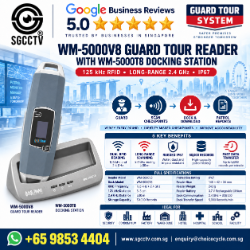
The Wireless Guard Tour WM-5000V8 Reader with WM-5000T8 Docking / Download Station is a professional electronic guard patrol and security checkpoint management system designed to provide verifiable records of security rounds, facility inspections and scheduled patrol activities.
Instead of relying on handwritten security logbooks, security officers carry the WM-5000V8 Guard Tour Reader and scan designated RFID checkpoints during their patrol. Each checkpoint visit creates an electronic record that can be downloaded through the WM-5000T8 station for reporting and review.
In Singapore, this type of system is suitable for museums, conference centres, meeting facilities, religious and prayer facilities, commercial buildings, factories, warehouses, schools, car parks and other premises requiring accountable security patrols.
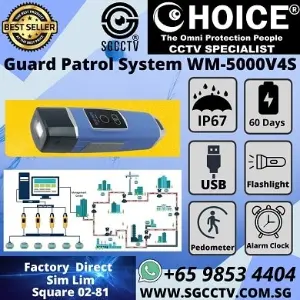
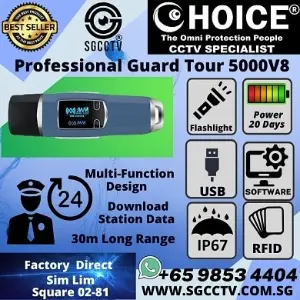
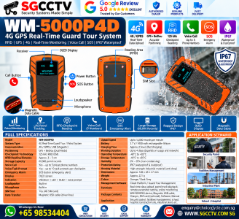
WM-5000V8 Wireless Guard Tour Reader
The WM-5000V8 is designed around a straightforward security principle:
GUARD → CHECKPOINT → TIME → ELECTRONIC RECORD
RFID checkpoints are installed at important locations throughout the premises.
The security officer follows the assigned patrol route and uses the WM-5000V8 to register each checkpoint.
A typical patrol could be:
MAIN ENTRANCE
↓
EMERGENCY EXIT
↓
RESTRICTED ROOM
↓
CAR PARK
↓
EQUIPMENT ROOM
↓
PERIMETER GATE
↓
SECURITY OFFICE
Management can subsequently review the patrol records rather than depending solely on handwritten declarations that a patrol was completed.
WM-5000V8 Key Features
| Feature | WM-5000V8 |
|---|---|
| Product Type | Wireless Guard Tour Reader |
| Technology | RFID Patrol Checkpoint System |
| RFID Modes | 125kHz + 2.4GHz |
| Checkpoint Operation | Contactless |
| Local Storage | Up to 60,000 records |
| Display | OLED |
| Feedback | LED / Vibration |
| Battery | Rechargeable lithium battery |
| Environmental Protection | IP67 |
| Additional Functions | Clock / Flashlight / Thermometer / Compass |
| Data Transfer | Via compatible WM-5000T8 station |
| Application | Security Patrol / Inspection / Guard Tour |
| Suitable Sites | Museum / Conference / Commercial / Religious Facilities |
Actual RFID reading distance and battery endurance depend on the checkpoint type, operating mode, installation environment and usage pattern.
WM-5000T8 Docking / Download Station
The WM-5000T8 provides the communication interface between the WM-5000V8 patrol reader and the guard-tour management computer.
A typical workflow is:
WM-5000V8
↓
WM-5000T8
↓
USB / COMPUTER
↓
GUARD TOUR SOFTWARE
↓
PATROL REPORT
This makes it possible for supervisors to retrieve and analyse electronic patrol records.
Why Use an Electronic Guard Tour System?
Traditional patrol management often depends on:
Paper Logbooks
Handwritten Signatures
Manual Time Records
These methods can be difficult to verify.
An electronic guard-tour system provides a more structured record of:
Guard Identity
Checkpoint
Date
Time
Patrol Route
Completed Checkpoints
Missed Checkpoints
Late Checkpoints
This helps management answer a basic operational question:
“Was the required security patrol actually completed?”
Museum Guard Patrol System Singapore
Museums can contain public galleries, restricted rooms, valuable collections, storage areas and multiple emergency exits.
A guard-tour system can be configured with checkpoints at:
Main Entrance
Exhibition Gallery
Emergency Exit
Collection Storage
Restricted Room
Loading Area
Plant Room
Security Control Room
Car Park
Perimeter Door
A patrol officer follows the required route and electronically registers each designated location.
This provides management with a record of the inspection without requiring a fixed CCTV camera to prove every patrol action.
Guard Tour + CCTV for Museum Security
For stronger security management, guard patrol and CCTV can perform complementary functions.
GUARD TOUR
provides evidence that a physical patrol checkpoint was visited.
CCTV
provides visual evidence of activity at the premises.
Together:
GUARD PATROL + CCTV + ACCESS CONTROL
can provide a more comprehensive security architecture.
Conference Security Patrol
Conference and convention facilities can experience periods of intense visitor activity followed by long periods where halls and meeting rooms are unoccupied.
Security patrol checkpoints can be established at:
Main Entrance
Conference Hall
Emergency Exits
Back-of-House Areas
Loading Bay
AV / Equipment Room
VIP Area
Storage Room
Car Park
Security Office
This provides an accountable method for confirming scheduled security rounds.
Meeting Facility Security
For corporate meeting facilities, guard-tour checkpoints can be used to verify inspections of:
Meeting Rooms
Boardrooms
Server Rooms
Restricted Offices
Emergency Exits
Electrical Rooms
Equipment Rooms
Reception Areas
After-Hours Entrances
This is particularly useful where security staff are required to perform scheduled rounds after normal operating hours.
Religious & Prayer Facility Security
The WM-5000V8 can also be used for appropriate security and facility-management patrols at religious facilities.
Applications can include:
Mosques
Churches
Temples
Prayer Halls
Religious Centres
Community Facilities
Typical security checkpoints could include:
MAIN ENTRANCE
EMERGENCY EXIT
CAR PARK
PERIMETER GATE
OFFICE
STORAGE ROOM
EQUIPMENT ROOM
RESTRICTED AREA
The purpose is to document facility and security inspections—not to track an individual’s religious beliefs or worship activities.
Security During Large Gatherings
Museums, conferences and religious facilities can all experience large crowds.
Security personnel may need to check:
Emergency Exits
Restricted Doors
Public Areas
Back-of-House Areas
Car Parks
Perimeter Gates
Equipment Rooms
Fire-Safety Locations
A guard-tour system helps management define a repeatable inspection route and confirm that assigned checkpoints were visited.
RFID Guard Patrol Checkpoints
RFID checkpoints are positioned at predetermined locations.
For example:
| Checkpoint | Location |
|---|---|
| CP01 | Main Entrance |
| CP02 | Emergency Exit A |
| CP03 | Car Park |
| CP04 | Electrical Room |
| CP05 | Restricted Room |
| CP06 | Loading Bay |
| CP07 | Rear Entrance |
| CP08 | Security Office |
The officer follows the scheduled route and records each checkpoint with the WM-5000V8.
This converts a physical patrol into an auditable electronic record.
Long-Range 2.4GHz RFID
The WM-5000V8 supports both conventional RFID checkpoint operation and 2.4GHz wireless RFID functionality.
Longer-range identification can be useful where a checkpoint cannot conveniently be approached closely, such as:
Restricted Areas
Protected Equipment
High Mounted Locations
Gated Areas
Large Open Areas
However, wireless range should always be tested under actual site conditions.
Walls, metal structures, tag orientation, radio interference and installation position can significantly affect practical range.
For projects requiring a specific long distance such as 100m or 150m, SGCCTV should first conduct a technical assessment rather than guarantee the distance based solely on a generic wireless specification.
60,000 Patrol Records
The WM-5000V8 provides substantial local record capacity, supporting up to approximately:
60,000 PATROL RECORDS
This allows the reader to continue collecting patrol information between data-download sessions.
A structured patrol record can help supervisors determine:
Which Guard
Which Location
What Time
Which Route
Completed or Missed
This is significantly easier to audit than multiple handwritten patrol books.
IP67 Guard Patrol Reader
The WM-5000V8 is designed with:
IP67 PROTECTION
This makes it suitable for demanding patrol environments where equipment may encounter dust or occasional water exposure.
Potential applications include:
Outdoor Walkways
Car Parks
Factories
Warehouses
Building Perimeters
Industrial Compounds
Commercial Properties
Security Posts
Correct handling and charging procedures should still be followed.
Night Guard Patrol
Security patrols frequently occur at night when buildings are less occupied and some incidents are more difficult to detect.
The WM-5000V8 includes features useful for patrol work, including an integrated:
FLASHLIGHT
together with its display and patrol-recording functions.
This can assist officers moving through:
Dark Corridors
Car Parks
Warehouses
Perimeter Areas
Plant Rooms
Back-of-House Areas
A built-in flashlight is a convenience feature and does not replace specialised lighting where high illumination is required.
Guard Tour Management Reports
Electronic guard-tour records can support reporting such as:
Daily Patrol Report
Night Patrol Report
Checkpoint Report
Missed Checkpoint Report
Late Patrol Report
Guard Activity Report
Route Completion Report
This gives supervisors a structured basis for reviewing security operations.
Guard Tour vs CCTV Camera
A guard-tour system and CCTV perform different functions.
| Guard Tour | CCTV |
|---|---|
| Confirms patrol checkpoint | Records video |
| Records time of visit | Shows visual activity |
| Tracks patrol completion | Provides incident evidence |
| Requires physical patrol | Provides continuous surveillance |
| Helps verify security rounds | Helps investigate events |
A stronger security design can use both:
GUARD TOUR + CCTV CAMERA
rather than treating one as a replacement for the other.
Guard Tour + Access Control
For facilities with restricted rooms, the system can also operate alongside access control.
For example:
RFID GUARD TOUR
Confirms the security officer reached the checkpoint.
ACCESS CONTROL
Controls who is authorised to enter.
CCTV
Records visual activity.
Together:
GUARD TOUR + ACCESS CONTROL + CCTV
can provide multiple layers of physical security.
More Than a Security Guard System
The same checkpoint principle can also support other operational inspection duties.
Potential applications include:
Facility Inspection
Cleaning Supervisor Rounds
Fire-Safety Inspection
Equipment Checks
Property Management
Maintenance Inspection
Warehouse Inspection
Building Management
The principle remains:
PERSON + LOCATION + DATE/TIME = VERIFIABLE RECORD
Existing Guard Tour Repair & Replacement
SGCCTV can troubleshoot existing guard-tour installations experiencing:
Reader Cannot Detect Checkpoint
Reader Cannot Charge
Short Battery Runtime
Damaged RFID Tag
Reader Display Failure
Docking Station Not Communicating
USB Communication Failure
Software Cannot Detect Reader
Patrol Records Cannot Download
Wireless Communication Failure
Old Reader Discontinued
A practical troubleshooting path is:
RFID CHECKPOINT → WM-5000V8 → WM-5000T8 → PC → SOFTWARE
before deciding which component requires replacement.
Repair or Replace?
| Problem | Recommended Action |
|---|---|
| Damaged checkpoint | Replace RFID Checkpoint |
| Charging issue | Check Charger / Reader |
| Weak battery | Assess Battery / Reader |
| Reader communication problem | Troubleshoot |
| T8 USB issue | Check Cable / Driver / PC |
| Docking station failure | Replace T8 if confirmed |
| Software configuration | Reconfigure |
| Reader hardware failure | Repair / Replace Reader |
| Obsolete complete system | Upgrade Guard Tour System |
SGCCTV Wireless Guard Tour Singapore
SGCCTV – Choicecycle CCTV provides WM-5000V8 Wireless Guard Tour Readers, WM-5000T8 docking/download stations, RFID checkpoints, guard patrol system setup, troubleshooting, replacement and security-system solutions in Singapore.
Suitable applications include:
MUSEUM
CONFERENCE
MEETING FACILITY
RELIGIOUS & PRAYER FACILITY
FACTORY
WAREHOUSE
COMMERCIAL BUILDING
CAR PARK
SECURITY PATROL
For larger projects, the number and positioning of checkpoints should be designed according to the building layout, patrol route, security manpower and reporting requirements.
Website: www.sgcctv.com.sg
WhatsApp: +65 9853 4404
Email: enquiry@choicecycle.com.sg
10 Frequently Asked Questions
1. What is the WM-5000V8 Wireless Guard Tour Reader?
It is an electronic RFID guard-tour device used to record security patrol checkpoints and create verifiable patrol records.
2. What does the WM-5000T8 do?
The WM-5000T8 is the compatible communication/download station used to transfer patrol records from the WM-5000V8 into the management computer.
3. Can the system be used in museums?
Yes. RFID checkpoints can be positioned at galleries, emergency exits, storage rooms, loading areas and other designated security locations.
4. Is it suitable for conferences and meeting facilities?
Yes. It can be used to document scheduled security and facility inspections at conference halls, meeting rooms, entrances, emergency exits and restricted areas.
5. Can it be used at religious and prayer facilities?
Yes. It can be used for appropriate facility-security patrols at entrances, exits, car parks, perimeter gates, offices and equipment areas.
6. How many patrol records can the WM-5000V8 store?
The reader supports approximately 60,000 records, providing substantial capacity between data downloads.
7. Is the WM-5000V8 suitable for outdoor patrols?
It has an IP67 rating, making it suitable for demanding patrol environments when used and maintained correctly.
8. Can it replace CCTV cameras?
No. Guard tour verifies physical patrol activity, while CCTV provides continuous video surveillance and incident evidence. Using both can provide stronger security coverage.
9. Can SGCCTV replace an existing old guard-tour system?
Yes. Existing checkpoints, readers, communication equipment and software requirements can first be assessed before deciding whether partial replacement or a complete upgrade is appropriate.
10. Where can I buy a WM-5000V8 and WM-5000T8 Guard Tour System in Singapore?
Contact SGCCTV – Choicecycle CCTV for guard-tour readers, docking/download stations, RFID checkpoints and security-system solutions. WhatsApp +65 9853 4404, email enquiry@choicecycle.com.sg, or visit www.sgcctv.com.sg.
SEO Keywords
Wireless Guard Tour Singapore, WM-5000V8 Singapore, WM-5000T8 Docking Station, Guard Patrol System Singapore, RFID Guard Tour Reader, Electronic Guard Tour System, Security Guard Patrol, Museum Guard Patrol, Museum Security Singapore, Conference Security System, Meeting Facility Security, Religious Facility Security, Prayer Hall Security, RFID Checkpoint, Security Patrol System, Guard Tour Repair Singapore, Guard Tour Replacement, SGCCTV, Choicecycle CCTV
15 Facebook Hashtags
#WirelessGuardTour #WM5000V8 #WM5000T8 #GuardTour #GuardPatrol #RFIDGuardTour #SecurityPatrol #MuseumSecurity #ConferenceSecurity #MeetingSecurity #FacilitySecurity #SecuritySystem #CCTVSingapore #SGCCTV #Choicecycle
Wireless GUARD TOUR WM-5000V8 reader WM-5000T8 docking station Guard Patrol Museum Conference Meeting Religious Prayer Singapore
For the WM-5000V8 + WM-5000T8, the normal Windows workflow is:
WM-5000V8 Reader → 2.4GHz wireless → WM-5000T8 → USB → Windows PC → Patrol Management System → Reports/Backup. The manufacturer describes the T8 as the data downloader for the V8, and the Windows software manages patrol areas, checkpoints, personnel, plans and reports. JWM Guard Tour
1. Install the software on Windows PC
Use a dedicated Windows PC if possible. Install the supplied Guard Tour / Patrol Management System and its communication driver before connecting the hardware. A current downloadable package is listed as Patrol Management System 2.0.2.6, while JWM documentation also refers to standalone, B/S and C/S software variants. YLI
After installation, restart Windows if the driver installer requests it.
WM-5000V8 / Patrol Management System downloads
2. Connect the WM-5000T8
Connect:
WM-5000T8 → USB cable → Windows PC
Then open Windows Device Manager and confirm there is no warning symbol for the downloader/USB communication device.
The T8 indicators are useful during troubleshooting: its blue indicator flashes during 2.4GHz connection/data transfer, while the yellow indicator is associated with tag searching/reading. Amazon Media
3. Register the WM-5000V8 reader
Open the Patrol Management System and locate the device/communication section.
Place or keep the WM-5000V8 near the WM-5000T8, then use the software’s device registration/communication function.
The official quick-start documentation specifically includes a device registration stage before patrol configuration. Mans
I recommend naming the readers clearly, for example:
| Device | Suggested Name |
|---|---|
| V8-001 | Security Guard 1 |
| V8-002 | Security Guard 2 |
| V8-003 | Night Patrol |
| V8-004 | Supervisor |
This becomes important once you operate several readers.
4. Register all checkpoint tags
Before permanently installing the RFID checkpoint tags around the building, register and label them first.
For example:
| Checkpoint | Software Name |
|---|---|
| CP01 | Main Entrance |
| CP02 | Museum Gallery A |
| CP03 | Emergency Exit 1 |
| CP04 | Electrical Room |
| CP05 | Server Room |
| CP06 | Loading Bay |
| CP07 | Car Park |
| CP08 | Rear Entrance |
| CP09 | Prayer Hall Entrance |
| CP10 | Security Office |
Scan/register each checkpoint and assign the correct physical location in the software.
Only after confirming the IDs should you install the tags at their final locations.
5. Register Guard ID tags
Give each security officer a unique Guard ID RFID tag/keyfob.
For example:
G001 — Security Officer A
G002 — Security Officer B
G003 — Security Officer C
G004 — Supervisor
At the start of the patrol, the officer scans their Guard ID before scanning the location checkpoints.
This lets the report associate:
WHO → WHERE → WHEN
rather than merely recording that an anonymous reader visited a checkpoint. Guard ID keyfobs are part of the documented WM-5000V8 system architecture. JWM Guard Tour
6. Create the patrol area and route
Next, create your site structure.
For example:
Area: Museum Building
Route: Night Security Patrol
Then assign:
Main Entrance → Gallery A → Gallery B → Emergency Exit → Electrical Room → Loading Bay → Car Park → Security Office
You can create separate routes for different purposes.
For example:
Route A — Opening Inspection
Route B — Day Security Patrol
Route C — Night Patrol
Route D — Closing Inspection
Route E — Emergency Exit Inspection
The software supports patrol areas/locations and patrol plans. Manuals+
7. Configure the patrol schedule
This is important if you want the PC to identify missed patrols rather than simply showing raw checkpoint records.
For example:
Night Patrol
Start: 10:00 PM
Frequency: Every 2 hours
Expected rounds:
10:00 PM
12:00 AM
2:00 AM
4:00 AM
6:00 AM
The software compares downloaded records with the configured patrol plan. Missed patrols can then appear in reports. JWM Guard Tour & Vanma Lock
8. Perform the actual patrol
The officer should first identify themselves using their Guard ID where that workflow is configured.
Then walk the route:
Guard ID → CP01 → CP02 → CP03 → CP04 → CP05…
The WM-5000V8 automatically stores the checkpoint ID and reading time.
Its internal memory can hold approximately 60,000 records, so records remain in the reader until they are downloaded/managed. JWM Guard Tour
9. Download patrol data to Windows
After the patrol, bring the WM-5000V8 near the WM-5000T8.
The workflow is:
WM-5000V8
↓ 2.4GHz
WM-5000T8
↓ USB
Windows PC
↓
Patrol Management Software
Use the software’s Read Data / Download Data / Batch Read function—the exact wording varies by software version.
The manufacturer’s quick-start material specifically describes reading the checkpoint tags and then using the software’s batch function, while the current product documentation describes manually extracting patrol data through the communication base after patrol. Mans
Important: Do not clear the V8 immediately after downloading.
First confirm that the records appear correctly in the PC database.
10. Check the downloaded records
Verify at least:
Reader
Guard
Checkpoint
Date
Time
Route
For example:
| Guard | Checkpoint | Date | Time | Result |
|---|---|---|---|---|
| Guard A | Main Entrance | 13 Oct | 22:01 | Completed |
| Guard A | Gallery A | 13 Oct | 22:05 | Completed |
| Guard A | Emergency Exit | 13 Oct | 22:09 | Completed |
| Guard A | Electrical Room | 13 Oct | 22:14 | Completed |
| Guard A | Loading Bay | 13 Oct | 22:20 | Completed |
Then run the appropriate patrol report.
11. Export reports
Depending on your installed Patrol Management System version, use its available report/export function to retain periodic records.
A good operational structure is:
Daily Patrol Reports
Weekly Patrol Reports
Monthly Patrol Reports
Missed Patrol Reports
Exception Reports
For security audits, monthly folders are practical:
Guard Tour
 └── 2026
      ├── 01 January
      ├── 02 February
      ├── 03 March
      ...
      └── 10 October
12. Back up the PC database — very important
Do not treat an exported patrol report as your only backup.
The standalone software stores operational data on the PC, and JWM specifically warns that standalone data is stored on one computer; moving to another PC can require schedules to be configured again. JWM Guard Tour & Vanma Lock
Therefore I recommend maintaining two types of backup:
A. Database/software backup — preserves configuration, guards, checkpoints, routes, schedules and historical data as supported by your exact software version.
B. Exported reports — preserves readable evidence independently of the live software database.
For a commercial deployment, use:
PC working database → local backup → external/NAS backup
and periodically test restoration on a spare Windows PC.
Recommended Singapore deployment
For a museum, conference centre, meeting facility or religious/prayer facility, I would configure it as:
1× WM-5000T8 at Security Office
2× or more WM-5000V8 readers
1× Guard ID per security officer
RFID checkpoint at every important inspection location
1× dedicated Windows PC
Then establish this operating procedure:
Guard starts shift → scans Guard ID → performs patrol → scans checkpoints → returns to security office → downloads V8 through T8 → supervisor checks missed checkpoints → exports report → backs up database.
That gives you a much stronger audit trail than simply using the V8 as an electronic clocking device.
One important caution
Before I give you the exact click-by-click Windows instructions—for example, which menu to click for Add Device, Register Checkpoint, Guard ID, Patrol Plan, Download, Query, Export and Database Backup—I need to know which JWM software version you have installed, because the manufacturer has several software architectures and the menus differ. The WM-5000V8 documentation references standalone/B/S/C/S variants, and a current Patrol Management System 2.0.2.6 package is also available. sgcctv
If you upload a screenshot of your WM-5000V8 Windows software main screen, I can give you the exact button-by-button setup procedure for your version.


Nunc lacus elit, faucibus ac laoreet sed, dapibus ac mi. Maecenas eu ante a elit tempus fermentum. Aliquam commodo tincidunt semper. Phasellus accumsan, justo ac mollis pharetra, ex dui pharetra nisl, a scelerisque ipsum nulla ac sem. Cras eu risus urna. Duis lorem sapien, congue eget nisl sit amet, rutrum faucibus elit.
Donec accumsan auctor iaculis. Sed suscipit arcu ligula, at egestas magna molestie a. Proin ac ex maximus, ultrices justo eget, sodales orci. Aliquam egestas libero ac turpis pharetra, in vehicula lacus scelerisque. Vestibulum ut sem laoreet, feugiat tellus at, hendrerit arcu.
Nunc lacus elit, faucibus ac laoreet sed, dapibus ac mi. Maecenas eu ante a elit tempus fermentum. Aliquam commodo tincidunt semper. Phasellus accumsan, justo ac mollis pharetra, ex dui pharetra nisl, a scelerisque ipsum nulla ac sem. Cras eu risus urna. Duis lorem sapien, congue eget nisl sit amet, rutrum faucibus elit.
Reviews
There are no reviews yet.