
Rapiscan Gatekeeper Intelligent Vehicle Occupant Detection (IVOD) system Verifies the identity of all vehicle occupants with accuracy and speed NEW DB
$1000.00
Sim Lim Square 02-81 10am-7pm Daily.
Whatsapp Enquiry Project +65 98534404, Technical Support +65 81120788, Site Visit Maintenance +65 81985572.
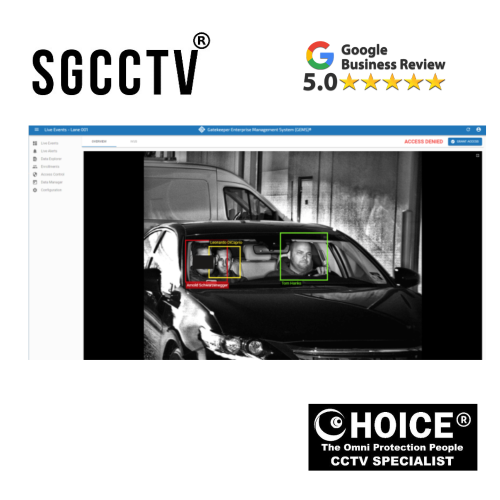
Rapiscan Gatekeeper Intelligent Vehicle Occupant Detection (IVOD) system Verifies the identity of all vehicle occupants with accuracy and speed
Rapiscan Gatekeeper Intelligent Vehicle Occupant Detection (IVOD) System
Advanced Security Solution for Fast and Accurate Occupant Verification
In today’s evolving security landscape, organizations face increasing challenges in controlling access, preventing unauthorized entry, and ensuring the safety of critical infrastructure. Traditional vehicle inspection methods often rely heavily on manual checks, which can be time-consuming, inconsistent, and vulnerable to human error. To address these challenges, the Rapiscan Gatekeeper Intelligent Vehicle Occupant Detection (IVOD) system introduces a powerful, automated approach to vehicle occupant verification—combining advanced sensing technologies with intelligent analytics to deliver speed, accuracy, and reliability.
Designed for high-security environments, the Gatekeeper IVOD system enables security personnel to verify the identity and presence of all vehicle occupants in real time, without requiring intrusive inspections or causing operational delays. This makes it an essential solution for locations where both security and throughput are critical.
Redefining Vehicle Security Screening
Vehicle access points are among the most vulnerable entry areas in any secured facility. From corporate campuses and government installations to airports, seaports, and industrial sites, ensuring that every occupant inside a vehicle is properly accounted for is crucial.
The Gatekeeper IVOD system transforms this process by automating occupant detection. Instead of relying on guards to visually inspect vehicles—which can be limited by visibility, lighting conditions, or human fatigue—the system uses intelligent detection technologies to identify and verify occupants quickly and accurately.
This ensures:
- No hidden passengers go unnoticed
- Reduced reliance on manual inspection
- Consistent and repeatable security checks
High-Speed, High-Accuracy Detection
One of the standout features of the Gatekeeper IVOD system is its ability to deliver accurate results at high speed. In busy access points where hundreds or even thousands of vehicles pass through daily, delays can create bottlenecks and disrupt operations.
The IVOD system is engineered to:
- Scan vehicles rapidly as they approach or pass through checkpoints
- Detect the number and position of occupants inside the vehicle
- Provide instant feedback to security personnel
This combination of speed and precision allows organizations to maintain tight security without compromising efficiency.
Rapiscan Gatekeeper Intelligent Vehicle Occupant Detection (IVOD) system Verifies the identity of all vehicle occupants with accuracy and speed
Intelligent Verification of Vehicle Occupants
Beyond simple detection, the system focuses on verification. It ensures that the number of occupants matches expected data or access permissions, helping to prevent unauthorized entry.
Key capabilities include:
- Identifying concealed or unauthorized passengers
- Supporting integration with access control systems
- Enhancing decision-making for security personnel
This intelligent verification process significantly improves situational awareness and reduces the risk of security breaches.
Non-Intrusive and Operator-Friendly
A major advantage of the Gatekeeper IVOD system is its non-intrusive operation. Unlike manual inspections that may require stopping vehicles, opening doors, or conducting physical checks, the system operates seamlessly as vehicles move through checkpoints.
Benefits include:
- Minimal disruption to traffic flow
- Improved user experience for drivers and passengers
- Reduced workload for security staff
The system’s interface is designed to be intuitive, allowing operators to quickly interpret results and take action when necessary.
Designed for High-Security Environments
The Gatekeeper IVOD system is ideal for a wide range of high-security applications, including:
- Government and military facilities
- Airports and transportation hubs
- Critical infrastructure sites
- Industrial plants and logistics centers
- Corporate campuses and data centers
In these environments, the ability to verify every occupant accurately and efficiently is essential for maintaining security and compliance.
Enhancing Operational Efficiency
By automating occupant detection and verification, the system not only improves security but also enhances overall operational efficiency.
Organizations benefit from:
- Faster vehicle processing times
- Reduced manpower requirements
- Lower risk of human error
- Consistent inspection standards
This makes the IVOD system a cost-effective solution for long-term security operations.
Integration with Modern Security Systems
The Gatekeeper IVOD system is designed to integrate seamlessly with existing security infrastructure. It can work alongside:
- Access control systems
- License plate recognition (LPR) systems
- Surveillance cameras
- Command and control platforms
This integration allows for a comprehensive security ecosystem, where data from multiple sources is combined to provide a complete picture of each vehicle entering or exiting a facility.
Reliability You Can Trust
Built with robust components and advanced engineering, the Gatekeeper IVOD system is designed for continuous operation in demanding environments. It delivers consistent performance regardless of weather conditions, lighting, or traffic volume.
This reliability ensures that security teams can depend on the system at all times, whether during peak hours or critical situations.
Why Choose Rapiscan Gatekeeper IVOD?
Organizations choose the Gatekeeper IVOD system because it offers:
- Accurate detection of all vehicle occupants
- High-speed processing for busy checkpoints
- Non-intrusive inspection methods
- Enhanced security and situational awareness
- Seamless integration with existing systems
- Reliable performance in real-world conditions
Rapiscan Gatekeeper Intelligent Vehicle Occupant Detection (IVOD) system Verifies the identity of all vehicle occupants with accuracy and speed
The Future of Vehicle Access Security
As security threats become more sophisticated, the need for advanced, automated solutions continues to grow. The Rapiscan Gatekeeper Intelligent Vehicle Occupant Detection system represents the future of vehicle screening—combining technology, intelligence, and efficiency to deliver superior protection.
By ensuring that every vehicle occupant is accounted for with accuracy and speed, the system helps organizations maintain secure perimeters while supporting smooth and efficient operations.
How the Rapiscan Gatekeeper IVOD System Works
Step-by-Step Vehicle Occupant Detection & Verification Process
The Rapiscan Gatekeeper Intelligent Vehicle Occupant Detection (IVOD) system works by combining advanced sensing technologies, intelligent analytics, and real-time processing to detect and verify every occupant inside a vehicle—quickly and accurately, without manual inspection.
🔍 1. Vehicle Approaches the Checkpoint
As a vehicle approaches the security gate:
- The IVOD system is already active and monitoring
- Sensors and cameras are positioned to capture the vehicle
- The system prepares to scan without requiring the vehicle to stop completely
👉 This ensures continuous traffic flow with minimal delay.
📡 2. Multi-Sensor Scanning Begins
Once the vehicle enters the scanning zone, the system activates multiple detection technologies simultaneously.
Technologies Used:
Thermal Imaging
- Detects body heat signatures inside the vehicle
- Identifies human presence even if hidden
Optical Cameras (Video Imaging)
- Captures visual images of occupants
- Helps confirm position and count
Intelligent Sensors
- Analyze movement and shape patterns
- Differentiate between humans and objects
👉 This multi-layer approach ensures high detection accuracy.
🧠 3. AI-Based Occupant Detection
The captured data is processed instantly using intelligent algorithms.
What the system analyzes:
- Number of occupants
- Seating positions
- Hidden or concealed passengers
- Abnormal patterns (e.g., someone lying down)
The system can:
✔ Detect occupants in low visibility
✔ Identify people behind tinted glass
✔ Recognize unusual positioning
👉 This eliminates reliance on human eyesight alone.
Rapiscan Gatekeeper Intelligent Vehicle Occupant Detection (IVOD) system Verifies the identity of all vehicle occupants with accuracy and speed
⚖️ 4. Verification Against Access Data
After detecting occupants, the system performs verification.
How it works:
- Compares detected occupants with expected data
- Integrates with:
- Access control systems
- License Plate Recognition (LPR)
- Security databases
Example:
- Vehicle registered for 2 الأشخاص
- System detects 3 occupants
👉 Flag raised instantly
👉 This step is critical for preventing unauthorized entry.
🚨 5. Real-Time Alert & Decision Support
If any mismatch or suspicious activity is detected:
- The system immediately alerts security personnel
- Displays results on monitoring screen
- Highlights areas of concern
Alerts include:
- Extra passengers
- Hidden occupants
- Suspicious movement
👉 Guards can take action instantly without guessing.
🚗 6. Seamless Vehicle Flow
If everything is normal:
- Vehicle is cleared quickly
- No need for manual inspection
- Traffic continues smoothly
👉 This maintains high throughput at busy checkpoints.
🔗 7. Integration with Security Systems
The IVOD system does not work alone—it integrates into a full security ecosystem.
It can connect with:
- Access control gates
- CCTV systems
- LPR (license plate recognition)
- Command center software
👉 This creates a complete security solution, not just a standalone scanner.
Rapiscan Gatekeeper Intelligent Vehicle Occupant Detection (IVOD) system Verifies the identity of all vehicle occupants with accuracy and speed
🛠️ 8. Continuous Monitoring & Logging
Every scan is recorded for:
- Audit trails
- Security reviews
- Incident investigation
Data stored includes:
- Vehicle details
- Occupant count
- Time & date
- Alerts triggered
👉 This improves accountability and compliance.
⚡ Key Advantages of How It Works
✔ Non-intrusive – No need to open doors
✔ Fast – Works in seconds
✔ Accurate – Multi-sensor + AI detection
✔ Reliable – Works in day/night conditions
✔ Scalable – Suitable for high-traffic areas
🧠 Simple Explanation (Easy Way to Understand)
Think of the IVOD system as:
👉 “A smart scanner that can see inside vehicles, count people, and instantly check if everything matches the allowed entry.”
🏢 Real-World Example
At a secure facility:
- Car arrives at gate
- IVOD scans vehicle automatically
- Detects 4 occupants
- System checks database → only 3 allowed
- Alert triggered
- Security stops vehicle for inspection
👉 Without IVOD, this could be easily missed.
🔐 Why This Matters
Traditional security:
❌ Manual checking
❌ Human error
❌ Slow
IVOD system:
✔ Automated
✔ Accurate
✔ Fast
👉 This is why it’s used in:
- Airports
- Military bases
- Data centers
- Critical infrastructure
🏁 Conclusion
The Rapiscan Gatekeeper IVOD system works by combining thermal imaging, intelligent sensors, and real-time analytics to detect and verify every vehicle occupant with speed and precision. It transforms vehicle access control from a manual process into an automated, intelligent security solution.
🚗 How to Install Rapiscan Gatekeeper IVOD System
Step-by-Step Deployment Guide for Vehicle Occupant Detection
Installing the IVOD system is not just mounting hardware—it is a system integration project involving sensors, positioning, calibration, and software configuration.
Rapiscan Gatekeeper Intelligent Vehicle Occupant Detection (IVOD) system Verifies the identity of all vehicle occupants with accuracy and speed
🧰 1. Site Survey & Planning (MOST IMPORTANT STEP)
Before installation, a full site survey must be done.
Check the following:
- Vehicle lane width (entry/exit lanes)
- Speed of vehicles at checkpoint
- Lighting conditions (day/night)
- Existing gate barrier or guardhouse layout
- CCTV and LPR camera positions
Decide:
- Mounting height of sensors
- Detection zone location
- Integration point with access control system
👉 Poor planning = poor detection accuracy.
📍 2. Define Installation Zone
The IVOD system must be installed at the correct vehicle capture point.
Recommended Zone:
- Before barrier gate OR at controlled checkpoint lane
- Straight vehicle path (no curves)
- Speed-controlled area (slow-moving vehicles)
Avoid:
- Sharp turns
- Obstructed lanes
- High glare areas
👉 The system needs a clear view into vehicle interiors.
🏗️ 3. Mount Sensor & Camera Units
The system typically includes:
- Thermal imaging sensors
- Optical cameras
- Processing unit (control box)
Installation Steps:
Step 1: Mount Structure
- Install poles or gantry frame above lane
- Ensure vibration-free mounting
Step 2: Sensor Placement
- Align sensors to cover full vehicle interior area
- Ensure both driver and rear passenger zones are visible
Step 3: Secure Cabling
- Run cables through protective conduits
- Separate power and data lines
👉 Stability is critical for accurate imaging.
⚡ 4. Power Supply Setup
Requirements:
- Stable AC power supply
- UPS backup recommended
Steps:
- Connect system to dedicated power source
- Install surge protection
- Ensure grounding is properly done
👉 Prevents downtime and system failure.
🔗 5. Network & System Integration
The IVOD system must connect to the security network.
Connect to:
- Command & Control Center
- Access control system
- License Plate Recognition (LPR) system
- CCTV monitoring platform
Configuration:
- Assign IP addresses
- Set secure network protocols
- Enable data encryption if required
👉 This allows real-time monitoring and alerts.
🧠 6. Software Installation & Setup
Once hardware is ready:
Install Control Software:
- IVOD management platform
- Analytics dashboard
Configure:
- Detection zones
- Vehicle classification rules
- Occupant count thresholds
Example Rule:
- Allowed occupants = 2
- If detected > 2 → trigger alert
📡 7. Calibration Process (CRITICAL STEP)
Calibration ensures accurate detection.
Steps:
- Run test vehicle through lane
- Capture baseline images
- Adjust sensor angles
- Fine-tune detection sensitivity
- Test day vs night conditions
👉 Without calibration, accuracy drops significantly.
Rapiscan Gatekeeper Intelligent Vehicle Occupant Detection (IVOD) system Verifies the identity of all vehicle occupants with accuracy and speed
🚗 8. System Testing (Dry Run)
Before going live:
Test Scenarios:
- Single occupant vehicle
- Multiple passengers
- Tinted windows
- Rear seat obstruction
Check:
- Detection accuracy
- Alert response time
- Integration with control room
🚨 9. Live Deployment
After successful testing:
- Switch system to live mode
- Train security officers
- Monitor first 24–72 hours closely
Operator Training Includes:
- Reading detection results
- Responding to alerts
- Handling false positives
🔧 10. Maintenance Setup
To ensure long-term performance:
Routine Maintenance:
- Clean camera lenses
- Check sensor alignment
- Update software
- Inspect wiring
Recommended Schedule:
- Monthly inspection
- Quarterly calibration check
⚠️ Common Installation Mistakes (IMPORTANT)
❌ Mounting too low or too high
❌ Installing in curved vehicle lanes
❌ Poor lighting conditions ignored
❌ No calibration after installation
❌ Weak network connection
👉 These mistakes cause false detection or missed occupants.
🧠 Pro Installer Tips
✔ Always install in slow-speed lanes
✔ Use overhead mounting for best visibility
✔ Combine with LPR system for full verification
✔ Keep backup power supply (UPS)
✔ Test with real vehicles, not empty lane only
🏁 Conclusion
Installing the Rapiscan Gatekeeper IVOD system requires careful planning, precise mounting, proper calibration, and full system integration. When correctly installed, it provides high-speed, accurate, and non-intrusive vehicle occupant detection, significantly improving security efficiency at controlled access points.
🚗 IVOD Troubleshooting Guide (Real Field Problems)
Common Issues & Practical Fixes for Vehicle Occupant Detection Systems
The IVOD system is highly advanced, but like any multi-sensor AI-based security system, performance depends heavily on installation quality, environment, calibration, and integration. Below are the most common real-world issues found in field deployments—and how to fix them.
⚠️ 1. False Alarms (Too Many Occupants Detected)
Problem:
System shows more occupants than actually present.
Common Causes:
- Reflections from glass windows
- Strong sunlight or headlights
- Incorrect sensor angle
- Poor calibration after installation
Fix:
✔ Recalibrate detection zone
✔ Adjust sensor angle downward slightly
✔ Install anti-glare shielding if sunlight is strong
✔ Reduce sensitivity in software settings
👉 In most real sites, this happens due to lighting + reflection issues, not system failure.
⚠️ 2. Missed Occupants (Undetected Passengers)
Problem:
System fails to detect all people inside vehicle.
Common Causes:
- Tint films on windows (very common in Singapore sites)
- Sensor too high or misaligned
- Vehicle moving too fast
- Occlusion (passengers leaning or hiding behind seats)
Fix:
✔ Reduce vehicle speed at checkpoint (≤10 km/h ideal)
✔ Lower sensor detection angle
✔ Increase thermal sensitivity
✔ Ensure clear overhead view of cabin
👉 This is critical in security-sensitive zones.
⚠️ 3. Poor Image Quality / Blurry Detection
Problem:
System output is unclear or low confidence.
Common Causes:
- Dirty camera lens
- Rain, dust, or humidity buildup
- Low light conditions at night
- Vibration on mounting pole
Fix:
✔ Clean optical and thermal lenses regularly
✔ Install protective housing with heating/defogging if needed
✔ Add stable steel mounting frame
✔ Improve lighting at checkpoint
👉 80% of “bad detection” cases are lens contamination issues.
Rapiscan Gatekeeper Intelligent Vehicle Occupant Detection (IVOD) system Verifies the identity of all vehicle occupants with accuracy and speed
⚠️ 4. System Delay / Slow Response
Problem:
Occupant results appear too late.
Common Causes:
- Network latency
- Weak processing unit performance
- Overloaded integration system (LPR + CCTV + IVOD)
- Poor bandwidth allocation
Fix:
✔ Upgrade to dedicated VLAN network
✔ Reduce unnecessary video streaming resolution
✔ Ensure edge processing is enabled
✔ Check CPU load on main controller
👉 Delay issues are usually network-related, not sensor-related.
⚠️ 5. No Detection / System Not Triggering
Problem:
Vehicle passes but system shows no analysis.
Common Causes:
- Sensor offline or power failure
- Trigger zone not defined properly
- Software service stopped
- Misaligned detection area
Fix:
✔ Check power supply + UPS status
✔ Restart IVOD service software
✔ Re-map detection zone coordinates
✔ Verify sensor IP connection
👉 This is often a configuration issue after maintenance work.
⚠️ 6. Inconsistent Results Between Lanes
Problem:
Lane A works fine, Lane B gives wrong results.
Common Causes:
- Different lighting conditions
- Uneven sensor calibration
- Physical installation height differences
- Lane speed variation
Fix:
✔ Standardize installation height across all lanes
✔ Perform per-lane calibration
✔ Install uniform lighting system
✔ Control vehicle speed consistency
👉 Consistency = proper site standardization
⚠️ 7. Night-Time Performance Drop
Problem:
Detection accuracy drops at night.
Common Causes:
- Insufficient IR/thermal balancing
- Poor ambient lighting
- Headlight glare interference
Fix:
✔ Install controlled LED lighting at entry lane
✔ Enable night-mode calibration
✔ Add anti-glare positioning for sensors
✔ Ensure thermal camera is active and calibrated
👉 Night performance depends heavily on lighting design, not just software.
Rapiscan Gatekeeper Intelligent Vehicle Occupant Detection (IVOD) system Verifies the identity of all vehicle occupants with accuracy and speed
⚠️ 8. Network Disconnect / Offline System
Problem:
System suddenly goes offline in control room.
Common Causes:
- Loose Ethernet connection
- IP conflict
- Switch overload
- Power instability
Fix:
✔ Check network switch and ports
✔ Assign static IP addresses
✔ Replace faulty LAN cables
✔ Add UPS backup for network equipment
👉 This is a very common field issue in large facilities.
⚠️ 9. Integration Failure (LPR / Access Control Not Syncing)
Problem:
IVOD works but does not communicate with other systems.
Common Causes:
- API mismatch
- Firewall blocking ports
- Incorrect integration configuration
- Software version mismatch
Fix:
✔ Verify API credentials
✔ Open required firewall ports
✔ Update firmware/software to compatible version
✔ Re-test integration handshake
👉 Integration issues are usually IT-side, not hardware failure.
⚠️ 10. Over-Sensitivity in Crowded Vehicles
Problem:
System triggers alerts too frequently in vans or buses.
Common Causes:
- High passenger density
- Overly sensitive detection settings
- Overlapping thermal signatures
Fix:
✔ Adjust occupancy threshold rules
✔ Switch to vehicle-type-based detection mode
✔ Fine-tune thermal separation settings
👉 Essential for public transport or shuttle vehicles.
🧠 Quick Field Diagnostic Flow (Installer Method)
If problem occurs:
- Check power
- Check network
- Check camera cleanliness
- Verify calibration
- Test with known vehicle
- Adjust software sensitivity
- Escalate to integration layer if needed
🏁 Final Installer Insight
In real deployments, most IVOD issues are caused by:
- ❌ Poor installation alignment
- ❌ Lighting conditions
- ❌ Network configuration
- ❌ Lack of calibration after maintenance
👉 NOT system failure
When properly installed and maintained, the IVOD system delivers:
✔ High accuracy
✔ Fast processing
✔ Reliable occupant detection
📞 Professional Support – Singapore
For installation, troubleshooting, or integration support:
Choicecycle (SGCCTV Singapore)
📍 Sim Lim Square #02-81
📞 WhatsApp: +65 9853 4404
📧 enquiry@choicecycle.com.sg
🌐 https://sgcctv.com.sg
🕒 11 AM – 8 PM
Rapiscan Gatekeeper Intelligent Vehicle Occupant Detection (IVOD) system Verifies the identity of all vehicle occupants with accuracy and speed


Nunc lacus elit, faucibus ac laoreet sed, dapibus ac mi. Maecenas eu ante a elit tempus fermentum. Aliquam commodo tincidunt semper. Phasellus accumsan, justo ac mollis pharetra, ex dui pharetra nisl, a scelerisque ipsum nulla ac sem. Cras eu risus urna. Duis lorem sapien, congue eget nisl sit amet, rutrum faucibus elit.
Donec accumsan auctor iaculis. Sed suscipit arcu ligula, at egestas magna molestie a. Proin ac ex maximus, ultrices justo eget, sodales orci. Aliquam egestas libero ac turpis pharetra, in vehicula lacus scelerisque. Vestibulum ut sem laoreet, feugiat tellus at, hendrerit arcu.
Nunc lacus elit, faucibus ac laoreet sed, dapibus ac mi. Maecenas eu ante a elit tempus fermentum. Aliquam commodo tincidunt semper. Phasellus accumsan, justo ac mollis pharetra, ex dui pharetra nisl, a scelerisque ipsum nulla ac sem. Cras eu risus urna. Duis lorem sapien, congue eget nisl sit amet, rutrum faucibus elit.