



SGCCTV 24 Inch Touch Screen Monitor IP65 Industrial Touch Screen Monitor Singapore 24 Inch Resistive Full HD HDMI DVI VGA Touch Monitor
in stock
$650.00
CHOICE Brand and SGCCTV Brand are Singapore IPOS Trade Mark Registered.
Widely deployed in Shopping Malls, Residential, Commercial, Office, Warehouse.
Specialist in all Security System CCTV Camera Door Access Alarm Switch
Technical Support at Sim Lim Square 02-81 11am~7pm Daily +65 98534404 +65 81985572
in stock
SGCCTV 24 Inch Touch Screen Monitor IP65 Industrial Touch Screen Monitor Singapore 24 Inch Resistive Full HD HDMI DVI VGA Touch Monitor
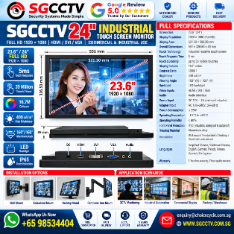
SGCCTV 24″ Industrial Touch Screen Monitor
Full HD 1920 × 1080 • Resistive Touch • HDMI / DVI / VGA • IP65 Front Protection
Based on the specification shown in your supplied SGCCTV product artwork, this is a 23.6″/24-inch industrial Full HD touchscreen monitor intended for CCTV control rooms, industrial automation, factory/warehouse applications, kiosks and commercial monitoring.
Comparable industrial 24-inch monitors confirm that Full HD, resistive touch, HDMI/DVI/VGA and front-panel IP65 is a standard industrial-display configuration. I-Tech Company
Full Specifications
| Specification | SGCCTV 24″ Industrial Touch Screen Monitor |
|---|---|
| Screen Size | 23.6″ / 24″ class |
| Resolution | 1920 × 1080 Full HD |
| Display Area | 521.30 × 293.20 mm |
| Overall Dimensions | 551 × 326.50 × 49 mm |
| Touch Technology | Industrial Resistive Touch Screen |
| Touch Response | 5 ms |
| Touch Durability | Up to 35 million touches |
| Display Colours | 16.7 million |
| Contrast Ratio | 1000:1 |
| Brightness | 400 cd/m² |
| Viewing Angle | 160° H / 160° V |
| Backlight | LED |
| Video Inputs | HDMI / DVI / VGA |
| Audio | Audio interface |
| Monitor Power | DC 12V / 4A external adapter |
| Adapter Input | AC 100–240V, 50/60Hz |
| Power Consumption | ≤25W |
| Operating Temperature | -10°C to +60°C |
| Operating Humidity | <80% |
| Front Protection | IP65 front panel |
| Housing | Aluminium alloy |
| Mounting | Wall / Embedded / Desktop / Cantilever arm |
| Warranty shown | 1-year free warranty / 3-year quality warranty |
Important specification note
The above values are taken from your supplied SGCCTV artwork. I would retain them as the product’s declared specifications, but they should be matched against the OEM production datasheet before a formal tender submission—particularly 400 cd/m² brightness, -10°C to +60°C operating temperature, IP65 front protection and 35-million-touch durability.
Industrial monitors with similar configurations commonly use resistive touch, 1920×1080 panels and IP65-protected front bezels, but their exact brightness, temperature and viewing-angle specifications vary by manufacturer. Arista IPC
Industrial Resistive Touch Screen
The key feature is the resistive touchscreen.
Unlike a standard office monitor, the display is intended to operate as an interactive control interface:
Touch Screen
→ Touch Controller / USB Interface
→ PC / Industrial Computer / Workstation
while video is carried separately:
PC / NVR / Workstation
→ HDMI / DVI / VGA
→ Monitor
This distinction is important: HDMI/DVI/VGA carries the video image; a separate touch-data connection is normally required for touchscreen control. This is also how comparable industrial resistive-touch monitors are designed. Industrial Monitor Direct
Excellent for CCTV Control Rooms
For CCTV applications, it can be used as an operator interface for:
NVR live view
Camera playback
PTZ control interface
VMS workstation
Alarm monitoring
Access-control management
Security control-room workstation
Typical architecture:
IP Cameras
↓
PoE Network
↓
NVR / VMS Server
↓ HDMI
SGCCTV 24″ Touch Screen Monitor
↕ Touch Interface
Operator
Important
A touchscreen monitor does not automatically make every NVR menu touch-compatible.
Touch operation depends on the connected NVR/PC, operating system, touchscreen driver/interface and application software. For a Windows-based VMS workstation, integration is generally more straightforward.
400 cd/m² High Brightness
Your specification states:
400 cd/m²
This is brighter than many conventional office monitors and can improve visibility in industrial control rooms and other brightly illuminated indoor environments.
For comparison, several commercial industrial 24-inch displays are specified around 250–300 nits, while industrial 400-nit models are also available. I-Tech Company
However, 400 cd/m² should not be marketed as sunlight-readable unless the exact panel has been tested/rated for that purpose.
IP65 Front Panel Protection
Your artwork specifies:
IP65 FRONT PROTECTION
This distinction is important.
It should be advertised as:
IP65 Front Panel
rather than simply:
IP65 Monitor
unless the complete enclosure has an independently documented IP65 rating.
Industrial panel monitors commonly protect the front bezel/display surface to IP65 when correctly installed, while the rear electronics and connectors do not necessarily have the same ingress rating. Anewtech Systems
Therefore:
Front: resistant to dust/water exposure according to its rating
Rear connectors: still require appropriate environmental protection.
HDMI + DVI + VGA
Three video interfaces provide good compatibility with both new and legacy systems:
HDMI
Recommended for modern NVRs, PCs and digital video sources.
DVI
Useful for industrial PCs and older professional equipment.
VGA
Useful for legacy NVRs, DVRs, PCs and industrial controllers.
Comparable industrial monitors also commonly combine HDMI, DVI and VGA for precisely this reason. Arista IPC
Four Installation Options
Your product artwork identifies:
1. Wall Mount — suitable for CCTV/security monitoring.
2. Embedded Mount — suitable for industrial panels, consoles and machine interfaces.
3. Desktop Stand — conventional workstation operation.
4. Cantilever Arm Mount — useful where operators need adjustable positioning.
This makes the monitor considerably more flexible than a conventional consumer desktop display.
Applications
CCTV Monitoring
NVR/VMS live view, playback and operator control.
Industrial Automation
Machine control, HMI and process visualization.
Factory / Warehouse
Production monitoring, security management and equipment interfaces.
Commercial Display
Interactive information and control applications.
Comparable industrial touch displays are similarly deployed for factory automation, machine interfaces, kiosks, warehousing and commercial/industrial systems. Arista IPC
10 Key Benefits
- 23.6″/24″ industrial display
- 1920 × 1080 Full HD
- Industrial resistive touchscreen
- 5ms stated touch response
- Up to 35 million stated touches
- 400 cd/m² stated brightness
- HDMI + DVI + VGA
- IP65 front-panel protection
- Aluminium-alloy housing
- Multiple wall, embedded, desktop and arm-mount configurations
10 FAQs
1. Is this a 24-inch touchscreen monitor?
Yes. It uses a 23.6-inch panel marketed in the 24-inch class.
2. What resolution does it support?
1920 × 1080 Full HD.
3. What touchscreen technology does it use?
Your product specification states industrial resistive touch.
4. Does it have HDMI?
Yes. The stated video interfaces are HDMI, DVI and VGA.
5. Can it connect to a CCTV NVR?
Yes, for video display when the NVR provides a compatible HDMI/VGA output. Touchscreen control itself must be checked against the NVR and touch interface.
6. Can it be used with a Windows CCTV workstation?
Yes, subject to the touchscreen controller/driver being compatible with the workstation OS and VMS software.
7. Is the whole monitor IP65 waterproof?
The supplied specification states IP65 front-panel protection. Do not interpret that as an IP65 rating for every rear connector and surface.
8. Can it be embedded into an industrial console?
Yes. Your specification lists embedded mounting as one of the installation options.
9. Is it suitable for industrial use?
The supplied product specification identifies an aluminium housing, resistive touchscreen, IP65 front protection and industrial mounting options. Comparable industrial displays use the same general architecture. Arista IPC
10. Where can I buy the SGCCTV 24″ Touch Screen Monitor?
SGCCTV / Choicecycle CCTV supplies security-system and industrial monitoring solutions in Singapore. WhatsApp +65 98534404 or email enquiry@choicecycle.com.sg.
Recommended Marketing Title
SGCCTV 24″ INDUSTRIAL TOUCH SCREEN MONITOR
FULL HD 1920 × 1080 • RESISTIVE TOUCH
400 cd/m² HIGH BRIGHTNESS
5ms TOUCH RESPONSE • 35 MILLION TOUCHES
HDMI • DVI • VGA • AUDIO
IP65 FRONT PROTECTION
ALUMINIUM HOUSING • INDUSTRIAL / COMMERCIAL USE
CCTV MONITORING • FACTORY AUTOMATION • WAREHOUSE • CONTROL ROOM
SEO Keywords: SGCCTV 24 Inch Touch Screen Monitor, Industrial Touch Screen Monitor Singapore, 24 Inch Resistive Touch Monitor, Full HD Touchscreen Monitor, IP65 Front Monitor, CCTV Touch Screen Monitor, Industrial CCTV Monitor, HDMI DVI VGA Touch Monitor, Factory Touch Screen, Warehouse Monitoring Display, HMI Touch Monitor Singapore, CCTV Control Room Monitor, 24 Inch Industrial Display, Security Monitoring Screen, SGCCTV.
15 Facebook Hashtags: #SGCCTV #TouchScreenMonitor #IndustrialMonitor #24InchMonitor #ResistiveTouch #FullHDMonitor #IP65 #CCTVMonitor #CCTVMonitoring #ControlRoom #IndustrialAutomation #FactoryAutomation #SecuritySystem #CCTVSingapore #TouchDisplay
/SGCCTV /seo /speccheck /compatibility /design /quotation /sales
SGCCTV 24 Inch Touch Screen Monitor IP65 Industrial Touch Screen Monitor Singapore 24 Inch Resistive Full HD HDMI DVI VGA Touch Monitor
SGCCTV CCTV Housing Blower Service provides inspection, repair, replacement and installation support for outdoor CCTV camera housings, cooling blowers/fans, IP security cameras and associated surveillance equipment in Singapore.
Outdoor CCTV housings protect cameras from environmental exposure, but the internal blower, fan, wiring, power supply and seals can deteriorate over time. Preventive inspection is particularly important for cameras operating continuously in Singapore’s hot and humid environment.
CCTV Housing Blower – What Does It Do?
A CCTV housing blower or ventilation fan helps circulate air inside a compatible camera enclosure.
Its main purposes include:
Internal Air Circulation • Heat Management • Reduced Heat Accumulation • Improved Operating Environment for Camera Electronics
For housings equipped with a blower system, failure of the fan may leave the internal camera operating at a higher temperature, particularly in locations exposed to direct sunlight.
SGCCTV Service & Installation
We can support CCTV housing and compatible security-camera systems with:
CCTV Housing Inspection
Blower / Cooling Fan Replacement
Blower Power Testing
Internal Wiring Inspection
Camera Housing Cleaning
Weather Seal Inspection
Bracket Inspection & Replacement
Camera Replacement
IP Camera Installation
Network & PoE Troubleshooting
NVR Troubleshooting
CCTV Preventive Maintenance
10 Benefits of CCTV Housing Blower Maintenance
- Reduce Internal Heat Build-Up — A working blower improves air circulation within compatible ventilated CCTV housings.
- Protect Camera Electronics — Excessive temperature can contribute to instability and shorten the service life of electronic components.
- Prevent Unexpected Camera Failure — Periodic inspection can identify failed fans, damaged wiring or deteriorating components before a complete CCTV failure occurs.
- Improve Reliability for 24/7 CCTV — Commercial surveillance cameras may operate continuously. Preventive maintenance helps keep the complete camera assembly serviceable.
- Repair Instead of Replacing Everything — Where practical, a defective blower or housing component may be replaced without unnecessarily replacing a serviceable camera.
- Check Weatherproofing — Maintenance provides an opportunity to inspect seals, cable glands and enclosure condition for possible water-ingress risks.
- Inspect Camera Housing Brackets — Outdoor brackets should be checked for looseness, corrosion, physical damage and mounting integrity.
- Troubleshoot Image Problems — Technicians can distinguish between camera failure and problems caused by power, cabling, network connectivity, enclosure conditions or NVR configuration.
- Suitable for Existing CCTV Systems — Housing repair can support older installations where the camera itself remains operational.
- Complete CCTV Maintenance — Housing, camera, PoE network, NVR, storage and power can be checked as one security system instead of troubleshooting individual components in isolation.
Typical CCTV Housing Problems
Common service conditions include:
Blower Not Spinning
Noisy Cooling Fan
Fan Running Slowly
Blower Power Failure
Camera Overheating
Water / Moisture Inside Housing
Dirty Housing Glass
Damaged Rubber Seal
Loose CCTV Bracket
Corroded Connections
Intermittent Camera Video
Network Camera Offline
PoE Power Failure
NVR Not Detecting Camera
A camera showing “offline” does not necessarily mean that the camera itself is faulty. The technician should check the complete signal and power path.
Professional Troubleshooting Process
A practical troubleshooting sequence is:
1. Check camera status
↓
2. Inspect housing and bracket
↓
3. Check blower/fan operation
↓
4. Check power supply / PoE
↓
5. Inspect Cat6/network cable
↓
6. Test network connectivity
↓
7. Check NVR/VMS connection
↓
8. Inspect recording and HDD status
↓
9. Repair or replace defective component
↓
10. Functional test before handover
This avoids replacing a camera when the actual fault may be a power supply, blower, network cable, PoE switch, connector or NVR issue.
CCTV Housing Blower Replacement
Where a blower has failed, replacement should be selected according to the existing housing’s:
Operating Voltage • Current Requirement • Fan Dimensions • Airflow Direction • Connector Type • Mounting Position
Installing an incorrect fan can result in poor airflow, electrical incompatibility or physical interference with the camera.
SGCCTV-HS22M Outdoor CCTV Housing
The SGCCTV-HS22M IP67 weatherproof outdoor CCTV housing can be used with compatible security cameras where a separate protective enclosure is required.
For housing-based installations, the complete system may include:
SGCCTV-HS22M Housing
CCTV Housing Blower / Fan
Camera & Lens
Mounting Bracket
Power / Network Connection
Surge Protection where required
Compatibility and the housing’s environmental rating should be considered for the complete assembled configuration.
CCTV & IP Security Camera Installation
SGCCTV provides support for surveillance systems including:
HIKVISION CCTV
DAHUA CCTV
Hanwha Vision CCTV
Bosch CCTV
UNV CCTV
SGCCTV Security Cameras
Services can include IP camera installation, NVR installation, PoE networking, fiber connectivity, CCTV housing installation, troubleshooting and preventive maintenance.
CCTV Preventive Maintenance
For commercial sites, preventive maintenance should cover more than cleaning the camera lens.
Recommended checks include:
Camera Image Quality
Camera Focus / View
Housing Condition
Blower/Fan Operation
Bracket & Mounting
Power Supply
PoE Switch
Network Connectivity
NVR Recording
Hard Disk Health
Date & Time
Remote Viewing
Cable & Connector Condition
This provides a more complete assessment of CCTV system health.
Outdoor CCTV Installation
For exposed outdoor installations, consider:
Weatherproof Housing
Weatherproof Junction Box
Proper Cable Glands
Outdoor-Rated Cabling
Surge Protection
Proper Earthing
UPS Backup
A weatherproof camera or housing alone does not make the entire installation weatherproof. Connectors, junctions and cable entries must also be properly protected.
SGCCTV CCTV Repair & Maintenance Singapore
SGCCTV / Choicecycle CCTV Pte Ltd provides support for:
CCTV Camera Repair
IP Camera Troubleshooting
CCTV Housing Repair
CCTV Housing Blower Replacement
NVR Troubleshooting
HDD Replacement
PoE Switch Troubleshooting
Network Troubleshooting
UPS Repair & Battery Replacement
CCTV Preventive Maintenance
For onsite CCTV troubleshooting, the existing equipment should be inspected before determining whether repair, component replacement or complete equipment replacement is the appropriate solution.
Where to Repair CCTV Camera & Housing in Singapore?
SGCCTV / Choicecycle CCTV Pte Ltd
Sim Lim Square #02-81, Singapore
WhatsApp: +65 98534404
Email: enquiry@choicecycle.com.sg
Website: SGCCTV.com.sg
10 FAQs
1. What is a CCTV housing blower?
It is a small fan/blower installed in a compatible camera housing to circulate air and assist with internal heat management.
2. Why does a CCTV housing blower fail?
Possible causes include fan wear, power failure, damaged wiring, contamination, corrosion or long operating hours.
3. Can the blower be replaced without replacing the camera?
Often yes, provided the housing and camera remain serviceable and a compatible replacement blower is available.
4. Can SGCCTV repair outdoor CCTV housings?
SGCCTV can inspect housing, blower, mounting, cabling and associated CCTV components and determine the appropriate repair scope.
5. Do all CCTV housings need a blower?
No. The requirement depends on housing design, camera heat output, environmental conditions and manufacturer specifications.
6. Can overheating cause CCTV problems?
Excessive operating temperature can affect electronic reliability. The cause should be properly diagnosed rather than assuming every camera fault is heat-related.
7. Do you service IP security cameras?
Yes. Services can cover IP cameras, PoE/network connectivity, NVRs and associated CCTV infrastructure.
8. Can you troubleshoot an offline CCTV camera?
Yes. Troubleshooting should check the camera, power/PoE, cabling, switch, IP network and NVR/VMS.
9. Is preventive CCTV maintenance necessary?
For commercial and critical surveillance systems, periodic maintenance can identify developing problems and confirm that recording and network functions remain operational.
10. Where can I find CCTV repair and maintenance services in Singapore?
Contact SGCCTV / Choicecycle CCTV Pte Ltd at Sim Lim Square #02-81 for CCTV housing, camera, NVR, PoE/network and maintenance enquiries.
#SGCCTV #CCTVRepair #CCTVMaintenance #CCTVHousing #CCTVBlower #CCTVFan #IPCamera #SecurityCamera #CCTVInstallation #OutdoorCCTV #CameraRepair #NVRRepair #PoESwitch #CCTVSingapore #SimLimSquare
SGCCTV 24 Inch Touch Screen Monitor IP65 Industrial Touch Screen Monitor Singapore 24 Inch Resistive Full HD HDMI DVI VGA Touch Monitor
CHOICECYCLE CCTV offer the best CCTV HOUSING BLOWER Easy access for service & installation Works with CCTV and IP security cameras (12V-AC) Singapore Security System SGCCTV Repair
Features:
12V DC Heater & Blower/Cooler Fan Kit Spare parts for CCTV Housing
Outdoor CCTV camera housing with built-in 12V-AC Heater/Blower for extreme cold or warm outdoor climate applications. This CCTV Camera housing fits all box style CCTV cameras and box style IP security cameras that we supplies. This heater / blower housing help in box hot and cold surveillance applications.
The heater turns on when temperatures reach 45 degrees or below and the blower turns on when the temperature reaches 75 degrees or above. The dimensions are 15 1/2″ long x 5 1/2″ wide x 4 1/4″ tall.
Features
- Forward opening hinged lid
- Aluminum Construction
- Heater & Fan Blower Installed (12V-AC)
- Designed for Indoor / Outdoor applications
- Easy access for service & installation
- Mounting place for outdoor bracket
- Beige color
- Works with CCTV and IP security cameras
- Fan turns on at 75 degrees
- Heater turns on at 45 degrees
- Dimensions: 15 1/2″ long x 5 1/2″ wide x 4 1/4″ tall
SGCCTV 24 Inch Touch Screen Monitor IP65 Industrial Touch Screen Monitor Singapore 24 Inch Resistive Full HD HDMI DVI VGA Touch Monitor


Nunc lacus elit, faucibus ac laoreet sed, dapibus ac mi. Maecenas eu ante a elit tempus fermentum. Aliquam commodo tincidunt semper. Phasellus accumsan, justo ac mollis pharetra, ex dui pharetra nisl, a scelerisque ipsum nulla ac sem. Cras eu risus urna. Duis lorem sapien, congue eget nisl sit amet, rutrum faucibus elit.
Donec accumsan auctor iaculis. Sed suscipit arcu ligula, at egestas magna molestie a. Proin ac ex maximus, ultrices justo eget, sodales orci. Aliquam egestas libero ac turpis pharetra, in vehicula lacus scelerisque. Vestibulum ut sem laoreet, feugiat tellus at, hendrerit arcu.
Nunc lacus elit, faucibus ac laoreet sed, dapibus ac mi. Maecenas eu ante a elit tempus fermentum. Aliquam commodo tincidunt semper. Phasellus accumsan, justo ac mollis pharetra, ex dui pharetra nisl, a scelerisque ipsum nulla ac sem. Cras eu risus urna. Duis lorem sapien, congue eget nisl sit amet, rutrum faucibus elit.
Related Products
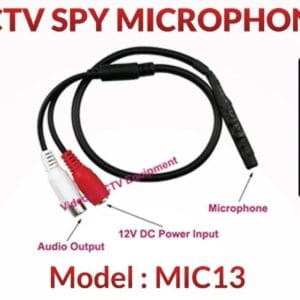
CCTV Microphone Singapore Camera Microphone Camera Audio CCTV Sound Security Camera System Two-way Audio Sim Lim Square Camera
Save47.9%Save $23.00Only$25.00 Original price was: $48.00.$25.00Current price is: $25.00.


Reviews
There are no reviews yet.