
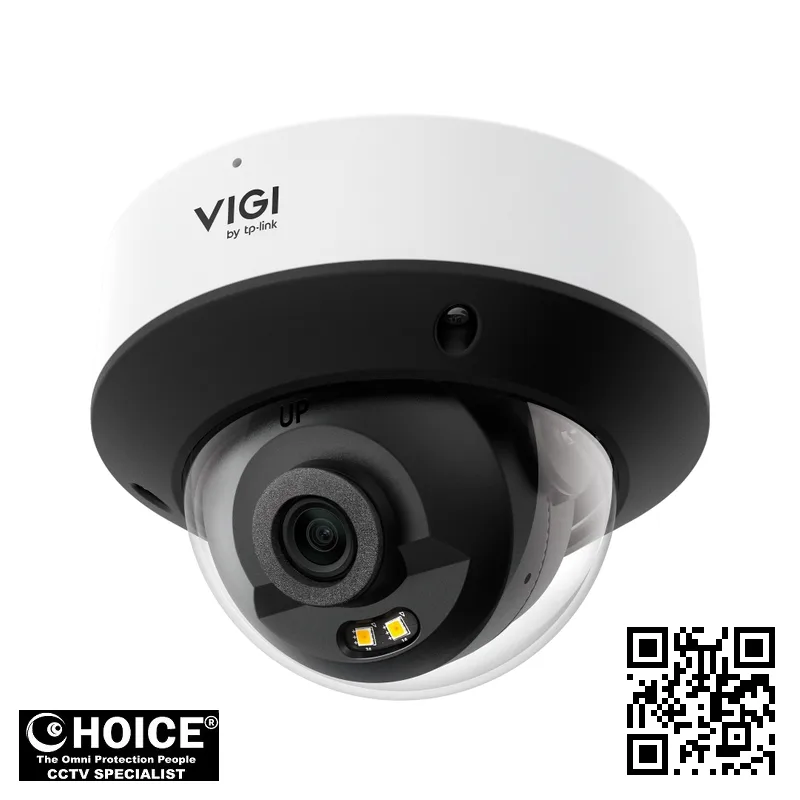
TP-Link InSight S225 VIGI 2MP Full-Color Dome Network Camera
TP-LINK PREMIUM PARTNERS SINGAPORE
Supply and Maintenance TP-LINK CCTV IP Cameras, NVR, DVR, PTZ Cameras,
Access Control System, Video Intercom.
1 Rochor Canal Road, Sim Lim Square 02-81 10am-7pm Daily.
Whatsapp Enquiry Project +65 98534404, Technical Support +65 81120788, Site Visit Maintenance +65 81985572.
TP-Link InSight S225 Singapore VIGI 2MP Full-Color Dome Network Camera | Superior 24/7 Color Night Vision
TP-Link InSight S225 Singapore offers a revolutionary approach to surveillance by providing continuous color imaging even in near-total darkness. This advanced VIGI series network camera is designed specifically for those who refuse to settle for grainy, black-and-white footage when security matters most. For property owners in Singapore, the ability to identify the color of a vehicle or the clothing of a person is a critical advantage during investigations. This camera utilizes sophisticated dual-light technology to ensure that every detail is captured with high precision. Whether you are protecting a small retail boutique or a large industrial warehouse, the InSight S225 provides the clarity needed for true peace of mind.
By integrating smart detection features, it transforms standard monitoring into an intelligent security ecosystem that actively alerts you to potential threats.
Key Features of the TP-Link InSight S225 Singapore
- Full-Color Night Vision: The integrated white LED and infrared technology allow the camera to produce vivid, colored images even in low-light environments.
- Intelligent Motion Detection: Advanced algorithms enable the camera to classify humans and vehicles, significantly reducing the number of false alarms caused by shadows or animals.
- High-Definition Clarity: With a 1920×1080 resolution, you receive sharp, detailed video streams that make it easier to recognize faces and license plates.
- Superior Weatherproofing: The IP67-rated enclosure ensures the device remains fully operational despite heavy tropical rain or dusty conditions.
- Vandal-Resistant Design: An IK10-rated metal body protects the internal components from physical tampering or impact, making it ideal for low-mounted areas.
- Efficient Video Compression: Utilizing H.265+ technology, the camera reduces bandwidth and storage requirements without sacrificing the quality of your video footage.
- Smart Perimeter Protection: Features such as line-crossing and intrusion detection allow you to set virtual boundaries that trigger instant notifications.
- Seamless Audio Monitoring: The built-in microphone captures ambient sounds within a 15-foot radius, adding an extra layer of auditory evidence to your recordings.
Technical Specifications
| Specification | Detail |
| Brand/Model | TP-Link InSight S225 VIGI |
| Resolution | 1920×1080 (Full HD) |
| Image Sensor | 1/3” Progressive Scan CMOS |
| Lens Options | 2.8 mm / 4 mm Fixed Focal Lens |
| Aperture | F2.0 |
| Field of View (2.8mm) | Horizontal: 98.8°, Vertical: 53.5°, Diagonal: 117° |
| Field of View (4mm) | Horizontal: 75.2°, Vertical: 40.8°, Diagonal: 8 |
| Min. Illumination | 0.005 Lux; 0 Lux with IR/White light |
| Night Vision Range | Up to 30 meters (98 ft) via IR and White LED |
| Video Compression | H.265+, H.265, H.264+, H.264 |
| Frame Rate | Up to 25/30 fps (depending on frequency) |
| Audio | Built-in Microphone (up to 4.6m radius) |
| Network Interface | 1 RJ45 10/100M Self-Adaptive Ethernet Port |
| Power Supply | 12V DC or PoE (802.3af/at) |
| Protection Rating | IP67 Waterproof, IK10 Vandal Proof |
| Operating Temperature | -30 °C to 60 °C |
| Material | Metal |
Applications and Use Cases in Singapore
Retail Stores: In the busy shopping districts of Singapore, the InSight S225 helps shop owners monitor aisles and prevent shoplifting through high-definition color monitoring.
Warehouses and Logistics: For large-scale storage facilities, the wide field of view and vehicle detection capabilities allow for efficient monitoring of loading bays and high-value inventory.
Condominiums and Apartments: Enhance estate security by using the vandal-proof dome to monitor entrances, elevators, and common corridors with minimal maintenance.
Office Buildings: Create a professional security presence in corporate lobbies and server rooms, utilizing the discreet dome design and smart intrusion alerts.
Car Parks: The high-contrast night vision is perfect for identifying vehicle makes, models, and license plates in dimly lit underground or multi-story parking structures.
Industrial Factories: Protect manufacturing assets and monitor worker safety in harsh environments, thanks to the rugged IP67 and IK10 ratings.
Why Choose the TP-Link InSight S225 Singapore
Choosing a security system in Singapore requires considering the unique environmental challenges of the region. The TP-Link InSight S225 Singapore is engineered to withstand the intense tropical heat and heavy monsoon rains that can degrade lesser cameras. Its robust metal construction and IP67 rating mean it will not succumb to the humidity that often causes internal corrosion in cheaper plastic alternatives.
Furthermore, when deploying cameras in residential or commercial spaces, compliance with the Personal Data Protection Act (PDPA) is essential. The InSight S225 supports privacy masking features, allowing you to black out specific areas like windows or neighbor’s properties. This ensures your security setup remains legally compliant while providing effective monitoring. With the ability to handle 230V-compatible power setups via PoE or DC, it integrates easily into existing Singaporean electrical infrastructures.
Installation Guide
Installing the TP-Link InSight S225 can be approached in two primary ways: Power over Ethernet (PoE) or traditional 12V DC power. PoE is highly recommended for most Singapore installations because it allows a single Ethernet cable to carry both data and power from a compatible PoE switch. This simplifies the wiring process, especially when mounting cameras in high ceilings or outdoor poles, reducing the need for separate electrical conduits.
If you are using the 12V DC method, you will need to ensure a stable power source is routed to the camera location. Regardless of the power method, a stable network connection is required. We recommend using Cat5e or Cat6 cabling to ensure maximum data throughput and minimal latency. For the best results, ensure your network switch supports the bandwidth requirements of high-definition streaming.
Once the hardware is mounted, setting up the software is straightforward. Users can utilize the VIGI App, Web UI, or VIGI VMS to configure the camera. During the initial setup, you will assign an IP address, set a strong password, and configure the smart detection zones. The VIGI App allows you to receive real-time push notifications directly to your smartphone, ensuring you are always aware of any security events as they happen.
Repair and Maintenance
To ensure the longevity of your TP-Link InSight S225, a regular maintenance schedule is vital. The most common issue in Singapore is lens obscuration due to dust, moisture, or spider webs. We recommend cleaning the camera dome with a soft, microfiber cloth every three months to maintain image clarity. Avoid using harsh chemicals that could damage the waterproof seals or the lens coating.
Another key maintenance task is checking the camera’s firmware. Periodically checking for updates via the VIGI Config Tool ensures that your device has the latest security patches and feature enhancements. Additionally, inspect the cable connections and the waterproof cable attachments to ensure no moisture has seepable into the RJ45 port. If you notice any flickering or loss of connectivity, check your PoE switch logs or the power supply stability first.
If you encounter persistent issues such as video loss or distorted images, troubleshooting should begin with a power cycle. If the problem persists, it may indicate a hardware fault or a network configuration error. For complex technical difficulties or physical damage to the unit, contacting a professional technician is advised to prevent further complications.
Where to Buy the InSight S224 in Singapore
SGCCTV — Authorised Hikvision & Dahua Dealer Singapore
Address: 1 Rochor Canal Road, Sim Lim Square #02-81, Singapore
Email: enquiry@choicecycle.com.sg
WhatsApp: +65 98534404 (24 hours)
Operating Hours: 10:00 AM – 7:00 PM daily
Website: https://sgcctv.com.sg
If you are looking for genuine TP-Link security solutions, SGCCTV (Choicecycle CCTV Pte Ltd) is your trusted local provider. We specialize in professional-grade surveillance equipment for residential and commercial needs.
Company: SGCCTV (Choicecycle CCTV Pte Ltd)
Address: 1 Rochor Canal Road, Sim Lim Square #02-81, Singapore 188504
WhatsApp enquiry: +65 98534404
Technical support: +65 81120788
Site visit / maintenance: +65 81985572
Email: enquiry@choicecycle.com.sg
Website: https://sgcctv.com.sg
Opening hours: 10:00 AM – 7:00 PM daily
Please note that availability is confirmed on enquiry. For all pricing enquiries, please WhatsApp +65 98534404.
Frequently Asked Questions
How can I find out the pricing for this camera?
To ensure you receive the most accurate and up-to-date information regarding our current offers, please WhatsApp +65 98534404. Our team can provide you with a detailed quotation based on your specific requirements and the number of units you need for your Singapore property.
Is the TP-Link InSight S225 suitable for outdoor use in Singapore?
Yes, this camera is specifically designed for harsh environments. It features an IP67 waterproof rating, which means it is fully protected against heavy rain and dust. This makes it an excellent choice for the tropical weather conditions commonly found throughout Singapore, ensuring reliable performance year-round.
Can I view the camera footage on my mobile phone while I am away?
Absolutely. By using the VIGI App, you can access your live video stream and recorded footage from anywhere in the world, provided your camera is connected to the internet. This allows for remote monitoring, which is perfect for business owners who need to keep an eye on their premises while traveling.
Does this camera support night vision in total darkness?
Yes, the InSight S225 features both Infrared (IR) and White LED illuminators. In complete darkness, the IR LEDs provide visibility up to 30 meters. If you prefer color footage at night, the White LED can be activated to provide full-color imaging, which is extremely helpful for identifying specific details like clothing color.
What is the difference between the 2.8mm and 4mm lens versions?
The 2.8mm lens offers a wider field of view, making it ideal for large, open areas like parking lots. The 4mm lens provides a narrower, more zoomed-in view, which is better for focusing on specific entry points or hallways. You should choose the lens based on the specific coverage area you need.
Is this camera compatible with my existing NVR system?
The InSight S225 supports the ONVIF protocol, which ensures high compatibility with various Network Video Recorders (NVRs). However, for the best experience and to access all the advanced VIGI smart features, we recommend using a compatible TP-Link VIGI NVR or the VIGI VMS software suite.
Does the camera include a microphone for audio recording?
Yes, this model comes with a built-in microphone that can record audio within a 15-foot radius of the camera. This feature is incredibly useful for capturing ambient sounds or verbal interactions, providing a more complete picture of the events occurring in the monitored area during a security incident.
How much storage will I need for the recorded footage?
The amount of storage required depends on your resolution settings and retention period. Because this camera uses H.265+ compression, it is highly efficient at saving space. For specific calculations regarding storage capacity for your setup, please contact us via WhatsApp +65 98534404 for professional guidance.
Is the camera resistant to vandalism?
Yes, the TP-Link InSight S225 is built with an IK10-rated metal housing. This rating indicates that the camera is designed to withstand significant physical impacts, making it much harder for vandals to disable the unit. This is a crucial feature for cameras installed in public-facing or low-level areas.
Can I set up alerts for specific activities like people or cars?
Yes, one of the standout features of the VIGI series is its smart event detection. You can configure the camera to specifically detect humans or vehicles. This reduces the frustration of receiving notifications for every moving tree branch or passing animal, ensuring you only react to real security threats.
Related Products
- TP-Link VIGI Network Video Recorders
- TP-Link VIGI PTZ Pan-Tilt Cameras
- High-Performance PoE Network Switches
The TP-Link InSight S225 Singapore is a premier choice for anyone seeking high-definition, full-color surveillance that can withstand the elements. With its intelligent detection, vandal-proof design, and easy integration, it provides a comprehensive security solution for any Singaporean setting. Do not leave your security to chance. For more information or to request a quote, please WhatsApp +65 98534404 or visit SGCCTV at Sim Lim Square today.
Choosing the TP-Link InSight S225 for Your Singapore Property
Selecting the right surveillance system is a critical decision for any property owner in Singapore. Whether you are managing a small studio apartment or a large industrial warehouse, the security needs vary significantly across our unique urban landscape.
The TP-Link InSight S225 is a versatile solution designed to meet these diverse requirements. Its 2MP resolution provides the clarity needed to identify faces and license plates, ensuring that no detail is lost during a security breach.
For HDB residents, security is often about monitoring the front door or common corridors. This camera is an excellent choice for those looking to keep an eye on deliveries or unexpected visitors arriving at their flats.
Condominium owners can utilize the TP-Link InSight S225 to monitor private balconies or shared facilities like swimming pools. The camera’s ability to provide continuous color imaging makes it ideal for tracking movement in shared residential spaces.
Landed property owners in Singapore face different challenges, such as perimeter security. Because this dome camera is discreet, it can be mounted under eaves or near gates without creating an intimidating atmosphere for guests.
Retailers in busy districts like Orchard or Bugis will find immense value in this device. The full-color technology ensures that even during late-night shifts, your shop floor remains clearly visible in vibrant, natural tones.
Office managers can deploy these cameras in lobbies or server rooms. The unobtrusive design of the dome shape allows it to blend seamlessly into modern corporate aesthetics while maintaining high-level surveillance capabilities.
In the industrial sectors of Jurong or Changi, warehouse owners need robust monitoring. The TP-Link InSight S225 excels in large spaces where detecting motion in low-light corners is essential for protecting high-value inventory.
One of the biggest advantages of this camera is its suitability for Singapore’s tropical climate. Our high humidity and frequent heavy rainfall can cause lesser equipment to fail or develop internal condensation quickly.
The rugged build of this network camera is designed to withstand the intense heat and moisture levels common in our region. This durability means fewer replacements and lower long-term maintenance costs for local businesses.
Typical placement for this model includes overhangs, porch ceilings, and indoor hallways. By positioning the camera under a slight cover, you maximize its lifespan against the occasional tropical downpour or high humidity.
The full-color feature is particularly useful during Singapore’s frequent monsoon periods. When skies are dark and overcast, the camera compensates to provide bright, usable imagery rather than grainy, black-and-white footage.
Integration into an existing network is seamless, making it a favorite for tech-savvy Singaporean homeowners. You can easily monitor your property via mobile devices, providing peace of mind while you are at work or traveling.
Ultimately, the TP-Link InSight S225 offers a perfect balance of performance and value. It is a smart investment for anyone seeking professional-grade security that is specifically capable of handling the local environment.
When you choose this model, you are investing in a system that understands the nuances of Singaporean living. From high-rise apartments to sprawling logistics hubs, this camera provides the clarity and reliability you deserve.
Installation and Setup Guide for the TP-Link InSight S225
Setting up your new TP-Link InSight S225 security camera is an exciting step toward securing your Singapore home or business. While the technology is advanced, the physical installation process is designed to be straightforward for both DIY enthusiasts and professional installers.
When planning your installation, consider the mounting options available for this dome camera. The rugged design allows for versatile placement on ceilings or walls. For indoor environments like retail shops or offices, ceiling mounting provides a wide-angle view of the entire room.
For outdoor applications, such as monitoring a driveway or a shopfront in Singapore, wall mounting is often preferred. The dome shape helps protect the lens from tampering and environmental elements, ensuring your footage remains clear during heavy tropical rainstorms.
One of the most critical decisions during setup is choosing between Power over Ethernet (PoE) and traditional power methods. The TP-Link InSight S225 supports PoE, which simplifies your cabling significantly by sending both data and electricity through a single Ethernet cable.
Using a PoE switch or a compatible NVR is highly recommended for a clean, professional look. This eliminates the need for unsightly power adapters near your camera, which is particularly useful when installing cameras in high, hard-to-reach locations in your property.
If you choose not to use PoE, you will need to ensure a stable power source is within close proximity to the camera. While this provides flexibility, it often results in more cluttered wiring, which might not be ideal for modern Singaporean interior aesthetics.
Next, you must handle the network integration. To get the most out of your TP-Link InSight S225, you should pair it with a compatible VIGI Network Video Recorder (NVR). This pairing allows for centralized management and much larger storage capacities for long-term recording.
Connecting the camera to your local network via a router or switch is essential for remote viewing. Ensure your network bandwidth is sufficient to handle high-definition streams, especially if you plan to connect multiple cameras to a single surveillance system.
Once the hardware is physically mounted and connected, the next step is app configuration. Download the TP-Link VIGI app on your smartphone to begin the digital setup. The app guides you through scanning the QR code on the camera to link it to your account.
Through the app, you can configure motion detection zones, set up email alerts, and adjust the full-color night vision settings. This allows you to customize how the camera responds to specific events, such as unauthorized movement after business hours.
Configuring the software is where you truly unlock the power of the camera. You can set up scheduled recordings to save storage space and ensure that you are only capturing the most important moments during the day or night.
While the TP-Link InSight S225 is user-friendly, many Singaporean business owners prefer a professional installation. A certified SGCCTV installer provides much more than just mounting hardware; they provide peace of mind through expert technical execution.
A professional installation includes a comprehensive site survey to identify blind spots. An expert knows exactly where to place each camera to maximize coverage, ensuring that no corner of your premises is left unmonitored or vulnerable to intruders.
Furthermore, professional services include precision cable management. We ensure that all Ethernet and power cables are neatly tucked away and protected from both the weather and potential vandalism, maintaining the professional look of your premises.
Our professional setup also includes full system testing and optimization. We calibrate the focus, adjust the sensitivity of the motion sensors, and verify that your mobile app is communicating perfectly with your NVR for seamless remote monitoring.
Choosing a professional service means you won’t have to worry about complex network configurations or IP address conflicts. We handle the technical heavy lifting, leaving you with a fully operational, high-performance surveillance system ready to protect your assets.
TP-Link InSight S225: Frequently Asked Questions
Where can I buy the TP-Link InSight S225?
You can buy the TP-Link InSight S225 from SGCCTV at Sim Lim Square #02-81, or order online.
Is the TP-Link InSight S225 suitable for outdoor use?
Yes — the TP-Link InSight S225 is built for Singapore’s tropical, humid weather.
Does the TP-Link InSight S225 come with a warranty?
Every TP-Link InSight S225 includes local warranty support from SGCCTV. Our team will confirm the exact coverage when you enquire.
How much does the TP-Link InSight S225 cost?
WhatsApp +65 98534404 for the best price on the TP-Link InSight S225 today.
Can SGCCTV install the TP-Link InSight S225?
Yes, SGCCTV offers professional installation for the TP-Link InSight S225 across Singapore.
Is the TP-Link InSight S225 available?
Availability of the TP-Link InSight S225 is confirmed by our team — WhatsApp +65 98534404 and we will check the current position for you.
What resolution does the TP-Link InSight S225 record?
The TP-Link InSight S225 captures sharp, detailed footage well suited to Singapore homes and businesses.
Does the TP-Link InSight S225 work at night?
Yes, the TP-Link InSight S225 delivers clear low-light footage, tested for Singapore conditions.
Can I view the TP-Link InSight S225 on my phone?
You can monitor the TP-Link InSight S225 remotely from anywhere in Singapore via the mobile app.
What warranty covers the TP-Link InSight S225?
The TP-Link InSight S225 is backed by local warranty support from SGCCTV in Singapore.


Nunc lacus elit, faucibus ac laoreet sed, dapibus ac mi. Maecenas eu ante a elit tempus fermentum. Aliquam commodo tincidunt semper. Phasellus accumsan, justo ac mollis pharetra, ex dui pharetra nisl, a scelerisque ipsum nulla ac sem. Cras eu risus urna. Duis lorem sapien, congue eget nisl sit amet, rutrum faucibus elit.
Donec accumsan auctor iaculis. Sed suscipit arcu ligula, at egestas magna molestie a. Proin ac ex maximus, ultrices justo eget, sodales orci. Aliquam egestas libero ac turpis pharetra, in vehicula lacus scelerisque. Vestibulum ut sem laoreet, feugiat tellus at, hendrerit arcu.
Nunc lacus elit, faucibus ac laoreet sed, dapibus ac mi. Maecenas eu ante a elit tempus fermentum. Aliquam commodo tincidunt semper. Phasellus accumsan, justo ac mollis pharetra, ex dui pharetra nisl, a scelerisque ipsum nulla ac sem. Cras eu risus urna. Duis lorem sapien, congue eget nisl sit amet, rutrum faucibus elit.
Reviews
There are no reviews yet.