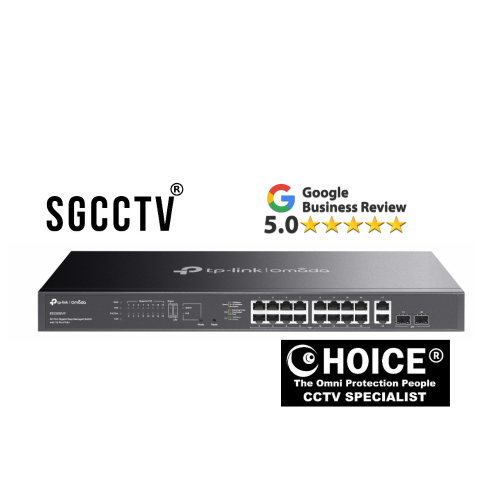
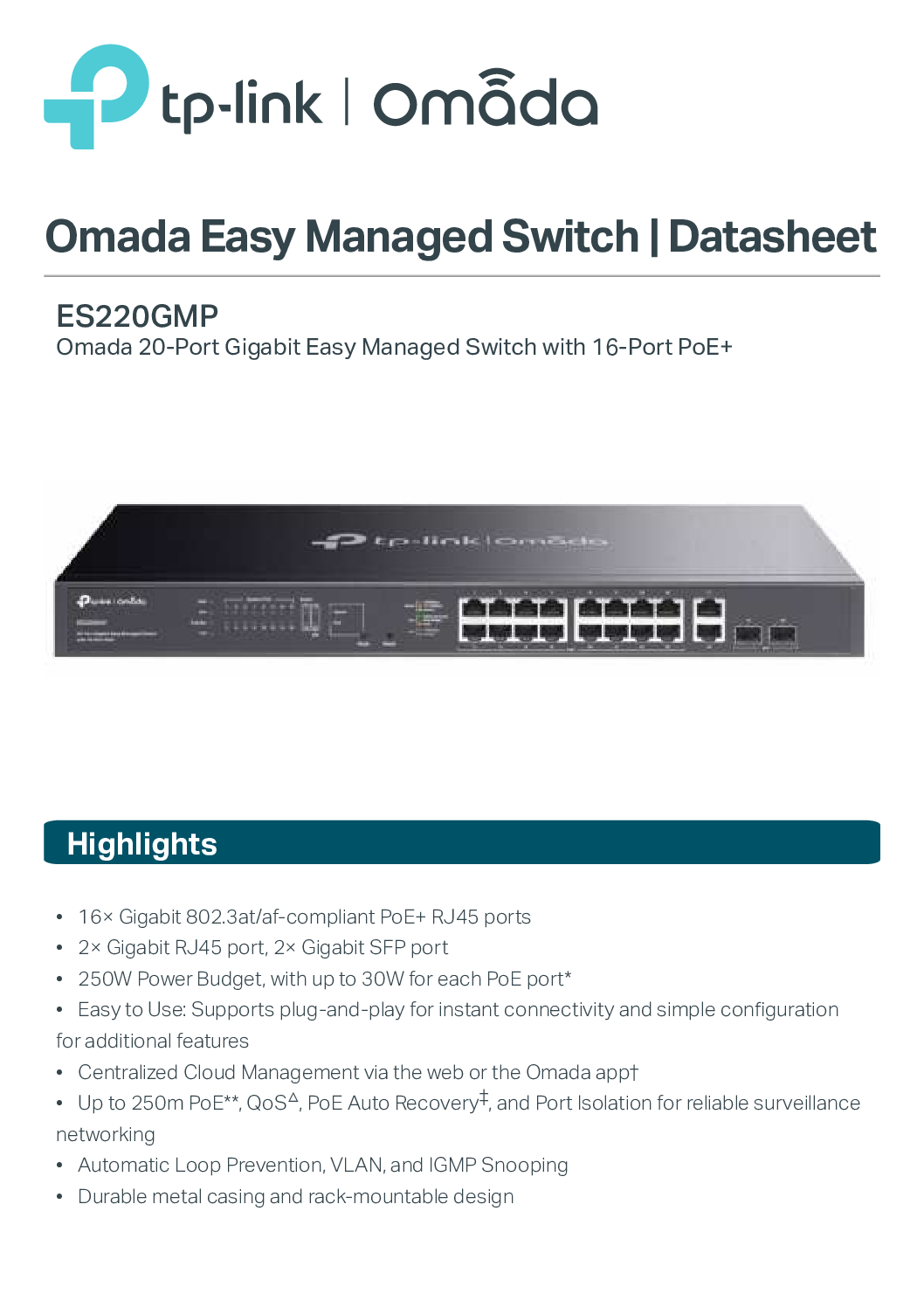

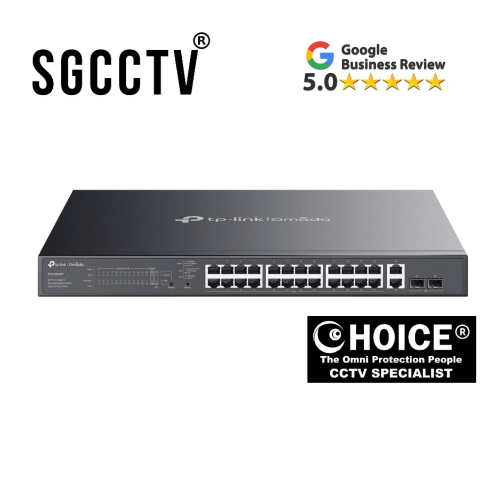
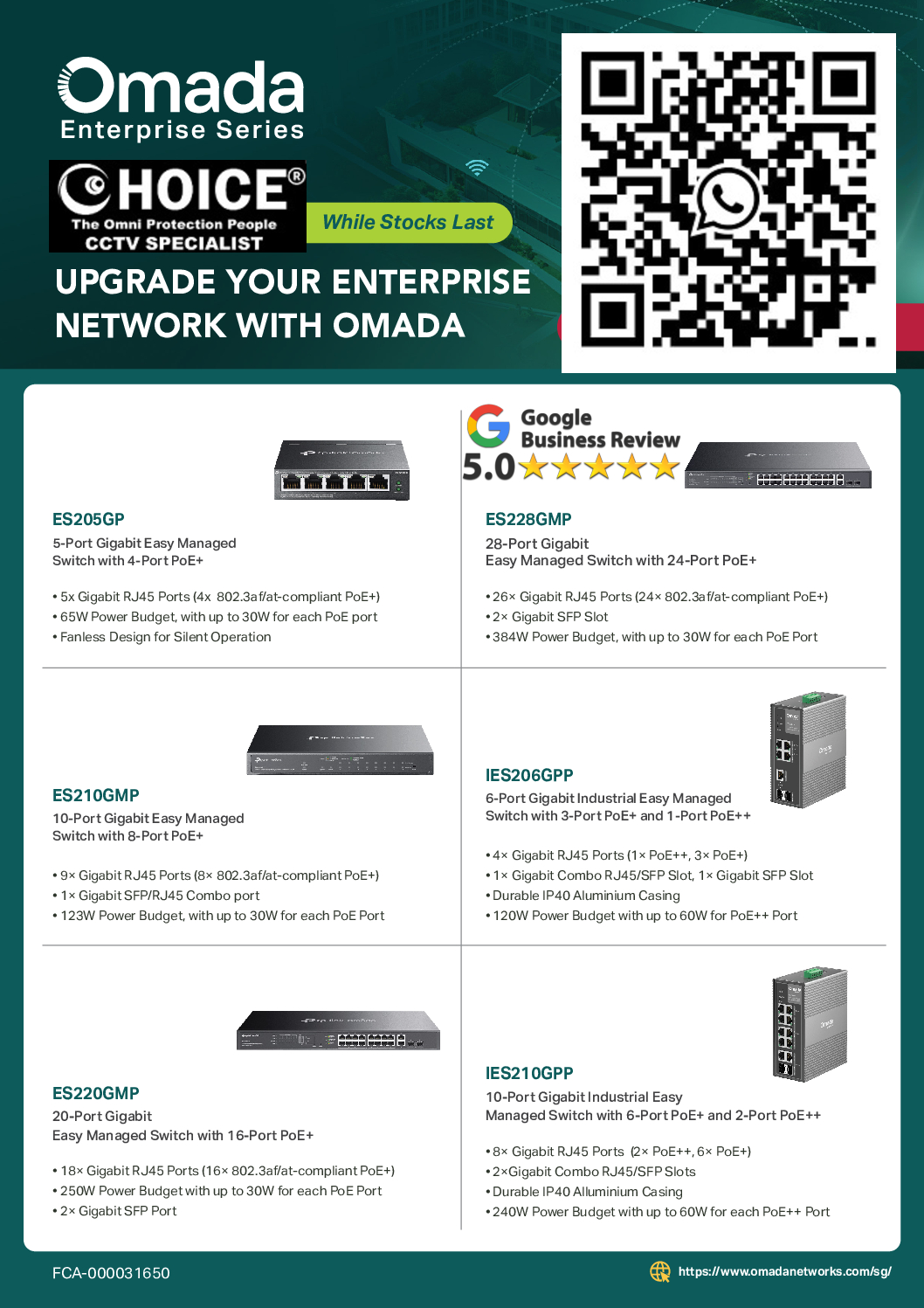
Tp-Link Omada ES220GMP 20-Port Gigabit Easy Managed Switch with 16-Port PoE+ 18× Gigabit RJ45 Ports 2× Gigabit SFP Port NEW DB
$645.00
TP-LINK SINGAPORE PARTNER FULL RANGE
Supply and Maintenance VIGI CCTV IP Cameras, NVR, Turbo HD Cameras, DVR, PTZ Cameras,
WIFI ROUTER ACCESS POINT
Sim Lim Square 02-81 10am-7pm Daily.
Whatsapp Enquiry Project +65 98534404, Technical Support +65 81120788, Site Visit Maintenance +65 81985572.
Tp-Link Omada ES220GMP 20-Port Gigabit Easy Managed Switch with 16-Port PoE+ 18× Gigabit RJ45 Ports 2× Gigabit SFP Port NEW
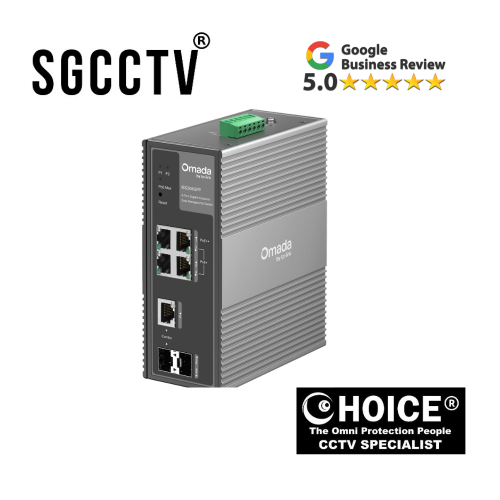
The TP-Link Omada IES220GMP 20-Port Gigabit Easy Managed Switch is a rugged, industrial-grade network switch designed to provide reliable Gigabit connectivity and power-over-Ethernet (PoE+) for cameras, access points, and other PoE devices. Its flexible ports and industrial design make it perfect for offices, factories, and outdoor surveillance systems.
🔑 Key Features
⚡ PoE+ Ports
- 16 PoE+ ports to power devices like IP cameras, WiFi APs, and VoIP phones
- Supports up to 30W per port
- Eliminates the need for separate power adapters
🚀 Gigabit Performance
- 18 Gigabit RJ45 ports for high-speed wired connections
- 2 Gigabit SFP ports for fiber uplinks
- Ensures smooth data transfer in high-traffic networks
🛠️ Industrial-Grade Design
- Rugged metal housing
- Wide temperature range (-40°C to 75°C)
- Resistant to dust, vibration, and harsh conditions
🧠 Easy Managed Features
- VLAN, QoS, and loop prevention
- Web-based management interface
- Monitors PoE usage and network health
☁️ Optional Omada Cloud Management
- Integrates with TP-Link Omada SDN Controller
- Allows centralized configuration and remote network monitoring
🎯 Ideal Use Cases
- IP surveillance systems with multiple PoE cameras
- Office networks with WiFi access points and VoIP devices
- Industrial IoT networks in factories or warehouses
- Outdoor or multi-building networks with fiber uplinks
💡 Why Choose TP-Link IES220GMP
- Rugged industrial design for harsh environments
- Powers multiple high-demand PoE devices
- Easy configuration via web interface or Omada cloud
- Combines high-speed connectivity and network management in one switch
📊 Technical Highlights
- Ports: 20 total (16 PoE+, 18 Gigabit RJ45, 2 SFP)
- PoE Power: Up to 30W per PoE+ port
- Management: Easy Managed
- Mounting: DIN rail or wall mount
- Operating Temp: -40°C ~ 75°C
Tp-Link Omada ES220GMP 20-Port Gigabit Easy Managed Switch with 16-Port PoE+ 18× Gigabit RJ45 Ports 2× Gigabit SFP Port NEW
⚡ 1. Powers Many Devices with PoE+ (No Extra Power Cables)
- 16 PoE+ ports deliver both power + data over one Ethernet cable
- Great for:
- IP surveillance cameras 📹
- Wireless access points 📶
- VoIP phones ☎️
- IoT sensors
💡 Saves money and reduces clutter — no need for separate power supplies for each device.
🚀 2. High‑Speed Full Gigabit Connectivity
- 18 Gigabit RJ45 ports for high‑speed wired connections
- 2 SFP ports for fiber uplinks — perfect for long distance or backbone connections
💡 Ideal for networks with heavy data flow (video, large files, cloud systems).
🛠️ 3. Rugged Industrial Design
- Built with industrial‑grade metal casing
- Works in wide temperature ranges (hot factories, cold outdoor cabinets)
- Strong resistance to dust, vibration, and rough environments
💡 Reliable where normal office switches would fail — perfect for factories, warehouses, and outdoor systems.
🧠 4. Easy Managed Networking (Not Just Plug‑and‑Play)
Includes features like:
- VLAN: segment different network groups
- QoS: prioritize important traffic (voice/video)
- Loop prevention: stable network without crashes
💡 Strong management tools without the complexity or cost of enterprise switches.
Tp-Link Omada ES220GMP 20-Port Gigabit Easy Managed Switch with 16-Port PoE+ 18× Gigabit RJ45 Ports 2× Gigabit SFP Port NEW
☁️ 5. Cloud & Centralized Control (Optional)
Works with:
TP-Link Omada SDN Controller
✔ Manage multiple sites from one dashboard
✔ Monitor traffic remotely
✔ Push updates / configs to all devices
💡 Great for multi‑site businesses or IT teams managing many switches.
📈 6. Ideal for Growing Networks
Whether you’re expanding:
- Surveillance systems
- WiFi coverage
- Office networks
- Industrial automation
This switch gives you port flexibility + future growth without needing a bigger unit now.
💰 7. Better Value Than Enterprise Gear
Compared to high‑end enterprise switches:
✔ More affordable
✔ Easier to set up
✔ Still has essential features
💡 You get professional performance without enterprise pricing.
Tp-Link Omada ES220GMP 20-Port Gigabit Easy Managed Switch with 16-Port PoE+ 18× Gigabit RJ45 Ports 2× Gigabit SFP Port NEW
🟢 Quick Summary — Why Buy This
| Benefit | What It Means for You |
|---|---|
| Lots of PoE ports | Power many devices easily |
| Gigabit + SFP | Fast network + long‑range connections |
| Industrial grade | Reliable in tough conditions |
| Smart features | Better performance, more control |
| Omada cloud support | Manage from anywhere |
| Great price | Professional features without big cost |
🔧 1. Physical Installation
Step 1: Mount the switch
- Use DIN rail or wall mount brackets included
- Place in a ventilated, dust-free area
Step 2: Connect devices
- PoE+ devices: Connect cameras, WiFi APs, or VoIP phones to any of the 16 PoE+ ports
- Non-PoE devices: Connect computers, NVR, or servers to RJ45 ports
- Fiber uplinks: Use the 2 SFP ports to connect other switches or long-distance backbone networks
Step 3: Power up
- Connect industrial power supply (check voltage rating)
- PoE devices will automatically receive power
🌐 2. Accessing the Switch
Option A: Web Browser
- Connect a computer to the switch
- Set your computer IP to the same subnet as switch default IP (check manual)
- Open a browser → enter the switch IP
- Default credentials:
- Username:
admin - Password:
admin
- Username:
- Change the password at first login
Option B: Omada Discovery Tool
- Download from TP-Link website
- Detects the switch automatically on the network
Tp-Link Omada ES220GMP 20-Port Gigabit Easy Managed Switch with 16-Port PoE+ 18× Gigabit RJ45 Ports 2× Gigabit SFP Port NEW
⚙️ 3. Basic Configuration
Set Static IP
- Navigate to Network Settings → IP
- Assign:
- IP: e.g., 192.168.1.10
- Gateway: e.g., 192.168.1.1
Enable PoE
- Navigate to PoE Settings
- Enable PoE on ports connected to cameras or APs
- Monitor total PoE power usage (16 PoE+ ports max 30W each)
Check SFP Ports
- Ensure fiber modules are correctly installed
- Verify uplink connectivity
🧩 4. Advanced Features (Optional)
- VLAN → segment network traffic (e.g., separate CCTV from office network)
- QoS → prioritize critical traffic (VoIP, video)
- Loop Prevention (STP) → prevent network loops
- Monitoring → check PoE usage and network health
☁️ 5. Optional Omada Cloud Management
- Install TP-Link Omada SDN Controller
- Connect the switch to the same network
- Use the “Adopt” button to add the switch
- Monitor and manage all ports and PoE remotely
Tp-Link Omada ES220GMP 20-Port Gigabit Easy Managed Switch with 16-Port PoE+ 18× Gigabit RJ45 Ports 2× Gigabit SFP Port NEW
⚡ 6. Example Setup Scenarios
CCTV Network
- PoE+ ports → 16 cameras
- Gigabit RJ45 ports → NVR + office devices
- SFP → uplink to main building or data center
WiFi Network in Office/Factory
- PoE+ ports → APs across floor
- Gigabit ports → computers, printers, servers
- SFP → connect other network switches in building
⚠️ 7. Common Setup Mistakes
- ❌ Using non-Cat5e/Cat6 cables for PoE+ → devices may not power
- ❌ Exceeding PoE budget → some devices won’t power on
- ❌ Not configuring IP → cannot access management interface
- ❌ Forgetting to enable PoE on ports
⏳ Typical Lifespan
This industrial switch is built to operate reliably for a long time. Here’s what you can generally expect:
📆 5–10+ years under normal use
- 5–7 years — very common lifespan in typical business/industrial settings
- 7–10+ years — possible with good conditions and regular maintenance
👉 Industrial switches like this are designed for continuous 24/7 operation — not short bursts like residential gear.
🔧 What Determines How Long It Lasts
🌡️ 1. Operating Environment
Temperature and dust are the toughest factors:
- Cool, well‑ventilated area → longer life
- Hot, dusty, unventilated area → shorter life
Industrial models tolerate higher temps, but heat still stresses electronics.
Tp-Link Omada ES220GMP 20-Port Gigabit Easy Managed Switch with 16-Port PoE+ 18× Gigabit RJ45 Ports 2× Gigabit SFP Port NEW
⚡ 2. PoE Load (Power Usage)
This model has 16 PoE+ ports — if all are delivering near maximum power all the time:
- More heat → more wear
- Keeping PoE load reasonable extends life
🧼 3. Cleanliness & Dust
Dust buildup blocks airflow and increases temperature:
- Regular cleaning extends lifespan
- Keeping it in an enclosure with proper ventilation helps
🔌 4. Power Quality
Stable, clean power is important:
- Using a UPS (uninterruptible power supply) or surge protector reduces stress
- Power fluctuations shorten device life
🧪 5. Network Load
Heavy traffic constantly at full bandwidth:
- May increase internal heat
- Still typical in business but can affect lifespan if combined with bad environment
📊 Real‑World Expectation
| Condition | Expected Lifespan |
|---|---|
| 👍 Cool, clean, light‑to‑medium load | 7–10+ years |
| ⚙ Industrial environment, moderate load | 5–8 years |
| 🔥 Hot / dusty / heavy PoE load | ~5 years or less |
⚠️ Common Issues & Solutions
1️⃣ PoE Devices Not Powering
Problem: Cameras, APs, or phones connected to PoE ports do not turn on.
Causes:
- PoE disabled on the port
- Total PoE power budget exceeded (max 30W per PoE+ port)
- Wrong or damaged cables (non-Cat5e/6)
Solution:
- Log into switch → PoE Settings → enable PoE on the required ports
- Check total PoE usage and ensure it’s under max power budget
- Replace cables with Cat5e or Cat6 for PoE+
- Verify devices support PoE+ standards
Tp-Link Omada ES220GMP 20-Port Gigabit Easy Managed Switch with 16-Port PoE+ 18× Gigabit RJ45 Ports 2× Gigabit SFP Port NEW
2️⃣ Cannot Access Web Interface
Problem: Browser cannot connect to switch IP
Causes:
- PC not in same subnet as switch
- IP conflicts on network
- Forgotten admin password
Solution:
- Set your PC IP to same subnet as default switch IP
- Use Omada Discovery Tool to detect the switch
- If credentials lost, press reset (5–10s) → restores factory defaults
3️⃣ Slow Network / Latency
Problem: Devices experience slow data or video lag
Causes:
- Cable quality or port speed mismatch
- Network congestion
- Loops in the network
Solution:
- Use Cat5e or Cat6 cables for all Gigabit connections
- Enable QoS in switch to prioritize important traffic (VoIP/video)
- Enable Loop Prevention (STP/RSTP)
- Check SFP uplink modules for proper connection
4️⃣ Devices Randomly Disconnect
Problem: Cameras or APs drop connections intermittently
Causes:
- Network loops
- IP conflicts
- Overloaded PoE power budget
Solution:
- Configure VLANs to separate traffic
- Assign static IPs for cameras, APs, and critical devices
- Monitor PoE usage → reduce overload
Tp-Link Omada ES220GMP 20-Port Gigabit Easy Managed Switch with 16-Port PoE+ 18× Gigabit RJ45 Ports 2× Gigabit SFP Port NEW
5️⃣ Overheating
Problem: Switch feels hot
Causes:
- High PoE load on many ports
- Poor ventilation
- Dust accumulation
Solution:
- Place switch in a ventilated, cool area
- Keep dust-free
- Avoid exceeding PoE budget
- Consider adding a fan or heat dissipation system if environment is very hot
6️⃣ Omada Cloud Issues
Problem: Switch not appearing in SDN Controller
Causes:
- No internet or network connection
- Firewall blocking communication
Solution:
- Verify switch is connected to network with internet access
- Open necessary ports for Omada cloud (TCP 29810, 29811)
- Use “Adopt” in Omada Controller
Tp-Link Omada ES220GMP 20-Port Gigabit Easy Managed Switch with 16-Port PoE+ 18× Gigabit RJ45 Ports 2× Gigabit SFP Port NEW
⚙️ How to Configure the Switch
Step 1: Access
- Browser → enter switch IP
- Username/Password → default
admin/admin
Step 2: Set Network IP
- Navigate to Network Settings → IP
- Assign static IP if needed
- Set gateway to your router
Step 3: Enable PoE
- Go to PoE Settings
- Enable PoE on required ports
- Check power consumption per port
Step 4: VLAN Setup (Optional)
- Go to VLAN Settings
- Create VLANs for CCTV, office network, guest WiFi
- Assign ports to VLANs
Step 5: QoS & Loop Prevention
- QoS: Prioritize video or VoIP traffic
- STP/RSTP: Prevent network loops in multi-switch setups
Step 6: Optional Cloud Management
- Connect to Omada SDN Controller
- Adopt the switch
- Monitor PoE usage, traffic, and firmware updates remotely
Tp-Link Omada ES220GMP 20-Port Gigabit Easy Managed Switch with 16-Port PoE+ 18× Gigabit RJ45 Ports 2× Gigabit SFP Port NEW
📌 Warranty for TP‑Link Omada IES220GMP 20‑Port Gigabit Easy Managed Switch
🛠️ 1. 5‑Year Replacement Warranty (Singapore)
- Omada series switches — including the IES220GMP — are typically covered by a 5‑year replacement warranty when purchased from authorized sellers in Singapore. This applies to Omada switches and PoE models.
- The warranty covers defects in materials or workmanship, meaning if the hardware fails under normal use, TP‑Link will typically replace the unit.
📋 What is covered
✔ Defective internal components
✔ Failures due to manufacturing faults
✔ Main unit issues (not accessories)
❌ What is not covered
✖ Physical damage (drops, water, misuse)
✖ If serial number is removed/defaced
✖ Products bought from unauthorized or overseas sellers
📌 Important Warranty Notes
- The original purchase date and receipt/proof of purchase are required when claiming the warranty.
- TP‑Link may replace defective units with a brand‑new or refurbished unit depending on availability.
- Warranty periods don’t reset with replacements — it continues from the original purchase date.
Tp-Link Omada ES220GMP 20-Port Gigabit Easy Managed Switch with 16-Port PoE+ 18× Gigabit RJ45 Ports 2× Gigabit SFP Port NEW
⚙️ Key specs (the important stuff)
- 20 total Gigabit ports
- 16× PoE+ ports (power devices like cameras/APs)
- 2× normal RJ45 ports
- 2× SFP uplink ports
- PoE budget: 250W total (up to 30W per port)
- Rack-mountable metal design (for server racks)
- Plug-and-play + web/cloud management
🚀 Features that matter
1. Power over Ethernet (PoE+)
- Powers devices like:
- IP cameras 🎥
- Wi-Fi access points 📡
- VoIP phones ☎️
- No need for separate power adapters
👉 Big advantage for surveillance or office setups.
2. Omada cloud ecosystem
- Can be managed via:
- Web browser
- Omada mobile app
- Centralized control across multiple devices/sites
👉 Useful if you’re running multiple switches + APs.
Tp-Link Omada ES220GMP 20-Port Gigabit Easy Managed Switch with 16-Port PoE+ 18× Gigabit RJ45 Ports 2× Gigabit SFP Port NEW
3. Basic network management
Even though it’s “easy managed”, you still get:
- VLAN (network segmentation)
- QoS (traffic prioritization)
- IGMP snooping (better streaming/multicast)
- Loop prevention (avoids network crashes)
👉 Enough for small business / prosumer setups.
4. Surveillance-friendly features
- Up to 250m PoE transmission (long cable runs)
- PoE Auto Recovery (restarts frozen cameras automatically)
- Port isolation (security)
Tp-Link Omada ES220GMP 20-Port Gigabit Easy Managed Switch with 16-Port PoE+ 18× Gigabit RJ45 Ports 2× Gigabit SFP Port NEW
🧠 Who should buy this?
👍 Good for:
- Small offices / SMEs
- CCTV systems (very common use)
- Homes with many APs or wired devices
- People who want simple VLAN + control
👎 Not ideal for:
- Advanced enterprise networks (need L3 routing, deep configs)
- High-performance setups (no 2.5G/10G ports)
- Heavy automation / complex VLAN environments
⚖️ Quick pros & cons
Pros
- Strong PoE power (250W)
- Easy setup + cloud management
- Good price-to-features ratio
- Reliable for surveillance networks
Cons
- Limited compared to full managed switches
- Only Gigabit (no multi-gig future-proofing)
- Some advanced features require Omada controller
Tp-Link Omada ES220GMP 20-Port Gigabit Easy Managed Switch with 16-Port PoE+ 18× Gigabit RJ45 Ports 2× Gigabit SFP Port NEW


Nunc lacus elit, faucibus ac laoreet sed, dapibus ac mi. Maecenas eu ante a elit tempus fermentum. Aliquam commodo tincidunt semper. Phasellus accumsan, justo ac mollis pharetra, ex dui pharetra nisl, a scelerisque ipsum nulla ac sem. Cras eu risus urna. Duis lorem sapien, congue eget nisl sit amet, rutrum faucibus elit.
Donec accumsan auctor iaculis. Sed suscipit arcu ligula, at egestas magna molestie a. Proin ac ex maximus, ultrices justo eget, sodales orci. Aliquam egestas libero ac turpis pharetra, in vehicula lacus scelerisque. Vestibulum ut sem laoreet, feugiat tellus at, hendrerit arcu.
Nunc lacus elit, faucibus ac laoreet sed, dapibus ac mi. Maecenas eu ante a elit tempus fermentum. Aliquam commodo tincidunt semper. Phasellus accumsan, justo ac mollis pharetra, ex dui pharetra nisl, a scelerisque ipsum nulla ac sem. Cras eu risus urna. Duis lorem sapien, congue eget nisl sit amet, rutrum faucibus elit.