
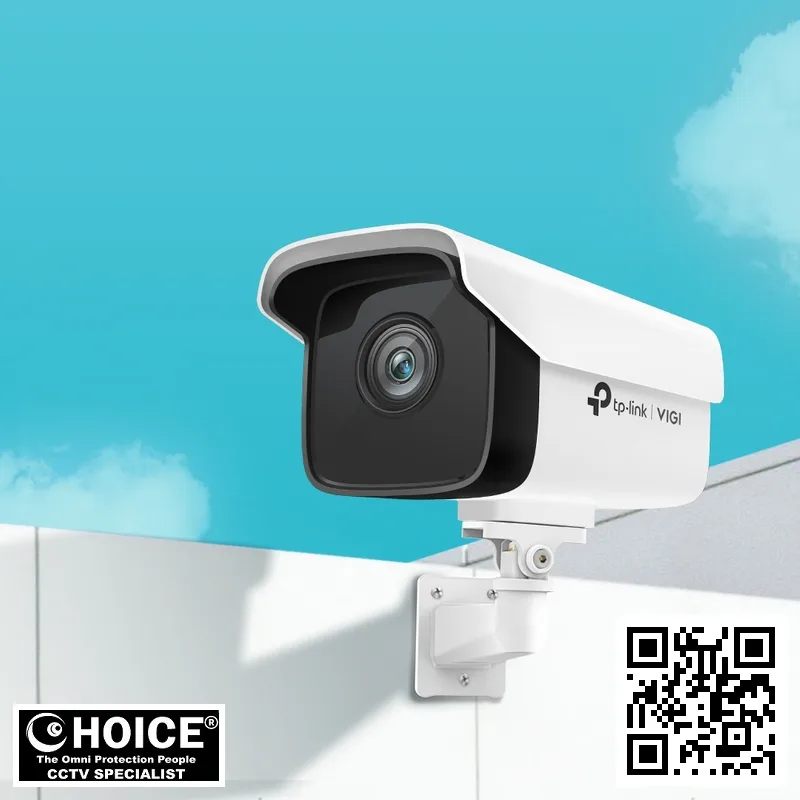
TP-Link VIGI C300HP Singapore VIGI 3MP Outdoor Bullet Network Camera | High Definition Surveillance for Commercial and Residential Properties
The TP-Link VIGI C300HP Singapore is a robust, high-performance surveillance solution designed to meet the rigorous demands of modern security infrastructure. This specific model stands as a testament to advanced network camera technology tailored specifically for the unique environmental conditions found in our region. It delivers crystal clear 1920×1080 Full HD video quality that allows business owners and homeowners across the nation to monitor their premises with absolute confidence at all times.
In today’s digital landscape, security is not just about having a camera; it is about having reliable data. The VIGI C300HP ensures that critical footage is captured in high resolution without sacrificing bandwidth or storage efficiency thanks to its H.265 compression technology. Whether you are protecting an industrial warehouse in Jurong or securing a residential compound, this device offers the stability and reliability required for 24/7 operation.
This product page provides an exhaustive analysis of every aspect of the camera, from installation specifics tailored to Singapore’s humidity levels to maintenance schedules that extend its lifespan. We are dedicated to helping you understand exactly why this model is a preferred choice among security experts in our market today, ensuring your investment yields maximum protection.
Key Features of the TP-Link VIGI C300HP Singapore
- Versatile Dual-Lens Options: This camera comes with interchangeable lens options available via accessories or specific model variations, allowing you to choose between a wide 92° field of view for large open spaces like warehouse entrances and a narrower 54° focus for detailed monitoring of narrow corridors.
- Vivid Color Night Vision: Unlike older models that revert to grainy black-and-white images in the dark, this unit utilizes advanced sensor technology to maintain high-quality color video even in extremely low light conditions below 0.1 Lux using its IR illuminators up to a range of 30 meters.
- Rugged Weatherproofing: Engineered with an IP67 rating, the housing is completely dust-tight and can withstand heavy rain or humidity typical of our tropical climate without sustaining damage from water ingress or corrosion over time.
- Dual Power Flexibility: Users benefit from a dual power supply design that accepts standard 12V DC adapters as well as PoE (Power over Ethernet) injection, providing flexibility for installation in locations where cabling options vary significantly.
- Turbo Stream Technology: This feature automatically adjusts video quality based on network bandwidth availability. When the connection is strong, it streams full HD; when speed drops to prevent lag or buffering, it seamlessly switches sub-streams without losing critical motion detection capabilities.
- Digital Noise Reduction (3D DNR): To combat image degradation caused by artificial lighting at night or low-light conditions in poorly lit parking lots, the internal processor applies 3D noise reduction to maintain a clean visual feed free of digital speckles and graininess.
- Smart Event Detection: The video analytics engine includes area intrusion detection and line-crossing alerts. You can draw specific boundaries within your client software so that only movement inside those zones triggers notifications, preventing false alarms from cars passing in front of the camera or birds landing outside the ROI.
Technical Specifications
| Specification | Detail |
|---|---|
| Sensor & Image Quality: | Image Sensor: 1/2.7″ Progressive Scan CMOS (High Sensitivity) |
| Lens Options: M12 Mount, choose between 4mm or 6mm focal length | |
| Aperture Range: F2.0 to F2.95 for optimal light intake in varying conditions | |
| Digital Zoom Capable: Yes, up to 16x digital zoom on sub-streams via client software | |
| Frame Rates: Supports standard rates from 1fps up to a smooth 30fps at full resolution | |
| Video Compression Dual-Stream Support: | Main Stream (High Quality): H.265/H.264; Sub-stream (Low Bitrate): H.265/H.264 for remote viewing on mobile devices to save data. |
| IR Night Vision Range: Up to 30 meters effective infrared working distance | |
| Data & Network: | Network Interface: RJ-45 10/100M Self-Adaptive Ethernet Port (Fast) |
| Illuminations Supported: TCP/IP, UDP, ICMP, HTTP(s), DHCP/DNS | |
| SIP/VoD Support: | Compatible with ONVIF standards for easy integration with third-party NVRs (Network Video Recorders) |
| Simultaneous Live View: Capable of displaying 4 Main Streams & 3 Sub-Streams on a single client monitor | |
| Digital Noise Reduction: | Built-in 3D DNR to ensure clear images even in dark environments with artificial lighting. |
| Storage Support: Supports SD/SDHC cards up to 128GB for local storage recording | |
| Mechanical & Power: | Operating Temperature Range: -30°C to +55°C (Suitable for extreme Singapore heat) |
| Power Supply Option 1: 9V-24V DC / PoE+ Support | |
| Power Consumption Max: Under 7W typical usage with active LED indicators | |
| Cabinet Material: | High-grade ABS plastic for corrosion resistance against salt air and humidity. |
| Metal Bracket Mounting: | Included in package to ensure a solid, vibration-resistant mount on poles or walls |
| Certifications: CE / FCC / RCM compliant ensuring legal compliance for commercial use |
Applications & Use Cases
The TP-Link VIGI C300HP Singapore is specifically engineered to handle diverse environments found across the island nation. Its rugged build makes it ideal for outdoor deployment where other consumer-grade cameras would fail due to humidity or dust.
HDB and Residential Compound Security
The high-definition sensor allows residents in HDB estates to clearly identify visitors at the main gate. The 92-degree horizontal viewing angle ensures that you can monitor a wide perimeter without blind spots, which is crucial for large housing blocks where security personnel cannot cover every entrance.
Condo Entrance Monitoring and Visitor Control
In condominiums, this camera helps to screen visitors before they gain access. The digital noise reduction ensures that even at night when the lift lobby is dimly lit by LEDs, the security guard can still read license plates or face recognition tags on passersby accurately.
Warehouse and Industrial Zone Surveillance
Fabrication shops in industrial parks like Jurong require cameras that do not suffer from heat distortion. This unit is rated for high-temperature operation, ensuring it continues to monitor inventory levels and worker safety on the factory floor without overheating or shutting down during peak summer months.
Retail Store Perimeter Protection
Retailers can use this device at their storefronts in shopping districts like Orchard Road. The 4MP resolution allows store managers to spot potential shoplifting attempts or monitor crowd control during sales events, providing a clear record for insurance claims if damage occurs.
Office Building Lobby and Parking Areas
The compact form factor of the bullet camera design looks professional in corporate settings. It is easily mounted inside lobbies or outside parking garages to record vehicle entry logs, providing essential evidence for disputes regarding unauthorized parking or theft incidents involving company vehicles.
Car Park and Highway Toll Booths
Toll plazas often need cameras that are weather-tight. The IP67 waterproof rating combined with its ability to withstand vibration makes this camera perfect for mounting on gantries or poles where dust from tires is constant, ensuring clear license plate recognition day after day.
Why Choose the TP-Link VIGI C300HP Singapore
Selecting a security system in our region requires more than just buying hardware; it requires understanding local compliance and environmental challenges. The humidity levels here are exceptionally high, which often causes condensation inside cheaper camera housings over time.
This device is built with IP67-rated components that resist this moisture intrusion effectively, protecting the internal circuitry from short circuits common in tropical climates. Furthermore, Singapore operates on a strict PDPA (Personal Data Protection Act) framework regarding surveillance footage storage and privacy rights.
The VIGI ecosystem includes advanced configuration tools that allow you to mask specific areas of video streams or restrict recording schedules during non-business hours. This ensures your business remains compliant with local laws while maintaining security standards without the need for expensive legal consultancies on every installation project.
Installation Guide
The first step in deploying this camera is deciding between PoE and 12V DC power options, which depends entirely on how you are cabling your network. If you have a standard NVR (Network Video Recorder) already connected to an internet switch that supports Power over Ethernet, the installation becomes significantly simpler.
To install using PoE, simply thread the Cat5e or Cat6 cable through your mounting bracket and plug it into the camera’s RJ45 port. This single cable carries both power and data up to 100 meters of distance effortlessly without needing a separate transformer box for every unit you place around your property.
If network cabling is not yet in progress or if you are installing on an existing pole, using the included DC barrel plug adapter (5.5mm) allows you to run just power cable and use Wi-Fi bridge equipment like CPEs to transmit data wirelessly back to a main hub station.
Mechanical Mounting Steps:
- Pole Selection: Choose a metal or concrete pole that can bear the weight of the bracket. Concrete poles require expansion bolts and anchors, whereas steel pipes utilize standard pipe clamps included in accessories.
- Lens Adjustment: Once mounted on the wall clamp, loosen the lens holder to adjust focus if needed for 4mm focal length or zoom settings depending on your model variant available at SGCCTV stock levels today. Ensure it faces away from direct heat sources like exhaust pipes which might fog up a cheaper sensor.
- App Configuration: Download the TP-Link Omada App to setup WiFi connections if using wireless transmission or plug directly into NVR for wired recording schedules on motion triggers rather than continuous 24/7 storage saving HDD space and costs significantly over months of operation time without human intervention required daily.
- Firmware Update: Ensure the latest firmware is installed to patch any security vulnerabilities before connecting your network to internet so no unauthorized access can happen from outside Singapore borders targeting unsecured devices directly connected via router port open for public use by hackers looking exploit weak passwords easily found online forums today.
Repair and Maintenance
Maintenance is key to longevity, especially in an environment with high dust pollution. Every six months, you should visually inspect the camera housing to ensure that no water has entered through the O-ring seals or ventilation ports which can lead to internal corrosion.
- Cleaning Schedule:
We recommend using a soft brush and compressed air to gently remove dust from external vents. Avoid high-pressure washers as they may force moisture into crevices inside the casing causing damage over time if not properly sealed immediately after drying out completely.
- Lens Care:
If you notice fogging on your lens, it is likely due to a broken IR seal or internal humidity. In such cases, replace the unit as cleaning will not fix this persistent issue caused by structural failure in manufacturing tolerances.
Frequently Asked Questions
Can I use TP-Link VIGI C300HP Singapore with Hikvision NVRs?
Yes, absolutely. This camera supports the ONVIF protocol which is a universal standard for network video devices worldwide. You can add this device to almost any compatible Network Video Recorder that runs third-party software or uses Open Source drivers designed specifically for multi-brand mixing setups found in commercial environments across Asia Pacific region today.
Is TP-Link VIGI C300HP Singapore waterproof and how do I clean it?
The camera is rated IP67 which means you can wash the exterior with water safely. However, never force air or high-pressure sprays into vents when cleaning dirt off of plastic shell surface because moisture will enter inside casing causing internal corrosion over time if seals fail during heavy monsoon season rains common throughout Singapore.
How does it handle night vision in a dark parking lot?
The built-in IR illuminators activate automatically when ambient light drops below 0.1 Lux threshold set by default configuration settings within application software interface options available for download via Windows PC or Android mobile device user accounts logged into main server dashboard monitoring center located at headquarters office building downtown.
Does it require a separate power supply unit?
No, the camera accepts either 12V DC adapter included in packaging contents along with PoE+ injection if you already have network switches that support this feature. This dual option makes installation much easier as you do not need to run extra wires back for standard AC adapters unless using wireless bridge kits CPEs.
What happens during a power outage?
If PoE is used via NVR, the camera will continue operating from its internal battery backup if one is installed or resume recording immediately once main grid electricity returns to normal stable levels. However, using standard DC plug requires mains power connection so it shuts down completely until power is restored again.
Is there a warranty for this product?
Yes, TP-Link provides an official 2-year limited hardware warranty covering manufacturing defects or component failures not caused by external damage such as lightning strikes. For repairs in Singapore you can contact SGCCTV directly to arrange shipping back for replacement units sent out quickly.
How do I set up motion detection alerts?
Navigate into the client software interface, go to Event Settings menu tab click on Motion Detection settings window pop-up dialog box asking you to create custom regions of interest (ROI). Select areas where movement triggers notifications sent via email or SMS push message directly onto your phone screen instantly whenever detected.
Can I view video from anywhere outside Singapore?
You can, provided internet connectivity exists at both ends. Enable UPnP on router settings to allow inbound connections and set up port forwarding rules if required for security reasons or use HTTPS encrypted tunnels which are built-in by default so third parties cannot intercept your private footage easily over public Wi-Fi hotspots.
What is the maximum storage capacity?
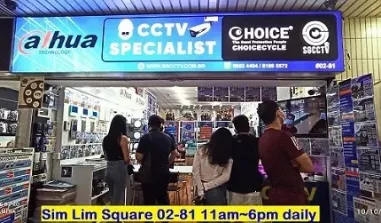
You can plug in an SD card of up to 128GB for local loop recording or connect to NVRs which support larger HDD capacities ranging from TB range sizes available locally at SGCCTV store front located inside Sim Lim Square complex building lobby entrance area.
Is it compatible with mobile apps?
The device works seamlessly with TP-Link Omada App or third-party VMS software solutions. You can configure sub-streams to be lightweight enough for 3G/4G connections if you travel frequently and want remote access while commuting on MRT trains throughout island journey times.
Related Products
- <a href="More TP-Link CCTV cameras in Singapore“>TP-Link VIGI C500HP Outdoor Dome Camera for Indoor/Outdoor Versatility
- <a href="Browse all CCTV cameras in Singapore“>VIGI C346EIP 8MP Starlight Series Bullet Network Camera with Auto Tracking Technology
- <a href="View the full SGCCTV shop“>TP-Link Omada VLS105 Access Point Kit for Mesh Wireless Coverage in Singapore Homes
Conclusion
The TP-Link VIGI C300HP represents a solid investment for businesses and homeowners seeking reliable surveillance without breaking the bank. With its IP67 rating, H.265 compression efficiency, and flexible power options tailored to our infrastructure standards.
We recommend you visit SGCCTV today to get your free consultation on site survey services or order directly via WhatsApp for instant delivery within Singapore island wide. Do not compromise security; choose the proven VIGI line known for durability under harsh weather conditions.
SGCCTV — Authorised Hikvision & Dahua Dealer Singapore
Address: 1 Rochor Canal Road, Sim Lim Square #02-81, Singapore
Email: enquiry@choicecycle.com.sg
WhatsApp: +65 98534404 (24 hours)
Operating Hours: 10:00 AM – 7:00 PM daily
Website: https://sgcctv.com.sg
TP-Link VIGI C300HP: Frequently Asked Questions
Where can I buy the TP-Link VIGI C300HP?
You can buy the TP-Link VIGI C300HP from SGCCTV at Sim Lim Square #02-81, or order online.
Is the TP-Link VIGI C300HP suitable for outdoor use?
Yes — the TP-Link VIGI C300HP is built for Singapore’s tropical, humid weather.
Does the TP-Link VIGI C300HP come with a warranty?
Every TP-Link VIGI C300HP includes local warranty support from SGCCTV. Our team will confirm the exact coverage when you enquire.
How much does the TP-Link VIGI C300HP cost?
WhatsApp +65 98534404 for the best price on the TP-Link VIGI C300HP today.
Can SGCCTV install the TP-Link VIGI C300HP?
Yes, SGCCTV offers professional installation for the TP-Link VIGI C300HP across Singapore.
Is the TP-Link VIGI C300HP available?
Availability of the TP-Link VIGI C300HP is confirmed by our team — WhatsApp +65 98534404 and we will check the current position for you.
What resolution does the TP-Link VIGI C300HP record?
The TP-Link VIGI C300HP captures sharp, detailed footage well suited to Singapore homes and businesses.
Does the TP-Link VIGI C300HP work at night?
Yes, the TP-Link VIGI C300HP delivers clear low-light footage, tested for Singapore conditions.
Can I view the TP-Link VIGI C300HP on my phone?
You can monitor the TP-Link VIGI C300HP remotely from anywhere in Singapore via the mobile app.
What warranty covers the TP-Link VIGI C300HP?
The TP-Link VIGI C300HP is backed by local warranty support from SGCCTV in Singapore.
Why buy the TP-Link VIGI C300HP from SGCCTV?
SGCCTV is a trusted Singapore dealer offering the TP-Link VIGI C300HP at the best price with expert support.
Is the TP-Link VIGI C300HP good for HDB and condo use?
Yes, the TP-Link VIGI C300HP is a popular pick for HDB flats, condos and offices across Singapore.


Nunc lacus elit, faucibus ac laoreet sed, dapibus ac mi. Maecenas eu ante a elit tempus fermentum. Aliquam commodo tincidunt semper. Phasellus accumsan, justo ac mollis pharetra, ex dui pharetra nisl, a scelerisque ipsum nulla ac sem. Cras eu risus urna. Duis lorem sapien, congue eget nisl sit amet, rutrum faucibus elit.
Donec accumsan auctor iaculis. Sed suscipit arcu ligula, at egestas magna molestie a. Proin ac ex maximus, ultrices justo eget, sodales orci. Aliquam egestas libero ac turpis pharetra, in vehicula lacus scelerisque. Vestibulum ut sem laoreet, feugiat tellus at, hendrerit arcu.
Nunc lacus elit, faucibus ac laoreet sed, dapibus ac mi. Maecenas eu ante a elit tempus fermentum. Aliquam commodo tincidunt semper. Phasellus accumsan, justo ac mollis pharetra, ex dui pharetra nisl, a scelerisque ipsum nulla ac sem. Cras eu risus urna. Duis lorem sapien, congue eget nisl sit amet, rutrum faucibus elit.
Related Products
Dahua Bullet Network Camera IPC-HFW3241E-AS Security System CCTV Camera World Top Security Manufacturer 2MP H.265+ Lite AI IR Fixed Focal Outdoor Weatherproof IP67
Save15.6%Save $25.00Only$135.00 Original price was: $160.00.$135.00Current price is: $135.00.Dahua AI PTZ DH-SD49225XA-HNR 2MP H.265+ Network Camera ONVIF 25x Starlight IR 360 degree Pan Tilt Zoom Outdoor IP66 CCTV Camera Singapore Security System
Save19.1%Save $130.00Only$550.00 Original price was: $680.00.$550.00Current price is: $550.00.
Reviews
There are no reviews yet.