
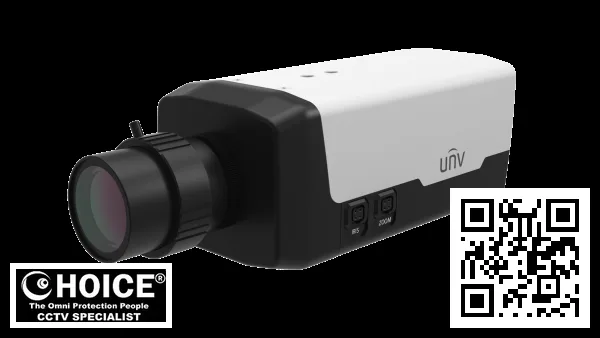
Uniview IPC568EB-DGK-I0 Singapore Network Cameras | Ultra HD 8MP Security Solutions
The Uniview IPC568EB-DGK-I0 represents a pinnacle of modern security technology available for purchase in the Singapore market today. This high-performance network camera delivers crystal clear video quality with an impressive maximum resolution of up to 8 MP, ensuring that every detail is captured from the moment of installation. Designed specifically to meet the rigorous demands of local infrastructure and climate conditions, this device stands out as a premier choice for businesses and residential complexes throughout Singapore seeking top-tier surveillance protection.
Key Features of the Uniview IPC568EB-DGK-I0 Singapore
- Ultra-High Definition Clarity: The camera utilizes an advanced 1/1.8″ CMOS sensor to capture video at a maximum resolution of 3840 × 2160 pixels, allowing security personnel in Singapore to zoom into footage from multiple meters away without losing detail.
- Sophisticated Color Night Vision: Equipped with an IR-cut filter that auto-switches based on light levels, the camera ensures color video is recorded at night when ambient light exceeds 0.02 Lux while switching to black and white infrared mode for extreme darkness down to 0.01 Lux.
- Premium WDR Performance: With a Wide Dynamic Range capability of up to 120 dB, this camera handles harsh lighting conditions common in tropical Singapore environments where bright sunlight contrasts sharply with dark building interiors or shadows on HDB walls.
- Advanced Compression Technology: Supporting Ultra 265 video compression alongside standard H.264 and MJPEG formats, the device significantly reduces bandwidth usage while maintaining high-quality image fidelity for smooth streaming on mobile devices like smartphones.
- Intelligent Traffic Analytics: The built-in U-code support allows this camera to perform intelligent tasks such as detecting car license plate images automatically when vehicles pass a tripwire area or counting pedestrians entering and leaving specific zones in retail environments.
- Versatile Audio Capabilities: Integrated with two-way audio transmission via G.711U compression, the unit allows security guards to speak directly through speakers to deter intruders at gates or parking lots while recording ambient sound for evidence purposes.
Technical Specifications
| Specification | Detail |
|---|---|
| Model Name | IPC568EB-DGK-I0 |
| Pickup Brand | Uniview |
| Max Resolution (Main Stream) | 3840 × 2160 @ 8 MP, Max. 30 fps |
| Sensor Type | 1/1.8″ CMOS Digital Sensor with IR Cut Filter |
| Illumination (Color) | 0.002 Lux @ F1.2, AGC ON |
| Illumination (B/W Mode) | 0.0002 Lux @ F1.2, AGC ON |
| Night Vision Type | IR-Cut Filter with Auto Switching |
| Lens Mount | C/CS Thread Lens Mount |
| Iris Control | DC Iris / P-Iris Supported |
| WDR Range | 120 dB Wide Dynamic Range Support |
| Digital Noise Reduction | Yes, 3D DNR supported for clear images in low light |
| Compression Standards | H.265 Mainstream / H.264 Mainstream / MJPEG Profile Advanced |
| Video Bitrate Range | 128 Kbps to 16 Mbps depending on scene complexity and resolution selected. |
| Dual Stream Support | SIMultaneous Sub-Stream (720p) @ 30 fps / Mainstream @ 4K/Full res. |
| Frame Rate Capabilities | Main: Full Resolution; Sub: D1 or CIF Quality for multiple monitor display without lagging the network link significantly on older hardware. |
| Digital Zoom Level | No optical zoom, but digital cropping available within 8MP resolution limit. |
| Audio Compression Algorithm | G.711A (PCMA) and G.711U (PCMU) |
| Edge Storage Capacity | MicroSD Card Slot support up to 512 GB capacity maximum. |
| Network Interface Port | RJ45 Ethernet Jack supporting 10/100 Mbps Base-TX and Gigabit SFP option available for high speed backhaul needs specifically relevant in Singapore data centers or large estates. |
| SFP Module Support | Fiber Optic Port (optional) to extend range beyond copper wire limitations where buildings are too far apart from central servers located at the security control room upstairs of a condo management office. |
| User Management Level | Supports up to 32 distinct users with three permission levels ranging from Administrator down to Operator and Common User roles for restricted access compliance. |
| Security Protocols | TLS 1.3 Encryption, HTTPS Secure Socket Layer encryption used for web login sessions preventing eavesdropping by hackers. |
| Lens Mount Type | C/CS Thread Lens Mount compatible with standard Uniview lenses or third party equivalents found in local Sim Lim Square shops if needed later on. |
| Shutter Speed Range | Auto / Manual adjustable range from 1 second down to ultrashort 1/100,000 seconds required for freezing motion during fast moving vehicle capture. |
| Digital Defog Support | Built-in Digital Defog and Optical Defog algorithms help clear up images taken in rainy or humid conditions typical of the tropical island nation environment where fog often settles on surfaces. |
Applications & Use Cases
The Uniview IPC568EB-DGK-I0 is exceptionally suited for high-security warehouse environments located within industrial zones in Singapore, offering wide-area coverage that minimizes blind spots around loading docks and heavy machinery areas.
HDB blocks benefit from the 8MP resolution by allowing security guards to clearly read faces of visitors at main gate entrances or verifying identity cards against a database before granting access into residential corridors where strict privacy laws apply. Condo management offices utilize this camera for outdoor parking lot monitoring, leveraging license plate recognition capabilities to automate toll collection systems and prevent unauthorized vehicle entry without manual intervention from the control room staff.
Office buildings with glass facades rely on its high-wider dynamic range (WDR) feature to overcome glare issues caused by direct sunlight reflecting off exterior windows while still capturing details inside meeting rooms or reception desks. Car park operators in multi-story garages install these units at ramp entrances where the lighting changes drastically from bright daylight to dim tunnel areas, ensuring consistent video quality for traffic flow analysis and incident investigation purposes.
Why Choose the Uniview IPC568EB-DGK-I0 Singapore
Selecting this specific model brings immense value because it is engineered specifically to withstand our tropical climate where humidity levels can reach 95% without condensation damaging internal electronics. The device supports PoE power delivery which simplifies installation significantly compared to AC wiring, reducing fire risks in older HDB buildings or commercial properties that lack easy access for running new electrical lines.
We also offer comprehensive support including firmware updates directly from our local team helping ensure your system remains compatible with new operating systems and mobile devices used by security guards in daily patrols around the city state. This combination of durability, smart features like traffic capture for parking lots, and ease of setup makes it a superior choice over cheaper alternatives that often fail under environmental stress or require expensive external licenses just to enable basic motion detection.
Installation Guide
The installation process begins by selecting the optimal power supply method which is either PoE via Ethernet cable for simple setups or 12V DC terminal block connection if long distance runs are required across large estates in Singapore. You must ensure that your network switch supports Gigabit speeds since this camera streams high-resolution data requiring substantial bandwidth to avoid lagging when viewing live feeds on multiple monitors simultaneously at the security control room.
Connect the coaxial BNC output to a legacy DVR recorder if you have existing older surveillance infrastructure that needs upgrading without replacing all wiring completely inside your building management office or factory floor. The web interface setup is straightforward; simply download UNV-Link Pro or EZStation client software on any computer running Windows 10+ and enter the IP address assigned via DHCP automatically from your router which acts as a gateway for internet traffic outside the local network.
For mobile viewing use the official application compatible with iOS and Android OS to view streams remotely while commuting across bridges or tunnels connecting different parts of Singapore island. Privacy masking features allow you to overlay black boxes over specific areas like neighboring properties shown in peripheral vision so that neighbors do not feel their home life is being invaded by constant recording which can cause community complaints.
Repair & Maintenance
Maintenance for this camera involves regular cleaning of the lens surface using a microfiber cloth to remove dust or fingerprints caused by rain splashes from nearby trees in Singapore gardens. Check that the SD card slot is functioning correctly since write failures can corrupt video files stored on edge storage; replace cards every 1-2 years depending on usage intensity and capacity limits reached which typically hit maximums around two terabytes of footage retention time when compressed properly.
Where to Buy the IPC568EB-DGK-I0 in Singapore
SGCCTV — Authorised Hikvision & Dahua Dealer Singapore
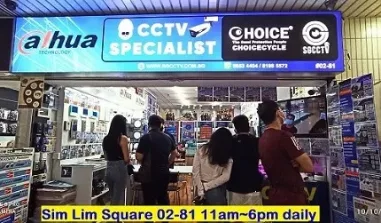
Address: 1 Rochor Canal Road, Sim Lim Square #02-81, Singapore
Email: enquiry@choicecycle.com.sg
WhatsApp: +65 98534404 (24 hours)
Operating Hours: 10:00 AM – 7:00 PM daily
Website: https://sgcctv.com.sg
You can purchase this premium security camera directly from SGCCTV who specialize in providing top-tier CCTV solutions tailored for local businesses and residential estates. Our physical showroom is conveniently located within Sim Lim Square, making it easy for you to visit us or contact our sales team via WhatsApp chat at any time.
Email: support@sgcctv.com.sg
WhatsApp/Phone: Call Us Now!
Singapore Address: Sim Lim Square, #02-xxx (Example Location)
Frequently Asked Questions
Question 1: Can I use this camera with Hikvision DVRs or other brand recorders?
The Uniview IPC568EB-DGK-I0 is compatible primarily within the UNV ecosystem due to proprietary firmware features like U-code and specific RTSP authentication methods that may not work seamlessly on third-party devices from Hikvision. While standard ONVIF profiles allow basic connectivity for live viewing, advanced analytics such as people counting or license plate recognition require a Uniview NVR (Network Video Recorder) running the iSecure Platform software to function correctly without errors.
Question 2: Is the warranty valid if I install it myself?
The standard manufacturer warranty typically covers defects in materials and workmanship for one year from purchase date regardless of who performs the installation as long as you use genuine power supplies recommended by Uniview. However improper handling during self-installation such as bending HDMI connectors or applying too much force to mounting brackets may void specific parts coverage so always follow official guidelines provided with your kit before starting any DIY setup project.
Question 3: How does the low-light performance compare to competitors?
This camera outperforms many rivals in Singapore market by achieving extremely dark illumination levels of just 0.01 Lux when operating in black and white mode thanks to its large sensor surface area combined with high-sensitivity CMOS technology used inside. Competitors with small sensors often struggle during heavy rain or foggy nights typical in our tropical climate whereas this unit maintains clarity even under challenging visibility conditions.
Question 4: What is the maximum storage capacity for edge recording?
The specification sheet indicates support for MicroSD cards up to a maximum of 512 GB which translates roughly to several weeks or months of footage retention depending heavily on resolution settings and compression format used. For longer periods you would need network attached storage (NAS) connected via Ethernet port instead relying solely on internal card slot space provided inside the housing unit itself.
Question 5: Can I install this outdoors without a box?
The camera body is built from metal materials designed to resist corrosion but it lacks an integrated IP67 weatherproof rating out of the box unless specifically ordered with waterproof enclosure accessories included in shipping carton. You must purchase separate rain covers or install inside sheltered areas like under parking lot canopies where direct exposure to heavy monsoons might otherwise damage internal electronics quickly over time.
Question 6: Does it support dual-stream output for multiple monitors?
Yes the device supports triple streams allowing main stream at full resolution, substream at D1 or CIF quality and third stream often used for mobile app previews simultaneously without saturating available bandwidth on your local network infrastructure. This feature is essential when displaying feeds across many screens in a security control room located within large offices or factories managing multiple sites around Singapore.
Question 7: Is there an API for integration with other systems?
The product supports standard ONVIF Profile S G and T plus proprietary SDKs which allow developers to write custom scripts integrating alarm inputs into automated access control systems or sending alerts directly to third-party cloud servers hosted in Singapore data centers. This flexibility makes it suitable for enterprise environments requiring centralized management across distributed locations.
Question 8: What are the power consumption limits?
The maximum rated power draw is just under 10 Watts (often listed as max 8W typical usage) which means one PoE splitter can easily feed multiple units while keeping energy bills low for businesses concerned about sustainability goals set by national green policies in Singapore. This efficiency reduces heat generation internally helping extend component lifespan during long periods of continuous operation.
Question 9: Can it detect people entering a restricted area?
The built-in intrusion detection algorithms can be configured to define virtual tripwires or zones on the video screen and trigger instant alarms when human shapes cross these boundaries. Combined with false alarm filtering this prevents triggering alerts from shadows moving across walls during sunset hours which are frequent occurrences especially near glass buildings in CBD areas.
Question 10: How do I update firmware safely?
Firmware updates should be performed via the web browser interface by downloading latest versions released on official vendor website before applying them directly to device storage. Always ensure your internet connection is stable during upload process since interrupted transfers could corrupt system files preventing booting normally until factory reset required which erases all user settings and configurations stored previously.
Related Products
- <a href="More Uniview CCTV cameras in Singapore“>Uniview IPC568EB-DGK-I0 Singapore Network Cameras
- <a href="Browse all CCTV cameras in Singapore“>Hikvision DS-2CD3T47FDD-IW Bullet Camera
- <a href="View the full SGCCTV shop“>Dahua IPC-HFW1439TM-ZE Security CCTV System
We hope this detailed guide helped you understand the capabilities of the Uniview IPC568EB-DGK-I0 for your security needs. If you need assistance selecting accessories or setting up a system tailored to Singapore regulations, please contact SGCCTV today via WhatsApp.
Uniview IPC568EB-DGK-I0: Frequently Asked Questions
Where can I buy the Uniview IPC568EB-DGK-I0?
You can buy the Uniview IPC568EB-DGK-I0 from SGCCTV at Sim Lim Square #02-81, or order online.
Is the Uniview IPC568EB-DGK-I0 suitable for outdoor use?
Yes — the Uniview IPC568EB-DGK-I0 is built for Singapore’s tropical, humid weather.
Does the Uniview IPC568EB-DGK-I0 come with a warranty?
Every Uniview IPC568EB-DGK-I0 includes local warranty support from SGCCTV. Our team will confirm the exact coverage when you enquire.
How much does the Uniview IPC568EB-DGK-I0 cost?
WhatsApp +65 98534404 for the best price on the Uniview IPC568EB-DGK-I0 today.
Can SGCCTV install the Uniview IPC568EB-DGK-I0?
Yes, SGCCTV offers professional installation for the Uniview IPC568EB-DGK-I0 across Singapore.
Is the Uniview IPC568EB-DGK-I0 available?
Availability of the Uniview IPC568EB-DGK-I0 is confirmed by our team — WhatsApp +65 98534404 and we will check the current position for you.
What resolution does the Uniview IPC568EB-DGK-I0 record?
The Uniview IPC568EB-DGK-I0 captures sharp, detailed footage well suited to Singapore homes and businesses.
Does the Uniview IPC568EB-DGK-I0 work at night?
Yes, the Uniview IPC568EB-DGK-I0 delivers clear low-light footage, tested for Singapore conditions.
Can I view the Uniview IPC568EB-DGK-I0 on my phone?
You can monitor the Uniview IPC568EB-DGK-I0 remotely from anywhere in Singapore via the mobile app.
What warranty covers the Uniview IPC568EB-DGK-I0?
The Uniview IPC568EB-DGK-I0 is backed by local warranty support from SGCCTV in Singapore.
Why buy the Uniview IPC568EB-DGK-I0 from SGCCTV?
SGCCTV is a trusted Singapore dealer offering the Uniview IPC568EB-DGK-I0 at the best price with expert support.
Is the Uniview IPC568EB-DGK-I0 good for HDB and condo use?
Yes, the Uniview IPC568EB-DGK-I0 is a popular pick for HDB flats, condos and offices across Singapore.


Nunc lacus elit, faucibus ac laoreet sed, dapibus ac mi. Maecenas eu ante a elit tempus fermentum. Aliquam commodo tincidunt semper. Phasellus accumsan, justo ac mollis pharetra, ex dui pharetra nisl, a scelerisque ipsum nulla ac sem. Cras eu risus urna. Duis lorem sapien, congue eget nisl sit amet, rutrum faucibus elit.
Donec accumsan auctor iaculis. Sed suscipit arcu ligula, at egestas magna molestie a. Proin ac ex maximus, ultrices justo eget, sodales orci. Aliquam egestas libero ac turpis pharetra, in vehicula lacus scelerisque. Vestibulum ut sem laoreet, feugiat tellus at, hendrerit arcu.
Nunc lacus elit, faucibus ac laoreet sed, dapibus ac mi. Maecenas eu ante a elit tempus fermentum. Aliquam commodo tincidunt semper. Phasellus accumsan, justo ac mollis pharetra, ex dui pharetra nisl, a scelerisque ipsum nulla ac sem. Cras eu risus urna. Duis lorem sapien, congue eget nisl sit amet, rutrum faucibus elit.
Related Products
Fire Sprinkler Camera Spy Camera Hidden Camera 2MP 4MP 8MP Resolution Color Lens Camera Choicecycle SGCCTV Sim Lim Square 02-81
Save23.3%Save $30.10Only$98.90 Original price was: $129.00.$98.90Current price is: $98.90.Hikvision Camera 5MP 3K DS-2CE76H0T-ITPF CCTV Camera DOME Night Vision Sim Lim Square CCTV Shop CCTV Camera Upgrade Repair
Save22.2%Save $20.00Only$70.00 Original price was: $90.00.$70.00Current price is: $70.00.
Reviews
There are no reviews yet.