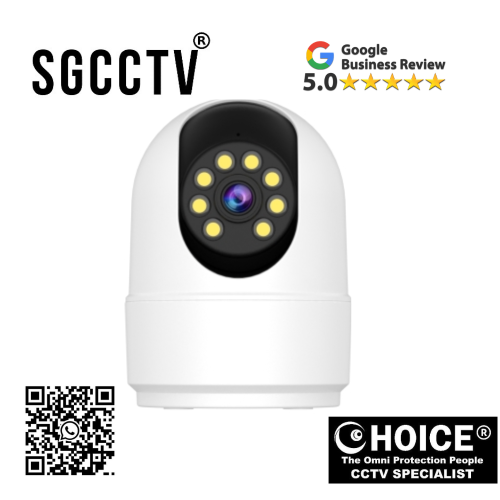

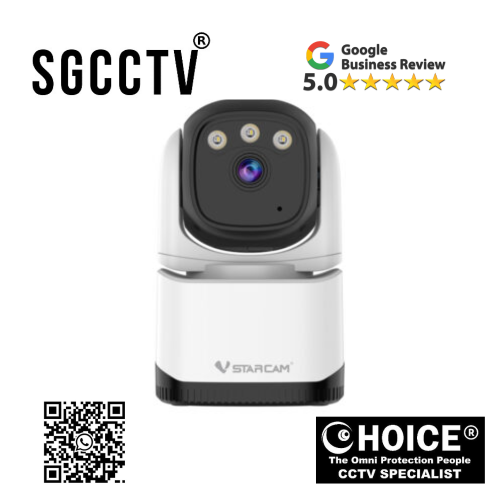
VStarcam CS4 3MP HD Humanoid Detection Full Colour Night Vision Wifi Pro Pan 310/Tilt 65 Two-Way Talk TF Card/Cloud Storage NEW DB
$500.00
VSTARCAM SINGAPORE OFFICIAL PARTNER
Supply and Maintenance SGCCTV CCTV IP Cameras, NVR, Turbo HD TVI Cameras, DVR, PTZ Cameras,
Access Control System, Video Intercom.
Sim Lim Square 02-81 10am-7pm Daily.
Whatsapp Enquiry Project +65 98534404, Technical Support +65 81120788, Site Visit Maintenance +65 81985572.
VStarcam CS4 3MP HD Humanoid Detection Full Colour Night Vision Wifi Pro Pan 310/Tilt 65 Two-Way Talk TF Card/Cloud Storage NEW
VStarcam CS4 3MP HD Smart Security Camera – Advanced Home & Business Protection with AI Human Detection
In today’s fast-moving world, security is no longer optional—it is essential. Whether you are protecting your home, office, shop, warehouse, elderly family members, children, or valuable assets, having a reliable smart surveillance system can make all the difference. The VStarcam CS4 3MP HD WiFi Pro Camera is designed to provide powerful, intelligent, and user-friendly security for modern users who want dependable protection without the complexity of expensive enterprise systems.
Built with cutting-edge surveillance technology, the VStarcam CS4 combines 3MP high-definition video clarity, AI-powered humanoid detection, full-colour night vision, 310° pan and 65° tilt remote control, two-way voice communication, and flexible local/cloud storage into one highly efficient security solution. This camera is ideal for users who want superior visual monitoring, smarter motion alerts, and full control from anywhere using a smartphone.
Unlike traditional fixed cameras that leave blind spots, the VStarcam CS4 offers wide-angle coverage with motorized pan and tilt functions, allowing users to monitor more areas with fewer cameras. This makes it especially useful for indoor spaces, retail stores, small offices, apartments, baby rooms, elderly care, and pet monitoring.
Crystal Clear 3MP HD Resolution – Better Detail, Better Security
One of the key strengths of the VStarcam CS4 is its 3MP HD image sensor, which delivers significantly clearer video than standard 1080p cameras. With higher pixel density, users can enjoy:
- Sharper facial recognition
- Better object identification
- More detailed movement tracking
- Clearer license plate or package visibility at short range
- Improved digital zoom without heavy image degradation
For security users, image quality is everything. A blurry camera can miss critical details during theft, intrusion, or suspicious activity. The 3MP lens in the CS4 helps ensure important moments are captured with enhanced precision.
This makes it highly beneficial for:
- Front door security
- Indoor living room monitoring
- Office desk surveillance
- Retail cashier oversight
- Childcare room observation
- Pet activity monitoring
Starcam CS4 3MP HD Humanoid Detection Full Colour Night Vision Wifi Pro Pan 310/Tilt 65 Two-Way Talk TF Card/Cloud Storage NEW
AI Humanoid Detection – Smarter Alerts, Fewer False Alarms
Traditional motion detection systems often trigger unnecessary alerts caused by:
- Pets
- Curtains moving
- Lighting changes
- Rain shadows
- Passing insects
The VStarcam CS4 solves this problem with advanced humanoid detection technology. Using intelligent motion algorithms, the camera focuses on identifying human shapes, significantly reducing false notifications.
Benefits include:
- More accurate intruder alerts
- Reduced notification fatigue
- Faster emergency response
- Better relevance for playback review
- Improved peace of mind
This feature is especially useful for homeowners who want meaningful alerts while away from home, business owners protecting inventory, or parents checking on household movement.
Full Colour Night Vision – See More Than Black & White
Many conventional security cameras switch to grainy infrared black-and-white mode at night. While functional, it often loses critical visual details like clothing color, object color, or environmental context.
The VStarcam CS4 features Full Colour Night Vision, which allows users to view vivid nighttime footage with enhanced detail even in low-light environments.
Advantages:
- Better suspect identification
- Clearer clothing color recognition
- Enhanced package monitoring
- Improved scene understanding
- More useful video evidence
Whether monitoring a hallway, storefront, garage, or living room, full-colour night vision provides stronger surveillance confidence.
310° Pan / 65° Tilt – Wide Coverage with Minimal Blind Spots
A major feature that sets the VStarcam CS4 apart is its remote-controlled motorized pan and tilt system.
Coverage:
- Pan: 310°
- Tilt: 65°
This wide movement range allows users to control the camera remotely through the mobile app, giving them the ability to inspect different parts of a room instantly.
Benefits:
- Covers larger spaces
- Reduces need for multiple cameras
- Tracks movement more effectively
- Great for warehouses, shops, and open-plan homes
- Useful for checking children or pets across multiple room angles
This flexibility transforms the CS4 into a dynamic surveillance solution rather than a static camera.
Starcam CS4 3MP HD Humanoid Detection Full Colour Night Vision Wifi Pro Pan 310/Tilt 65 Two-Way Talk TF Card/Cloud Storage NEW
Two-Way Talk – Real-Time Communication Anywhere
The built-in microphone and speaker system allows users to communicate directly through the camera using the VStarcam app.
Common uses:
- Talk to family members
- Check on children
- Calm pets
- Greet visitors
- Warn intruders
- Communicate with employees
This makes the VStarcam CS4 more than just a camera—it becomes a real-time communication tool.
For example:
- A parent can guide a child from work
- A business owner can instruct staff remotely
- A homeowner can warn suspicious visitors
WiFi Pro Connectivity – Easy Wireless Setup
The VStarcam CS4 supports WiFi connectivity, removing the need for complicated network cabling.
Installation advantages:
- Faster deployment
- Cleaner setup
- Suitable for renters
- Flexible placement
- Smartphone app control
- Ideal for DIY users
Users simply connect the device to power, configure it through the VStarcam app, and begin monitoring.
Flexible Storage – TF Card + Cloud Storage
Modern users need options, and the VStarcam CS4 provides both:
TF Card Storage:
- Local recording
- Lower recurring cost
- Convenient playback
Cloud Storage:
- Off-site backup
- Better theft protection
- Remote video access
- Event history preservation
This dual storage flexibility means users can choose based on budget and security preference.
Starcam CS4 3MP HD Humanoid Detection Full Colour Night Vision Wifi Pro Pan 310/Tilt 65 Two-Way Talk TF Card/Cloud Storage NEW
Perfect for Homeowners
For residential use, the CS4 is excellent for:
Baby Monitoring:
- Watch sleeping children
- Two-way comfort communication
- Night visibility
Elderly Care:
- Check on seniors remotely
- Emergency voice contact
Pet Monitoring:
- Monitor pets during work hours
- Speak remotely
Entry Security:
- Indoor entrance observation
- Visitor communication
Excellent for Business Owners
Retailers and SMEs benefit from:
- Staff supervision
- Customer service monitoring
- Theft prevention
- Inventory oversight
- Office security
Its pan/tilt and AI detection reduce operational blind spots.
Easy Mobile App Integration
Using smartphone connectivity, users can:
- View live feed
- Rotate camera
- Talk remotely
- Review recordings
- Receive AI alerts
- Manage settings
This provides full security control from virtually anywhere.
Modern Design with Practical Functionality
The VStarcam CS4 is designed for:
- Home aesthetics
- Retail interiors
- Office environments
Its compact build blends security with modern style.
Starcam CS4 3MP HD Humanoid Detection Full Colour Night Vision Wifi Pro Pan 310/Tilt 65 Two-Way Talk TF Card/Cloud Storage NEW
Why VStarcam CS4 Stands Out Against Standard WiFi Cameras
Compared to basic cameras:
VStarcam CS4 offers:
- 3MP higher clarity
- AI human detection
- Full-colour night vision
- Wider pan/tilt
- Dual storage
- Two-way audio
Who Should Buy VStarcam CS4?
Best for:
- Homeowners
- Parents
- Pet owners
- Small businesses
- Retail stores
- Offices
- Elderly caregivers
- Apartment residents
Long-Term Value
The CS4 offers strong ROI because:
- Reduces theft risks
- Improves situational awareness
- Supports remote living
- Offers scalable security
Final Verdict – Is VStarcam CS4 Worth It?
The VStarcam CS4 3MP HD Humanoid Detection Full Colour Night Vision WiFi Pro Camera is a feature-rich smart surveillance solution that balances affordability, intelligence, and convenience.
Top strengths:
- 3MP HD clarity
- AI humanoid detection
- Full-colour night vision
- Pan 310° / Tilt 65°
- Two-way communication
- TF + Cloud storage
- Easy WiFi setup
For users seeking smart, flexible, and dependable surveillance without complex installation, the VStarcam CS4 is an outstanding investment.
Focus Keywords:
VStarcam CS4, VStarcam CS4 3MP Camera, VStarcam CS4 WiFi Camera, VStarcam CS4 Full Colour Night Vision, VStarcam CS4 Humanoid Detection, VStarcam CS4 Singapore, VStarcam CS4 Setup
Why Buy From Choicecycle (SGCCTV Singapore)?
When purchasing security products, product quality is only half the equation—professional support matters too. Choicecycle (SGCCTV Singapore) provides trusted CCTV expertise, product guidance, and after-sales support for security buyers in Singapore.
Starcam CS4 3MP HD Humanoid Detection Full Colour Night Vision Wifi Pro Pan 310/Tilt 65 Two-Way Talk TF Card/Cloud Storage NEW
How VStarcam CS4 3MP HD WiFi Pro Camera Is Made – Full Manufacturing Process Explained
The VStarcam CS4 3MP HD Humanoid Detection Full Colour Night Vision Smart Camera may look compact on the outside, but inside it is a highly engineered combination of optics, electronics, wireless communication, AI software, precision mechanics, and quality control systems. From raw material sourcing to final packaging, every stage of manufacturing is designed to ensure the camera delivers reliable security, smooth pan/tilt motion, clear video, and long-term durability.
Understanding how the VStarcam CS4 is made helps buyers appreciate why modern smart cameras are far more advanced than traditional CCTV systems. This product combines camera hardware, semiconductor engineering, networking technology, firmware programming, and industrial design into one consumer-friendly security solution.
Stage 1: Product Design & Research Development (R&D)
Before physical production begins, the VStarcam CS4 starts as a design concept created by engineers, software developers, and product designers.
Key planning goals:
- 3MP HD image quality
- AI humanoid detection
- Full-colour night vision
- WiFi connectivity
- Two-way talk
- Pan/Tilt mobility
- TF card & cloud storage compatibility
- Mobile app support
During this stage:
Engineers determine:
- Sensor type
- Lens specifications
- Infrared/white LED requirements
- Motor strength for pan/tilt
- Plastic housing dimensions
- Heat dissipation methods
- PCB board size
- Power efficiency
- Firmware architecture
Software developers build:
- Human detection algorithms
- Mobile app integration
- Video compression
- Motion alerts
- Storage systems
- Remote control functions
This phase can take months because performance, affordability, and reliability must be balanced carefully.
Starcam CS4 3MP HD Humanoid Detection Full Colour Night Vision Wifi Pro Pan 310/Tilt 65 Two-Way Talk TF Card/Cloud Storage NEW
Stage 2: Raw Material Sourcing
The VStarcam CS4 is made from multiple specialized components sourced from electronics and industrial manufacturing suppliers.
Main materials include:
Optical Components:
- 3MP CMOS image sensor
- Glass or coated plastic lens
- IR-cut filter
- LED night vision modules
Electronic Components:
- Printed Circuit Board (PCB)
- WiFi chipset
- CPU/SoC processor
- RAM memory
- TF card slot
- Speaker
- Microphone
- Power management ICs
Mechanical Components:
- ABS plastic shell
- Pan motor
- Tilt motor
- Internal gear systems
- Mounting bracket
Packaging:
- Product box
- User manual
- Adapter
- Screws
- Mounting template
Each component must meet safety and performance standards before entering assembly.
Stage 3: Lens & Imaging System Manufacturing
The camera’s ability to capture clear images depends heavily on its optical system.
Lens production includes:
- Precision molding or glass shaping
- Anti-reflective coating
- UV filtering
- Focus calibration
- Distortion correction
Image Sensor Integration:
The 3MP CMOS sensor is attached to the PCB and aligned precisely with the lens.
Why this matters:
Even tiny alignment errors can cause:
- Blurry footage
- Focus issues
- Poor night vision
- Distorted edges
Manufacturers use automated optical calibration tools to ensure consistent quality.
Starcam CS4 3MP HD Humanoid Detection Full Colour Night Vision Wifi Pro Pan 310/Tilt 65 Two-Way Talk TF Card/Cloud Storage NEW
Stage 4: PCB Assembly (Brain of the Camera)
The PCB is the core control center.
Surface Mount Technology (SMT):
Automated machines place microscopic components onto the circuit board:
- Chips
- Resistors
- Capacitors
- WiFi modules
- Memory
Process:
- Solder paste application
- Component placement
- Reflow oven heating
- Automated optical inspection (AOI)
This ensures every board is electrically functional.
Stage 5: AI Processor & Firmware Installation
The VStarcam CS4’s humanoid detection depends on onboard firmware and AI software.
Firmware programming includes:
- Human shape recognition
- Motion zones
- Push notifications
- Pan/Tilt controls
- Mobile app communication
- Video compression (H.264/H.265 depending model)
- Security encryption
Testing:
Software engineers simulate:
- Human movement
- Pet movement
- Lighting shifts
- WiFi interruptions
This reduces false alarms and improves user experience.
Stage 6: Audio System Integration
For two-way talk, the CS4 includes:
- Speaker driver
- Microphone
- Noise reduction software
Manufacturing focus:
- Echo suppression
- Voice clarity
- Waterproof mesh (if applicable)
- Sound chamber design
This ensures users can clearly hear and speak remotely.
Starcam CS4 3MP HD Humanoid Detection Full Colour Night Vision Wifi Pro Pan 310/Tilt 65 Two-Way Talk TF Card/Cloud Storage NEW
Stage 7: Pan/Tilt Mechanical Assembly
One of the CS4’s biggest features is its 310° pan and 65° tilt.
Internal mechanism includes:
- Servo motors
- Gear systems
- Position sensors
- Rotational stop controls
Production steps:
- Motor installation
- Gear lubrication
- Rotation testing
- Cable routing
Common factory checks:
- Smooth movement
- Noise level
- Motor lifespan
- Position accuracy
A poor-quality motor system would lead to:
- Stuck movement
- Jittering
- Grinding noise
- Reduced lifespan
Stage 8: Outer Shell Injection Molding
The housing is typically made from durable ABS or polycarbonate plastic.
Process:
- Plastic pellets heated
- Injection mold shaping
- Cooling
- Trimming
- Surface finishing
Design priorities:
- Heat resistance
- Structural stability
- Aesthetic appearance
- Mounting strength
The shell protects internal electronics while keeping the camera lightweight.
Stage 9: Full Assembly Line Integration
At this stage, all parts come together:
- Lens module
- PCB
- Speaker
- Microphone
- Motors
- Housing
- LEDs
- Antennas
Workers or robotic systems:
- Connect wiring
- Secure screws
- Seal components
- Attach external casing
Starcam CS4 3MP HD Humanoid Detection Full Colour Night Vision Wifi Pro Pan 310/Tilt 65 Two-Way Talk TF Card/Cloud Storage NEW
Stage 10: Quality Control Testing
This is one of the most important steps.
Every unit may undergo:
Visual tests:
- Lens clarity
- Housing scratches
- LED brightness
Mechanical tests:
- Pan/Tilt rotation
- Motor sound
- Stability
Wireless tests:
- WiFi signal strength
- App pairing
- QR code setup
AI tests:
- Human detection
- Alert triggers
Night tests:
- IR mode
- Full-colour mode
Audio tests:
- Microphone
- Speaker
Starcam CS4 3MP HD Humanoid Detection Full Colour Night Vision Wifi Pro Pan 310/Tilt 65 Two-Way Talk TF Card/Cloud Storage NEW
Stage 11: Security & Firmware Validation
Since smart cameras connect online, cybersecurity matters.
Manufacturers test:
- Password setup
- App encryption
- Firmware updates
- Cloud communication
- Account authentication
This protects users from unauthorized access.
Stage 12: Packaging & Distribution
After passing inspection:
- Camera wrapped
- Accessories packed
- Serial numbers added
- QR labels printed
- User guides inserted
Box contents often include:
- VStarcam CS4 camera
- Power adapter
- Mounting kit
- Manual
- Warranty card
Products are then shipped globally.
Safety Certifications
Reliable smart cameras may undergo:
- CE certification
- FCC compliance
- RoHS
- WiFi certification
These ensure:
- Electrical safety
- Wireless compatibility
- Material safety
Starcam CS4 3MP HD Humanoid Detection Full Colour Night Vision Wifi Pro Pan 310/Tilt 65 Two-Way Talk TF Card/Cloud Storage NEW
How Manufacturing Quality Affects Buyers
A well-manufactured CS4 means:
- Better image quality
- Longer lifespan
- Fewer false alarms
- Stable WiFi
- Smoother motion
- Better night vision
- Safer cloud use
Common Manufacturing Challenges
Potential issues:
- Cheap sensors = blurry video
- Weak motors = pan failure
- Poor firmware = false alerts
- Low-grade plastic = overheating
- Weak WiFi chip = disconnections
This is why purchasing from trusted suppliers matters.
Final Summary
The VStarcam CS4 is made through a sophisticated combination of:
Hardware:
- 3MP sensor
- Lens
- Motors
- Audio
- WiFi
Software:
- AI detection
- App systems
- Cloud integration
Engineering:
- Mechanical precision
- PCB electronics
- Optical calibration
This makes the VStarcam CS4 far more than a simple camera—it is a smart surveillance ecosystem designed for modern protection.
Starcam CS4 3MP HD Humanoid Detection Full Colour Night Vision Wifi Pro Pan 310/Tilt 65 Two-Way Talk TF Card/Cloud Storage NEW
How to Set Up VStarcam CS4 3MP HD WiFi Pro Camera – Complete Installation & Configuration Guide
Setting up the VStarcam CS4 3MP HD Smart Camera correctly is the key to getting the best performance from its powerful features, including 3MP HD video, humanoid detection, full-colour night vision, 310° pan / 65° tilt control, two-way talk, and TF card / cloud storage.
Whether you are installing it for home security, office monitoring, baby watching, elderly care, pet surveillance, or retail protection, this step-by-step guide will help you configure your camera properly for stable performance.
This guide is written for beginners and advanced users alike, with no technical coding required.
Before You Start – What’s Inside the Box
Before setup, confirm your package includes:
Standard VStarcam CS4 package:
- VStarcam CS4 Camera
- Power Adapter
- USB/Power Cable
- Mounting Bracket/Base
- Screws & Wall Plugs
- User Manual
- QR Code Label
Starcam CS4 3MP HD Humanoid Detection Full Colour Night Vision Wifi Pro Pan 310/Tilt 65 Two-Way Talk TF Card/Cloud Storage NEW
Step 1: Choose the Best Installation Location
Proper camera placement affects:
- WiFi strength
- Motion detection accuracy
- Night vision
- Pan/Tilt coverage
Ideal indoor placement:
Good locations:
- Living room corner
- Main entrance interior
- Baby room shelf
- Office reception
- Retail cashier area
- Warehouse monitoring point
Avoid:
- Direct sunlight facing lens
- Mirrors facing camera
- Thick concrete walls blocking WiFi
- Near microwave ovens
- Near strong heat sources
- Outdoor exposed rain (unless protected)
Step 2: Power On the Camera
Instructions:
- Connect the power cable to the camera
- Plug adapter into wall socket
- Wait 30–60 seconds
You should notice:
- LED indicator turns on
- Startup voice prompt
- Camera head may rotate automatically
This indicates successful boot.
Step 3: Download the VStarcam Mobile App
The VStarcam CS4 usually works with the official VStarcam app.
Search for:
“Eye4” or “VStarcam” app (depending regional model)
Install on:
- Android
- iPhone
Step 4: Register Your Account
Process:
- Open app
- Sign up with email or mobile number
- Verify account
- Log in
Important:
Use a strong password:
- Uppercase
- Lowercase
- Numbers
- Symbols
This protects your camera from unauthorized access.
Starcam CS4 3MP HD Humanoid Detection Full Colour Night Vision Wifi Pro Pan 310/Tilt 65 Two-Way Talk TF Card/Cloud Storage NEW
Step 5: Reset Camera (Recommended for First-Time Setup)
If camera was previously tested or paired:
Reset method:
- Locate reset button
- Hold for 5–10 seconds
- Wait for voice prompt
This ensures:
- Factory default settings
- Fresh network pairing
- Cleaner installation
Step 6: Add Device to App
In app:
- Tap “+ Add Device”
- Choose WiFi Camera
- Scan QR code on camera
OR
- Enter UID manually
Starcam CS4 3MP HD Humanoid Detection Full Colour Night Vision Wifi Pro Pan 310/Tilt 65 Two-Way Talk TF Card/Cloud Storage NEW
Step 7: Connect to WiFi
Important:
Most VStarcam cameras work best on 2.4GHz WiFi
NOT:
- 5GHz only networks
WiFi setup:
- Select home WiFi
- Enter password
- Wait for pairing
- Listen for successful confirmation
Common WiFi issues:
If connection fails:
- Move camera closer to router
- Confirm 2.4GHz
- Re-enter password
- Restart router
- Reset camera
Step 8: Name Your Camera
Examples:
- Living Room
- Shop Front
- Baby Room
- Office Entrance
- Warehouse
This helps manage multiple cameras.
Starcam CS4 3MP HD Humanoid Detection Full Colour Night Vision Wifi Pro Pan 310/Tilt 65 Two-Way Talk TF Card/Cloud Storage NEW
Step 9: Update Firmware Immediately
Firmware updates improve:
- Security
- AI detection
- Stability
- App compatibility
- Bug fixes
To update:
- Open camera settings
- Check firmware
- Download latest version
- Install
Important:
Do not unplug during update.
Step 10: Insert TF Card (Optional Local Recording)
Recommended:
Use quality Class 10 MicroSD / TF card
Steps:
- Power off camera
- Insert card
- Restart
- Format card in app
Benefits:
- Local storage
- Playback history
- No monthly cloud cost
Starcam CS4 3MP HD Humanoid Detection Full Colour Night Vision Wifi Pro Pan 310/Tilt 65 Two-Way Talk TF Card/Cloud Storage NEW
Step 11: Configure Cloud Storage (Optional)
Cloud storage provides:
- Theft-proof backup
- Remote history
- Safer event retention
Steps:
- Open storage settings
- Subscribe if needed
- Enable event backup
Step 12: Set Motion Detection / Humanoid Detection
This is critical.
Recommended:
Enable:
- Human detection
- Motion zones
- Alert push notifications
Adjust sensitivity:
Too high:
- Too many alerts
Too low:
- Missed events
Starcam CS4 3MP HD Humanoid Detection Full Colour Night Vision Wifi Pro Pan 310/Tilt 65 Two-Way Talk TF Card/Cloud Storage NEW
Best settings:
Home:
Medium sensitivity
Office:
High sensitivity
Pet room:
Human-only mode
Step 13: Configure Pan/Tilt Controls
Use app joystick to:
- Pan 310°
- Tilt 65°
Suggested:
Set favorite viewpoints:
- Door
- Window
- Baby crib
- Store counter
Step 14: Test Two-Way Talk
Steps:
- Open live view
- Tap microphone
- Speak
Test:
- Voice clarity
- Echo
- Delay
Starcam CS4 3MP HD Humanoid Detection Full Colour Night Vision Wifi Pro Pan 310/Tilt 65 Two-Way Talk TF Card/Cloud Storage NEW
Step 15: Night Vision Setup
Options:
- Auto IR
- Full-colour night mode
- Scheduled mode
Recommended:
Indoor:
Auto
Entrance:
Full-colour
Step 16: Share Camera Access
Useful for:
- Family
- Staff
- Security teams
In app:
- Share device
- Add account
- Set permissions
Starcam CS4 3MP HD Humanoid Detection Full Colour Night Vision Wifi Pro Pan 310/Tilt 65 Two-Way Talk TF Card/Cloud Storage NEW
Wall Mount Installation (Optional)
Tools:
- Drill
- Screws
- Wall plugs
Process:
- Mark holes
- Drill
- Mount bracket
- Secure camera
- Adjust angle
Security Best Practices
Always:
- Change default password
- Update firmware
- Use secure WiFi
- Avoid public networks
- Enable encryption
- Review login history
Common Setup Problems & Fixes
Starcam CS4 3MP HD Humanoid Detection Full Colour Night Vision Wifi Pro Pan 310/Tilt 65 Two-Way Talk TF Card/Cloud Storage NEW
Problem 1: Camera Won’t Connect to WiFi
Fix:
- Use 2.4GHz
- Reset camera
- Move closer to router
Problem 2: No QR Scan
Fix:
- Clean label
- Increase light
- Manual UID entry
Problem 3: No Night Vision
Fix:
- Enable in settings
- Clean lens
- Remove reflective objects
Problem 4: No Recording
Fix:
- Format TF card
- Check cloud subscription
- Confirm storage enabled
Problem 5: Pan/Tilt Not Working
Fix:
- Restart
- Firmware update
- Motor calibration
Advanced Tips
For Best Performance:
- Use strong WiFi
- Place camera high
- Avoid backlight
- Clean lens monthly
- Test alerts weekly
- Upgrade TF card for longer storage
Starcam CS4 3MP HD Humanoid Detection Full Colour Night Vision Wifi Pro Pan 310/Tilt 65 Two-Way Talk TF Card/Cloud Storage NEW
Best Use Scenarios
Home:
- Baby room
- Elderly care
- Entry points
Business:
- Shop floor
- Office desk
- Storage room
Personal:
- Pets
- Apartment
- Temporary surveillance
Final Setup Checklist
Must Do:
Hardware:
✔ Plug in
✔ Position camera
✔ Insert TF card
Software:
✔ Install app
✔ Connect WiFi
✔ Update firmware
✔ Enable AI
✔ Configure alerts
Starcam CS4 3MP HD Humanoid Detection Full Colour Night Vision Wifi Pro Pan 310/Tilt 65 Two-Way Talk TF Card/Cloud Storage NEW
Final Thoughts
The VStarcam CS4 is designed to be beginner-friendly while offering advanced security features. With proper setup, users can enjoy:
- HD security
- Smart AI alerts
- Full-colour night monitoring
- Wide coverage
- Two-way communication
- Reliable storage
Correct setup ensures maximum protection and long-term reliability.
Starcam CS4 3MP HD Humanoid Detection Full Colour Night Vision Wifi Pro Pan 310/Tilt 65 Two-Way Talk TF Card/Cloud Storage NEW
Choicecycle / SGCCTV Singapore:
Website: https://sgcctv.com.sg
Email: enquiry@choicecycle.com.sg
WhatsApp: +65 9853 4404
Store: Sim Lim Square #02-81 Singapore
Operating Hours: 11 AM – 8 PM

Donec accumsan auctor iaculis. Sed suscipit arcu ligula, at egestas magna molestie a. Proin ac ex maximus, ultrices justo eget, sodales orci. Aliquam egestas libero ac turpis pharetra, in vehicula lacus scelerisque. Vestibulum ut sem laoreet, feugiat tellus at, hendrerit arcu..


Nunc lacus elit, faucibus ac laoreet sed, dapibus ac mi. Maecenas eu ante a elit tempus fermentum. Aliquam commodo tincidunt semper. Phasellus accumsan, justo ac mollis pharetra, ex dui pharetra nisl, a scelerisque ipsum nulla ac sem. Cras eu risus urna. Duis lorem sapien, congue eget nisl sit amet, rutrum faucibus elit.
Donec accumsan auctor iaculis. Sed suscipit arcu ligula, at egestas magna molestie a. Proin ac ex maximus, ultrices justo eget, sodales orci. Aliquam egestas libero ac turpis pharetra, in vehicula lacus scelerisque. Vestibulum ut sem laoreet, feugiat tellus at, hendrerit arcu.
Nunc lacus elit, faucibus ac laoreet sed, dapibus ac mi. Maecenas eu ante a elit tempus fermentum. Aliquam commodo tincidunt semper. Phasellus accumsan, justo ac mollis pharetra, ex dui pharetra nisl, a scelerisque ipsum nulla ac sem. Cras eu risus urna. Duis lorem sapien, congue eget nisl sit amet, rutrum faucibus elit.