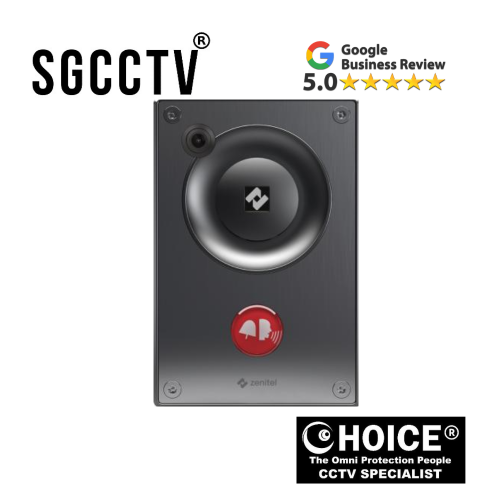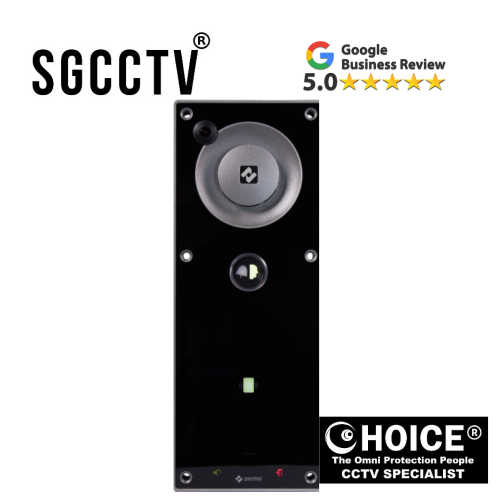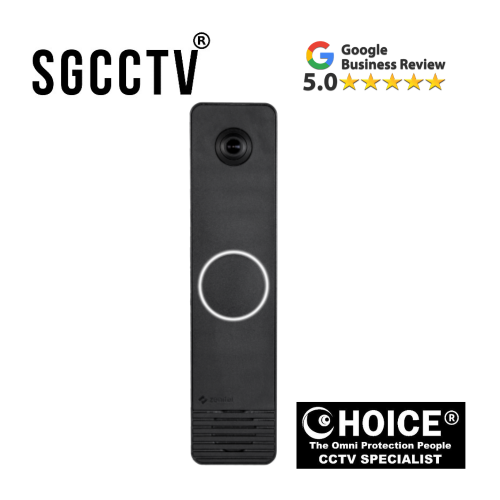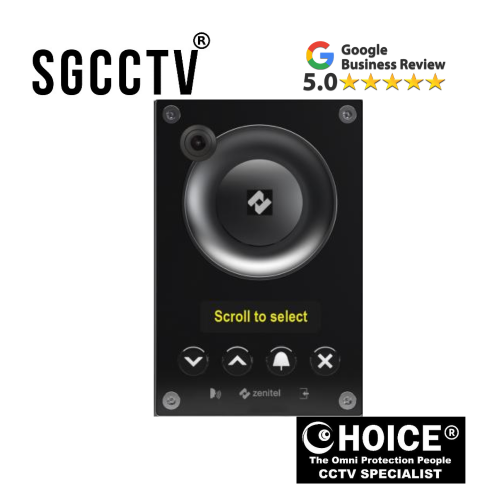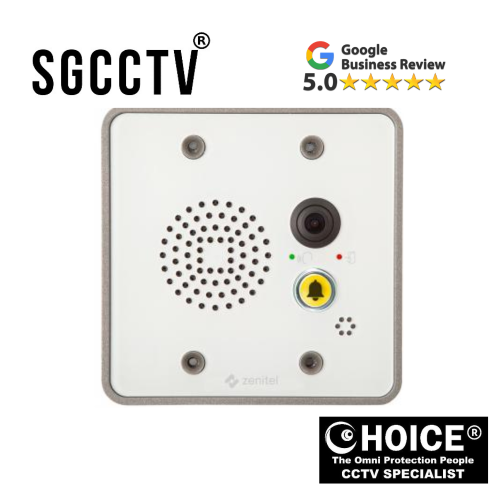



Zenitel TMIV-1+ Mini Video Intercom Mini IP & SIP Video Intercom designed for reliable building communication with a clean, durable build NEW DB
$315.00
Sim Lim Square 02-81 10am-7pm Daily.
Whatsapp Enquiry Project +65 98534404, Technical Support +65 81120788, Site Visit Maintenance +65 81985572.
Zenitel TMIV-1+ Mini Video Intercom Mini IP & SIP Video Intercom designed for reliable building communication with a clean, durable build
The Zenitel TMIV-1+ Mini IP & SIP Video Intercom is a compact yet powerful communication solution designed for modern building security and access control needs. It brings together high-quality video, clear audio, and reliable network connectivity in a sleek and durable design, making it ideal for both residential and commercial environments where dependable door communication is essential.
Built with a clean white thermoplastic front plate, the unit is engineered for long-term durability while maintaining a modern, minimal appearance that blends easily into any installation setting. The single call button interface ensures simple and intuitive operation for users, while the integrated LED indicator provides clear door status feedback, improving both convenience and security awareness at entry points.
On the audio side, the TMIV-1+ is equipped with advanced sound processing technology that delivers high sound pressure levels for clear voice transmission even in noisy environments. It also features automatic volume gain control, active noise cancellation, and echo suppression, ensuring that conversations remain natural, crisp, and easy to understand at all times.
For video performance, the device includes a wide-angle HD camera that captures a broad field of view, allowing better coverage of entry areas. Its strong low-light performance ensures reliable visibility even during nighttime or poorly lit conditions, enhancing overall security monitoring. With support for RTSP and ONVIF streaming protocols, the system integrates smoothly with third-party video management platforms, offering flexible deployment options for various security infrastructures.
Installation is designed to be highly flexible, with both wall-mounted and flush-mounted configurations available, making it suitable for new installations as well as retrofit projects. This adaptability reduces installation complexity and allows integrators to deploy the system across different building layouts with ease.
One of the key strengths of this model is its seamless ecosystem compatibility. The TMIV-1+ integrates fully with Zenitel communication platforms and systems, including industry-leading solutions such as Zenitel Connect Pro, ICX-AlphaCom, IC-EDGE, as well as standard SIP-based infrastructures. This makes it a highly flexible choice for organizations looking to upgrade or expand their existing communication and security systems without replacing their entire setup.
Overall, the Zenitel TMIV-1+ stands out as a reliable, efficient, and future-ready video intercom solution that combines strong performance, user-friendly design, and wide system compatibility—making it a trusted choice for secure and intelligent building communication.
Zenitel TMIV-1+ Mini Video Intercom Mini IP & SIP Video Intercom designed for reliable building communication with a clean, durable build
🔧 1. Before You Start (Preparation)
Make sure you have:
- PoE switch or 12V DC power supply (check device spec used on site)
- Ethernet cable (Cat5e / Cat6 recommended)
- Drill + mounting tools
- Wall or flush-mount box (depending on installation type)
- Network access to your SIP/Zenitel system
Also ensure your system is ready in platforms like Zenitel or SIP server configuration.
📍 2. Choose Installation Location
Select a location that:
- Is about 1.4m–1.6m from ground (face level)
- Has stable network connection
- Avoids direct heavy rain/sun (unless protected housing is used)
- Gives clear camera view of entry area
🧱 3. Mounting the Device
Wall Mount:
- Mark screw holes using mounting template
- Drill holes and insert wall plugs
- Fix backplate securely to wall
Flush Mount:
- Prepare recessed wall box
- Ensure depth matches device housing
- Secure mounting frame inside wall opening
Zenitel TMIV-1+ Mini Video Intercom Mini IP & SIP Video Intercom designed for reliable building communication with a clean, durable build
🔌 4. Wiring Connection
- Connect Ethernet cable to LAN port
- If PoE is used, connect to PoE switch (data + power in one cable)
- If not PoE, connect 12V DC power supply (if supported)
- Ensure all cables are tightly secured and insulated
🌐 5. Network Configuration
- Power on the device
- Find IP address using network scanner or Zenitel tools
- Log into web interface
- Configure:
- IP address (static recommended)
- SIP server details (if SIP system used)
- RTSP / ONVIF settings (if connected to VMS/NVR)
It integrates with systems like IC-EDGE, ICX-AlphaCom, and Zenitel Connect Pro.
🎥 6. Camera & Audio Setup
- Adjust camera angle if needed
- Test live video feed
- Test speaker and microphone clarity
- Enable echo cancellation / auto gain if available
Zenitel TMIV-1+ Mini Video Intercom Mini IP & SIP Video Intercom designed for reliable building communication with a clean, durable build
🔘 7. Button & Door Integration
- Connect relay output (if used for door lock)
- Test call button functionality
- Ensure door unlock trigger works correctly
- Confirm LED status indicator changes properly
🧪 8. Final Testing
- Make test SIP call
- Check audio both ways
- Confirm video streaming stability
- Test door unlock function
- Verify night/low-light image quality
⚠️ Tips (Important)
- Always isolate power before wiring
- Use shielded cable for long runs
- Avoid installing near strong electromagnetic sources
- Update firmware after installation if available
Zenitel TMIV-1+ Mini Video Intercom Mini IP & SIP Video Intercom designed for reliable building communication with a clean, durable build
🔧 1. No Power / Device Not Turning On
Possible causes:
- PoE switch not supplying power
- Loose Ethernet cable
- Incorrect 12V DC adapter (if used)
Fix:
- Check PoE port is active (try another port)
- Replace Ethernet cable (Cat5e/Cat6)
- Verify power source voltage and polarity
🌐 2. Device Not Found on Network (No IP Address)
Possible causes:
- DHCP not assigned
- Network cable fault
- VLAN/network restriction
Fix:
- Use IP scanner tool to detect device
- Assign static IP manually
- Check switch/router settings
- Ensure same network segment as management PC
Zenitel TMIV-1+ Mini Video Intercom Mini IP & SIP Video Intercom designed for reliable building communication with a clean, durable build
📞 3. SIP Call Not Connecting
Possible causes:
- Wrong SIP credentials
- Firewall blocking ports
- SIP server not registered
Fix:
- Re-check SIP ID, password, and server IP
- Ensure ports (usually 5060/5061) are open
- Confirm registration status in web interface
- Restart SIP server or device
Works with platforms like IC-EDGE, ICX-AlphaCom, and Zenitel Connect Pro when configured correctly.
🎥 4. No Video / Blank Camera Feed
Possible causes:
- RTSP/ONVIF disabled
- Incorrect VMS settings
- Network bandwidth issue
Fix:
- Enable RTSP/ONVIF in settings
- Re-add device in NVR/VMS
- Check network speed and packet loss
- Restart camera stream
Zenitel TMIV-1+ Mini Video Intercom Mini IP & SIP Video Intercom designed for reliable building communication with a clean, durable build
🔊 5. Poor Audio / Echo / Noise
Possible causes:
- Incorrect volume gain
- Microphone blockage
- Environment echo (glass walls, metal surfaces)
Fix:
- Enable echo cancellation
- Adjust mic/speaker gain levels
- Reduce speaker volume slightly
- Reposition device away from reflective surfaces
🔘 6. Door Unlock Not Working
Possible causes:
- Relay wiring error
- Wrong output configuration
- Electric lock mismatch
Fix:
- Check relay NO/NC wiring
- Test relay manually from web interface
- Verify door lock voltage compatibility
- Ensure correct trigger settings
Zenitel TMIV-1+ Mini Video Intercom Mini IP & SIP Video Intercom designed for reliable building communication with a clean, durable build
💡 7. LED Indicator Not Working
Possible causes:
- Feature disabled in settings
- Firmware mismatch
Fix:
- Enable LED status option in configuration
- Update firmware if available
- Restart device
📡 8. Intermittent Connection / Lag
Possible causes:
- Weak network signal
- Poor switch quality
- High network traffic
Fix:
- Use dedicated PoE switch
- Avoid long or damaged cables
- Reduce network congestion
- Assign static IP to stabilize connection
Zenitel TMIV-1+ Mini Video Intercom Mini IP & SIP Video Intercom designed for reliable building communication with a clean, durable build
⚠️ Preventive Tips
- Always use Cat6 cable for stable performance
- Keep firmware updated
- Avoid outdoor exposure without proper housing
- Use managed PoE switch for better reliability
🔄 Zenitel TMIV-1+ vs Hikvision Video Intercom – Common Issues Comparison
Both systems are reliable IP video intercom solutions, but they behave differently when problems occur due to architecture, configuration complexity, and ecosystem design.
📊 PRODUCT COMPARISON TABLE
| Issue Type | Zenitel TMIV-1+ (Zenitel systems) | Hikvision Video Intercom |
|---|---|---|
| Network / Offline Issue | Usually stable; issues mainly from PoE or SIP misconfig | Very common: device offline, IP conflict, SIP registration failure |
| SIP Call Failure | Rare; mostly wrong SIP config or server mismatch | Frequent “calling failed” due to SIP mismatch or call group error |
| Audio Problem | Clear audio, but issues usually from gain or echo setup | One-way audio, echo, no sound are common complaints |
| Video Issue | Stable RTSP/ONVIF stream; usually network-related | Video freeze, blue screen, or stream not loading under load |
| Door Unlock Failure | Rare; mostly relay wiring issue | Common relay misconfiguration or wiring faults |
| Configuration Complexity | Moderate (SIP-based, professional setup) | High (multiple apps, firmware versions, device roles) |
| Firmware Issues | Rare but controlled updates | Frequent issues after updates or version mismatch |
| System Integration | Strong enterprise integration (IC-EDGE / AlphaCom) IC-EDGE | Works with Hik-Connect ecosystem; can be unstable in mixed setups |
| Installation Errors | Mostly wiring / network mistakes | IP setup, subnet, gateway, DNS mistakes common |
Zenitel TMIV-1+ Mini Video Intercom Mini IP & SIP Video Intercom designed for reliable building communication with a clean, durable build
⚠️ KEY DIFFERENCE SUMMARY
🔵 Zenitel (TMIV-1+ system)
- More stable in enterprise environments
- Fewer random failures
- Issues mostly come from:
- SIP configuration
- PoE/network setup
- Relay wiring
- Designed for professional communication systems
🔴 Hikvision Intercom
- More feature-rich but more complex
- Common issues include:
- “Calling failed” errors
- Device going offline
- One-way audio problems
- Video not loading on app or indoor station
- Often affected by:
- IP conflicts
- Firmware mismatch
- Network instability
🧠 REAL-WORLD INSTALLER EXPERIENCE
Zenitel systems:
- “Set once, stable long-term”
- Fewer daily complaints after commissioning
Hikvision systems:
- “Works fine after install, but needs tuning”
- Requires more troubleshooting when network changes happen
Zenitel TMIV-1+ Mini Video Intercom Mini IP & SIP Video Intercom designed for reliable building communication with a clean, durable build
🛠️ MAIN ROOT CAUSES (Both Systems)
Even though issues differ, both systems usually fail due to:
- Poor network design (switch/PoE problems)
- Incorrect SIP settings
- Wrong IP configuration
- Loose cabling or poor termination
- Firewall blocking ports
🏁 FINAL TAKEAWAY
- Zenitel TMIV-1+ → more stable, enterprise-grade, fewer random faults
- Hikvision intercom → more affordable + feature-rich, but higher chance of configuration-related issues
🔄 Zenitel vs Hikvision Video Intercom Systems – Full SEO Comparison Guide
When choosing a video intercom system, two of the most common brands in the market are Zenitel and Hikvision. Both are widely used in residential, commercial, and industrial projects—but they are built with very different philosophies.
This guide gives a clear, practical, SEO-optimized comparison to help you decide which system is better for your project based on performance, stability, installation, and long-term maintenance.
🧠 1. Brand Overview
🔵 Zenitel (Enterprise Communication Focus)
Zenitel is known for mission-critical communication systems used in:
- Commercial buildings
- Industrial sites
- Transport infrastructure
- High-security facilities
Zenitel systems focus heavily on:
- Audio clarity
- System reliability
- SIP-based integration
- Long-term stability
Their intercom solutions (like TMIV series) are designed to work in always-on environments where failure is not an option.
Zenitel TMIV-1+ Mini Video Intercom Mini IP & SIP Video Intercom designed for reliable building communication with a clean, durable build
🔴 Hikvision (Mass Market Security Ecosystem)
Hikvision is one of the world’s largest CCTV and security manufacturers.
Their intercom systems are:
- Feature-rich
- Cost-effective
- Designed for easy integration with CCTV + NVR systems
They are widely used in:
- Condominiums
- Small offices
- Residential homes
📊 2. Quick Comparison Table
| Feature | Zenitel Intercom | Hikvision Intercom |
|---|---|---|
| System Type | Enterprise communication system | Security + surveillance ecosystem |
| Audio Quality | ⭐⭐⭐⭐⭐ Very clear, noise cancellation | ⭐⭐⭐ Good but can have echo issues |
| Video Stability | High stability RTSP/SIP stream | Stable but depends on network load |
| Installation Complexity | Medium (professional setup) | Medium–High (multiple apps/settings) |
| SIP Reliability | Very strong | Moderate (depends on configuration) |
| Ecosystem Integration | Strong with Zenitel platforms | Strong with Hikvision CCTV ecosystem |
| Common Issues | Mostly configuration/network setup | IP conflict, offline devices, audio issues |
| Maintenance | Low after setup | Medium–High over time |
| Best For | Critical communication systems | Budget + CCTV integrated systems |
Zenitel TMIV-1+ Mini Video Intercom Mini IP & SIP Video Intercom designed for reliable building communication with a clean, durable build
🔊 3. Audio Performance Comparison
🔵 Zenitel Audio Strength
Zenitel systems are built for voice-first communication.
They include:
- Automatic gain control (AGC)
- Echo cancellation
- Noise suppression
- High sound pressure output
👉 Result:
Even in noisy environments (factories, gates, outdoor entrances), voice remains clear.
🔴 Hikvision Audio Performance
Hikvision intercoms offer decent audio quality but may experience:
- Echo in enclosed spaces
- One-way audio issues
- Volume imbalance between indoor/outdoor stations
👉 Most issues come from:
- Incorrect gain settings
- Network delay
- Device firmware mismatch
🎥 4. Video Quality & Streaming
🔵 Zenitel
- Stable HD video stream
- Strong low-light performance
- Supports RTSP and ONVIF integration
- Designed for professional VMS systems
👉 Best advantage: consistent uptime
Zenitel TMIV-1+ Mini Video Intercom Mini IP & SIP Video Intercom designed for reliable building communication with a clean, durable build
🔴 Hikvision
- Higher resolution options available
- Integrated easily with Hik-Connect app
- Works well with Hikvision NVR ecosystem
👉 Common issue:
- Video delay or freezing under heavy network traffic
🌐 5. System Integration
🔵 Zenitel Integration Strength
Zenitel integrates with:
- SIP-based systems
- Enterprise platforms like IC-EDGE
- Large communication networks
It is commonly used in structured systems where intercom is part of a larger communication infrastructure.
👉 Ideal for:
- Hospitals
- Airports
- Industrial control rooms
🔴 Hikvision Integration Strength
Hikvision integrates best with:
- CCTV cameras
- NVR systems
- Hik-Connect mobile app
👉 Ideal for:
- Homes
- Condos
- Small businesses
Zenitel TMIV-1+ Mini Video Intercom Mini IP & SIP Video Intercom designed for reliable building communication with a clean, durable build
⚠️ 6. Common Issues Comparison
🔵 Zenitel Common Issues (Less Frequent)
- SIP configuration errors
- Network PoE power issues
- Relay wiring mistakes
- Incorrect server settings
👉 Key point:
Once configured correctly, Zenitel systems are very stable long-term
🔴 Hikvision Common Issues (More Frequent)
- Device goes offline
- IP address conflicts
- “Calling failed” errors
- One-way or no audio
- Video not loading in app
- Firmware mismatch issues
👉 Key point:
Hikvision systems often require ongoing tuning and troubleshooting
🔧 7. Installation & Maintenance
🔵 Zenitel Installation
- Requires professional setup
- SIP configuration needed
- Proper network planning recommended
👉 Advantage:
Once installed correctly, maintenance is minimal.
Zenitel TMIV-1+ Mini Video Intercom Mini IP & SIP Video Intercom designed for reliable building communication with a clean, durable build
🔴 Hikvision Installation
- Easier for basic setups
- More flexible for DIY installers
- Requires careful IP configuration
👉 Disadvantage:
Small mistakes in setup can lead to long-term issues.
🏢 8. Best Use Cases
🔵 Choose Zenitel If You Need:
- High reliability communication
- Industrial-grade system
- Noise-free voice clarity
- Enterprise integration
- Long-term stability
🔴 Choose Hikvision If You Need:
- Budget-friendly solution
- CCTV + intercom combined system
- Residential or small office use
- Mobile app monitoring
Zenitel TMIV-1+ Mini Video Intercom Mini IP & SIP Video Intercom designed for reliable building communication with a clean, durable build
🧾 9. Final Verdict
Both systems are strong—but they serve different purposes.
- Zenitel = Professional communication-first system
- Hikvision = Security ecosystem-first system
👉 Simple summary:
- If you want stability and voice reliability → Zenitel wins
- If you want affordable CCTV integration → Hikvision wins
🧠 10. Expert Recommendation
For long-term projects like:
- Factories
- Commercial buildings
- Security-critical environments
👉 Zenitel is the safer choice.
For:
- Homes
- Small offices
- Budget installations
👉 Hikvision is more practical.
Zenitel TMIV-1+ Mini Video Intercom Mini IP & SIP Video Intercom designed for reliable building communication with a clean, durable build
🔥 Need Help Choosing the Right System?
If you’re unsure which intercom fits your project, I can help you:
- Design a full system layout
- Recommend compatible models
- Compare pricing for your site
- Suggest installation wiring setup
🔧 Intercom Troubleshooting Master Guide (Installer Edition)
A practical field guide for IP Video Intercom systems (Zenitel & Hikvision)
This guide is designed for installers working with IP/SIP video intercom systems, including enterprise systems like Zenitel and mass-market systems like Hikvision.
It focuses on real on-site problems, fast diagnosis, and proven fixes.
⚡ 1. QUICK FIELD CHECK (DO THIS FIRST)
Before deep troubleshooting, always verify:
🔌 Power
- PoE switch ON?
- Correct port (PoE or PoE+)?
- Device LED lit?
🌐 Network
- Same subnet as laptop?
- Cable tested with LAN tester?
- Link light blinking?
📡 IP Address
- Found in router/DHCP list?
- Scanned using IP tool?
👉 70% of intercom issues are power or network related.
Zenitel TMIV-1+ Mini Video Intercom Mini IP & SIP Video Intercom designed for reliable building communication with a clean, durable build
🔴 2. DEVICE OFFLINE / NOT DETECTED
❌ Symptoms
- Cannot find device IP
- Web interface not accessible
- NVR/VMS cannot add device
🔍 Causes
- No PoE power
- Wrong VLAN / subnet
- DHCP failure
- Faulty cable
🛠 Fix
- Try different PoE port
- Direct connect to laptop + static IP test
- Use IP scanner tool
- Replace Ethernet cable
- Check switch VLAN settings
📞 3. SIP CALL NOT WORKING
❌ Symptoms
- Call fails immediately
- No ring on indoor station
- “Not registered” status
🔍 Causes
- Wrong SIP credentials
- Firewall blocking SIP ports
- Server mismatch
🛠 Fix
- Verify SIP ID/password
- Check SIP server IP/domain
- Open ports:
- 5060 (SIP)
- 5061 (TLS SIP)
- Confirm registration status = REGISTERED
👉 Zenitel systems usually show clearer SIP logs for debugging.
Zenitel TMIV-1+ Mini Video Intercom Mini IP & SIP Video Intercom designed for reliable building communication with a clean, durable build
🔊 4. AUDIO ISSUES (MOST COMMON FIELD PROBLEM)
❌ Symptoms
- One-way audio
- Echo feedback
- Low volume
- Distorted sound
🔍 Causes
- Wrong gain settings
- Mic/speaker placement
- Network delay
- AGC disabled
🛠 Fix
- Enable:
- Echo cancellation
- AGC (Auto Gain Control)
- Reduce speaker volume slightly
- Avoid reflective surfaces (glass walls)
- Check network latency (<150ms ideal)
👉 Zenitel systems generally have stronger built-in noise handling compared to Hikvision.
🎥 5. VIDEO NOT DISPLAYING
❌ Symptoms
- Black screen
- Frozen image
- No stream in NVR/VMS
🔍 Causes
- RTSP/ONVIF disabled
- Incorrect stream URL
- Network bandwidth issue
🛠 Fix
- Enable RTSP/ONVIF in device settings
- Re-add device in VMS/NVR
- Test stream using VLC
- Reduce resolution temporarily
- Check switch bandwidth
Zenitel TMIV-1+ Mini Video Intercom Mini IP & SIP Video Intercom designed for reliable building communication with a clean, durable build
🔘 6. DOOR LOCK NOT WORKING
❌ Symptoms
- Button works but door does not unlock
- Relay click heard but no action
🔍 Causes
- Incorrect NO/NC wiring
- Wrong voltage (12V/24V mismatch)
- Relay configuration error
🛠 Fix
- Verify wiring:
- COM → Common
- NO → Normally Open
- NC → Normally Closed
- Test relay manually in web UI
- Confirm electric lock type
- Use external relay if needed
📡 7. DEVICE KEEPS GOING OFFLINE
❌ Symptoms
- Works then disconnects randomly
- App shows offline
🔍 Causes
- Unstable PoE switch
- IP conflict
- Power drop
🛠 Fix
- Use managed PoE switch
- Assign static IP
- Check power budget per port
- Replace low-quality switch
Zenitel TMIV-1+ Mini Video Intercom Mini IP & SIP Video Intercom designed for reliable building communication with a clean, durable build
📶 8. LAG / DELAY IN AUDIO OR VIDEO
❌ Symptoms
- Delay when calling
- Slow video response
🔍 Causes
- Network congestion
- High latency switch
- WiFi bridge instability
🛠 Fix
- Use wired connection only
- Reduce network load
- Use gigabit switch
- Avoid cheap PoE extenders
🔧 9. CONFIGURATION RESET ISSUES
❌ Symptoms
- Settings lost after reboot
- Device resets randomly
🔍 Causes
- Firmware bug
- Power instability
- Corrupted config
🛠 Fix
- Update firmware
- Use stable power supply
- Factory reset and reconfigure
- Backup config after setup
Zenitel TMIV-1+ Mini Video Intercom Mini IP & SIP Video Intercom designed for reliable building communication with a clean, durable build
🧠 10. ZENITEL VS HIKVISION FIELD DIFFERENCE
🔵 Zenitel (Enterprise behavior)
- Fewer random failures
- More stable SIP performance
- Strong audio processing
- Easier debugging logs
👉 Main issues = configuration/network setup only
🔴 Hikvision (Common installer reality)
- More frequent IP/SIP issues
- App connectivity problems
- Audio echo complaints
- Firmware sensitivity
👉 Main issues = setup + network + firmware mismatch
🧰 11. INSTALLER PRO TIPS
✔ Always test before mounting
✔ Label all network cables
✔ Use PoE tester
✔ Assign static IPs for all intercom devices
✔ Keep firmware same version across system
✔ Avoid mixing switch brands in one system
🏁 FINAL FIELD SUMMARY
If an intercom system fails:
👉 80% = Network / PoE issue
👉 15% = Configuration issue
👉 5% = Hardware fault
Zenitel TMIV-1+ Mini Video Intercom Mini IP & SIP Video Intercom designed for reliable building communication with a clean, durable build
🏬 Choicecycle (SGCCTV Singapore) – Contact & Support
For professional advice, installation, and product supply:
📍 SGCCTV Choicecycle, Sim Lim Square #02-81, Singapore
📞 WhatsApp: +65 9853 4404
📧 enquiry@choicecycle.com.sg
🌐 https://sgcctv.com.sg
🕒 Operating Hours: 11 AM – 8 PM

Donec accumsan auctor iaculis. Sed suscipit arcu ligula, at egestas magna molestie a. Proin ac ex maximus, ultrices justo eget, sodales orci. Aliquam egestas libero ac turpis pharetra, in vehicula lacus scelerisque. Vestibulum ut sem laoreet, feugiat tellus at, hendrerit arcu..


Nunc lacus elit, faucibus ac laoreet sed, dapibus ac mi. Maecenas eu ante a elit tempus fermentum. Aliquam commodo tincidunt semper. Phasellus accumsan, justo ac mollis pharetra, ex dui pharetra nisl, a scelerisque ipsum nulla ac sem. Cras eu risus urna. Duis lorem sapien, congue eget nisl sit amet, rutrum faucibus elit.
Donec accumsan auctor iaculis. Sed suscipit arcu ligula, at egestas magna molestie a. Proin ac ex maximus, ultrices justo eget, sodales orci. Aliquam egestas libero ac turpis pharetra, in vehicula lacus scelerisque. Vestibulum ut sem laoreet, feugiat tellus at, hendrerit arcu.
Nunc lacus elit, faucibus ac laoreet sed, dapibus ac mi. Maecenas eu ante a elit tempus fermentum. Aliquam commodo tincidunt semper. Phasellus accumsan, justo ac mollis pharetra, ex dui pharetra nisl, a scelerisque ipsum nulla ac sem. Cras eu risus urna. Duis lorem sapien, congue eget nisl sit amet, rutrum faucibus elit.