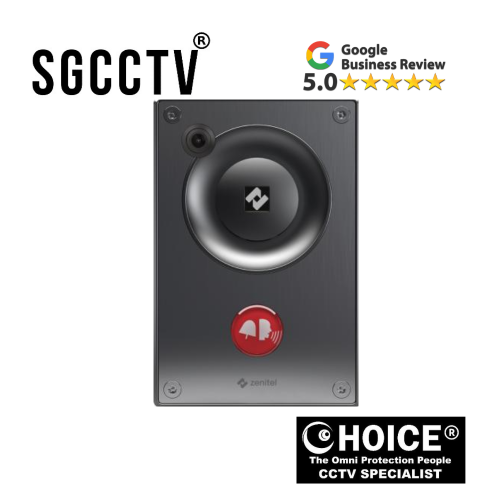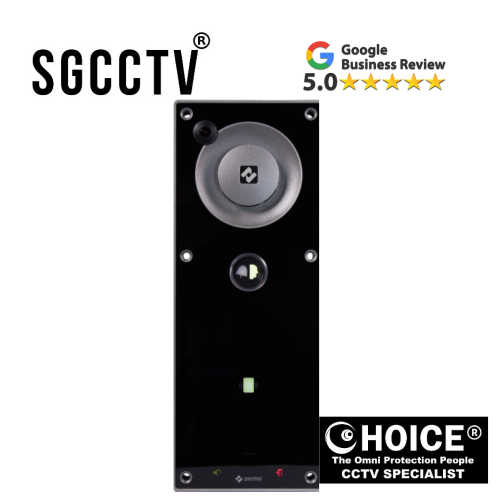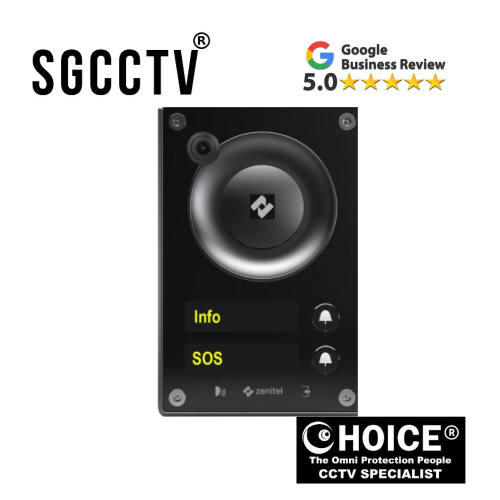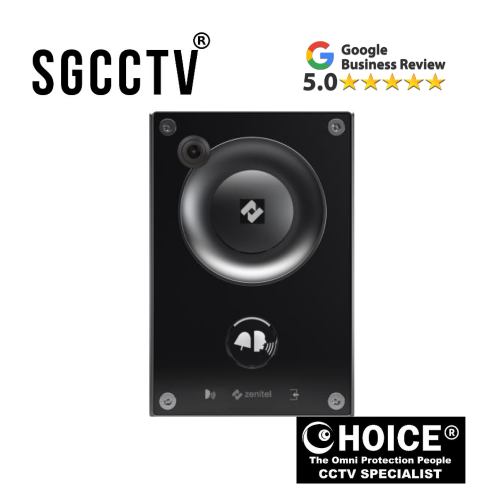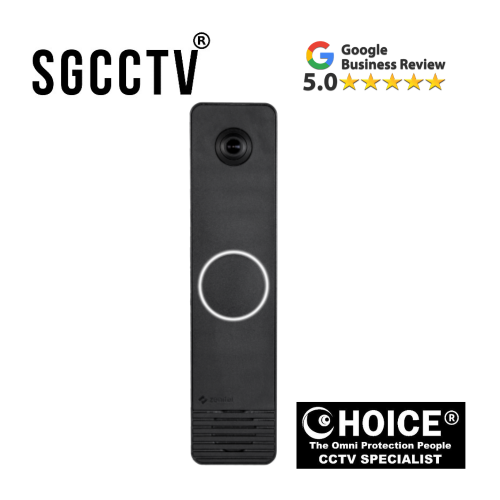



Zenitel ZSD-1 Slim Video Intercom IP based video intercom including automatic volume gain control Seamless video and device integration
The Zenitel ZSD-1 Slim Video Intercom is a modern IP-based video intercom solution designed for secure, reliable, and high-performance building communication. Built for today’s smart infrastructure requirements, it combines sleek slim design with advanced audio and video technologies, making it an ideal choice for residential, commercial, and high-security environments where clarity, stability, and seamless integration are essential.
Engineered as part of Zenitel’s professional communication ecosystem, the ZSD-1 delivers exceptional voice clarity through advanced audio processing, including automatic volume gain control (AGC) that ensures consistent sound levels in all environments. Whether installed at a quiet residential entrance or a noisy industrial gate, the system automatically adjusts audio output to maintain clear and natural communication between visitors and occupants.
On the video side, the ZSD-1 Slim Video Intercom provides smooth and reliable IP-based streaming, ensuring real-time visual verification of visitors. Its seamless video transmission capability allows security personnel and building users to monitor entrances with high stability and minimal delay, supporting modern security standards where instant visual confirmation is critical.
One of the strongest advantages of the ZSD-1 is its seamless integration capability. It is designed to work effortlessly within Zenitel’s communication ecosystem and integrates smoothly with platforms such as Zenitel Connect Pro, ICX-AlphaCom, and IC-EDGE, as well as SIP-based third-party systems. This flexibility makes it suitable for both standalone installations and large-scale networked communication infrastructures, including multi-building complexes and enterprise facilities.
The slim and modern design of the ZSD-1 also makes it highly suitable for projects where aesthetics matter. Its compact form factor allows for discreet installation without compromising durability or performance, making it an excellent fit for contemporary architectural designs.
From a security perspective, the system enhances access control by combining audio, video, and network communication into a single intelligent platform. This reduces the need for multiple standalone devices while improving operational efficiency and situational awareness at entry points.
Overall, the Zenitel ZSD-1 Slim Video Intercom stands out as a powerful IP communication solution that delivers high-quality audio performance, stable video transmission, intelligent gain control, and seamless system integration. It is built for long-term reliability and is ideal for organizations seeking a professional-grade intercom system that supports modern smart building infrastructure while ensuring secure and efficient visitor management.
Zenitel ZSD-1 Slim Video Intercom IP based video intercom including automatic volume gain control Seamless video and device integration
🔧 Zenitel ZSD-1 Slim Video Intercom – Setup Guide
⚡ 1. Pre-Installation Checklist
Before powering up the device, make sure you have:
- PoE switch (recommended) or DC power supply (if supported)
- Cat5e / Cat6 Ethernet cable
- Laptop for configuration
- Network access (router/switch available)
- SIP server details (if using SIP system)
Optional integration platforms:
Zenitel Connect Pro, IC-EDGE, or ICX-AlphaCom
📍 2. Physical Installation
- Choose mounting height: 1.4m – 1.6m (face level)
- Ensure clear camera view of entrance
- Avoid direct sunlight or heavy rain exposure
- Mount backplate securely (wall or flush mount)
- Fix device firmly and ensure no movement
Zenitel ZSD-1 Slim Video Intercom IP based video intercom including automatic volume gain control Seamless video and device integration
🔌 3. Wiring Connection
- Connect Ethernet cable to LAN port
- If PoE is used → connect to PoE switch (data + power)
- If DC power is used → connect correct voltage supply
- Check LED power indicator
👉 Always ensure stable power before configuration.
🌐 4. Find Device IP Address
After powering ON:
- Check router DHCP list
- Or use IP scanning tool (recommended for installers)
- Identify ZSD-1 device IP address
Then access via browser:
🔐 5. Login to Web Interface
- Enter default credentials (check device label/manual)
- Change admin password immediately
- Set correct time zone and NTP server
📡 6. Network Configuration
Inside network settings:
- Set Static IP (recommended)
- Configure:
- IP Address
- Subnet Mask
- Gateway
- DNS
👉 This prevents disconnection issues later.
Zenitel ZSD-1 Slim Video Intercom IP based video intercom including automatic volume gain control Seamless video and device integration
📞 7. SIP Configuration (If Used)
Go to SIP settings:
- SIP Server IP / Domain
- SIP User ID
- Password
- Port (usually 5060)
Check status:
- REGISTERED = OK
- FAILED = check credentials/network
🎥 8. Video Setup
- Enable video stream
- Set resolution (HD recommended)
- Enable RTSP / ONVIF if connecting to VMS/NVR
- Test live view
👉 Ensure smooth stream without lag.
🔊 9. Audio Configuration
- Enable Automatic Volume Gain Control (AGC)
- Enable echo cancellation
- Adjust microphone gain
- Test 2-way communication
👉 This ensures clear audio in noisy environments.
🔘 10. Door Lock Setup
- Connect relay output:
- COM
- NO / NC (depending on lock type)
- Configure unlock duration (e.g. 3–5 seconds)
- Test door unlock from web interface
🧪 11. Final Testing Checklist
✔ Make SIP call test
✔ Check video clarity
✔ Test audio both directions
✔ Verify door unlock function
✔ Confirm LED status indicator
✔ Check network stability
⚠️ Common Setup Mistakes
- Wrong SIP credentials
- Using DHCP (causes IP change issues)
- Incorrect relay wiring (NO vs NC)
- Weak PoE switch
- Firewall blocking SIP ports
🧠 Pro Installer Tips
✔ Always assign static IP
✔ Label all cables
✔ Test before final mounting
✔ Use managed PoE switch
✔ Keep firmware updated
✔ Back up configuration after setup
🏁 Done!
Once configured properly, the ZSD-1 operates as a stable IP video intercom system with high audio clarity, reliable video streaming, and seamless integration into modern SIP infrastructures.
🔧 Zenitel ZSD-1 Slim Video Intercom – Troubleshooting Guide (Installer Edition)
This guide helps installers quickly diagnose and fix common issues for the Zenitel ZSD-1 Slim Video Intercom (IP-based) in real field conditions
Zenitel ZSD-1 Slim Video Intercom IP based video intercom including automatic volume gain control Seamless video and device integration
.
⚡ 1. QUICK FIRST CHECK (DO THIS FIRST)
Before deep troubleshooting, always verify:
🔌 Power
- PoE switch active?
- Correct PoE port (PoE/PoE+)?
- Device LED ON?
🌐 Network
- Cable link light blinking?
- Same subnet as laptop?
- Switch port enabled?
📡 IP Address
- Found in DHCP list?
- Scanned via IP tool?
👉 Most issues are power or network related.
🔴 2. DEVICE NOT POWERING ON
❌ Symptoms
- No LED
- No web access
- Device completely dead
🔍 Causes
- No PoE power
- Faulty cable
- Wrong voltage (if DC used)
- Bad switch port
🛠 Fix
- Try another PoE port
- Replace Ethernet cable (Cat5e/Cat6)
- Test with PoE injector
- Verify switch PoE budget
- Check polarity (DC models)
Zenitel ZSD-1 Slim Video Intercom IP based video intercom including automatic volume gain control Seamless video and device integration
🌐 3. DEVICE NOT FOUND ON NETWORK
❌ Symptoms
- Cannot find IP
- Web interface not loading
- No response from device
🔍 Causes
- DHCP failure
- VLAN mismatch
- IP conflict
- Wrong subnet
🛠 Fix
- Use IP scanner tool
- Check router DHCP list
- Assign static IP
- Connect directly laptop → device
- Disable VLAN temporarily for testing
📞 4. SIP CALL NOT CONNECTING
❌ Symptoms
- Call fails instantly
- No ringing
- “Not registered”
🔍 Causes
- Wrong SIP credentials
- SIP server unreachable
- Firewall blocking ports
- DNS issue
🛠 Fix
- Verify SIP ID/password
- Check SIP server IP/domain
- Ensure port 5060/5061 open
- Restart SIP server
- Confirm registration status = REGISTERED
👉 Works with systems like IC-EDGE, ICX-AlphaCom, and Zenitel Connect Pro when configured properly.
Zenitel ZSD-1 Slim Video Intercom IP based video intercom including automatic volume gain control Seamless video and device integration
🔊 5. AUDIO ISSUES (ECHO / LOW VOLUME / NO SOUND)
❌ Symptoms
- Echo during call
- One-way audio
- Low volume
- Distorted sound
🔍 Causes
- AGC disabled
- Gain too high/low
- Network delay
- Poor mic placement
🛠 Fix
- Enable Automatic Volume Gain Control (AGC)
- Enable echo cancellation
- Adjust mic/speaker gain
- Reduce speaker volume slightly
- Avoid reflective surfaces (glass/metal walls)
👉 Zenitel systems usually perform better than consumer-grade intercoms, but settings must still be tuned correctly.
🎥 6. NO VIDEO / BLACK SCREEN
❌ Symptoms
- No live view
- Frozen image
- Video not loading in VMS
🔍 Causes
- RTSP/ONVIF disabled
- Wrong stream settings
- Network bandwidth issue
- Firewall blocking stream
🛠 Fix
- Enable RTSP/ONVIF
- Re-add device in VMS/NVR
- Test stream via VLC
- Reduce resolution temporarily
- Check network speed (recommended gigabit)
Zenitel ZSD-1 Slim Video Intercom IP based video intercom including automatic volume gain control Seamless video and device integration
🔘 7. DOOR LOCK NOT WORKING
❌ Symptoms
- Button works but door does not open
- Relay clicks but no unlocking
🔍 Causes
- Wrong NO/NC wiring
- Incorrect relay configuration
- Wrong lock voltage
- Damaged relay wiring
🛠 Fix
- Verify wiring:
- COM → Common
- NO → Normally Open
- NC → Normally Closed
- Test relay manually from web UI
- Confirm lock type (fail-safe/fail-secure)
- Use external relay module if needed
📡 8. DEVICE KEEPS GOING OFFLINE
❌ Symptoms
- Works then disconnects
- Random offline status
🔍 Causes
- Unstable PoE switch
- IP conflict
- Power drop
- Bad network cable
🛠 Fix
- Use managed PoE switch
- Assign static IP
- Replace Ethernet cable
- Check PoE power budget
- Avoid cheap switches
Zenitel ZSD-1 Slim Video Intercom IP based video intercom including automatic volume gain control Seamless video and device integration
📶 9. LAG / DELAY IN CALL OR VIDEO
❌ Symptoms
- Slow response
- Audio delay
- Video lag
🔍 Causes
- Network congestion
- High latency switch
- WiFi bridge (not recommended)
🛠 Fix
- Use wired connection only
- Use gigabit switch
- Reduce network load
- Avoid long daisy-chained switches
🔧 10. CONFIGURATION RESET / SETTINGS LOST
❌ Symptoms
- Device resets after reboot
- Settings not saved
🔍 Causes
- Power instability
- Firmware bug
- Corrupted configuration
🛠 Fix
- Update firmware
- Use stable PoE source
- Factory reset and reconfigure
- Backup configuration after setup
🧠 11. FIELD INSTALLER SUMMARY
Most ZSD-1 issues come from:
- ⚡ 70% Network / PoE problems
- ⚙️ 20% Configuration errors
- 🔧 10% Hardware faults
Zenitel ZSD-1 Slim Video Intercom IP based video intercom including automatic volume gain control Seamless video and device integration
🧰 PRO INSTALLER TIPS
✔ Always assign static IP
✔ Label every cable
✔ Use managed PoE switch
✔ Test before final mounting
✔ Keep firmware consistent across system
✔ Back up configuration after commissioning
🏁 FINAL NOTE
The ZSD-1 Slim Video Intercom is a high-stability IP intercom system, and when properly configured, it delivers excellent long-term reliability with minimal maintenance.
🔄 ZSD-1 vs Hikvision Slim Video Intercom – Full SEO Comparison Guide
When choosing a modern IP video intercom system, two popular options in the market are the Zenitel ZSD-1 Slim Video Intercom and Hikvision Slim Video Intercom series. Both are widely used for door access control, visitor management, and security monitoring—but they are built with very different design philosophies.
This guide gives a professional installer-level comparison covering performance, stability, installation, and real-world issues.
🧠 1. Product Overview
🔵 Zenitel ZSD-1 Slim Intercom
The ZSD-1 is a professional IP-based mullion video intercom designed for enterprise and high-reliability environments.
Key focus:
- High-quality voice communication
- Stable SIP integration
- Long-term system reliability
- Enterprise-level integration
It is commonly used in:
- Commercial buildings
- Industrial gates
- High-security access points
🔴 Hikvision Slim Video Intercom
Hikvision intercom systems are part of a large security ecosystem combining CCTV + access control + mobile app control.
Key focus:
- Cost-effective deployment
- CCTV + intercom integration
- User-friendly mobile app (Hik-Connect)
It is commonly used in:
- Condominiums
- Homes
- Small to medium offices
Zenitel ZSD-1 Slim Video Intercom IP based video intercom including automatic volume gain control Seamless video and device integration
📊 2. Full Technical Comparison Table
| Feature | Zenitel ZSD-1 | Hikvision Slim Intercom |
|---|---|---|
| System Type | Enterprise SIP intercom system | Security + CCTV ecosystem |
| Audio Quality | ⭐⭐⭐⭐⭐ HD voice, advanced echo cancellation | ⭐⭐⭐ Good but can have echo / imbalance |
| Video Stability | Highly stable RTSP/ONVIF stream | Stable but can lag under network load |
| SIP Performance | Very strong and reliable | Moderate, depends on setup |
| Installation Complexity | Medium (professional setup required) | Medium–High (many settings/apps) |
| Ecosystem Integration | Zenitel platforms + SIP systems | Hikvision CCTV + NVR + Hik-Connect |
| Common Issues | Misconfiguration, network setup | Offline device, IP conflict, audio issues |
| Maintenance Needs | Low after commissioning | Medium–High (firmware + tuning) |
| Long-Term Stability | Very high | Moderate depending on network |
| Best Use Case | Critical communication systems | Residential & CCTV-integrated setups |
🔊 3. Audio Performance Comparison
🔵 Zenitel ZSD-1 Audio Strength
The ZSD-1 is built with professional communication-grade audio, featuring:
- Automatic Volume Gain Control (AGC)
- Noise reduction
- Echo cancellation
- High sound clarity in noisy environments
👉 Result:
Clear communication even at:
- Factory gates
- Outdoor entrances
- High traffic areas
Zenitel ZSD-1 Slim Video Intercom IP based video intercom including automatic volume gain control Seamless video and device integration
🔴 Hikvision Audio Performance
Hikvision intercoms offer decent audio but may experience:
- Echo feedback
- One-way audio issues
- Volume inconsistency
👉 Common causes:
- Incorrect gain settings
- Network delay
- Firmware mismatch
🎥 4. Video Performance
🔵 Zenitel
- Stable HD video streaming
- Strong low-light performance
- ONVIF / RTSP support
- Designed for professional VMS integration
👉 Strength: consistent uptime and stability
🔴 Hikvision
- High resolution options available
- Strong integration with Hik-Connect app
- Works well in Hikvision-only ecosystems
👉 Weakness:
- Possible video delay under network congestion
- App dependency for full features
🌐 5. System Integration
🔵 Zenitel Integration
ZSD-1 integrates with:
- SIP-based systems
- Enterprise platforms like IC-EDGE
- Unified communication systems
👉 Best for structured communication networks in large buildings.
Zenitel ZSD-1 Slim Video Intercom IP based video intercom including automatic volume gain control Seamless video and device integration
🔴 Hikvision Integration
Hikvision integrates with:
- CCTV cameras
- NVR recording systems
- Mobile app (Hik-Connect)
👉 Best for combined security + surveillance systems.
⚠️ 6. Common Issues Comparison
🔵 Zenitel ZSD-1 Issues (Less Frequent)
- SIP configuration errors
- Network/PoE setup mistakes
- Relay wiring issues
- Firewall blocking SIP ports
👉 Key point:
Once correctly configured → very stable long-term operation
🔴 Hikvision Intercom Issues (More Frequent)
Common real-world problems include:
- Device goes offline unexpectedly
- IP address conflicts
- “Call failed” errors
- One-way or missing audio
- Video not loading in app or indoor station
- Firmware compatibility issues
👉 Key point:
Requires ongoing tuning and maintenance in many installations
🔧 7. Installation & Maintenance
🔵 Zenitel ZSD-1
- Requires professional configuration
- SIP setup needed
- Static IP strongly recommended
👉 Advantage:
Very low maintenance after commissioning
Zenitel ZSD-1 Slim Video Intercom IP based video intercom including automatic volume gain control Seamless video and device integration
🔴 Hikvision Intercom
- Easier for basic installation
- More flexible for DIY installers
- Requires careful setup of IP, app, and devices
👉 Disadvantage:
Small configuration mistakes can cause long-term issues
🏢 8. Best Applications
🔵 Choose Zenitel ZSD-1 If You Need:
- High reliability communication
- Industrial or commercial security gates
- Noise-free voice clarity
- Long-term stable system
- Professional SIP integration
🔴 Choose Hikvision If You Need:
- Budget-friendly system
- CCTV + intercom integration
- Residential or condo setup
- Mobile app monitoring convenience
🧠 9. Final Verdict
Both systems are strong—but serve different purposes:
- Zenitel ZSD-1 = Enterprise communication reliability
- Hikvision Intercom = Affordable security ecosystem solution
👉 Simple takeaway:
- Want stability + clear communication → Zenitel wins
- Want cost-effective CCTV integration → Hikvision wins
Zenitel ZSD-1 Slim Video Intercom IP based video intercom including automatic volume gain control Seamless video and device integration
🏁 Need Help Choosing or Installing?
If you’re planning a project, I can help you with:
- System design layout
- Wiring diagrams (PoE + relay + SIP)
- Installer troubleshooting checklist
- Model selection for condos, factories, or homes
⚠️ Real Field Problems (Zenitel vs Hikvision)
In real-world installations, issues rarely come from hardware failure. Instead, most problems are caused by network setup, SIP configuration, power delivery, and system integration mistakes. However, the type and frequency of issues differ greatly between Zenitel and Hikvision systems.
Below is a breakdown of the most common field problems installers actually face on-site.
🔵 Zenitel ZSD-1 – Real Field Problems
Zenitel systems are generally very stable once correctly configured, but installation requires proper networking knowledge.
⚠️ Common Issues Seen in the Field
1. SIP Registration Failure
- Device shows “Not Registered”
- Caused by wrong SIP credentials or server mismatch
- Often occurs during first-time setup
2. Network / VLAN Mismatch
- Device not reachable from main network
- Happens when VLAN tagging is incorrect in managed switches
3. PoE Power Instability
- Device randomly reboots
- Caused by underpowered PoE switch or long cable runs
4. Firewall Blocking SIP Traffic
- Calls fail or no audio connection
- Ports like UDP 5060/5061 blocked in enterprise networks
5. Configuration Mode Confusion
- Device set in wrong system mode (SIP vs IC-EDGE vs ICX)
- Leads to registration or call failure issues
👉 Installer insight:
Once properly configured, Zenitel systems are usually stable for years with minimal service calls.
Zenitel ZSD-1 Slim Video Intercom IP based video intercom including automatic volume gain control Seamless video and device integration
🔴 Hikvision Intercom – Real Field Problems
Hikvision systems are easier to deploy initially, but they generate more ongoing troubleshooting cases in real installations.
⚠️ Common Issues Seen in the Field
1. Device Goes Offline Randomly
- Intercom disappears from app or indoor station
- Often caused by IP conflict or PoE switch instability
2. “Call Failed” or No Ringing
- Door station presses but indoor unit does not respond
- Usually SIP or master-slave configuration mismatch
3. One-Way Audio / Echo Issues
- Visitor hears resident but not vice versa
- Common with incorrect gain settings or firmware mismatch
4. App Connectivity Problems (Hik-Connect)
- Delayed notifications or missed calls
- Cloud connection instability or DNS/network issues
5. Firmware Compatibility Issues
- After updates, devices may stop communicating properly
- Mixed firmware versions between door station and indoor station
6. IP Address Conflicts
- Devices become unreachable after router reboot
- DHCP/static IP misconfiguration
👉 Installer insight:
Hikvision systems often require ongoing tuning and occasional reconfiguration, especially in larger or mixed-network environments.
🧠 Key Difference (Field Reality)
- Zenitel = Configuration-sensitive, but stable once done correctly
- Hikvision = Easier setup, but more long-term troubleshooting cases
Zenitel ZSD-1 Slim Video Intercom IP based video intercom including automatic volume gain control Seamless video and device integration
🔧 Installer Summary
| Issue Type | Zenitel | Hikvision |
|---|---|---|
| Network problems | Medium (setup-based) | High (frequent in field) |
| SIP issues | Low–Medium | Medium–High |
| Audio issues | Low | High |
| Stability after setup | Very High | Medium |
| Maintenance calls | Rare | More frequent |
🏁 Final Takeaway
In real installations:
- Zenitel systems fail mainly during setup, not operation
- Hikvision systems often require ongoing adjustments after installation
👉 That is why installers often describe Zenitel as a “commission once, then stable” system, while Hikvision is seen as a “needs tuning and maintenance” system in mixed network environments.
🧠 Fault Diagnosis Flowchart (Installer Guide)
IP Video Intercom Troubleshooting Path – Zenitel vs Hikvision
This flowchart helps installers quickly identify and isolate faults in IP video intercom systems like Zenitel and Hikvision.
Use it on-site to reduce troubleshooting time and avoid unnecessary replacements.
⚡ STEP 1 — DEVICE POWER CHECK
🔌 Q1: Is the device powering ON?
❌ NO
➡ Check:
- PoE switch port enabled?
- Ethernet cable damage?
- Correct PoE standard (802.3af/at)?
- DC power polarity (if used)
✔ FIX → Restore power → Re-test
Zenitel ZSD-1 Slim Video Intercom IP based video intercom including automatic volume gain control Seamless video and device integration
✅ YES
➡ Go to Step 2
🌐 STEP 2 — NETWORK DETECTION
📡 Q2: Can you find the device IP?
❌ NO DEVICE FOUND
➡ Check:
- Same network subnet?
- DHCP enabled?
- VLAN blocking?
- Switch port active?
✔ FIX → Assign static IP / bypass VLAN test
✅ DEVICE FOUND
➡ Go to Step 3
🌐 STEP 3 — WEB ACCESS TEST
💻 Q3: Can you open web interface?
❌ NO ACCESS
➡ Check:
- Firewall blocking port 80/443
- Wrong IP address
- Browser cache issue
- Network isolation
✔ FIX → Direct laptop connection test
✅ ACCESS OK
➡ Go to Step 4
📞 STEP 4 — SIP REGISTRATION (CALL FUNCTION)
☎️ Q4: Is SIP registered?
❌ NOT REGISTERED
➡ Check:
- SIP username/password
- SIP server IP/domain
- Port 5060 / 5061 blocked?
- DNS resolution issue
✔ FIX → Correct SIP config → restart device
❌ REGISTERED BUT NO CALL
➡ Check:
- Call group settings (Hikvision issue common)
- Dial plan mismatch
- Firewall NAT rules
Zenitel ZSD-1 Slim Video Intercom IP based video intercom including automatic volume gain control Seamless video and device integration
✅ CALL WORKS
➡ Go to Step 5
🔊 STEP 5 — AUDIO TEST
🎤 Q5: Is audio working correctly?
❌ NO / ONE-WAY AUDIO
➡ Check:
- Microphone enabled?
- Speaker gain too low/high?
- Echo cancellation off?
- Network delay >150ms?
✔ FIX:
- Enable AGC (Auto Gain Control)
- Adjust mic gain
- Reduce echo reflections
⚠️ ECHO ISSUE
➡ Common in:
- Glass doors
- Metal walls
- Poor acoustic placement
✔ FIX → Lower speaker volume + enable echo cancellation
✅ AUDIO OK
➡ Go to Step 6
🎥 STEP 6 — VIDEO TEST
📷 Q6: Is video stable?
❌ NO VIDEO / BLACK SCREEN
➡ Check:
- RTSP/ONVIF enabled?
- Camera stream configured?
- Bandwidth sufficient?
✔ FIX → Re-add device in NVR/VMS
⚠️ LAG / FREEZING
➡ Check:
- Network congestion
- Switch overload
- WiFi bridge used?
✔ FIX → Use gigabit wired network
✅ VIDEO OK
➡ Go to Step 7
🔘 STEP 7 — DOOR LOCK CONTROL
🚪 Q7: Does door unlock work?
❌ NOT WORKING
➡ Check:
- Relay wiring (NO/NC/COM)
- Electric lock type mismatch
- Wrong trigger duration
✔ FIX → Test relay manually from web UI
Zenitel ZSD-1 Slim Video Intercom IP based video intercom including automatic volume gain control Seamless video and device integration
✅ WORKING
➡ SYSTEM OK
🧠 FINAL DIAGNOSIS SUMMARY
🔵 Zenitel Systems Pattern
- Most issues = configuration or network setup
- Rare hardware failure
- Strong SIP stability once configured
🔴 Hikvision Systems Pattern
- More frequent issues = IP conflict + app + firmware
- Requires periodic tuning
- Sensitive to network changes
⚡ QUICK INSTALLER RULE (VERY IMPORTANT)
👉 80% of intercom faults = NETWORK
👉 15% = CONFIGURATION
👉 5% = HARDWARE
🧰 PRO INSTALLER TIP FLOW (FAST MODE)
If in doubt, follow this shortcut:
- Power check
- IP scan
- Direct laptop test
- SIP registration
- Audio test
- Video test
- Relay test
🛡️ Warranty Information – Video Intercom Systems
All IP Video Intercom systems, including models from Zenitel and Hikvision, are supplied with manufacturer-backed warranty coverage to ensure product reliability and customer confidence.
📅 Standard Warranty Period
- Standard warranty: Typically 12 to 24 months (depends on model and project agreement)
- Covers manufacturing defects and hardware failure under normal use conditions
🧾 What is Covered
✔ Manufacturing defects
✔ Hardware malfunction under normal operation
✔ Power circuit failure (non-external damage)
✔ Internal component failure
✔ Firmware-related faults (if officially supported)
❌ What is NOT Covered
- Physical damage (impact, water damage, vandalism)
- Incorrect installation or wiring errors
- Lightning surge or power surge damage
- Unauthorized modification or repair
- Network issues (SIP, IP, firewall misconfiguration)
- Improper power supply (wrong voltage / non-PoE standards)
🔧 On-Site vs Carry-In Warranty
Depending on project agreement:
🏢 On-site warranty
- Technician support at installation site
- Common for commercial / condo projects
📦 Carry-in warranty
- Customer sends unit back for inspection
- Common for retail purchases
Zenitel ZSD-1 Slim Video Intercom IP based video intercom including automatic volume gain control Seamless video and device integration
⚡ Warranty Response Process
- Report issue with device details
- Basic troubleshooting done remotely
- Fault verification (hardware vs setup issue)
- Replacement or repair approval
- Unit repaired or swapped (if eligible)
🧠 Important Installer Note
Most intercom “faults” are NOT hardware failures. In real projects:
- 80% = network / SIP / configuration issues
- 15% = installation wiring issues
- 5% = actual hardware failure
👉 This is why proper installation is critical before claiming warranty.
🏁 Final Statement
Warranty ensures protection against manufacturing defects, but proper installation, correct SIP setup, and stable network design are essential for long-term system performance.
Zenitel ZSD-1 Slim Video Intercom IP based video intercom including automatic volume gain control Seamless video and device integration
🏬 Choicecycle (SGCCTV Singapore) – Support & Warranty Handling
📍 SGCCTV Choicecycle, Sim Lim Square #02-81, Singapore
📞 WhatsApp: +65 9853 4404
📧 enquiry@choicecycle.com.sg
🌐 https://sgcctv.com.sg
🕒 Operating Hours: 11 AM – 8 PM


Nunc lacus elit, faucibus ac laoreet sed, dapibus ac mi. Maecenas eu ante a elit tempus fermentum. Aliquam commodo tincidunt semper. Phasellus accumsan, justo ac mollis pharetra, ex dui pharetra nisl, a scelerisque ipsum nulla ac sem. Cras eu risus urna. Duis lorem sapien, congue eget nisl sit amet, rutrum faucibus elit.
Donec accumsan auctor iaculis. Sed suscipit arcu ligula, at egestas magna molestie a. Proin ac ex maximus, ultrices justo eget, sodales orci. Aliquam egestas libero ac turpis pharetra, in vehicula lacus scelerisque. Vestibulum ut sem laoreet, feugiat tellus at, hendrerit arcu.
Nunc lacus elit, faucibus ac laoreet sed, dapibus ac mi. Maecenas eu ante a elit tempus fermentum. Aliquam commodo tincidunt semper. Phasellus accumsan, justo ac mollis pharetra, ex dui pharetra nisl, a scelerisque ipsum nulla ac sem. Cras eu risus urna. Duis lorem sapien, congue eget nisl sit amet, rutrum faucibus elit.