



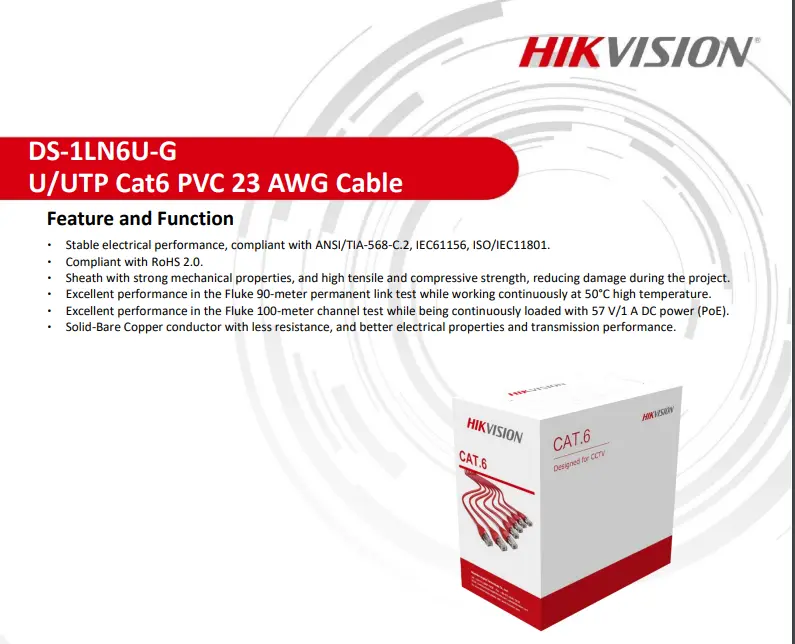

Cat6 Network Cable DAHUA DH-PFM920I-6UN-C PFM920I-6U-C UTP 4-pair Purity Copper IP POE Switch Server Rack CCTV Cable IP Camera
$168.00
DAHUA SINGAPORE OFFICIAL PARTNER FULL RANGE
Supply and Maintenance DAHUA CCTV IP Cameras, NVR, Turbo HD TVI Cameras, DVR, PTZ Cameras,
Access Control System, Video Intercom.
Sim Lim Square 02-81 10am-7pm Daily.
Whatsapp Enquiry Project +65 98534404, Technical Support +65 81120788, Site Visit Maintenance +65 81985572.
Cat6 Network Cable DAHUA DH-PFM920I-6UN-C PFM920I-6U-C UTP 4-pair Purity Copper IP POE Switch Server Rack CCTV Cable IP Camera
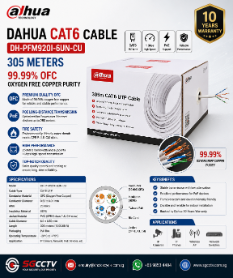
DAHUA Cat6 Network Cable DH-PFM920I-6UN-C / PFM920I-6U-C – High-Performance UTP Cable for CCTV & Networking in Singapore
For stable and reliable IP networks, the choice of cabling makes all the difference. The DAHUA Cat6 Network Cable DH-PFM920I-6UN-C / PFM920I-6U-C is a professional-grade UTP 4-pair copper cable designed for high-speed data transmission, PoE power supply, and seamless integration with IP-based systems.
Perfect for IP cameras, PoE switches, servers, and CCTV racks, this Cat6 cable ensures excellent conductivity, low signal loss, and long-term durability.
Key Features of DAHUA Cat6 Network Cable
Category 6 UTP Cable – High-speed data transmission with reduced crosstalk and interference.
4-Pair Pure Copper Conductors – 100% copper for stable performance and stronger PoE delivery compared to CCA (Copper Clad Aluminum).
Supports PoE / PoE+ – Ideal for powering IP cameras, access control, and wireless APs via network switches.
High Bandwidth – Up to 250MHz, ensuring reliable connectivity for IP surveillance and networking.
Durable Jacket Material – Designed for professional installations in racks, conduits, and structured cabling environments.
Compatibility – Works seamlessly with Dahua IP cameras, NVRs, PoE switches, and third-party network devices.
Applications in Security & Networking
CCTV IP Camera Cabling – Stable power and video transmission for Dahua and third-party cameras.
PoE Switch to Server Rack – Efficient cabling for data centers, server rooms, and control stations.
Access Control & IP Devices – Reliable power and data for biometric readers, intercoms, and IoT devices.
Corporate & SME Networks – Ensures high-speed connectivity for offices, retail outlets, and warehouses.
Why Choose Dahua Cat6 Network Cable from SGCCTV?
Guaranteed pure copper cable for long-distance CCTV and IP installations
Tested for performance and compliance with Cat6 standards
Professional supply and installation services in Singapore
Local support and consultation for CCTV, networking, and security systems
Secure Connectivity with Dahua Cat6 Cables in Singapore
When building a reliable Dahua Security System, cabling is just as important as cameras and recorders. The DAHUA Cat6 Network Cable DH-PFM920I-6UN-C / PFM920I-6U-C offers durability, high bandwidth, and superior PoE performance, making it the right choice for professional CCTV and IT infrastructure.
📞 Contact us today at +65 9853 4404 (WhatsApp) or email enquiry@choicecycle.com.sg to get your Dahua Cat6 Network Cable and CCTV installation package.
🌐 Visit: https://sgcctv.com.sg for more details on Dahua CCTV solutions in Singapore.
More Choices : POE Switch ||
DAHUA CCTV CAMERA PTZ
DAHUA BUDGET IP CAMERA DH-ED125-E DH-SF125-E || DAHUA CCTV DOME 2MP HDW2241TP-S ||
DAHUA IP CAMERA IPC-HDW2249T-S-IL || DAHUA CCTV DOME 4MP HDW2441TP-S ||
DAHUA CCTV DOME 4MP DH-IPC-DHBW2441R || DAHUA CCTV DOME 4MP DH-IPC-DHBW2441E-S ||
Panoramic Network Fisheye IPC-EBW8630 || DAHUA CCTV Pan-Tilt-Zoom DH-SD29204T-GN-W ||
DAHUA CCTV Pan-Tilt-Zoom SD22404DB-GNY || DAHUA CCTV Pan-Tilt-Zoom SD22204DB-GNY ||
Dahua IVS Camera SD3A400-GN-A-PV ||
Dahua IMOU Cue C22P No Drilling Wall Ceiling || DAHUA IMOU CRUISER 4G ||
CCTV CAMERA BRACKET PFA135 PFA152-E LR1002 ||
DAHUA CCTV DVR NVR
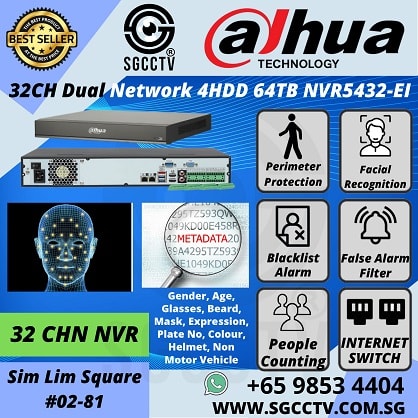
DAHUA 32CH NVR NVR5432-EI DHI-NVR5832-EI || DAHUA 32CH NVR NVR5432-EI DHI-NVR5832-EI ||
Dahua Network Video Recorder NVR5432-EI || DAHUA 64CH NVR DHI-NVR5464-EI NVR5864-EI ||
DAHUA ACCESS CONTROL VIDEO INTERCOM || DAHUA Face Recognition Control DHI-ASI3213A-W ||
DAHUA VIDEO INTERCOM VTH2421FB(W)-P ||
DAHUA SWITCH SOLUTIONS
DAHUA Drone Thermal Camera DHI-UAV-V3300 || Industrial Drone Thermal Camera with Gimbal ||
Video Wall System LS550UDM-EG Display Panels || Solar-Powered CCTV DH-SD6C3432XB-HNR-AGQ-PV 4MP 32X ||
Solar-Powered CCTV KIT DH-PFM364L-D1
1. Collection from SGCCTV Choicecycle Sim Lim Square CCTV SPECIALIST #02-81 11am~8pm. Whatsapp 98534404 for stock level before visit.
2. Payment by PayNow 201207820G
Cat6 Network Cable DAHUA DH-PFM920I-6UN-C PFM920I-6U-C UTP 4-pair Purity Copper IP POE Switch Server Rack CCTV Cable IP Camera Singtel M1 Starhub Network
When choosing a CCTV cable for your network, there are several factors to consider. Here are some guidelines to help you choose the best CCTV cable, specifically the Cat6 network cable PFM920I-6U-C, for your needs:
- Compatibility: Ensure that the cable is compatible with the devices you are using, such as IP cameras, POE switches, servers, DVRs, NVRs, and network equipment from brands like Dahua, Singtel, M1, Starhub, etc.
- Cable Type: Cat6 cables are commonly used for network installations. They offer higher bandwidth and faster data transmission compared to Cat5e cables. The PFM920I-6U-C is a specific model of Cat6 cable.
- Cable Quality: Look for high-quality cables that are built to last and can handle the demands of your CCTV system. The cable should be made from high-purity copper conductors, as this ensures better signal transmission and reduces the risk of interference.
- Length: Determine the length of cable you require for your installation. Measure the distance between your network devices and choose a cable that is long enough to connect them without excessive slack.
- Shielding: Consider whether you need shielded or unshielded cables. Shielded cables offer better protection against electromagnetic interference (EMI) and are more suitable for environments with high levels of electrical noise.
- POE Support: If you plan to use Power over Ethernet (POE) to power your IP cameras or other devices, ensure that the cable is capable of carrying both data and power. Cat6 cables are typically designed to support POE.
- Brand and Warranty: Consider reputable brands known for their quality networking products. Check for warranties or guarantees provided by the manufacturer, as this can give you confidence in the product’s reliability.
- Price and Budget: Compare prices from different suppliers to find the best balance between quality and affordability. Avoid extremely cheap cables, as they may be of inferior quality and can affect the performance of your CCTV system.
- Reviews and Recommendations: Read customer reviews and seek recommendations from professionals or other users who have experience with the specific cable you are considering. Their feedback can provide insights into the cable’s performance and reliability.
By considering these factors, you can make an informed decision and choose the best CCTV cable, such as the Cat6 network cable PFM920I-6U-C, that meets your requirements for your specific network setup and devices.
Cat6 Network Cable DAHUA DH-PFM920I-6UN-C PFM920I-6U-C UTP 4-pair Purity Copper IP POE Switch Server Rack CCTV Cable IP Camera Singtel M1 Starhub Network

Cat6 Network Cable DAHUA DH-PFM920I-6UN-C PFM920I-6U-C UTP 4-pair Purity Copper IP POE Switch Server Rack CCTV Cable IP Camera Singtel M1 Starhub Network
When choosing the best CCTV cable for your network, there are several factors to consider. Here’s a step-by-step guide to help you make an informed decision:
- Determine your requirements: Start by understanding your specific needs and requirements. Consider factors such as the distance between the CCTV camera and the network device, the bandwidth requirements, and whether Power over Ethernet (PoE) functionality is necessary.
- Cable type: The CCTV cable you mentioned, PFM920I-6U-C, is a Cat6 network cable. Cat6 cables are suitable for high-speed data transmission and can handle Gigabit Ethernet connections. Ensure that Cat6 is appropriate for your network requirements.
- Quality and brand: Look for cables from reputable brands known for their quality and reliability. Dahua is a well-known brand in the security industry, so the PFM920I-6U-C cable should be a good choice. Verify that the cable meets industry standards and certifications.
- Cable construction: Check the construction of the cable. Look for high-purity copper conductors, as they provide better signal transmission compared to other materials. Copper conductors are typically more reliable and durable.
- Length: Determine the required cable length based on the distance between the devices you need to connect. Ensure that the cable length is sufficient to reach your CCTV camera from the network device without any signal loss.
- Shielding: Consider the level of shielding required for your installation. Shielding protects the cable from interference, such as electromagnetic interference (EMI) and radio frequency interference (RFI). Look for cables with adequate shielding, such as foil shielding or braided shielding, depending on your environment and potential sources of interference.
- PoE compatibility: If you plan to power your CCTV camera through the Ethernet cable using PoE, ensure that the cable supports PoE functionality. Cat6 cables generally support PoE, but it’s essential to verify this feature to avoid any compatibility issues.
- Compatibility with devices and connectors: Ensure that the CCTV cable is compatible with your CCTV camera, DVR, NVR, IP camera, switch, and other network devices. Check the connector types required (e.g., RJ45) and verify that the cable has the appropriate connectors.
- Budget: Consider your budget while evaluating different options. Compare prices from different vendors and ensure you’re getting a good balance between quality and cost-effectiveness.
- Reviews and recommendations: Read customer reviews and seek recommendations from professionals or online forums to gather feedback on the performance and reliability of the specific cable you’re considering.
By considering these factors, you can choose the best CCTV cable, such as the PFM920I-6U-C, that meets your network requirements, provides reliable data transmission, and ensures a stable connection between your CCTV devices.
Cat6 Network Cable DAHUA DH-PFM920I-6UN-C PFM920I-6U-C UTP 4-pair Purity Copper IP POE Switch Server Rack CCTV Cable IP Camera


Nunc lacus elit, faucibus ac laoreet sed, dapibus ac mi. Maecenas eu ante a elit tempus fermentum. Aliquam commodo tincidunt semper. Phasellus accumsan, justo ac mollis pharetra, ex dui pharetra nisl, a scelerisque ipsum nulla ac sem. Cras eu risus urna. Duis lorem sapien, congue eget nisl sit amet, rutrum faucibus elit.
Donec accumsan auctor iaculis. Sed suscipit arcu ligula, at egestas magna molestie a. Proin ac ex maximus, ultrices justo eget, sodales orci. Aliquam egestas libero ac turpis pharetra, in vehicula lacus scelerisque. Vestibulum ut sem laoreet, feugiat tellus at, hendrerit arcu.
Nunc lacus elit, faucibus ac laoreet sed, dapibus ac mi. Maecenas eu ante a elit tempus fermentum. Aliquam commodo tincidunt semper. Phasellus accumsan, justo ac mollis pharetra, ex dui pharetra nisl, a scelerisque ipsum nulla ac sem. Cras eu risus urna. Duis lorem sapien, congue eget nisl sit amet, rutrum faucibus elit.
Related Products
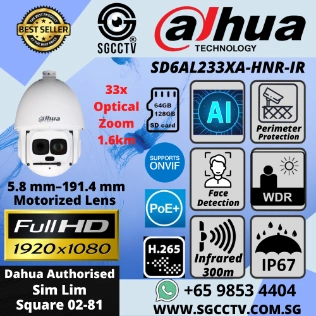
Dahua PTZ Camera SD49225GB-HNR DH-SD49225T-HN Network Camera 2MP H.265+ ONVIF 25x Starlight IR AI PTZ 360 Pan Tilt Zoom Outdoor IP66 IR 100m Perimeter Face detection
Save30.2%Save $208.00Only$480.00 Original price was: $688.00.$480.00Current price is: $480.00.


Reviews
There are no reviews yet.