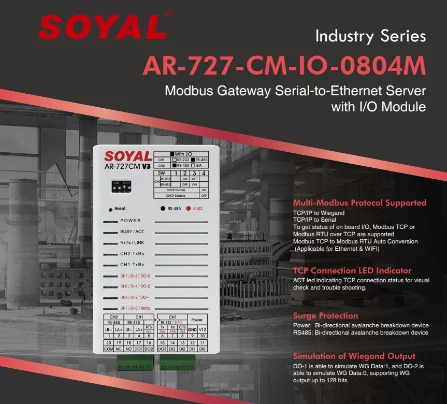
ENTRYPASS EP.HIO.PSU HYBRID I/O CONTROL PANEL OUTPUTS RS485 TCP/IP MODBUS ALARM ELEVATOR CONTROL REPAIR REPLACE
ENTRYPASS SINGAPORE OFFICIAL PARTNER FULL RANGE
Supply and Maintenance ENTRYPASS Access Control Access Control System, Video Intercom.
Sim Lim Square 02-81 10am-7pm Daily.
Whatsapp Enquiry Project +65 98534404, Technical Support +65 81120788, Site Visit Maintenance +65 81985572.
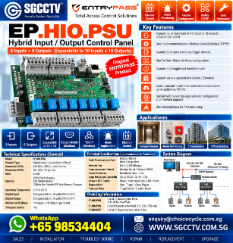
ENTRYPASS EP.HIO.PSU HYBRID I/O CONTROL PANEL OUTPUTS RS485 TCP/IP MODBUS ALARM ELEVATOR CONTROL REPAIR REPLACE
ENTRYPASS EP.HIO.PSU Hybrid I/O Control Panel Singapore | 8 Inputs 8 Outputs | RS485 TCP/IP Modbus | Alarm Elevator Control Repair Replace
The ENTRYPASS EP.HIO.PSU Hybrid Input / Output Control Panel is a flexible security-system controller designed for alarm monitoring, elevator access control and I/O integration. It combines digital inputs and relay/output control with both serial and Ethernet communications, making it suitable for existing ENTRYPASS systems that require interaction with alarms, floor controls, sensors and other security devices.
The standard EP.HIO.PSU provides 8 digital inputs and 8 digital outputs, with expansion to 16 inputs and 16 outputs using the EP.HIO.EXP expansion board. It supports RS232/RS485, 10/100 Mbps Ethernet, Modbus Serial and Modbus TCP/IP, allowing it to serve both legacy serial installations and network-connected systems.
SGCCTV – Choicecycle CCTV provides ENTRYPASS EP.HIO.PSU troubleshooting, repair, replacement, expansion and access-control upgrading in Singapore, including alarm and elevator-control applications.
ENTRYPASS EP.HIO.PSU Full Specifications
| Specification | EP.HIO.PSU |
|---|---|
| Product | Hybrid Input / Output Control Panel with PSU |
| Digital Inputs | 8 |
| Digital Outputs | 8 |
| Expansion | 16 Inputs + 16 Outputs with EP.HIO.EXP |
| Expansion Board | EP.HIO.EXP – additional 8 inputs / 8 outputs |
| Serial Port | RS232 / RS485 user configurable |
| Network Port | RJ45 10/100 Mbps |
| Protocol | Modbus Serial / Modbus TCP/IP |
| Trigger | Open Trigger / Close Trigger |
| Function Mode | Toggle Mode / Duration Mode |
| Time Zone Control | Yes |
| MCU | 64 KB |
| Flash Memory | 256K |
| SRAM Buffer | 32K |
| Storage | 32 Mbit non-volatile SPI Flash |
| Operating Temperature | 0°C to 65°C |
| Power Protection | 2.5A Resettable Fuse |
| LED Indication | Power / Communication / LAN / Event |
| Application | Alarm / Elevator / I/O Integration |
| EP.HIO.PSU Dimensions | 289 × 309 × 85 mm |
| Configuration | Built-in web-server architecture |
8 Inputs + 8 Outputs
The standard EP.HIO provides:
8 DIGITAL INPUTS
and:
8 DIGITAL OUTPUTS
This allows the controller to receive status information from external equipment and provide controlled outputs to other systems.
With the EP.HIO.EXP, capacity can be expanded to:
16 INPUTS + 16 OUTPUTS
per expanded HIO configuration.
This flexibility makes HIO useful for both alarm-monitoring and elevator-control applications.
What Is Hybrid I/O?
I/O means:
INPUT / OUTPUT
An input receives information from another device.
Examples can include:
Alarm Contact
Door Contact
Emergency Push Button
Sensor
Equipment Fault Contact
Lift Status Contact
Fire Alarm Interface Contact
An output allows the controller to activate or signal another device or interface.
Examples can include:
Relay Activation
Buzzer
Strobe
Floor Control
Alarm Indication
External Equipment Interface
This is why the EP.HIO can be used for considerably more than a conventional card-access door.
Alarm Monitoring Application
The EP.HIO can be used to receive alarm or equipment status through its digital inputs.
A basic architecture can be:
SENSOR / ALARM CONTACT
↓
EP.HIO INPUT
↓
EVENT PROCESSING
↓
ENTRYPASS SYSTEM
↓
ALARM / ACTION / OUTPUT
Depending on the programmed system, an input event can be monitored and associated with a corresponding action.
Applications can include:
Emergency Push Buttons
Equipment Alarms
Door Status
Security Sensors
Building Alarm Contacts
Fault Monitoring
Alarm Annunciation
The exact implementation depends on the project design.
Elevator Access Control Application
The HIO is also designed for elevator access-control applications.
In an elevator system, outputs can be used as part of the interface that enables authorised floor selections.
A simplified architecture can be:
CARD / CREDENTIAL
↓
ENTRYPASS ACCESS CONTROL
↓
EP.HIO
↓
FLOOR OUTPUT
↓
LIFT INTERFACE
↓
AUTHORISED FLOOR ENABLED
The ENTRYPASS architecture supports elevator access configurations where individual cardholders can be assigned different floor-access permissions.
Elevator Control from 8 to 136 Floors
Within supported ENTRYPASS elevator architectures, the HIO can form part of installations scaling from 8-floor control up to 136 floors, depending on the master controller, HIO expansion arrangement and overall system design.
For example:
Employee A → Floors 2–5
Employee B → Floor 8
Management → Floors 2–20
Contractor → Designated Floor Only
Visitor → Temporary Authorised Floor
The actual permissions are determined by the access-control configuration and lift integration.
RS485 Communication
The EP.HIO supports a user-configurable:
RS232 / RS485 SERIAL PORT
RS485 is widely used in access-control and building-security installations because it can connect distributed equipment over longer cable distances than typical short-range serial interfaces.
However, RS485 communication depends on correct:
A/B Polarity
Cable Condition
Device Address
Termination
Topology
Communication Settings
Electrical Environment
When an HIO becomes intermittently offline, the controller itself may not necessarily be defective.
TCP/IP Ethernet Network
The EP.HIO also provides:
RJ45 10/100 Mbps Ethernet
This allows the HIO to communicate across a compatible IP network rather than depending entirely on serial communication.
A networked architecture can be:
EP.HIO → RJ45 → NETWORK SWITCH → LAN → SERVER
This is particularly useful where security equipment is distributed throughout a building.
Modbus Serial
The EP.HIO supports:
MODBUS SERIAL
This allows compatible serial communications for integration applications.
The exact Modbus architecture, register mapping and third-party interface requirements should be confirmed during system design rather than assuming every Modbus device can be connected without configuration.
Modbus TCP/IP
The HIO also supports:
MODBUS TCP/IP
This provides Modbus communications over the Ethernet network.
Therefore, the EP.HIO supports dual communication modes:
MODBUS SERIAL + MODBUS TCP/IP
This is particularly useful when maintaining an older security installation while progressively moving toward network-based infrastructure.
Built-In Web Server
An important EP.HIO feature is its built-in web server.
Network parameters can be configured through the controller’s web interface, including items such as:
IP Address
Subnet Mask
Server IP
and related network parameters.
The onboard web architecture also supports firmware management for the HIO platform.
This can simplify configuration compared with older equipment requiring factory-level programming for network changes.
Active Event Transmission
The HIO architecture is designed to actively transmit current event information to the host server when operating through the supported network architecture.
Instead of relying solely on a host computer repeatedly polling stored events, this design can allow events to be delivered more quickly for processing.
This is particularly useful for:
Alarm Monitoring
Security Events
Emergency Inputs
Elevator Control
Building I/O Monitoring
where timely event reporting matters.
Open Trigger & Close Trigger
The EP.HIO supports:
OPEN TRIGGER
and:
CLOSE TRIGGER
This allows different types of dry-contact or compatible input arrangements to be accommodated.
When replacing an existing HIO, the existing input logic must be recorded carefully.
A technician should not assume every connected device uses the same trigger state.
Toggle Mode & Duration Mode
Current HIO specifications include:
TOGGLE MODE
and:
DURATION MODE
These modes provide flexibility in how outputs behave after an event.
Depending on system programming, an output may need to change state or operate for a defined duration.
This can be useful for:
Alarm Outputs
Elevator Floor Control
External Relays
Security Indicators
Building Equipment Interfaces
One-to-Many / Many-to-One / Many-to-Many
The HIO architecture supports flexible relationships between inputs and outputs.
Depending on configuration, applications can be designed around:
ONE-TO-MANY
One event controls multiple actions.
MANY-TO-ONE
Several events can trigger a common output.
MANY-TO-MANY
Multiple inputs interact with multiple outputs according to programmed logic.
This flexibility makes the HIO useful for customised security and building-control applications.
EP.HIO.PSU vs EP.HIO.PCB vs EP.HIO.EXP
There are three important model references to distinguish:
| Model | Description |
|---|---|
| EP.HIO.PCB | Hybrid Input / Output Control Panel PCB |
| EP.HIO.PSU | Hybrid Input / Output Control Panel with PSU |
| EP.HIO.EXP | Expansion Board – additional 8 Inputs + 8 Outputs |
Therefore, customers should not confuse an HIO expansion board with a complete HIO controller.
The exact existing equipment should be checked before ordering replacement parts.
EP.HIO.EXP Expansion Board
If more I/O points are required, the EP.HIO.EXP provides an additional:
8 INPUTS + 8 OUTPUTS
When combined with the HIO controller, this expands the system to:
16 INPUTS + 16 OUTPUTS
This can be useful for larger alarm-monitoring or elevator-control applications.
EP.HIO.PSU Repair Singapore
An HIO installation can develop several different types of faults:
Controller Completely Dead
No LAN Connection
Cannot Ping Controller
RS485 Offline
Modbus Communication Failure
Input Not Detecting
Output Relay Not Operating
Alarm Event Missing
Elevator Floor Not Enabled
Intermittent Communication
Controller Rebooting
Power Supply Failure
Expansion Board Offline
Server Cannot Receive Events
Network Configuration Lost
Correct diagnosis should identify which section of the system is actually responsible.
Input Not Working
If one HIO input does not detect an alarm or sensor, troubleshoot:
FIELD DEVICE → CONTACT → CABLE → TERMINAL → HIO INPUT → CONFIGURATION
Possible causes include:
Faulty Sensor
Incorrect Open/Close Trigger Setting
Broken Cable
Loose Terminal
Wrong Input Mapping
Failed Input Circuit
Configuration Error
If seven inputs operate correctly and only one does not, replacing the entire controller may be unnecessary.
Output Not Working
If an HIO output fails to activate:
SOFTWARE / EVENT → HIO → OUTPUT → RELAY / INTERFACE → FIELD EQUIPMENT
Check:
Output Programming
Time Zone
Event Logic
Terminal Connection
Relay / Output Condition
Connected Load / Interface
Power Supply
Expansion Board
For elevator applications, the lift-side interface should also be checked by the appropriate responsible party.
RS485 Offline Troubleshooting
If serial communications fail, check:
RS485 A/B Wiring
Cable Continuity
Terminal Tightness
Device Address
Communication Settings
Termination
Electrical Interference
Controller Power
HIO Electronics
A reversed RS485 pair or damaged communication cable can create a fault that appears to be a failed controller.
TCP/IP Offline Troubleshooting
If the HIO cannot communicate over Ethernet, troubleshoot:
HIO → RJ45 → PATCH CABLE → NETWORK SWITCH → LAN → SERVER
Check:
Power LED
LAN LED
Ethernet Cable
Switch Port
IP Address
Subnet Mask
Server Address
IP Conflict
Network Routing
Firewall / Network Policy
HIO Network Interface
Replacing the controller before checking the network can result in unnecessary cost.
HIO Power Supply Failure
The PSU should also be checked when the controller behaves unpredictably.
Power problems may cause:
Random Reboot
Communication Drop
Output Instability
Input Errors
Controller Offline
LAN Disconnect
Complete System Failure
The EP.HIO specification includes a 2.5A resettable fuse, but the complete PSU and electrical supply should still be inspected when troubleshooting.
Repair or Replace EP.HIO.PSU?
| Fault | Recommended Action |
|---|---|
| Loose terminal | Repair |
| Network configuration | Reconfigure |
| RS485 wiring fault | Repair |
| Ethernet cable fault | Replace Cable |
| PSU fault | Repair / Replace PSU |
| Individual input problem | Diagnose Input |
| Output failure | Diagnose / Replace Module |
| EP.HIO.EXP failure | Replace Expansion Board |
| Main HIO electronics failure | Replace HIO Controller |
| Obsolete/repeated failures | Plan System Upgrade |
The objective should be to replace the defective component rather than automatically replacing the entire security system.
Replacing an Existing EP.HIO.PSU
Before removing an old HIO, record the existing configuration carefully.
Important information includes:
IP Address
Subnet Mask
Server IP
RS485 Wiring
Device Address
Input Mapping
Output Mapping
Open / Close Trigger Settings
Toggle / Duration Settings
Modbus Configuration
Connected HIO Expansion
Elevator Floor Mapping
Alarm Logic
Time Zones
Field Wiring
This is especially important in live commercial buildings where a single HIO may control many security functions.
Elevator Control Safety
The HIO can provide access-control outputs for elevator applications, but it should not be treated as the elevator’s primary safety controller.
Access-control technicians should work only on the approved security interface and coordinate lift-side work with the appropriate elevator contractor or responsible party.
The lift’s proprietary safety circuits should not be altered as part of an ordinary access-control replacement.
Alarm Integration
The EP.HIO can also provide a useful bridge between physical security events and central monitoring.
For example:
EMERGENCY BUTTON
↓
HIO INPUT
↓
ENTRYPASS EVENT
↓
HIO OUTPUT / SECURITY RESPONSE
A properly designed system may also combine compatible:
ACCESS CONTROL + ALARM + CCTV
so that security personnel can use both alarm information and video evidence during incident investigation.
Preventive Maintenance
Periodic maintenance for an EP.HIO installation should include:
PSU Voltage
Controller Status
LAN Communication
RS485 Communication
Input Testing
Output Testing
Expansion Board
Terminal Tightness
Network Settings
Event Reporting
Alarm Operation
Elevator Floor Control
Server Communication
For critical applications, actual input/output operation should be tested rather than relying only on LED status.
SGCCTV ENTRYPASS EP.HIO.PSU Repair & Replacement Singapore
SGCCTV – Choicecycle CCTV Pte Ltd provides ENTRYPASS EP.HIO.PSU Hybrid I/O control panel troubleshooting, EP.HIO.EXP expansion-board replacement, RS485 troubleshooting, TCP/IP network diagnosis, Modbus integration support, alarm-control repair, elevator access-control repair, PSU replacement and security-system upgrading in Singapore.
Existing systems can be diagnosed through:
FIELD DEVICE → INPUT → HIO → COMMUNICATION → LOGIC → OUTPUT → CONTROLLED DEVICE
before deciding whether the appropriate solution is:
REPAIR → REPLACE → EXPAND → UPGRADE
Website: www.sgcctv.com.sg
WhatsApp: +65 9853 4404
Email: enquiry@choicecycle.com.sg
10 Frequently Asked Questions
1. What is the ENTRYPASS EP.HIO.PSU?
It is a Hybrid Input / Output Control Panel supplied with a power supply, designed for alarm, elevator and security-system I/O applications.
2. How many inputs and outputs does EP.HIO.PSU have?
The standard controller provides 8 digital inputs and 8 digital outputs.
3. Can EP.HIO.PSU be expanded?
Yes. The EP.HIO.EXP adds another 8 inputs and 8 outputs, giving up to 16 inputs and 16 outputs in the expanded configuration.
4. Does EP.HIO support RS485?
Yes. Its serial communication port is user configurable for RS232/RS485.
5. Does EP.HIO support TCP/IP?
Yes. It has an RJ45 10/100 Mbps Ethernet port and supports network communication.
6. Does EP.HIO support Modbus?
Yes. The documented protocols include Modbus Serial and Modbus TCP/IP.
7. Can EP.HIO be used for elevator control?
Yes. Elevator control is one of its documented applications, including floor-access-control architectures.
8. Can EP.HIO be used for alarm monitoring?
Yes. Its digital inputs and outputs can be configured for compatible alarm-monitoring and control applications.
9. Why is my HIO online but one input or output is not working?
The fault may involve field wiring, input configuration, trigger mode, output mapping, relay/interface equipment or an individual I/O circuit rather than the entire controller.
10. Where can I repair or replace ENTRYPASS EP.HIO.PSU in Singapore?
SGCCTV – Choicecycle CCTV provides troubleshooting, repair, replacement and upgrading for ENTRYPASS access-control, alarm and elevator-control installations. Contact WhatsApp +65 9853 4404, enquiry@choicecycle.com.sg, or visit www.sgcctv.com.sg.
SEO Keywords
ENTRYPASS EP.HIO.PSU Singapore, EP HIO PSU Hybrid I/O Control Panel, ENTRYPASS Hybrid Input Output, EP.HIO.EXP, 8 Input 8 Output Controller, 16 Input 16 Output Controller, RS485 Control Panel, TCP IP Control Panel, Modbus Serial Controller, Modbus TCP IP, elevator access control Singapore, alarm control panel Singapore, ENTRYPASS repair Singapore, access control repair, elevator control repair, security system replacement, SGCCTV, Choicecycle CCTV
15 Facebook Hashtags
#ENTRYPASS #EPHIO #EPHIOPSU #EPHIOEXP #HybridIO #RS485 #Modbus #ModbusTCP #AlarmSystem #ElevatorControl #AccessControl #AccessControlRepair #SecuritySystem #SGCCTV #Choicecycle
ENTRYPASS EP.HIO.PSU HYBRID I/O CONTROL PANEL OUTPUTS RS485 TCP/IP MODBUS ALARM ELEVATOR CONTROL REPAIR REPLACE
The ENTRYPASS EP.L3800.PSU Elevator Master Control Panel is designed for elevator access-control applications where authorised users are permitted to access selected floors according to their credentials and programmed access rights. It works as part of a larger ENTRYPASS architecture involving readers, elevator controllers, I/O or output boards, power supplies, management software and the building’s existing lift control system.
SGCCTV – Choicecycle CCTV provides ENTRYPASS elevator access-control troubleshooting, repair, replacement and upgrading in Singapore, including existing EP.L3800.PSU, EP.POB.PSU and networked multi-elevator controller installations.
Model clarification: current ENTRYPASS documentation identifies the networked multi-elevator controller as EP.NE4800.PSU. If an installed unit is labelled EP.N4800.PSU or EP.N5200.PSU, its physical label, PCB revision and existing system documentation should be checked before ordering a replacement.
ENTRYPASS EP.L3800.PSU Elevator Master Control Panel
The EP.L3800.PSU is an ENTRYPASS elevator control panel supplied with a power supply and enclosure.
Current documentation describes it as:
Elevator Master Control Panel with 8-Floor Control + PSU with Casing
The L3800 can form the central interface between the access-control system and the lift-floor control infrastructure.
A typical architecture is:
ACCESS CARD / READER
↓
EP.L3800.PSU
↓
HIO / OUTPUT CONTROL
↓
EXISTING LIFT CONTROL PANEL
↓
AUTHORISED FLOOR ENABLED
The access-control equipment does not replace the elevator’s primary safety controller. It provides security-related floor-access interfacing to the existing lift-control system.
EP.L3800.PSU Key Functions
| Feature | EP.L3800.PSU |
|---|---|
| Product Type | Elevator Access Control Panel |
| Application | Lift / Elevator Floor Access |
| Base Floor Control | 8 Floors |
| Expansion | HIO expansion architecture |
| Communication | RS-485 system architecture |
| Reader Input | Supported within system design |
| Key Switch | Supported in documented architecture |
| Power Supply | Included with PSU version |
| Enclosure | Supplied with casing |
| Software Integration | ENTRYPASS platform architecture |
| Application | Commercial / Industrial / Building Access Control |
ENTRYPASS documentation shows the L3800 architecture supporting up to eight HIO nodes, allowing larger floor-control configurations to be designed.
How Elevator Access Control Works
Without access restriction, a person entering a lift may be able to select any normally available floor.
With an elevator access-control system:
PRESENT CARD
↓
CONTROLLER CHECKS USER
↓
ACCESS RIGHTS CHECKED
↓
PERMITTED FLOOR RELAY ENABLED
↓
USER SELECTS AUTHORISED FLOOR
For example:
Employee A → Floors 2, 3, 4
Employee B → Floors 5, 6
Manager → Floors 2–10
Contractor → Floor 3 only
Visitor → Approved floor only
Actual behaviour depends on the lift interface and access-control programming.
EP.POB.PSU Passive Output Board
The ENTRYPASS EP.POB.PSU is a Passive Output Board used within ENTRYPASS elevator-control architectures.
It is particularly relevant to multi-elevator installations.
The documented architecture shows configurations involving:
EP.NE4800 + EP.POB.PSU
for controlling multiple elevator cabs.
The POB provides output interfacing required between the elevator access controller and the corresponding lift-control arrangement.
Multi-Elevator Configuration
For larger buildings with several lift cars, the access-control design becomes more complex.
A system may include:
Central Server
↓
ENTRYPASS Network
↓
NE4800 Elevator Controller
↓
POB Output Board
↓
Individual Elevator Controllers
↓
ELEVATOR CAB 1 / 2 / 3 / 4
ENTRYPASS documentation illustrates both a single POB arrangement serving four elevator controllers and configurations using individual POB boards for separate elevator controllers.
The actual design should follow the existing lift architecture and project requirements.
EP.NE4800.PSU Networked Multi-Elevator Controller
The EP.NE4800.PSU is identified in current ENTRYPASS documentation as a:
Networked Multi-Elevator Controller
This is intended for more advanced networked elevator-access applications.
Compared with a simple standalone floor-access arrangement, a networked controller can form part of a centralised access-management system.
This is useful for:
Commercial Buildings
Office Towers
Factories
Warehouses
Condominiums
Industrial Buildings
Restricted Facilities
Multi-Lift Installations
L3800 vs NE4800
| Feature | EP.L3800.PSU | EP.NE4800.PSU |
|---|---|---|
| Application | Elevator Access Control | Multi-Elevator Access Control |
| Architecture | Serial / expandable | Networked |
| Base Floor Control | 8-floor control documented | Multi-elevator architecture |
| Expansion | HIO | POB / associated system modules |
| Central Management | Supported within system architecture | Designed for networked management |
| Typical Use | Existing serial lift access | Larger networked lift systems |
The correct replacement should be determined from the existing system architecture rather than selecting a controller solely by model number.
ENTRYPASS Elevator Access Control Repair Singapore
Older elevator-access systems can develop faults after years of continuous operation.
Common symptoms include:
Card Reads but Floor Button Cannot Press
All Floors Remain Locked
All Floors Become Accessible
One Floor Cannot Be Selected
Several Floors Not Working
Reader Completely Dead
Controller Offline
Communication Failure
Relay Output Failure
Power Supply Failure
Controller Repeatedly Restarts
Software Cannot Communicate with Controller
Lift Access Works Intermittently
Output Board Failure
Battery Failure
RS-485 Communication Problem
Network Controller Offline
A systematic diagnosis is required before replacing the controller.
Card Reader Works but Floor Cannot Be Selected
If the access reader accepts the user’s card but the authorised floor remains disabled, the reader itself may not be faulty.
The troubleshooting path should continue through:
CARD → READER → ACCESS CONTROLLER → FLOOR OUTPUT → LIFT INTERFACE
Possible causes include:
User Has No Floor Permission
Access Level Incorrect
Time Zone Restriction
Controller Offline
Output Relay Failure
HIO / POB Problem
Wiring Failure
Lift Interface Problem
Power Supply Problem
Replacing the reader alone will not correct these faults.
One Floor Not Working
If almost every floor works except one, the main controller may still be operating correctly.
Check:
FLOOR CONFIGURATION → OUTPUT → RELAY → WIRING → LIFT INPUT
Possible causes include:
Incorrect Floor Mapping
Failed Relay Output
Loose Terminal
Damaged Cable
Programming Error
Lift Controller Input Problem
This type of fault can sometimes be repaired without replacing the complete access-control panel.
Multiple Floors Not Working
If a group of floors suddenly becomes unavailable, the technician should investigate whether those floors share the same:
HIO Module
POB
Power Supply
Communication Bus
Controller
or common wiring path.
The failure pattern can provide an important clue to the actual defective component.
EP.L3800.PSU Power Supply Troubleshooting
The PSU is an important part of the controller assembly.
Ageing power equipment can cause:
Controller Rebooting
Intermittent Communication
Reader Failure
Relay Instability
Controller Offline
Random Access Problems
System Failure During Power Interruption
Testing should include the incoming supply, DC output, controller load and backup arrangement where applicable.
A controller should not automatically be declared defective until its power supply has been verified.
RS-485 Communication Troubleshooting
Existing L3800 installations can use RS-485 communications between system components.
RS-485 problems may be caused by:
A/B Polarity Reversed
Loose Terminal
Cable Damage
Poor Termination
Electrical Noise
Communication Converter Failure
Incorrect Device Address
Controller Failure
Expansion Module Failure
When communication is unstable, changing the controller without first checking the RS-485 infrastructure may leave the original problem unresolved.
Repair or Replace ENTRYPASS Controller?
| Problem | Recommended Action |
|---|---|
| Loose wiring | Repair |
| Incorrect configuration | Reprogram |
| RS-485 problem | Troubleshoot / Repair |
| PSU failure | Replace PSU |
| Backup battery failure | Replace Battery |
| Individual relay/output failure | Assess Board Repair / Replacement |
| HIO failure | Replace / Repair Module |
| POB failure | Replace / Repair Module |
| Main controller failure | Replace Controller |
| Obsolete hardware | Plan Migration |
| Repeated system failures | Upgrade System |
The objective is to identify the defective module rather than unnecessarily replacing the complete installation.
Replacing an Existing EP.L3800.PSU
Replacing an elevator access controller requires more planning than replacing an ordinary card reader.
Before replacement, record and verify:
Existing Controller Model
PCB / Hardware Revision
Floor Quantity
Floor Number Mapping
Reader Configuration
HIO Modules
Output Wiring
RS-485 Addresses
Software Configuration
Power Supply
Existing Lift Interface
Access Levels
User Database
Time Zones
Emergency / Fire Release Arrangement
This information is important because the new controller must reproduce the intended floor-access logic.
Do Not Modify Lift Safety Circuits
Elevator access control is a security interface, not the elevator’s primary safety-control system.
Work involving the lift’s proprietary controller, safety chain or other regulated elevator functions should be coordinated with the appropriate lift contractor and responsible parties.
SGCCTV access-control work should focus on the authorised access-control interface and agreed integration points.
This distinction is especially important during replacement of old elevator-access panels.
ENTRYPASS Platform Migration
An older ENTRYPASS installation does not necessarily require complete replacement.
A staged strategy may be more practical:
Phase 1 — Troubleshoot
Check controller, PSU, communication and outputs.
Phase 2 — Repair
Restore cabling, PSU, communication or individual modules.
Phase 3 — Replace
Replace failed L3800, HIO, POB or compatible controller hardware where appropriate.
Phase 4 — Upgrade
Move obsolete installations toward supported networked ENTRYPASS architecture.
Phase 5 — Integrate
Where required, integrate compatible:
DOOR ACCESS + ELEVATOR ACCESS + CCTV + SECURITY MANAGEMENT
Elevator Access + CCTV Security
Elevator access control determines which floors a credential is authorised to access.
CCTV provides visual evidence of who actually entered the lift lobby or elevator.
A comprehensive security system can therefore combine:
CARD ACCESS EVENT
ELEVATOR FLOOR ACCESS
CCTV VIDEO
This can assist investigation of:
Unauthorised Floor Access
Tailgating
Lost or Misused Cards
After-Hours Access
Security Incidents
Visitor Movement
Restricted-Floor Entry
Compatibility and integration capability depend on the selected access-control and video-management platforms.
Preventive Maintenance for Elevator Access Control
Because lift-access controllers can operate continuously, preventive maintenance should include:
Controller Status
Power Supply Voltage
Backup Battery
Reader Operation
RS-485 Communication
Network Communication
HIO Modules
POB Boards
Floor Relay Outputs
Terminal Connections
Access Database
Floor Permissions
Event Logs
Software Communication
A test should include actual credential-to-floor operation rather than checking only whether the controller’s power LED is on.
SGCCTV ENTRYPASS Access Control Repair Singapore
SGCCTV – Choicecycle CCTV Pte Ltd provides ENTRYPASS EP.L3800.PSU elevator master control panel troubleshooting, EP.POB.PSU output-board servicing, EP.NE4800.PSU networked multi-elevator controller troubleshooting, access-control repair, replacement, PSU and battery replacement, reader servicing and security-system upgrading in Singapore.
For existing systems, the diagnostic sequence can include:
CARD → READER → CONTROLLER → HIO / POB → FLOOR OUTPUT → LIFT INTERFACE
before determining whether the appropriate solution is:
REPAIR → REPLACE → UPGRADE
Website: www.sgcctv.com.sg
WhatsApp: +65 9853 4404
Email: enquiry@choicecycle.com.sg
10 Frequently Asked Questions
1. What is the ENTRYPASS EP.L3800.PSU?
It is an elevator access-control panel supplied with a PSU and enclosure. Current product documentation describes the configuration as an elevator master control panel with 8-floor control, with expansion supported through the system architecture.
2. Can the L3800 control more than eight floors?
The system architecture supports expansion using HIO modules. The exact number of floors and required modules should be designed according to the installed system.
3. What is EP.POB.PSU?
It is an ENTRYPASS Passive Output Board used within supported elevator-control architectures, including multi-elevator configurations.
4. What is EP.NE4800.PSU?
It is an ENTRYPASS Networked Multi-Elevator Controller intended for networked elevator access-control applications.
5. My model is labelled EP.N4800.PSU or EP.N5200.PSU. Can it be replaced directly?
Do not assume direct compatibility. The physical model label, PCB revision, software, wiring and controller architecture should first be checked against the proposed replacement.
6. Why does my access card work but the lift-floor button remain disabled?
Possible causes include incorrect floor permissions, time-zone settings, controller communication, HIO/POB failure, relay-output failure, wiring or the lift-interface input.
7. Can a faulty L3800 power supply be replaced without replacing the whole access system?
Potentially yes. If the controller and other components remain serviceable, PSU-level repair or replacement may be sufficient after proper diagnosis.
8. Can an old ENTRYPASS elevator access system be upgraded?
Yes. Depending on the existing architecture, a phased migration can retain serviceable readers, wiring or other infrastructure while replacing obsolete controllers and modules.
9. Can elevator access control be integrated with CCTV?
Yes, on compatible systems. Access events and CCTV can be used together to improve security monitoring and incident investigation.
10. Where can I get ENTRYPASS elevator access-control repair or replacement in Singapore?
SGCCTV – Choicecycle CCTV provides troubleshooting, repair, replacement and upgrading for existing access-control and security systems. Contact WhatsApp +65 9853 4404, email enquiry@choicecycle.com.sg, or visit www.sgcctv.com.sg.
SEO Keywords
ENTRYPASS EP.L3800.PSU Singapore, EP L3800 PSU Elevator Control Panel, ENTRYPASS Elevator Master Control Panel, EP.POB.PSU Singapore, ENTRYPASS Passive Output Board, EP.NE4800.PSU, EP.N4800.PSU repair, EP.N5200.PSU replacement, elevator access control Singapore, lift access control repair, elevator controller repair, ENTRYPASS repair Singapore, access control replacement Singapore, lift card access system, elevator security system, SGCCTV, Choicecycle CCTV
15 Facebook Hashtags
#ENTRYPASS #EPL3800 #EPL3800PSU #EPPOBPSU #EPNE4800 #ElevatorAccessControl #LiftAccessControl #ElevatorController #AccessControl #AccessControlRepair #AccessControlReplacement #SecuritySystem #SingaporeSecurity #SGCCTV #Choicecycle
ENTRYPASS EP.HIO.PSU HYBRID I/O CONTROL PANEL OUTPUTS RS485 TCP/IP MODBUS ALARM ELEVATOR CONTROL REPAIR REPLACE
Professional Access Control Power Supply for Facial Recognition, Door Access & Time Attendance Systems
A reliable power supply is one of the most important components of any facial recognition, access control and time attendance system. Even the most advanced biometric terminal cannot operate correctly if the power source is unstable or incorrectly designed.
The ENTRYPASS EP.POB.PSU, EP.N4800.PSU and EP.N5200.PSU power supply units are designed to provide stable DC power for EntryPass facial recognition terminals, door access controllers, RFID card readers, magnetic locks, electric strikes, exit buttons and related security devices.
Whether you are installing a new access control system or replacing an ageing power supply, choosing the correct ENTRYPASS PSU helps improve system reliability, minimise downtime and protect connected equipment.
Why Choose ENTRYPASS Power Supply?
Power supplies are responsible for delivering stable power to critical security equipment.
A quality ENTRYPASS power supply helps:
- Maintain stable system operation
- Reduce voltage fluctuations
- Support continuous access control operation
- Improve equipment reliability
- Protect connected access devices
- Support professional commercial installations
A correctly designed power distribution system is especially important when multiple devices such as facial terminals, controllers and magnetic locks are connected.
Compatible ENTRYPASS Systems
These power supply models are suitable for use with compatible ENTRYPASS solutions including:
- Facial Recognition Terminals
- Fingerprint Readers
- RFID Card Readers
- Door Access Controllers
- Time Attendance Terminals
- Magnetic Locks (EM Locks)
- Electric Strike Locks
- Door Exit Buttons
- Emergency Break Glass Units
- Door Sensors
- Access Control Expansion Modules
Always confirm the voltage, current and compatibility requirements before installation.
Professional Access Control Power Distribution
A typical ENTRYPASS door access system may include:
Facial Recognition Terminal → Access Controller → Power Supply → Magnetic Lock → Exit Button → Door Sensor → Management Software
The power supply provides stable operating power for the overall system and should be selected according to the total load of all connected devices.
Suitable Applications
The ENTRYPASS EP.POB.PSU, EP.N4800.PSU and EP.N5200.PSU are suitable for:
- Office Buildings
- Commercial Buildings
- Factories
- Warehouses
- Schools
- Universities
- Hospitals
- Hotels
- Condominiums
- MCST Properties
- Government Offices
- Data Centres
- Server Rooms
- Laboratories
- Industrial Facilities
Stable Power for Facial Recognition Systems
Modern facial recognition terminals require consistent power to maintain:
- Fast user authentication
- Reliable communication
- Door control operation
- Event logging
- Network connectivity
- Time attendance recording
An unstable or overloaded power supply may contribute to:
- Device rebooting
- Communication failures
- Door lock malfunction
- Unexpected shutdown
- Access interruption
Correct power planning helps improve overall system reliability.
Ideal for System Expansion
As businesses grow, additional equipment may be added to existing access control systems.
Examples include:
- Additional Door Controllers
- More Facial Recognition Terminals
- Extra Card Readers
- Additional EM Locks
- Exit Buttons
- Door Sensors
Selecting the appropriate power supply helps support future expansion while maintaining reliable operation.
Common Signs of a Faulty Access Control Power Supply
If your access control system experiences any of the following symptoms, the power supply should be inspected as part of the troubleshooting process:
- Facial Recognition Terminal Not Powering On
- Door Cannot Unlock
- EM Lock Not Releasing
- Controller Offline
- System Randomly Restarting
- Card Reader Not Responding
- Time Attendance Device Offline
- Intermittent Door Access Failure
- Power LED Not Illuminated
- Burning Smell or Overheating
A qualified technician should verify the power supply, wiring, battery backup (if installed), controller and locking devices before replacing equipment.
ENTRYPASS Power Supply Repair & Replacement Singapore
SGCCTV provides professional services including:
- Power Supply Replacement
- Door Access Troubleshooting
- Facial Recognition Installation
- Time Attendance Setup
- Controller Configuration
- EM Lock Replacement
- Access Control Upgrading
- Preventive Maintenance
- Technical Support
- On-site Diagnosis
Our engineers can identify whether the issue originates from:
- Power Supply
- Controller
- Facial Recognition Terminal
- Door Lock
- Exit Button
- Network Connection
- Cabling
- Battery Backup
- Configuration
This systematic approach helps reduce unnecessary replacement costs.
Why Buy from SGCCTV Singapore?
- Genuine Security Products
- Professional Installation
- Experienced Technical Engineers
- Door Access Repair & Replacement
- Facial Recognition Specialists
- Commercial & Industrial Project Experience
- Preventive Maintenance Contracts
- Technical Consultation
- After-Sales Support
SGCCTV – ENTRYPASS Security System Supplier Singapore
SGCCTV supplies complete ENTRYPASS security solutions including:
- Facial Recognition Systems
- Access Control Systems
- Time Attendance Systems
- RFID Card Readers
- Door Controllers
- Magnetic Locks
- Electric Strike Locks
- Exit Buttons
- Emergency Break Glass
- Power Supply Units
- Installation
- Repair
- Replacement
- Preventive Maintenance
- Technical Support
Contact SGCCTV Singapore
Website: www.sgcctv.com.sg
Email: enquiry@choicecycle.com.sg
WhatsApp: +65 98534404
10 Frequently Asked Questions (FAQ)
1. What are the ENTRYPASS EP.POB.PSU, EP.N4800.PSU and EP.N5200.PSU?
These are ENTRYPASS access control power supply units designed to provide stable power for compatible facial recognition terminals, controllers, locks and related access control equipment.
2. Why is a dedicated access control power supply important?
A dedicated power supply helps provide stable voltage for connected security devices, improving reliability and reducing the likelihood of interruptions caused by insufficient or unstable power.
3. Can these power supplies be used for facial recognition systems?
Yes. They are intended for use with compatible ENTRYPASS facial recognition and access control systems, subject to the required voltage and current specifications.
4. Can one power supply support multiple devices?
It depends on the total current consumption of all connected equipment. The power supply should always be selected according to the manufacturer’s electrical specifications and system design.
5. What devices can be connected?
Compatible installations may include facial recognition terminals, access controllers, RFID card readers, magnetic locks, electric strikes, exit buttons and other supported ENTRYPASS security devices.
6. What are common symptoms of a faulty power supply?
Possible symptoms include terminals failing to power on, controllers going offline, doors not unlocking, intermittent resets or unstable system operation. These symptoms can also have other causes, so proper troubleshooting is recommended.
7. Can I replace only the power supply instead of the whole access control system?
In many cases, yes. If troubleshooting confirms that the power supply is the cause of the fault and the remaining equipment is functioning correctly, replacing the power supply may restore normal operation.
8. Do these power supplies support time attendance systems?
Yes. They can be used with compatible ENTRYPASS time attendance terminals that meet the electrical requirements of the selected power supply.
9. Can SGCCTV troubleshoot my ENTRYPASS door access system?
Yes. SGCCTV provides onsite troubleshooting, repair, replacement, preventive maintenance and upgrading for ENTRYPASS access control, facial recognition and attendance systems throughout Singapore.
10. Where can I buy ENTRYPASS Power Supply EP.POB.PSU, EP.N4800.PSU and EP.N5200.PSU in Singapore?
Contact SGCCTV Singapore for genuine ENTRYPASS power supplies, facial recognition systems, access control equipment, installation and technical support.
WhatsApp: +65 98534404
Email: enquiry@choicecycle.com.sg
Website: www.sgcctv.com.sg
Top SEO Keywords
ENTRYPASS Power Supply Singapore, EP.POB.PSU Singapore, EP.N4800.PSU Singapore, EP.N5200.PSU Singapore, ENTRYPASS Access Control Power Supply, Facial Recognition Power Supply Singapore, Door Access Power Supply, Time Attendance Power Supply, ENTRYPASS Door Controller Power Supply, Magnetic Lock Power Supply, EM Lock Power Supply Singapore, Access Control Repair Singapore, Facial Recognition Repair Singapore, Door Access Replacement Singapore, ENTRYPASS Supplier Singapore, Security System Supplier Singapore, Time Attendance System Singapore, Access Control Installation Singapore, SGCCTV Singapore, Door Access Technical Support Singapore
ENTRYPASS EP.HIO.PSU HYBRID I/O CONTROL PANEL OUTPUTS RS485 TCP/IP MODBUS ALARM ELEVATOR CONTROL REPAIR REPLACE
Professional AI Facial Recognition Security System for Commercial & Industrial Applications
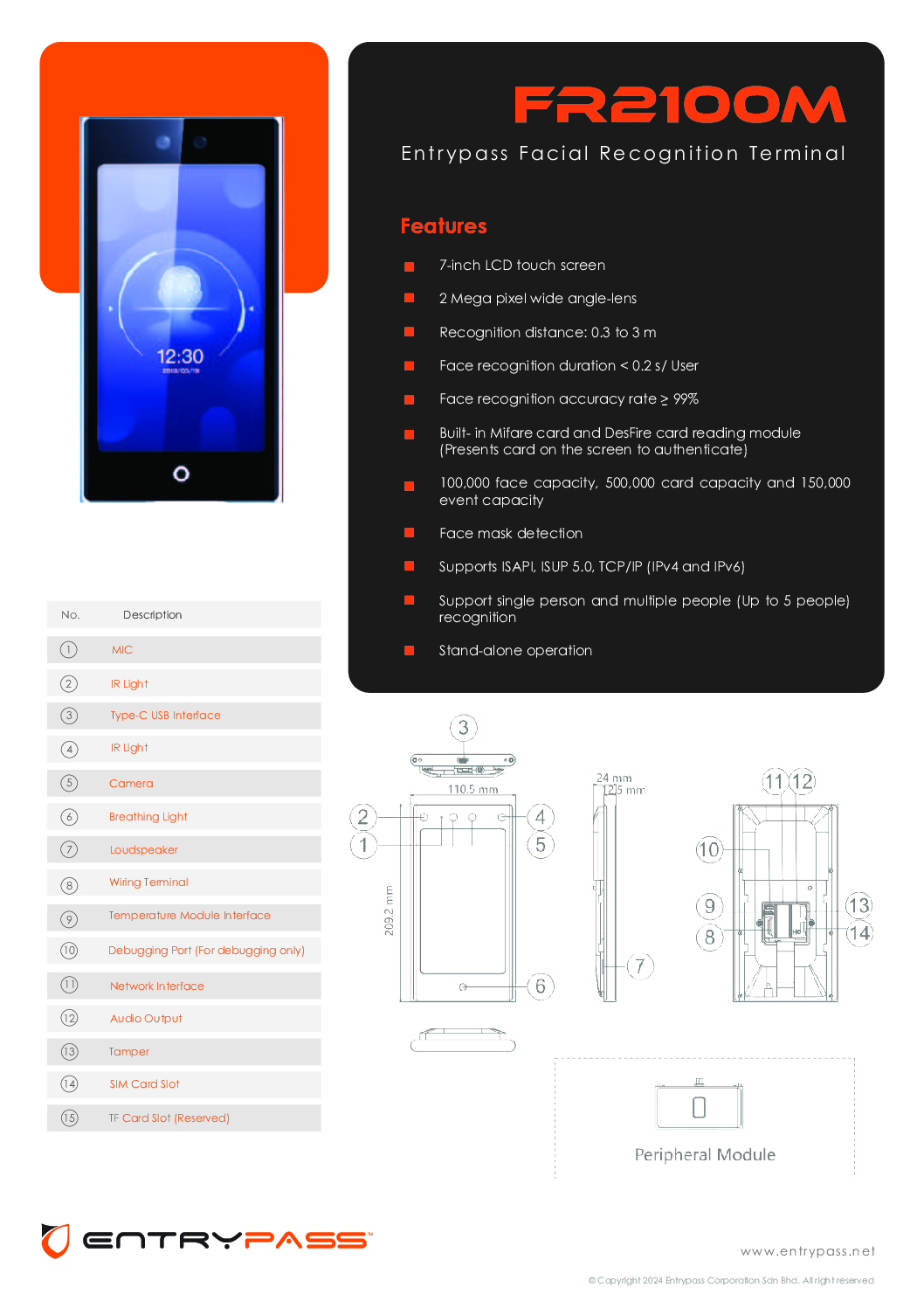
The ENTRYPASS EP-SFR2100M / FR2100M Facial Recognition Terminal is a high-capacity biometric access control solution designed for organisations requiring fast facial authentication, door access control, RFID card authentication and personnel attendance management.
Powered by AI and deep-learning facial recognition technology, the FR2100M offers a stated recognition speed below 0.2 seconds per user and accuracy above 99%. It also provides face anti-spoofing and data-encryption features for stronger identity authentication. (EntryPass)
With capacity for up to 100,000 faces, 500,000 cards and 150,000 events, the FR2100M is particularly suitable for large offices, factories, warehouses, commercial buildings and enterprise security projects. (EntryPass)
Key Features of ENTRYPASS EP-SFR2100M
The FR2100M provides a strong combination of biometric and card-based authentication:
- 7-inch LCD touchscreen
- 2MP wide-angle camera
- 100,000 face capacity
- 500,000 card capacity
- 150,000 event capacity
- Facial recognition under 0.2 seconds/user
- Stated facial recognition accuracy above 99%
- 0.3 to 3 metre facial recognition distance
- Built-in MIFARE & DesFire card reader
- Face anti-spoofing
- Face mask detection
- Single-person and multi-person recognition up to 5 people
- ISAPI, ISUP 5.0 and TCP/IP IPv4/IPv6 support (EntryPass)
100,000 Face Capacity – Built for Large Organisations
One major advantage of the ENTRYPASS FR2100M is its high user capacity.
With storage for up to 100,000 faces, it can support much larger deployments than conventional small-office biometric terminals. Its 500,000-card capacity also makes it suitable for environments where facial recognition and physical credentials operate together. (EntryPass)
This makes the FR2100M particularly attractive for factories, industrial facilities, corporate campuses, warehouses and multi-department organisations.
Fast Face Recognition – Less Than 0.2 Seconds
Security should not create unnecessary congestion at staff entrances.
EntryPass specifies facial recognition at less than 0.2 seconds per user, with an accuracy rate above 99%. (EntryPass)
Fast authentication is especially valuable at locations where hundreds of employees may arrive or leave within a short period.
Facial Recognition + MIFARE + DesFire
The FR2100M is more than a face reader.
It incorporates a 13.56 MHz MIFARE and DesFire compatible card reader, allowing businesses to deploy facial and card-based authentication according to their security policy. (EntryPass)
For example, different areas can be designed around different authentication requirements depending on the overall access-control configuration.
Face Recognition → Convenient contactless access
RFID Card → Traditional credential access
Face + Card → Higher-security authentication workflow
Face Anti-Spoofing Security
Professional facial recognition requires protection against attempts to fool the authentication system.
EntryPass specifies face anti-spoofing together with data encryption for privacy protection on the FR2100M platform. (EntryPass)
This makes facial recognition more appropriate for controlled-access environments where authentication reliability is important.
0.3 to 3 Metres Recognition Distance
The FR2100M supports facial recognition from approximately 0.3 to 3 metres, giving installers flexibility when positioning the terminal at entrances and access points. (EntryPass)
The combination of a 7-inch touchscreen and 2MP wide-angle camera also provides a user-friendly interface for enrolment and authentication.
Facial Recognition Time Attendance System
When deployed with the appropriate EntryPass access-control platform and attendance configuration, personnel transactions can support time-attendance reporting and workforce management. EntryPass lists Time Attendance Report functionality within its broader access-control platform capabilities. (EntryPass)
This allows organisations to build an integrated environment around:
Employee Identification → Door Access → Transaction Records → Attendance Reporting
The exact attendance workflow should be configured according to the organisation’s HR and access-control requirements.
Contactless Access Control
Face recognition eliminates the need to physically touch a fingerprint reader or always present an access card.
The authorised user’s face becomes an authentication credential, creating a faster and more convenient access-control experience. EntryPass specifically positions its facial recognition platform as a contactless identification solution. (EntryPass)
Ideal Applications in Singapore
The ENTRYPASS EP-SFR2100M is suitable for factories, warehouses, corporate offices, commercial buildings, industrial facilities, schools, laboratories, server rooms, staff entrances, restricted departments and large organisations requiring centralised personnel access management.
EntryPass also positions its wider platform for centralised security and complex project environments, including manufacturing and other enterprise applications. (EntryPass)
ENTRYPASS Security System Supplier Singapore – SGCCTV
SGCCTV provides professional security solutions covering ENTRYPASS Facial Recognition, Door Access Control, Time Attendance, RFID Card Access, Magnetic Locks, Door Controllers, Exit Buttons, Emergency Break Glass, Power Supplies, Installation, Maintenance, Troubleshooting and System Upgrading.
A complete facial recognition access-control system can be designed around:
FR2100M Facial Terminal → Access Controller → Door Lock → Exit Device → Management Software → Attendance / Security Reporting
SGCCTV Singapore
WhatsApp: +65 98534404
Email: enquiry@choicecycle.com.sg
SGCCTV Singapore
10 FAQ – ENTRYPASS EP-SFR2100M
1. What is the ENTRYPASS EP-SFR2100M?
The FR2100M is a professional EntryPass Facial Recognition Terminal designed for high-capacity biometric access-control applications. It combines facial authentication, RFID card reading, networking and access-control functions. (EntryPass)
2. How many faces can the FR2100M store?
The FR2100M supports up to 100,000 faces, making it suitable for large organisations and enterprise deployments. (EntryPass)
3. How many access cards can it support?
EntryPass specifies a capacity of up to 500,000 cards, together with storage for 150,000 events. (EntryPass)
4. How fast is ENTRYPASS FR2100M face recognition?
The manufacturer specifies facial recognition in less than 0.2 seconds per user, with a stated accuracy rate above 99%. (EntryPass)
5. What is the facial recognition distance?
The FR2100M has a specified recognition distance of approximately 0.3 to 3 metres. (EntryPass)
6. Does FR2100M support access cards?
Yes. It includes a built-in MIFARE and DesFire card-reading module, providing an alternative or complementary authentication method to facial recognition. (EntryPass)
7. Does it have anti-spoofing protection?
Yes. EntryPass specifies face anti-spoofing and data-encryption capabilities designed to strengthen authentication security and privacy protection. (EntryPass)
8. Can FR2100M be used for time attendance?
Yes, when deployed with the appropriate EntryPass management and attendance configuration. EntryPass’s broader access-control platform supports Time Attendance Report functionality. (EntryPass)
9. Is the FR2100M suitable for factories and large companies?
Yes. Its 100,000-face and 500,000-card capacity, fast recognition and network integration make it particularly suitable for factories, warehouses, corporate offices, commercial properties and other large personnel-access applications. (EntryPass)
10. Where can I buy ENTRYPASS EP-SFR2100M in Singapore?
Contact SGCCTV Singapore for ENTRYPASS facial recognition, door access, time attendance, controllers, locking hardware, installation and technical support.
WhatsApp: +65 98534404
Email: enquiry@choicecycle.com.sg
SGCCTV Singapore – Access Control & Security Systems
10 FAQ – ENTRYPASS EP-FR2010M
1. What is the ENTRYPASS FR2010M?
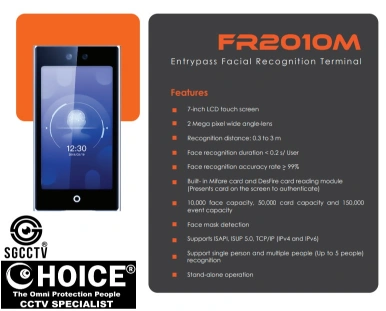
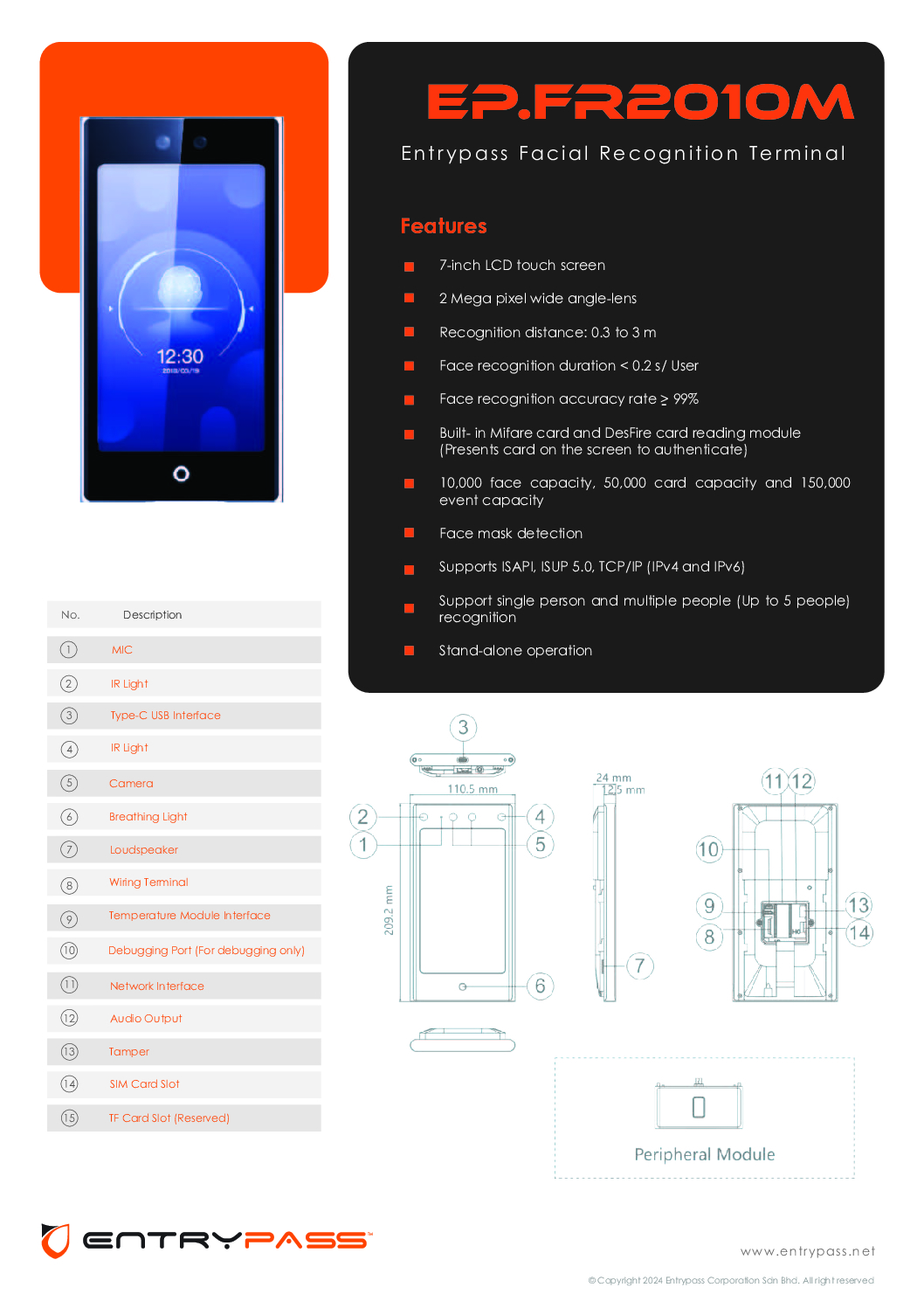
The FR2010M is an EntryPass Facial Recognition Terminal designed for professional access-control applications. It combines AI facial recognition with an integrated RFID credential reader and network connectivity. (EntryPass)
2. How fast is the FR2010M face recognition?
EntryPass specifies a facial recognition duration of less than 0.2 seconds per user, with a stated recognition accuracy above 99%. (EntryPass)
3. How many faces can the FR2010M store?
The FR2010M supports up to 10,000 faces, along with 50,000 cards and 150,000 events. (EntryPass)
4. Can it be used for employee time attendance?
Yes. Facial authentication events can support employee attendance and personnel-management workflows, depending on the access-control software and system configuration deployed.
5. Does the FR2010M support access cards?
Yes. It incorporates a MIFARE and DesFire card-reading module, allowing RFID card authentication in addition to facial recognition. (EntryPass)
6. Can face and card authentication be combined?
Yes. EntryPass describes the terminal as supporting dual authentication modes, providing greater flexibility when configuring security requirements. (EntryPass)
7. What is the facial recognition distance?
The specified recognition distance is approximately 0.3 metres to 3 metres. This gives installers flexibility when positioning the terminal according to the entrance layout. (EntryPass)
8. Does the FR2010M have anti-spoofing protection?
Yes. EntryPass specifies face anti-spoofing as a security feature and also references data encryption for privacy protection. (EntryPass)
9. Is ENTRYPASS FR2010M suitable for offices and factories?
Yes. Its facial authentication, RFID capability, large credential capacity and network integration make it suitable for offices, factories, warehouses, commercial premises and controlled-access areas.
10. Where can I buy ENTRYPASS FR2010M in Singapore?
Contact SGCCTV Singapore for ENTRYPASS facial recognition terminals, access-control systems, door hardware, installation, maintenance and technical support.
WhatsApp: +65 98534404
Email: enquiry@choicecycle.com.sg
SGCCTV ENTRYPASS FR2010M product page
EntryPass Security System
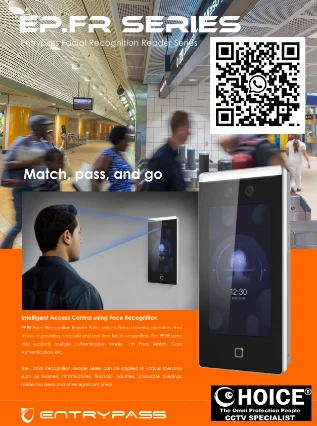
ENTRYPASS Facial Recognition EP.FR2010M || ENTRYPASS Facial Recognition Terminal EP.FR2006M || ENTRYPASS Face Recognition EP-FR2010M || ENTRYPASS Face Recognition EP-FR2006M ||
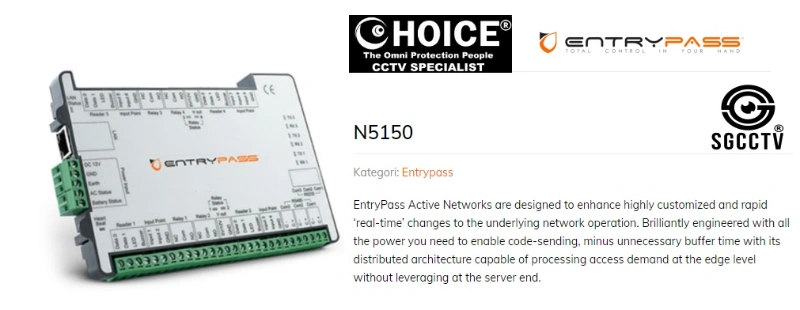
ENTRYPASS ACTIVE NETWORK CONTROL PANEL EP.N5150.PSU || ENTRYPASS Control Panel EPS3150PSU Two Door Controller ||
SUPREMA IP67 RFID XPass-2 READER || SUPREMA FINGERPRINT BLN2-ODB READER ||
SUPREMA Outdoor Compact RFID Device XP2-GKDPB || SUPREMA Door Access Terminal XP2-GDPB || SUPREMA Outdoor Compact RFID Device XP-2-MDPB || ||
ENTRYPASS EP.HIO.PSU HYBRID I/O CONTROL PANEL OUTPUTS RS485 TCP/IP MODBUS ALARM ELEVATOR CONTROL REPAIR REPLACE


Nunc lacus elit, faucibus ac laoreet sed, dapibus ac mi. Maecenas eu ante a elit tempus fermentum. Aliquam commodo tincidunt semper. Phasellus accumsan, justo ac mollis pharetra, ex dui pharetra nisl, a scelerisque ipsum nulla ac sem. Cras eu risus urna. Duis lorem sapien, congue eget nisl sit amet, rutrum faucibus elit.
Donec accumsan auctor iaculis. Sed suscipit arcu ligula, at egestas magna molestie a. Proin ac ex maximus, ultrices justo eget, sodales orci. Aliquam egestas libero ac turpis pharetra, in vehicula lacus scelerisque. Vestibulum ut sem laoreet, feugiat tellus at, hendrerit arcu.
Nunc lacus elit, faucibus ac laoreet sed, dapibus ac mi. Maecenas eu ante a elit tempus fermentum. Aliquam commodo tincidunt semper. Phasellus accumsan, justo ac mollis pharetra, ex dui pharetra nisl, a scelerisque ipsum nulla ac sem. Cras eu risus urna. Duis lorem sapien, congue eget nisl sit amet, rutrum faucibus elit.