
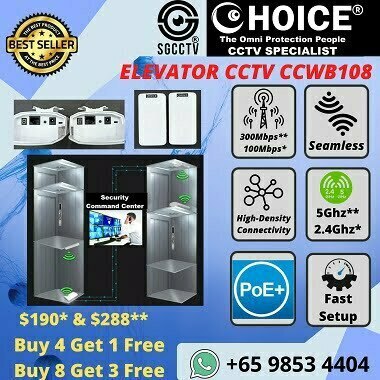


MCST Managing Agent WIFI BRIDGE CCWB108 ELEVATOR CCTV FACTORY Port Ship Vessel Wireless 2.4Ghz 5.8Ghz Lift Cabin Motor Room
$190.00
CHOICE Brand and SGCCTV Brand are Singapore IPOS Trade Mark Registered.
Widely deployed in Shopping Malls, Residential, Commercial, Office, Warehouse.
Compatible with ALL DVR & NVR ONVIF protocols.
Great Technical Support at Sim Lim Square 02-81 11am~7pm Daily +65 98534404
MCST Managing Agent WIFI BRIDGE CCWB108 ELEVATOR CCTV FACTORY Port Ship Vessel Wireless 2.4Ghz 5.8Ghz Lift Cabin Motor Room
WIFI BRIDGE CCWB108 – Elevator CCTV Wireless Bridge Singapore
Lift Cabin • Motor Room • Factory • Port • Ship/Vessel • ASRS • MCST & Managing Agent
The CHOICE CCWB108 WiFi Bridge is a point-to-point wireless networking solution intended for CCTV installations where pulling a conventional Ethernet cable is difficult or impractical. It is marketed for elevator/lift CCTV, factories, warehouses, ports, vessels and ASRS systems, with 2.4GHz and 5.8GHz versions, one-click pairing, high-gain directional antenna and PoE-based installation. sgcctv
For elevator CCTV, the bridge can create the data link between equipment associated with the moving lift cabin and the fixed building CCTV network, avoiding the need to use ordinary Ethernet cabling as a moving data cable.
CCWB108 Key Specifications
| Specification | CCWB108 |
|---|---|
| Product | Wireless WiFi Bridge / CPE |
| Wireless Options | 2.4GHz / 5.8GHz |
| Configuration | Transmitter + Receiver pair |
| Pairing | One-click pairing / toggle switch |
| Antenna | 11dBi high-gain antenna |
| Application | Point-to-Point wireless bridge |
| Advertised Distance | 300m / up to 3km clear line-of-sight, depending configuration |
| Power | 24V PoE stated for CCWB108 listing |
| Primary Application | IP CCTV / Network bridging |
| Elevator Application | Lift Cabin ↔ Fixed Network |
| Other Applications | Factory / Warehouse / ASRS / Port / Vessel |
| Current Listed Price | 2.4GHz S$190/pair; 5.8GHz S$295/pair |
These specifications and prices are from the current CCWB108 listing; actual range is highly dependent on line-of-sight, interference, antenna alignment and installation environment. sgcctv
Elevator CCTV – Lift Cabin to Motor Room / Building Network
A typical IP CCTV design is:
CCTV Camera inside Lift Cabin
↓
Network / PoE Equipment on Lift Cabin
↓
CCWB108 Wireless Bridge – Cabin Side
⇅ Wireless Data Link
CCWB108 Wireless Bridge – Fixed Side
↓
Building LAN / PoE Switch
↓
CCTV NVR
↓
Security Control Room / Guardhouse
This allows the video network to cross between the moving lift and fixed infrastructure wirelessly.
The current installation guidance also states that the client should coordinate a lift technician to provide access/movement of the lift and provide the required power points for the bridge/camera equipment. sgcctv
Why 5.8GHz for Elevator CCTV?
For many CCTV bridge installations, 5.8GHz is attractive because there may be less congestion than the heavily used 2.4GHz band. The current CCWB108 listing specifically positions the 5.8GHz version for IP-camera monitoring and elevator applications. sgcctv
However, the best band should be determined after assessing the actual lift shaft and RF environment. Elevator shafts contain substantial metal structures, moving cars, cables and electrical equipment, so quoted open-air distances should not be interpreted as guaranteed elevator-shaft distances.
MCST & Managing Agent Lift CCTV Applications
The CCWB108 can be considered for:
Condominium Lift CCTV • Commercial Building Elevators • Shopping Mall Lifts • Office Buildings • Factory Goods Lifts • Warehouse Lifts • Carpark Lifts • Service Lifts
For an MCST or Managing Agent, the objective is typically:
Lift Cabin Camera → Reliable Video Transmission → Existing NVR → Security Control Room
This can be particularly useful when upgrading an older lift-camera installation where running a new dedicated data cable through the travelling infrastructure is difficult.
Factory & ASRS Applications
The same point-to-point concept can be applied to industrial environments:
Remote CCTV / Moving Equipment
⇅
CCWB108 Wireless Link
⇅
Factory Network
→ NVR / VMS
Possible applications include warehouse CCTV, ASRS areas, loading bays, remote buildings and locations where trenching or installing Ethernet/fibre is impractical.
For mission-critical industrial control, however, CCTV traffic should be separated conceptually from safety-critical machine-control communications unless the complete network has been engineered for that purpose.
Port, Ship & Vessel CCTV
A wireless bridge can also provide a network link between suitable locations where running a temporary cable is impractical.
IP Camera → Network → Wireless Bridge ⇄ Wireless Bridge → NVR/VMS
Marine deployments require additional engineering consideration for salt corrosion, weather exposure, vibration, grounding, power quality and RF conditions. The CCWB108 listing itself does not establish an IP weatherproof or marine certification, so it should not be advertised as marine-certified without additional documentation. sgcctv
10 Major Benefits
- Wireless CCTV transmission where network cabling is difficult.
- Elevator CCTV application between lift cabin and fixed infrastructure.
- Choice of 2.4GHz or 5.8GHz versions.
- One-click pairing simplifies initial bridge setup.
- 11dBi high-gain directional antenna is specified.
- Point-to-point networking carries IP CCTV traffic transparently across the wireless link.
- Suitable for MCST and Managing Agent lift CCTV upgrades.
- Useful for factory, warehouse and ASRS CCTV.
- Can reduce the need for difficult long-distance network cabling in suitable applications.
- Supplied as transmitter + receiver for a complete point-to-point link. sgcctv
Important Engineering Note – 300m / 3km
The advertised 300m / 3km figures should not be interpreted as guaranteed performance inside an elevator shaft.
Wireless performance depends on:
RF interference + line-of-sight + antenna alignment + lift position + shaft construction + metal obstruction + channel selection + camera bitrate + power stability
For a lift project, testing the wireless link throughout the entire travel of the elevator, including lowest floor, highest floor and intermediate positions, is more meaningful than relying solely on the nominal open-air range.
10 FAQs
1. What is CCWB108 used for?
It creates a wireless network bridge between two Ethernet network locations and is marketed particularly for CCTV and elevator applications. sgcctv
2. Can it transmit CCTV from a lift cabin?
Yes. Elevator CCTV is one of the stated CCWB108 applications. sgcctv
3. Does it support 2.4GHz?
Yes, a 2.4GHz version is listed.
4. Does it support 5.8GHz?
Yes. A 5.8GHz version is also available and is specifically positioned for elevator/IP-camera applications. sgcctv
5. Which frequency should I use for a lift?
5.8GHz can be advantageous where 2.4GHz congestion is high, but the actual shaft should be tested because RF conditions vary substantially between buildings.
6. Is it supplied as a pair?
Yes. The CCWB108 listing specifies one transmitter + one receiver. sgcctv
7. Can it connect to an existing CCTV NVR?
It operates as a network bridge, so IP CCTV traffic can be carried to the network/NVR when the cameras, addressing and network architecture are correctly configured.
8. Is 3km guaranteed inside an elevator shaft?
No. The 3km figure is stated for point-to-point use without obstacles. Elevator-shaft performance depends on the actual RF environment. sgcctv
9. Does the lift contractor need to be involved?
For an elevator installation, yes. The current installation guidance calls for the client to arrange a lift technician for lift access and movement and to provide the necessary power points. sgcctv
10. Can it be used in factories, ports and vessels?
Those are advertised use cases, but environmental suitability must be evaluated separately—particularly weatherproofing, corrosion, vibration and RF conditions for port/marine installations. sgcctv
CCWB108 Singapore, WiFi Bridge Singapore, Elevator CCTV Singapore, Lift CCTV Wireless Bridge, Lift Cabin CCTV, Lift Motor Room CCTV, Elevator Camera Wireless Transmission, MCST CCTV Singapore, Managing Agent CCTV, 5.8GHz WiFi Bridge Singapore, 2.4GHz Wireless Bridge, Factory CCTV Wireless Bridge, ASRS CCTV Camera, Port CCTV Singapore, Ship Vessel CCTV Wireless Bridge
#CCWB108 #WiFiBridge #WirelessBridge #ElevatorCCTV #LiftCCTV #LiftCamera #LiftCabin #MCST #ManagingAgent #FactoryCCTV #ASRS #PortSecurity #WirelessCCTV #SGCCTV #ChoicecycleCCTV
SGCCTV / Choicecycle CCTV Pte Ltd — Elevator CCTV • Wireless Bridge • Troubleshooting • Repair • Replacement
WhatsApp: +65 9853 4404 | Email: enquiry@choicecycle.com.sg | Website: SGCCTV.com.sg
CHOICECYCLE CCTV offer the best WIFI BRIDGE CCWB108 ELEVATOR CCTV FACTORY Port Ship Vessel ASRS Camera Wireless 2.4Ghz 5.8Ghz POE MCST Managing Agent CCTV Contractors Lift Cabin Motor Room
2.4GHz $190.00 per pair || 5.8GHz $295.00 per pair.
Features: Full Specification HERE
Toggle switch, One-click pairing, Say goodbye to complex settings Easy to set up, 1pcs Transmitter + 1pcs Receiver, Easy Pairing,
Specification :
1.One-click pairing
2.High power built-in PA
3.Preferred choice smooth channel
4. 300 meters & 3 km stable transmission
5. 2.4Ghz & 5.8GHz Anti-interference
6.11dBi High gain antenna
Point to point as WIFI bridge 3km (no obstacles)
5.8G cpe best solution for the ip cam monitor or elevator , less interference ,long Range WIFI Transmit
1. Collection from SGCCTV Choicecycle Sim Lim Square CCTV SPECIALIST #02-81 11am~8pm. Whatsapp 98534404 for stock level before visit.
2. Payment by PayNow 201207820G or QR code will receive Free Gift Warning Stickers worth $20.00 (1pc per client order)
3. Please add $18.00 for delivery – 3~5 days.
4. Can issue e-Invoice for your accounting. (upon request)
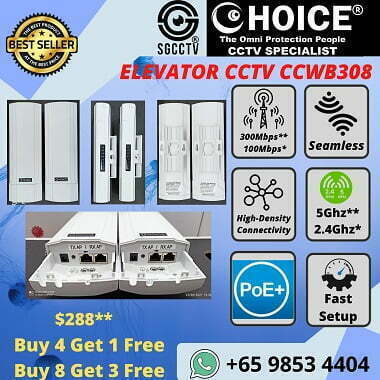
More choice of Wireless Products : Cheap WIFI Mesh Ruijie || TP-Link Professional Mesh || CCWB108 CCWB308 || Elevator Contactless Sensor ||
CHOICE Wireless Alarm System || Hikvision Wireless Alarm System ||
MCST Managing Agent WIFI BRIDGE CCWB108 ELEVATOR CCTV FACTORY Port Ship Vessel Wireless 2.4Ghz 5.8Ghz Lift Cabin Motor Room
Installation notes:
1. Client Need To Arrange Lift Technician Open The Lift And Move Down The Lift.
2. Client Need To Provide Two 13A Power Point For The Wireless Bridge Inside The Lift.
3. Client Need To Provide One 13A Power Point For Camera On top The Lift Cabin.
A network bridge is a computer networking device that creates a single, aggregate network from multiple communication networks or network segments.
This function is called network bridging. Bridging is distinct from routing. Routing allows multiple networks to communicate independently and yet remain separate, whereas bridging connects two separate networks as if they were a single network In the OSI model, bridging is performed in the data link layer.
If one or more segments of the bridged network are wireless, the device is known as a wireless bridge.
The main types of network bridging technologies are simple bridging, multiport bridging, and learning or transparent bridging.
MCST Managing Agent WIFI BRIDGE CCWB108 ELEVATOR CCTV FACTORY Port Ship Vessel Wireless 2.4Ghz 5.8Ghz Lift Cabin Motor Room
Wi-Fi bridge is a device that connects two or more network segments, allowing them to communicate with each other. It typically extends the coverage area of a wireless network or connects a wired network to a wireless one. The specific features and functions of a Wi-Fi bridge can vary depending on the manufacturer and model.
For your use case in an elevator, CCTV systems, factories, ports, ships, vessels, ASRS (Automated Storage and Retrieval Systems), and camera management in lift cabins or motor rooms, you might expect the following features in a Wi-Fi bridge:
- Wireless Connectivity: The Wi-Fi bridge should support both 2.4GHz and 5.8GHz frequency bands for flexibility and compatibility.
- Power over Ethernet (PoE): PoE support allows you to power the device through the Ethernet cable, simplifying installation, especially in areas where power outlets may be limited.
- High Data Throughput: It should be capable of high data transfer rates to support the transmission of video feeds from CCTV cameras and other data-intensive applications.
- Security: Strong encryption and security features to protect the data being transmitted over the wireless link, which is especially important for security applications like CCTV.
- Reliability: The device should be reliable and able to maintain a stable connection even in challenging environments such as factories, ports, or on vessels.
- Management Tools: Tools and features for managing the device, including remote management capabilities and firmware updates.
- Scalability: The ability to connect multiple devices or expand the network as needed, which can be crucial in large installations like ASRS systems or port facilities.
- Quality of Service (QoS): QoS features to prioritize critical data traffic, ensuring that important video streams or control signals have sufficient bandwidth.
- Compatibility: Ensure it’s compatible with the CCTV cameras and other equipment you intend to use.
- Range: The Wi-Fi bridge should have the range necessary to cover the desired areas, including elevator cabins and motor rooms.
To get specific details about the “WIFI BRIDGE CCWB108” and its suitability for your requirements, I would recommend consulting the product’s user manual or contacting the manufacturer or supplier for more information. Additionally, it’s important to work with experienced CCTV contractors or technicians who can help you select and install the appropriate equipment for your specific needs.
MCST Managing Agent WIFI BRIDGE CCWB108 ELEVATOR CCTV FACTORY Port Ship Vessel Wireless 2.4Ghz 5.8Ghz Lift Cabin Motor Room
Steps for installing and configuring a Wi-Fi bridge for your elevator CCTV and other applications. Please note that you should consult the product’s user manual or contact the manufacturer for specific instructions related to the CCWB108 model. Here are the general steps you can follow:
Installation:
- Preparation: Gather all the necessary equipment, including the Wi-Fi bridge, PoE injector or switch, Ethernet cables, and any mounting hardware. Ensure that you have access to power outlets and PoE sources as needed.
- Mounting: Determine the optimal location to mount the Wi-Fi bridge. It should be placed in a location with a clear line of sight or minimal obstructions to the devices it needs to connect. Mount it securely according to the manufacturer’s recommendations.
- Power Connection: If the Wi-Fi bridge supports PoE, connect it to a PoE injector or switch. This will provide both power and data connectivity over a single Ethernet cable. Make sure the PoE source is appropriately powered and connected to a power source.
- Ethernet Connection: Connect the Wi-Fi bridge to your network using an Ethernet cable. One end should be connected to the Wi-Fi bridge, and the other end to your network switch or router.
- Antenna Adjustment: If the Wi-Fi bridge has external antennas, adjust them to optimize the signal strength and connectivity. The angles and positions may vary based on your specific environment.
- Power On: Power on the Wi-Fi bridge. It should start booting up and establishing a connection with the network.
Configuration:
- Access the Web Interface: Open a web browser on a computer connected to the same network and enter the IP address of the Wi-Fi bridge. You should find this IP address in the user manual or on a label on the device itself.
- Login: You will be prompted to log in with a username and password. The default login credentials are often provided in the user manual and should be changed for security reasons.
- Wireless Settings: Configure the Wi-Fi bridge to connect to your existing wireless network. You will need to enter the SSID and security key (WPA/WPA2 passphrase) of your network.
- Network Settings: Set the IP address and network settings for the Wi-Fi bridge. It should be on the same subnet as your network for proper communication.
- Security Settings: Configure the Wi-Fi bridge’s security features, including encryption and authentication settings, to protect your data.
- Save and Reboot: Save your settings and reboot the Wi-Fi bridge to apply the configuration changes.
- Test Connection: Verify that the Wi-Fi bridge is successfully connecting to your network and providing connectivity to the elevator CCTV, ASRS cameras, or other devices in your environment.
- Fine-Tuning: Adjust the settings as needed for optimal performance. This may include adjusting antenna positioning or signal strength settings.
- Documentation: Keep a record of the configuration settings, including IP addresses, login credentials, and any other important details for future reference.
Remember that these steps are general guidelines, and specific procedures can vary depending on the Wi-Fi bridge model and manufacturer. Always consult the product’s user manual and consider working with experienced CCTV contractors or technicians to ensure a successful installation and configuration. Additionally, prioritize network security to protect your data and devices.
MCST Managing Agent WIFI BRIDGE CCWB108 ELEVATOR CCTV FACTORY Port Ship Vessel Wireless 2.4Ghz 5.8Ghz Lift Cabin Motor Room


Nunc lacus elit, faucibus ac laoreet sed, dapibus ac mi. Maecenas eu ante a elit tempus fermentum. Aliquam commodo tincidunt semper. Phasellus accumsan, justo ac mollis pharetra, ex dui pharetra nisl, a scelerisque ipsum nulla ac sem. Cras eu risus urna. Duis lorem sapien, congue eget nisl sit amet, rutrum faucibus elit.
Donec accumsan auctor iaculis. Sed suscipit arcu ligula, at egestas magna molestie a. Proin ac ex maximus, ultrices justo eget, sodales orci. Aliquam egestas libero ac turpis pharetra, in vehicula lacus scelerisque. Vestibulum ut sem laoreet, feugiat tellus at, hendrerit arcu.
Nunc lacus elit, faucibus ac laoreet sed, dapibus ac mi. Maecenas eu ante a elit tempus fermentum. Aliquam commodo tincidunt semper. Phasellus accumsan, justo ac mollis pharetra, ex dui pharetra nisl, a scelerisque ipsum nulla ac sem. Cras eu risus urna. Duis lorem sapien, congue eget nisl sit amet, rutrum faucibus elit.



Reviews
There are no reviews yet.