
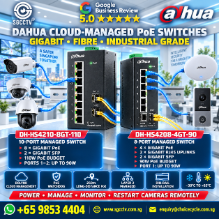





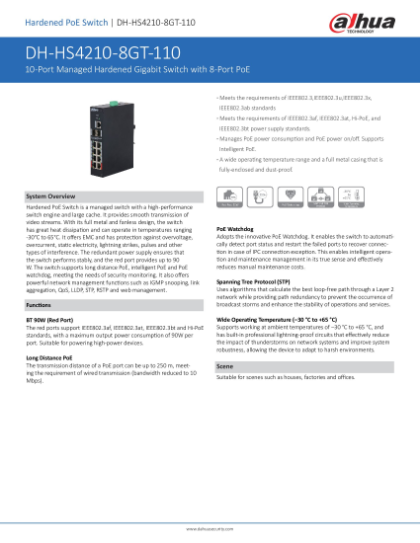
DAHUA INDUSTRIAL SWITCH HS4210-8GT-110 Din-Rail Switch DAHUA Security System Supplier CCTV CAMERA SINGAPORE Repair Upgrade
in stock
$680.00
DAHUA SINGAPORE OFFICIAL PLANTINUM PARTNER
Supply and Maintenance DAHUA CCTV IP Cameras, NVR, Turbo HD TVI Cameras, DVR, PTZ Cameras,
Access Control System, Video Intercom.
Sim Lim Square 02-81 10am-7pm Daily.
Whatsapp Enquiry Project +65 98534404, Technical Support +65 81120788, Site Visit Maintenance +65 81985572.
in stock
DAHUA INDUSTRIAL SWITCH HS4210-8GT-110 Din-Rail Switch DAHUA Security System Supplier CCTV CAMERA SINGAPORE Repair Upgrade
DAHUA INDUSTRIAL SWITCH DH-IS4210-8GT-120
8-Port Gigabit PoE DIN-Rail Managed Switch | CCTV & Security System Singapore
The DAHUA DH-IS4210-8GT-120 is a professional Layer-2 industrial managed Gigabit PoE switch designed for CCTV and security networks operating in demanding environments. It combines 8 × Gigabit PoE RJ45 ports + 2 × Gigabit SFP fiber ports, providing a total of 10 network ports in a compact DIN-rail/desktop industrial enclosure. (Dahua Technology)
It is particularly suitable for CCTV cameras, high-power PTZ cameras, WiFi access points, video intercom, facial-recognition terminals, door-access systems and remote fiber-connected security nodes.
Key Specifications
| Specification | DAHUA DH-IS4210-8GT-120 |
|---|---|
| Type | Industrial L2 Managed PoE Switch |
| Copper Ports | 8 × 10/100/1000Mbps RJ45 PoE |
| Fiber Ports | 2 × 1000Mbps SFP |
| Total Network Ports | 10 |
| PoE Standards | 802.3af / 802.3at / Hi-PoE / 802.3bt |
| High-Power Ports | Ports 1–2: up to 90W/port |
| Ports 3–8 | Up to 30W/port |
| Total PoE Budget | 120W maximum |
| Long-Range PoE | Up to 250m at 10Mbps |
| Switching Capacity | 20Gbps |
| Forwarding Rate | 14.88Mpps |
| MAC Table | 8K |
| VLAN | Up to 4K |
| Jumbo Frame | 10KB |
| Management | Web HTTP/HTTPS + SNMP |
| Cloud Management | DAHUA DoLynk Care |
| Network Protection | STP / RSTP / ERPS |
| Link Aggregation | Static + LACP |
| Operating Temperature | -40°C to +75°C |
| Mounting | DIN-Rail / Desktop |
| Input | 53VDC |
| Dimensions | 125 × 53.5 × 175mm |
| Net Weight | Approx. 1.25kg |
These specifications are from Dahua’s current product listing and July 2024 datasheet. (Dahua Technology)
8-Port Gigabit PoE + 2-Port SFP Fiber
The architecture is ideal for a remote CCTV node:
8 × CCTV / PTZ / Security Devices
↓ Cat6 PoE
DH-IS4210-8GT-120
↓ 2 × Gigabit SFP
Fiber Backbone
↓
Core Switch → NVR / VMS / Control Room
Ports 1–8 operate at Gigabit Ethernet speeds, while ports 9–10 are Gigabit SFP interfaces. (Dahua Security Transmission)
120W Intelligent PoE
The switch has a 120W total PoE budget.
Ports 1 and 2 are the high-power ports and support up to 90W per port, while ports 3–8 support up to 30W each. The total simultaneous load must remain within the switch’s 120W budget. (Dahua Technology)
A practical configuration could therefore be:
Port 1 → High-Power PTZ
Port 2 → WiFi AP / PTZ
Ports 3–8 → Fixed IP Cameras
This makes the IS4210 substantially more flexible than a basic PoE+ switch when higher-power security equipment is involved.
IEEE 802.3bt 90W High-Power PoE
The red high-power ports support:
IEEE 802.3af PoE
IEEE 802.3at PoE+
DAHUA Hi-PoE
IEEE 802.3bt PoE
Dahua specifically rates the red ports for up to 90W maximum output per port, subject to the total PoE budget. (Dahua Security)
This can support compatible high-power equipment such as larger PTZ cameras, wireless APs and other IEEE 802.3bt-powered devices.
250m Long-Distance PoE
For conventional installations:
0–100m → Gigabit PoE
For long-distance CCTV:
150–250m → Extended PoE at 10Mbps
Dahua’s own testing shows that at 250m, available endpoint power depends on the PoE mode: approximately 40W under its 90W 802.3bt test, 37W under Hi-PoE 60W, and 25.5W under 802.3at 30W. Actual performance varies with cable quality, resistance and endpoint consumption. (Dahua Technology)
Therefore, 250m PoE should not be advertised as 250m Gigabit.
For very long or mission-critical links, fiber + a remote PoE switch remains the preferred network architecture.
PoE Watchdog – Automatic Camera Recovery
The IS4210-8GT-120 supports PoE Watchdog. (Dahua Security)
A typical recovery sequence is:
IP Camera Stops Responding
→ PoE Watchdog Detects Failure
→ PoE Port Restarts
→ Camera Reboots
→ Network Connection Recovers
This can reduce unnecessary maintenance trips caused by recoverable endpoint lockups.
Industrial -40°C to +75°C
A major difference between this model and ordinary commercial PoE switches is its -40°C to +75°C operating-temperature specification. (Dahua Technology)
That makes it particularly attractive for equipment cabinets and harsher operating environments such as:
Factories • Warehouses • Guard Houses • Car Parks • Infrastructure • Remote CCTV Cabinets • Industrial Plants • Outdoor Security Enclosures
The switch itself is not an outdoor weatherproof enclosure; environmental protection still depends on the cabinet and installation design.
DIN-Rail Installation
The compact industrial chassis supports DIN-rail mounting, making it well suited to:
CCTV Control Panels
Electrical / ELV Cabinets
Network Cabinets
Security Equipment Panels
Industrial Control Cabinets
Dahua also supports desktop mounting. (Dahua Security Transmission)
One important procurement point: Dahua specifies that the power adapter is not included with the switch. The switch requires the appropriate DC supply. (Dahua Security)
SFP Fiber Optic CCTV Network
A strong application is connecting a remote building back to the main CCTV room:
REMOTE BUILDING

Camera 1 ─┐
Camera 2 ─┤
Camera 3 ─┤
Camera 4 ─┤
PTZ ──────┤
AP ───────┤
          ▼
┌─────────────────────┐
│ DAHUA IS4210-8GT-120│
│ 8 × GE PoE          │
│ 2 × GE SFP          │
└──────────┬──────────┘
           │
         SFP
           │
════════ FIBER ════════
           │
         SFP
           ▼
     CORE SWITCH
           │
     ┌─────┴─────┐
     ▼           ▼
   NVR/VMS      LAN
Fiber distance depends on the selected SFP module and fiber type. Dahua documentation lists both single-mode and multimode SFP options for this platform. (Dahua Security)
VLAN for Security-System Integration
The switch supports IEEE 802.1Q VLAN, allowing one physical switch to carry several logically separated security networks. (Dahua Technology)
For example:
VLAN 10 — CCTV
VLAN 20 — Door Access
VLAN 30 — Video Intercom
VLAN 40 — WiFi AP
VLAN 50 — IP Phone
VLAN 99 — Network Management
This is particularly useful for integrated commercial security projects where CCTV, access control and other IP systems share the same fiber backbone.
ERPS + STP/RSTP + LACP
The IS4210-8GT-120 supports STP, RSTP, ERPS and link aggregation/LACP. (Dahua Technology)
For larger installations, ERPS can be useful for designing resilient fiber-ring architectures:
Switch A → Switch B → Switch C → Switch D → Switch A
This is especially relevant to factories, campuses, transport infrastructure, warehouses and multi-building CCTV systems.
DoLynk Care Cloud Management
The current Dahua specification also lists centralized cloud management through DoLynk Care, alongside Web and SNMP management. (Dahua Technology)
This provides a useful maintenance architecture:
Customer Site A
Customer Site B
Customer Site C
Customer Site D
↓
DAHUA DoLynk Care
↓
Centralized Supported Device Management
For a security-system service provider, remote visibility can help reduce troubleshooting time before deciding whether an onsite visit is necessary.
Recommended CCTV Installation
                    INTERNET
                       │
                 ROUTER/FIREWALL
                       │
                  CORE SWITCH
                   │       │
                   │      NVR
                   │
               SFP FIBER
                   │
                   ▼
        ┌─────────────────────┐
        │ DH-IS4210-8GT-120   │
        │ INDUSTRIAL PoE      │
        └─┬─┬─┬─┬─┬─┬─┬─┬───┘
          │ │ │ │ │ │ │ │
          ▼ ▼ ▼ ▼ ▼ ▼ ▼ ▼
         C1 C2 C3 C4 C5 C6 PTZ AP

                    POWER
                      │
                    UPS
                      │
            ┌─────────┴─────────┐
            ▼                   ▼
        PoE Switch             NVR
For security installations requiring backup operation, the PoE switch, NVR, router and relevant core switches should all be considered in the UPS load calculation.
10 Major Benefits
- 8 × Gigabit PoE ports
- 2 × Gigabit SFP fiber ports
- 120W total PoE capacity
- Up to 90W high-power PoE ports
- IEEE 802.3bt support
- Up to 250m extended PoE
- PoE Watchdog
- DIN-rail industrial installation
- -40°C to +75°C operation
- VLAN + ERPS + LACP + DoLynk Care management (Dahua Technology)
10 FAQ
1. Is the IS4210-8GT-120 an 8-port or 10-port switch?
It has 10 network interfaces in total: 8 Gigabit PoE RJ45 + 2 Gigabit SFP. (Dahua Security Transmission)
2. Is every RJ45 port Gigabit?
Yes. Ports 1–8 are 10/100/1000Mbps. (Dahua Technology)
3. What is the total PoE budget?
120W maximum. (Dahua Technology)
4. Does it support 90W PoE?
Yes. Ports 1–2 support up to 90W per port, subject to the overall power budget. (Dahua Security)
5. Can it power PTZ cameras?
Yes, provided the PTZ’s PoE standard and maximum power requirement are compatible.
6. Does it support fiber optic connections?
Yes. It has 2 × Gigabit SFP ports. (Dahua Security Transmission)
7. Can it transmit PoE up to 250m?
Yes, under specified conditions. Extended operation is 10Mbps, not Gigabit, at the longer distances. (Dahua Security)
8. Does it support DIN-rail installation?
Yes. Both DIN-rail and desktop installation are supported. (Dahua Technology)
9. Is the power adapter included?
No. Dahua specifies that the required power supply is purchased separately. (Dahua Security)
10. Is it suitable for CCTV security systems?
Yes. Its PoE, fiber, watchdog, VLAN, industrial-temperature and network-management features make it particularly suitable for professional IP CCTV infrastructure.
SEO Title
DAHUA DH-IS4210-8GT-120 Singapore | 8-Port Gigabit PoE Industrial DIN-Rail Switch 2-SFP Fiber CCTV Switch
15 SEO Keywords
DAHUA IS4210-8GT-120, DH-IS4210-8GT-120 Singapore, DAHUA Industrial Switch, DAHUA Industrial PoE Switch, 8 Port Gigabit PoE Switch, DIN Rail PoE Switch Singapore, Industrial Network Switch Singapore, 10 Port PoE Switch, 2 SFP Fiber PoE Switch, 120W PoE Switch, 90W PoE Switch, CCTV PoE Switch Singapore, CCTV Network Switch Singapore, DAHUA Security System Singapore, SGCCTV Singapore
15 Facebook Hashtags
#DAHUA #DahuaSingapore #IS42108GT120 #IndustrialSwitch #IndustrialPoE #PoESwitch #GigabitPoE #DINRail #FiberOptic #SFPSwitch #PoEWatchdog #CCTVNetwork #CCTVSingapore #SGCCTV #ChoicecycleCCTV
DAHUA Industrial Switch HS4210-8GT-110 Din-Rail Switch | Singapore CCTV Security System Supplier | Repair & Upgrade Services
Looking for a reliable industrial-grade network switch to power your CCTV and security system? The DAHUA HS4210-8GT-110 Industrial Switch is the perfect solution for professional surveillance deployments in Singapore.
✅ High-Performance Networking – Equipped with 8 Gigabit ports, the HS4210-8GT-110 ensures smooth, fast, and stable data transmission for CCTV cameras, NVRs, and security devices.
✅ Din-Rail Mounting Design – Compact and rugged, ideal for industrial environments such as factories, power plants, and data centres.
✅ Industrial-Grade Durability – Built to withstand harsh operating conditions with wide temperature tolerance and robust protection.
✅ Seamless Integration – Works perfectly with DAHUA CCTV cameras, NVRs, and access control systems, ensuring compatibility and reliability.
✅ Security & Stability – Designed for continuous operation to keep your surveillance systems running without interruption.
As a trusted DAHUA Security System Supplier in Singapore, we provide:
Supply & installation of DAHUA Industrial Switches & CCTV cameras
System repair, upgrade, and maintenance services
Professional consultation for network security solutions
Whether you’re upgrading your CCTV infrastructure or setting up a new surveillance system, the DAHUA HS4210-8GT-110 Din-Rail Switch delivers speed, stability, and long-term reliability.
📞 Contact us today at +65 98534404 (WhatsApp) or email enquiry@choicecycle.com.sg for a free quotation.
🌐 Visit us at https://sgcctv.com.sg – Singapore’s trusted partner for CCTV cameras, DAHUA security systems, and repair services.
For the DAHUA DH-IS4210-8GT-120 / DH-HS4210-8GT-110 / PFS4210-8GT-DP, the basic CCTV wiring and configuration are very similar. The DH-HS4208-4GT-90 follows the same principle but has only 4 PoE device ports.
Recommended wiring diagram
                    INTERNET / ROUTER
                           │
                           │ LAN
                           ▼
                  ┌─────────────────┐
                  │ CORE / LAN      │
                  │ NETWORK SWITCH  │
                  └────────┬────────┘
                           │
                    Gigabit / Fiber
                           │
               ┌───────────▼───────────┐
               │ DAHUA MANAGED PoE     │
               │ DH-IS4210-8GT-120     │
               │                       │
               │  P1  P2 ... P8        │
               │  │   │      │         │
               │ SFP1      SFP2        │
               └──┬───┬──────┬─────────┘
                  │   │      │
       Cat6 PoE   │   │      │ Cat6 PoE
                  │   │      │
             ┌────▼┐ ┌▼────┐ ┌▼─────────┐
             │CAM 1│ │PTZ  │ │CAM 3–8   │
             └─────┘ └─────┘ └──────────┘

                           │
                      Fiber SFP
                           │
                           ▼
                  ┌─────────────────┐
                  │ MAIN CCTV ROOM  │
                  │ Core Switch     │
                  └────────┬────────┘
                           │
                    ┌──────┴───────┐
                    ▼              ▼
               ┌─────────┐    ┌─────────┐
               │DAHUA NVR│    │ PC / VMS│
               └────┬────┘    └─────────┘
                    │
                    ▼
                 MONITOR
For a simple single-building installation, you do not need fiber:
Internet Router
      │
      ├────────────── NVR
      │
      └────────────── DAHUA PoE Switch
                          │
                 ┌────────┼────────┐
                 │        │        │
                CAM1     CAM2     CAM3 ... CAM8
Power wiring
For a reliable CCTV system, I recommend putting the entire surveillance chain behind the UPS:
230VAC
  │
  ▼
[UPS]
  │
  ├──────── DAHUA PoE Switch
  │
  ├──────── NVR
  │
  ├──────── Router
  │
  └──────── Core Switch

DAHUA PoE Switch
  │
  └──── Cat6 ──── Camera
        DATA
          +
        POWER
This is important: putting only the NVR on UPS is insufficient. If the PoE switch loses AC power, all PoE cameras connected to it stop operating.
Initial configuration
Connect your laptop directly to one of the switch’s Ethernet ports. Temporarily configure the laptop to the same IP subnet as the switch’s factory-management IP, then open the switch IP address in a browser.
Because default IP/login details can vary by model, firmware and hardware revision, check the label/manual for the exact factory address rather than assuming one universal Dahua default.
After login, immediately configure a permanent management IP. For example:
Router/Gateway       192.168.10.1
PoE Switch           192.168.10.2
NVR                  192.168.10.10

Camera 1             192.168.10.101
Camera 2             192.168.10.102
Camera 3             192.168.10.103
Camera 4             192.168.10.104
Camera 5             192.168.10.105
Camera 6             192.168.10.106
Camera 7             192.168.10.107
Camera 8             192.168.10.108

Subnet Mask          255.255.255.0
Gateway              192.168.10.1
I recommend static IP addresses for the NVR, switches and CCTV cameras, or DHCP reservations where centrally managed. This makes troubleshooting much easier.
Configure PoE
Enter the switch’s PoE Management section and check each camera port.
For example:
| Port | Device | Expected Power |
|---|---|---|
| P1 | High-power PTZ | 40–60W* |
| P2 | PTZ / WiFi AP | 20–30W* |
| P3 | Fixed Camera | 6–10W |
| P4 | Fixed Camera | 6–10W |
| P5 | Fixed Camera | 6–10W |
| P6 | Fixed Camera | 6–10W |
| P7 | Fixed Camera | 6–10W |
| P8 | Fixed Camera | 6–10W |
*Always check the endpoint’s actual PoE standard and maximum consumption.
Do not calculate only by number of ports. You must check:
Total camera wattage ≤ switch total PoE budget
For the DH-IS4210-8GT-120, for example:
6 Fixed Cameras × 8W = 48W
1 PTZ × 25W          = 25W
1 WiFi AP × 15W      = 15W
                       ----
Total                 = 88W
That fits within a 120W budget with some reserve.
Configure PoE Watchdog
For CCTV installations, enable PoE Watchdog on the appropriate camera ports where supported.
Camera Normal
     │
     ▼
Switch checks camera
     │
     ├── Responding ──► No action
     │
     └── Not responding
              │
              ▼
        Restart PoE Port
              │
              ▼
        Camera Reboots
This is useful for remote cameras because some network lockups can be recovered without physically visiting the site.
Do not use overly aggressive watchdog settings: a camera undergoing firmware upgrade or intentional maintenance should not be repeatedly power-cycled.
Configure VLANs for a professional installation
If this switch is used only for CCTV, one CCTV VLAN may be enough.
For a mixed security network, I recommend separating systems:
VLAN 10 = CCTV
VLAN 20 = Door Access
VLAN 30 = Video Intercom
VLAN 40 = WiFi AP
VLAN 50 = IP Phone
VLAN 99 = Switch Management
Example:
CAM 1 ── Port 1 ── VLAN 10
CAM 2 ── Port 2 ── VLAN 10
CAM 3 ── Port 3 ── VLAN 10
CAM 4 ── Port 4 ── VLAN 10

Access ─ Port 5 ── VLAN 20
Intercom Port 6 ── VLAN 30
AP ───── Port 7 ── VLAN 40

SFP1 ───────────── TRUNK
                    │
                    ▼
                 CORE SWITCH
The uplink becomes a tagged trunk carrying the required VLANs. The camera ports normally operate as untagged/access ports in the CCTV VLAN.
Fiber connection
For two buildings:
BUILDING A                              BUILDING B

IP Cameras
 │ │ │ │
 ▼ ▼ ▼ ▼
┌──────────────────┐
│ DAHUA PoE SWITCH │
│             SFP1 ├───────┐
└──────────────────┘       │
                           │
                    Fiber Optic Cable
                           │
┌──────────────────┐       │
│ CORE SWITCH  SFP ├───────┘
└────────┬─────────┘
         │
         ├──── NVR
         ├──── VMS Server
         └──── Router
Both ends must use compatible SFP modules. For example, do not mix single-mode optics with multimode fiber unless the specific optics/design support it. Also match wavelength, speed and connector type.
For inter-building CCTV, fiber has another important benefit: it eliminates a direct conductive Ethernet path between buildings, helping with electrical isolation.
When to use 250m Extend Mode
Use long-range/Extend PoE only when the camera cable genuinely exceeds normal Ethernet design distance.
0–100m
CAMERA ───────────── PoE SWITCH
       Normal Mode

100–250m
CAMERA ───────────────────────── PoE SWITCH
           Extend Mode
Do not enable Extend Mode everywhere simply because the switch supports it. Extended mode may reduce link bandwidth, so normal Gigabit operation is preferable for standard cable runs.
For new installations requiring substantially more than 100m, fiber + a remote PoE switch is often the better engineering solution.
Recommended complete CCTV configuration
                         INTERNET
                            │
                     [FIREWALL/ROUTER]
                            │
                            │
                    ┌───────▼───────┐
                    │  CORE SWITCH  │
                    └───┬───────┬───┘
                        │       │
                     NVR/VMS   PC
                        │
                 ===== FIBER =====
                        │
                        ▼
              ┌─────────────────────┐
              │ DAHUA INDUSTRIAL    │
              │ MANAGED PoE SWITCH  │
              │                     │
              │ P1 P2 P3 P4 ... P8 │
              └─┬──┬──┬──┬──────┬──┘
                │  │  │  │      │
                ▼  ▼  ▼  ▼      ▼
               CAM CAM CAM PTZ  AP

230VAC
   │
   ▼
┌──────────┐
│   UPS    │
└────┬─────┘
     │
     ├──── PoE Switch
     ├──── Core Switch
     ├──── NVR/VMS
     └──── Router
For your DH-IS4210-8GT-120, I would use P1/P2 for high-power PTZ or other high-power PoE equipment, normal fixed cameras on the remaining ports, SFP1 as the main fiber uplink, and keep SFP2 available for redundancy/ring or a second fiber connection where the network design requires it. For the HS4210-8GT-110 and PFS4210-8GT-DP, the topology is essentially the same, but the exact PoE limits and management menus should follow that model’s firmware/hardware revision.
DAHUA CCTV CAMERA PTZ
DAHUA BUDGET IP CAMERA DH-ED125-E DH-SF125-E || DAHUA CCTV DOME 2MP HDW2241TP-S ||
DAHUA IP CAMERA IPC-HDW2249T-S-IL || DAHUA CCTV DOME 4MP HDW2441TP-S ||
DAHUA CCTV DOME 4MP DH-IPC-DHBW2441R || DAHUA CCTV DOME 4MP DH-IPC-DHBW2441E-S ||
Panoramic Network Fisheye IPC-EBW8630 || DAHUA CCTV Pan-Tilt-Zoom DH-SD29204T-GN-W ||
DAHUA CCTV Pan-Tilt-Zoom SD22404DB-GNY || DAHUA CCTV Pan-Tilt-Zoom SD22204DB-GNY ||
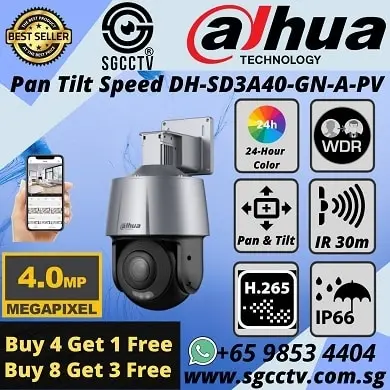
Dahua IVS Camera SD3A400-GN-A-PV ||
Dahua IMOU Cue C22P No Drilling Wall Ceiling || DAHUA IMOU CRUISER 4G ||
CCTV CAMERA BRACKET PFA135 PFA152-E LR1002 ||
DAHUA CCTV DVR NVR
DAHUA 32CH NVR NVR5432-EI DHI-NVR5832-EI || DAHUA 32CH NVR NVR5432-EI DHI-NVR5832-EI ||
Dahua Network Video Recorder NVR5432-EI || DAHUA 64CH NVR DHI-NVR5464-EI NVR5864-EI ||
DAHUA ACCESS CONTROL VIDEO INTERCOM || DAHUA Face Recognition Control DHI-ASI3213A-W ||
DAHUA VIDEO INTERCOM VTH2421FB(W)-P ||
DAHUA SWITCH SOLUTIONS
DAHUA Drone Thermal Camera DHI-UAV-V3300 || Industrial Drone Thermal Camera with Gimbal ||
Video Wall System LS550UDM-EG Display Panels || Solar-Powered CCTV DH-SD6C3432XB-HNR-AGQ-PV 4MP 32X ||
Solar-Powered CCTV KIT DH-PFM364L-D1
1. Collection from SGCCTV Choicecycle Sim Lim Square CCTV SPECIALIST #02-81 11am~8pm. Whatsapp 98534404 for stock level before visit. 2. Payment by PayNow 201207820G
DAHUA INDUSTRIAL SWITCH HS4210-8GT-110 Din-Rail Switch DAHUA Security System Supplier CCTV CAMERA SINGAPORE Repair Upgrade


Nunc lacus elit, faucibus ac laoreet sed, dapibus ac mi. Maecenas eu ante a elit tempus fermentum. Aliquam commodo tincidunt semper. Phasellus accumsan, justo ac mollis pharetra, ex dui pharetra nisl, a scelerisque ipsum nulla ac sem. Cras eu risus urna. Duis lorem sapien, congue eget nisl sit amet, rutrum faucibus elit.
Donec accumsan auctor iaculis. Sed suscipit arcu ligula, at egestas magna molestie a. Proin ac ex maximus, ultrices justo eget, sodales orci. Aliquam egestas libero ac turpis pharetra, in vehicula lacus scelerisque. Vestibulum ut sem laoreet, feugiat tellus at, hendrerit arcu.
Nunc lacus elit, faucibus ac laoreet sed, dapibus ac mi. Maecenas eu ante a elit tempus fermentum. Aliquam commodo tincidunt semper. Phasellus accumsan, justo ac mollis pharetra, ex dui pharetra nisl, a scelerisque ipsum nulla ac sem. Cras eu risus urna. Duis lorem sapien, congue eget nisl sit amet, rutrum faucibus elit.


Reviews
There are no reviews yet.