
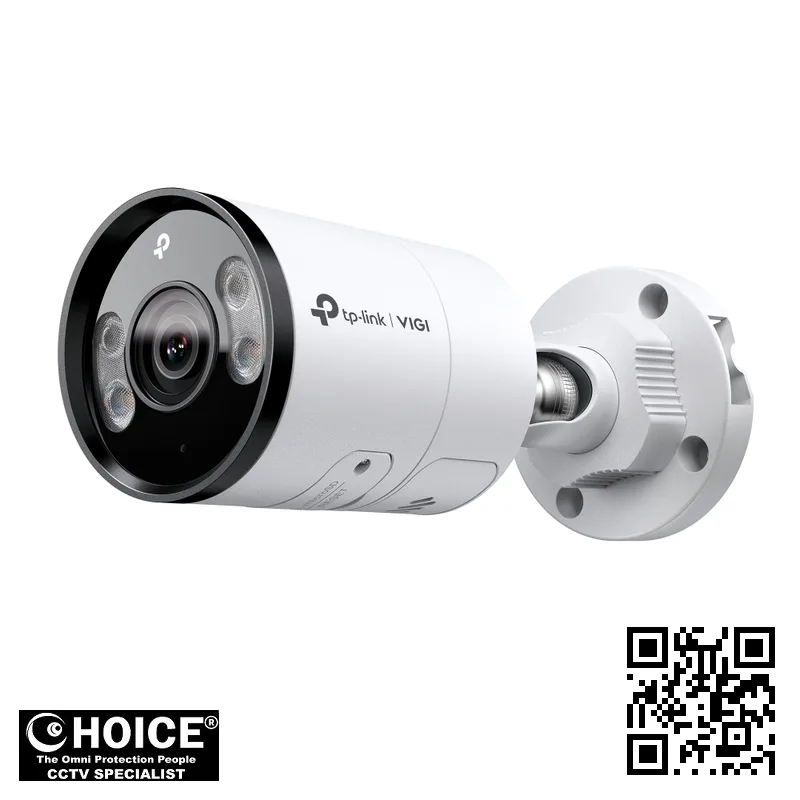
TP-Link InSight S345 VIGI 4MP Outdoor Full-Color Bullet Network Camera
TP-LINK PREMIUM PARTNERS SINGAPORE
Supply and Maintenance TP-LINK CCTV IP Cameras, NVR, DVR, PTZ Cameras,
Access Control System, Video Intercom.
1 Rochor Canal Road, Sim Lim Square 02-81 10am-7pm Daily.
Whatsapp Enquiry Project +65 98534404, Technical Support +65 81120788, Site Visit Maintenance +65 81985572.
TP-Link InSight S345 Singapore VIGI 4MP Outdoor Full-Color Bullet Network Camera | 24/7 Vivid Color Surveillance
TP-Link InSight S345 Singapore offers a sophisticated leap in security technology for property owners seeking high-definition clarity. This VIGI series network camera is specifically engineered to provide 4MP resolution, ensuring that every detail is captured with precision. Whether you are monitoring a residential driveway or a large-scale commercial perimeter, this camera provides the reliability required in the modern era. For buyers in Singapore, the ability to see in full color even during the darkest hours of the night provides a significant advantage in identifying intruders or vehicles.
By integrating advanced sensor technology, the InSight S345 ensures that your surveillance remains effective, providing peace of mind through consistent, high-quality visual evidence when it matters most.
Key Features of the TP-Link InSight S345 Singapore
- Advanced 4MP High-Resolution Imaging: Capture incredibly detailed video at 2688 x 1520 resolution, allowing for much clearer identification of faces and license plates.
- Full-Color Night Vision: Utilizing both IR and White LED illuminators, this camera delivers vibrant color images even in near-zero lux conditions.
- Intelligent People and Vehicle Analytics: The system can intelligently classify objects, allowing you to filter alerts specifically for humans or vehicles to reduce false alarms.
- Robust Weatherproof Design: With an IP67 rating, the camera is built to withstand heavy tropical rain and dust, making it ideal for outdoor use in Singapore.
- Two-Way Audio Communication: Featuring a built-in microphone and speaker, you can listen to surroundings and communicate with visitors remotely via the VIGI app.
- Smart Event Detection: Stay informed with advanced detection capabilities including line-crossing, intrusion, and loitering detection to secure your perimeter effectively.
- Efficient H.265+ Video Compression: This technology significantly reduces bandwidth and storage requirements without sacrificing the quality of your video streams.
- Wide Dynamic Range (WDR) 120dB: The camera manages difficult lighting conditions, such as strong backlight, to ensure clear images in high-contrast environments.
Technical Specifications
| Specification | Detail |
| Brand & Model | TP-Link InSight S345 VIGI |
| Max Resolution | 2688 x 1520 (4MP) |
| Image Sensor | 1/2.7” or 1/2.65” Progressive Scan CMOS (Model Dependent) |
| Lens Options | 2.8 mm, 4 mm, or 6 mm Fixed Focal Length |
| Aperture | F1.6 |
| Minimum Illumination | 0.005 Lux; 0 Lux with IR/White light |
| Video Compression | H.265+, H.265, H.264+, H.264 |
| Frame Rate | Up to 30fps (depending on resolution and frequency) | Up to 30 m (98 ft) via IR and White LED |
| Audio | Built-in Microphone and Speaker (Two-Way Audio) |
| Storage | MicroSD Card Slot (Supports up to 512 GB) |
| Network Interface | 1 RJ45 10/100M Self-Adaptive Ethernet Port, PoE |
| Power Supply | 12V DC or PoE (802.3af/at) |
| Protection Rating | IP67 Weatherproof |
| Operating Temperature | -30 °C to 60 °C |
| Dimensions | 184 × 74 × 74 mm |
| Weight | 0.525 Kg |
Applications and Use Cases in Singapore
Warehouses and Logistics Hubs: The high DORI (Detect, Observe, Recognize, Identify) distance makes this camera perfect for monitoring large loading bays and perimeter fences. It ensures that assets are tracked and unauthorized entries are caught instantly.
Condominiums and Residential Estates: For Singapore landed properties or condo management, the full-color night vision provides excellent coverage of car parks and garden areas. It helps security guards monitor common areas with extreme clarity.
Retail and Showrooms: Use the intelligent analytics to monitor foot traffic and detect unusual behavior near high-value displays. The two-way audio feature also allows for remote interaction with staff or customers.
Office Buildings: Secure your office entrances and server rooms with the InSight S345. Its ability to detect object removal or abandoned items adds an extra layer of security for corporate assets.
Car Parks and Parking Lots: The vehicle detection feature is highly effective for managing parking lot security. It can differentiate between cars and motorcycles, helping to maintain an accurate record of vehicle movements.
Industrial Factories: In manufacturing environments, the IP67 rating ensures the camera survives dusty or humid factory floors. It provides a reliable way to monitor production lines and machinery safety.
Why Choose the TP-Link InSight S345 Singapore
Choosing the TP-Link InSight S345 Singapore means investing in hardware designed for the local environment. Singapore experiences high humidity and frequent heavy rainfall; the IP67-rated metal housing of this camera is specifically built to resist these tropical elements. Unlike standard cameras that may fog up or fail during a monsoon, the InSight S345 maintains its integrity and image clarity.
Furthermore, for businesses operating in Singapore, adhering to the Personal Data Protection Act (PDPA) is critical. This camera provides advanced features like Privacy Masks, allowing you to obscure sensitive areas or neighboring properties from the recording. This ensures your surveillance setup remains compliant with local privacy regulations while still providing maximum security for your intended zones.
Powering the unit is straightforward in Singapore’s infrastructure. Whether you are using a standard 230V power adapter or a modern PoE (Power over Ethernet) switch, the TP-Link InSight S345 integrates seamlessly into existing electrical and network setups found in most local buildings.
Installation Guide
When planning your installation, you must decide between using 12V DC power or Power over Ethernet (PoE). PoE is highly recommended for Singaporean professional setups as it allows a single Ethernet cable to provide both data and power to the camera. This reduces the need for complex wiring and makes the installation much cleaner, especially for outdoor mounting on high poles or eaves.
For those using the 12V DC method, ensure you have a stable power source located near the camera or use a suitable power extender. The camera’s design includes waterproof cable attachments to prevent moisture from entering the connection points, which is vital for preventing long-term corrosion in our humid climate.
Once the hardware is mounted, the software setup is handled via the VIGI App or the VIGI VMS on your PC. You will need to connect the camera to your local network, assign an IP address, and configure your detection zones. The VIGI Config Tool can assist in discovering the camera on your network, making the initial configuration process smooth and efficient for both beginners and professionals.
Repair and Maintenance
To ensure the longevity of your TP-Link InSight S345, a regular maintenance schedule is recommended. Every few months, use a soft, damp cloth to wipe the camera lens and the housing. Dust and grime buildup can significantly degrade the 4MP image quality and interfere with the IR/White light illuminators.
Common issues often stem from network instability or power fluctuations. If you experience video flickering or disconnection, first check the Ethernet cable integrity and the PoE switch’s power budget. Ensure that the MicroSD card, if used for local storage, is periodically checked for errors and has sufficient capacity for your required recording duration.
If the camera’s night vision appears dim, check if the IR Cut Filter is functioning correctly or if the White LED is obstructed by nearby foliage or structures. For any persistent hardware issues, contacting a professional technician for a physical inspection is the best course of all action to avoid damaging the sensitive internal components.
Where to Buy the InSight S345 in Singapore
SGCCTV — Authorised Hikvision & Dahua Dealer Singapore
Address: 1 Rochor Canal Road, Sim Lim Square #02-81, Singapore
Email: enquiry@choicecycle.com.sg
WhatsApp: +65 98534404 (24 hours)
Operating Hours: 10:00 AM – 7:00 PM daily
Website: https://sgcctv.com.sg
If you are looking for the TP-Link InSight S345 in Singapore, you can visit SGCCTV (Choicecycle CCTV Pte Ltd) at our Sim Lim Square location. We are located at 1 Rochor Canal Road, Sim Lim Square #02-81, Singapore 188504.
For all enquiries regarding product availability, technical specifications, or to request a quotation, please contact us directly. For pricing information, please WhatsApp +65 98534404. Our team can assist you with technical support at +65 81120788, or if you require a site visit or maintenance services, you can reach us at +65 81985572.
You may also send an email to enquiry@choicecycle.com.sg or visit our website at https://sgcctv.com.sg. Our opening hours are 10:00 AM – 7:00 PM daily.
Frequently Asked Questions
How can I find out the price of the TP-Link InSight S345?
To ensure you receive the most accurate and current information regarding the cost of this camera, please WhatsApp +65 98534404 for pricing. Our team will be happy to provide you with a detailed quotation based on your specific security requirements and any additional accessories you may need for your installation.
Is the TP-Link InSight S345 suitable for outdoor use in Singapore’s weather?
Yes, the camera is specifically designed for outdoor environments. It features an IP67 rating, which means it is highly resistant to dust and can withstand heavy rain and moisture. This makes it an excellent choice for the tropical climate and high humidity levels commonly found throughout Singapore.
Can I view the camera footage on my mobile phone while I am away?
Absolutely. The TP-Link InSight S345 is compatible with the VIGI App, allowing you to access live streams and recorded footage directly from your smartphone. As long as your camera is connected to a network with internet access, you can monitor your property from anywhere in the world securely.
Does this camera support storage on a microSD card?
Yes, the camera features a built-in MicroSD card slot that supports capacities up to 512 GB. This allows for local edge storage, which is a great way to ensure you have continuous recordings even if there is a temporary interruption in your network connection or NVR availability.
Note: Availability of storage components is confirmed on enquiry.
What is the difference between the IR and White Light modes?
The camera features both IR (Infrared) and White LED illuminators. The IR mode provides discreet, black-and-white night vision that is invisible to the naked eye. The White Light mode provides full-color imaging at night, which is extremely useful for identifying specific colors of clothing or vehicles during an incident.
Is the installation process difficult for a non-technical user?
While the hardware involves mounting and cabling, the software configuration is designed to be user-friendly. Using the VIGI Config Tool and the VIGI App, you can easily set up your camera. However, for complex setups involving PoE switches and network integration, we recommend consulting a professional installer.
Does the camera have any intelligent detection features?
Yes, the InSight S345 is equipped with advanced analytics. It can perform human and vehicle classification, which reduces false alerts caused by animals or moving trees. It also supports line-crossing, intrusion, and even abnormal sound detection to provide a highly intelligent security perimeter.
Can I use this camera with my existing NVR system?
The TP-Link InSight S345 supports the ONVIF protocol, which allows for compatibility with many different NVR systems. However, for the best experience and to access all the advanced VIGI-specific features like advanced analytics and two-way audio, we recommend using the VIGI series NVR or VMS software.
How do I know if the camera is compatible with my network?
The camera uses a standard RJ45 Ethernet interface and supports both IPv4 and IPv6. If you have a standard network setup with a router or a PoE switch, the camera will integrate easily. For specific network architecture advice, please contact our technical support team for guidance.
What should I do if the camera’s image becomes blurry?
If the image quality degrades, the first step is to check the lens for any dirt, water droplets, or spider webs. Cleaning the lens with a soft cloth often resolves the issue. If the blurriness persists, it could be related to focus or network bandwidth, so please contact us for assistance.
Related Products
- TP-Link VIGI Network Video Recorders (NVR)
- TP-Link VIGI PTZ Pan-Tilt Cameras
- High-Performance PoE Network Switches
In conclusion, the TP-Link InSight S345 is a premier choice for anyone seeking high-definition, full-color surveillance in Singapore. Its combination of 4MP clarity, intelligent analytics, and robust weather resistance makes it an essential component for modern security. For more information or to secure your property today, WhatsApp +65 98534404 or visit SGCCTV at Sim Lim Square to speak with our experts.
Choosing the TP-Link InSight S345 for Your Singapore Property
Deciding on the right security hardware is a critical step for any property owner in Singapore. Whether you are looking to protect a small apartment or a large industrial facility, the TP-Link InSight S345 offers a versatile solution that adapts to various-sized environments.
For HDB residents, the TP-Link InSight S345 provides an extra layer of vigilance for your corridor or entrance. It helps monitor package deliveries and ensures that your doorstep remains a secure zone, giving you peace of mind even when you are away at work.
Condo owners can utilize this camera to monitor private balconies or perimeter walkways. Its high-resolution 4MP imaging ensures that every detail is captured, making it easier to identify unauthorized visitors or suspicious activities near your unit’s boundary.
If you own a landed property, such as a terrace or bungalow, the TP-Link InSight S345 is an ideal choice for perimeter defense. Its wide-angle view is perfect for overseeing long driveways, garden gates, and the sides of your home where shadows often hide intruders.
Retail shop owners in busy districts like Orchard or Bugis can rely on this camera for 24/7 monitoring. The full-color night vision feature ensures that even during late-night shifts, your storefront and cash counter remain clearly visible in high definition.
For office managers, installing this camera near loading bays or main entrances helps track employee arrivals and visitor logs. It serves as a reliable deterrent against theft and ensures that the workplace remains a safe environment for all staff members.
Warehouse and logistics operators in Singapore’s industrial estates will benefit from the robust monitoring capabilities. The camera can oversee large loading docks and storage aisles, ensuring that high-value inventory is protected from pilferage and unauthorized access.
Typical placement is key to maximizing your security investment. We recommend mounting the camera under eaves or overhangs to protect the lens from direct heavy rainfall, while ensuring a clear line of sight to your primary entry points.
In Singapore, our tropical climate presents unique challenges for electronic hardware. The constant cycle of intense heat and heavy monsoon rains can cause standard cameras to degrade, leading to fogged lenses or internal moisture buildup.
The TP-Link InSight S345 is engineered to withstand these local conditions. With a high-quality weather-resistant housing, it is built to endure the high humidity and frequent tropical downpours that are characteristic of our island nation.
The full-color technology is particularly effective during Singapore’s dark, overcast nights. Unlike traditional infrared cameras that produce grainy black-and-white footage, this model maintains vibrant colors, making it easier to identify clothing colors or vehicle details.
This clarity is vital when reviewing footage after an incident. Being able to distinguish between a delivery rider in a red uniform and a stranger in dark clothing can make a significant difference during a police investigation.
Furthermore, the smart detection features reduce the nuisance of false alarms. In a busy Singaporean neighborhood, moving tree branches or passing vehicles won’t constantly trigger alerts, ensuring you only receive notifications when they truly matter.
Choosing the right camera means looking beyond just the resolution. It means finding a device that integrates seamlessly into your lifestyle while being rugged enough to survive the unpredictable Singaporean weather patterns year-round.
Investing in professional-grade surveillance like this model ensures that your property remains a fortress. From small HDB flats to massive industrial warehouses, the versatility of this camera makes it a premier choice for local property owners.
Installation and Setup Guide for the TP-Link InSight S345
Setting up your new TP-Link InSight S345 security camera is an essential step toward securing your Singapore home or business premises. While the hardware is robust, a proper installation ensures you capture every detail in full color, regardless of the lighting conditions.
When planning your installation, consider the primary mounting options available for this bullet-style camera. The TP-Link InSight S345 features a versatile mounting bracket that can be attached to various surfaces, including concrete walls, wooden eaves, or metal poles, making it ideal for diverse Singaporean architectural styles.
Placement is critical for maximizing the 4MP resolution. We recommend mounting the camera at a height of 2.5 to 3.5 meters. This elevation is high enough to prevent tampering but low enough to capture clear facial features and license plates of approaching vehicles or pedestrians.
One of the standout features of this model is its Power over Ethernet (PoE) capability. Using a single Ethernet cable allows you to transmit both high-speed data and electrical power to the camera, significantly reducing the clutter of extra wires around your property.
If your installation site is far from a power outlet, PoE is the most efficient choice. However, if you have a nearby power source, you can also use a traditional DC power adapter. Deciding between PoE and standard power depends on your existing building infrastructure.
Integrating the camera into your network is the next vital step. To ensure a stable connection, we recommend connecting the camera to a high-quality Network Video Recorder (NVR). This allows for continuous 24/7 recording and provides a centralized hub for all your security footage.
For those using a standalone setup, pairing the camera with your existing router via a PoE switch is straightforward. Ensure your network bandwidth is sufficient to handle the 4MP stream to prevent lagging or dropped frames during critical moments of monitoring.
Once the hardware is physically mounted and wired, it is time for the digital configuration. Download the official VIGI app onto your smartphone. This mobile interface is the command center for your TP-Link InSight S345, allowing for real-time viewing and remote management.
The app configuration process involves scanning the QR code located on the camera body. Follow the on-screen prompts to connect the device to your local Wi-Fi or wired network. This step links the camera to your account, enabling instant push notifications for motion detection.
During the app setup, you should also configure the motion detection zones. This allows you to ignore non-essential movement, such as swaying tree branches or passing traffic on busy Singaporean roads, and focus only on your actual driveway or entrance.
While a DIY setup is possible, many property owners in Singapore prefer a professional installation. A professional SGCCTV installation service goes beyond simple mounting. It includes comprehensive cable management, waterproof sealing for all outdoor junctions, and precise camera angle calibration.
Our professional installers ensure that every junction box is weather-sealed against Singapore’s heavy tropical rain. We also perform a post-installation test to verify that the night vision and full-color modes are functioning perfectly across the entire field of view.
Choosing a professional service also means your network security is prioritized. We assist in setting up secure passwords and ensuring your NVR is isolated from unauthorized access, providing you with true peace of mind and a high-performance surveillance ecosystem.
TP-Link InSight S345: Frequently Asked Questions
Where can I buy the TP-Link InSight S345?
You can buy the TP-Link InSight S345 from SGCCTV at Sim Lim Square #02-81, or order online.
Is the TP-Link InSight S345 suitable for outdoor use?
Yes — the TP-Link InSight S345 is built for Singapore’s tropical, humid weather.
Does the TP-Link InSight S345 come with a warranty?
Every TP-Link InSight S345 includes local warranty support from SGCCTV. Our team will confirm the exact coverage when you enquire.
How much does the TP-Link InSight S345 cost?
WhatsApp +65 98534404 for the best price on the TP-Link InSight S345 today.
Can SGCCTV install the TP-Link InSight S345?
Yes, SGCCTV offers professional installation for the TP-Link InSight S345 across Singapore.
Is the TP-Link InSight S345 available?
Availability of the TP-Link InSight S345 is confirmed by our team — WhatsApp +65 98534404 and we will check the current position for you.
What resolution does the TP-Link InSight S345 record?
The TP-Link InSight S345 captures sharp, detailed footage well suited to Singapore homes and businesses.
Does the TP-Link InSight S345 work at night?
Yes, the TP-Link InSight S345 delivers clear low-light footage, tested for Singapore conditions.
Can I view the TP-Link InSight S345 on my phone?
You can monitor the TP-Link InSight S345 remotely from anywhere in Singapore via the mobile app.
What warranty covers the TP-Link InSight S345?
The TP-Link InSight S345 is backed by local warranty support from SGCCTV in Singapore.


Nunc lacus elit, faucibus ac laoreet sed, dapibus ac mi. Maecenas eu ante a elit tempus fermentum. Aliquam commodo tincidunt semper. Phasellus accumsan, justo ac mollis pharetra, ex dui pharetra nisl, a scelerisque ipsum nulla ac sem. Cras eu risus urna. Duis lorem sapien, congue eget nisl sit amet, rutrum faucibus elit.
Donec accumsan auctor iaculis. Sed suscipit arcu ligula, at egestas magna molestie a. Proin ac ex maximus, ultrices justo eget, sodales orci. Aliquam egestas libero ac turpis pharetra, in vehicula lacus scelerisque. Vestibulum ut sem laoreet, feugiat tellus at, hendrerit arcu.
Nunc lacus elit, faucibus ac laoreet sed, dapibus ac mi. Maecenas eu ante a elit tempus fermentum. Aliquam commodo tincidunt semper. Phasellus accumsan, justo ac mollis pharetra, ex dui pharetra nisl, a scelerisque ipsum nulla ac sem. Cras eu risus urna. Duis lorem sapien, congue eget nisl sit amet, rutrum faucibus elit.
Reviews
There are no reviews yet.