
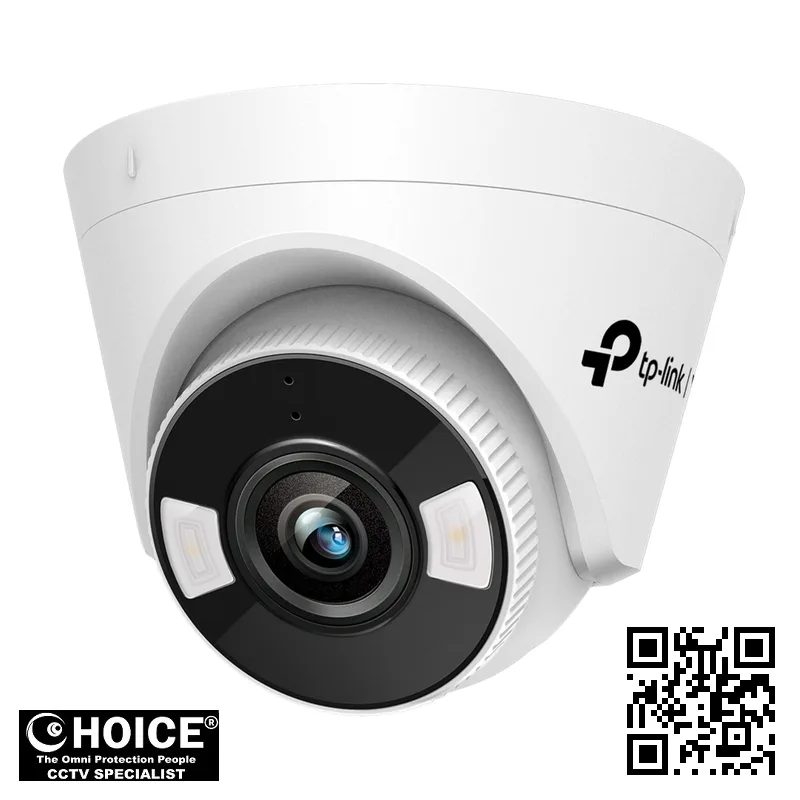
TP-Link VIGI C440-W 4MP Full-Color Wi-Fi Turret Network Camera
TP-LINK PREMIUM PARTNERS SINGAPORE
Supply and Maintenance TP-LINK CCTV IP Cameras, NVR, DVR, PTZ Cameras,
Access Control System, Video Intercom.
1 Rochor Canal Road, Sim Lim Square 02-81 10am-7pm Daily.
Whatsapp Enquiry Project +65 98534404, Technical Support +65 81120788, Site Visit Maintenance +65 81985572.
TP-Link VIGI C440-W Singapore VIGI 4MP Full-Color Wi-Fi Turret Network Camera | Advanced 24/7 Color Surveillance
TP-Link VIGI C440-W Singapore provides a revolutionary approach to residential and commercial surveillance by offering high-definition monitoring that does not fade when the lights go out. This advanced VIGI 4MP Full-Color Wi-Fi Turret Network Camera is engineered specifically for users who require crystal-clear imagery and reliable connectivity in a wireless format. In a dense urban environment like Singapore, having a camera that can distinguish between subtle color differences is vital for identifying vehicles, clothing, or specific objects during night-time incidents. By utilizing integrated white LEDs alongside traditional infrared technology, this camera ensures that every detail is captured in vivid color, providing much more actionable intelligence than standard monochrome cameras.
Whether you are securing a small retail shop or monitoring a large warehouse, this TP-lar device offers the perfect blend of high-resolution 2K imaging and flexible Wi-Fi connectivity for modern security needs.
Key Features of the TP-Link VIGI C440-W Singapore
- Ultra-High Definition 4MP Resolution: The camera captures images at 2560 x 1440 resolution, ensuring that every pixel contributes to a sharp, clear picture for precise identification.
- Full-Color Night Vision: Equipped with both IR and White LEDs, the camera can switch to full-color mode to provide detailed visual evidence even in total darkness.
- Smart Event Detection: Advanced AI capabilities allow for human and vehicle classification, reducing false alarms caused by animals, leaves, or moving shadows.
- Two-Way Audio Communication: Featuring a built-in microphone and speaker, this unit allows users to listen in and communicate directly with people near the camera.
- Efficient H.265+ Compression: The use of high-efficiency video coding significantly reduces bandwidth and storage requirements without sacrificing the quality of your video stream.
- Robust Wireless Connectivity: A strong 2.4 GHz Wi-Fi connection ensures that you can install the camera in locations where running long Ethernet cables is difficult.
- Wide Dynamic Range (DWDR): This technology helps the camera manage high-contrast scenes, preventing faces or license plates from appearing as dark silhouettes against bright backgrounds.
- Integrated Storage Capability: With a built-in MicroSD card slot supporting up to 512 GB, you can record directly to the device for easy, localized data management.
Technical Specifications
| Specification | Detail |
| Brand/Model | TP-Link VIGI C440-W |
| Resolution | 2560 x 1440 (4MP Max) |
| Image Sensor | 1/3” Progressive Scan CMOS |
| Lens Type | Fixed Focal Lens (4 mm) |
| Field of View (FOV) | Horizontal: 80°, Vertical: 43.2°, Diagonal: 94.2° |
| Aperture | F1.6 |
| Minimum Illumination | 0.005 Lux; 0 Lux with IR/White Light |
| Night Vision Range | IR/White LED Range: 30m |
| Video Compression | H.265+, H.265, H.264+, H.264 |
| Audio | Two-Way Audio (Built-in Mic and Speaker) |
| Wireless Frequency | 2.4 GHz (Wi-Fi 802.11b/g/n) |
| Storage | MicroSD Card Slot (Up to 512 GB) |
| Power Supply | 9-12V DC / 5.5mm Coaxial Plug |
| Operating Temperature | -30°C to 60°C |
| Dimensions | 123 × 83 × 123 mm |
| Weight | Net: 0.24 Kg / Gross: 0.53 Kg |
Applications and Use Cases in Singapore
For Warehouse and Industrial Facilities: The VIGI C440-W is ideal for monitoring large loading bays and storage aisles. Its ability to classify vehicles and humans helps security personnel focus on genuine intrusions rather than movement from machinery or pests.
For Retail and Shopfronts: Small business owners in Singapore can use this camera to monitor cash registers and entrance points. The full-color night vision is particularly useful for identifying shoplifters or suspicious activity after business hours.
For HDB and Condominium Residential Use: This camera fits perfectly in private balconies or corridors. The Wi-Fi capability makes it easy to install without messy wiring, helping residents keep an eye on their property entrances with minimal disruption.
For Office and Corporate Spaces: Monitor meeting rooms or reception areas to ensure workplace safety. The two-way audio feature is also useful for intercom-style communication with visitors at the office entrance.
For Car Parks and Driveways: The high-resolution 4MP sensor and wide detection range (up to 80m) make it a great choice for monitoring vehicle movement and ensuring that no unauthorized cars enter private parking slots.
Why Choose the TP-.Link VIGI C440-W Singapore
Choosing a security solution in Singapore requires considering the local environment. The tropical climate, characterized by high humidity and heavy rainfall, demands hardware that can withstand temperature fluctuations. The VIGI C440-W is built to operate in extreme temperatures ranging from -30°C to 60°C, making it resilient against the heat of a Singapore afternoon.
Furthermore, when installing cameras in residential or commercial areas, staying compliant with the Personal Data Protection Act (PDPA) is essential. This camera provides advanced privacy mask features, allowing you to black out specific areas (up to 4 masks) to ensure you are not recording private property or public walkways unintentionally. This helps businesses and homeowners maintain high security standards while respecting the privacy rights of others in the community.
Lastly, the power requirements are compatible with standard local electrical setups. With a stable 9-12V DC power supply, integrating this camera into existing security infrastructures or new smart home setups is straightforward and reliable for long-term use.
Installation Guide
When planning your installation, you must decide between a wired or wireless setup. While the VIGI C440-W features excellent 2.4 GHz Wi-Fi for ease of use, for maximum stability in large buildings, you might consider a wired approach using the RJ45 Ethernet port. If you are using the 12V DC power method, ensure you have a nearby power source or a suitable power adapter to reach the camera location.
For the network setup, ensure your Wi-Fi router provides a strong signal at the camera’s mounting point. If the camera is placed far from the router, you may need a Wi-Fi extender to prevent signal drops. The camera supports 802.11b/g/n protocols, making it compatible with most modern routers found in Singapore homes and offices.
The software setup is highly intuitive. Users can manage their cameras via the VIGI App, the VICI Security Manager, or a Web UI. Once the camera is powered on, simply follow the prompts in the app to connect it to your local network. This allows you to view live feeds and receive instant alerts on your smartphone, regardless of where you are.
Repair and Maintenance
To ensure your TP-Link VIGI C440-W remains functional, a regular maintenance schedule is highly recommended. Dust and grime can accumulate on the lens and the LED covers, which may degrade image quality over time. We recommend wiping the lens with a soft, microfiber cloth every few months to maintain clarity.
Common issues often involve connectivity drops. If you notice the camera is offline, first check the power supply and then verify the Wi-Fi signal strength. If the signal is weak, repositioning your router or adding an access point may be necessary. Additionally, always check the MicroSD card health periodically, as constant overwriting can eventually lead to card failure. Replacing the card every 1-2 years is a good practice for continuous recording reliability.
If you encounter persistent software glitches, performing a factory reset using the on-board reset button can often resolve configuration errors. For more complex technical issues involving hardware or network integration, always consult with a professional technician to avoid damaging the device’s sensitive components.
Where to Buy the VIGI C440-W in Singapore
SGCCTV — Authorised Hikvision & Dahua Dealer Singapore
Address: 1 Rochor Canal Road, Sim Lim Square #02-81, Singapore
Email: enquiry@choicecycle.com.sg
WhatsApp: +65 98534404 (24 hours)
Operating Hours: 10:00 AM – 7:00 PM daily
Website: https://sgcctv.com.sg
If you are looking for genuine TP-Link VIGI products, SGCCTV (Choicecycle CCTV Pte Ltd) is your trusted local provider. We are located in the heart of the electronics hub at Sim Lim Square. You can visit us to discuss your security needs in person.
Company: SGCCTV (Choicecycle CCTV Pte .Ltd)
Address: 1 Rochor Canal Road, Sim Lim Square #02-81, Singapore 188504
WhatsApp enquiry: +65 98534404
Technical support: +65 81120788
Site visit / maintenance: +65 81985572
Email: enquiry@choicecycle.com.sg
Website: https://sgcctv.com.sg
Opening hours: 10:00 AM – 7:00 PM daily
Please note that availability is confirmed on enquiry. For all pricing information, please WhatsApp +65 98534404 to speak with our team directly.
Frequently Asked Questions
How can I find out the price of this camera?
To ensure you receive the most accurate and up-to-date information regarding our current offers, please WhatsApp +65 98534404. Our team is ready to provide you with a detailed quotation based on your specific requirements and any bulk purchase needs you might have for your Singapore property.
Is the VIGI C440-W suitable for outdoor use in Singapore?
The camera is designed to handle a wide temperature range from -30°C to 60°C, which is excellent for the local climate. However, always ensure that the power connections and the DC port are properly shielded from direct heavy rain exposure to prevent moisture ingress into the electrical components.
Can I view the camera footage on my mobile phone while I am away?
Yes, you can. By using the VIGI App, you can access the live stream and recorded footage from anywhere in the world, provided your mobile device has an internet connection. This allows for real-time monitoring of your home or business from your smartphone, tablet, or even a computer.
Does this camera support SD card storage for continuous recording?
Yes, the TP-Link VIGI C440-W features a built-in MicroSD card slot that supports capacities up to 512 GB. This allows for local storage of video footage without the need for an expensive NVR, making it a very cost-effective solution for many users in Singapore looking for simple security.
Will the camera work with my existing TP-Link networking equipment?
The VIGI series is designed to integrate seamlessly within the TP-Link ecosystem. If you are already using TP-Link Omada or VIGI-compatible switches and routers, you can enjoy a highly stable and unified network environment, which simplifies the management of your entire security and networking infrastructure.
How does the “Full-Color” feature actually work at night?
Unlike traditional cameras that use infrared light to produce black and white images, this camera features integrated White LEDs. When the environment becomes too dark for standard sensors, the White LEDs illuminate the area, allowing the 4MP sensor to capture the scene in full, vibrant color for better identification.
Can I set up alerts for specific movements like cars or people?
Absolutely. One of the standout features of this camera is its Smart Event detection. You can configure the system to specifically detect human or vehicle movement, as well as area intrusions or line-crossing. This intelligence helps you avoid unnecessary notifications from small animals or moving trees.
Is the installation process difficult for a non-technical person?
The wireless nature of the VIGI C440-W makes it much easier than traditional wired systems. While we recommend professional installation for complex setups, the VIGI App provides a very user-friendly interface that guides you through the initial network configuration and camera setup process quite simply.
What happens if the Wi-Fi signal is interrupted?
If the Wi-Fi connection is lost, the camera will stop transmitting the live stream to your app. However, if you have a MicroSD card installed, the camera will continue to record the footage locally to the card. Once the connection is restored, you can review the recorded events.
Does this camera support two-way communication?
Yes, the camera is equipped with both a built-in microphone and a speaker. This enables two-way audio, meaning you can not only hear what is happening near the camera but also speak through the camera to warn intruders or greet visitors at your entrance or warehouse gate.
Related Products
- TP-Link VIGI Network Video Recorders (NVR)
- TP-Link VIGI Outdoor Bullet Cameras
- TP-Link Omada Business Networking Solutions
The TP-Link VIGI C440-W is a premier choice for anyone seeking high-resolution, color-accurate surveillance with the flexibility of Wi-Fi. Its advanced AI features and robust build make it an essential tool for modern security in Singapore. For more information or to request a quote, please WhatsApp +65 98534404 or visit SGCCTV at Sim Lim Square today.
Choosing the TP-Link VIGI C440-W for Your Singapore Property
Deciding on the right security solution requires understanding the unique architectural landscape of Singapore. Whether you reside in a high-rise HDB flat or a sprawling landed estate, the TP-Link VIGI C4MP-W offers versatile monitoring capabilities.
For residents in HDB apartments, this camera is ideal for monitoring common corridors or entry foyers. Its compact turret design ensures it remains unobtrusive while providing high-definition clarity for your front door security needs.
Condominium owners can leverage the wireless capabilities of the TP-Link VIGI C440-W to monitor balconies or private garden areas. The Wi-Fi connectivity simplifies installation in modern apartments where running long Ethernet cables might be difficult.
Landed property owners in areas like Serangoon or Bukit Timah often face larger perimeter challenges. This camera excels at watching driveway entrances and perimeter fences, providing a clear view of any approaching visitors or vehicles.
Retail shop owners across Singapore can utilize this camera to monitor point-of-sale counters and customer aisles. The 4MP resolution ensures that small details, such as currency notes or product movements, are captured with extreme precision.
Small office environments benefit from the discreet nature of the turret form factor. It can be tucked into ceiling corners to oversee workstations and pantry areas without creating a heavy, intimidating presence in the workspace.
For warehouse operators, the TP-Link VIGI C440-W provides an extra layer of inventory protection. It is particularly effective for monitoring loading bays and high-value storage zones where motion detection is a critical requirement.
Placement is key to maximizing your security investment. We recommend mounting the camera under eaves or overhangs to ensure the lens remains unobstructed by tropical foliage or structural elements of your building.
Singapore’s tropical climate presents specific challenges for electronic hardware. High humidity and sudden heavy downpours can degrade inferior camera models, leading to lens fogging or internal circuit failure over time.
The rugged construction of this VIGI model is designed to withstand the local environment. It handles the heat and moisture levels common in Singapore, ensuring consistent performance during the monsoon season and summer months.
The full-color technology is a game-changer for night-time monitoring. Unlike traditional cameras that switch to grainy black-and-white, this unit maintains vibrant color even in low-light conditions, aiding in accurate suspect identification.
When paired with a reliable Wi-Fi network, the setup process is incredibly efficient. This makes it a favorite for Singaporean homeowners who want professional-grade security without the complexity of professional-grade rewiring.
Investing in the TP-Link VIGI C440-W means investing in peace of mind. You gain a high-resolution, color-capable, and weather-resilient eye that works tirelessly to protect your assets, your family, or your business inventory.
Our team in Singapore can assist you with the optimal positioning of your cameras. We ensure that every angle is covered, minimizing blind spots and maximizing the utility of your new VIGI surveillance system.
Installation and Setup Guide for the TP-Link VIGI C440-W
Setting up your new TP-Link VIGI C440-W requires careful planning to ensure maximum coverage for your Singapore property. Whether you are securing a landed house in Serangoon or a small shop in Orchard, the placement of your turret camera is the most critical step in the installation process.
When considering mounting options, the turret design of the TP-Link VICI C440-W offers great versatility. You can mount it on flat surfaces like walls or ceilings. For outdoor use, ensure the mounting area is stable and provides a clear line of sight to your primary entry points.
The camera can be positioned under eaves or overhangs to provide extra protection from Singapore’s heavy tropical rain. While the unit is weather-resistant, choosing a sheltered mounting spot helps extend the lifespan of the hardware and ensures the lens remains clear of debris and water droplets.
One of the most important decisions during setup is choosing between PoE and standard power. If you use a Power over Ethernet (PoE) switch, a single Ethernet cable can provide both data and power. This simplifies wiring and reduces the number of electrical outlets needed near your camera.
Alternatively, if you prefer using the built-in Wi-Fi capabilities, you will need to ensure a nearby power outlet is available. This is a great option for retrofitting existing homes in Singapore where running new Ethernet cables through thick concrete walls might be too difficult.
Regarding network connectivity, the TP-Link VIGI C440-W excels when paired with a VIGI NVR (Network Video Recorder). Connecting the camera to an NVR allows for centralized storage, much larger hard drive capacities, and more advanced playback features for reviewing recorded footage during an incident.
If you do not use an NVR, you can still utilize micro SD card slots for local storage. However, for high-security environments, we always recommend a dedicated NVR. This ensures that even if the camera is tampered with, your precious video evidence remains safely stored on the recorder.
Once the hardware is physically mounted, the next step is app configuration. Download the TP-Link VIGI app on your smartphone to begin the digital setup. The app will guide you through connecting the camera to your local Wi-Fi or wired network via a simple scanning process.
During the app configuration, you should perform a “field of view” test. Use your phone to check the live stream and adjust the camera angle. Ensure that there are no blind spots and that the full-color night vision feature is capturing the intended area clearly.
Configuring motion detection zones within the app is also highly recommended. You can mask out busy streets or moving trees to prevent false alerts. This ensures that you only receive notifications on your phone when actual suspicious activity is detected near your premises.
While DIY installation is possible, many homeowners in Singapore prefer a professional touch. A professional SGCCTV installation includes a comprehensive site survey to identify the best camera angles and the most efficient cable routing paths to avoid unsightly wires in your home.
Our professional installers ensure that all waterproof glands are correctly sealed and that all network connections are tested for stability. We also handle the complex task of configuring your NVR and mobile alerts, so your system is fully operational the moment we leave.
Choosing a professional service means you get peace of mind. We handle the technical heavy lifting, ensuring your TP-Link VIGI C440-W is integrated perfectly into your local network, providing seamless, high-definition monitoring that you can rely on 24/7, regardless of the weather.
TP-Link VIGI C440-W: Frequently Asked Questions
Where can I buy the TP-Link VIGI C440-W?
You can buy the TP-Link VIGI C440-W from SGCCTV at Sim Lim Square #02-81, or order online.
Is the TP-Link VIGI C440-W suitable for outdoor use?
Yes — the TP-Link VIGI C440-W is built for Singapore’s tropical, humid weather.
Does the TP-Link VIGI C440-W come with a warranty?
Every TP-Link VIGI C440-W includes local warranty support from SGCCTV. Our team will confirm the exact coverage when you enquire.
How much does the TP-Link VIGI C440-W cost?
WhatsApp +65 98534404 for the best price on the TP-Link VIGI C440-W today.
Can SGCCTV install the TP-Link VIGI C440-W?
Yes, SGCCTV offers professional installation for the TP-Link VIGI C440-W across Singapore.
Is the TP-Link VIGI C440-W available?
Availability of the TP-Link VIGI C440-W is confirmed by our team — WhatsApp +65 98534404 and we will check the current position for you.
What resolution does the TP-Link VIGI C440-W record?
The TP-Link VIGI C440-W captures sharp, detailed footage well suited to Singapore homes and businesses.
Does the TP-Link VIGI C440-W work at night?
Yes, the TP-Link VIGI C440-W delivers clear low-light footage, tested for Singapore conditions.
Can I view the TP-Link VIGI C440-W on my phone?
You can monitor the TP-Link VIGI C440-W remotely from anywhere in Singapore via the mobile app.
What warranty covers the TP-Link VIGI C440-W?
The TP-Link VIGI C440-W is backed by local warranty support from SGCCTV in Singapore.
Why buy the TP-Link VIGI C440-W from SGCCTV?
SGCCTV is a trusted Singapore dealer offering the TP-Link VIGI C440-W at the best price with expert support.
Is the TP-Link VIGI C440-W good for HDB and condo use?
Yes, the TP-Link VIGI C440-W is a popular pick for HDB flats, condos and offices across Singapore.


Nunc lacus elit, faucibus ac laoreet sed, dapibus ac mi. Maecenas eu ante a elit tempus fermentum. Aliquam commodo tincidunt semper. Phasellus accumsan, justo ac mollis pharetra, ex dui pharetra nisl, a scelerisque ipsum nulla ac sem. Cras eu risus urna. Duis lorem sapien, congue eget nisl sit amet, rutrum faucibus elit.
Donec accumsan auctor iaculis. Sed suscipit arcu ligula, at egestas magna molestie a. Proin ac ex maximus, ultrices justo eget, sodales orci. Aliquam egestas libero ac turpis pharetra, in vehicula lacus scelerisque. Vestibulum ut sem laoreet, feugiat tellus at, hendrerit arcu.
Nunc lacus elit, faucibus ac laoreet sed, dapibus ac mi. Maecenas eu ante a elit tempus fermentum. Aliquam commodo tincidunt semper. Phasellus accumsan, justo ac mollis pharetra, ex dui pharetra nisl, a scelerisque ipsum nulla ac sem. Cras eu risus urna. Duis lorem sapien, congue eget nisl sit amet, rutrum faucibus elit.
Related Products
HIKVISION CCTV Camera Package Plug and Play Package for 6 Full HD Camera Installation service
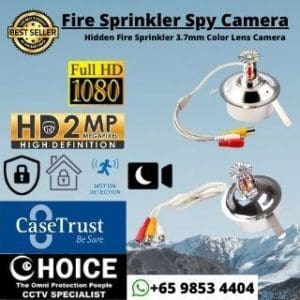
Save27.3%Save $232.00Only$618.00 Original price was: $850.00.$618.00Current price is: $618.00.Fire Sprinkler Camera Spy Camera Hidden Camera 2MP 4MP 8MP Resolution Color Lens Camera Choicecycle SGCCTV Sim Lim Square 02-81
Save23.3%Save $30.10Only$98.90 Original price was: $129.00.$98.90Current price is: $98.90.
Reviews
There are no reviews yet.