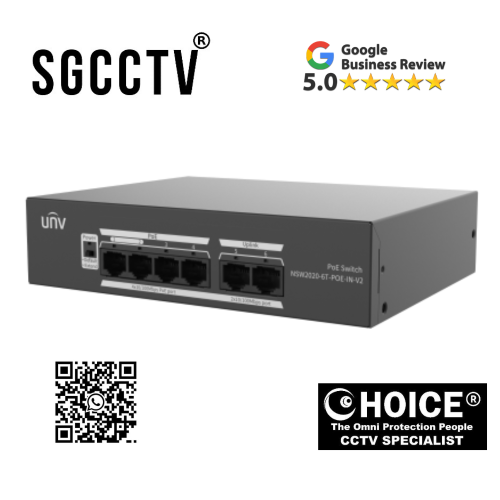



UNV UNIVIEW NSW2020-6T-POE-IN-V2 Ethernet Switch (PoE) Support port traffic control Support buffer optimization NEW DB
$75.00
UNV UNIVIEW Security Partner
Widely deployed in Shopping Malls, Residential, Commercial, Office, Warehouse.
Specialist in all Security System CCTV Camera Door Access Alarm Switch
Technical Support at Sim Lim Square 02-81 11am~7pm Daily +65 98534404
UNV UNIVIEW NSW2020-6T-POE-IN-V2 Ethernet Switch (PoE) Support port traffic control Support buffer optimization NEW
In today’s modern surveillance and networking environments, stable power delivery and reliable data transmission are the foundation of any high-performance IP CCTV system. Whether deployed in commercial buildings, industrial facilities, retail stores, residential estates, or smart city infrastructures, network switches play a critical role in ensuring uninterrupted connectivity between IP cameras, recorders, and control systems.
The UNV UNIVIEW NSW2020-6T-POE-IN-V2 Unmanaged Ethernet Switch is a professional-grade PoE (Power over Ethernet) network switch designed specifically for CCTV and IP surveillance applications. Built with advanced buffer optimization, intelligent port traffic control, and stable power distribution capabilities, this switch ensures smooth, efficient, and reliable network performance for multi-camera surveillance systems.
Engineered by Uniview (UNV), one of the world’s leading surveillance technology manufacturers, this unmanaged PoE switch is designed for simplicity, durability, and efficiency—making it the ideal solution for installers and system integrators who require plug-and-play deployment without complex configuration.
UNV UNIVIEW NSW2020-6T-POE-IN-V2 Ethernet Switch (PoE) Support port traffic control Support buffer optimization NEW
1. Introduction to UNV NSW2020-6T-POE-IN-V2 PoE Switch
The UNV UNIVIEW NSW2020-6T-POE-IN-V2 Unmanaged Ethernet Switch is a compact yet powerful unmanaged Ethernet switch equipped with PoE functionality. It is designed to deliver both data and electrical power through a single Ethernet cable, simplifying installation and reducing cabling costs for IP camera systems.
This model is widely used in:
- Small to medium CCTV installations
- Office surveillance systems
- Retail security setups
- Residential IP camera networks
- Entry-level enterprise surveillance deployments
Its plug-and-play design eliminates the need for complex configuration, making it extremely user-friendly for installers and technicians.
2. What Makes This PoE Switch Important in CCTV Systems?
In any IP surveillance system, cameras require two essential things:
- Stable network data connection
- Reliable power supply
Instead of using separate power adapters for each camera, PoE switches combine both into a single cable solution.
The UNV UNIVIEW NSW2020-6T-POE-IN-V2 Unmanaged Ethernet Switch simplifies this process by:
- Supplying power directly through Ethernet ports
- Eliminating multiple power adapters
- Reducing installation complexity
- Improving system reliability
This makes CCTV deployment faster, cleaner, and more cost-efficient.
UNV UNIVIEW NSW2020-6T-POE-IN-V2 Ethernet Switch (PoE) Support port traffic control Support buffer optimization NEW
3. PoE Technology Explained (Power over Ethernet)
Power over Ethernet (PoE) is a technology that allows both data and electrical power to be transmitted through a single Ethernet cable (Cat5e/Cat6).
Key advantages of PoE:
- No need for separate power cables
- Faster installation process
- Reduced electrical wiring costs
- Centralized power management
- Safer low-voltage distribution
The NSW2020-6T-POE-IN-V2 integrates this technology to ensure stable power delivery to IP cameras, access points, and other PoE-enabled devices.
4. Unmanaged Switch – Simple Plug & Play Operation
This model is an unmanaged switch, which means it does not require manual configuration or software setup.
Benefits of unmanaged design:
- No technical configuration required
- Plug-and-play installation
- Automatic device detection
- Easy maintenance
- Ideal for quick deployment projects
This makes it especially suitable for CCTV installers who need fast and reliable installation without complex network setup.
UNV UNIVIEW NSW2020-6T-POE-IN-V2 Ethernet Switch (PoE) Support port traffic control Support buffer optimization NEW
5. Port Traffic Control for Stable Network Performance
One of the key features of this switch is port traffic control support, which helps manage data flow efficiently across connected devices.
Why port traffic control matters:
- Prevents network congestion
- Ensures smooth video streaming
- Reduces packet loss
- Improves camera stability
- Maintains consistent bandwidth distribution
In surveillance systems where multiple cameras stream simultaneously, this feature ensures that all video feeds remain stable and uninterrupted.
6. Buffer Optimization for Smooth Video Transmission
The UNV UNIVIEW NSW2020-6T-POE-IN-V2 Unmanaged Ethernet Switch includes advanced buffer optimization technology, which improves data handling during high network load.
Buffer optimization benefits:
- Prevents video lag and freezing
- Smoothens multi-camera streaming
- Reduces network packet delay
- Enhances real-time monitoring performance
- Improves system stability during peak usage
This is particularly important in environments with multiple HD or 4MP/8MP IP cameras operating simultaneously.
7. Stable Power Distribution for PoE Devices
This PoE switch is designed to deliver consistent and stable power output to connected devices.
Key power benefits:
- Stable voltage delivery to IP cameras
- Protection against power fluctuations
- Reduced risk of device failure
- Supports multiple PoE devices simultaneously
This ensures long-term reliability for CCTV systems operating 24/7.
UNV UNIVIEW NSW2020-6T-POE-IN-V2 Ethernet Switch (PoE) Support port traffic control Support buffer optimization NEW
8. Ideal Applications of UNV NSW2020-6T-POE-IN-V2
The UNV UNIVIEW NSW2020-6T-POE-IN-V2 Unmanaged Ethernet Switch is suitable for a wide range of surveillance and networking applications.
Common use cases include:
- Residential CCTV systems
- Small office surveillance setups
- Retail shop security systems
- Restaurant monitoring systems
- School and classroom surveillance
- Small warehouse IP camera networks
- Condo and apartment CCTV installations
Its compact size and simple operation make it ideal for small to medium deployments.
9. Easy Installation and Deployment
One of the biggest advantages of this switch is its ease of installation.
Installation steps:
- Connect power supply to switch
- Connect IP cameras to PoE ports
- Connect uplink port to NVR or router
- System automatically starts working
No software installation or configuration is required.
This reduces installation time significantly and lowers technical complexity.
10. Reliable Build Quality for Continuous Operation
The switch is designed for 24/7 continuous operation, making it suitable for surveillance environments where uptime is critical.
Build quality advantages:
- Industrial-grade components
- Stable heat dissipation design
- Long operational lifespan
- Consistent performance under load
This ensures that CCTV systems remain online without interruption.
UNV UNIVIEW NSW2020-6T-POE-IN-V2 Ethernet Switch (PoE) Support port traffic control Support buffer optimization NEW
11. Why Choose UNV Uniview NSW2020-6T-POE-IN-V2?
There are many PoE switches in the market, but this model stands out due to its balance of simplicity, reliability, and performance.
Key advantages:
- Plug-and-play unmanaged design
- Built-in PoE support for IP cameras
- Port traffic control for stable streaming
- Buffer optimization for smooth video
- Compact and easy installation
- Cost-effective CCTV networking solution
- Trusted Uniview engineering quality
12. How It Improves CCTV System Performance
When integrated into a CCTV system, this PoE switch significantly improves overall performance by:
- Reducing cable clutter
- Improving network stability
- Ensuring consistent camera uptime
- Enhancing video streaming quality
- Centralizing power distribution
It acts as the central power and data hub for IP surveillance systems.
13. Comparison to Standard Network Switches
Unlike regular network switches, the UNV UNIVIEW NSW2020-6T-POE-IN-V2 Unmanaged Ethernet Switch provides:
| Feature | Standard Switch | UNV PoE Switch |
|---|---|---|
| Power delivery | ❌ No | ✔ Yes |
| CCTV support | Limited | Fully optimized |
| Installation | Complex | Plug & play |
| Cable requirement | Power + LAN | Single cable |
| Stability for cameras | Basic | Optimized |
UNV UNIVIEW NSW2020-6T-POE-IN-V2 Ethernet Switch (PoE) Support port traffic control Support buffer optimization NEW
14. Long-Term Reliability for Security Systems
This switch is built for long-term deployment in security environments where reliability is critical.
Reliability benefits:
- Stable 24/7 performance
- Reduced system downtime
- Strong resistance to network overload
- Durable hardware design
It is ideal for mission-critical surveillance applications.
15. Conclusion
The UNV UNIVIEW NSW2020-6T-POE-IN-V2 Unmanaged Ethernet Switch is a powerful, efficient, and reliable PoE networking solution designed specifically for modern IP CCTV systems. With its plug-and-play functionality, port traffic control, buffer optimization, and stable power delivery, it provides everything needed for smooth and efficient surveillance network performance.
Whether you are installing a small residential CCTV system or deploying multiple IP cameras in a commercial environment, this PoE switch ensures consistent connectivity, reduced installation complexity, and long-term operational stability.
It is not just a network switch—it is the foundation of a stable and efficient IP surveillance infrastructure.
🔧 HOW TO SET UP UNV POE SWITCH (STEP-BY-STEP)
1️⃣ Unbox & Check Equipment 📦
Inside the box, you should have:
- PoE switch
- Power adapter / power cable
- User manual
Check:
- No physical damage
- All ports are clean and intact
2️⃣ Connect Power ⚡
- Plug the power cable into the switch
- Turn on power
👉 You should see LED lights turn ON
UNV UNIVIEW NSW2020-6T-POE-IN-V2 Ethernet Switch (PoE) Support port traffic control Support buffer optimization NEW
3️⃣ Connect Internet / NVR (Uplink Port) 🌐
Locate the Uplink port (usually marked differently from PoE ports)
Connect:
- Uplink port → Router OR NVR LAN port
👉 This allows video to be sent to your recorder/system
4️⃣ Connect IP Cameras 🎥
Now plug your CCTV cameras into PoE ports:
- Use Ethernet cable (Cat5e / Cat6)
- Plug one camera per PoE port
👉 Each camera gets:
✔ Power
✔ Data
✔ Network connection
No separate power adapter needed
5️⃣ Wait for Auto Detection ⏳
After connecting:
- Cameras will boot up automatically
- NVR will auto-detect cameras (if connected)
LED indicators will show:
- Green = data active
- Yellow = PoE power active
6️⃣ Connect to NVR (if using CCTV system) 🖥️
If you have an NVR (like Uniview system):
- Go to Camera Management
- Click Auto Search
- Add cameras automatically
UNV UNIVIEW NSW2020-6T-POE-IN-V2 Ethernet Switch (PoE) Support port traffic control Support buffer optimization NEW
7️⃣ Test Live View ✔️
Check:
- Live video display
- Camera stability
- Night vision (IR ON/OFF)
- Motion detection
⚠️ IMPORTANT INSTALLATION TIPS
❌ Don’t mix PoE and non-PoE ports wrongly
❌ Don’t overload switch beyond camera limit
❌ Use proper Cat6 cable for long distance
❌ Avoid placing switch in hot/closed cabinet without ventilation
🔥 COMMON ISSUES & FIXES
❌ Camera not showing
✔ Check Ethernet cable
✔ Try another PoE port
✔ Restart switch
❌ No power to camera
✔ Ensure PoE LED is ON
✔ Check switch power adapter
❌ Video lag
✔ Use Cat6 cable
✔ Reduce camera bitrate
✔ Check buffer/load usage
🛡️ WARRANTY DETAILS
✔️ Standard Warranty
- Usually: 1 to 2 years warranty
- Some distributors offer:
- 1-year warranty (common in retail packages)
- 2–3 years warranty (authorized distributor / project supply)
UNV UNIVIEW NSW2020-6T-POE-IN-V2 Ethernet Switch (PoE) Support port traffic control Support buffer optimization NEW
📌 What warranty covers
Typically includes:
- Manufacturing defects
- Power failure (non-physical damage)
- Port failure (PoE not working)
- Internal component faults
❌ What is NOT covered
- Lightning / surge damage
- Physical damage (drop, water ingress)
- Improper installation
- Over-voltage or wrong power input
⚡ Important note (installer tip)
Even though warranty exists, PoE switches often fail early due to:
- No UPS protection
- Poor grounding
- Outdoor electrical surge
👉 Always use a UPS (backup power) to extend lifespan and protect warranty validity.
⚠️ 1. PoE Port Failure (No power to camera)
🔍 Symptoms:
- Camera suddenly goes offline
- No PoE light on that port
- Camera not powering up
💥 Causes:
- Power surge through Ethernet cable
- Overloading switch PoE budget
- Cheap / damaged LAN cable
🛡️ Prevention:
- Use Cat5e/Cat6 pure copper cables
- Do not exceed PoE load limit
- Install a surge protector or UPS
- Avoid outdoor lightning exposure without protection
UNV UNIVIEW NSW2020-6T-POE-IN-V2 Ethernet Switch (PoE) Support port traffic control Support buffer optimization NEW
⚠️ 2. Switch Overheating 🔥
🔍 Symptoms:
- Random camera disconnects
- Switch becomes very hot
- Network lag or freeze
💥 Causes:
- Poor ventilation (closed cabinet)
- High ambient temperature
- Continuous full PoE load
🛡️ Prevention:
- Install in well-ventilated area
- Avoid stacking devices on top
- Use rack with airflow fan
- Do not place near heat sources
⚠️ 3. Network Lag / Video Freezing 📉
🔍 Symptoms:
- Cameras stutter
- Playback delay
- Pixelated video
💥 Causes:
- Bandwidth congestion
- Poor quality cables
- No traffic control optimization at system level
🛡️ Prevention:
- Use Gigabit uplink port properly
- Upgrade to Cat6 cables
- Avoid mixing too many high bitrate cameras on one switch
- Enable proper NVR bitrate settings
UNV UNIVIEW NSW2020-6T-POE-IN-V2 Ethernet Switch (PoE) Support port traffic control Support buffer optimization NEW
⚠️ 4. Entire Switch Stops Working (Power Failure) ⚡
🔍 Symptoms:
- All cameras offline at once
- No LED lights on switch
💥 Causes:
- Power adapter failure
- Electrical surge / lightning strike
- No UPS protection
🛡️ Prevention:
- Always use a UPS (Uninterruptible Power Supply)
- Use surge-protected power socket
- Avoid unstable building power supply
⚠️ 5. One Port Not Working (Dead Port Issue)
🔍 Symptoms:
- One camera not detected
- Other ports still working fine
💥 Causes:
- Port damaged from surge
- Physical cable damage
- Long-term heat stress
🛡️ Prevention:
- Avoid plugging/unplugging repeatedly while powered ON
- Use proper cable management
- Replace damaged cables immediately
⚠️ 6. IP Camera Not Detected (Looks like switch issue but not)
🔍 Symptoms:
- Camera plugged in but no display
- Switch shows PoE active but no video
💥 Causes:
- Wrong IP range
- Camera not initialized
- NVR not detecting device
🛡️ Prevention:
- Always set cameras in same subnet as NVR
- Use auto-detect in NVR
- Reset camera if reused
UNV UNIVIEW NSW2020-6T-POE-IN-V2 Ethernet Switch (PoE) Support port traffic control Support buffer optimization NEW
⚠️ 7. PoE Budget Overload ⚡📊
🔍 Symptoms:
- Some cameras randomly shut down
- Switch unstable under load
💥 Causes:
- Too many high-power cameras connected
- Exceeding total PoE watt limit
🛡️ Prevention:
- Check total watt consumption
- Use fewer cameras per switch
- Upgrade to larger PoE switch if needed
🧠 SIMPLE FIELD SUMMARY
Most failures come from:
👉 Power surge ⚡
👉 Heat 🔥
👉 Cheap cables ❌
👉 Overloading 📊
👉 Poor installation ⚙️
⚔️ UNV PoE Switch vs Hikvision PoE Switch
| Feature | UNV Uniview NSW2020-6T-POE-IN-V2 | Hikvision PoE Switch (DS-3E / DS-3E010xP series) |
|---|---|---|
| Type | Unmanaged PoE switch | Mostly unmanaged / smart-managed options |
| PoE Standard | IEEE 802.3af / 802.3at | IEEE 802.3af / 802.3at |
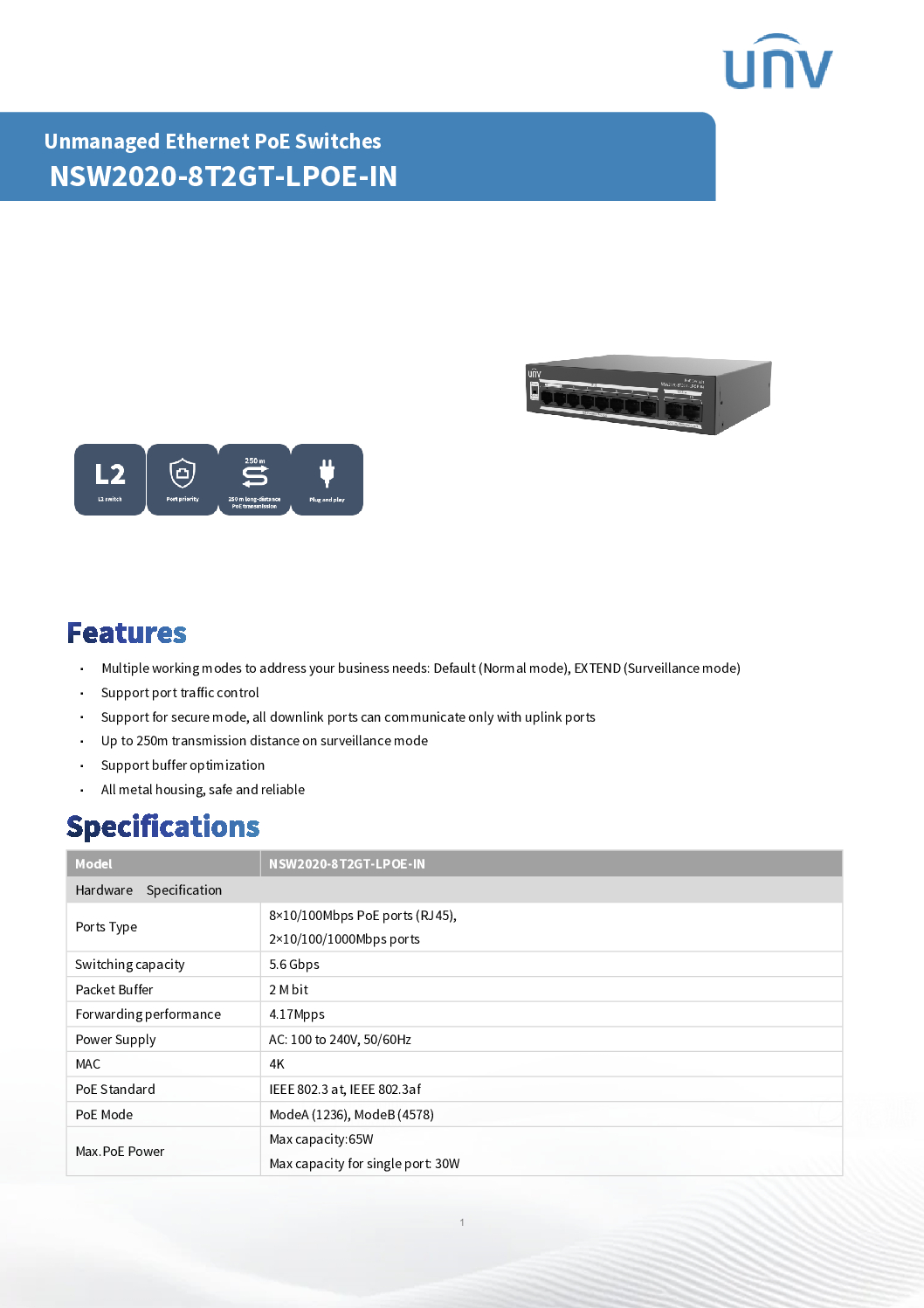
| Ports (entry model) | 6 ports (4 PoE + uplink) | 4–8–16–24 ports depending model |
| Total PoE Budget | ~65W total | 60W–250W+ (higher models stronger) |
| Max per port | 30W | 30W |
| Network speed | 10/100 Mbps (entry level CCTV switch) | Many models offer Gigabit uplinks |
| CCTV features | Port control + buffer optimization + extend mode | Basic + some models have VLAN / isolation |
| Long-distance mode | Up to 250m extend mode | Available in Hikvision “easy smart” models |
| Build quality | Metal casing, compact CCTV design | Slightly more industrial options available |
| Setup | Plug & play | Plug & play (some smart config models exist) |
| Ecosystem | Works with UNV + ONVIF systems | Best with Hikvision ecosystem |
UNV UNIVIEW NSW2020-6T-POE-IN-V2 Ethernet Switch (PoE) Support port traffic control Support buffer optimization NEW
🔥 KEY DIFFERENCES (IMPORTANT)
1. Performance & Stability
👉 Hikvision advantage (slightly higher-end models)
- More PoE budget options
- Gigabit uplink on many models
- Better scaling for large systems
👉 UNV advantage (this model)
- Very stable for small–medium CCTV systems
- Buffer optimization helps reduce camera lag
- Very reliable for plug-and-play setups
2. CCTV Optimization
Both are CCTV-focused, but:
UNV:
- Simple unmanaged design
- Built-in surveillance mode (extend mode up to 250m)
- Very installer-friendly
Hikvision:
- More advanced switch range
- Some models include VLAN / network segmentation
- Better for large enterprise IT integration
3. Ease of Use
👉 UNV wins here:
- Fully plug-and-play
- No setup required
- Faster deployment for installers
👉 Hikvision:
- Some “smart switches” need basic configuration
- Slightly more complex in advanced models
4. Power & Expansion
👉 Hikvision wins in large systems:
- Higher PoE budget models available (industrial grade)
- Better for 16–48 camera setups
👉 UNV:
- Best for small to medium CCTV projects (4–8 cameras per switch typical)
UNV UNIVIEW NSW2020-6T-POE-IN-V2 Ethernet Switch (PoE) Support port traffic control Support buffer optimization NEW
5. Value for Money
👉 UNV advantage:
- Usually cheaper per port
- Enough for most CCTV installations
- Good stability for price
👉 Hikvision:
- More expensive in higher-tier switches
- Better for enterprise scaling
🧠 SIMPLE REAL-WORLD SUMMARY
Choose UNV PoE switch if:
✔ Small–medium CCTV system
✔ Simple plug-and-play installation
✔ Cost-effective projects (shops, homes, small buildings)
✔ You want easy setup without IT configuration
Choose Hikvision PoE switch if:
✔ Large CCTV system (16–48 cameras)
✔ Need higher PoE power budget
✔ Enterprise / industrial deployment
✔ Need VLAN or advanced network control
UNV UNIVIEW NSW2020-6T-POE-IN-V2 Ethernet Switch (PoE) Support port traffic control Support buffer optimization NEW
📞 Choicecycle (SGCCTV Singapore) – CTA
For supply, installation, or CCTV system design support:
SGCCTV Choicecycle
📍 Sim Lim Square #02-81, Singapore
📞 WhatsApp: +65 9853 4404
📧 enquiry@choicecycle.com.sg
🌐 https://sgcctv.com.sg
🕒 11 AM – 8 PM


Nunc lacus elit, faucibus ac laoreet sed, dapibus ac mi. Maecenas eu ante a elit tempus fermentum. Aliquam commodo tincidunt semper. Phasellus accumsan, justo ac mollis pharetra, ex dui pharetra nisl, a scelerisque ipsum nulla ac sem. Cras eu risus urna. Duis lorem sapien, congue eget nisl sit amet, rutrum faucibus elit.
Donec accumsan auctor iaculis. Sed suscipit arcu ligula, at egestas magna molestie a. Proin ac ex maximus, ultrices justo eget, sodales orci. Aliquam egestas libero ac turpis pharetra, in vehicula lacus scelerisque. Vestibulum ut sem laoreet, feugiat tellus at, hendrerit arcu.
Nunc lacus elit, faucibus ac laoreet sed, dapibus ac mi. Maecenas eu ante a elit tempus fermentum. Aliquam commodo tincidunt semper. Phasellus accumsan, justo ac mollis pharetra, ex dui pharetra nisl, a scelerisque ipsum nulla ac sem. Cras eu risus urna. Duis lorem sapien, congue eget nisl sit amet, rutrum faucibus elit.