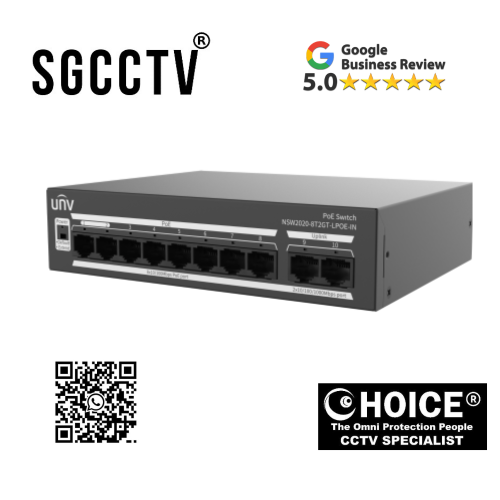
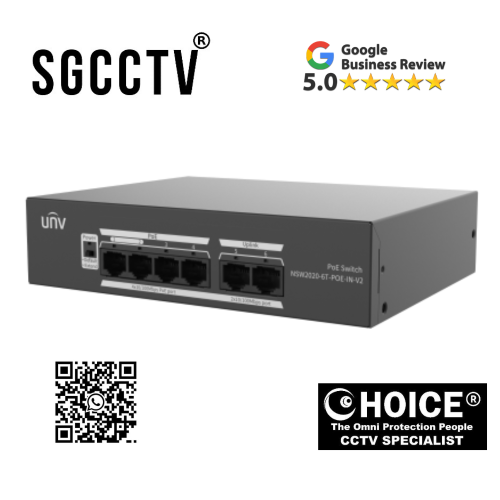

UNV UNIVIEW NSW2020-8T2GT-LPOE-IN 10-PORT POE SWITCH Support port traffic control Up to 250m transmission distance NEW
UNV Uniview NSW2020-8T2GT-LPOE-IN 10-Port PoE Switch – The Ultimate Solution for Reliable, Long-Distance Network Connectivity
In today’s fast-paced digital environment, network infrastructure is no longer just a supporting component—it’s the backbone of modern operations. Whether you’re managing a surveillance system, running a small-to-medium business, or deploying smart devices across a facility, having a reliable, efficient, and scalable network switch is essential. That’s where the UNV Uniview NSW2020-8T2GT-LPOE-IN 10-Port PoE Switch steps in as a powerful and practical solution designed to meet the growing demands of modern connectivity.
This advanced PoE (Power over Ethernet) switch is engineered to deliver seamless performance, enhanced flexibility, and long-distance transmission capabilities, making it an ideal choice for both commercial and residential applications. With support for port traffic control and an impressive transmission range of up to 250 meters, this switch stands out as a dependable networking solution for users who demand both performance and efficiency.
A New Standard in PoE Switching Technology
The UNV Uniview NSW2020-8T2GT-LPOE-IN is not just another network switch—it represents a new generation of intelligent networking devices built to simplify installation, reduce infrastructure costs, and enhance overall network performance. Designed with precision and reliability in mind, this 10-port PoE switch integrates advanced features that cater to the evolving needs of IP-based systems, especially in surveillance and security environments.
Power over Ethernet technology allows both power and data to be transmitted through a single Ethernet cable, eliminating the need for separate power supplies for connected devices such as IP cameras, wireless access points, and VoIP phones. This not only simplifies cabling but also significantly reduces installation time and costs.
With 8 PoE ports and 2 Gigabit uplink ports, the NSW2020-8T2GT-LPOE-IN ensures stable connectivity and efficient data transmission across all connected devices. Whether you’re expanding an existing network or building one from scratch, this switch provides the flexibility and performance required for a smooth and reliable setup.
UNV UNIVIEW NSW2020-8T2GT-LPOE-IN 10-PORT POE SWITCH Support port traffic control Up to 250m transmission distance NEW
Key Features That Set It Apart
1. 10-Port Configuration for Versatile Connectivity
The switch comes equipped with 10 ports, including 8 PoE-enabled ports and 2 Gigabit uplink ports. This configuration allows users to connect multiple devices simultaneously without compromising on speed or performance. The Gigabit uplink ports ensure high-speed data transfer to core networks, making it suitable for bandwidth-intensive applications.
2. Long-Distance Transmission Up to 250 Meters
One of the standout features of this PoE switch is its ability to support transmission distances of up to 250 meters. This extended range is particularly beneficial for large installations such as warehouses, campuses, parking lots, and outdoor surveillance systems where devices are spread across vast areas.
Traditional Ethernet switches typically support a maximum distance of 100 meters, but with this extended capability, users can reduce the need for additional switches or signal repeaters, ultimately lowering infrastructure costs.
3. Intelligent Port Traffic Control
Efficient network management is critical for maintaining optimal performance. The NSW2020-8T2GT-LPOE-IN includes advanced port traffic control features that allow administrators to manage bandwidth allocation and prioritize network traffic effectively.
This ensures that critical applications such as video surveillance or real-time communication receive the necessary bandwidth, preventing lag, packet loss, or network congestion. It’s an essential feature for environments where consistent performance is non-negotiable.
4. Reliable PoE Power Supply
With robust PoE capabilities, this switch can deliver stable power to connected devices, eliminating the need for external power adapters. This is especially useful in scenarios where power outlets are limited or difficult to access.
The device supports multiple PoE standards, ensuring compatibility with a wide range of devices. Whether you’re powering IP cameras, access control systems, or wireless access points, you can rely on consistent and safe power delivery.
5. Plug-and-Play Simplicity
Ease of use is another major advantage of this switch. The plug-and-play design means that no complex configuration is required. Simply connect your devices, and the switch will automatically detect and configure them for optimal performance.
This makes it an excellent choice for users who may not have extensive networking expertise but still require a reliable and efficient solution.
UNV UNIVIEW NSW2020-8T2GT-LPOE-IN 10-PORT POE SWITCH Support port traffic control Up to 250m transmission distance NEW
Ideal Applications for the NSW2020-8T2GT-LPOE-IN
The versatility of this PoE switch makes it suitable for a wide range of applications across different industries. Here are some of the most common use cases:
Surveillance and Security Systems
This switch is particularly well-suited for IP surveillance systems. With its long-distance transmission capability and stable PoE power supply, it ensures uninterrupted video streaming from multiple cameras. The traffic control feature also prioritizes video data, ensuring clear and lag-free footage.
Small and Medium Businesses
For offices and commercial spaces, the switch provides reliable connectivity for computers, VoIP phones, printers, and wireless access points. Its compact design and efficient performance make it a valuable addition to any business network.
Smart Homes and IoT Deployments
As smart home technology continues to evolve, the need for a robust network infrastructure becomes increasingly important. This switch can support various IoT devices, ensuring seamless communication and control across the network.
Educational Institutions
Schools and universities can benefit from the switch’s ability to support multiple devices across large campuses. The extended transmission distance reduces the need for additional networking equipment, making it a cost-effective solution.
Industrial and Outdoor Environments
In industrial settings or outdoor installations, where devices may be located far from the central network, the 250-meter transmission capability proves invaluable. It ensures reliable connectivity even in challenging environments.
Benefits of Choosing This PoE Switch
Cost Efficiency
By combining power and data transmission into a single cable, the switch significantly reduces installation and maintenance costs. The extended transmission range further minimizes the need for additional hardware.
Scalability
As your network grows, this switch provides the flexibility to add more devices without requiring a complete overhaul of your infrastructure. Its robust design ensures long-term usability.
Enhanced Performance
With intelligent traffic management and high-speed uplink ports, the switch delivers consistent and reliable performance, even in demanding environments.
Simplified Installation
The plug-and-play functionality eliminates the need for complex configurations, making it easy to deploy and manage.
Energy Efficiency
PoE technology helps optimize energy usage by delivering power only when needed, contributing to a more sustainable and efficient network setup.
UNV UNIVIEW NSW2020-8T2GT-LPOE-IN 10-PORT POE SWITCH Support port traffic control Up to 250m transmission distance NEW
Why This Switch Is a Smart Investment
Investing in a high-quality network switch is crucial for ensuring the stability and efficiency of your entire network. The UNV Uniview NSW2020-8T2GT-LPOE-IN offers a perfect balance of performance, reliability, and affordability.
Its advanced features, such as long-distance transmission and traffic control, address common challenges faced in modern networking environments. Whether you’re setting up a new system or upgrading an existing one, this switch provides the tools you need to build a robust and future-ready network.
Future-Proof Your Network Infrastructure
As technology continues to evolve, the demand for faster, more reliable, and scalable networking solutions will only increase. Choosing a switch that can adapt to these changes is essential for staying ahead.
The NSW2020-8T2GT-LPOE-IN is designed with future needs in mind. Its high-performance capabilities and flexible design ensure that it can support emerging technologies and growing network demands.
1. Design & Engineering Phase
Everything starts with the manufacturer—Zhejiang Uniview Technologies—designing the switch.
Engineers define:
- Number of ports (8 PoE + 2 uplinks)
- Power budget for PoE
- Chipset (switching IC)
- Transmission features (like 250m extend mode)
- Traffic control capabilities
They create:
- Circuit schematics
- PCB (Printed Circuit Board) layout
- Thermal and power management plans
This stage ensures the switch can handle continuous data flow, power delivery, and heat dissipation reliably.
2. Core Components Manufacturing
The switch is made from multiple key components, each produced separately:
a. Switching Chip (the “brain”)
A specialized network switching chip controls:
- Data packet forwarding
- Port traffic control
- VLAN and QoS functions
These chips are typically produced by semiconductor companies and then integrated into the board.
b. PoE Controller
This component manages:
- Power delivery over Ethernet cables
- Voltage regulation
- Device detection (so it only powers compatible devices)
c. PCB (Printed Circuit Board)
The PCB is a multi-layer board that connects all components:
- Copper layers route signals and power
- Designed to minimize interference and heat
UNV UNIVIEW NSW2020-8T2GT-LPOE-IN 10-PORT POE SWITCH Support port traffic control Up to 250m transmission distance NEW
3. PCB Assembly (SMT Process)
This is where the switch starts to physically take shape.
Factories use Surface Mount Technology (SMT):
- Solder paste is applied to the PCB
- Tiny components (chips, resistors, capacitors) are placed by automated machines
- The board goes through a reflow oven to solder everything in place
This process is highly automated and extremely precise.
4. Through-Hole Assembly
Some larger components are added manually or semi-automatically:
- Ethernet (RJ45) ports
- Power connectors
- Transformers (for PoE isolation)
These are inserted into the board and soldered for durability.
5. Firmware Installation
Once the hardware is ready, the software layer is added.
Engineers install firmware that controls:
- Port behavior
- Traffic control features
- Extend mode (250m transmission)
- Power management
This firmware is what allows the switch to intelligently manage network traffic and PoE delivery.
6. Metal Casing & Physical Build
The internal board is then placed into a protective enclosure:
- Usually steel or aluminum casing
- Designed for heat dissipation and durability
- Includes ventilation for cooling
Ports are aligned with the front panel for easy access.
7. Testing & Quality Control
Before shipping, every unit goes through strict testing:
Functional Testing
- All ports checked for connectivity
- PoE output verified
- Data throughput tested
Stress Testing
- Continuous operation under load
- Heat and power stability checks
Safety Testing
- Electrical safety
- Surge protection verification
UNV UNIVIEW NSW2020-8T2GT-LPOE-IN 10-PORT POE SWITCH Support port traffic control Up to 250m transmission distance NEW
8. Packaging & Distribution
Finally:
- The switch is packaged with manuals and power cables
- Labeled and serialized
- Distributed globally through suppliers and resellers
Simple Way to Think About It
If you want a quick mental model:
- Chipset = brain
- PCB = nervous system
- PoE module = power supply system
- Firmware = intelligence
- Casing = protection
All of these come together to create a device that can:
- Send data
- Deliver power
- Manage traffic
- Work reliably over long distances
For the UNV Uniview NSW2020-8T2GT-LPOE-IN 10-Port PoE Switch, the warranty typically depends on where you purchase it, but here’s the reliable baseline:
Standard Manufacturer Warranty
Devices from Zhejiang Uniview Technologies (UNV / Uniview) generally come with:
- 2 to 3 years limited hardware warranty
- Covers manufacturing defects and hardware failures
- Includes repair or replacement (not refunds)
What the Warranty Usually Covers
- Faulty ports (PoE or uplink not working)
- Power supply issues (device not powering on)
- Internal hardware defects
- Failures under normal usage conditions
What It Typically Does NOT Cover
- Physical damage (drops, water, fire)
- Power surges or lightning damage
- Improper installation or misuse
- Unauthorized repairs or modifications
Important: Warranty Can Vary by Seller
In places like Singapore, resellers or distributors may offer:
- Local warranty (often 2–3 years)
- Faster replacement support
- On-site or carry-in service (depends on vendor)
Some sellers even extend warranty periods as part of a package.
UNV UNIVIEW NSW2020-8T2GT-LPOE-IN 10-PORT POE SWITCH Support port traffic control Up to 250m transmission distance NEW
How to Confirm Your Exact Warranty


Nunc lacus elit, faucibus ac laoreet sed, dapibus ac mi. Maecenas eu ante a elit tempus fermentum. Aliquam commodo tincidunt semper. Phasellus accumsan, justo ac mollis pharetra, ex dui pharetra nisl, a scelerisque ipsum nulla ac sem. Cras eu risus urna. Duis lorem sapien, congue eget nisl sit amet, rutrum faucibus elit.
Donec accumsan auctor iaculis. Sed suscipit arcu ligula, at egestas magna molestie a. Proin ac ex maximus, ultrices justo eget, sodales orci. Aliquam egestas libero ac turpis pharetra, in vehicula lacus scelerisque. Vestibulum ut sem laoreet, feugiat tellus at, hendrerit arcu.
Nunc lacus elit, faucibus ac laoreet sed, dapibus ac mi. Maecenas eu ante a elit tempus fermentum. Aliquam commodo tincidunt semper. Phasellus accumsan, justo ac mollis pharetra, ex dui pharetra nisl, a scelerisque ipsum nulla ac sem. Cras eu risus urna. Duis lorem sapien, congue eget nisl sit amet, rutrum faucibus elit.