


UNV UNIVIEW NVR504-B Series4 HDDs 16-CH 1U Network Video Recorder 16/32-channel input Up to 16 Megapixels resolution recording NEW DB
$680.00
UNV UNIVIEW Security Partner
Widely deployed in Shopping Malls, Residential, Commercial, Office, Warehouse.
Specialist in all Security System CCTV Camera Door Access Alarm Switch
Technical Support at Sim Lim Square 02-81 11am~7pm Daily +65 98534404
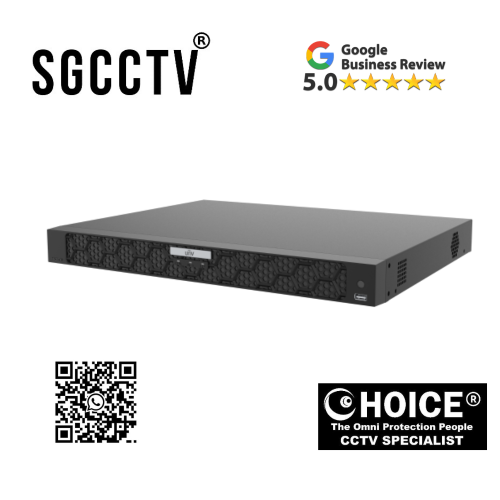
UNV UNIVIEW NVR504-B Series4 HDDs 16-CH 1U Network Video Recorder 16/32-channel input Up to 16 Megapixels resolution recording NEW
In today’s modern security landscape, surveillance systems are no longer just about recording video—they are about intelligent management, ultra-high-definition clarity, long-term reliability, and seamless scalability. Whether deployed in commercial buildings, industrial facilities, government infrastructure, retail chains, or residential estates, a powerful Network Video Recorder (NVR) is the backbone of any IP surveillance system.
The UNV Uniview NVR504-B Series 16-Channel 1U Network Video Recorder is engineered to deliver advanced performance, massive storage flexibility, and ultra-high-definition recording capabilities for professional security environments. Designed to support up to 16/32 IP camera inputs and record video resolutions of up to 16 megapixels, this NVR provides exceptional clarity, stability, and scalability for demanding surveillance applications.
Built by Uniview, a global leader in video surveillance technology, this NVR series represents the perfect balance between performance, efficiency, and affordability—making it one of the most reliable recording solutions for modern IP CCTV systems.
UNV UNIVIEW NVR504-B Series4 HDDs 16-CH 1U Network Video Recorder 16/32-channel input Up to 16 Megapixels resolution recording NEW
1. Introduction to UNV Uniview NVR504-B Series
The UNV Uniview NVR504-B Series 16-Channel 1U Network Video Recorder belongs to Uniview’s professional-grade recording solutions designed for mid-to-large scale surveillance deployments. It is a 1U rack-mounted NVR system, making it suitable for server rooms, security control centers, and structured CCTV installations.
This model supports:
- Up to 16 IP camera channels (expandable to 32 depending on configuration)
- Ultra-high resolution recording up to 16MP per camera
- Multiple HDD storage support (Series supports up to 4 HDDs)
- Advanced H.265 video compression for efficient storage usage
- Smart video management and playback features
It is designed to handle high-volume video streams from multiple cameras simultaneously without compromising performance, making it ideal for large-scale security infrastructures.
2. Ultra-High Resolution Recording up to 16 Megapixels
One of the most powerful features of the UNV Uniview NVR504-B Series 16-Channel 1U Network Video Recorder is its ability to support recording resolutions up to 16 megapixels.
This means the system can handle ultra-high-definition surveillance cameras, ensuring crystal-clear footage with extreme detail accuracy.
Benefits of 16MP Recording Capability:
- Ultra-sharp image clarity for forensic investigation
- Better zoom-in capability without image distortion
- Improved facial recognition accuracy
- Enhanced license plate readability
- Ideal for critical security environments
Compared to traditional 1080p or 4MP systems, 16MP recording provides significantly more detail, making it highly valuable for security-sensitive industries.
UNV UNIVIEW NVR504-B Series4 HDDs 16-CH 1U Network Video Recorder 16/32-channel input Up to 16 Megapixels resolution recording NEW
3. Multi-Channel Flexibility: 16 / 32 Channel Input Support
The NVR504-B Series offers flexible channel support, making it adaptable for both medium and large-scale surveillance systems.
Channel Options:
- 16-channel base configuration
- Expandable up to 32 channels (depending on model setup)
This flexibility allows system integrators to:
- Start small and scale up later
- Integrate multiple building zones
- Manage distributed surveillance networks
- Reduce system replacement costs in the future
It is especially useful for enterprises that plan phased expansion of their security infrastructure.
UNV UNIVIEW NVR504-B Series4 HDDs 16-CH 1U Network Video Recorder 16/32-channel input Up to 16 Megapixels resolution recording NEW
4. Massive Storage Capacity with 4 HDD Support
The UNV Uniview NVR504-B Series 16-Channel 1U Network Video Recorder supports up to 4 internal hard drives (HDDs), providing massive storage scalability.
Storage Benefits:
- Long-term video retention
- Supports high-resolution 16MP recordings
- RAID configuration support (model dependent)
- Redundant backup options for data protection
- Reduced risk of data loss
With multiple HDD slots, users can configure storage based on their requirements—whether for short-term recording or long-term archival storage.
5. Advanced H.265 Video Compression Technology
Efficient storage management is critical in modern surveillance systems. This NVR uses H.265 video compression, one of the most advanced compression technologies available today.
Advantages of H.265 Compression:
- Up to 50% lower storage usage compared to H.264
- Reduced network bandwidth consumption
- Longer recording retention on the same storage capacity
- Improved video streaming stability
- Lower operational costs
This makes the system highly efficient, especially when managing multiple high-resolution cameras simultaneously.
UNV UNIVIEW NVR504-B Series4 HDDs 16-CH 1U Network Video Recorder 16/32-channel input Up to 16 Megapixels resolution recording NEW
6. Professional 1U Rack-Mount Design
The NVR504-B Series is built in a 1U rack-mounted chassis, making it ideal for professional installation environments.
Design Advantages:
- Compact and space-saving form factor
- Easy integration into server racks
- Efficient heat dissipation design
- Suitable for 24/7 operation
- Professional control room deployment
This design is commonly used in:
- Security operation centers (SOC)
- Data rooms
- Enterprise IT racks
- Commercial surveillance hubs
7. High Performance Processing for Multi-Camera Management
Handling multiple high-resolution IP cameras requires strong processing power. The UNV Uniview NVR504-B Series 16-Channel 1U Network Video Recorder is built with robust hardware architecture that ensures smooth performance even under heavy loads.
Processing Capabilities:
- Simultaneous multi-channel decoding
- Real-time playback and recording
- Smooth live view streaming
- Stable network data handling
This ensures no lag, delay, or frame drops—even when managing dozens of high-definition camera feeds.
UNV UNIVIEW NVR504-B Series4 HDDs 16-CH 1U Network Video Recorder 16/32-channel input Up to 16 Megapixels resolution recording NEW
8. Smart Video Management Features
Modern surveillance systems require intelligent control features. This NVR includes advanced video management tools for easier monitoring and operation.
Key Features:
- Multi-screen live view layout
- Instant playback and search
- Event-based recording
- Motion detection indexing
- Smart timeline navigation
These features significantly improve operational efficiency, especially for security teams monitoring large facilities.
9. Reliable Data Security and Backup
Data security is critical in surveillance systems. The NVR504-B Series ensures reliable video storage protection through multiple mechanisms.
Security Features:
- Redundant storage options
- Automatic video recovery
- Secure user authentication
- Network encryption protocols
- Stable firmware architecture
This ensures that critical surveillance footage remains protected at all times.
10. Wide Application Scenarios
The UNV Uniview NVR504-B Series 16-Channel 1U Network Video Recorder is suitable for a wide range of professional applications.
Common Use Cases:
- Corporate office buildings
- Shopping malls and retail chains
- Industrial factories and warehouses
- Government facilities
- Educational institutions
- Transportation hubs
- Residential estates and condominiums
- Critical infrastructure sites
Its scalability and performance make it a preferred choice for both small and large security deployments.
UNV UNIVIEW NVR504-B Series4 HDDs 16-CH 1U Network Video Recorder 16/32-channel input Up to 16 Megapixels resolution recording NEW
11. Easy Integration with IP Cameras
This NVR is designed for seamless compatibility with Uniview IP cameras and ONVIF-supported third-party cameras.
Integration Benefits:
- Plug-and-play setup with UNV cameras
- ONVIF compatibility for third-party devices
- Automatic camera discovery
- Centralized device management
- Simplified installation process
This makes deployment faster and more efficient for installers and system integrators.
12. Installation and Setup Overview
Installing the NVR504-B Series is straightforward for professional technicians.
Basic Setup Steps:
- Mount NVR into server rack
- Connect IP cameras via PoE switch or network
- Install HDDs into internal slots
- Configure IP address and network settings
- Add cameras via auto-detection or manual input
- Set recording schedules and storage rules
With proper setup, the system can be fully operational within a short time.
13. Reliability and Long-Term Performance
The UNV Uniview NVR504-B Series 16-Channel 1U Network Video Recorder is designed for continuous 24/7 operation, making it highly reliable for mission-critical environments.
Reliability Features:
- Industrial-grade components
- Continuous recording capability
- Stable firmware system
- Efficient cooling design
- Long operational lifespan
This ensures uninterrupted surveillance performance in all conditions.
UNV UNIVIEW NVR504-B Series4 HDDs 16-CH 1U Network Video Recorder 16/32-channel input Up to 16 Megapixels resolution recording NEW
14. Why Choose UNV Uniview NVR504-B Series?
There are many NVR systems available in the market, but this model stands out due to its balance of performance, scalability, and cost efficiency.
Key Advantages:
- Supports ultra-high 16MP resolution
- Flexible 16/32-channel input
- Large storage capacity with 4 HDD support
- Efficient H.265 compression
- Stable enterprise-grade performance
- Easy integration with IP camera systems
- Trusted Uniview global brand reliability
15. Conclusion
The UNV Uniview NVR504-B Series 16-Channel 1U Network Video Recorder is a powerful, scalable, and professional-grade surveillance recording solution designed for modern security infrastructures. With its support for ultra-high-resolution recording, multi-channel flexibility, large storage capacity, and advanced compression technology, it delivers everything needed for a reliable and efficient CCTV system.
Whether deployed in commercial buildings, industrial facilities, or large residential developments, this NVR provides the performance and stability required for continuous 24/7 monitoring.
It is not just a recorder—it is the core intelligence hub of a complete surveillance ecosystem.
UNV UNIVIEW NVR504-B Series4 HDDs 16-CH 1U Network Video Recorder 16/32-channel input Up to 16 Megapixels resolution recording NEW
⭐ WHY BUY UNV UNIVIEW NVR504-B SERIES 16-CHANNEL NVR?
In modern surveillance systems, the Network Video Recorder is the core brain of the entire CCTV setup. If the NVR is weak, even the best cameras will underperform. That is why choosing a stable, high-capacity, and scalable recorder like the UNV NVR504-B Series is extremely important for long-term security reliability.
The UNV Uniview NVR504-B Series 16-Channel 1U Network Video Recorder is built for professional environments that demand high resolution, continuous recording, and multi-camera management without failure.
Below are the key reasons why this NVR is worth investing in:
🔥 1. Supports Ultra High 16MP Recording Quality
This NVR supports recording resolutions up to 16 megapixels, which is far beyond standard Full HD or even 4MP systems.
Why this matters:
- Captures ultra-detailed footage
- Clear facial recognition at distance
- Better license plate readability
- Strong forensic evidence quality
👉 In real-world security, higher resolution = better investigation success rate.
📹 2. 16 / 32 Channel Flexibility for Expansion
The system supports:
- 16-channel base setup
- Expandable up to 32 channels (depending on configuration)
Why this is important:
- Start small, expand later without replacing system
- Suitable for growing businesses
- Perfect for multi-building surveillance
👉 This makes it ideal for warehouses, factories, malls, and large residential estates.
💾 3. Massive Storage Support (Up to 4 HDDs)
With support for up to 4 internal hard drives, this NVR allows long-term recording storage.
Benefits:
- Store weeks or months of footage
- Supports high-resolution video without space issues
- Flexible HDD configuration
- Reliable long-term archival storage
👉 This is critical for businesses that require compliance or evidence retention.
UNV UNIVIEW NVR504-B Series4 HDDs 16-CH 1U Network Video Recorder 16/32-channel input Up to 16 Megapixels resolution recording NEW
⚡ 4. Efficient H.265 Compression Saves Storage & Bandwidth
The NVR uses H.265 compression technology, which significantly reduces file size.
Advantages:
- Up to 50% less storage usage vs older systems
- Lower network bandwidth consumption
- Longer recording retention
- Smooth multi-camera streaming
👉 You get more recording time without increasing storage cost.
🧠 5. Stable Performance for Multi-Camera Systems
This NVR is designed to handle multiple high-resolution IP cameras at once without lag.
Performance benefits:
- Smooth live view across multiple channels
- Stable 24/7 recording
- No frame drops under load
- Reliable decoding for HD streams
👉 This is essential for professional security operations.
🔌 6. Easy Integration with IP Cameras (ONVIF Supported)
The system supports:
- Uniview IP cameras (best compatibility)
- ONVIF standard cameras from other brands
Why this matters:
- Flexible system design
- Easy upgrades in future
- Compatible with mixed camera setups
👉 You are not locked into one brand ecosystem.
UNV UNIVIEW NVR504-B Series4 HDDs 16-CH 1U Network Video Recorder 16/32-channel input Up to 16 Megapixels resolution recording NEW
🏢 7. Professional 1U Rack Design for Security Rooms
The NVR comes in a 1U rack-mount chassis, making it ideal for professional setups.
Advantages:
- Fits server racks neatly
- Clean control room installation
- Efficient cooling design
- Suitable for 24/7 operations
👉 This is the standard for enterprise CCTV deployments.
🔄 8. ANR Technology Prevents Data Loss
The system includes ANR (Automatic Network Replenishment).
What it does:
- If network drops, cameras store footage locally
- Once connection returns, data syncs automatically
👉 This prevents missing recordings during outages.
📊 9. Built for Large-Scale Security Projects
This NVR is commonly used in:
- Commercial buildings
- Shopping malls
- Industrial factories
- Transport hubs
- Government facilities
- Condominium CCTV systems
👉 It is not a basic home recorder—it is a professional-grade surveillance backbone.
🛠️ 10. Easy Setup & Maintenance
Despite its powerful capabilities, it remains easy to configure:
- Auto camera detection
- Web-based configuration
- Remote viewing support
- Simple HDD installation
👉 Installers can deploy it quickly without complex setup.
UNV UNIVIEW NVR504-B Series4 HDDs 16-CH 1U Network Video Recorder 16/32-channel input Up to 16 Megapixels resolution recording NEW
🧩 FINAL REASON TO BUY
The biggest reason to choose the UNV Uniview NVR504-B Series 16-Channel 1U Network Video Recorder is simple:
👉 It delivers enterprise-level stability, high-resolution recording, and scalable channel expansion at a cost-effective price point
You are not just buying an NVR—you are investing in a central surveillance system that can grow with your security needs.
🔧 HOW TO SET UP / CONFIG UNV NVR (STEP-BY-STEP)
1️⃣ Physical Installation (Hardware Setup)
🧱 Step 1: Install Hard Disks (HDD)
- Open NVR top cover
- Insert up to 4 SATA HDDs
- Screw tightly into bracket
- Connect SATA + power cables
👉 Recommended: Surveillance-grade HDD (WD Purple / Seagate SkyHawk)
🔌 Step 2: Connect Devices
Connect the following:
- Monitor → HDMI or VGA port
- Mouse → USB port
- Network → LAN cable to router or switch
- Cameras → PoE switch or directly via network
⚡ Step 3: Power ON
- Plug in power adapter
- Turn on NVR
- Wait for boot screen
UNV UNIVIEW NVR504-B Series4 HDDs 16-CH 1U Network Video Recorder 16/32-channel input Up to 16 Megapixels resolution recording NEW
2️⃣ Initial Setup (First Boot Wizard)
When NVR starts, you will see setup wizard:
🧑💻 Step 1: Language & Region
- Select language (English)
- Set time zone (Singapore: GMT+8)
🔐 Step 2: Create Admin Password
- Set strong password
- Confirm password
👉 Important: Don’t forget this (no password = locked system)
⏰ Step 3: Time Settings
- Enable NTP (auto time sync)
- Or set manually
💾 Step 4: Format HDD
- Go to Disk Management
- Select all HDDs
- Click “Initialize / Format”
👉 This is REQUIRED before recording works
3️⃣ Add Cameras (Most Important Step)
You have 2 methods:
✔️ METHOD A: Auto Add (Easiest)
- Go to Camera Management
- Click “Auto Search”
- NVR will detect IP cameras
- Click “Add All”
✔️ METHOD B: Manual Add (If auto fails)
Enter:
- Camera IP address
- Username: admin
- Password (camera password)
Then click “Add”
UNV UNIVIEW NVR504-B Series4 HDDs 16-CH 1U Network Video Recorder 16/32-channel input Up to 16 Megapixels resolution recording NEW
4️⃣ Configure Recording Settings 🎥
Go to:
👉 Main Menu → Storage → Record Schedule
Set:
- Continuous recording (24/7) OR
- Motion detection OR
- Smart event recording
👉 Recommended setup:
- 24/7 for critical sites
- Motion for homes/shops
5️⃣ Configure Motion Detection (Optional Smart Setup)
Go to:
👉 Camera Settings → Motion Detection
Adjust:
- Sensitivity (Medium recommended)
- Detection area (highlight zones)
- Link recording + alarm
6️⃣ Enable Remote Viewing (Mobile App) 📱
Step 1:
Download app:
👉 UNV “EZView”
Step 2:
- Scan QR code on NVR
- Or manually enter SN (serial number)
Step 3:
- Login with admin account
Now you can view:
- Live view
- Playback
- Alerts
UNV UNIVIEW NVR504-B Series4 HDDs 16-CH 1U Network Video Recorder 16/32-channel input Up to 16 Megapixels resolution recording NEW
7️⃣ Network Setup (Important for Remote Access)
Go to:
👉 Network Settings
Configure:
- IP address (static recommended)
- Gateway (router IP)
- DNS (8.8.8.8 recommended)
8️⃣ Playback Setup 🔍
To check recordings:
- Go to Playback menu
- Select date/time
- Choose camera channel
- Click play
UNV UNIVIEW NVR504-B Series4 HDDs 16-CH 1U Network Video Recorder 16/32-channel input Up to 16 Megapixels resolution recording NEW
⚠️ COMMON MISTAKES (VERY IMPORTANT)
❌ Forgetting to format HDD → no recording
❌ Wrong camera password → offline status
❌ IP mismatch (camera not same subnet)
❌ Not enabling recording schedule
❌ Using non-PoE switch without power
🧠 QUICK INSTALLER SUMMARY
👉 Setup flow is:
- Install HDD
- Connect cameras + monitor
- Power ON
- Set password + time
- Format HDD
- Add cameras
- Enable recording
- Setup mobile app
UNV UNIVIEW NVR504-B Series4 HDDs 16-CH 1U Network Video Recorder 16/32-channel input Up to 16 Megapixels resolution recording NEW
💾 WHAT HDD IS COMPATIBLE?
✔️ 1. Type of HDD (IMPORTANT)
You must use:
👉 Surveillance-grade SATA HDD
Examples:
- WD Purple (Western Digital)
- Seagate SkyHawk
- Toshiba S300
❌ DO NOT USE:
- Laptop HDD (2.5″)
- Desktop green/blue HDD (not recommended for CCTV)
- SSD (not necessary for NVR storage)
- External USB drives
👉 Reason: CCTV runs 24/7 recording, normal drives will fail faster.
📦 2. Storage Capacity Support
Based on Uniview specs:
- Supports up to 4 SATA HDDs
- Each HDD supports up to:
- 16TB–24TB per drive (depending on firmware/model/environment)
✔️ Practical recommendation:
- 4TB → small shop / home
- 8TB → standard business
- 10TB–12TB → commercial use (recommended sweet spot)
- 16TB+ → large enterprise / long retention
UNV UNIVIEW NVR504-B Series4 HDDs 16-CH 1U Network Video Recorder 16/32-channel input Up to 16 Megapixels resolution recording NEW
⚙️ 3. HDD Requirements (VERY IMPORTANT)
Your HDD must be:
- SATA 3.5” interface
- 5400RPM or 7200RPM
- Designed for continuous recording (NAS / surveillance class)
🔥 4. Best HDD Choices (Industry Standard)
⭐ Most recommended:
- WD Purple (best compatibility with NVR systems)
- Seagate SkyHawk (very common in CCTV setups)
⚠️ 5. Common Mistakes People Make
❌ Using normal PC HDD → early failure
❌ Mixing different HDD sizes without setup
❌ Not formatting inside NVR first
❌ Using SMR drives (can cause lag in recording systems)
UNV UNIVIEW NVR504-B Series4 HDDs 16-CH 1U Network Video Recorder 16/32-channel input Up to 16 Megapixels resolution recording NEW
Your UNV NVR supports:
👉 SATA surveillance HDD only
👉 Up to 4 drives
👉 Up to 16–24TB per drive (depending on model/conditions)
SGCCTV Choicecycle
📍 Sim Lim Square #02-81, Singapore
📞 WhatsApp: +65 9853 4404
📧 Email: enquiry@choicecycle.com.sg
🌐 Website: https://sgcctv.com.sg
🕒 Operating Hours: 11 AM – 8 PM


Nunc lacus elit, faucibus ac laoreet sed, dapibus ac mi. Maecenas eu ante a elit tempus fermentum. Aliquam commodo tincidunt semper. Phasellus accumsan, justo ac mollis pharetra, ex dui pharetra nisl, a scelerisque ipsum nulla ac sem. Cras eu risus urna. Duis lorem sapien, congue eget nisl sit amet, rutrum faucibus elit.
Donec accumsan auctor iaculis. Sed suscipit arcu ligula, at egestas magna molestie a. Proin ac ex maximus, ultrices justo eget, sodales orci. Aliquam egestas libero ac turpis pharetra, in vehicula lacus scelerisque. Vestibulum ut sem laoreet, feugiat tellus at, hendrerit arcu.
Nunc lacus elit, faucibus ac laoreet sed, dapibus ac mi. Maecenas eu ante a elit tempus fermentum. Aliquam commodo tincidunt semper. Phasellus accumsan, justo ac mollis pharetra, ex dui pharetra nisl, a scelerisque ipsum nulla ac sem. Cras eu risus urna. Duis lorem sapien, congue eget nisl sit amet, rutrum faucibus elit.