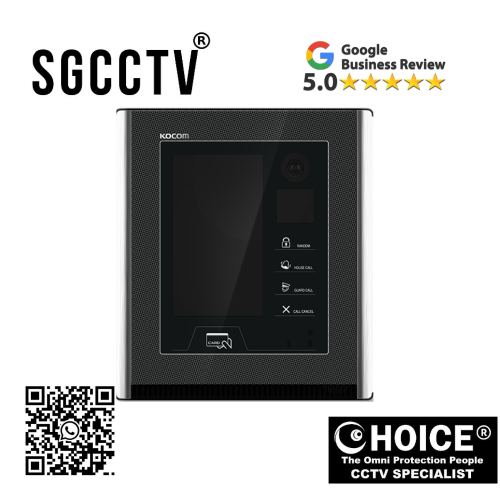
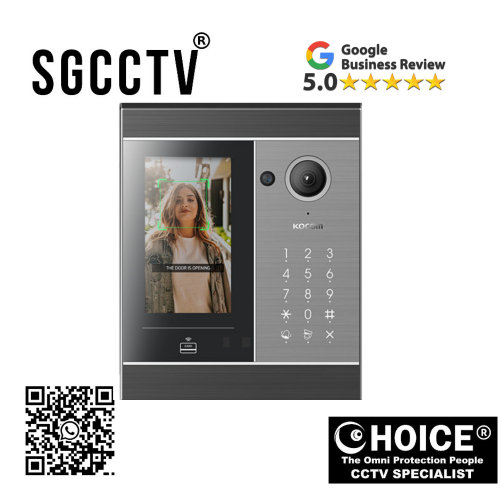
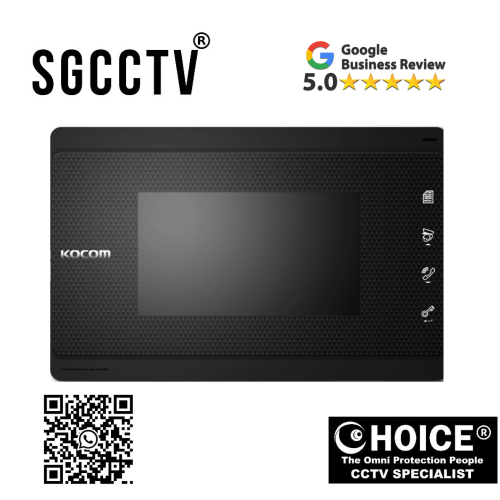

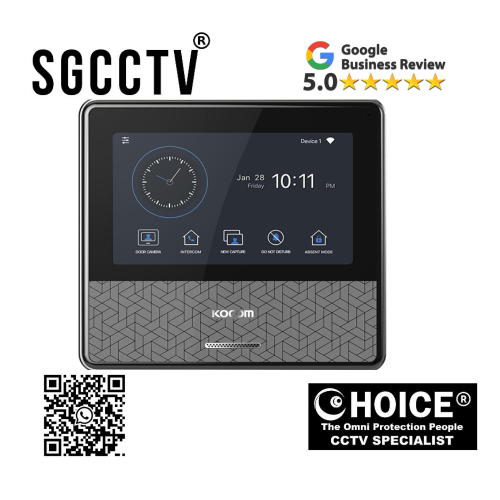
KOCOM LOBBYPHONE K6B LP-70D Call and communication with household & guard phone Video output (*DC 24V ADAPTOR INCLUDED) NEW DB
$1555.00
Supply and Maintenance HIKVISION CCTV IP Cameras, NVR, Turbo HD TVI Cameras, DVR, PTZ Cameras,
Access Control System, Video Intercom.
Sim Lim Square 02-81 10am-7pm Daily.
Whatsapp Enquiry Project +65 98534404, Technical Support +65 81120788, Site Visit Maintenance +65 81985572.
KOCOM LOBBYPHONE K6B LP-70D Call and communication with household & guard phone Video output (*DC 24V ADAPTOR INCLUDED) NEW
The KOCOM K6B LP-70D Lobbyphone is a modern and professional lobbyphone system designed to provide secure visitor communication, household calling, guard phone integration, and video output support for residential and commercial properties. Built for apartments, condominiums, office buildings, and multi-unit developments, the K6B LP-70D combines access communication, visitor coordination, and centralized entrance management into one practical security solution.
Featuring household and guard phone communication, integrated video output capability, and a DC 24V adaptor included for stable operation, the LP-70D is engineered for modern building environments where communication reliability and controlled access are essential.
As modern buildings become larger and more security-focused, centralized communication systems are increasingly necessary. Traditional doorbells or simple audio systems are often insufficient for high-traffic environments such as:
- Condominiums
- Apartments
- Commercial offices
- Residential towers
- Corporate entrances
- Security-managed developments
The KOCOM LP-70D is specifically developed to meet these growing demands by providing professional communication between visitors, residents, and security personnel while maintaining simple daily operation.
Why Modern Buildings Need Advanced Lobbyphone Systems
Building security is no longer just about locking doors. Modern residents and property managers now require:
- Visitor verification
- Household communication
- Security coordination
- Guard communication
- Centralized entrance management
- Video monitoring support
The KOCOM LP-70D helps address all of these needs in one integrated system.
A lobbyphone system serves as the communication bridge between:
- Visitors
- Residents
- Security guards
- Building management
This helps improve:
- Security
- Convenience
- Resident satisfaction
- Building professionalism
KOCOM LOBBYPHONE K6B LP-70D Call and communication with household & guard phone Video output (*DC 24V ADAPTOR INCLUDED) NEW
Key Features of the KOCOM K6B LP-70D
Call and Communication with Household Units
One of the main strengths of the LP-70D is its ability to call and communicate directly with household units.
When visitors arrive:
- They can select or call a household
- Residents receive communication
- Visitors can identify themselves
- Residents can verify access
This helps improve:
- Visitor screening
- Controlled access
- Delivery management
- Resident convenience
This feature is especially important in:
- Condominium towers
- Apartments
- Multi-unit housing projects
Guard Phone Communication
The LP-70D supports communication with guard phones, making it highly valuable for security-managed properties.
This allows:
- Security guard coordination
- Visitor verification support
- Building-wide communication
- Emergency assistance
- Security escalation
In buildings with:
- Security counters
- Guardhouses
- Reception desks
- Security offices
this feature greatly improves operational efficiency.
Guard integration helps ensure suspicious visitors or unexpected situations can be handled professionally.
Video Output Support
The LP-70D includes video output functionality, adding visual communication capability to the system.
Video output allows:
- Visitor image display
- Monitoring integration
- Security system expansion
- Better entrance visibility
This is useful for:
- CCTV integration
- Monitor displays
- Security control rooms
- Building management systems
Visual support improves visitor verification and professional entrance security.
DC 24V Adaptor Included
Stable power is essential for communication systems.
The included DC 24V adaptor provides:
- Reliable power delivery
- Easier installation
- Reduced compatibility issues
- Stable long-term performance
This helps installers and property managers simplify deployment while maintaining proper operational standards.
KOCOM LOBBYPHONE K6B LP-70D Call and communication with household & guard phone Video output (*DC 24V ADAPTOR INCLUDED) NEW
Why Choose the KOCOM LP-70D?
Improved Security
Security is one of the primary reasons for investing in a professional lobbyphone system.
The LP-70D improves building security by:
- Verifying visitors
- Managing resident calls
- Coordinating with guards
- Supporting visual systems
- Reducing unauthorized access
Instead of uncontrolled building entry, residents and security teams gain communication-based access management.
Better Visitor Management
Modern properties receive:
- Guests
- Couriers
- Delivery services
- Maintenance personnel
- Contractors
The LP-70D allows these visitors to communicate professionally before access is granted.
This improves:
- Safety
- Delivery handling
- Resident control
- Operational convenience
Centralized Building Communication
The LP-70D creates a communication hub for:
- Lobby stations
- Household units
- Guard stations
This centralization helps:
- Improve response speed
- Increase security efficiency
- Simplify communication
Professional Building Image
A well-designed lobby communication system enhances the professional image of:
- Luxury apartments
- Corporate offices
- Smart developments
- Modern condominiums
The LP-70D supports a cleaner, more organized entrance experience.
How the KOCOM LP-70D Works
The LP-70D functions as the main entrance communication station.
Step 1 – Visitor Arrives at Lobby Entrance
A visitor approaches the main entrance and selects the desired household or communication point.
Step 2 – Household or Guard Phone Communication Activates
The system routes communication to:
- Household unit
- Guard phone
- Security station
The receiving party can:
- Speak with visitor
- Verify purpose
- Decide on entry authorization
KOCOM LOBBYPHONE K6B LP-70D Call and communication with household & guard phone Video output (*DC 24V ADAPTOR INCLUDED) NEW
Step 3 – Video Output Supports Monitoring
If integrated with display systems, visual monitoring may assist in:
- Visitor identification
- Entrance visibility
- Security observation
Step 4 – Access Coordination
Once verification is complete:
- Residents may approve entry
- Security may coordinate visitor access
- Building access procedures continue
Applications of the KOCOM LP-70D
Apartments
Apartment buildings benefit from:
- Household communication
- Visitor management
- Security coordination
Condominiums
Condominium residents appreciate:
- Controlled access
- Guard communication
- Professional lobby systems
Commercial Offices
Office buildings use the LP-70D for:
- Reception support
- Visitor coordination
- Employee communication
- Security management
Guarded Residential Communities
Guarded communities benefit from:
- Security oversight
- Visitor coordination
- Multi-point communication
Corporate Towers
Corporate entrances require:
- Professional communication
- Security management
- Visitor handling
Installation Overview
Step 1 – Select Main Entrance Installation Point
Install the LP-70D:
- Near primary entrance
- At accessible user height
- In protected environment
Step 2 – Secure Mounting
Proper mounting ensures:
- Stability
- User accessibility
- Long-term durability
KOCOM LOBBYPHONE K6B LP-70D Call and communication with household & guard phone Video output (*DC 24V ADAPTOR INCLUDED) NEW
Step 3 – Connect Household Communication Lines
Ensure communication pathways to:
- Residential units
- Guard stations
- Management offices
Step 4 – Connect Video Output
If used:
- Connect to monitors
- Connect to CCTV systems
- Connect to security displays
Step 5 – Connect DC 24V Power
Use included adaptor for:
- Stable power
- Proper voltage
- Reliable system operation
Step 6 – Test Communication
Verify:
- Household calling
- Guard communication
- Audio clarity
- Video output
- System stability
Common Issues and Solutions
No Household Communication
Possible causes:
- Wiring issue
- Routing error
- Power problem
Solutions:
- Check communication lines
- Inspect system settings
- Verify voltage
Guard Phone Not Responding
Possible causes:
- Incorrect connection
- Communication routing fault
Solutions:
- Check guard line
- Verify configuration
Video Output Failure
Possible causes:
- Display connection issue
- Wiring problem
Solutions:
- Check output connections
- Verify monitor compatibility
Weak Audio
Possible causes:
- Cable quality
- Volume settings
- Electrical interference
Solutions:
- Improve cabling
- Adjust audio settings
- Reduce interference
KOCOM LOBBYPHONE K6B LP-70D Call and communication with household & guard phone Video output (*DC 24V ADAPTOR INCLUDED) NEW
Why KOCOM Is Trusted
KOCOM is recognized for:
- Reliable communication systems
- Smart building solutions
- Stable intercom products
- User-friendly design
- Professional security systems
Its products are widely used in:
- Residential developments
- Commercial buildings
- Apartments
- Condominiums
- Security projects
Why the LP-70D Is Suitable for Singapore
Singapore buildings often prioritize:
- Controlled access
- Smart communication
- Security integration
- Professional building systems
The LP-70D is highly suitable because it supports:
- Household communication
- Guard phone coordination
- Video output
- Modern building security
This makes it ideal for:
- HDB projects
- Condominiums
- Apartments
- Offices
- Commercial developments
Long-Term Value
Investing in a professional lobbyphone system improves:
- Security
- Resident convenience
- Property image
- Building operational efficiency
The LP-70D provides long-term value through reliable daily communication and security integration.
Final Thoughts
The KOCOM K6B LP-70D Lobbyphone is a professional entrance communication and security system designed for modern buildings requiring reliable household calling, guard phone communication, and video output capability.
Its combination of:
- Household communication
- Guard phone integration
- Video output support
- DC 24V adaptor included
- Modern professional design
makes it an excellent choice for apartments, condominiums, offices, commercial properties, and smart building developments.
Whether used in residential or commercial environments, the LP-70D provides practical communication, improved visitor coordination, and stronger building security.
How to Set Up the KOCOM K6B LP-70D Lobbyphone
The KOCOM K6B LP-70D Lobbyphone is designed to function as a centralized entrance communication system for apartments, condominiums, offices, and commercial buildings. It supports household calling, guard phone communication, and video output integration, making it a practical solution for visitor communication and secure building coordination.
Proper setup is important to ensure:
- Stable household communication
- Reliable guard phone operation
- Clear audio quality
- Functional video output
- Long-term system stability
This guide explains the general setup process for the KOCOM LP-70D.
Before Starting Installation
Before installation, prepare:
- KOCOM LP-70D lobbyphone unit
- DC 24V power adaptor (included)
- Household communication lines
- Guard phone communication lines
- Video output cables (if used)
- Mounting bracket and screws
- Wiring tools
- Basic installation tools
Planning the communication layout before installation is highly recommended.
KOCOM LOBBYPHONE K6B LP-70D Call and communication with household & guard phone Video output (*DC 24V ADAPTOR INCLUDED) NEW
Step 1 – Choose the Installation Location
The LP-70D should usually be installed:
- At the main building entrance
- Inside the lobby area
- At visitor-accessible height
- In a protected environment
- Away from excessive moisture
- Away from direct rain exposure
Ideal placement helps improve:
- Visitor convenience
- Security efficiency
- Camera visibility (if integrated)
- Daily usability
For condominiums or apartments, installation is commonly near:
- Main gate
- Lobby entrance
- Reception area
- Security counter
Step 2 – Prepare the Mounting Surface
Ensure the wall or mounting surface is:
- Flat
- Stable
- Strong enough to hold the unit
- Accessible for communication wiring
Mark the mounting points accurately before drilling.
Step 3 – Install the Mounting Bracket
The LP-70D typically uses a secure wall mounting bracket.
Installation Process
- Position the bracket correctly
- Mark screw positions
- Drill holes if needed
- Install anchors
- Secure bracket firmly
Proper bracket installation prevents:
- Loose mounting
- Vibration
- Operational instability
Step 4 – Connect the DC 24V Power Adaptor
The LP-70D includes a DC 24V adaptor for stable power supply.
Important Notes
Always:
- Use the included recommended adaptor
- Verify correct voltage
- Ensure secure power wiring
Incorrect voltage may cause:
- System failure
- Audio issues
- Unit instability
- Hardware damage
Stable power is essential for long-term reliability.
Step 5 – Connect Household Communication Wiring
One of the main functions of the LP-70D is household calling.
Connect communication lines from the lobbyphone to:
- Apartment units
- Condominium units
- Residential indoor stations
- Office communication endpoints
This allows visitors to contact specific households directly.
Important:
Each household communication path should be labeled clearly to simplify setup and future maintenance.
KOCOM LOBBYPHONE K6B LP-70D Call and communication with household & guard phone Video output (*DC 24V ADAPTOR INCLUDED) NEW
Step 6 – Connect Guard Phone Communication
If the building uses a security guard station, connect the LP-70D to the guard phone system.
This allows:
- Security coordination
- Visitor verification
- Guard intervention
- Emergency communication
This is especially useful for:
- Guarded communities
- Condominiums
- Offices
- Commercial properties
Ensure proper communication routing between:
- Lobbyphone
- Guard station
- Security office
Step 7 – Connect Video Output (If Applicable)
The LP-70D supports video output functionality.
Video output may connect to:
- Indoor monitors
- CCTV systems
- Security display systems
- Management monitors
This allows:
- Visitor visibility
- Monitoring support
- Security integration
Use proper compatible video cables and ensure display compatibility.
Step 8 – Organize Cable Management
Proper cable management is essential for:
- Signal stability
- Easy maintenance
- Professional installation
- Reduced interference
Best practices:
- Label cables clearly
- Separate power and communication lines
- Avoid high-voltage interference
- Secure cables properly
Poor cable management can lead to:
- Audio distortion
- Signal loss
- Maintenance confusion
Step 9 – Mount the LP-70D Unit
Once wiring is complete:
- Align the lobbyphone with the mounting bracket
- Secure the unit carefully
- Ensure cables are not pinched
- Confirm stable positioning
The unit should be:
- Straight
- Firm
- Easily accessible
Step 10 – Power On the System
Turn on the DC 24V power supply and verify:
- Unit powers up
- Buttons respond
- Household communication activates
- Guard communication works
- Video output functions
If the system does not power on:
- Recheck power wiring
- Confirm voltage
- Inspect terminal connections
KOCOM LOBBYPHONE K6B LP-70D Call and communication with household & guard phone Video output (*DC 24V ADAPTOR INCLUDED) NEW
Step 11 – Configure Household Calling Functions
Program household call routing according to building structure.
For example:
- Unit numbers
- Apartment IDs
- Residential zones
- Office extensions
This ensures visitors can reach the correct destination quickly.
Step 12 – Test Household Communication
Test by:
- Selecting a household
- Initiating communication
- Verifying audio clarity
- Confirming correct routing
Check:
- Voice clarity
- Ring response
- Correct household connection
Step 13 – Test Guard Phone Communication
If connected:
- Contact the guard station
- Verify response
- Confirm two-way audio clarity
This step is critical for security-managed buildings.
Step 14 – Test Video Output
If video output is installed:
- Verify monitor display
- Confirm signal quality
- Check visual clarity
Ensure:
- Stable output
- Proper compatibility
- Reliable monitoring
Step 15 – Final System Inspection
Check:
- Mounting stability
- Audio quality
- Communication routing
- Video function
- Power stability
This helps prevent future operational issues.
Common Setup Mistakes
Incorrect Household Wiring
May cause:
- Wrong unit connection
- Failed communication
- Misrouted calls
Solution:
- Double-check wiring labels
- Verify communication maps
Weak Power Supply
May cause:
- Random shutdown
- Poor audio
- Operational instability
Solution:
- Use proper DC 24V adaptor
- Verify stable voltage
KOCOM LOBBYPHONE K6B LP-70D Call and communication with household & guard phone Video output (*DC 24V ADAPTOR INCLUDED) NEW
Poor Cable Quality
May cause:
- Audio interference
- Signal instability
- Video distortion
Solution:
- Use professional-grade communication cables
Guard Phone Misconfiguration
May cause:
- Security station not responding
- Communication failure
Solution:
- Verify routing and guard station integration
Recommended Setup for Different Environments
Condominium
- Household communication
- Guard integration
- Video output
Apartment
- Household communication
- Main lobby calling
Office
- Reception communication
- Department call routing
- Security support
Commercial Building
- Lobby communication
- Security desk integration
- Monitoring output
Why Professional Installation Is Recommended
Professional installation helps ensure:
- Correct communication routing
- Proper wiring
- Stable power
- Clean setup
- Long-term reliability
This reduces:
- Communication errors
- Maintenance issues
- System instability
Maintenance Tips After Setup
Clean Regularly
Use:
- Soft dry cloth
- Gentle maintenance
Check Wiring
Inspect:
- Loose terminals
- Cable wear
- Communication quality
KOCOM LOBBYPHONE K6B LP-70D Call and communication with household & guard phone Video output (*DC 24V ADAPTOR INCLUDED) NEW
Maintain Stable Power
Use:
- Surge protection
- Proper grounding
Troubleshooting During Setup
No Communication
Check:
- Wiring
- Routing
- Power
Weak Audio
Check:
- Volume
- Cable quality
- Interference
No Guard Response
Check:
- Guard station wiring
- Communication path
Video Output Failure
Check:
- Cable connection
- Display compatibility
Final Thoughts
The KOCOM K6B LP-70D Lobbyphone is a practical and professional building communication solution for apartments, condominiums, offices, and commercial properties.
Proper setup ensures:
- Reliable household communication
- Stable guard phone support
- Functional video output
- Professional visitor management
Its combination of centralized communication, security integration, and building coordination makes it a valuable entrance communication system for modern developments.
KOCOM K6B LP-70D Lobbyphone Warranty (Simple Answer)
The KOCOM K6B LP-70D Lobbyphone commonly comes with a standard 12-month (1-year) manufacturer or distributor warranty for hardware defects under normal usage conditions.
KOCOM LOBBYPHONE K6B LP-70D Call and communication with household & guard phone Video output (*DC 24V ADAPTOR INCLUDED) NEW
What the Warranty Usually Covers
Covered:
- Factory manufacturing defects
- Internal communication board faults
- Audio hardware issues (speaker/microphone)
- Power circuit defects
- Mainboard failure
- Video output hardware faults (if applicable)
What Is Usually NOT Covered
Not Covered:
- Incorrect installation or wiring mistakes
- Physical damage (cracks, impact, vandalism)
- Water or moisture damage
- Lightning or power surge damage
- Unauthorized repair or modification
- Cable damage or external accessories
Important Note
Warranty terms may vary depending on:
- Seller / distributor
- Country
- Installer support package
- Commercial project agreements
For the most accurate warranty details, always confirm directly with your supplier before purchase.
Best Practice to Protect Warranty
- Use the included DC 24V adaptor
- Install professionally
- Keep the unit dry
- Use surge protection
- Avoid tampering
Recommendation
When buying from an authorized supplier like Choicecycle, you may also receive:
- Installation support
- Technical troubleshooting
- After-sales assistance
- Warranty claim guidance
KOCOM LOBBYPHONE K6B LP-70D Call and communication with household & guard phone Video output (*DC 24V ADAPTOR INCLUDED) NEW
Contact Choicecycle (SGCCTV Singapore)
For more information about the KOCOM K6B LP-70D Lobbyphone or other intercom and security solutions, contact us today.
SGCCTV Choicecycle
Sim Lim Square #02-81, Singapore
WhatsApp: +65 9853 4404
Email: enquiry@choicecycle.com.sg
Website: https://sgcctv.com.sg
Operating Hours: 11 AM – 8 PM

Donec accumsan auctor iaculis. Sed suscipit arcu ligula, at egestas magna molestie a. Proin ac ex maximus, ultrices justo eget, sodales orci. Aliquam egestas libero ac turpis pharetra, in vehicula lacus scelerisque. Vestibulum ut sem laoreet, feugiat tellus at, hendrerit arcu..


Nunc lacus elit, faucibus ac laoreet sed, dapibus ac mi. Maecenas eu ante a elit tempus fermentum. Aliquam commodo tincidunt semper. Phasellus accumsan, justo ac mollis pharetra, ex dui pharetra nisl, a scelerisque ipsum nulla ac sem. Cras eu risus urna. Duis lorem sapien, congue eget nisl sit amet, rutrum faucibus elit.
Donec accumsan auctor iaculis. Sed suscipit arcu ligula, at egestas magna molestie a. Proin ac ex maximus, ultrices justo eget, sodales orci. Aliquam egestas libero ac turpis pharetra, in vehicula lacus scelerisque. Vestibulum ut sem laoreet, feugiat tellus at, hendrerit arcu.
Nunc lacus elit, faucibus ac laoreet sed, dapibus ac mi. Maecenas eu ante a elit tempus fermentum. Aliquam commodo tincidunt semper. Phasellus accumsan, justo ac mollis pharetra, ex dui pharetra nisl, a scelerisque ipsum nulla ac sem. Cras eu risus urna. Duis lorem sapien, congue eget nisl sit amet, rutrum faucibus elit.