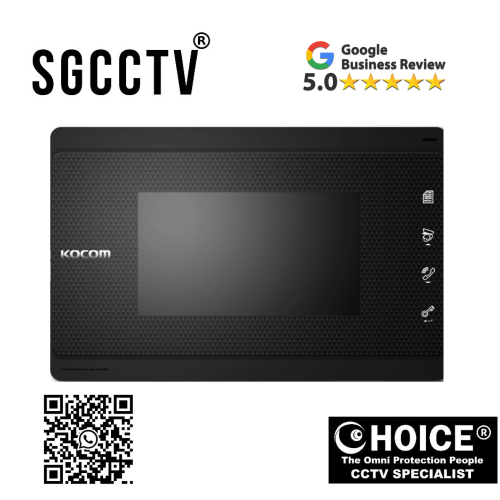

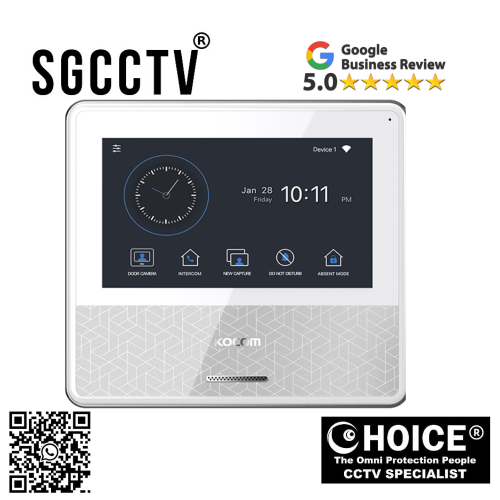
KOCOM MONITOR K6B VP-70C 7 Color digital LCD monitor Internal communication between indoor units Easy to operate using OSD menu NEW DB
$650.00
Supply and Maintenance HIKVISION CCTV IP Cameras, NVR, Turbo HD TVI Cameras, DVR, PTZ Cameras,
Access Control System, Video Intercom.
Sim Lim Square 02-81 10am-7pm Daily.
Whatsapp Enquiry Project +65 98534404, Technical Support +65 81120788, Site Visit Maintenance +65 81985572.
KOCOM MONITOR K6B VP-70C 7 Color digital LCD monitor Internal communication between indoor units Easy to operate using OSD menu NEW
The KOCOM K6B VP-70C 7 Inch Color Digital LCD Monitor is a modern indoor video intercom monitor designed to provide secure communication, visitor monitoring, and convenient internal communication for homes, apartments, condominiums, offices, and commercial buildings. Equipped with a 7-inch color digital LCD screen, internal communication capability between indoor units, and an easy-to-use OSD menu system, the K6B VP-70C offers a reliable and user-friendly communication experience for modern properties.
As buildings become smarter and security-conscious, intercom systems are no longer considered luxury equipment. They are now essential components in both residential and commercial environments. The KOCOM K6B VP-70C helps property owners improve communication efficiency while enhancing security and convenience.
Its clean and compact design allows it to integrate beautifully into modern interiors while delivering practical functionality for daily use. Whether used in a landed house, apartment, office reception, or condominium unit, the VP-70C provides reliable communication and visitor management capabilities.
The monitor is designed for users who want a balance of simplicity, functionality, and modern appearance without complicated controls or difficult operation. Its intuitive interface ensures users of all ages can operate the system comfortably.
Modern Video Intercom Systems for Smart Living
Traditional doorbells only notify users that someone is outside. They do not allow visual verification or communication before opening the door. Modern video intercom systems like the KOCOM VP-70C completely transform this experience by allowing users to:
- See visitors
- Communicate safely
- Verify identities
- Manage access remotely
- Improve indoor communication
This significantly increases both convenience and security.
In today’s world, many property owners prioritize:
- Controlled access
- Visitor verification
- Family safety
- Delivery management
- Better communication systems
The KOCOM VP-70C addresses all of these requirements effectively.
KOCOM MONITOR K6B VP-70C 7 Color digital LCD monitor Internal communication between indoor units Easy to operate using OSD menu NEWKey Features of the KOCOM K6B VP-70C
1. 7-Inch Color Digital LCD Monitor
The KOCOM VP-70C features a large 7-inch color digital LCD screen designed for clear and comfortable viewing.
The screen provides:
- Sharp visitor images
- Easy identification
- Comfortable viewing distance
- Better visibility for elderly users
- Modern display quality
Compared to smaller monitors, the 7-inch screen improves user comfort significantly.
This is especially useful for:
- Families
- Apartment residents
- Reception desks
- Security offices
The display allows users to clearly identify visitors before granting entry.
2. Internal Communication Between Indoor Units
One of the major advantages of the VP-70C is its internal communication capability between indoor monitors.
This feature allows communication between rooms or units within the property.
Benefits include:
- Room-to-room communication
- Improved family communication
- Office communication convenience
- Faster coordination between areas
- Better internal connectivity
For larger homes or offices, this feature adds significant convenience.
For example:
- Parents can contact children in another room
- Office staff can communicate internally
- Reception can contact management directly
This transforms the intercom system into a practical indoor communication network.
3. Easy-to-Operate OSD Menu
The monitor includes an intuitive OSD (On-Screen Display) menu system that simplifies operation.
Users can easily adjust:
- Brightness
- Contrast
- Volume
- Ring tones
- Communication settings
- Screen preferences
Unlike older systems with complicated control layouts, the VP-70C provides a modern and user-friendly menu interface.
The OSD menu is especially helpful for:
- Elderly users
- First-time users
- Office personnel
- Residential environments
The menu structure reduces confusion and improves overall usability.
KOCOM MONITOR K6B VP-70C 7 Color digital LCD monitor Internal communication between indoor units Easy to operate using OSD menu NEW4. Stylish and Compact Design
Modern interior spaces demand products that are both functional and aesthetically pleasing.
The VP-70C features:
- Clean design lines
- Compact housing
- Modern appearance
- Minimalist style
It blends naturally into:
- Modern homes
- Condominiums
- Luxury apartments
- Office interiors
- Reception counters
Its slim profile also allows easier installation in limited wall spaces.
Why Choose the KOCOM K6B VP-70C?
Improved Home Security
The VP-70C allows users to visually confirm visitors before opening doors.
This helps:
- Prevent unauthorized access
- Improve family safety
- Reduce security risks
- Manage deliveries safely
- Increase homeowner confidence
Video verification provides much greater security compared to traditional audio-only intercoms.
Convenient Communication
The built-in communication system allows:
- Visitor interaction
- Internal room communication
- Hands-free conversations
- Faster response times
This improves daily convenience significantly.
User-Friendly Operation
Many intercom systems fail because they are too complicated for everyday users.
The VP-70C solves this problem with:
- Simple controls
- Easy menu navigation
- Logical interface layout
- Clear display operation
Users can learn system operation quickly without technical training.
KOCOM MONITOR K6B VP-70C 7 Color digital LCD monitor Internal communication between indoor units Easy to operate using OSD menu NEWProfessional Appearance
The monitor’s modern styling enhances interior aesthetics.
Suitable for:
- Luxury homes
- Condominiums
- Commercial offices
- Apartment projects
- Reception areas
Its professional appearance complements modern architecture and interior design.
How the KOCOM VP-70C Works
The system works by connecting:
- Outdoor door camera station
- Indoor monitor
- Power supply
- Optional electronic lock
Visitor Calls from Outdoor Station
When a visitor presses the outdoor call button:
- The monitor rings indoors
- The screen activates
- Live video appears
The indoor user can immediately see who is outside.
Two-Way Audio Communication
The monitor includes:
- Built-in speaker
- Built-in microphone
This allows:
- Clear communication
- Safe conversation before entry
- Hands-free interaction
Users can communicate without physically opening the door.
Internal Indoor Communication
If multiple indoor monitors are installed, users can communicate between indoor units.
This is useful for:
- Large homes
- Multi-floor houses
- Offices
- Commercial spaces
The feature functions similarly to an internal communication system.
KOCOM MONITOR K6B VP-70C 7 Color digital LCD monitor Internal communication between indoor units Easy to operate using OSD menu NEWOptional Door Unlock Function
If connected to an electronic lock:
- Users can unlock doors remotely
- Controlled access becomes easier
- Security improves significantly
This is commonly used in:
- Condominiums
- Offices
- Gated homes
- Apartment buildings
Who Should Buy the KOCOM VP-70C?
Homeowners
Families benefit from:
- Better security
- Visitor verification
- Internal communication
- Easy operation
Especially suitable for homes with:
- Elderly residents
- Children
- Frequent deliveries
Condominium Residents
Condominium users appreciate:
- Controlled access
- Visitor management
- Compact installation
- Modern appearance
Office Environments
Office applications include:
- Reception communication
- Internal office calls
- Visitor screening
- Controlled access management
Property Developers
Developers often select KOCOM products because of:
- Reliable operation
- Professional design
- User-friendly systems
- Stable performance
KOCOM MONITOR K6B VP-70C 7 Color digital LCD monitor Internal communication between indoor units Easy to operate using OSD menu NEWInstallation Guide for KOCOM VP-70C
Step 1 – Select Installation Location
Choose a location:
- Near entrance
- Comfortable viewing height
- Away from direct sunlight
- Near communication wiring
Step 2 – Mount the Monitor
Secure the monitor firmly to the wall using proper mounting brackets.
Ensure:
- Stable support
- Correct alignment
- Clean cable routing
Step 3 – Connect System Wiring
Connect:
- Video communication cables
- Power supply
- Door station wiring
- Optional lock wiring
Proper wiring ensures stable operation.
Step 4 – Configure OSD Settings
Adjust:
- Display brightness
- Audio volume
- Ring tones
- Communication settings
Step 5 – Test the System
Verify:
- Video quality
- Audio clarity
- Internal communication
- Door unlock operation
Common Problems and Solutions
No Display
Possible causes:
- Power issue
- Loose connection
- Faulty wiring
Solutions:
- Check power supply
- Inspect cable connections
- Restart monitor
KOCOM MONITOR K6B VP-70C 7 Color digital LCD monitor Internal communication between indoor units Easy to operate using OSD menu NEWNo Audio Communication
Possible causes:
- Volume muted
- Wiring problem
- Speaker issue
Solutions:
- Increase volume
- Check audio wiring
- Test outdoor station
Poor Video Quality
Possible causes:
- Signal interference
- Camera issue
- Cable quality problems
Solutions:
- Use quality cables
- Inspect camera lens
- Avoid electrical interference
Internal Communication Not Working
Possible causes:
- Improper indoor unit setup
- Communication line issue
Solutions:
- Check monitor configuration
- Inspect indoor communication wiring
Advantages Over Traditional Intercom Systems
| Feature | KOCOM VP-70C | Traditional Audio Intercom |
|---|---|---|
| Video Verification | Yes | No |
| Internal Communication | Yes | Limited |
| LCD Display | Yes | No |
| Modern Interface | Yes | Basic |
| OSD Menu | Yes | No |
| Security Level | High | Lower |
The VP-70C provides a major upgrade in both convenience and safety.
Why KOCOM Is Trusted Worldwide
KOCOM is known for:
- Reliable intercom systems
- Stable communication technology
- User-friendly interfaces
- Modern product designs
- Long-term durability
Its systems are widely used in:
- Residential buildings
- Apartments
- Offices
- Commercial projects
KOCOM MONITOR K6B VP-70C 7 Color digital LCD monitor Internal communication between indoor units Easy to operate using OSD menu NEWMaintenance Tips
Keep the Screen Clean
Use:
- Soft microfiber cloth
- Dry cleaning method
Avoid harsh chemicals.
Protect Against Power Surges
Recommended:
- Surge protection
- Stable power supply
This helps protect internal circuitry.
Inspect Wiring Regularly
Loose wiring may cause:
- Poor video
- Audio issues
- Intermittent operation
Avoid Moisture Exposure
The monitor is designed for indoor environments.
Avoid:
- Water contact
- Excess humidity
- Condensation
Long-Term Reliability
The VP-70C is designed for long-term operation in daily-use environments.
With proper installation and maintenance, it can provide:
- Stable communication
- Reliable visitor monitoring
- Consistent performance
for many years.
KOCOM MONITOR K6B VP-70C 7 Color digital LCD monitor Internal communication between indoor units Easy to operate using OSD menu NEWFinal Thoughts
The KOCOM K6B VP-70C 7 Inch Color Digital LCD Monitor is an excellent solution for modern indoor communication and visitor management.
Its combination of:
- 7-inch color LCD display
- Internal communication capability
- User-friendly OSD menu
- Compact modern design
- Reliable operation
makes it highly suitable for homes, condominiums, apartments, offices, and commercial properties.
Whether upgrading an older intercom system or installing a new communication solution, the VP-70C delivers practical functionality, improved security, and modern convenience for everyday use.
How the KOCOM K6B VP-70C 7″ Color Digital LCD Monitor Is Made & Who Will Buy It
The KOCOM K6B VP-70C 7 Inch Color Digital LCD Monitor is a professionally engineered indoor video intercom monitor designed for secure communication, visitor monitoring, and internal communication within residential and commercial environments. Products like the VP-70C are manufactured using a combination of electronic engineering, LCD display technology, communication circuitry, durable housing construction, and modern user-interface design.
The production process involves multiple stages including:
- Product design
- Electronic component manufacturing
- LCD integration
- PCB assembly
- Audio system integration
- Software programming
- Quality testing
- Final assembly
The goal of the manufacturing process is to create a monitor that is:
- Reliable
- Easy to use
- Durable
- Visually modern
- Stable for daily operation
Stage 1 – Product Planning and Design
Before manufacturing begins, engineers and designers first develop the concept of the intercom monitor.
During this stage, manufacturers determine:
- Screen size
- Housing dimensions
- Internal communication capability
- User interface layout
- OSD menu design
- Power requirements
- Wiring compatibility
- Audio quality standards
The VP-70C is specifically designed to be:
- Compact
- Easy to operate
- Suitable for modern interiors
- Comfortable for daily use
The simple and clean appearance is carefully planned so the monitor can blend naturally into homes, apartments, and offices.
KOCOM MONITOR K6B VP-70C 7 Color digital LCD monitor Internal communication between indoor units Easy to operate using OSD menu NEWStage 2 – LCD Screen Manufacturing
One of the most important components of the VP-70C is its 7-inch color digital LCD display.
The LCD display is manufactured through advanced electronic display production processes.
LCD Production Process
The display manufacturing process usually includes:
- Glass panel preparation
- Liquid crystal layer application
- Polarizer installation
- LED backlight integration
- Digital signal processing layer assembly
The screen must provide:
- Clear visibility
- Stable brightness
- Accurate color reproduction
- Long operational lifespan
Manufacturers carefully test the display for:
- Dead pixels
- Color consistency
- Brightness uniformity
- Viewing angle quality
The 7-inch size is chosen because it offers:
- Comfortable viewing
- Compact installation
- Clear visitor identification
without taking excessive wall space.
Stage 3 – PCB and Electronic Circuit Board Production
The monitor contains internal PCB (Printed Circuit Board) systems that act as the brain of the device.
The PCB controls:
- Video processing
- Audio communication
- OSD menu system
- Button operation
- Power regulation
- Internal communication functions
PCB Manufacturing Process
The PCB is produced using:
- Copper circuit layers
- Electronic component soldering
- Automated assembly machines
- Precision testing equipment
Components attached to the PCB include:
- Processors
- Capacitors
- Resistors
- Audio chips
- Communication modules
- Voltage regulators
Modern automated machines place these tiny components with extremely high precision.
Stage 4 – Audio System Integration
The VP-70C supports two-way communication and internal communication between indoor units.
To achieve this, manufacturers install:
- Microphones
- Speakers
- Audio amplification circuits
- Noise filtering systems
The audio system must provide:
- Clear voice transmission
- Stable communication
- Low distortion
- Reliable performance
Engineers test the audio system to ensure:
- Proper microphone sensitivity
- Clear speaker output
- Balanced sound levels
This allows users to communicate comfortably with visitors or other indoor units.
Stage 5 – OSD Menu and Software Development
The VP-70C uses an OSD (On-Screen Display) menu system.
Software engineers design the interface to ensure:
- Easy navigation
- Fast response
- User-friendly controls
- Simple icon operation
The software controls:
- Display settings
- Brightness adjustment
- Audio configuration
- Ring tone settings
- Communication features
The menu is designed so users of all ages can operate the monitor easily.
KOCOM MONITOR K6B VP-70C 7 Color digital LCD monitor Internal communication between indoor units Easy to operate using OSD menu NEWStage 6 – Housing and Exterior Construction
The monitor housing is manufactured using durable plastic materials designed for indoor use.
The casing is engineered to provide:
- Heat resistance
- Electrical insulation
- Modern appearance
- Structural durability
The compact design helps:
- Reduce wall space usage
- Improve aesthetics
- Simplify installation
The smooth finish and minimalist appearance are carefully developed to suit modern homes and offices.
Stage 7 – Button and Interface Manufacturing
The VP-70C uses icon-based control buttons for easier operation.
The buttons are manufactured to provide:
- Responsive feedback
- Long-term durability
- Comfortable usage
Manufacturers test:
- Button sensitivity
- Response speed
- Wear resistance
The icon system reduces confusion and makes operation intuitive.
Stage 8 – Internal Communication System Engineering
One unique feature of the VP-70C is internal communication between indoor units.
This feature requires specialized communication circuitry that allows:
- Room-to-room communication
- Multi-unit indoor calling
- Internal audio routing
The system must synchronize communication signals between monitors reliably.
This makes the VP-70C more advanced than standard single-monitor intercom systems.
Stage 9 – Product Assembly
Once all components are manufactured:
- LCD screen
- PCB boards
- Speakers
- Microphones
- Buttons
- Housing
they are assembled together into the final product.
Assembly workers or automated systems carefully install:
- Wiring connections
- Circuit modules
- Display units
- Control systems
Each monitor is assembled according to strict production standards.
KOCOM MONITOR K6B VP-70C 7 Color digital LCD monitor Internal communication between indoor units Easy to operate using OSD menu NEWStage 10 – Quality Control Testing
Every monitor undergoes multiple tests before packaging.
Common Factory Tests Include
Screen Testing
Checking:
- Brightness
- Display clarity
- Color quality
- Dead pixels
Audio Testing
Testing:
- Microphone performance
- Speaker clarity
- Communication quality
Button Testing
Ensuring:
- Proper response
- Smooth operation
- Long-term durability
Communication Testing
Verifying:
- Indoor communication
- Video transmission
- Door station connection
Power Stability Testing
Checking:
- Voltage regulation
- Power efficiency
- Heat stability
Only products that pass all inspections proceed to packaging.
Stage 11 – Packaging and Shipping
After testing:
- The monitor is cleaned
- Protective film is applied
- Accessories are packed
- User manuals are included
Products are then prepared for:
- Local distributors
- Security installers
- Retail stores
- Commercial projects
KOCOM MONITOR K6B VP-70C 7 Color digital LCD monitor Internal communication between indoor units Easy to operate using OSD menu NEWWhy the VP-70C Is Designed This Way
The VP-70C is built around practical daily usage.
Manufacturers focus on:
- Reliability
- Simplicity
- Easy communication
- User-friendly operation
- Modern appearance
The compact design and simple controls make it suitable for:
- Elderly users
- Families
- Office staff
- Apartment residents
Who Will Buy the KOCOM VP-70C?
1. Homeowners
Families are one of the biggest user groups.
They buy the VP-70C for:
- Visitor verification
- Better security
- Internal communication
- Safer home access
Parents especially appreciate the ability to see visitors before opening doors.
2. Condominium Residents
Condo residents often require:
- Controlled visitor access
- Delivery verification
- Compact wall-mounted systems
The VP-70C fits perfectly in condominium environments because of its slim and modern design.
3. Apartment Owners
Apartment users benefit from:
- Easy installation
- Simple operation
- Better communication
- Improved entrance security
4. Offices
Office environments use the VP-70C for:
- Reception communication
- Internal office calls
- Visitor screening
- Controlled access management
Its internal communication feature is especially useful for office operations.
5. Property Developers
Developers prefer reliable intercom systems that:
- Look modern
- Are easy to maintain
- Provide stable operation
- Appeal to buyers
KOCOM products are often selected for:
- Apartment projects
- Condominiums
- Residential developments
6. Security Installers
Professional installers choose KOCOM because:
- Installation is straightforward
- Systems are stable
- Customer support is reliable
- Products are user-friendly
Why Businesses Choose KOCOM
Commercial users appreciate:
- Professional appearance
- Reliable communication
- Easy operation
- Long-term durability
The VP-70C helps improve:
- Reception efficiency
- Building communication
- Access control
KOCOM MONITOR K6B VP-70C 7 Color digital LCD monitor Internal communication between indoor units Easy to operate using OSD menu NEWWhy the VP-70C Is Suitable for Singapore
Singapore properties often prioritize:
- Compact equipment
- Modern design
- Reliable security
- Easy operation
The VP-70C is highly suitable because:
- It fits modern interiors
- It supports visitor verification
- It offers internal communication
- It provides convenient operation
This makes it ideal for:
- HDB flats
- Condominiums
- Offices
- Landed homes
Final Thoughts
The KOCOM K6B VP-70C 7 Inch Color Digital LCD Monitor is carefully engineered using advanced LCD technology, communication circuitry, audio systems, software integration, and durable housing construction to provide reliable indoor communication and visitor management.
Its manufacturing process focuses on:
- Reliability
- User-friendly operation
- Modern aesthetics
- Long-term performance
The VP-70C is highly suitable for:
- Homeowners
- Condominium residents
- Apartments
- Offices
- Property developers
- Security installers
because it combines practical communication features, easy operation, and modern security functionality in one compact indoor monitor.
How to Set Up the KOCOM K6B VP-70C 7″ Color Digital LCD Monitor
The KOCOM K6B VP-70C 7 Inch Color Digital LCD Monitor is designed for indoor video intercom communication and visitor monitoring. Proper setup is important to ensure stable video transmission, clear audio communication, smooth internal communication between indoor units, and reliable operation.
This guide explains the general installation and setup process for the KOCOM VP-70C monitor in homes, apartments, condominiums, offices, and commercial buildings.
Before Starting Installation
Before installation begins, prepare:
- KOCOM VP-70C monitor
- Outdoor door camera/intercom station
- Power supply
- Communication cables
- Mounting screws
- Wall bracket
- Basic installation tools
It is recommended to plan the cable routing before mounting the monitor.
KOCOM MONITOR K6B VP-70C 7 Color digital LCD monitor Internal communication between indoor units Easy to operate using OSD menu NEWStep 1 – Choose the Installation Location
The monitor should be installed:
- Near the main entrance
- At comfortable eye level
- In a dry indoor area
- Away from direct sunlight
- Away from strong heat sources
Recommended installation height:
- Around chest or eye level for comfortable viewing
Avoid locations with:
- Excessive moisture
- Strong vibration
- Water exposure
- Poor ventilation
Step 2 – Prepare the Wall Surface
The wall should be:
- Flat
- Strong enough to support the monitor
- Accessible for wiring
Common installation surfaces:
- Concrete wall
- Drywall
- Wooden partition
- Office partition wall
Mark the mounting points carefully before drilling.
Step 3 – Install the Mounting Bracket
The VP-70C usually uses a wall mounting bracket.
Installation Process
- Position the bracket
- Mark screw holes
- Drill mounting holes
- Insert wall anchors if needed
- Secure the bracket firmly
A properly secured bracket prevents:
- Loose mounting
- Vibration
- Misalignment
Step 4 – Prepare the Wiring
The monitor requires communication wiring between:
- Indoor monitor
- Outdoor door station
- Power supply
- Optional indoor units
- Optional electronic lock
Cable quality is very important for:
- Stable video
- Clear audio
- Reliable communication
Step 5 – Connect the Power Supply
The monitor requires proper voltage input.
Important Setup Notes
Always:
- Use the recommended power supply
- Check voltage compatibility
- Ensure stable electrical connection
Incorrect power connection may cause:
- Screen flickering
- Failure to power on
- Internal circuit damage
KOCOM MONITOR K6B VP-70C 7 Color digital LCD monitor Internal communication between indoor units Easy to operate using OSD menu NEWStep 6 – Connect the Outdoor Door Camera
The outdoor station sends:
- Video signal
- Audio signal
- Call signal
to the VP-70C monitor.
Wiring Must Support
- Video communication
- Audio communication
- Call activation
- Door release function (if applicable)
Ensure all wiring connections are secure.
Loose wiring may cause:
- No display
- No sound
- Unstable operation
Step 7 – Connect Internal Communication Units
One key feature of the VP-70C is internal communication between indoor monitors.
If multiple indoor monitors are installed:
- Connect communication lines between monitors
- Configure indoor communication settings
- Test room-to-room calling
This setup is useful for:
- Multi-floor homes
- Large houses
- Offices
- Commercial properties
Step 8 – Optional Door Lock Connection
If using an electronic door lock:
- Connect lock control wiring
- Configure unlock function
- Test door release operation
This allows users to unlock the entrance directly from the monitor.
Common lock types:
- Magnetic locks
- Electric strike locks
- Smart access systems
Step 9 – Mount the Monitor onto the Bracket
Once wiring is completed:
- Align the monitor with the bracket
- Carefully attach the monitor
- Ensure cables are not pinched
- Secure the monitor firmly
The monitor should sit:
- Straight
- Stable
- Flush against the wall
Step 10 – Power On the System
Turn on the power supply and check:
- Screen activation
- Boot process
- Audio response
- Indoor communication
- Outdoor camera display
If the screen remains blank:
- Recheck power wiring
- Verify voltage
- Inspect cable connections
Step 11 – Configure the OSD Menu
The VP-70C includes an OSD (On-Screen Display) menu for configuration.
Common Settings
Brightness Adjustment
Adjust screen brightness for comfortable viewing.
Contrast Settings
Improve image clarity and visibility.
Ring Volume
Adjust incoming call sound levels.
Audio Volume
Configure speaker communication volume.
Communication Settings
Set internal communication preferences if multiple monitors are installed.
Step 12 – Test Visitor Communication
Test the outdoor station:
- Press the outdoor call button
- Verify indoor ringing
- Check live video display
- Test two-way audio communication
Ensure:
- Voice is clear
- Video is stable
- Buttons respond properly
Step 13 – Test Internal Communication
If multiple indoor units exist:
- Call another monitor
- Test voice clarity
- Verify connection stability
This ensures internal communication works correctly.
KOCOM MONITOR K6B VP-70C 7 Color digital LCD monitor Internal communication between indoor units Easy to operate using OSD menu NEWStep 14 – Test Door Unlock Function
If connected to an electronic lock:
- Receive incoming call
- Press unlock button
- Verify door release
Ensure:
- Lock activates correctly
- Release timing functions properly
Common Setup Mistakes
Incorrect Wiring Polarity
Wrong cable polarity may cause:
- No display
- Communication failure
- System instability
Always follow wiring diagrams carefully.
Weak Power Supply
Insufficient power may cause:
- Flickering screen
- Random rebooting
- Audio issues
Use stable recommended power sources.
Poor Cable Quality
Low-quality cables may cause:
- Video noise
- Audio distortion
- Signal loss
Professional-grade cabling is recommended.
Loose Wiring Connections
Loose terminals often create:
- Intermittent communication
- Unstable video
- Audio interruption
Double-check all connections carefully.
Recommended Setup Environment
The VP-70C performs best in:
- Indoor dry environments
- Stable temperature areas
- Clean electrical systems
Avoid:
- Excessive humidity
- Direct rain exposure
- Extreme heat
Why Professional Installation Is Recommended
Although setup may appear simple, professional installers help ensure:
- Proper wiring
- Stable communication
- Clean cable management
- Safe power setup
- Reliable long-term operation
Professional installation reduces:
- System failures
- Wiring mistakes
- Signal issues
- Warranty risks
Maintenance After Installation
Clean the Monitor Regularly
Use:
- Soft dry cloth
- Non-abrasive cleaning method
Avoid liquid cleaners directly on the screen.
Inspect Wiring Periodically
Check for:
- Loose cables
- Corrosion
- Wear
Protect Against Power Surges
Recommended:
- Surge protector
- Stable grounding
- Proper electrical protection
Troubleshooting During Setup
No Power
Possible causes:
- Incorrect voltage
- Loose power wiring
- Faulty adapter
No Video
Possible causes:
- Camera connection problem
- Loose cable
- Signal interference
No Audio
Possible causes:
- Volume muted
- Faulty wiring
- Audio cable issue
KOCOM MONITOR K6B VP-70C 7 Color digital LCD monitor Internal communication between indoor units Easy to operate using OSD menu NEW
Internal Communication Not Working
Possible causes:
- Indoor monitor wiring issue
- Incorrect communication setup
Final Thoughts
The KOCOM K6B VP-70C 7 Inch Color Digital LCD Monitor is designed for reliable indoor communication, visitor monitoring, and secure access management.
Proper setup ensures:
- Stable video display
- Clear audio communication
- Smooth internal communication
- Reliable door control operation
Its user-friendly OSD menu, internal communication capability, and modern compact design make it an excellent solution for homes, apartments, condominiums, offices, and commercial environments.
KOCOM MONITOR K6B VP-70C 7 Color digital LCD monitor Internal communication between indoor units Easy to operate using OSD menu NEW
Contact Choicecycle (SGCCTV Singapore)
For more information about the KOCOM K6B VP-70C 7″ Color Digital LCD Monitor or other intercom and security solutions, contact us today.
SGCCTV Choicecycle
Sim Lim Square #02-81, Singapore
WhatsApp: +65 9853 4404
Email: enquiry@choicecycle.com.sg
Website: https://sgcctv.com.sg
Operating Hours: 11 AM – 8 PM

Donec accumsan auctor iaculis. Sed suscipit arcu ligula, at egestas magna molestie a. Proin ac ex maximus, ultrices justo eget, sodales orci. Aliquam egestas libero ac turpis pharetra, in vehicula lacus scelerisque. Vestibulum ut sem laoreet, feugiat tellus at, hendrerit arcu..


Nunc lacus elit, faucibus ac laoreet sed, dapibus ac mi. Maecenas eu ante a elit tempus fermentum. Aliquam commodo tincidunt semper. Phasellus accumsan, justo ac mollis pharetra, ex dui pharetra nisl, a scelerisque ipsum nulla ac sem. Cras eu risus urna. Duis lorem sapien, congue eget nisl sit amet, rutrum faucibus elit.
Donec accumsan auctor iaculis. Sed suscipit arcu ligula, at egestas magna molestie a. Proin ac ex maximus, ultrices justo eget, sodales orci. Aliquam egestas libero ac turpis pharetra, in vehicula lacus scelerisque. Vestibulum ut sem laoreet, feugiat tellus at, hendrerit arcu.
Nunc lacus elit, faucibus ac laoreet sed, dapibus ac mi. Maecenas eu ante a elit tempus fermentum. Aliquam commodo tincidunt semper. Phasellus accumsan, justo ac mollis pharetra, ex dui pharetra nisl, a scelerisque ipsum nulla ac sem. Cras eu risus urna. Duis lorem sapien, congue eget nisl sit amet, rutrum faucibus elit.