
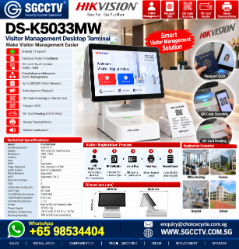


HIKVISION DS-K5033MW VISITOR MANAGEMENT DESKTOP TERMINAL Office Schools Security Guardhouses Reception Counters
in stock
$7500.00
HIKVISION SINGAPORE OFFICIAL PLANTINUM PARTNER
Supply and Maintenance HIKVISION CCTV IP Cameras, NVR, Turbo HD TVI Cameras, DVR, PTZ Cameras,
Access Control System, Video Intercom.
Sim Lim Square 02-81 10am-7pm Daily.
Whatsapp Enquiry Project +65 98534404, Technical Support +65 81120788, Site Visit Maintenance +65 81985572.
in stock
HIKVISION DS-K5033MW VISITOR MANAGEMENT DESKTOP TERMINAL Office Schools Security Guardhouses Reception Counters
HIKVISION DS-K5033MW Visitor Management Desktop Terminal Singapore | Office School Guardhouse Reception Visitor Registration System
The HIKVISION DS-K5033MW Visitor Management Desktop Terminal is a professional digital visitor-registration solution designed to replace or reduce traditional paper visitor logbooks at office receptions, schools, security guardhouses, commercial buildings, factories, institutions and reception counters.
The terminal combines a 10.1-inch touchscreen, Android 11 operating system, visitor registration, QR-code scanning, M1 card reading, passport OCR and local visitor-record storage in a compact desktop platform. It supports both stand-alone and networked visitor-management applications, making it suitable for anything from a single reception counter to a more integrated security-management environment.
For organisations still using handwritten visitor books, the DS-K5033MW provides a more structured approach:
VISITOR ARRIVES → REGISTER → VERIFY / CAPTURE DETAILS → ISSUE VISITOR CREDENTIAL → AUTHORISED ACCESS → CHECK-OUT → VISITOR RECORD
HIKVISION DS-K5033MW Key Specifications
| Specification | DS-K5033MW |
|---|---|
| Product Type | Visitor Management Desktop Terminal |
| Operating System | Android 11 |
| Display | 10.1-inch Touchscreen |
| Resolution | 1280 × 800 |
| Camera | 2MP |
| Visitor Capacity | Up to 300,000 visitor records |
| Visitor Registration | Paperless |
| QR Code | Supported |
| Card Technology | M1 / 13.56MHz |
| Card Reading Distance | 0–4cm |
| Card Reading Time | <1 second |
| Passport OCR | Supported |
| Network | Wired Ethernet |
| Wi-Fi | 2.4GHz Supported |
| USB | 3 ports |
| Audio | Built-in Loudspeaker |
| Application | Stand-alone / Networked |
| Installation | Desktop / Countertop |
| Power | 12VDC, 5A |
| Working Temperature | -10°C to 50°C |
| Environment | Indoor |
The DS-K5033MW should be selected according to the exact visitor workflow and required integrations; available functions can also depend on firmware and management-platform configuration.
Paperless Visitor Registration
Traditional visitor management commonly involves:
Paper Logbook
↓
Visitor Writes Name
↓
Security Checks Details
↓
Temporary Pass Issued
↓
Visitor Leaves
This creates several operational challenges, including difficult record searching, handwriting errors and inefficient retrieval of historical visitor information.
The DS-K5033MW moves this process toward:
DIGITAL VISITOR REGISTRATION
Visitor information is entered into the terminal and stored electronically.
This can make visitor records easier for authorised administrators to search, manage and retrieve.
Up to 300,000 Visitor Records
A significant feature of the DS-K5033MW is support for:
UP TO 300,000 VISITOR RECORDS
This makes the terminal suitable for locations handling substantial visitor traffic.
Examples include:
Corporate Offices
Schools
Factories
Commercial Buildings
Guardhouses
Reception Counters
Institutions
Large Facilities
Record-retention periods and the personal information collected should be configured according to the organisation’s operational requirements and applicable privacy/data-protection obligations.
10.1-Inch Touchscreen
The terminal incorporates a:
10.1-INCH TOUCHSCREEN
allowing the visitor-management workflow to be performed directly from the desktop terminal.
This makes it suitable for a reception counter or security guardhouse where space is limited and a full desktop computer arrangement may be inconvenient.
QR Code Visitor Pass
The DS-K5033MW supports:
QR CODE SCANNING
This can form part of a digital visitor workflow.
Depending on the deployed system, visitor credentials can be associated with authorised access processes rather than relying exclusively on handwritten visitor passes.
A typical workflow can be:
VISITOR REGISTRATION
↓
VISITOR CREDENTIAL / QR CODE
↓
AUTHORISED ACCESS
↓
CHECK-OUT
For integrated projects, exact compatibility between the visitor platform, access-control devices and QR-code readers should be confirmed during system design.
M1 Card Visitor Pass
The DS-K5033MW also supports:
13.56MHz M1 CARD
with a specified reading distance of approximately:
0–4cm
and reading duration of:
LESS THAN 1 SECOND
This provides another option for temporary visitor credential workflows.
For example:
Visitor arrives
↓
Reception registers visitor
↓
Temporary M1 card assigned
↓
Visitor receives authorised access
↓
Visitor returns card during check-out
The complete functionality depends on the connected access-control architecture.
Passport OCR
The DS-K5033MW supports:
PASSPORT OCR
OCR means Optical Character Recognition.
Instead of requiring reception staff to manually type every supported document field, OCR can assist in extracting information from a passport for visitor registration.
This can be useful at facilities receiving frequent international visitors.
Document support and recognition performance should be confirmed for the exact deployment and document types used.
Office Visitor Management Singapore
The DS-K5033MW is particularly suitable for corporate reception areas.
A typical office visitor workflow can be:
1. Visitor Arrives
The guest reports to reception.
2. Visitor Registration
Visitor information is registered electronically.
3. Host Identified
The employee or department being visited is recorded.
4. Visitor Credential Issued
A QR code or compatible visitor card can be used according to the system design.
5. Access Permission
The visitor receives access only according to the assigned permissions.
6. Check-Out
Visitor status is updated when leaving.
This creates a more structured visitor-management process than an uncontrolled paper register.
School Visitor Management
Schools need to manage different groups entering their premises, potentially including:
Parents
Contractors
Vendors
Delivery Personnel
Maintenance Technicians
Guests
Event Visitors
Service Providers
The DS-K5033MW can be positioned at a school:
SECURITY GUARDHOUSE
or:
GENERAL OFFICE / RECEPTION
to support a digital visitor-registration workflow.
This can help the school maintain more organised records of external visitors.
The actual visitor policy, identity verification and access permissions remain the responsibility of the school.
Security Guardhouse Visitor Management
Guardhouses are a strong application for a visitor terminal because security officers are frequently responsible for registering incoming visitors.
Potential applications include:
Commercial Buildings
Factories
Warehouses
Schools
Industrial Facilities
Office Compounds
Restricted Facilities
A digital workflow can be:
VEHICLE / VISITOR ARRIVES
↓
SECURITY REGISTERS VISITOR
↓
HOST / PURPOSE CONFIRMED
↓
VISITOR PASS ISSUED
↓
ACCESS PERMITTED
↓
CHECK-OUT RECORDED
This provides security management with a structured visitor history.
Reception Counter Visitor Terminal
The desktop design makes the DS-K5033MW suitable for:
FRONT DESK / RECEPTION COUNTER
Rather than having a receptionist switch between a paper book, card reader and multiple separate devices, a visitor terminal can centralise important parts of the registration workflow.
The unit’s 10.1-inch touchscreen is compact enough for reception environments while still providing an interactive interface.
Stand-Alone Visitor Management
The DS-K5033MW supports:
STAND-ALONE APPLICATION
This can be useful for smaller premises where visitor registration is required without a large centralised security-management deployment.
For example:
ONE OFFICE
ONE GUARDHOUSE
ONE RECEPTION
ONE VISITOR TERMINAL
can operate as a relatively straightforward visitor-management point, subject to the required configuration.
Networked Visitor Management
For larger applications, the DS-K5033MW can also be used in a:
NETWORKED APPLICATION
A typical architecture can be:
DS-K5033MW
↓
LAN / NETWORK
↓
VISITOR MANAGEMENT PLATFORM
↓
ACCESS CONTROL
↓
DOORS / AUTHORISED AREAS
Depending on the selected platform and system design, visitor management can be combined with access permissions for doors and other controlled areas.
Visitor Management + Door Access Control
Visitor registration becomes considerably more useful when integrated with access control.
Instead of merely recording:
“John visited the building.”
an integrated system can be designed to manage:
“John is authorised to access Door A from 2:00 PM to 4:00 PM.”
This supports the principle of:
VISITOR IDENTITY + TIME + AUTHORISED AREA
rather than giving visitors unrestricted movement throughout a facility.
Visitor Management + Elevator Access
In larger office buildings, visitor access can potentially be coordinated with compatible elevator access-control systems.
For example:
VISITOR REGISTERED
↓
VISITOR CREDENTIAL ISSUED
↓
LOBBY ACCESS
↓
AUTHORISED ELEVATOR / FLOOR
↓
VISITOR CHECK-OUT
This can be useful where different tenants or departments occupy different floors.
Compatibility must be confirmed between the visitor-management platform and the elevator access-control equipment.
Visitor Management + CCTV
Visitor management and CCTV perform different but complementary security functions.
| Visitor Management | CCTV |
|---|---|
| Registers visitor | Records video |
| Records visitor details | Provides visual evidence |
| Records visit purpose | Shows physical activity |
| Manages credentials | Monitors entrances |
| Supports check-in/out | Supports incident investigation |
A more comprehensive security system can therefore combine:
VISITOR MANAGEMENT + ACCESS CONTROL + CCTV
This can be particularly useful for:
Offices
Schools
Factories
Commercial Buildings
Security Guardhouses
Reception Security Workflow
For higher-security sites, a visitor workflow can be designed around:
PRE-REGISTRATION
↓
ARRIVAL
↓
IDENTITY VERIFICATION
↓
HOST CONFIRMATION
↓
VISITOR CREDENTIAL
↓
RESTRICTED ACCESS PERMISSION
↓
CCTV MONITORING
↓
CHECK-OUT
The appropriate level of verification should be determined by the site’s risk profile rather than collecting unnecessary visitor information.
Visitor Data & Privacy
A visitor-management terminal can process personal information, so deployment should not focus only on hardware.
Organisations should also define:
What visitor information is required
Why it is collected
Who can access it
How long records should be retained
When records should be deleted
How administrator accounts are protected
How exported records are controlled
How the visitor-management network is secured
This is especially important when identity documents, photographs or other personal information are involved.
DS-K5033MW Network Troubleshooting
If the terminal cannot communicate with the management system, troubleshoot:
DS-K5033MW → NETWORK CABLE / WI-FI → SWITCH / AP → LAN → SERVER
Check:
IP Address
Subnet Mask
Gateway
Ethernet Cable
Network Switch
Wi-Fi Connection
Server Communication
Firewall Rules
Software Configuration
Firmware Compatibility
A network problem should be eliminated before assuming that the visitor terminal itself has failed.
Visitor Terminal Repair & Replacement
Common visitor-management problems can include:
Terminal Cannot Start
Touchscreen Not Responding
Network Offline
Wi-Fi Cannot Connect
QR Code Cannot Scan
M1 Card Cannot Read
Passport OCR Failure
Visitor Records Cannot Synchronise
USB Device Not Detected
Software Cannot Communicate
Power Supply Failure
System Freezing
Old Visitor Terminal Discontinued
A systematic troubleshooting sequence is:
POWER → TERMINAL → READER / SCANNER → NETWORK → SOFTWARE → ACCESS CONTROL
before replacing equipment.
Repair or Replace?
| Problem | Recommended Action |
|---|---|
| Network cable fault | Repair / Replace Cable |
| Incorrect network setting | Reconfigure |
| Power adaptor problem | Replace PSU / Adaptor |
| Software configuration | Reconfigure |
| QR scanning issue | Diagnose Scanner / Configuration |
| Card reading issue | Check Card / Reader |
| Touchscreen failure | Assess Repair / Replacement |
| Main terminal failure | Replace Terminal |
| Obsolete visitor system | Upgrade Platform |
| Repeated failures | System Migration Assessment |
SGCCTV HIKVISION Visitor Management Singapore
SGCCTV – Choicecycle CCTV provides HIKVISION DS-K5033MW Visitor Management Desktop Terminal supply, setup, configuration, troubleshooting, replacement and integration with compatible CCTV and access-control systems in Singapore.
Suitable applications include:
OFFICE RECEPTION
SCHOOLS
SECURITY GUARDHOUSES
FACTORIES
COMMERCIAL BUILDINGS
RECEPTION COUNTERS
INSTITUTIONS
SECURITY FACILITIES
For larger projects, the visitor terminal should be designed as part of the overall:
VISITOR MANAGEMENT → ACCESS CONTROL → CCTV → SECURITY MANAGEMENT
architecture.
Website: www.sgcctv.com.sg
WhatsApp: +65 9853 4404
Email: enquiry@choicecycle.com.sg
10 Frequently Asked Questions
1. What is the HIKVISION DS-K5033MW?
It is a desktop visitor-management terminal designed for paperless visitor registration and both stand-alone and networked visitor-management applications.
2. What size screen does the DS-K5033MW have?
It has a 10.1-inch touchscreen with 1280 × 800 resolution.
3. How many visitor records can it store?
The terminal supports up to approximately 300,000 visitor records.
4. Can the DS-K5033MW scan QR codes?
Yes. QR-code scanning is supported for compatible visitor-management workflows.
5. Can it read visitor cards?
Yes. It supports 13.56MHz M1 cards, with a specified reading distance of up to approximately 4cm.
6. Does the DS-K5033MW support passport OCR?
Yes. Passport OCR is one of its supported visitor-registration functions.
7. Can it be used in a school guardhouse?
Yes. It can be used to support digital registration of parents, contractors, vendors, guests and other visitors according to the school’s visitor-management policy.
8. Can it be installed at an office reception counter?
Yes. Its desktop form factor and touchscreen design make office reception one of its practical applications.
9. Can visitor management integrate with door access and CCTV?
Yes, subject to compatible system design. Visitor management can work with access-control permissions, while CCTV provides complementary visual security and incident evidence.
10. Where can I buy or replace HIKVISION DS-K5033MW in Singapore?
Contact SGCCTV – Choicecycle CCTV for HIKVISION visitor-management, CCTV and access-control solutions. WhatsApp +65 9853 4404, email enquiry@choicecycle.com.sg, or visit www.sgcctv.com.sg.
HIKVISION DS-K5033MW Singapore, HIKVISION Visitor Management, Visitor Management Desktop Terminal, Visitor Registration System Singapore, Office Visitor Management, School Visitor Management System, School Guardhouse Visitor System, Security Guardhouse Visitor Registration, Reception Counter Visitor Terminal, Paperless Visitor Registration, QR Code Visitor Management, Passport OCR Visitor System, M1 Card Visitor Pass, Digital Visitor Logbook, Access Control Singapore, Visitor Management CCTV Integration, SGCCTV, Choicecycle CCTV
#HIKVISION #DSK5033MW #VisitorManagement #VisitorTerminal #VisitorRegistration #PaperlessVisitor #OfficeSecurity #SchoolSecurity #GuardhouseSecurity #ReceptionSecurity #AccessControl #SecuritySystem #CCTVSingapore #SGCCTV #Choicecycle
HIKVISION DS-K5033MW VISITOR MANAGEMENT DESKTOP TERMINAL Office Schools Security Guardhouses Reception Counters
The HIKVISION DS-3E0510P-E and DS-3E0510P-E/M are compact 8-port Gigabit unmanaged PoE switches designed for IP CCTV cameras, network surveillance systems, offices, shops, warehouses and commercial security installations.
With 8 × Gigabit PoE ports, Gigabit uplink, SFP fibre connectivity, IEEE 802.3af/at PoE, up to 30W per PoE port and 6kV surge protection, these switches provide a straightforward plug-and-play solution for powering and networking IP security cameras.
They are particularly suitable where customers require a reliable Gigabit CCTV PoE switch without complicated managed-switch configuration.
Key Specifications
| Feature | DS-3E0510P-E / DS-3E0510P-E/M |
|---|---|
| Switch Type | Layer 2 Unmanaged PoE Switch |
| PoE Ports | 8 × Gigabit PoE |
| PoE Speed | 10/100/1000 Mbps |
| RJ45 Uplink | 1 × Gigabit |
| Fibre Uplink | 1 × Gigabit SFP |
| Total Interfaces | 10 Ports |
| PoE Standard | IEEE 802.3af / 802.3at |
| Maximum per PoE Port | 30W |
| DS-3E0510P-E/M PoE Budget | 58W |
| Switching Capacity | 20Gbps |
| Packet Forwarding Rate | 14.88 Mpps |
| MAC Address Table | 4K |
| Surge Protection | 6kV |
| Housing | Metal |
| Cooling | Fanless |
| Installation | Desktop / Wall Mount |
Important: Different hardware revisions can have different PoE budgets. For example, the newer DS-3E0510P-E/M(B) version has an 80W total PoE budget. Always confirm the exact suffix before quotation or replacement.
8 × Gigabit PoE Ports
The switch provides:
8 × 10/100/1000 Mbps PoE Ports
A single CAT6 cable can carry both:
NETWORK DATA + PoE POWER
between the switch and a compatible IP camera.
A typical CCTV installation is:
HIKVISION IP Camera × 8
↓
CAT6 Network Cable
↓
DS-3E0510P-E/M PoE Switch
↓
Gigabit Uplink
↓
NVR / Router / Main Network
This simplifies CCTV installation because separate local power adapters are generally unnecessary for standard IEEE 802.3af/at cameras.
Gigabit PoE for High-Resolution CCTV
Gigabit networking makes the switch suitable for modern IP surveillance systems using:
2MP Full HD Cameras
4MP Cameras
6MP Cameras
8MP 4K Cameras
Network Intercoms
Wireless Access Points
Other Compatible PoE Devices
The switch provides a 20Gbps switching capacity and wire-speed forwarding architecture.
This is particularly useful when several high-resolution cameras are simultaneously transmitting video to an NVR or VMS.
IEEE 802.3af / 802.3at PoE+
The DS-3E0510P-E/M supports:
IEEE 802.3af + IEEE 802.3at
with up to:
30W Maximum Output per PoE Port
This supports a wide range of standard PoE and PoE+ security equipment.
However, the total PoE budget must always be calculated.
For example:
8 cameras × 5W = 40W
This is within a 58W total PoE budget.
But:
8 devices × 15W = 120W
would exceed it.
Therefore:
8 PoE Ports ≠ 8 × 30W simultaneously
The individual port limit and total switch PoE budget are two different specifications.
Gigabit RJ45 Uplink
The switch provides a dedicated:
1 × Gigabit RJ45 Uplink
This can connect to:
NVR
Router
Core Network Switch
Server
Firewall
Internet Network
For example:
8 Cameras → PoE Switch → Gigabit Uplink → HIKVISION NVR
This provides a simple architecture for a small or medium-sized CCTV system.
Gigabit SFP Fibre Uplink
Another important feature is the:
1 × Gigabit SFP Fibre Optical Port
This allows the PoE switch to be integrated into a fibre network using a suitable SFP module.
A typical installation could be:
Remote CCTV Cameras
↓
DS-3E0510P-E/M
↓
SFP Module
↓
Fibre Cable
↓
Main Building Network
↓
NVR / Server
Fibre is especially useful between buildings or over distances where conventional copper Ethernet is unsuitable.
Long-Distance CCTV — Use Fibre for Proper Network Design
For long-distance CCTV, do not confuse this model with Hikvision’s switches that specifically provide 300m Extend Mode.
The DS-3E0510P-E and DS-3E0510P-E/M are standard Gigabit unmanaged PoE switches. For conventional copper Ethernet, system design should follow the applicable Ethernet cabling limits.
For longer distances, a professional design can use:
CAMERA → CAT6 → PoE SWITCH → SFP → FIBRE → MAIN NETWORK
This provides a much more robust solution for long-distance backbone transmission.
If up to 300m PoE-over-CAT6 Extend Mode is specifically required, select an appropriate Hikvision long-range switch designed for that function rather than assuming the DS-3E0510P-E/M provides it.
SFP Fibre for Building-to-Building CCTV
The integrated SFP interface makes this model useful for installations such as:
Factory Building A ↔ Factory Building B
Warehouse ↔ Security Office
Guardhouse ↔ Main Building
Remote Camera Zone ↔ Control Room
Car Park ↔ Security Command Centre
Using optical fibre also provides electrical isolation between network segments, which can be advantageous for inter-building network design.
6kV Surge Protection
The switch provides:
6kV Surge Protection
on its PoE interfaces.
This provides additional protection against certain electrical transients.
However, for outdoor CCTV installations, surge protection should be considered as part of a complete system involving:
Proper Earthing
Surge Protection Devices
Correct Outdoor Cabling
Weatherproof Junction Boxes
UPS Protection
Fibre Isolation where appropriate
A switch’s built-in surge rating should not be treated as a substitute for a properly designed lightning and surge-protection system.
Fanless Metal Design
The DS-3E0510P-E/M uses a fanless metal enclosure.
Advantages include:
Silent Operation
No Cooling-Fan Noise
Fewer Mechanical Components
Compact Installation
Suitable for Small Network Cabinets
The switch can be desktop- or wall-mounted.
Important Server Rack Note
This is a compact switch rather than a standard 19-inch rackmount switch.
It can be placed on a rack shelf or suitably mounted inside a CCTV/network cabinet, but it should not be advertised as a native 19-inch rackmount switch unless appropriate mounting hardware is used.
Plug-and-Play Unmanaged Switch
The DS-3E0510P-E/M is an:
UNMANAGED PoE SWITCH
This means it is designed primarily for straightforward plug-and-play operation.
For many small CCTV installations, this is an advantage:
Connect Power
↓
Connect Cameras
↓
Connect NVR / Network
↓
System Operates
No complex VLAN or switch-management configuration is required for a basic network.
Unmanaged vs Smart Managed PoE Switch
This distinction is important.
DS-3E0510P-E / DS-3E0510P-E/M
Best for:
Simple CCTV Networks
Plug-and-Play Installation
8-Camera Systems
Gigabit Networking
SFP Fibre Uplink
Hikvision Smart Managed Series
Better when the project specifically requires:
VLAN
PoE Watchdog
STP / RSTP
Cable Detection
Remote Management
Network Topology
300m Long-Range Mode
For professional or larger CCTV projects, switch selection should be based on the network design rather than simply the number of ports.
CCTV + Server Rack + Internet Network
Although commonly described as a CCTV PoE switch, the DS-3E0510P-E/M is fundamentally a Gigabit Ethernet switch with PoE capability.
It can therefore form part of a network architecture involving:
IP Cameras
NVR
Server Rack
Router
Firewall
Internet Connection
Fibre Backbone
Network Storage
Compatible PoE Equipment
For business installations, CCTV traffic can be integrated into the wider network according to the customer’s cybersecurity and network-segmentation requirements.
CCTV PoE Switch Repair & Replacement
When multiple IP cameras suddenly go offline, the cameras themselves may not be faulty.
The problem can occur anywhere along the path:
CAMERA → RJ45 → CAT6 → PoE PORT → SWITCH → UPLINK → NVR
Common PoE switch problems include:
No Power
No PoE Output
Camera Offline
Intermittent Network Connection
Damaged RJ45 Port
Faulty Power Adapter
PoE Budget Overload
SFP Module Failure
Fibre Link Failure
Uplink Failure
Surge Damage
Correct troubleshooting should isolate the fault before replacing equipment unnecessarily.
Upgrade an Old CCTV PoE Switch
An ageing 10/100 Mbps PoE switch can become a network bottleneck when a CCTV system is upgraded to higher-resolution cameras.
Replacing it with a Gigabit model can provide:
Higher Network Capacity
Gigabit Camera Connections
Gigabit NVR Uplink
SFP Fibre Expansion
PoE+ Support
Improved Surge Protection
This makes the DS-3E0510P-E/M a practical replacement for straightforward 8-camera CCTV networks.
SGCCTV HIKVISION PoE Switch Singapore
SGCCTV – Choicecycle CCTV Pte Ltd provides HIKVISION PoE switches, Gigabit network switches, CCTV cameras, NVRs, SFP modules, fibre networking, CAT6 cabling, server-rack solutions, PoE troubleshooting, CCTV repair and network upgrades.
Website: www.sgcctv.com.sg
WhatsApp: +65 9853 4404
Email: enquiry@choicecycle.com.sg
10 Frequently Asked Questions
1. How many PoE ports does the HIKVISION DS-3E0510P-E/M have?
It provides 8 Gigabit PoE ports, together with a Gigabit RJ45 port and Gigabit SFP fibre interface.
2. Are all eight PoE ports Gigabit?
Yes. The eight PoE interfaces support 10/100/1000 Mbps Ethernet.
3. Does the DS-3E0510P-E/M support PoE+?
Yes. It supports IEEE 802.3af and IEEE 802.3at, with up to 30W available on an individual PoE port.
4. What is the PoE budget?
The referenced DS-3E0510P-E/M has a 58W total PoE budget. The newer DS-3E0510P-E/M(B) revision provides 80W, so always check the exact model suffix.
5. Does it have an SFP fibre port?
Yes. It provides one Gigabit SFP optical interface for compatible fibre-network applications.
6. Can it be used for 4K CCTV cameras?
Yes, provided the cameras’ network bandwidth and PoE requirements remain within the switch and overall system design limits.
7. Does this model support 300m long-range PoE?
Do not assume so. The DS-3E0510P-E/M is a standard unmanaged Gigabit PoE switch. For 300m Extend Mode, select a Hikvision model specifically designed and specified for long-range PoE.
8. Is the DS-3E0510P-E/M a managed switch?
No. It is an unmanaged Layer 2 PoE switch designed for straightforward plug-and-play networking.
9. Can it be installed in a server rack?
It can be installed on a suitable rack shelf or inside a network/CCTV cabinet, but it is a compact desktop/wall-mount unit rather than a standard native 19-inch rackmount switch.
10. Can SGCCTV replace a faulty CCTV PoE switch?
Yes. SGCCTV Choicecycle provides PoE troubleshooting, switch replacement, CAT6 testing, SFP/fibre troubleshooting and CCTV network upgrading.
#Hikvision #HikvisionSwitch #DS3E0510PE #DS3E0510PEM #PoESwitch #8PortPoE #GigabitPoE #GigabitSwitch #SFP #FibreNetwork #ServerRack #CCTVRepair #CCTVSingapore #SGCCTV #Choicecycle
Reliable cabling is the backbone of any CCTV surveillance system, IT network, or server rack infrastructure. The Hikvision CCTV Cat6 Network Cable DS-1LN6U-G is designed for high-performance connectivity, supporting long-distance transmission, Power over Ethernet (POE), and professional networking requirements. Perfect for CCTV installations, POE switches, server racks, and internet connectivity with Singapore ISPs like Singtel, M1, and Starhub.
At CHOICECYCLE Singapore, we provide premium-quality Hikvision Cat6 cables, ensuring fast, stable, and reliable network performance for residential, commercial, and industrial installations.
HIKVISION DS-K5033MW VISITOR MANAGEMENT DESKTOP TERMINAL Office Schools Security Guardhouses Reception Counters
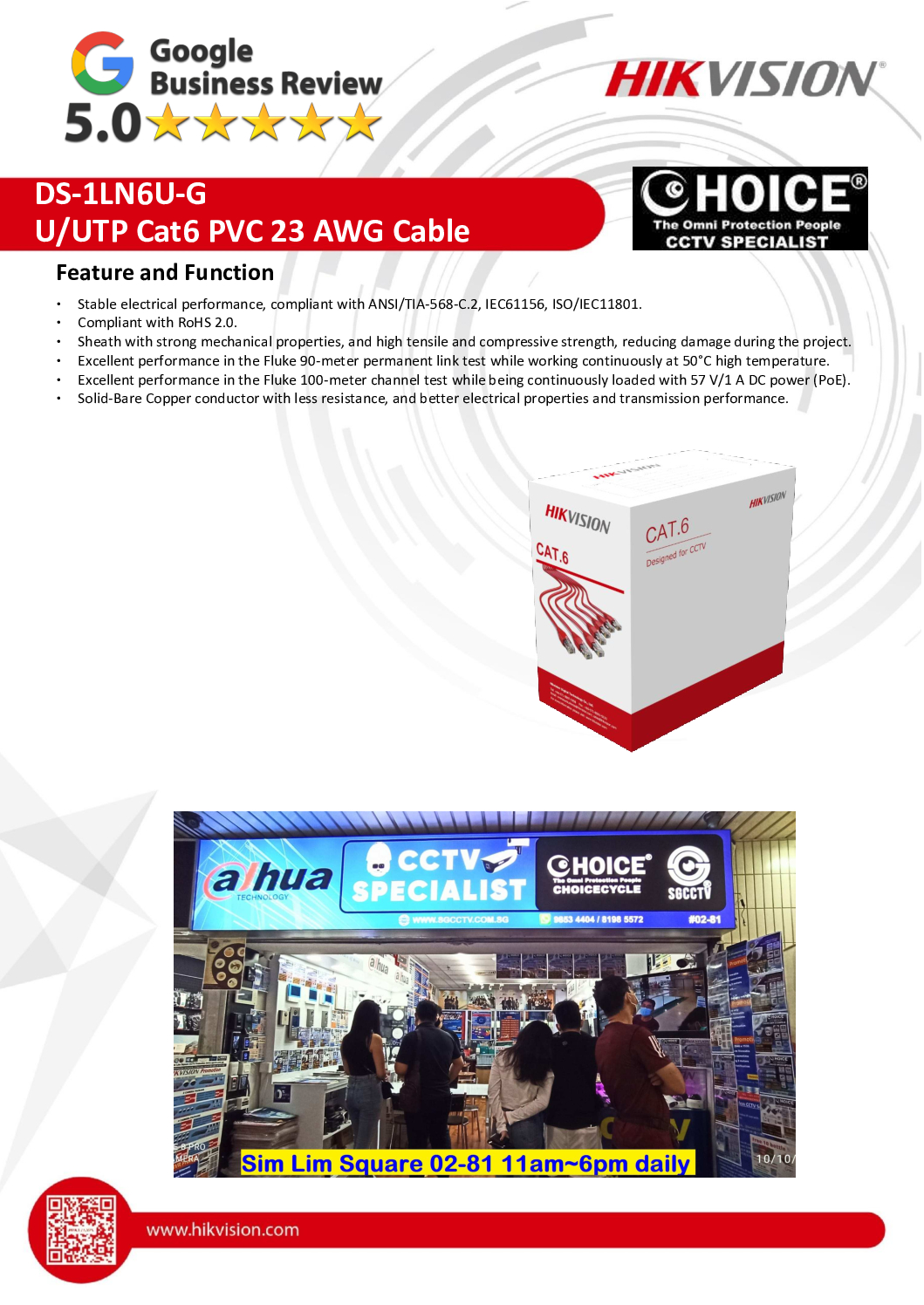
The HIKVISION DS-1LN6U-G is a professional Cat6 U/UTP Network Cable designed for high-speed Ethernet networking, AI CCTV systems, PoE switches, IP cameras, Wi-Fi access points, server racks, access control systems, and structured cabling installations.
Manufactured with 99.95% Solid Bare Copper 23AWG conductors, the DS-1LN6U-G delivers outstanding signal transmission, low resistance, and reliable Power over Ethernet (PoE) performance. Supplied in a 305-metre pull box, it is suitable for commercial buildings, offices, factories, schools, hospitals, warehouses, and data centres.
The cable complies with ANSI/TIA-568-C.2, ISO/IEC 11801, and RoHS 2.0 standards, and has passed Fluke 90 m Permanent Link and 100 m PoE Channel tests, making it an excellent choice for professional network installations. (Hikvision)
SGCCTV Singapore supplies, installs, tests, certifies, repairs, and maintains structured cabling systems for CCTV, networking, and enterprise infrastructure.
Key Features
- HIKVISION DS-1LN6U-G
- Cat6 U/UTP Network Cable
- 305 Metre Pull Box
- 99.95% Solid Bare Copper
- 23 AWG Conductor
- PVC Jacket
- 250 MHz Bandwidth
- Gigabit Ethernet Ready
- Excellent PoE Performance
- Supports IEEE 802.3af / at / bt Devices
- Fluke 90m Permanent Link Passed
- Fluke 100m PoE Channel Passed
- ANSI/TIA-568-C.2 Compliant
- ISO/IEC 11801 Compliant
- RoHS 2.0 Compliant
- Grey Jacket
- Rip Cord & Separator Design
- Low DC Resistance
- Professional Structured Cabling (Hikvision)
Benefits
- Stable Gigabit Network Performance
- Reliable PoE Power Transmission
- Lower Signal Loss
- Long Cable Service Life
- Suitable for High-Resolution IP Cameras
- Ideal for Server Rooms & Data Centres
- Better Network Reliability
- Professional CCTV Installations
- Easy Cable Pulling
- Future-Ready Network Infrastructure
Ideal Applications
- CCTV IP Camera Systems
- HIKVISION NVR Systems
- PoE Switches
- Server Racks
- Data Centres
- Office Networks
- Industrial Networks
- Schools
- Hospitals
- Warehouses
- Hotels
- Smart Buildings
- Wi-Fi Access Points
- Singtel Fibre Networks
- StarHub & M1 Business Internet Networks
Why Choose HIKVISION DS-K5033MW VISITOR MANAGEMENT DESKTOP TERMINAL Office Schools Security Guardhouses Reception Counters
The HIKVISION DS-1LN6U-G uses solid bare copper conductors instead of copper-clad aluminium (CCA), providing lower resistance, improved signal quality, and more reliable PoE performance. It is suitable for IP cameras, VoIP phones, Wi-Fi access points, servers, and enterprise networking. The cable has been verified through Fluke testing for both structured cabling and PoE operation. (Hikvision)
SGCCTV Professional Services
SGCCTV provides complete structured cabling and networking services including:
- Cat5e & Cat6 Cabling
- Cat6A & Fibre Optic Installation
- Server Rack Installation
- PoE Switch Configuration
- CCTV Network Design
- Structured Cabling Certification
- Fluke Cable Testing
- Internet Network Setup
- Preventive Maintenance
- Technical Support
Website: https://sgcctv.com.sg
Email: enquiry@choicecycle.com.sg
WhatsApp: +65 98534404
Frequently Asked Questions (FAQ)
1. What is the HIKVISION DS-1LN6U-G?
The DS-1LN6U-G is a 305 m Cat6 U/UTP network cable with 23 AWG solid bare copper conductors designed for Ethernet networking and PoE applications. (Hikvision)
2. Is the cable made from solid copper?
Yes. It uses 99.95% solid bare copper conductors, providing lower resistance and better transmission than copper-clad aluminium (CCA) cables. (assets.hikvision.com)
3. Is it suitable for PoE CCTV cameras?
Yes. It has passed Fluke 100 m PoE Channel Testing, making it suitable for IP cameras, PoE switches, VoIP phones, and wireless access points. (Hikvision)
4. What is the maximum cable length?
The cable is supplied in a 305-metre pull box. For standard Ethernet installations, the recommended permanent link is 90 metres with a total channel length of 100 metres according to structured cabling standards. (Hikvision)
5. Does it support Gigabit Ethernet?
Yes. It is a Cat6 cable suitable for Gigabit Ethernet applications and structured network installations. (Hikvision)
6. Can it be used for server racks?
Yes. It is suitable for server rooms, server racks, patch panels, switches, routers, and structured cabling systems.
7. Is it compatible with Singtel, StarHub and M1 fibre Internet?
Yes. It can be used for internal Ethernet cabling connected to fibre broadband equipment from Singtel, StarHub, M1, and other Internet service providers.
8. What devices can use this cable?
It is suitable for IP cameras, NVRs, PoE switches, Wi-Fi access points, desktop computers, servers, NAS storage, access control systems, and VoIP phones.
9. Does SGCCTV provide installation and testing?
Yes. SGCCTV provides cable installation, Fluke certification, patch panel termination, server rack setup, troubleshooting, maintenance, and network upgrades.
10. Why choose SGCCTV Singapore?
SGCCTV has more than 20 years of experience delivering CCTV, structured cabling, fibre optic networking, PoE infrastructure, server rack installation, and enterprise networking solutions with professional after-sales support.
#Hikvision
#DS1LN6UG
#Cat6Cable
#SolidCopper
#StructuredCabling
#PoE
#NetworkCable
#ServerRack
#CCTVNetworking
#LANCable
#GigabitEthernet
#FiberBroadband
#SGCCTV
#Choicecycle
#SingaporeNetworking
Key Features of Hikvision DS-1LN6U-G Cat6 Network Cable
High-Quality Solid Copper Conductors
100% solid copper for low resistance and stable connectivity.
Reduces signal loss over long distances.
305m Roll Length
Large spool suitable for multiple camera setups and long-distance cabling.
Ideal for CCTV, server rooms, and network backbone.
Cat6 Standard for High-Speed Transmission
Supports Gigabit Ethernet speeds up to 1 Gbps.
Backward compatible with Cat5e systems.
POE (Power over Ethernet) Ready
Delivers both data and power over a single cable for Hikvision IP cameras and POE switches.
Simplifies installation and reduces cabling clutter.
Professional Networking & Server Rack Support
Compatible with switches, routers, and server racks.
Reliable for high-traffic network environments and data centres.
Long-Distance Signal Integrity
Maintains performance across distances up to 100 meters per segment, ideal for large premises.
Supports Singapore ISPs: Singtel, M1, Starhub for smooth internet integration.
Benefits of Using Hikvision Cat6 DS-1LN6U-G Cable
✅ Stable Network Performance – High-quality solid copper reduces interference.
✅ Long-Distance CCTV Installations – Ensures cameras receive both power and data without signal loss.
✅ Cost-Effective POE Setup – Single cable supports power and data, reducing installation costs.
✅ Future-Proof Networking – Supports high-speed LAN and gigabit Ethernet for growing networks.
✅ Durable & Reliable – Designed for long-term use in commercial, industrial, and residential setups.
Applications in Singapore
CCTV Surveillance Systems
Connects IP cameras to NVR/DVR and POE switches.
Ensures 24/7 monitoring without downtime.
Server Rack Networking
Structured cabling for servers, switches, and patch panels.
Supports enterprise-grade IT infrastructure.
POE Switch Deployments
Powers Hikvision POE cameras, wireless access points, and other devices over a single cable.
Residential & Commercial Internet
Works with Singtel, M1, Starhub connections for stable internet.
Long-Distance Installations
Ideal for warehouses, schools, shopping malls, and industrial sites where cable runs are extensive.
Why Choose CHOICECYCLE Singapore for HIKVISION DS-K5033MW VISITOR MANAGEMENT DESKTOP TERMINAL Office Schools Security Guardhouses Reception Counters
🛠 Certified supplier of Hikvision Cat6 network cables.
🚚 Fast islandwide delivery across Singapore.
🔑 Supports POE CCTV, server racks, and enterprise IT installations.
💰 Affordable pricing without compromising quality.
🏢 Suitable for schools, commercial buildings, government facilities, and industrial projects.
Technical Specifications
Model: DS-1LN6U-G
Cable Type: Cat6 UTP Network Cable
Conductor: 100% Solid Copper
Length: 305 meters per roll
Support: POE, Gigabit Ethernet
Applications: CCTV, NVR, POE switches, server racks, internet connectivity
Long Distance: Maintains signal integrity up to 100m per segment
Order Hikvision Cat6 CCTV Cable in Singapore
Upgrade your network and CCTV installations with the Hikvision CCTV Cat6 DS-1LN6U-G network cable. Perfect for POE setups, long-distance connections, server racks, and internet integration with Singtel, M1, and Starhub.
📱 WhatsApp us at +65 9853 4404
📧 Email enquiry@choicecycle.com.sg
🌐 Visit: https://sgcctv.com.sg
CHOICECYCLE Singapore – Your Trusted Supplier for CCTV, Network & POE Solutions.
📌 1. What is the Hikvision DS-1LN6U-G Cat6 cable used for?
This Cat6 cable is designed for high-speed data transmission in:
- CCTV IP camera systems
- PoE switches
- Server racks & structured cabling
- Internet setups (Singtel, M1, StarHub)
It supports Gigabit Ethernet (1Gbps) and stable long-distance connections.
📌 2. Is this cable suitable for PoE (Power over Ethernet)?
Yes. The DS-1LN6U-G uses solid pure copper conductors, making it ideal for:
- PoE cameras
- PoE switches
- Stable power + data transmission over a single cable
👉 Ensures less voltage drop compared to cheaper cables.
📌 3. What is the maximum distance supported?
- Standard: 100 meters (328 ft) per Ethernet run
- Beyond 100m: Requires PoE extender or switch relay
Solid copper ensures full signal strength up to max distance.
📌 4. Why is solid copper important vs cheap aluminium cables?
Solid Copper (DS-1LN6U-G):
- Better conductivity
- Stable data speed (no lag/drop)
- Supports full PoE power delivery
Cheap CCA (Copper-Clad Aluminium):
- Lower performance
- Signal loss over distance
- Overheating risk in PoE
👉 Cheap cables directly affect camera performance & NVR recording stability.
📌 5. Can this cable support 4MP / 8MP CCTV cameras?
Yes. It supports:
- 2MP / 4MP / 5MP / 8MP (4K) IP cameras
- High bitrate video streaming
👉 No bottleneck when paired with proper switch/NVR.
📌 6. Is it suitable for outdoor or long-distance installation?
Yes, but:
- Use conduit or trunking protection
- Avoid direct exposure unless using outdoor-rated version
Solid copper helps maintain performance in long-distance runs.
📌 7. Does cable quality affect internet speed (Singtel, M1, StarHub)?
Yes — significantly.
Poor quality cables:
- Reduce actual speed (e.g. 1Gbps → 100Mbps)
- Cause packet loss & latency
- Affect WiFi access point performance
👉 Good Cat6 ensures full ISP bandwidth delivery.
📌 8. What is the difference between Cat5e and Cat6?
- Cat5e: Up to 1Gbps (basic use)
- Cat6: Better shielding, lower interference, more stable
👉 Cat6 is recommended for:
- CCTV systems
- Server racks
- Future upgrades
📌 9. Can this cable be used in server racks and patch panels?
Yes. It is suitable for:
- Patch panels
- Keystone jacks
- Structured cabling systems
👉 Provides clean and professional rack management setup.
📌 10. Why do cheap cables cause CCTV failure or lag?
Low-grade cables (CCA / thin copper):
- Cannot handle high bitrate video
- Cause intermittent disconnection
- Lead to NVR “offline camera” issues
- Reduce PoE power stability
👉 This results in:
- Recording gaps
- Blurry or delayed video
- Frequent maintenance issues
🔧 Summary (Professional Insight)
For security systems and networking, cable quality is not where you save cost.
Using pure copper Cat6 like DS-1LN6U-G ensures:
- Stable CCTV operation
- Reliable PoE power delivery
- Full-speed internet performance
- Lower long-term maintenance cost
HIKVISION DS-K5033MW VISITOR MANAGEMENT DESKTOP TERMINAL Office Schools Security Guardhouses Reception Counters
HIKVISION CCTV CAMERA PTZ
HIKVISION DS-2CE70DF0T-MF ColorVu Dome || Hikvision DS-2CE16D1T-IT3 2MP 1080P Bullet ||
HIKVISION 4MP DS-2CD1343G2-I(UF) || Hikvision 4MP POE DOME Camera DS-2CD1143G2-LIU ||
HIKVISION SOLAR-POWER 4MP DS-2XS2T47G1-LDH/4G || Hikvision POE Bullet Camera DS-2CD2T23G0-I5-I8 ||
Hikvision POE Bullet Camera DS-2CD2023G2-I || HIKVISION 4MP Motorized Varifocal DS-2XC6645G0 ||
HIKVISION 4MP Motorized Varifocal DS-2CD2643G2-IZS || HIKVISION LICENSE PLATE CAMERA DS-TCG405-E ||
Marine Grade CCTV SINGAPORE HIKVISION DS-2XE6222F-IS || HIKVISION CCTV CAMERA BRACKET DS-1260ZJ ||
HIKVISION CCTV DVR NVR
CCTV NVR Hikvision DS-7604NI-Q1/4P || HIKVISION DVR eSSD iDS-E04HQHI-B ||
HIKVISION POE SSD NVR DS-7804N-SSD || HIKVISION 8CH Mobile NVR AE-MH0408 ||
HIKVISION 16CH Mobile NVR DS-MP7608HN/GLF/WI58 || HIKVISION 32CH NVR Video Recorder DS-MP3516-RH ||
CCTV NVR Hikvision DS-9632NI-M8 DS-9664NI-M8 ||
HIKVISION ACCESS CONTROL VIDEO INTERCOM
HIKVISION Facial Recognition DS-K1T321MFWX || HIKVISION Facial Recognition Thermal DS-K1T341BMI-T ||
HIKVISION TOP SECURITY IRIS-EYE READER DS-K1T981MF || HIKVISION OUTDOOR READER DS-K1T502DBFWX-C ||
HIKVISION IP INTERCOM DS-KD8003-IME1 || HIKVISION IP INTERCOM DS-KIS703-P || HIKVISION IP INTERCOM DS-KIS603-P ||
HIKVISION SWITCH SOLUTIONS
HIKVISION 4-PORTS POE SWITCH DS-3E1105P-E || HIKVISION 24-Port Gigabit Switch DS-3E1526P-SI ||
HIKVISION ALARM AX-PRO Magnet Detector || HIKVISION Professional Alarm DS-PHA64-LP ||
HIKVISION SFP Module HK-SFP+-10G-20-1270 || HIKVISION SFP Module HK-SFP+-10G-20-1330 ||
Hikvision Industry Monitor DS-D6065UN || HIKVISION HikCentral Professional 32CH ||
HIKVISION Virtual Patrolling HikCentral || Interactive Whiteboard Hikvision DS-D5B65RB-D ||
Hikvision Video Decoder DS-6901UDI || Hikvision Video Encoder DS-6700HWI ||
HIKVISION DS-K5033MW VISITOR MANAGEMENT DESKTOP TERMINAL Office Schools Security Guardhouses Reception Counters


Nunc lacus elit, faucibus ac laoreet sed, dapibus ac mi. Maecenas eu ante a elit tempus fermentum. Aliquam commodo tincidunt semper. Phasellus accumsan, justo ac mollis pharetra, ex dui pharetra nisl, a scelerisque ipsum nulla ac sem. Cras eu risus urna. Duis lorem sapien, congue eget nisl sit amet, rutrum faucibus elit.
Donec accumsan auctor iaculis. Sed suscipit arcu ligula, at egestas magna molestie a. Proin ac ex maximus, ultrices justo eget, sodales orci. Aliquam egestas libero ac turpis pharetra, in vehicula lacus scelerisque. Vestibulum ut sem laoreet, feugiat tellus at, hendrerit arcu.
Nunc lacus elit, faucibus ac laoreet sed, dapibus ac mi. Maecenas eu ante a elit tempus fermentum. Aliquam commodo tincidunt semper. Phasellus accumsan, justo ac mollis pharetra, ex dui pharetra nisl, a scelerisque ipsum nulla ac sem. Cras eu risus urna. Duis lorem sapien, congue eget nisl sit amet, rutrum faucibus elit.
Related Products
CCTV Microphone Singapore Camera Microphone Camera Audio CCTV Sound Security Camera System Two-way Audio Sim Lim Square Camera
Save47.9%Save $23.00Only$25.00 Original price was: $48.00.$25.00Current price is: $25.00.PTZ Remote controller, PTZ controller, Remote controller, Camera controller
Save34.1%Save $30.00Only$58.00 Original price was: $88.00.$58.00Current price is: $58.00.
Reviews
There are no reviews yet.